Logic Pro Free Trial (2026): 1 Month or 3 Months?
Apple’s Logic Pro page calls the standard Creator Studio trial 30 days, and its Creator Studio page says one month free. Eligible new devices may receive three months.

Yes, you can still try Logic Pro, and today the door is Apple Creator Studio. The standard offer is short: the Logic Pro product page says 30 days, and the Creator Studio page says one month free for new subscribers. An eligible new Mac or iPad may qualify for three months. Whatever the marketing says, the expiry and renewal date shown for your Apple Account is the offer you actually have. The old standalone 90-day download is gone, and Apple’s former trial page now redirects to the regular Logic Pro page.
Don't press “Accept Free Trial” on a slow evening just to look around. The trial covers the whole Creator Studio bundle, so starting it for Logic Pro also starts the clock on Final Cut Pro, Pixelmator Pro and the other included apps.
I checked this against Apple’s current U.S. offer page, support documentation, promotional terms and App Store listing on September 15, 2026, then rechecked all four, plus the Logic Pro 12.4 release notes, on October 1. Prices, eligibility and availability can differ by country or Apple Account.
Which Logic Pro trial can you get?
| Offer | Who it is for | What to check |
|---|---|---|
| 30 days / one month | New Apple Creator Studio subscribers | US renewal: $12.99/month or $129/year; confirm the plan and date before accepting |
| 30 days / one month | Eligible college students and educators | US renewal: $2.99/month or $29.99/year after verification; education plans do not support Family Sharing |
| Three months | Eligible new Mac or iPad owners | Device eligibility, claim deadline, previous family offers and the selected renewal plan |
Apple uses both wordings: 30 days on the Logic Pro product page and 1 month free on the Creator Studio page. Either way, go by the expiry date on your own confirmation screen.
What happened to the 90-day Logic Pro trial?
Apple began offering 90-day trials of Logic Pro X and Final Cut Pro X as free downloads from its website in March 2020. For Final Cut Pro X that stretched the existing 30-day trial; for Logic Pro X, 9to5Mac reported at the time that it was the first free trial Apple had offered. It was billed as a limited-time offer, but the 90-day download stayed for years.
That ended with Apple’s Creator Studio announcement on January 13, 2026, which came with a one-month free trial. Within days, Cult of Mac found the standalone trial pages gone, and 9to5Mac’s updated report says Apple had pulled the last regional trial links by February 2.
So treat the leftovers with suspicion. Old trial installers re-uploaded to download portals and file-sharing links don’t come from Apple, and you have no reliable way to confirm nothing inside them was changed. Terminal scripts that promise to reset the old trial clock don’t give you an Apple offer either; they work around a time limit Apple set. The routes in Apple’s guide to buying and downloading Pro Apps are the Mac App Store, a copy preinstalled on a new Mac bought from apple.com and the Pro Apps Bundle for Education, which Apple now sells preinstalled with a new Mac rather than on its own.
The longer legitimate option today is the three-month offer that comes with an eligible new Mac or iPad. Without one, plan your test around a month.
Check eligibility before you start
The standard trial has one condition worth knowing: Apple offers it to new Creator Studio subscribers. The device offer is pickier. Under Apple’s current US three-month offer terms:
- the Mac or iPad must be new and bought from Apple or an authorized reseller;
- an eligible iPad needs at least 6 GB of memory and an A16, A17 Pro or M-series chip or later;
- the offer must be claimed within three months of first activating the device;
- it cannot be combined with another Creator Studio free trial or offer;
- only one offer is available per Apple Account, and one per Family for family-shareable plans; a previous three-month redemption by you or your Family excludes this offer, and education plans do not support Family Sharing;
- current subscribers and former subscribers whose subscription expired within the previous 30 days are excluded.
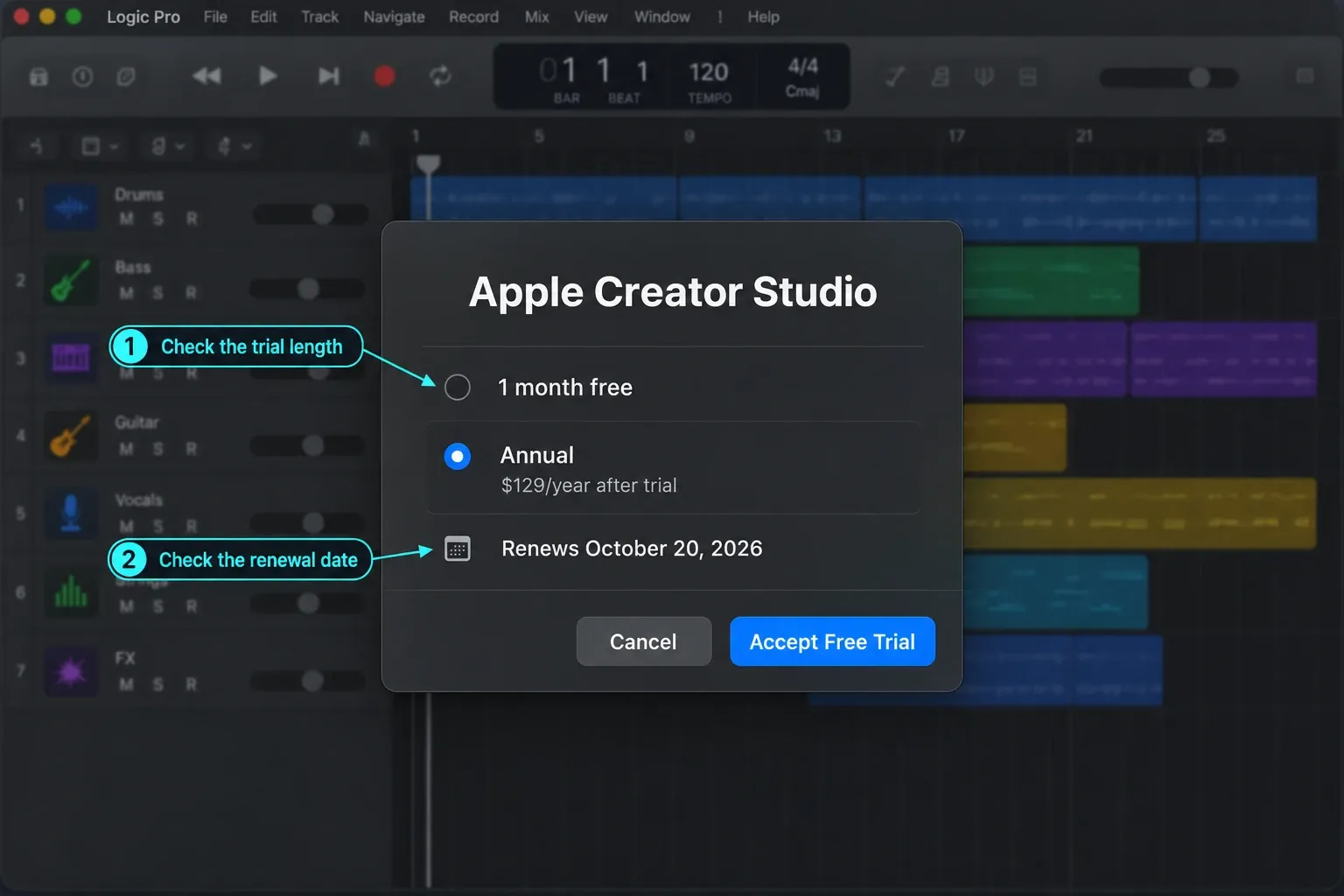
Sign in with the same Apple Account that set up the eligible device. A Managed Apple Account can't subscribe to Creator Studio at all, according to Apple. Then read the offer on screen before you confirm anything. If it says one month and you expected three, stop there and sort out eligibility first, because the published US terms don't promise that a shorter trial can be upgraded later.
Make sure your hardware can run Logic Pro too. Apple’s own pages disagree on the minimum macOS: its support page lists macOS 26.6 or later on a Mac with Apple silicon for Logic Pro 12.4, the Logic Pro product page says macOS 15.6 or later, and the Creator Studio App Store listing asks for macOS 15.4 or later and M1 or later. The App Store lists iPadOS 26 or later and an A12 Bionic chip or later for Logic Pro for iPad 3.4, the same support page gives iPadOS 27 or later, and some features need A17 Pro or later. Apple keeps the full list in its Creator Studio system requirements, and our Logic Pro requirements guide translates it into plain English.
How to start the Logic Pro free trial on Mac
- Open the App Store and find the Creator Studio version of Logic Pro. Apple still sells a separate one-time-purchase Mac app, so look at the label and icon before you download anything.
- Download and install the Creator Studio app from the App Store, open Logic Pro, choose Continue and read the trial and renewal plan it shows you.
- Select Accept Free Trial, or the three-month option if Apple offers it to you, and confirm with your Apple Account.
- Create a small test project straight away. The clock started when you accepted the offer, and it keeps running whether or not you have time to record this week.
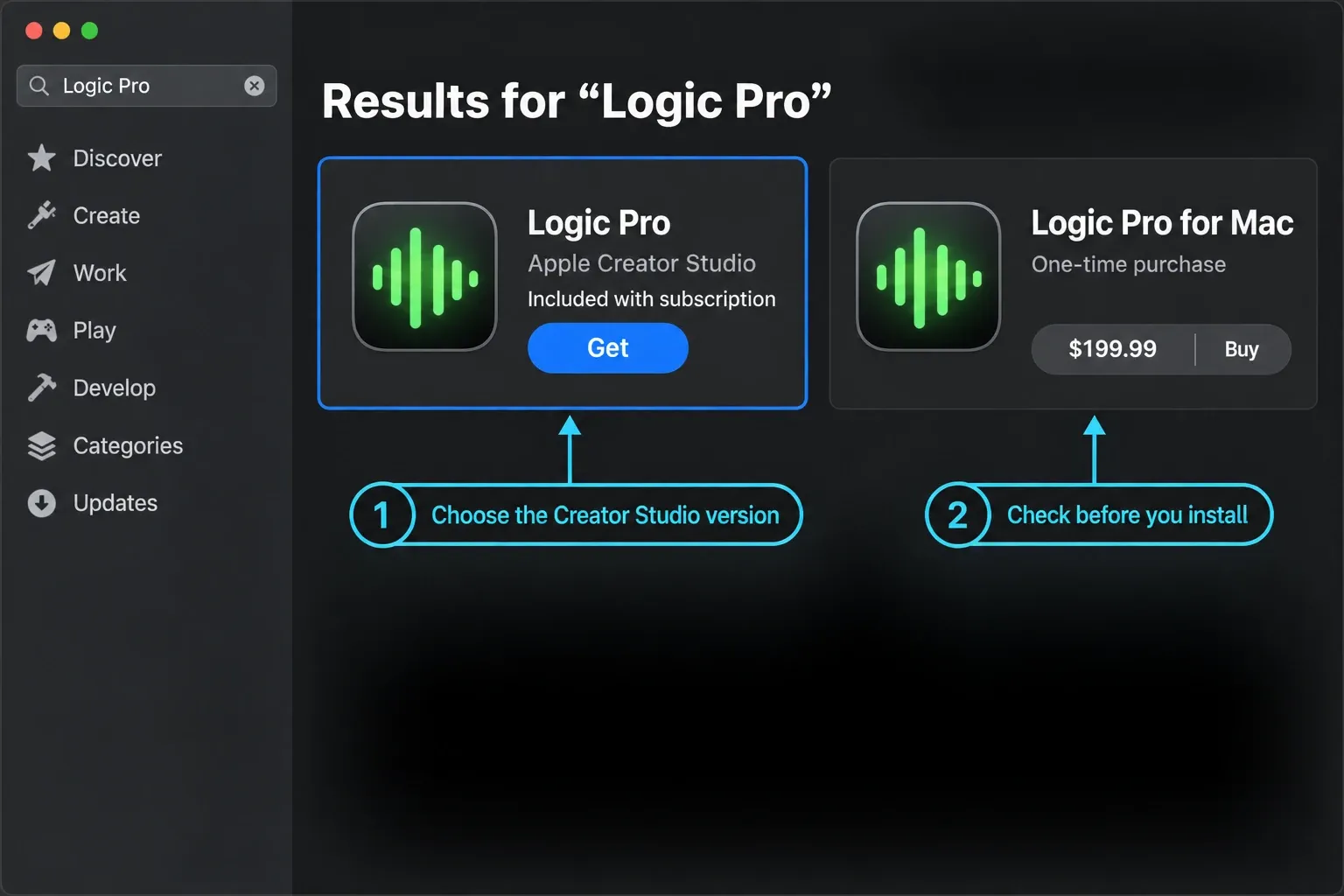
Already subscribed but still looking at Accept Free Trial? Scroll down and choose Already Subscribed? so the app recognizes your subscription. Don't accept another offer just to get rid of that screen. The App Store labels this version Free · In-App Purchases, which only means you can download it before the subscription starts. Logic Pro itself is not free.
Weighing the subscription against the standalone Mac edition before you install either? Our guide to the official Logic Pro download for Mac compares them. This page sticks to the trial.
You don't need every sound before your first session, and Apple can't agree on the size anyway. The Mac App Store listing says 6 GB for the minimum install and 44 GB or more for the full Sound Library, while Apple Support separately says the full library needs approximately 72 GB of free space. Neither number guarantees room for every current selection of packs. Check the sizes Logic shows you, leave space for downloads, macOS and your own recordings, and install only the content packages your test project needs.
How the Logic Pro trial works on iPad
On iPad, Apple presents Creator Studio as the main trial route: open the Creator Studio version of Logic Pro, tap Continue and accept the offer shown for your account. If you already pay for the old standalone Logic Pro for iPad plan, don't cancel it on reflex. Apple tells existing iPad subscribers to download and open another Creator Studio app and join the bundle from there. According to Apple, starting Creator Studio stops that standalone subscription from auto-renewing for the same subscriber, and you can request a prorated refund.
Apple also documents how to reactivate an expired standalone iPad subscription once Creator Studio ends. That route is for people who already had the standalone plan. It doesn't mean a brand-new subscriber can sign up for the legacy plan today.
What to test before the Logic Pro trial ends
A month is plenty to judge Logic, as long as you spend it on your own workflow. Tutorials and preset browsing show you what's inside the app. They won't tell you whether it suits the way you make music.
- Finish one short project. Take a two- or three-minute song from setup to final bounce. A complete pass shows you the friction that isolated feature tests hide.
- Record with your real hardware. Plug in your audio interface, microphone, MIDI controller and headphones, then check input selection, monitoring, buffer behavior and round-trip latency.
- Edit both audio and MIDI. Record several takes, build a comp and fix one timing problem, then edit notes and controller data in the Piano Roll. Our recording and editing workflow puts those jobs in a sensible order.
- Mix with stock tools first. Set levels, route a reverb send, reach for Channel EQ and compression, automate one change and bounce the result. The mixing hub walks that path without any third-party plug-ins.
- Open the plug-ins you already own. Make sure the current Audio Unit versions validate and that any license manager you depend on works on your Mac and OS.
- Test the handoff. Export a stereo mix plus the stems or trackouts your collaborators expect, and open those files from a clean folder before you call the test a success.
- Try cross-device work only if you need it. Move one real project between Mac and iPad and look for missing plug-ins, sounds and file locations. Cross-platform access doesn't make every third-party tool identical on both sides.
If Logic is your first DAW, set a smaller target: record or program eight bars, arrange them into a short song and export it. Our beginner Logic Pro path starts exactly there.
What happens when the trial ends?
Apple says you keep the projects and files created with Creator Studio apps after the subscription period ends. The Creator Studio FAQ is blunter about what that means: to open or edit a project, you need to be an active subscriber. The exception is a one-time-purchase copy of the Mac app, which Apple’s support article names as a way to keep working on those projects.
So before the last day, do the boring handoff work:
- save the Logic project with its assets;
- bounce a reference mix;
- export any stems or audio someone else may need;
- write down your third-party plug-in versions and licenses;
- keep a second copy outside the project folder.
If you decide to keep Logic, compare the Mac purchase and Creator Studio on the dedicated Logic Pro cost and license page. That’s where the choice belongs, because the best route depends on whether you need only the Mac app or the wider Mac-and-iPad bundle.
How to cancel the Logic Pro free trial safely
Apple’s support page says you can cancel at any time and keep access until the end of the subscription period. For trial subscriptions, Apple’s general cancellation guidance asks you to cancel at least 24 hours before the trial ends, and the US three-month terms say at least one day before renewal. Treat those as deadlines, and cancel earlier if you already know your answer.
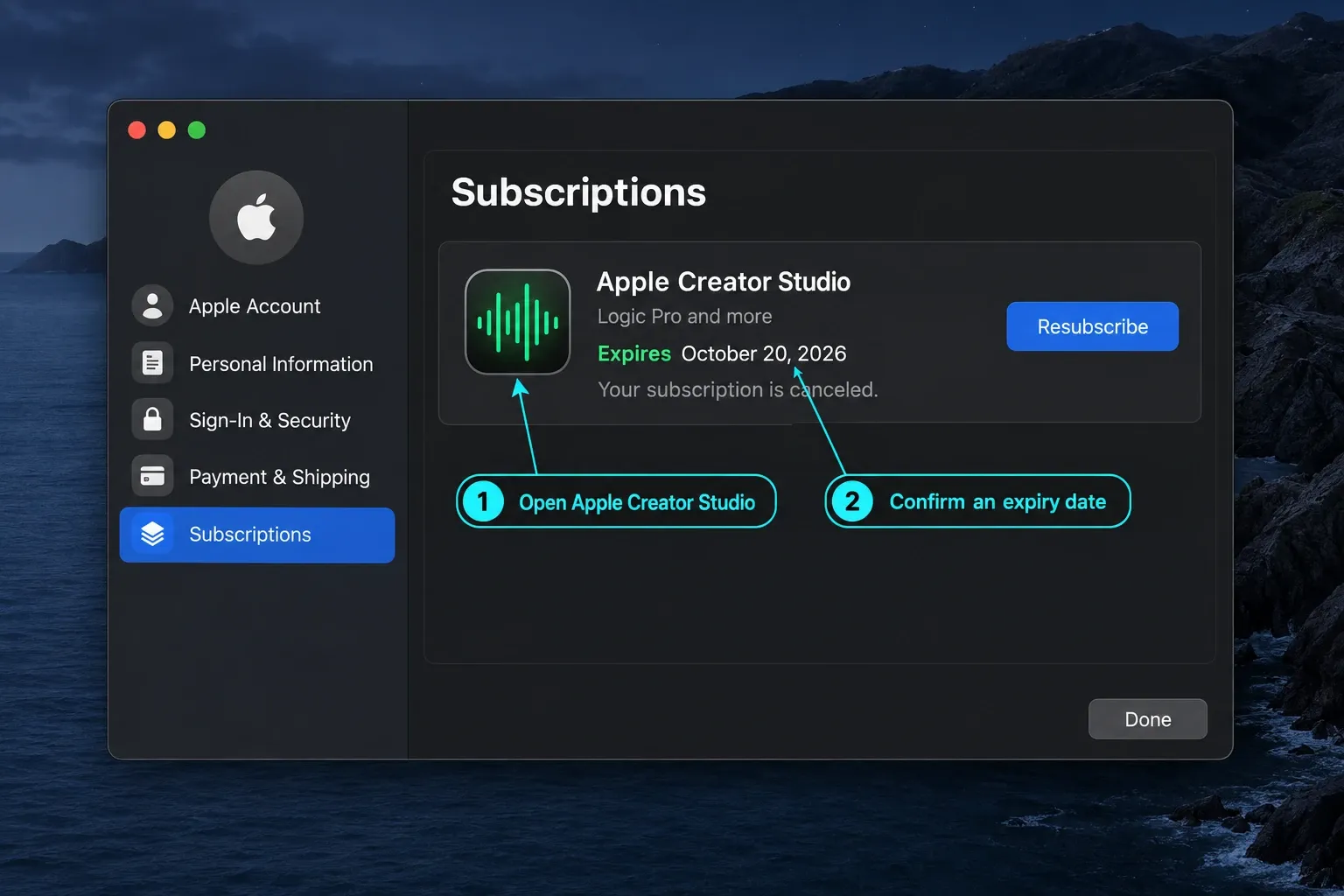
On Mac: open the app menu in any included app and choose Manage Subscriptions. In the App Store subscription list, select Apple Creator Studio and choose Cancel Subscription.
On iPad or iPhone: open Settings, tap your Apple Account, choose Subscriptions, select Apple Creator Studio and tap Cancel Subscription.
Then go back to the subscription screen and make sure it shows an expiry date instead of a renewal date. Apple says a missing Cancel button or a red expiration message means the subscription is already canceled. Keep the confirmation email, or a screen capture of the expiry date, until the trial has run out.
Should you trial Logic Pro or stay with GarageBand?
If you're still learning to record, arrange and finish a song, start in GarageBand. It's free, and Apple documents that a current GarageBand project can open directly in Logic Pro with no separate import or conversion step. You can build a real project there at no cost and bring it into Logic when the trial starts.
Start the Logic trial when GarageBand stops you doing a specific job: detailed editing, routing, automation, a particular instrument, a bigger mix or a collaboration requirement. Test that blocker first. If you're not sure you've hit that point yet, our Logic Pro vs GarageBand comparison will help you decide.
Logic Pro free trial FAQ
How long is the Logic Pro free trial in 2026?
Apple’s Logic Pro product page describes the standard Creator Studio trial as 30 days, and the Creator Studio page calls it one month free. An eligible new Mac or iPad can qualify for a three-month offer, subject to Apple’s current regional terms and the offer shown for your Apple Account.
Is the old 90-day standalone Logic Pro trial still available?
No. The standalone trial disappeared in January 2026 when Apple introduced Creator Studio, and the last regional download pages were gone by early February. The former Logic Pro trial URL now redirects to the regular product page; the route Apple documents today is the Creator Studio trial, which includes Logic Pro.
Is the Logic Pro trial limited?
Apple describes the offer as a trial of the Creator Studio subscription and documents access to the included app features for the subscription period. There is no separate reduced-feature list for the trial. Some Logic Pro features still depend on your device and operating system.
When does the Logic Pro trial start?
The moment you accept the free-trial offer and subscribe with your Apple Account. It doesn't wait for your first project.
Can I get both the standard and three-month Logic Pro trials?
Not at the same time. Apple’s US three-month terms say the offer cannot be combined with another Creator Studio trial or offer, and they exclude current subscribers and anyone whose subscription ended within the previous 30 days, so check which offer your Apple Account shows before you accept anything.
Can I extend or restart the Logic Pro trial?
Apple doesn't document a general extension for the standard trial, and its US three-month promotion terms say that offer cannot be reactivated. If a technical problem stopped you from using an offer, contact Apple Support, but don't plan around an extension.
What happens to Logic Pro projects after the trial?
Apple says your projects and files stay on your devices after the subscription period ends. To open or edit them in Logic Pro you need an active subscription again or a purchased copy of the Mac app, so export any urgent audio or handoff files before the trial expires.
How do I cancel the Logic Pro free trial?
Cancel Apple Creator Studio from Subscriptions in the App Store or System Settings on Mac, or from Settings, your Apple Account, then Subscriptions on iPad or iPhone. Apple says your access continues until the end of the subscription period.
Can I use Logic Pro free permanently?
No. No current Apple offer makes Logic Pro permanently free. After the trial, Mac users can buy Logic Pro separately or keep Creator Studio, and GarageBand remains Apple’s free starting point for music production.
Is there a Logic Pro free trial for Windows?
No. Logic Pro runs only on Mac and iPad, so there is no Windows version to try. Our guide to Logic Pro on Windows covers the realistic options on a PC.


