Logic Pro vs GarageBand (2026): Which Should You Use?
A fact-checked Logic Pro vs GarageBand comparison built around the work you need to finish, not a padded list of features.

GarageBand is enough until you can name the job it cannot finish. Logic Pro becomes the sensible upgrade when you need note-by-note pitch editing, a full mixer with buses and aux channels, deeper MIDI control, Session Players, stem separation, or spatial-audio delivery. If you are still recording demos, building arrangements, using Drummer, adding Audio Units and exporting stereo mixes, the free app is not a toy you need to outgrow on schedule.
Documentation checked September 15, 2026, with app versions and requirements rechecked September 30. This comparison covers GarageBand for Mac 10.4.14 and Logic Pro 12.4, current Apple pricing and current project-transfer rules. “Logic Pro X” still appears in searches, but Apple dropped the X from the product name years ago. For comparisons with Ableton, FL Studio and Pro Tools, start at the Logic Pro comparisons hub.
Logic Pro vs GarageBand: the quick answer
Choose GarageBand if you're learning recording, writing songs, making demos, producing a podcast, using a modest number of tracks, or simply haven't hit a clear limitation. It's free, its interface keeps most technical choices out of the way, and a GarageBand project can move into Logic later.
Choose Logic Pro if the work now requires individual-note vocal correction, repeatable bus and aux routing, detailed automation, complex MIDI processing, large-session organization, Stem Splitter, Session Players beyond Drummer, or Dolby Atmos. Logic also makes more sense when you're exchanging structured sessions and stems with other producers or engineers.
Do not upgrade because a comparison calls GarageBand “basic.” Upgrade when a missing function costs more time than learning the Logic workflow. If you do move, the Logic Pro beginner tutorial takes the project from setup to export without making you learn every window first.
Logic Pro vs GarageBand feature comparison
| Decision point | GarageBand for Mac | Logic Pro for Mac | What it means |
|---|---|---|---|
| Price in the US | Free | $199.99 one-time purchase; also in Creator Studio | Stay free until a Logic-only tool solves a real problem |
| Audio recording | Multitrack recording and multiple takes | Multitrack recording plus deeper comping, editing and project tools | Both can capture a serious recording |
| Audio timing | Flex Time and Groove Track | Full Flex Time workflow with Smart Tempo integration | GarageBand handles common timing repair |
| Pitch editing | Track-wide pitch correction for monophonic audio | Flex Pitch note editor | Logic wins when one note needs precise repair |
| Drummer | Yes, including rhythm-follow controls | Yes, with a deeper editor and conversion options | GarageBand already covers fast drum arrangements |
| Other Session Players | No | Bass Player and Keyboard Player, including synth styles | Logic can build parts around the Chord Track |
| Third-party plug-ins | Compatible 64-bit Audio Units | Compatible Audio Units with deeper routing | Audio Units are not a Logic-only benefit |
| Automation | Volume, pan, effects and Smart Control parameters | More parameters, modes and region automation | GarageBand is more capable here than many comparisons claim |
| Arrangement sections | Arrangement markers | Arrangement markers plus broader global-track tools | Both can reorganize song sections |
| Signal routing | Simplified mixer and built-in Echo/Reverb buses | Buses, auxes, outputs, Track Stacks and VCA channel strips | This is one of the clearest professional gaps |
| Logic Remote | Supported | Supported with more Logic-specific controls | Remote control is available in both |
| Stem Splitter and Dolby Atmos | No | Yes, with hardware and project requirements | Choose Logic when those delivery tools are required |
| Project transfer | Opens in Logic Pro | Cannot be reopened in GarageBand for Mac | Treat the move as a one-way step and keep the original |
What GarageBand can actually do
GarageBand is deliberately simpler, but “simpler” isn't the same as “record button plus loops.” Apple says the Mac app can create and mix up to 255 audio tracks. It records multiple takes, supports Flex Time, has a Groove Track, includes Drummer, works with compatible Audio Units, shows a Score Editor, accepts a movie track, and lets you build a project with arrangement markers.
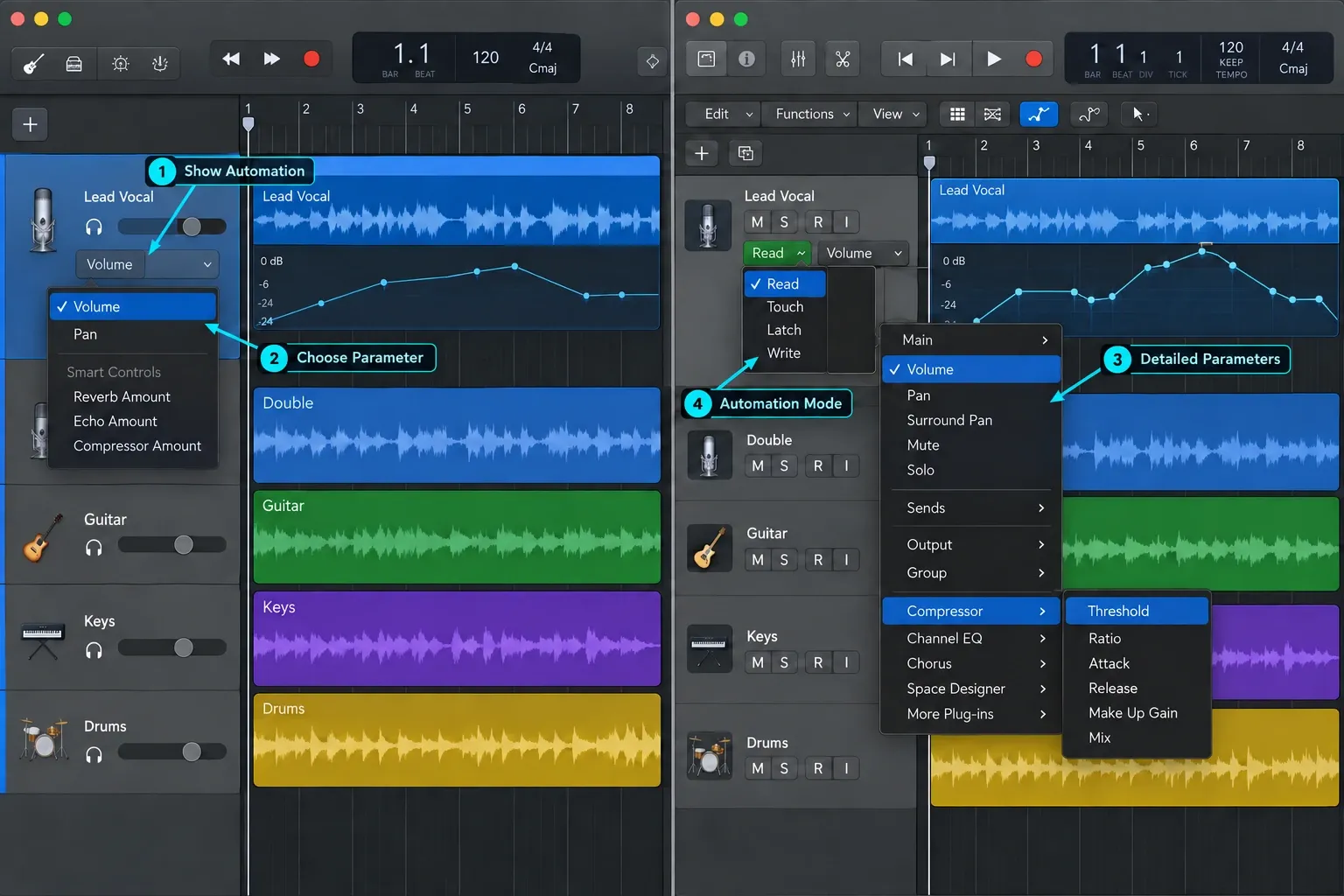
Its automation is also routinely understated. The current GarageBand User Guide lets you automate volume, pan, parameters for added effects and available Smart Controls. That's less flexible than Logic's automation system, but it's plainly more than “volume and pan only.”
GarageBand also works with Logic Remote. An iPhone or iPad can control playback, recording, basic mixing, automation and Touch Instruments on a Mac running GarageBand. Any comparison that marks Logic Remote as a Logic-only feature is wrong.
The practical ceiling isn't a universal track number. A large project can get awkward because GarageBand hides the routing and organizational controls that make complex sessions easier to manage. That's a workflow limit, not proof that a clean recording made in GarageBand is somehow lower quality.
What Logic Pro adds that changes the work
Logic's strongest advantages aren't about the number of included presets. They're control and repeatability.
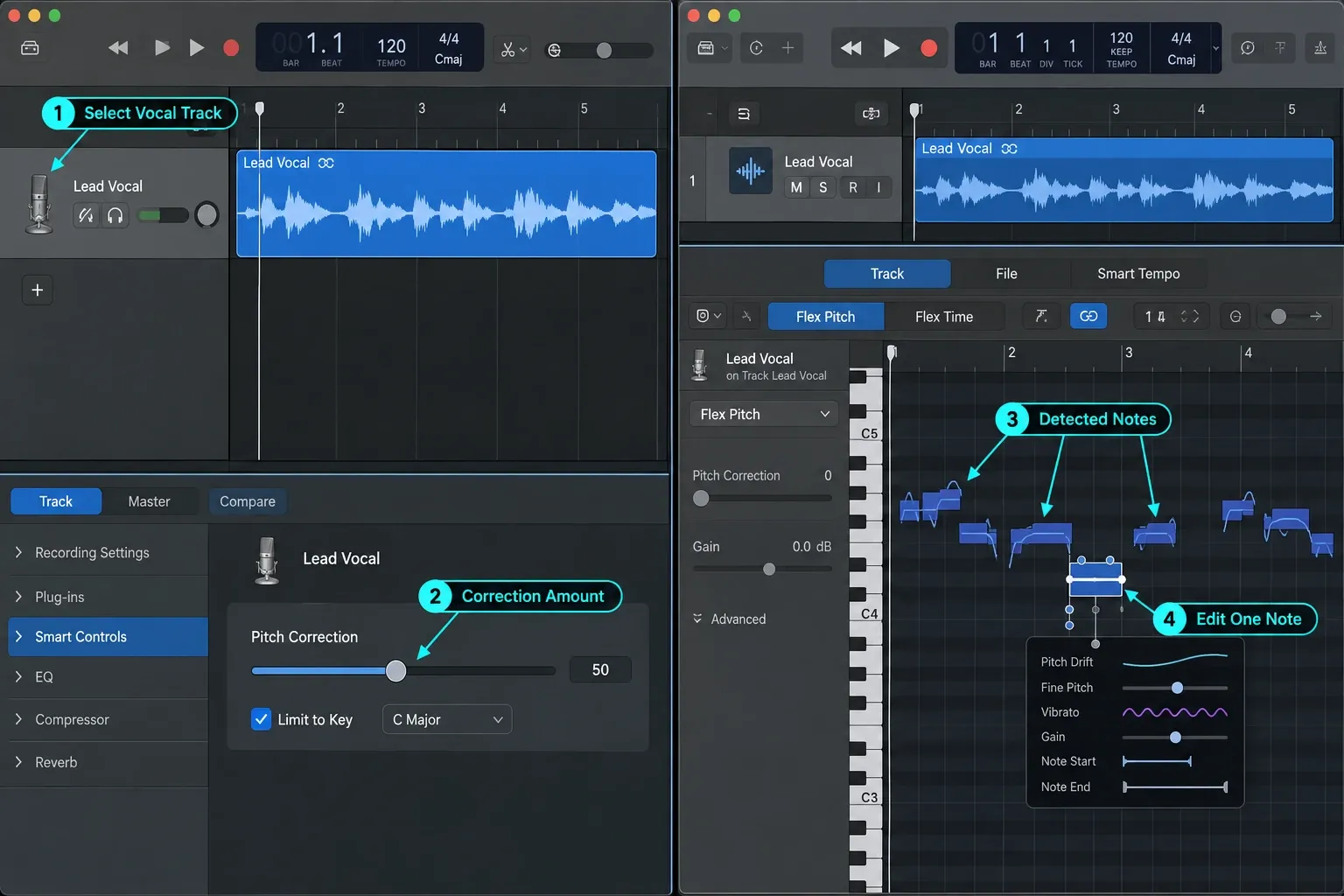
Flex Pitch displays detected notes inside recorded audio and lets you edit pitch, timing, length, vibrato, gain and other note parameters. GarageBand applies its Pitch Correction slider to all regions on the selected audio track. Apple specifies monophonic material; it does not provide Logic’s individual-note editor. Apple's Flex Pitch documentation confirms the individual controls. Our Flex Pitch workflow shows when to use them without flattening a performance.
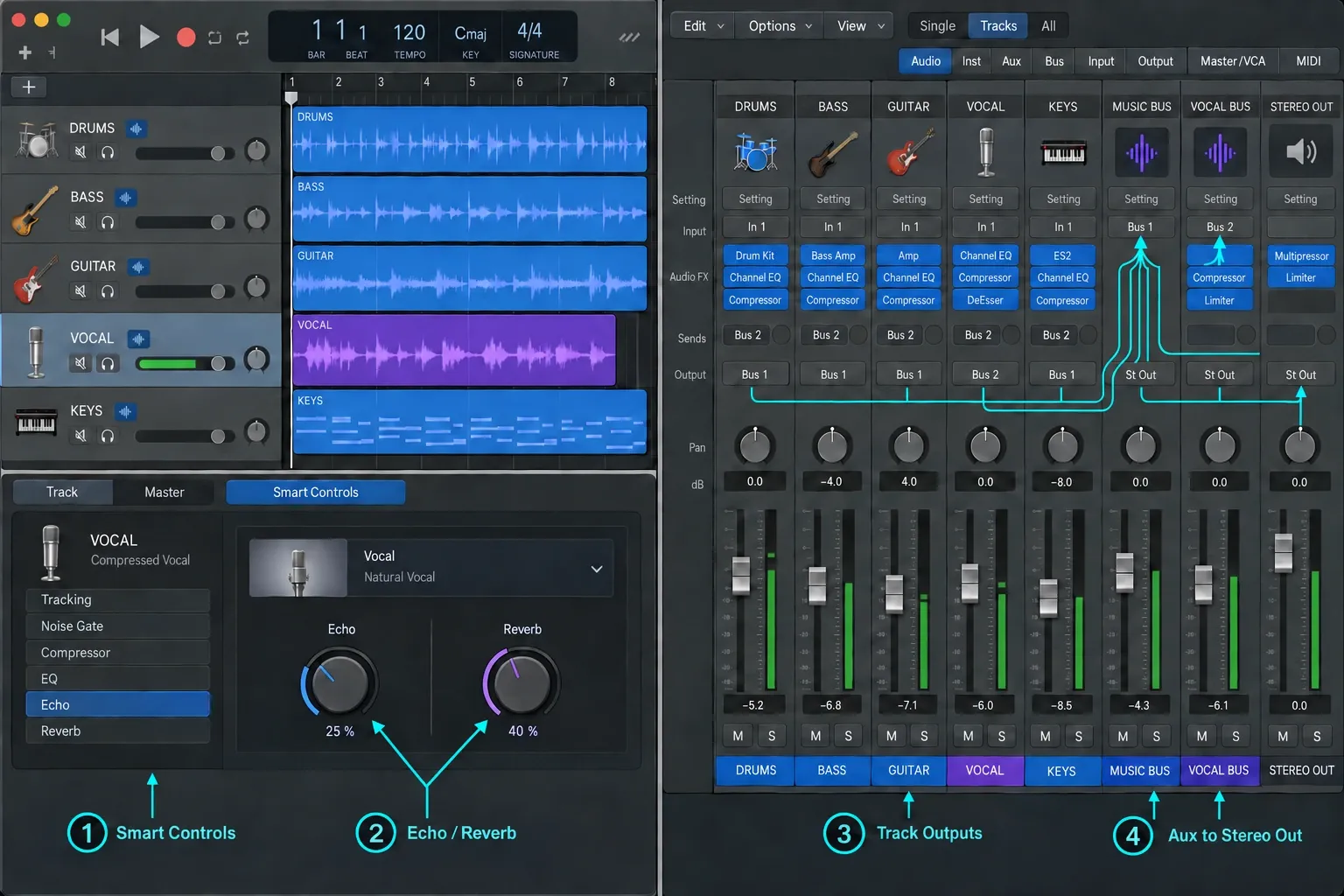
The full mixer gives you aux channel strips for send returns, grouping and multiple destinations, plus output and VCA channel strips. This matters when the same reverb should serve several tracks, drums need parallel compression, headphone mixes need separate outputs, or a large arrangement needs controlled submixes. The mixing hub follows that signal flow from gain staging through mastering.
Session Players and the Chord Track extend the Drummer idea with Bass Player and Keyboard Player. Their available styles include synth bass and synth keyboard parts. Apple added Synth Player and Chord ID in 2026. Chord ID analyzes audio or MIDI to populate the Chord Track, which can then guide Session Players. These are arrangement tools, not a promise that the part they write will fit every song.
Stem Splitter separates supported audio into vocals, drums, bass, guitar, piano and other instrumental parts on an Apple-silicon Mac. It's useful for remix preparation, practice material and recovering workable elements from a stereo file. It won't restore the untouched original multitracks.
Dolby Atmos tools let Logic create and export an ADM BWF master for spatial-audio delivery. That only matters if spatial delivery is actually in the brief. It shouldn't influence a beginner choosing a DAW for stereo songs.
Recording and editing: which app is enough?
For recording a voice, guitar, keyboard or small ensemble, both apps can do the fundamental job: choose an input, arm tracks, record takes and edit regions. GarageBand can record to multiple tracks and keep multiple takes. It also has input monitoring, a tuner and familiar amp and pedal tools.
Logic becomes easier to justify as the edit grows more specific. Quick Swipe Comping, detailed take management, Flex Pitch, broader fade tools, deeper transient work and more complete project organization reduce the amount of manual repair. If you choose Logic and need to capture a clean take, use the Logic Pro audio-recording guide. Don't buy the app because a feature list makes ordinary recording sound impossible in GarageBand.
For podcasts and spoken word, GarageBand is often enough when the format is one or two speakers with straightforward editing and a stereo export. Logic earns its place when the production needs reusable buses, detailed loudness metering, many episodes built from a template, or complex cleanup chains. Neither app repairs a poor microphone position or a clipped recording.
Mixing and routing: the most important difference
GarageBand supplies track volume and pan, plug-ins, EQ, master effects, automation and its shared Echo and Reverb effects. You can make a balanced stereo mix with those tools. The limitation appears when you need to design the signal path rather than accept the simplified one.
Logic exposes buses, aux channel strips, inserts, outputs, Track Stacks and VCA control. A vocal can feed one delay and two reverbs. Drums can route to a parallel compressor, groups can feed different hardware outputs, and a summing stack can carry shared processing. Save those paths in a template and recall them instead of rebuilding by compromise.
This is why “professional vs beginner” is a poor dividing line. A songwriter can release a straightforward GarageBand mix. A beginner learning parallel compression may need Logic. Choose based on routing, editing and delivery requirements, not the label attached to the person using the app.
MIDI, beats and songwriting
GarageBand covers more songwriting work than its reputation suggests. It includes Drummer, Apple Loops, the Piano Roll, notation editing, an arpeggiator inside Smart Controls, arrangement markers, tempo changes and transposition. For a first beat or a song built around a few software instruments, that's a complete path from idea to export.
Logic adds a dedicated Step Sequencer, Drum Machine Designer, MIDI FX such as Arpeggiator and Chord Trigger, more detailed event editing, Track Stacks, the Chord Track and the wider Session Player lineup. Those tools matter when you want repeatable pattern programming, controlled MIDI transformations or arrangements that have outgrown a flat track list. The MIDI recording guide covers the first practical session.
Don't treat the included players as replacements for decisions. They're fast ways to audition rhythm, harmony and texture. The arrangement still needs editing, sound choice and space.
Price, trial and platform differences
GarageBand is free on Mac, iPhone and iPad. In the United States, Apple still sells Logic Pro for Mac as a $199.99 one-time purchase. Apple has released major updates to existing Mac App Store owners without a new charge, but it has not promised how future paid upgrades will work. Treat the current price and past update record as separate facts.
Apple Creator Studio is the subscription alternative: $12.99 per month or $129 per year in the US after a one-month trial for eligible new subscribers. It includes Logic Pro on Mac and iPad plus Final Cut Pro, Pixelmator Pro, Motion, Compressor and MainStage. Older comparisons may still mention a 90-day standalone Logic trial. Verify any old regional or download page instead of planning around it. Regional prices vary. The Logic Pro cost guide separates the one-time Mac purchase from the bundle.
The Creator Studio edition of Logic Pro for Mac requires Apple silicon; Apple’s support page gives macOS 26.6 or later for Logic Pro 12.4, while the Creator Studio App Store listing asks for macOS 15.4 or later. The standalone Logic Pro listing also gives macOS 15.4 but does not state a chip minimum; check it on the exact Mac rather than assuming Intel eligibility. GarageBand for Mac 10.4.14 requires macOS 15.6 or later according to its current US App Store listing. A working older installation is a separate case. Back up projects and the working setup, and check interface drivers and third-party plug-ins before updating either app or macOS.
Moving a GarageBand project to Logic Pro
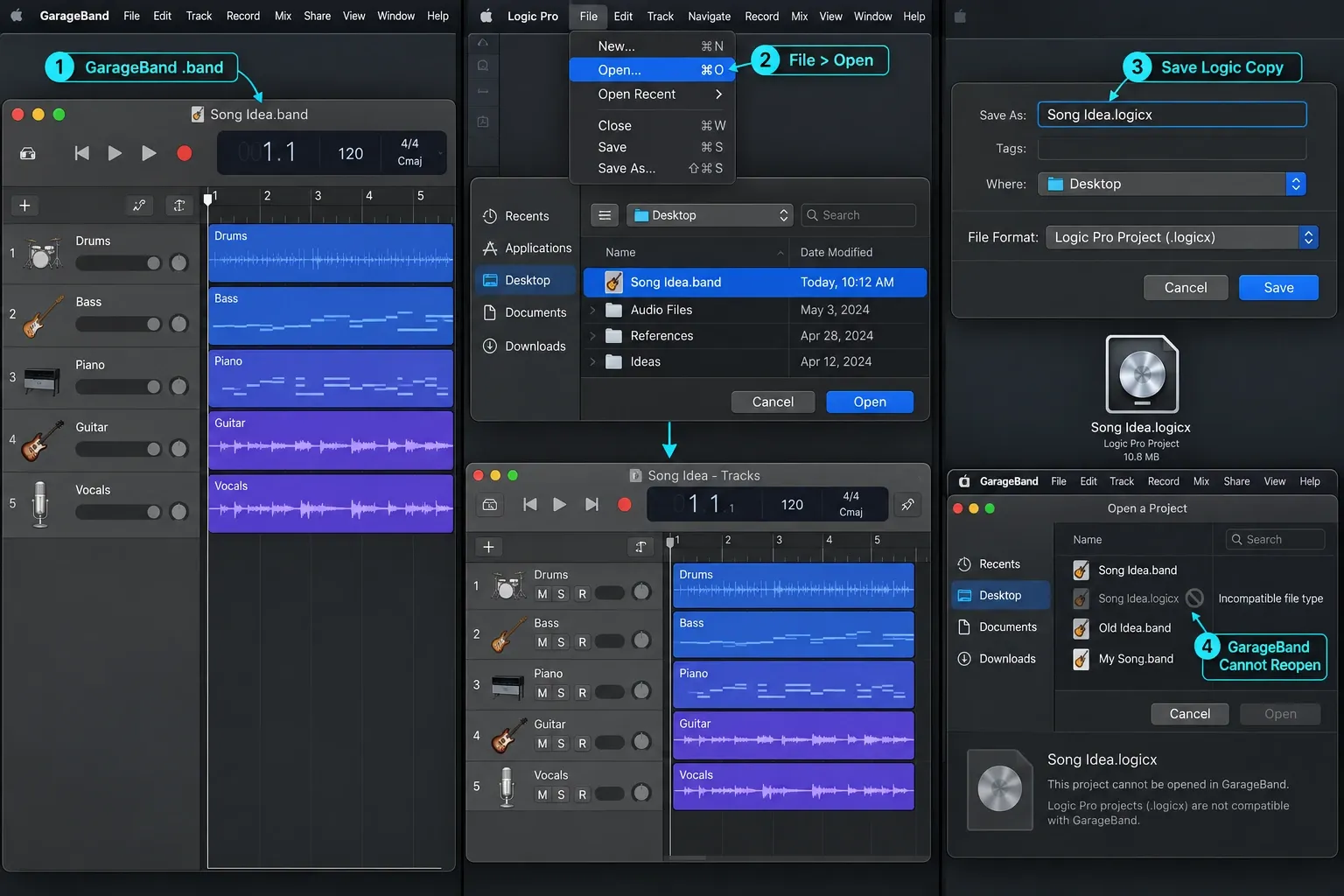
Keep a backup before changing the apps or project. The normal Mac upgrade path is one-way. Apple's current project-transfer guide says to update both apps, then open the GarageBand project directly in Logic Pro. There's no separate import or conversion step.
Logic creates the needed tracks, uses the GarageBand tempo and initial key signature, translates GarageBand patches, and imports supported mixing data and effects for software-instrument or Apple Loops tracks. GarageBand's shared Reverb and Echo effects are translated to Logic buses.
Back up the GarageBand project and working setup before updating either app. Confirm that your Mac, interface drivers and third-party plug-ins support the intended versions, then update where compatible. In Logic, choose File > Open, select the GarageBand project, and save the new Logic project to a separate location. Check missing-media and plug-in warnings, listen to the converted song against a reference export, then save and reopen it. GarageBand for Mac cannot reopen the saved Logic project, so keep the original for collaborators who still use GarageBand.
Which should you use?
Beginner learning music production: start with GarageBand unless a course or collaborator specifically uses Logic. The shared concepts of tracks, regions, cycle recording, automation, plug-ins and arrangement transfer well.
Singer-songwriter recording vocals and guitar: GarageBand is enough for writing, takes and a straightforward mix. Move when Flex Pitch, deeper comping or reusable vocal buses become part of the normal workflow.
Beat maker or electronic producer: GarageBand handles loops, Drummer and basic MIDI. Logic is the better long-term tool when Step Sequencer, Drum Machine Designer, MIDI FX, Chord Track and full instrument editing are central rather than occasional.
Band recording rehearsals or demos: stay with GarageBand if the session remains easy to navigate and mix. Choose Logic when cue mixes, many inputs, subgroups, comping and repeatable routing are required.
Mixing for clients or delivering stems: choose Logic when the brief needs flexible routing, detailed metering, automation, Track Stacks or repeatable stem exports. A straightforward paid stereo mix does not require an upgrade merely because it is client work. The stem export guide shows the handoff rather than merely listing formats.
Mobile-first work: GarageBand for iPhone and iPad is free. Logic Pro for iPad belongs to a different purchasing and feature decision, so compare it separately in the Logic Pro for iPad guide.
The short version remains simple: keep GarageBand while it lets you finish. Move to Logic when you can point to the missing edit, route, instrument or delivery format. That gives the upgrade a purpose on day one.
Logic Pro vs GarageBand FAQ
Is Logic Pro better than GarageBand?
Logic Pro is more capable for detailed audio editing, flexible signal routing, advanced MIDI work, Session Players, Stem Splitter and Dolby Atmos. GarageBand is often the better starting tool because it is free, faster to learn and already covers multitrack recording, Drummer, Audio Units, automation, arrangement markers and basic mixing. The better choice is the least complex app that finishes your current work.
Is GarageBand enough for beginners?
Yes. GarageBand can record multiple takes, edit audio and MIDI, use Drummer, automate volume, pan and effect parameters, load compatible Audio Units, arrange song sections and export finished stereo files. A beginner does not need Logic Pro until a specific missing tool or routing requirement starts blocking the project.
Can GarageBand projects open in Logic Pro?
Yes. Apple says Logic Pro can open current GarageBand projects from Mac, iPad and iPhone without a separate conversion step. Logic recreates the required tracks, tempo and key, translates GarageBand patches, and imports supported mixing data and effects. Back up the project and working setup first, check compatibility, then update the apps where supported. Open the GarageBand project in Logic and save a separate Logic copy; verify media, plug-ins and playback before continuing.
Can Logic Pro projects open in GarageBand?
No. Apple documents the normal transfer as one-way: GarageBand to Logic Pro. After the project is saved as a Logic Pro project, GarageBand for Mac cannot open it. Logic can share a special version to GarageBand for iPhone or iPad: it contains a reference mix on one track, not the full editable Logic arrangement. New tracks added on the mobile device can return to the original Logic project through iCloud. This is not full-project editing in GarageBand for Mac.
Does GarageBand have Flex Pitch?
No. GarageBand applies pitch correction across the selected audio track and has Flex Time tools, but it does not provide Logic Pro's note-by-note Flex Pitch editor. Logic shows detected notes and lets you edit pitch, timing, length, vibrato, gain and formant-related parameters individually.
Does GarageBand support third-party plug-ins?
GarageBand for Mac supports compatible 64-bit Audio Units plug-ins. Plug-in availability and authorization still depend on the developer and your macOS version. This is not a Logic-only feature, although Logic offers a deeper mixer, routing system and larger included instrument and effect set.
Does GarageBand work with Logic Remote?
Yes. Apple's Logic Remote guides explicitly support GarageBand on Mac as well as Logic Pro and MainStage. From an iPhone or iPad you can control playback, recording, basic mixing, automation and Touch Instruments, subject to the controls available in GarageBand.
How much does Logic Pro cost compared with GarageBand?
GarageBand is free. In the United States, Logic Pro for Mac remains available as a $199.99 one-time purchase. Apple Creator Studio is an alternative subscription at $12.99 per month or $129 per year and includes Logic Pro on Mac and iPad plus other Apple creative apps. Prices and availability vary by region.
Does Logic Pro sound better than GarageBand?
Not automatically. Apple says Logic translates supported GarageBand tracks, tempo, key, patches, mixing data and effects when it opens the project, so opening it is not a fidelity upgrade by itself. Logic can change the finished result when you use its deeper editing, routing, metering, instruments, effects or delivery tools. A better recording, edit and mix still come from the choices you make, not the app name.


