Logic Pro vs Ableton Live: Which DAW Fits Your Workflow?
A practical Logic Pro vs Ableton Live comparison based on workflow, recording, beat making, mixing, live performance, platform and current price.

Choose Logic Pro if you work on a recent Apple-silicon Mac and want one deep package for songwriting, multitrack recording, comping and mixing. Choose Ableton Live if Session View, clip launching, performance or Windows support matters more. For many electronic producers on a Mac, the honest answer is to trial both: genre alone doesn’t decide this comparison. The way you begin and finish a song does.
This desktop comparison covers the documented features of Logic Pro 12.4 and Ableton Live 12.4.6, checked on September 21, 2026, with both release versions rechecked September 30. Prices below are current U.S. list prices; taxes, regional pricing and promotions can differ.
Logic Pro vs Ableton Live: the quick verdict
Both can record, edit, arrange, mix and export professional audio. This is a workflow comparison, not a controlled sound-quality or CPU benchmark. Your source recordings, processing and export settings matter more to the result than choosing a DAW by reputation. Compare the tasks you repeat, not an unsupported claim that one audio engine sounds better.
| Your priority | Better starting point | Why |
|---|---|---|
| Vocals, bands and repeated takes | Logic Pro | Take Folders, Quick Swipe Comping and a timeline-led studio workflow |
| Clip-based writing and improvisation | Ableton Live | Session View is central to the program, not an extra mode |
| Live performance | Ableton Live | Flexible clip launching, scenes, follow actions and tight controller integration |
| Most included production tools for one Mac purchase | Logic Pro | $199.99 standalone price with the full Mac feature set |
| Windows or mixed Mac/Windows work | Ableton Live | Live supports both platforms; Logic does not |
| Custom devices and experimental routing | Ableton Live Suite | Max for Live is bundled with Suite; available as a paid add-on for Standard |
| Traditional composing, score work and detailed mixing | Logic Pro | Its editors, mixer and included instruments are built around a full studio project |
Do not switch just because another producer works differently. If your current DAW lets you finish music without fighting it, a new shortcut set, device library and project format can cost more time than the missing feature is worth.
Platform and system requirements decide first
Check the exact Logic Pro edition before buying for an Intel Mac. Apple’s Creator Studio requirements call for a Mac with Apple silicon and list macOS 26.6 or later for Logic Pro 12.4, while Apple’s product page gives macOS 15.6 or later. The standalone Mac App Store listing gives macOS 15.4 or later but does not publish a chip minimum. That omission is not an Intel compatibility guarantee: check the listing on the exact Mac before paying or replacing a working installation. Our Logic Pro requirements guide explains the practical RAM and storage questions beyond Apple’s minimum.
Ableton Live 12 supports macOS 11 or later on an Intel Core i5 or Apple-silicon Mac. On Windows, Ableton lists Windows 10 22H2 or Windows 11 22H2 or later, a fifth-generation Intel Core i5 or AMD Ryzen processor with AVX2, and 8 GB RAM. Those are eligibility floors. They aren’t sensible targets for a large sample library or a low-latency session. The current Live shop page carries the complete requirements for both systems.
If you use Windows now, or expect to share editable projects between Mac and Windows, Ableton wins before the workflow comparison starts. For desktop editing, Logic requires a compatible Mac. A separate Logic Pro for iPad app can exchange compatible projects, but it does not provide a Windows version.
Tracks and Live Loops versus Arrangement and Session View
Logic opens into the familiar studio model: tracks run left to right across a timeline. Record a verse, move a chorus, automate a send, then shape the song in place. Its nonlinear Live Loops grid can play cells and scenes, record audio or MIDI into cells, and capture that performance into the Tracks area. Apple’s Live Loops guide confirms that the grid and timeline can exchange regions in both directions.
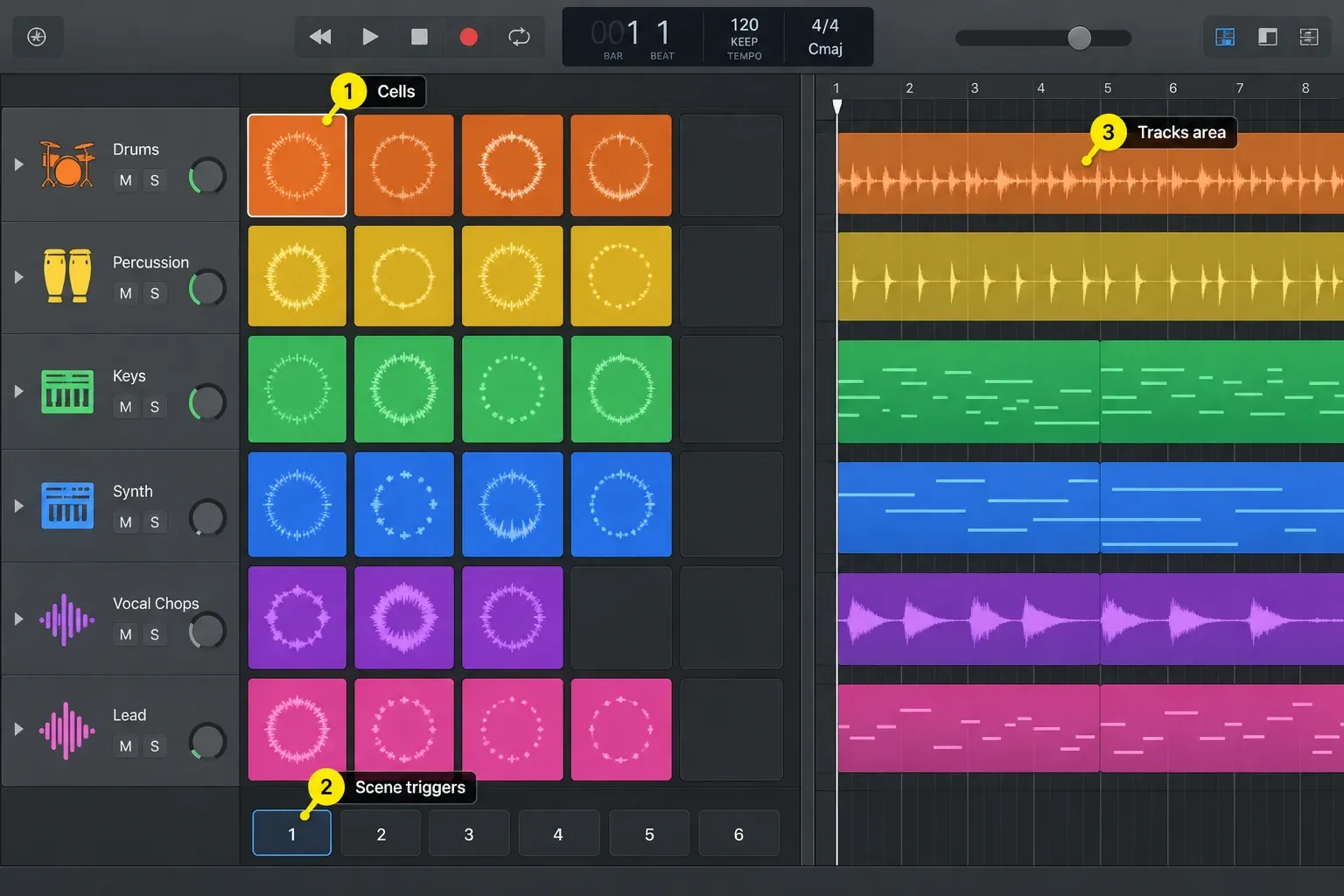
Ableton gives equal weight to two views. Arrangement View is a linear timeline. Session View is a grid where clips launch in any order, individually or as scenes, without stopping playback. You can improvise in Session View and record the performance into Arrangement View. That loop-to-performance-to-song path is why Live feels immediate to producers who build by trying combinations instead of laying out a complete timeline first.
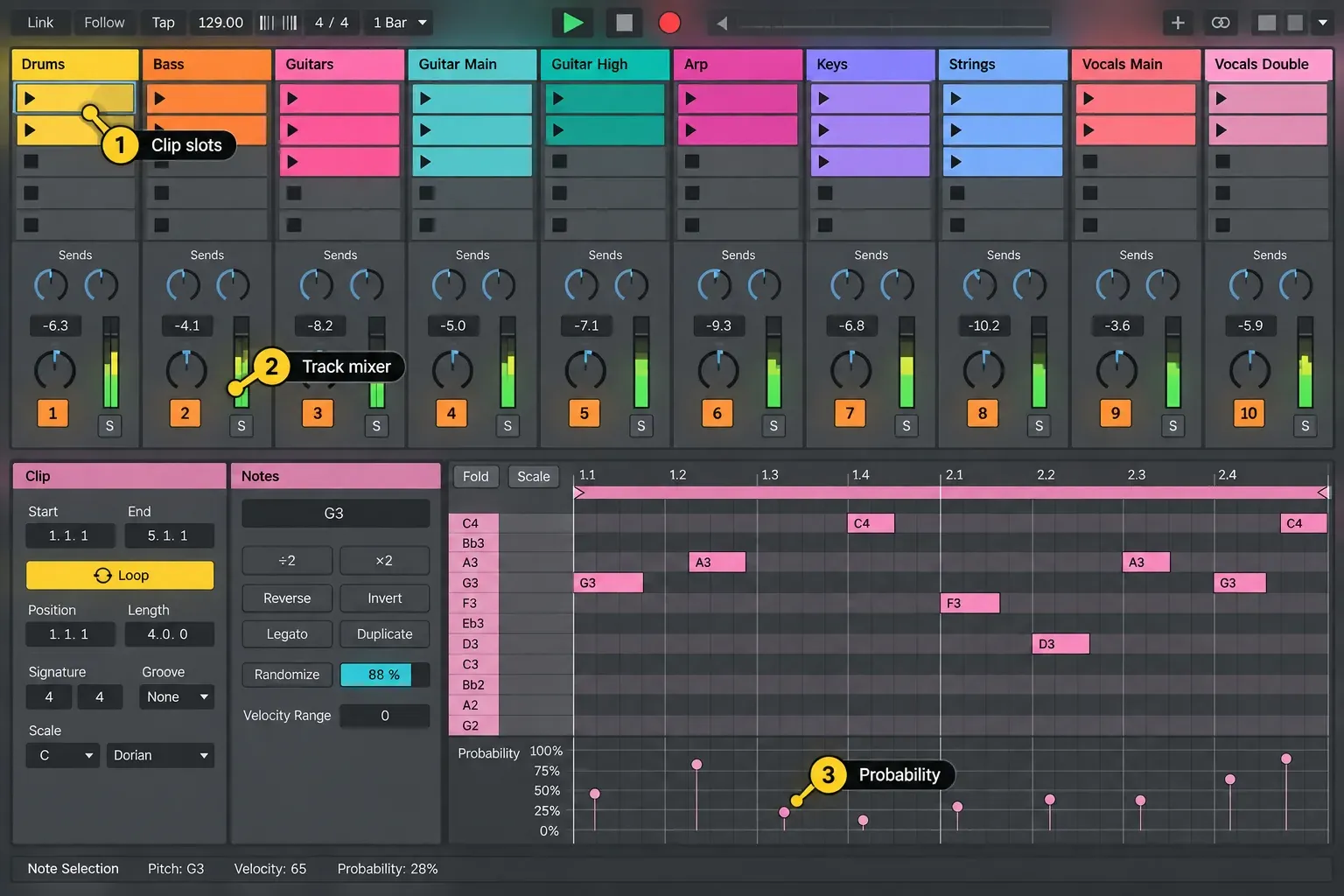
Live Loops is capable, but it doesn’t make the applications identical. Ableton’s browser, devices, clip properties, controllers and performance logic all grow from the Session/Arrangement relationship. Logic adds a nonlinear workspace to a recording-and-mixing environment. Pick the model you expect to use every day, not the checkbox both products share.
Recording, comping and audio editing
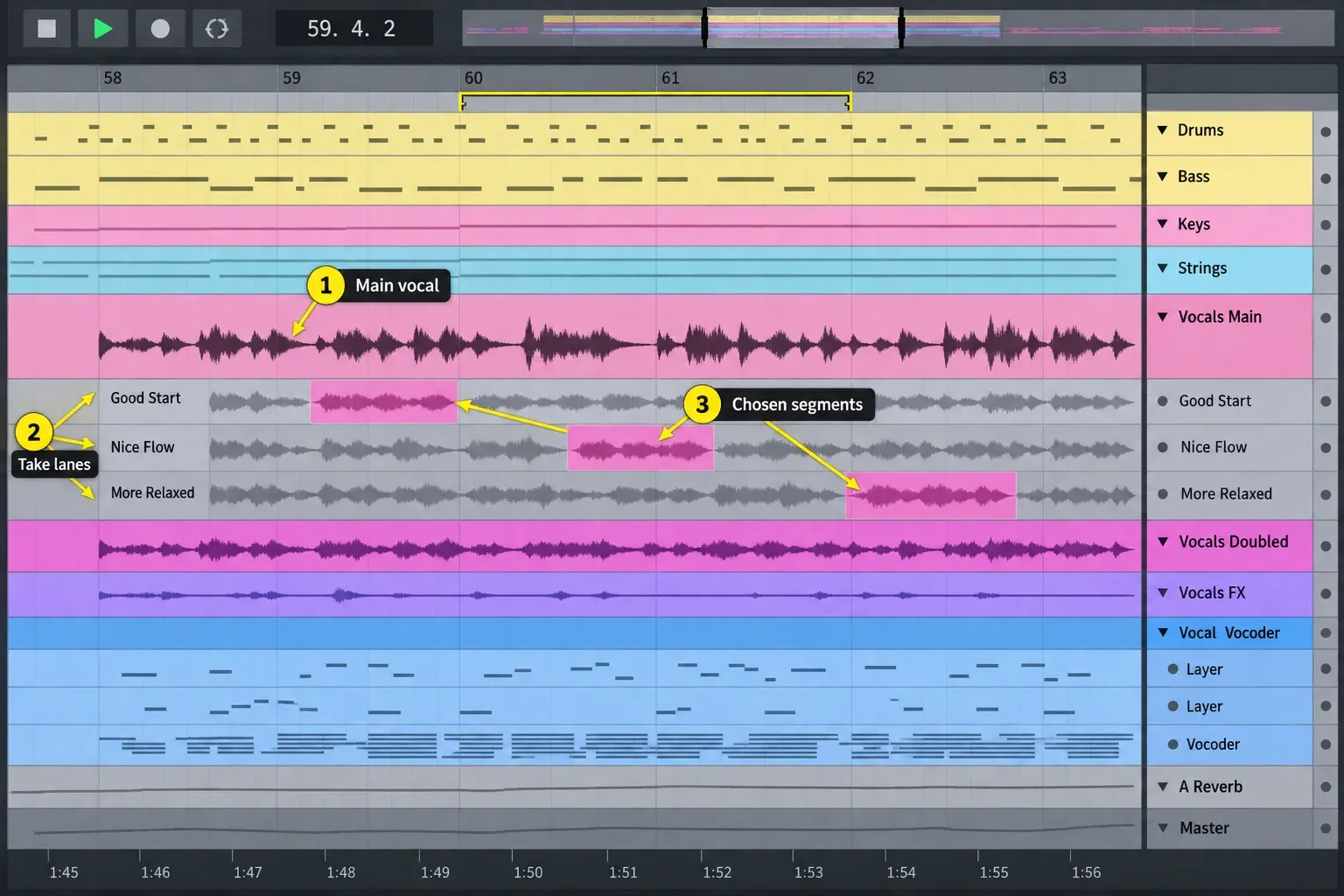
For a singer, guitarist or band recording several passes, Logic is usually the more direct choice. Cycle recording can collect passes into a Take Folder. Quick Swipe Comping lets you select the preferred phrase from each take, and alternative comps can remain available until the edit is settled. Apple documents how a chosen comp can later be flattened or flattened and merged. Preserve a copy with the original takes before flattening a comp. Flex Time, Flex Pitch and the separate editors then cover timing, pitch and detailed region work.
Ableton isn’t a weak recorder. Live creates take lanes in Arrangement View, lets you audition material and build a composite performance, and supports linked-track editing for phase-related sources in Standard and Suite. Its current comping manual also notes that take lanes can hold alternate arrangements or samples, so the same system works creatively as well as for vocals.
The practical split is emphasis. Logic presents recording, takes, editors and the mixer as one continuous studio job. Ableton’s recording tools are fully usable, but the application earns its advantage when the recorded material becomes a flexible clip. For a detailed Logic workflow, use our recording and editing hub.
Beat making, MIDI, sampling and time-stretching
Ableton suits ideas that start with a sample. With Warp enabled, audio follows tempo changes while retaining its musical position in bars and beats; its duration in seconds changes. You can vary clips while the set keeps playing. Live 12 includes scale-aware MIDI editing, while Standard and Suite supply the expanded MIDI generators and transformations, audio-to-MIDI conversion and audio slicing. Check those edition limits before following a Suite demonstration in Intro.
Logic answers with Quick Sampler, Sampler, Drum Machine Designer, Step Sequencer, Beat Breaker, Smart Tempo and Live Loops. It’s a strong beat-making system, especially if the same project will later need vocals, a detailed mix and delivery. Logic 12.4 also includes the six-category Stem Splitter workflow on supported Apple-silicon Macs.
The edition detail matters: Ableton added stem separation in Live 12.3, but the feature is Suite-only. Live Intro and Standard don’t include it. So don’t line up Logic’s $199.99 full Mac app against Live Intro as if the feature sets matched, or against Suite as if the prices did.
Mixing and included instruments and effects
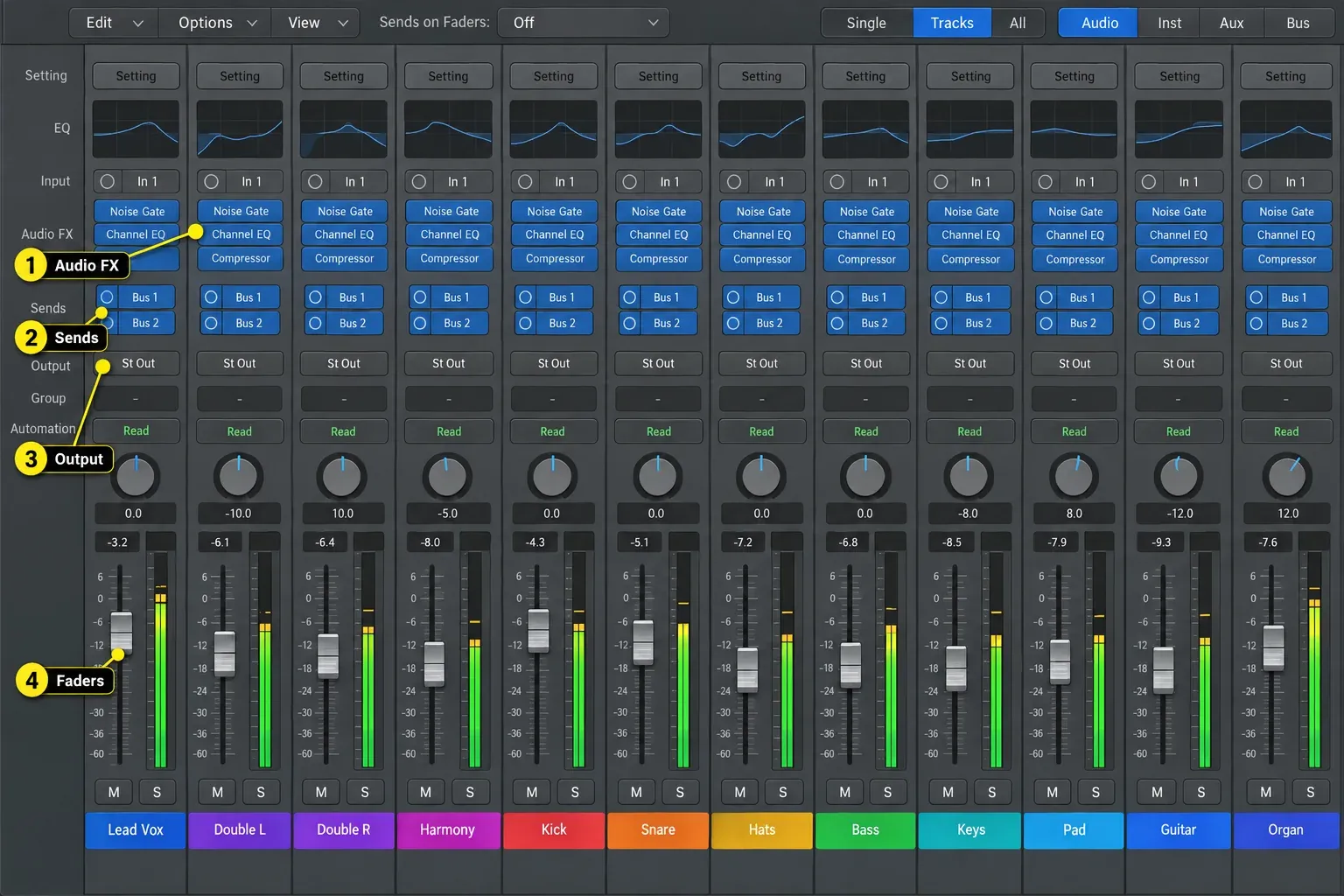
Logic’s mixer looks and behaves like a console. Channel strips, inserts, sends, buses, auxiliaries, groups and multiple output formats all stay visible across a large session. Channel EQ, Compressor, Space Designer, ChromaVerb, Delay Designer, Alchemy, Sampler and the Session Players cover enough ground to finish substantial work without buying a starter bundle of plug-ins. The Logic Pro mixing hub then takes that signal flow from gain staging through mastering.
Ableton puts instruments and effects into a clean device chain at the bottom of the set. Racks can group devices and expose macros, and modulation sits right next to the parameter it’s changing. That compact design is quick for building an instrument, resampling it and reshaping it mid-performance. Arrangement View now carries mixer controls as well, so you don’t have to leave the timeline to mix.
Do not rely on old plug-in counts when choosing an edition. Ableton’s own shop and comparison pages currently show different totals for some instruments and effects after recent Live 12 changes. The named feature list is the safer buying reference. Standard supplies the full workflow and a broader library. Suite bundles Max for Live, stem separation and the largest included instrument set. Standard can also use Max for Live with a separately purchased add-on; buying Suite is not the only route to custom devices. For a fuller edition comparison, see the Ableton Live Standard vs Suite guide.
Live performance and controllers
This is Ableton’s clearest advantage. Session View can launch clips and scenes in an order that isn’t fixed in advance. MIDI mapping, follow actions, tempo following, Max for Live and Ableton Push support sets that need to react on stage. The important point isn’t that Logic can’t trigger loops. It’s that Live’s performance model runs through the whole application.
Logic Live Loops and Remix FX can support an improvised set, and Logic Remote adds multitouch control from an iPhone or iPad. MainStage is Apple’s separate application for a performance rig built around instruments, patches and backing tracks. If the show is mainly linear playback with live instruments, either platform can work. If the arrangement must change at each launch, Live is the easier system to design around.
Price, editions, trials and upgrades
| Option | U.S. price checked September 14, 2026 | What to know |
|---|---|---|
| Logic Pro for Mac | $199.99 once | Standalone Mac app; no subscription is required |
| Apple Creator Studio | $12.99/month or $129/year | Logic plus Apple’s other creative apps; one-month trial for new subscribers |
| Ableton Live 12 Intro | $99 | 16 audio/MIDI tracks and 16 scenes |
| Ableton Live 12 Standard | $349 | Unlimited tracks/scenes and the main production workflow; Max for Live costs extra; no stem separation |
| Ableton Live 12 Suite | $749 | Max for Live, stem separation and the complete bundled edition |
| Live 12 Suite rent-to-own | $31.21/month for 24 payments | Ableton states the same total as buying once; check the payment schedule at checkout |
Apple says the subscription and one-time-purchase versions of Logic Pro have the same features. Choose on the buying model: Logic for Mac alone for $199.99, or the bundle if you will also use its other creative apps or Logic for iPad. The standalone Mac purchase does not include MainStage or a separate iPad entitlement. Do not treat either purchase as a promise of lifetime free major upgrades. Creator Studio renews automatically unless cancelled; check the offer terms before starting a trial.
Ableton offers a 30-day Live 12 Suite trial with saving and exporting enabled and no credit card required. Where Ableton offers Suite rent-to-own, each payment counts toward ownership. The standard new-license offer uses 24 payments; upgrade and educational offers can differ. Ableton states that the total matches the one-off purchase price, although the displayed monthly amount is rounded. You can pause the plan and retain your progress, but access ends after the current paid billing cycle. Rent-to-own requires online activation and allows up to three days offline between verification checks; after that, saving and exporting stop until verification succeeds. Check this before an offline performance. Rent-to-own is for Suite, not Intro or Standard. Minor updates within a major Live version are free. Ableton’s upgrade policy says a move from one major version to the next is paid, with personalized upgrade prices shown after sign-in.
So Logic has the strongest up-front value if you already own a compatible Mac. Ableton can justify the higher price when its two-view workflow or stage features remove friction you’d otherwise face every day. See our current Logic Pro price guide and trial guide before paying.
Live Lite is different from Intro: it has an eight-track limit and comes with qualifying third-party hardware or apps, rather than being a generally free standalone download. If you already have a Lite serial, try that workflow before buying another edition. Ableton explains Lite licensing and its edition limits.
Before the Suite trial expires, save the project and export audio copies of anything you need to keep. Install and authorize the purchased edition separately. A trial Set containing Suite-only devices or more tracks/scenes than Lite or Intro allows can open with saving and exporting disabled. Preserve the original, then remove or license unsupported features and reauthorize the paid edition. Ableton’s trial-to-paid guide explains the installer and project-recall limits.
Collaboration and moving projects
Neither application opens the other’s native project as a fully editable session. The reliable handoff is consolidated audio from the same start point, plus MIDI files, tempo information and notes about sample rate, bit depth, plug-ins and routing. Export or bounce any sound that depends on a device the recipient doesn’t own, and keep the editable original. Freezing a track alone is not a cross-DAW deliverable.
Live Sets can move between Mac and Windows, but collaborators still need compatible Live versions, editions, plug-ins and licensed Packs. A Set saved in a newer version may not open in an earlier one. Audio Unit plug-ins do not run on Windows; having a VST version does not automatically replace an AU instance. Render those tracks before transfer. Use Collect All and Save, then send the entire Project folder, not just the .als file. This collects referenced media and Max for Live devices, not third-party plug-ins. For Logic-to-Windows handoff, aligned audio and MIDI remain the practical baseline rather than expecting a native Logic project to open. The Collect All and Save walkthrough on abletonlive.net covers the portable-project details.
If you’re changing DAWs, rebuild one real song during the trial. Test recording latency, comping, sample search, automation, CPU load, controller mapping, export and project recall. Export the song, close the application and reopen the saved project to check that your sounds and media are still available.
Which one should you buy?
Buy Logic Pro when the Mac is settled, the work starts with performances or songwriting, and you want the complete studio, mixer and instrument library for one price. It’s also the safer recommendation for a home studio that needs to record, arrange, mix and master without immediately adding paid devices.
Buy Ableton Live when Session View is the reason you want a DAW, you perform with clips, you resample and reshape audio constantly, or you need Windows support. Standard is the sensible full-workflow edition for many producers. Choose Suite if its bundled Max for Live license, stem separation or extra devices justify the cost. If Max for Live is your only missing feature, compare the Standard add-on price with your personalized Suite upgrade offer.
Keep the DAW you already finish songs in if this comparison doesn’t expose a real block. A completed mix in either program beats an unfinished migration. If neither workflow feels right, our DAW comparisons hub also covers FL Studio, Pro Tools, Cubase and other alternatives.
Frequently asked questions
Is Logic Pro better than Ableton Live?
Logic Pro is the better fit for many Mac-based songwriters, recording musicians and mix engineers. Ableton Live is the better fit for Session View, clip-based composition, stage performance and cross-platform work. Neither is universally better. This comparison does not claim a measured sound-quality advantage for either application.
Which is easier for a beginner?
Logic is easier if you already understand a tape-machine or studio timeline: create tracks, record, arrange and mix. Ableton can feel faster if you think in loops and scenes, but learning how Session and Arrangement View interact adds an early concept. Trial both with the same small song.
Which is better for recording vocals or a band?
Logic Pro usually offers the more direct full-session workflow through Take Folders, Quick Swipe Comping, Flex editing and its console-style mixer. Ableton Live also supports take lanes and comping in all current Live editions; Standard and Suite add linked-track editing for multiple related tracks.
Which is better for electronic music and beat making?
Ableton often fits loop-based writing, warping, resampling and live rearrangement more naturally. Logic remains fully capable through Live Loops, Step Sequencer, Drum Machine Designer, Sampler, Alchemy and Smart Tempo. The deciding question is workflow, not genre.
Does Logic Pro work on Windows?
No. Logic Pro has Mac and iPad apps, not a Windows app. Apple’s product page gives macOS 15.6 or later and Apple silicon, and its Creator Studio support page gives macOS 26.6 or later for Logic Pro 12.4. The standalone Mac listing gives macOS 15.4 but no chip minimum, so verify it on the exact Mac rather than assuming Intel eligibility. Ableton Live 12 supports macOS and Windows under its published requirements.
Is Ableton Live worth more than Logic Pro?
It can be if Session View, performance tools or Windows support are central to the work. On a compatible Mac, Logic’s $199.99 standalone price delivers more included studio functionality per dollar. Value depends on which workflow saves time, not the number of bundled items alone.
Can Logic Pro and Ableton Live open each other’s projects?
No. Exchange consolidated audio stems and MIDI rather than expecting an editable native project transfer. Include tempo, sample rate, bit depth and plug-in notes, and print any sound that depends on a device the other person lacks.
Does Ableton Live have stem separation?
Yes, but Ableton’s current edition comparison lists stem separation only for Live 12 Suite. It is not included in Intro or Standard. Logic Pro includes Stem Splitter on supported Apple-silicon Macs.


