Best Mac for Logic Pro in 2026: Air, Pro or Mini?
Compare MacBook Air, MacBook Pro, Mac mini and Mac Studio for Logic Pro by workload, memory, storage, ports and portability.

For a portable Logic Pro setup, start with the 13-inch MacBook Air M5 for recording and everyday production. Move to a 14-inch MacBook Pro with M5 Pro when a representative project shows that you need more memory, ports or sustained processing. For a fixed studio, Mac mini is the default value choice; Mac Studio makes sense when large sample libraries or combined audio and video work exceed the lower tiers.
Checked September 21, 2026 against Apple’s specifications and launch announcements, with MacBook Air options, US store prices, and Logic Pro's version and Apple-silicon requirement rechecked October 8, 2026. These are configuration recommendations based on published specifications, not performance rankings. The M6 Mac mini and M5 Mac Studio have been available since September 22; check the total configured price and delivery date before paying.
If you're still checking whether your present computer qualifies, start with the Logic Pro system requirements. Need the app as well as a Mac? The Get Logic Pro hub separates the download, trial, price and compatibility routes.
Best Mac for Logic Pro: quick picks
- Fixed-studio starting point: Mac mini M6 with 16GB memory and 512GB storage. Compare the complete configured system price with discounted previous-generation stock before buying.
- Best portable value: 13-inch MacBook Air M5 with 16GB and 512GB.
- Laptop for demanding portable work: 14-inch MacBook Pro with M5 Pro, sized to your projects.
- Desktop for large sample templates: Mac Studio M5 Max when a measured workload needs its memory range, rather than because a new chip sounds like a benchmark winner.
- Best neat all-in-one: iMac M4 when its built-in display matters more than future display flexibility.
- Not our pick for a new long-term Logic Pro setup: Intel Macs or the fixed-8GB MacBook Neo.
MacBook Air, MacBook Pro, Mac mini and Mac Studio compared
| Mac | Configuration to consider | Choose it when | Watch for |
|---|---|---|---|
| Mac mini M6 | 16GB / 512GB | Your studio stays at one desk | Add display and input devices to the price |
| MacBook Air M5 | 16GB / 512GB | You record, arrange and edit on the move | Fanless cooling and only two Thunderbolt 4 ports |
| MacBook Pro M5 Pro | From 24GB / 1TB | You need portable power, more ports and sustained load headroom | Higher price and weight |
| Mac Studio M5 Max | 36GB / 512GB | Your fixed studio loads large sample libraries or heavy mixed-media projects | Buy for measured memory and processing needs |
| iMac M4 | 16GB / 512GB upgrade | You want one tidy computer-and-display package | 256GB base is tight; compare two-port and four-port configurations |
The table deliberately doesn't promise that one machine supports a particular number of tracks. Logic's load shifts with sample rate, I/O buffer, plug-in oversampling, routing, software instruments, library preload and whether tracks are frozen. Apple makes the same point indirectly in its guide to avoiding system overloads in Logic Pro: buffer size, plug-ins, software instruments, track freezing and project organization all alter the result.
Start with Logic Pro 12 compatibility
For a new purchase, an M-series Mac is the straightforward choice. Apple’s Creator Studio requirements specify macOS 26.6 or later and Apple silicon for Logic Pro 12.4; its subscription app listing asks for macOS 15.4 or later and explicitly says M1 or later on Mac. The standalone Mac App Store web listing states macOS 15.4 without a chip minimum. That omission does not establish which update an existing Intel Mac will receive: check the offer on that machine. We would not buy Intel for a new long-term setup.
Apple's older Logic Pro Tech Specs page still lists macOS 14.4 and 72GB for the complete Sound Library. The current Mac App Store listing instead asks for macOS 15.4 and states 6GB for a minimum install or 44GB or more for the full library. For a current purchase, use the current App Store listing and Apple’s Creator Studio requirements rather than the older Tech Specs figures.
The MacBook Neo has an A18 Pro and fixed 8GB memory, with 256GB or 512GB storage. A18 Pro is not an M-series chip, so do not infer subscription eligibility from the words Apple silicon alone. Confirm the exact Logic edition and required features on that Mac before buying. Even if your intended setup runs, the fixed memory and one USB 3 port plus one USB 2 port leave less room for sample libraries and peripherals than the M5 Air. We would choose an M-series Mac with at least 16GB for this buying guide.
Check the software around Logic too. Apple advises confirming third-party Audio Units, audio interfaces, MIDI devices, control surfaces and storage in its Logic Pro troubleshooting guidance. The new desktop announcements are tied to macOS 27: confirm vendor support for the actual OS and Logic version that will run on your purchase. Do not assume you can install the older macOS from your current studio Mac. If a plug-in is the problem, use the Logic Pro plug-in checks before blaming the computer.
Choose memory and processing power from your projects
Use your existing projects as the test. Open the heaviest one you trust, note its sample rate and buffer, and check Activity Monitor's Memory Pressure together with Logic's Performance Meter. Then classify the bottleneck:
- Memory pressure rises: prioritize more unified memory, especially for Kontakt, Spitfire, EastWest and other sampled instruments.
- One processing thread spikes: the limit may be a live instrument, oversampled plug-in or low-latency signal path rather than total track count.
- Performance falls during sustained load: check the cause before buying. If thermal limits are involved, compare an actively cooled Mac with the fanless Air using the same project; session length alone does not prove overheating.
- Storage is always full: buy more internal capacity or plan an external library drive before spending on a faster chip.
- Your current Apple-silicon Mac is stable: keep it unless a measured constraint or unsupported macOS version gives you a reason to replace it.
This is also the honest way to weigh advice from reviews. A benchmark only transfers when it names the Mac configuration, Logic and macOS versions, project file, sample rate, buffer, plug-in versions and measurement method. “It ran 100 tracks” on its own tells you almost nothing.
Is MacBook Air good for Logic Pro X?
Yes. The current 13- and 15-inch MacBook Air use the M5 chip, and Apple starts them with 16GB of unified memory and a 512GB SSD, configurable to 24GB or 32GB of memory and up to 4TB of storage. The Air meets Logic Pro 12's Apple-silicon requirement and runs features such as Stem Splitter, ChromaGlow and Mastering Assistant without opening Logic in Rosetta. Apple documents what's unavailable in Rosetta in its native Apple-silicon guidance.
Searching for Logic Pro X? That's the older name of the same Mac app. Apple now calls it Logic Pro, the current Mac version is 12.4, and in the US you can buy it for $199.99 or use it through a Creator Studio subscription. Our guide to the one-time price and Creator Studio options compares the two, and the Logic Pro download guide for Mac covers Apple's official routes.
An Air can be a good fit for recording vocals, editing MIDI, arranging and mixing moderate projects. Its fanless design keeps fan noise out of the room, but it does not establish how many instruments your session can run. For sustained CPU-heavy work at small buffers, we would shortlist an actively cooled Pro and compare the same project. The result depends on the exact Mac, plug-ins, settings and room conditions, not simply whether the session lasts an hour.
For most buyers, the 13-inch M5 Air is the portable value pick. Choose the 15-inch model when the extra Arrange-window space earns its added weight and cost. Upgrade memory before storage when sampled instruments are the main constraint. Prioritize internal storage when you often work away from external drives. Use Apple's live store configuration as the price check, because region, tax and build-to-order choices change.
Buying the Air new from Apple's US store? Its configuration page lets you add a standalone, preinstalled Logic Pro license, and the same page offers a free three-month Creator Studio trial with a new Mac, subject to Apple's offer terms. You don't need both on day one; our Logic Pro free trial guide explains how to check the trial length and renewal date shown for your Apple Account.
Use MagSafe for charging and both Thunderbolt 4 ports remain available. Count the audio interface, external SSD, display, MIDI controller and license dongles you need at the same time. A powered dock may help, but check that the interface manufacturer supports the proposed connection; a USB-C socket alone does not tell you which protocol a device uses.
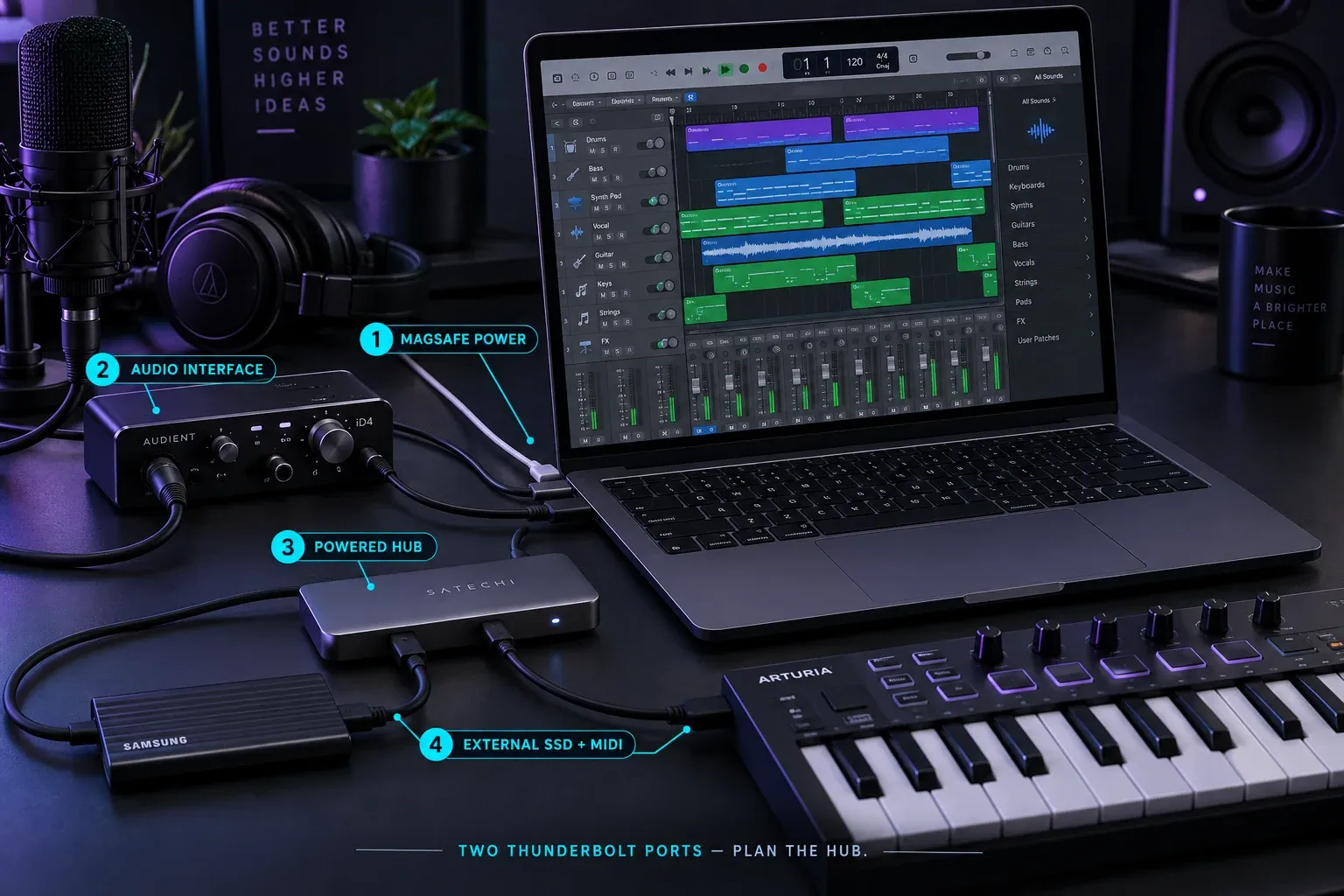
When a MacBook Air is enough, and when to step up
The Air's limits are fixed on the day you buy it: memory tops out at 32GB, there's no fan, and you get two Thunderbolt 4 ports. Check your projects against those three limits before you choose.
- Stay with the Air: for recording a few tracks at a time, editing, arranging with Logic's own instruments and mixing moderate projects. 16GB is a sensible starting point.
- Add memory: when sampled instruments are the constraint. 24GB or 32GB is the upgrade, and the Air stops there, so a template that already needs more belongs on a MacBook Pro or a desktop Mac.
- Add storage: choose 1TB or more if your sample libraries travel with you and you'd rather not carry an external SSD.
- Step up to a MacBook Pro: when you need more than 32GB, when a representative project still struggles under sustained load at a small buffer, or when you want HDMI, an SDXC slot and three Thunderbolt ports without a dock.
Before replacing an Air that mostly copes, use Logic's own relief valves. Freeze finished tracks with heavy instruments or plug-ins so they play back as audio, and raise the I/O buffer while you mix rather than record. If the project still overloads after that, you've found a limit that's worth paying to remove.
Will an older MacBook Air run Logic Pro?
Any MacBook Air from the M1 model onward meets the Apple-silicon requirement, and Apple lists every one of them, back to the M1 MacBook Air from 2020, as compatible with macOS Tahoe 26. Intel Airs are a different story. The Intel Retina 13-inch Air from 2020 stops at macOS Sequoia, which still covers the macOS 15.4 minimum on the standalone App Store listing, but Apple's Logic Pro page asks for a Mac with Apple silicon, so check which version the App Store offers on that machine before relying on it. Older Intel Airs, including the 2018 and 2019 models, aren't on Apple's macOS Sequoia compatibility list at all, so they can't reach that 15.4 minimum.
On an older M-series Air, check the memory first, because it can't be upgraded later. If yours has 8GB, recording and editing are realistic, but sampled instruments run out of room sooner than on the 16GB that current Airs start with. On the Logic Pro Help forum in January 2024, forum admin David Nahmani described running “huge projects” on a base-model M1 Air. Take that as one experienced user's report, not a promise for your plug-ins and libraries.
Mac mini M6: price the complete fixed-studio system
If your studio stays at one desk, compare the M6 mini with discounted previous-generation stock and the M5 Pro tier. Apple’s August 25 Mac mini announcement gives a US starting price of $899 and availability from September 22. That price is for 16GB memory and 256GB storage, not our suggested 512GB configuration. Treat 16GB/512GB as a practical starting configuration, not a benchmark winner, and check the total configured price before buying.
Apple's current Mac mini specifications list 16GB of memory on M6, configurable to 24GB or 32GB. Mac mini with M5 Pro starts at 24GB and supports configurations up to 64GB. Choose M5 Pro when a measured project needs more processing headroom, you need more than 32GB, or Thunderbolt 5 matters for a wider storage or display setup. Do not buy it simply because “Pro” sounds safer.
The port distinction is also clear in Apple's Mac mini technical specifications: M6 has three rear Thunderbolt 4 ports, while M5 Pro uses three rear Thunderbolt 5 ports. Both models also have HDMI, Ethernet, two front USB-C ports and a front headphone jack.
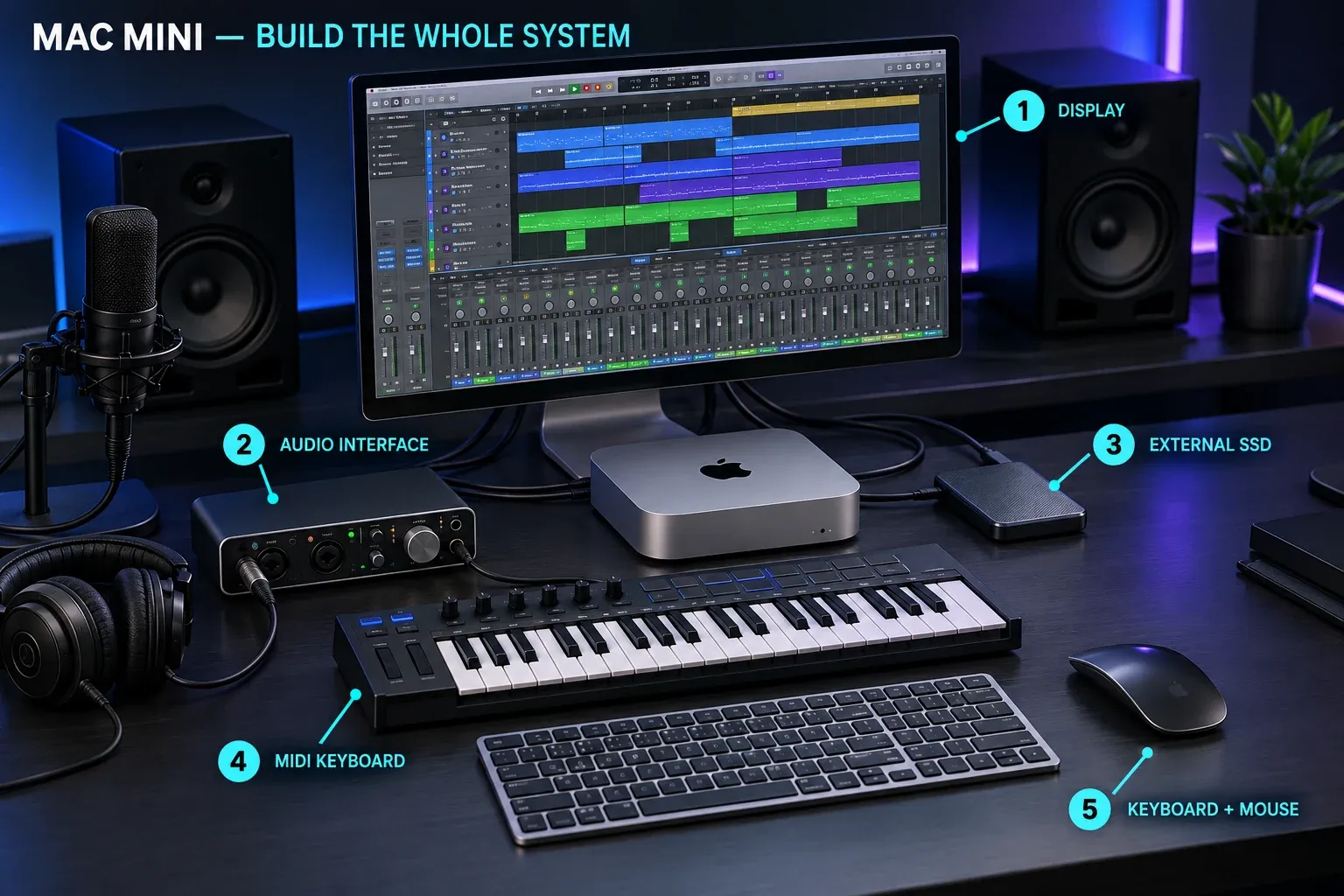
The complete-system layout above shows why the Mac mini's list price is only part of the budget. Add the price of a display, keyboard, pointing device, webcam if you need one, and any dock or USB-A hub. If you move sessions between rooms every week, a laptop is simpler.
MacBook Pro M5 Pro: more memory and ports on the move
The current MacBook Pro specification table lists M5 Pro configurations with 15-core or 18-core CPUs, 24GB of unified memory at the starting tier and options up to 64GB with the appropriate chip configuration. The 14-inch and 16-inch models start with 1TB storage and include three Thunderbolt 5 ports, HDMI, an SDXC slot and MagSafe. Check the live store for the exact price of the size, memory and storage combination you choose.
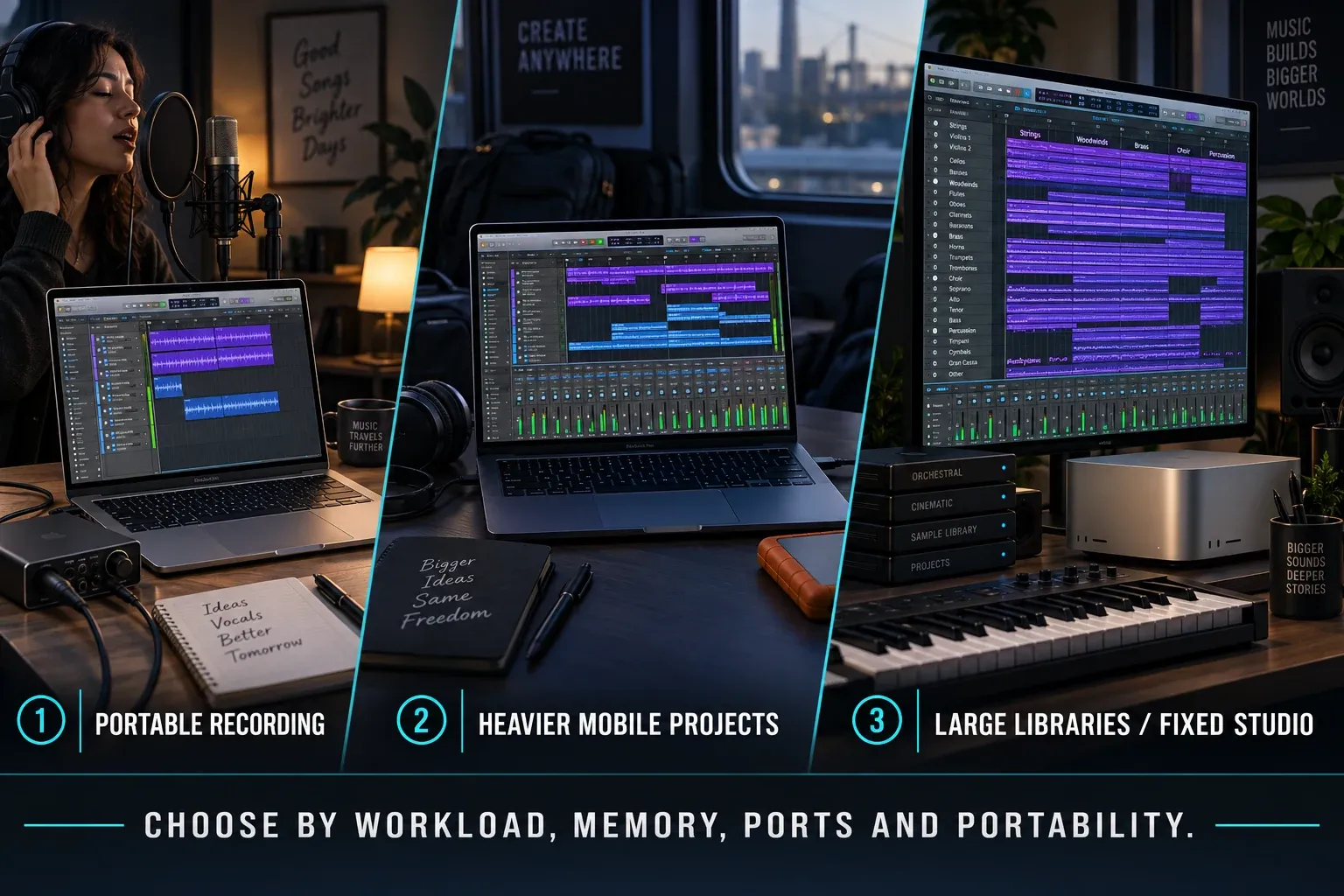
For Logic Pro, compare CPU performance, memory capacity, cooling and ports before paying for more GPU cores. Check whether your particular plug-ins benefit from GPU acceleration rather than buying from the graphics specification alone. The M5 Pro belongs on the shortlist if you need large virtual-instrument projects or a demanding live setup to travel with you. For a fixed desk, compare its full price with a mini and display instead of paying for portability you will not use.
Choose 14-inch versus 16-inch by how you actually work. The 16-inch gives Logic's mixer, Piano Roll and Arrange area more room and usually lives more comfortably as a desk-replacement machine. The 14-inch is easier to carry. Connect either to a display at the studio and the screen-size argument becomes less important.
Mac Studio M5 Max: buy it for memory and fixed-studio headroom
Apple's August 25 Mac Studio announcement set September 22 as the availability date for M5 Max and M5 Ultra. The US launch price starts at $2,499 for M5 Max and $5,499 for M5 Ultra. The current technical specifications show 36GB of memory and 512GB of storage at the M5 Max starting tier. Mac Studio is the fixed-room choice when a measured orchestral template, a large sampled-instrument setup or combined audio and video work genuinely exceeds the lower tiers.
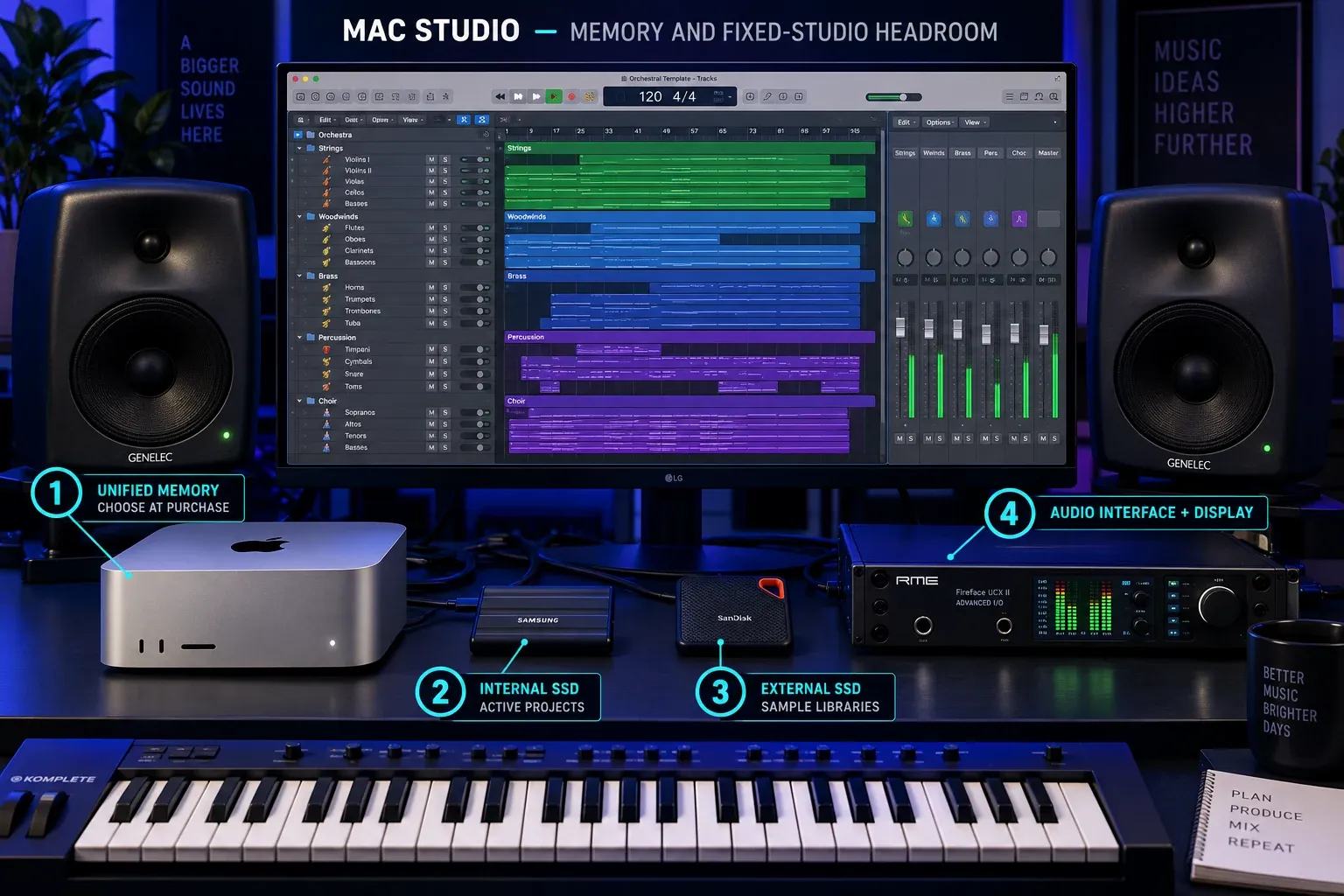
Do not assume M5 Max automatically beats M5 Pro for every Logic project. Audio work is not mainly a GPU contest, and one latency-sensitive channel strip can hit a processing limit before a large multicore system is fully occupied. The Studio earns its price when you need its memory range, fixed-desktop cooling, storage options and connectivity, not because Max is the largest label on the shelf.
The M5 Ultra version is a specialist purchase. It starts with 96GB of unified memory and can be configured to 256GB or 512GB. Apple says the 512GB option is coming in late October. That capacity can matter for unusually large templates or mixed audio, video and local-compute work. Most Logic users should stop at M5 Max and spend the difference on storage, monitoring, room treatment or instruments.
How much unified memory does Logic Pro need?
- 16GB: a sound starting point for audio recording, editing, Logic's own instruments and effects, and moderate third-party plug-in use.
- 24GB or 32GB: the useful upgrade for sample-heavy songwriting, several large instruments, or Logic running beside notation, video or streaming software.
- 48GB or 64GB: appropriate when a measured template already pushes past the lower tiers or when you deliberately keep large libraries resident.
- 128GB or more: only for a measured template or combined workload that needs it. In the new Mac Studio range compared here, capacities above 128GB require M5 Ultra; this is not a minimum for professional music production.
Unified memory in the Macs compared here is not a user-upgradeable component. The tiers above are buying guidance, not Logic’s minimum requirements or guaranteed project limits. Check Memory Pressure with a representative project, leave room for the work you actually plan to add, and avoid paying for unused capacity.
512GB or 1TB for Logic Pro?
512GB is workable for a MacBook Air or an upgraded Mac mini. The current entry Mac mini is 256GB. Apple's current Mac App Store listing says 44GB or more for the full Logic Sound Library. That leaves room for the app, macOS and active projects on a 512GB drive, but third-party libraries can consume the rest quickly. A 1TB internal SSD is the more comfortable choice for a laptop that often works away from external drives.
Logic Pro 12 can store its library on another compatible volume. Apple's current instructions explain how to move the Logic Pro Sound Library to external storage and note the formatting and access requirements. Keep an independent backup. A library drive is working storage, not a backup by itself.
Should you buy a refurbished or used Mac?
A refurbished M-series Mac can be a better buy than a new machine with the wrong configuration. Check the exact model, supported macOS, memory, storage and critical plug-ins or devices. On a laptop, inspect battery condition and the power adapter. For a private sale, have the seller remove Activation Lock and verify you can set up the Mac before paying. Do not accept a promise that a locked machine will be usable later. The Logic Pro cost guide covers the app purchase separately.
Apple says its Certified Refurbished products include a one-year limited warranty. Inventory and discounts move constantly, so this guide won't promise a fixed percentage saving. Used machines from private sellers don't carry the same guarantee.
An M1, M2, M3, M4, M5 or M6 badge alone isn't enough. Compare the exact model, memory and total price against your measured workload and the current macOS requirement. A discounted M4 mini can be sensible, while a newer M6 should justify its complete-system cost. Do not buy an Intel Mac for a new Logic Pro 12 setup.
The buying checklist
- Confirm every essential Audio Unit and audio interface supports the macOS version you will run.
- Open your heaviest real project and identify whether CPU, memory, storage or portability is the actual problem.
- Choose desktop or laptop before comparing chips.
- Select memory from measured use; it cannot be upgraded later.
- Count ports and include the real cost of docks, displays and external storage.
- Keep enough budget for backups and the audio equipment that changes your work more than an unused chip tier.
If the current Mac struggles only while recording at a small buffer, work through the Logic Pro latency guide before you replace hardware. When projects stop with a system overload message, use the ordered overload checks to find whether the cause is the project, a plug-in or the computer.
If the Mac is only one part of a broader software decision, compare the current choices in the best DAW for Mac guide. Switching DAWs to avoid a measured hardware bottleneck rarely fixes the underlying sample-library, plug-in or storage constraint.
Best Mac for Logic Pro FAQ
What is the best Mac for Logic Pro in 2026?
For portable recording and moderate production, start with the M5 MacBook Air. Choose a 14-inch M5 Pro MacBook Pro when measured processing, memory or port needs justify it. For a fixed studio, start with Mac mini and compare the full M6 configuration price with discounted M4 and M5 Pro alternatives. Choose Mac Studio only when your measured workload needs its memory range or fixed-studio headroom.
Is a MacBook Air good for Logic Pro X?
Yes. The M5 Air has an M-series chip, starts with 16GB memory and a 512GB SSD, and supports features that require native Apple-silicon operation. Its fanless design is quiet. For sustained CPU-heavy projects, compare your session on an actively cooled Pro; neither the model name nor a generic track count guarantees the result. Any M1 or later Air meets Logic Pro 12's Apple-silicon requirement; on an older Intel Air, check which version the App Store offers before you rely on it.
Is 16GB of memory enough for Logic Pro?
16GB is a sensible starting point for recording audio, using Logic's instruments and effects, and running a moderate set of third-party plug-ins. Choose 24GB or 32GB if you use large sampled instruments or keep several creative apps open. Buy 48GB or more only when an existing template or measured memory use justifies it.
Should I buy an M4, M5 or M6 Mac for Logic Pro?
Compare the exact model, configuration, price and software support. The M6 Mac mini and M5 Mac Studio have been available since September 22. A discounted M4 mini may still be the better value for a project that already runs well. Replace a stable setup only when a measured limit justifies the cost.
How much storage should a Logic Pro Mac have?
512GB is workable for Logic Pro, active projects and a selective sound library. Apple's current Mac App Store listing says 44GB or more for the full Logic Sound Library, so 1TB is more comfortable if you keep many projects or third-party libraries locally. Logic Pro 12 also lets you move its Sound Library to compatible external storage.
Can Logic Pro 12 run on an Intel Mac?
Creator Studio requires Apple silicon: its Mac app listing specifies M1 or later with macOS 15.4 or later, and Apple’s Creator Studio support page gives macOS 26.6 or later for Logic Pro 12.4. The separate standalone web listing does not state a chip minimum. Check which version the App Store offers on your exact Intel Mac; do not infer eligibility from that omission. Several newer features are unavailable on Intel, and we would choose M-series hardware for a new purchase.
Is a refurbished Apple-silicon Mac worth buying for Logic Pro?
It can be, provided the exact model supports the required macOS version and has enough memory and storage for your work. Check plug-in and audio-interface compatibility before changing systems. Apple's Certified Refurbished Macs include a one-year limited warranty, but available models and discounts change.
Mac mini or MacBook Pro for Logic Pro?
Buy the Mac mini if the computer will stay at one desk and you already own a display, keyboard and pointing device. Buy the MacBook Pro if you record in different rooms, take projects to studios or perform live. Do not pay the portability premium unless you will actually use it.


