Best DAW for Mac in 2026: Logic Pro, Ableton, Pro Tools Compared

There is no single best Mac DAW: the useful choice depends on whether the job is recording, beat production, live performance, post-production, or cross-platform collaboration. If you want a direct answer before reading further: Logic Pro is the best choice for most Mac producers. But that's not true for everyone, and the gap between the top contenders is smaller than most comparison articles suggest.
Last verified August 4, 2026 — product details, requirements, prices, and procedures were checked against Logic Pro — Apple and the contextual vendor documentation linked in this guide.
For head-to-head workflow and licensing differences, continue with the Logic Pro comparisons hub.
This article covers the 6 DAWs worth considering as a Mac user in 2026 — what each one is best at, what it costs, and which makes sense for your situation.
Logic Pro for Mac: Best DAW by User Type
- Best overall: Logic Pro — strongest mix of price, stock content, and Apple Silicon performance
- Best for electronic music and live performance: Ableton Live
- Best for professional studio and audio post: Pro Tools
- Best for beat-first production: FL Studio
- Best free option: GarageBand
- Best low-cost professional engine: Reaper
- Best cross-platform (Mac + Windows): Ableton Live or FL Studio
Logic Pro vs Other Mac DAWs: Quick Comparison Table
| DAW | Price model | Mac support | Windows support | Best for | Main weakness |
|---|---|---|---|---|---|
| Logic Pro | $199.99 one-time (or Creator Studio, regional pricing varies) | Yes — Apple silicon required for the current version | No | All-round Mac production | Mac-only; the current version requires Apple silicon |
| Ableton Live 12 | Intro/Standard/Suite one-time; regional pricing varies | Yes (native Apple Silicon) | Yes | Electronic music, live performance | Suite price; steeper for traditional recording |
| Pro Tools | Subscription-first; perpetual options via Avid/resellers | Yes (native Apple Silicon) | Yes | Professional studio / audio post | Ongoing subscription cost; steep learning curve |
| FL Studio | Multiple tiers, one-time, lifetime updates — check image-line.com | Yes (native Apple Silicon) | Yes | Beat production, hip-hop, electronic | No iPad app; some legacy plugins Windows-only |
| GarageBand | Free | Yes | No | Beginners, casual recording | Limited automation and editing depth vs Logic |
| Reaper | $60 personal license | Yes (native Apple Silicon) | Yes | Budget-conscious professionals | No bundled instruments or content library |
Logic Pro for Mac: The Best All-Round DAW for Most People
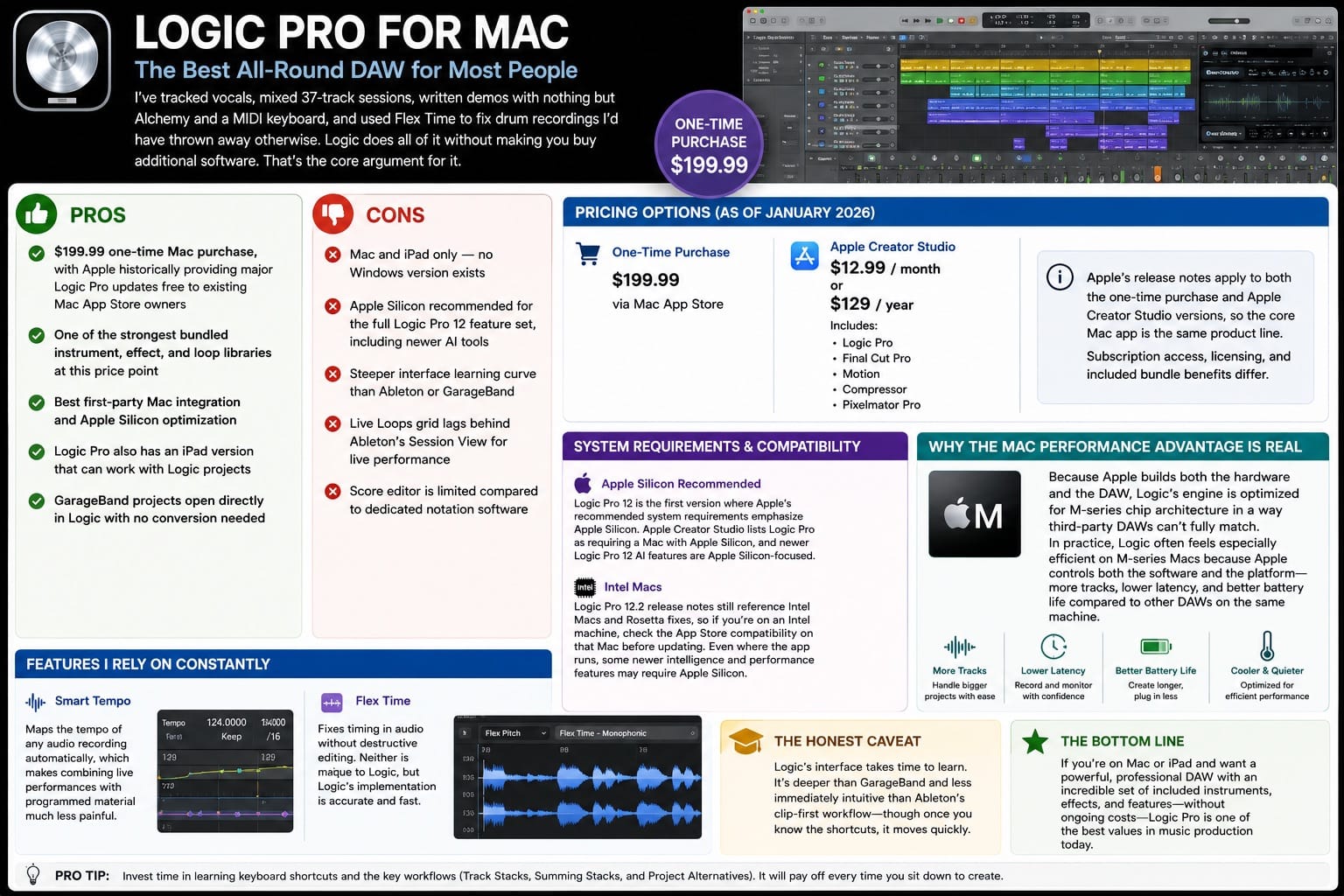
I've tracked vocals, mixed dense sessions, written demos with nothing but Alchemy and a MIDI keyboard, and used Flex Time to fix drum recordings I'd have thrown away otherwise. Logic does all of it without making you buy additional software. That's the core argument for it.
- Pros
- $199.99 one-time Mac purchase, with Apple historically providing major Logic Pro updates free to existing Mac App Store owners
- One of the strongest bundled instrument, effect, and loop libraries at this price point
- Best first-party Mac integration and Apple Silicon optimization
- Logic Pro also has an iPad version that can work with Logic projects
- GarageBand projects open directly in Logic with no conversion needed
- Cons
- Mac and iPad only — no Windows version exists
- Apple silicon required for the current Logic Pro 12 release
- Steeper interface learning curve than Ableton or GarageBand
- Live Loops grid lags behind Ableton's Session View for live performance
- Score editor is limited compared to dedicated notation software
Logic Pro for Mac costs $199.99 as a one-time purchase. As of January 2026, Logic Pro 12 is also available through Apple Creator Studio at $12.99 per month or $129 per year — a bundle that also includes Final Cut Pro, Motion, Compressor, and Pixelmator Pro. Apple's release notes apply to both the one-time purchase and Apple Creator Studio versions, so the core Mac app is the same product line. Subscription access, licensing, and included bundle benefits differ.
Logic Pro 12, released January 28, 2026, requires macOS 15.6 or later and a Mac with Apple silicon on Apple's current product page. Intel and Rosetta references remain in some release notes, but they do not make Intel a supported path to Logic Pro 12. Intel users can keep an older compatible Logic Pro version or choose a DAW that still supports their hardware.
The Mac performance advantage is real, not marketing. Because Apple builds both the hardware and the DAW, Logic's engine is optimized for M-series chip architecture in a way third-party DAWs can't fully match. In practice, Logic often feels especially efficient on M-series Macs because Apple controls both the software and the platform — more tracks, lower latency, and better battery life compared to other DAWs on the same machine.
Smart Tempo and Flex Time are the two features I rely on constantly. Smart Tempo maps the tempo of any audio recording automatically, which makes combining live performances with programmed material much less painful. Flex Time fixes timing in audio without destructive editing. Neither is unique to Logic, but Logic's implementation is accurate and fast.
The honest caveat: Logic's interface takes time to learn. It's deeper than GarageBand and less immediately intuitive than Ableton's clip-first workflow — though once you know the shortcuts, it moves quickly.
Logic Pro vs Ableton Live: Which Mac DAW Fits Your Workflow
Most DAW comparison articles treat this as a close call. For most Mac producers, it isn't. Logic wins on value, breadth, and native Mac performance. Ableton wins on one specific thing: clip-based, non-linear production and live performance.
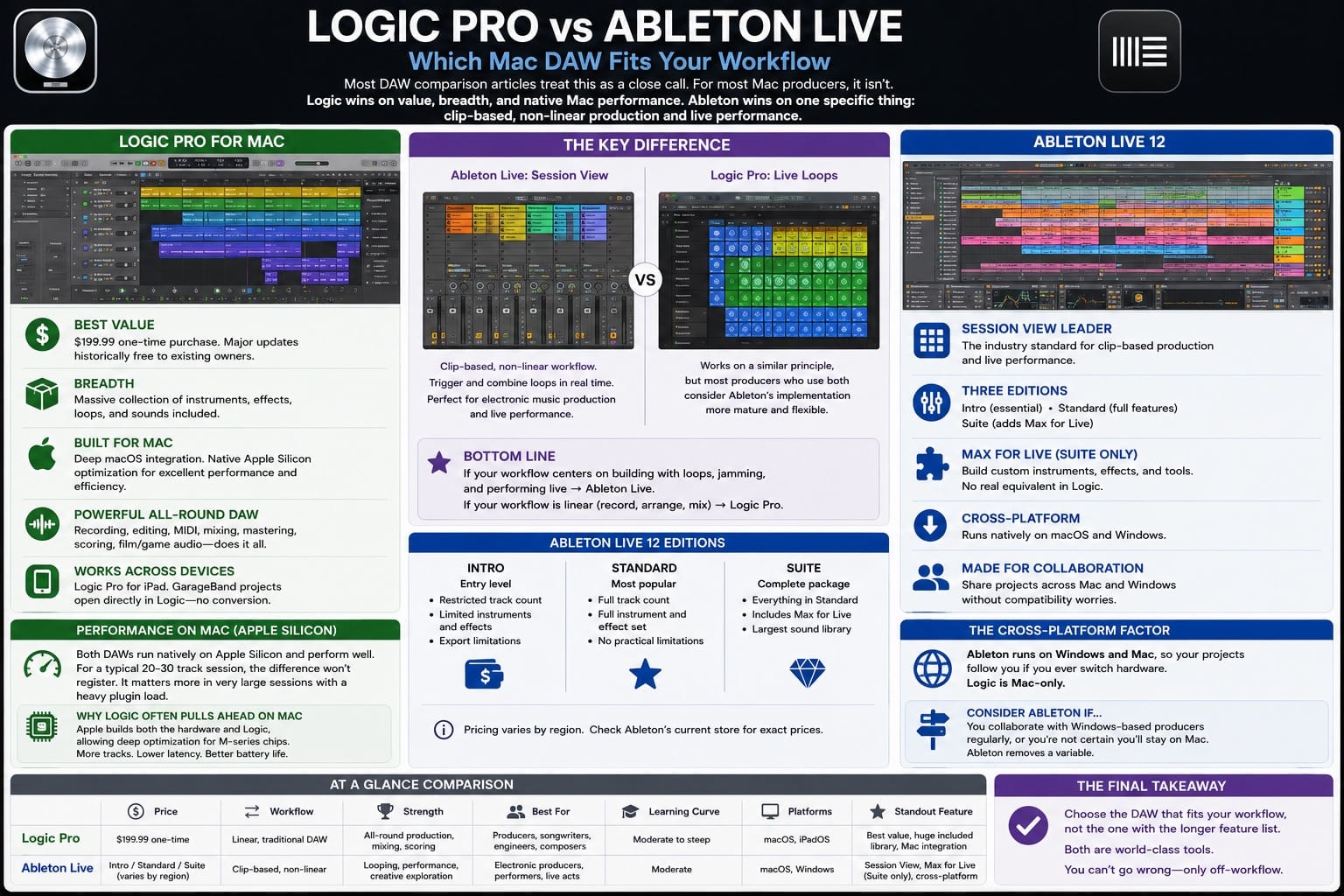
Ableton's Session View is a grid where every cell holds a looping musical idea. You can trigger and combine clips in real time, which makes it the natural tool for electronic producers who build tracks by looping ideas together, and for anyone performing live. Logic's Live Loops grid works on a similar principle, but most producers who use both consider Ableton's implementation more mature and flexible.
Ableton Live 12 comes in three tiers. Intro is the entry level with a restricted track count and instrument set. Standard removes most practical limitations. Suite adds Max for Live, which is an environment for building custom instruments and effects — a feature with no real equivalent in Logic. If you want Max for Live, Ableton Suite is the only path. Check Ableton's current store for pricing, as regional prices vary.
On Mac, both DAWs run natively on Apple Silicon and perform well. For a typical 20-to-30 track session, the difference won't register. It matters more in very large sessions with a heavy plugin load.
The cross-platform argument is worth naming. Ableton runs on Windows and Mac, so your projects follow you if you ever switch hardware. Logic is Mac-only. If you collaborate with Windows-based producers regularly, or if you're not certain you'll stay on Mac, Ableton removes a variable.
| Feature | Logic Pro | Ableton Live 12 Suite | Recommendation |
|---|---|---|---|
| Price | $199.99 one-time | Suite one-time; regional pricing varies | Logic wins on value |
| Mac-only | Yes | No (Mac + Windows) | Ableton if cross-platform matters |
| Apple Silicon optimization | First-party, deepest | Native, strong | Logic for large sessions |
| Stock content library | Extensive (~72–75 GB full install) | Smaller; Suite adds more | Logic wins on bundled content |
| Live performance workflow | Live Loops (capable) | Session View (stronger) | Ableton for clip-based/live work |
| Max for Live | No equivalent | Suite only | Ableton if Max for Live is essential |
| iPad version | Separate iPad app, works with Logic projects | Ableton Note (sketching only) | Logic for iPad workflow |
Logic Pro vs Pro Tools: When Studio Session Compatibility Matters
Pro Tools is still how most commercial recording studios and audio post facilities operate. If you're an engineer who moves sessions in and out of professional studios, or you work in film and TV post-production, Pro Tools is the common format. That matters less for independent producers, but it still matters for anyone working in those contexts.
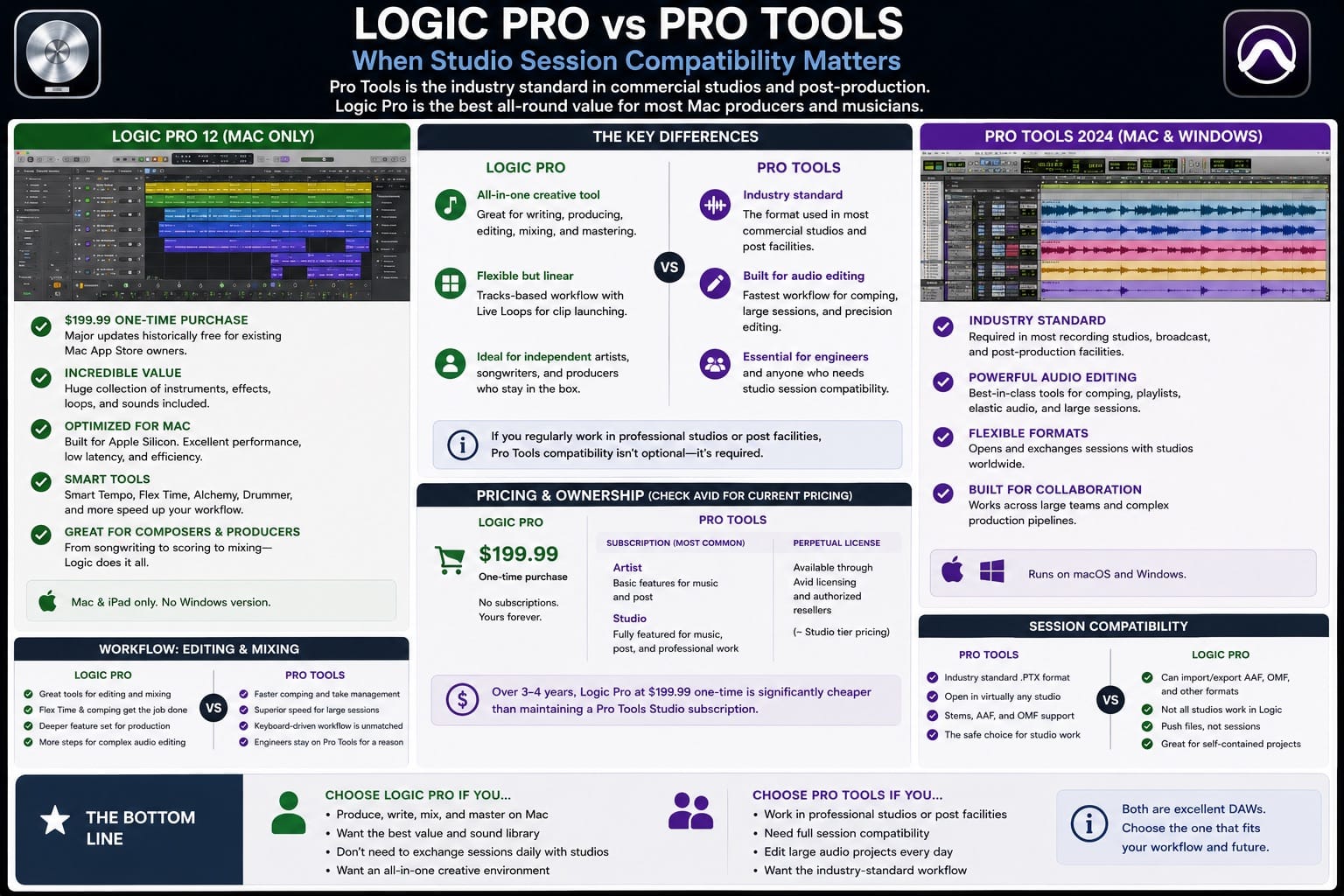
Pro Tools is subscription-first now, though Avid still offers perpetual options through its licensing path and authorized resellers, often around the Studio tier's price level — check Avid's current pricing before purchasing. The Artist subscription tier handles basic work; the Studio tier is where most working engineers land. Over any 3-to-4 year period, Logic Pro at $199.99 one-time is significantly cheaper than maintaining a Pro Tools Studio subscription.
Pro Tools' editing workflow for comping vocal takes and large multi-track sessions is faster than Logic's once you know the keyboard shortcuts. Engineers who trained on Pro Tools tend to stay on it for this reason. But if session compatibility with commercial studios isn't a daily requirement, Logic Pro handles the same workload at a much lower total cost.
Logic Pro vs FL Studio: Mac Beat Production Compared
FL Studio has a reputation as a Windows DAW, but it's been natively supported on Apple Silicon for several versions now and the Mac build is mature. One license covers both platforms, which is useful if you work across machines.
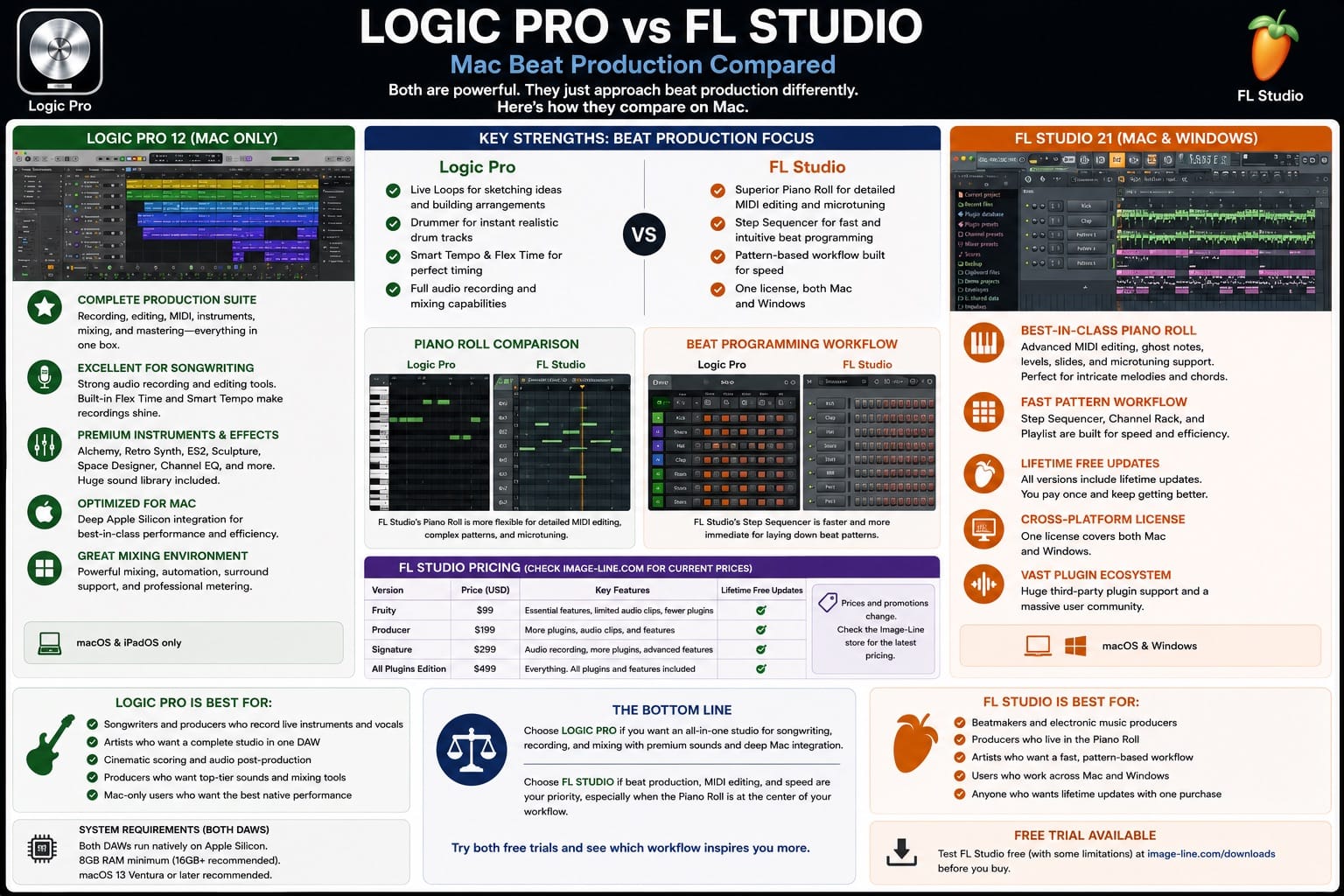
FL Studio's Piano Roll is what keeps producers on it. I've used both, and FL Studio's Piano Roll is more flexible for detailed MIDI editing than Logic's, particularly for complex patterns and microtuning. The Step Sequencer is also faster for laying down beat patterns than Logic's equivalent.
FL Studio comes in multiple tiers at different price points, with lifetime free updates included on all of them. Check Image-Line's current store before purchasing — pricing and promotions change and the entry tier is accessible enough that it's worth seeing current numbers directly.
For songwriting, recording live instruments, and mixing, Logic is more complete. For beat-heavy production where the Piano Roll is central to your workflow, FL Studio is genuinely competitive and worth testing on its free trial before committing.
Logic Pro vs GarageBand: When the Free Option Is Enough
GarageBand comes free on every Mac and iPad. It shares a familiar Apple music-production workflow with Logic and opens cleanly into Logic later — so if you start on GarageBand and upgrade, your existing projects come with you intact.
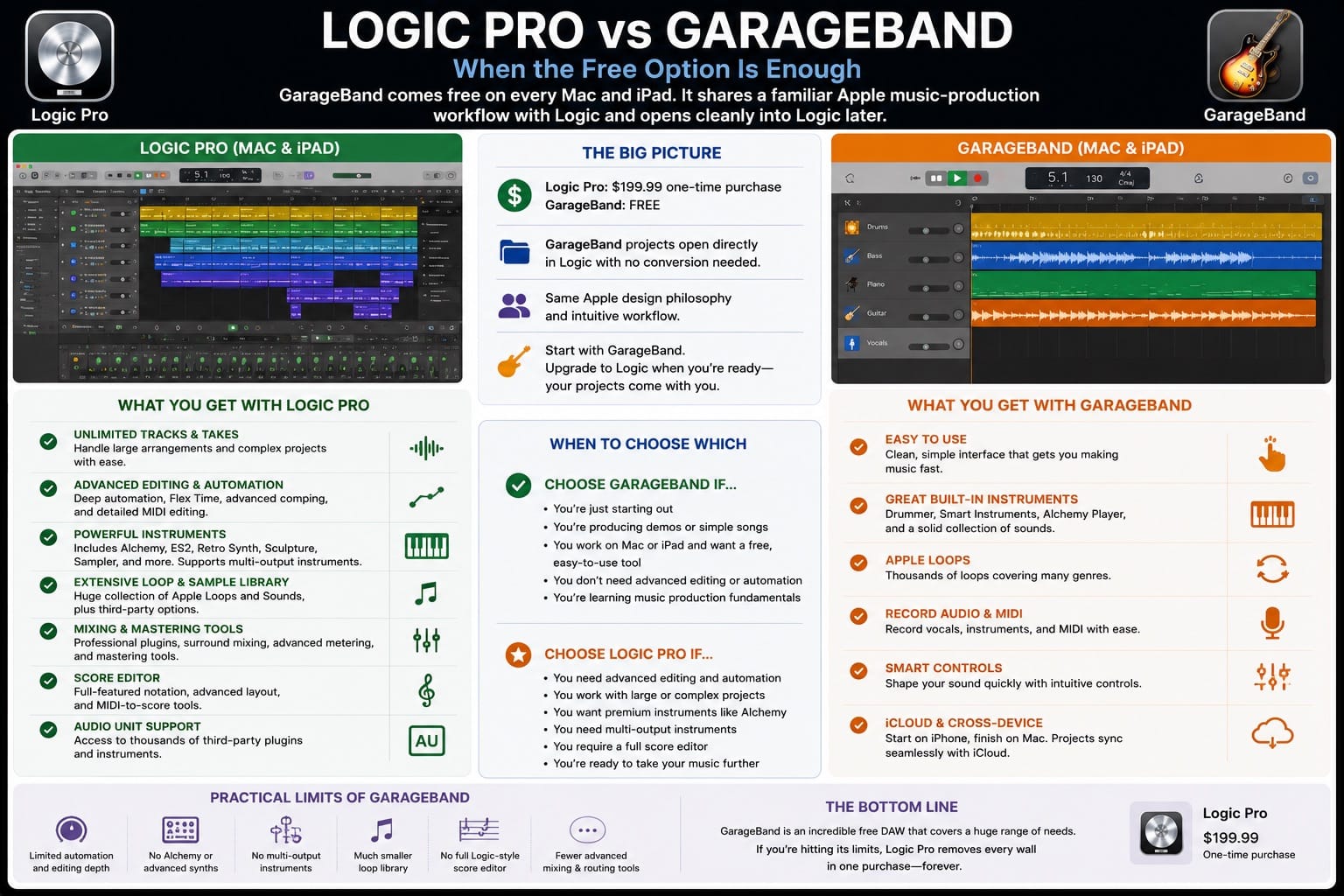
The practical limits of GarageBand are limited automation and editing depth compared with Logic, no Alchemy, no multi-output instruments, a much smaller loop library, and no full Logic-style score editor. If you're hitting those walls regularly, Logic Pro removes all of them in one purchase. If GarageBand covers everything you need, there's no reason to upgrade.
Reaper: The Low-Cost Mac DAW Worth Knowing About
Reaper costs $60 for a personal license. It runs natively on Apple Silicon, has unlimited tracks, supports AU and VST plugins, and handles large sessions with unusually low CPU overhead. The interface is sparse and requires configuration, but if your main concern is budget and you're willing to spend time setting it up, Reaper is a legitimate professional tool.
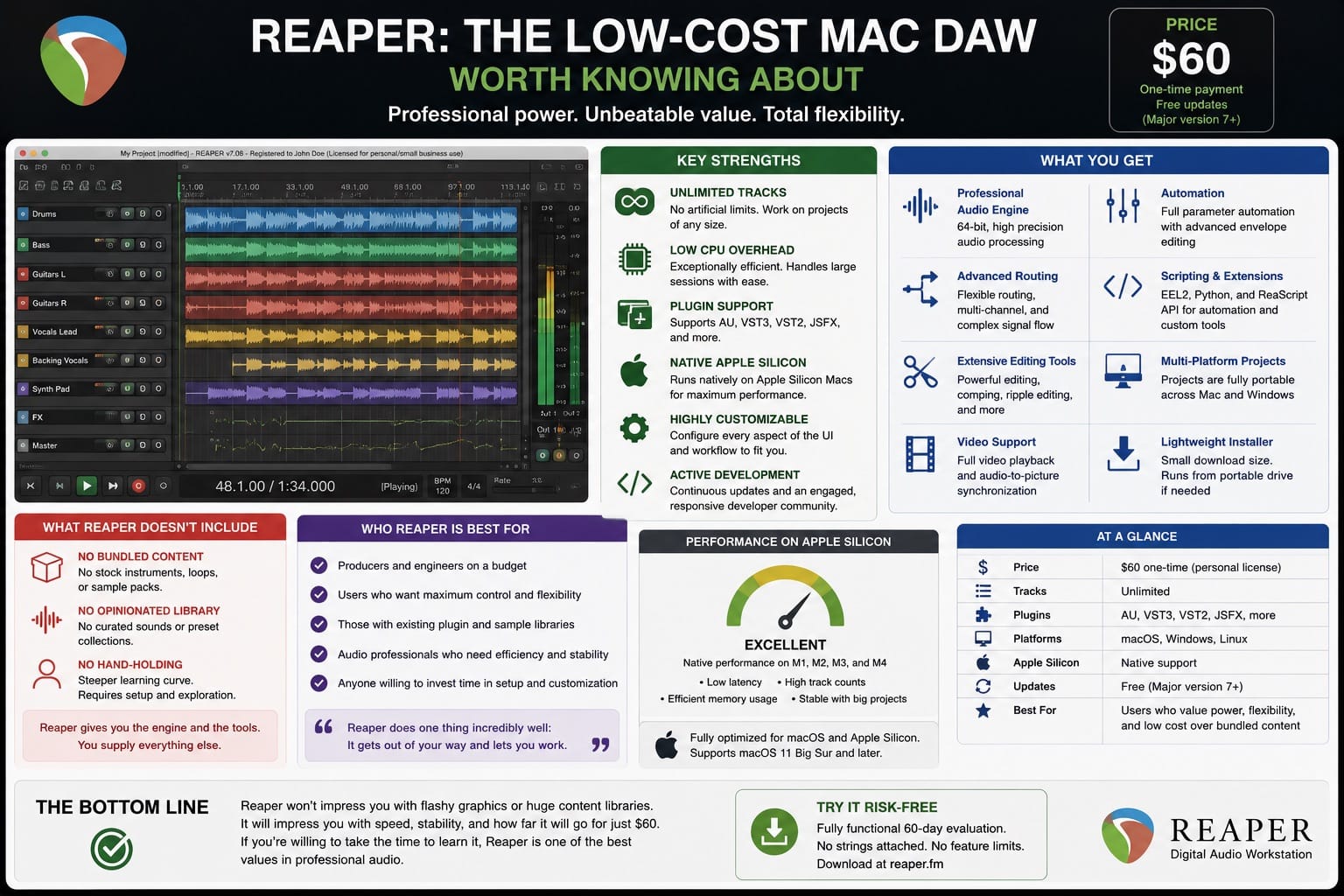
What it lacks is any kind of curated content library — no stock instruments, no bundled sample packs. You get the engine and the tools; you supply everything else. For producers already deep into third-party plugins who don't need bundled content, Reaper on Mac is worth a serious look.
Who Should Not Choose Logic Pro
Logic Pro is the right answer for most Mac producers, but not all. Skip it if:
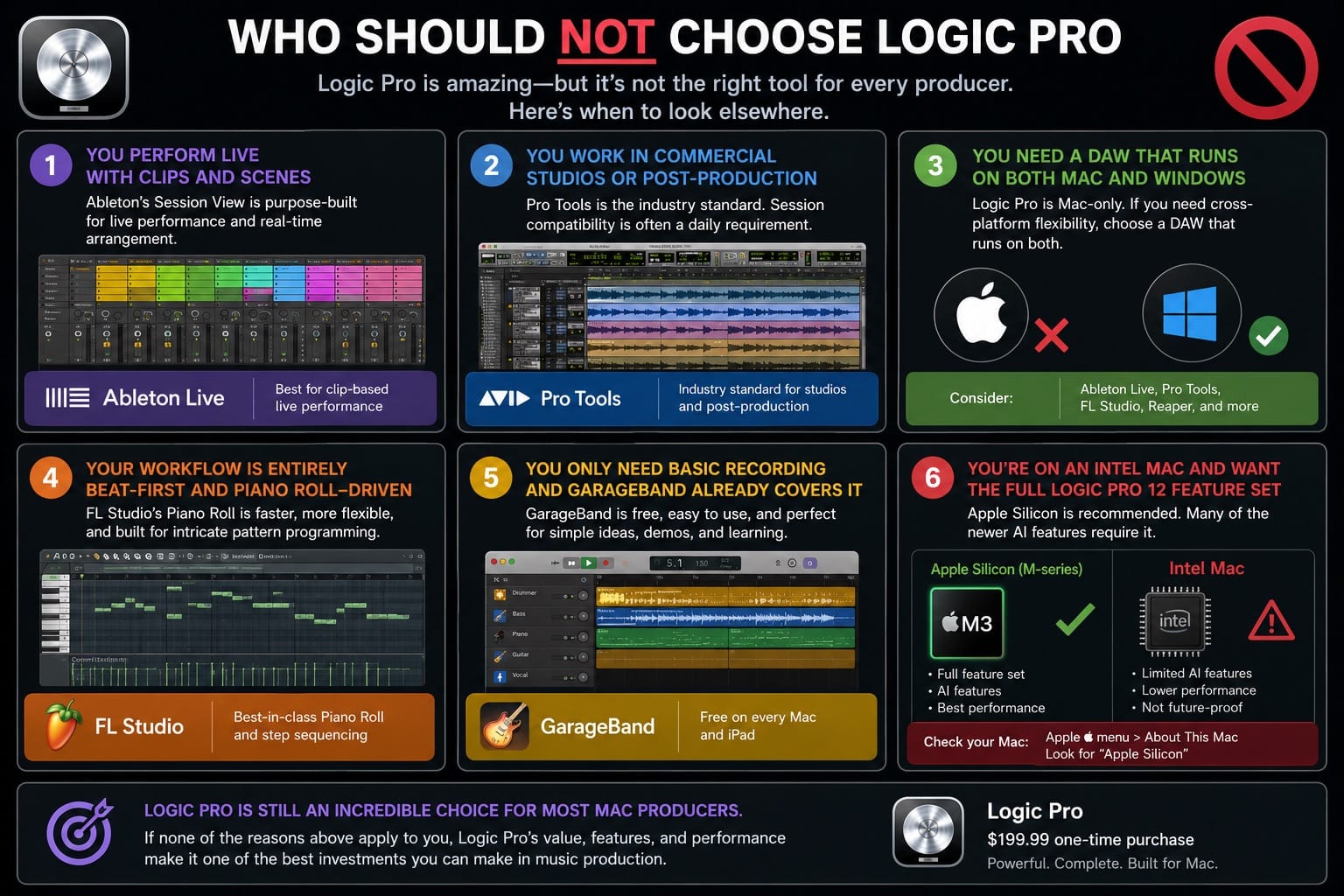
- You perform live with clips and scenes — Ableton's Session View is the better tool
- You work in commercial post-production or recording studios where Pro Tools session compatibility is a daily requirement
- You need a DAW that runs on both Mac and Windows — Logic is Mac-only
- Your workflow is entirely beat-first and you live in a piano roll — FL Studio's Piano Roll is more flexible for that use case
- You only need basic recording and GarageBand already covers it — no reason to spend $199.99
- You're on an Intel Mac and need the current Logic Pro 12 release — Apple silicon is required
Best DAW for Mac: Use-Case Recommendation Table
| Use Case | Best DAW for Mac | Runner-Up | Reason |
|---|---|---|---|
| All-round production on Mac | Logic Pro | Ableton Live Standard | Best value, deepest Mac integration |
| Electronic music and live performance | Ableton Live | Logic Pro | Session View, Max for Live |
| Professional studio / audio post | Pro Tools | Logic Pro | Industry session compatibility |
| Beat production / hip-hop | FL Studio or Logic Pro | Ableton Live | FL Piano Roll; Logic for full production |
| Tight budget | GarageBand (free) or Reaper ($60) | FL Studio entry tier | Both capable; GarageBand upgrades to Logic |
| Cross-platform (Mac + Windows) | Ableton Live or FL Studio | Pro Tools | Logic is Mac-only |
| Intel Mac users | Verify App Store compatibility first; Logic Pro 11 as fallback | Ableton Live or Reaper | Logic Pro 12 requires Apple silicon |
Logic Pro for Mac: Final Verdict
For someone committed to Apple Silicon Mac, producing music across multiple genres, and wanting the most capable tool for the lowest total cost: Logic Pro. The bundled instrument and plugin library alone justifies the price against any competitor, and the Mac optimization advantage compounds as Apple continues to push M-series chip performance.
The cases where Logic isn't the right answer are specific and real: Session View and Max for Live users belong in Ableton, audio post engineers belong in Pro Tools, and anyone needing Windows compatibility needs a cross-platform option.
Everyone else: start with the one-month Apple Creator Studio trial, build a session, and see how it sits before committing.
Frequently Asked Questions
Is Logic Pro the best DAW for Mac?
For most Mac-based producers and songwriters, yes. Logic Pro's combination of price ($199.99 one-time), content depth, and native Mac optimization makes it the strongest all-round option. Ableton Live is a better fit for electronic music and live performance.
Does Logic Pro work on Windows?
No. Logic Pro is Mac and iPad only. Apple has not indicated any plans to release a Windows version. If you need a DAW that runs on both platforms, Ableton Live, FL Studio, and Pro Tools all work on Mac and Windows.
Is Logic Pro better than Ableton Live for Mac?
For songwriting, recording live instruments, and mixing, Logic Pro offers more at a lower price. For clip-based electronic production, live performance, and Max for Live integration, Ableton Live is the stronger tool. Both are professional-grade and widely used.
Is Logic Pro worth it over GarageBand?
If you're regularly hitting GarageBand's limits — limited automation depth, no Alchemy, no Flex Time — then yes, at $199.99 Logic Pro is worth it. If GarageBand handles everything you need, there's no reason to upgrade.
Can Logic Pro replace Pro Tools in a professional studio?
For recording and mixing music, Logic Pro can handle the same workload. The practical barrier is session compatibility: commercial studios and audio post facilities typically run Pro Tools, and sharing sessions across platforms adds friction. For independent production without studio handoffs, Logic is a complete replacement.
Is Logic Pro good for hip-hop and beat making?
Yes. Drummer, Step Sequencer, Alchemy for bass and synth sounds, and Quick Sampler all serve beat production well. Some dedicated hip-hop producers prefer FL Studio's Piano Roll and pattern workflow, but Logic handles the genre without gaps.
Are Logic Pro updates really free?
Every major update Apple has shipped since Logic became a Mac App Store purchase has been free for existing owners. This covers all updates through Logic Pro 12 (released January 2026). Apple hasn't formally guaranteed this as a permanent written policy, but the track record since 2013 is consistent.
What is the cheapest DAW for Mac?
GarageBand is free on every Mac. Reaper is $60 for a personal license. FL Studio's entry tier is accessible — check Image-Line's current store for the latest price. Logic Pro at $199.99 is the most expensive on this list but includes far more bundled content than any of the lower-priced options.
Does Logic Pro 12 work on Intel Macs?
Apple's current Logic Pro product page requires Apple silicon for Logic Pro 12. Intel and Rosetta references in older release notes do not change that current requirement. An Intel Mac can continue using an older compatible Logic Pro version, but it is not a supported route to Logic Pro 12.
Related guides
Logic Pro vs GarageBand, Logic Pro vs Ableton Live, How much Logic Pro costs


