GarageBand for Windows: No PC Version, So Use These Instead
Apple makes GarageBand only for Mac, iPhone and iPad. Here’s the free Windows DAW for each GarageBand job, how to bring songs across as audio and when a Mac is the better fix.

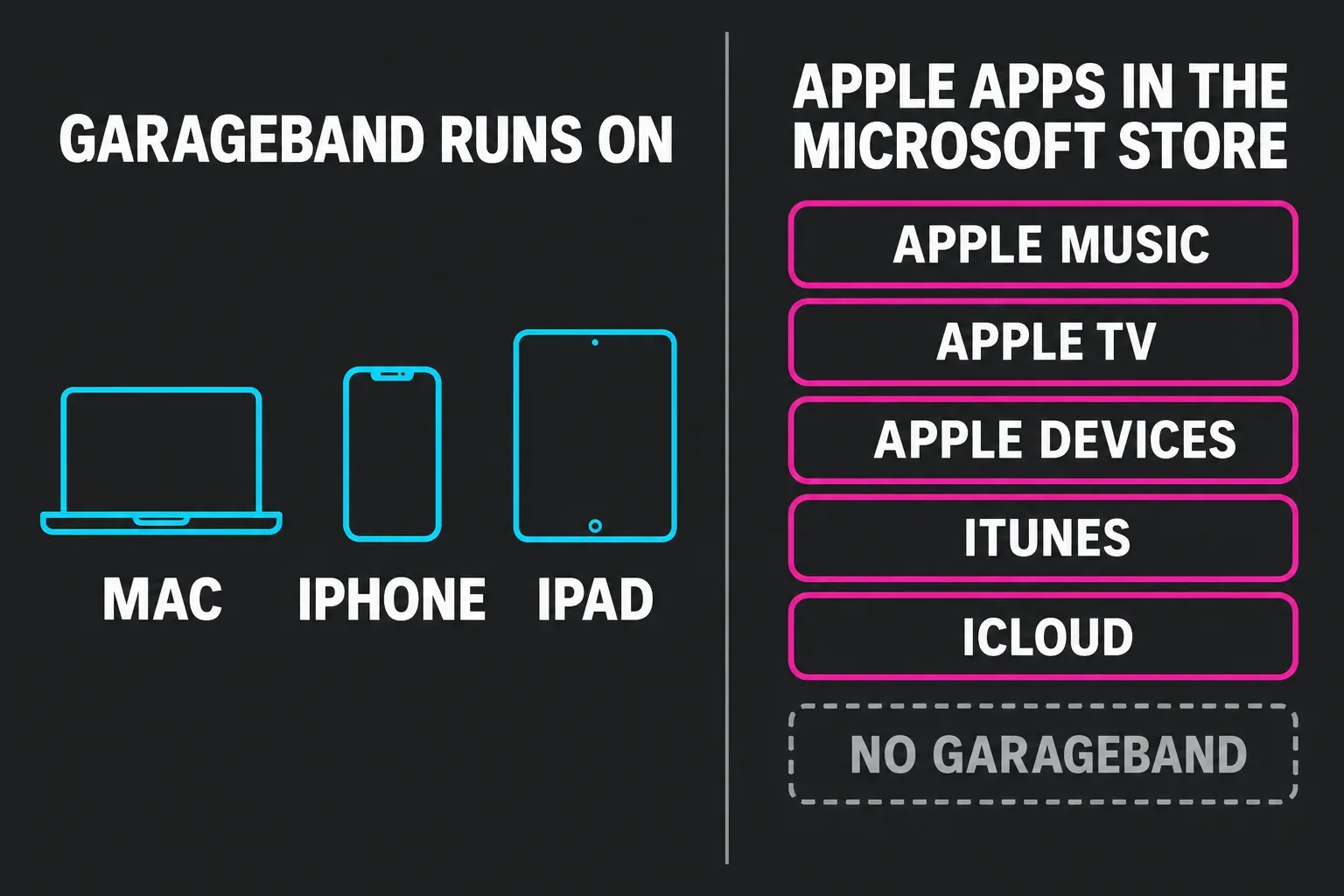
There’s no GarageBand for Windows. Apple makes GarageBand only for Mac, iPhone and iPad, and the apps it does ship for Windows through the Microsoft Store are Apple Music, Apple TV, Apple Devices, iTunes and iCloud. On a PC, pick the free Windows DAW that does the part of GarageBand you liked: Cakewalk Next for quick ideas, Sonar for recording and mixing, Fender Studio for guitar, Waveform Free for an unlimited all-rounder and LMMS for pattern beats.
Any site offering a “GarageBand for PC” download is selling you something Apple didn’t make. Below you’ll find why the usual workarounds fail, which alternative fits which job, how to bring an existing song across as audio and when a used Mac is the cheaper answer. If you meant Logic Pro on a PC, that question has its own answer in Logic Pro on Windows.
Why is there no GarageBand download for Windows?
Apple does not release GarageBand for Windows. Its list of Apple apps for Windows covers Apple Music, Apple TV, Apple Devices and iTunes, and Apple’s page on updating Apple apps from the Microsoft Store adds iCloud. GarageBand isn’t on either page.
Google even ranks a Microsoft Store listing for this search, “Beginner’s Guide For GarageBand.” It’s a $9.99 video course from macProVideo.com, listed since 2015, with 114 minutes of training on Apple’s app. It won’t install GarageBand on your PC.
The workarounds don’t hold up either. Apple’s macOS software license does not let you install, use or run macOS on a non-Apple-branded computer, which rules out a Hackintosh and macOS in a virtual machine on a PC. The license does allow up to two extra copies in virtual machines, but only on an Apple-branded computer that already runs macOS, so it helps Mac owners and nobody else. The unofficial download sites that rank for “GarageBand for PC” aren’t Apple, and nothing from Apple stands behind what they install. Skip them: every option below comes from a vendor you can name.
Which free Windows DAW fits the way you used GarageBand?
GarageBand does several jobs at once, so the right replacement depends on which one you miss. My default for most people coming from GarageBand is Cakewalk Next, because it lets you play instruments from the computer keyboard, has a 16-pad controller for beats and costs nothing. If you need a full mixer and serious recording, go straight to Sonar.
| What you used GarageBand for | Windows pick | Why it fits |
|---|---|---|
| Sketching ideas with no extra gear | Cakewalk Next | Plays synths, chords and drums from the computer keyboard, plus a 16-pad controller |
| Recording and mixing a whole song | Sonar free tier | Core of Cakewalk by BandLab with a traditional studio and mixing workflow |
| Guitar through an amp sound | Fender Studio | ’65 Twin Reverb, Rumble 800 bass amp, five pedals and a tuner |
| An all-rounder with no limits | Waveform Free | Unlimited free version that also lists Windows 10 |
| Pattern beats and retro synths | LMMS | Beat+Bassline Editor and 16 built-in synthesizers, open source |
| GarageBand itself | GarageBand on iPhone or iPad | Free, same app family, exports audio a PC can use |
For a wider field that includes Mac-only and paid options, see the best free DAWs, the best DAWs for beginners and these Logic Pro alternatives.
Cakewalk Next for quick ideas
Cakewalk Next is now completely free, with an optional BandLab Membership for premium extras, and you sign in with a free BandLab account. Its virtual MIDI controller turns the computer keyboard into a playable instrument, and you lay out a song by drawing blocks for each part. That’s the nearest Windows match to opening GarageBand on a laptop and just playing. Cakewalk suggests Windows 11, 16 GB of RAM and an 8-core CPU.
Sonar for recording and mixing
Sonar’s free tier carries the core of Cakewalk by BandLab, and Cakewalk says Sonar offers a more traditional studio workflow and mixing than Next. Pick it when you track vocals or a band and want a proper mixer view. The suggested specs are Windows 11, 16 GB, an 8-core CPU and ASIO-compatible hardware. If an older guide sends you to Cakewalk by BandLab, read Cakewalk’s own warning first: once its activations expire, you can’t save or modify projects in it.
Fender Studio for guitar
Fender launched Fender Studio as a free recording app for iOS, Android, macOS, Windows and Linux. It ships a ’65 Twin Reverb, a Rumble 800 bass amp, five effects pedals and a tuner, with six more amps and effects after a free Fender Connect registration. Fender’s app listing caps the free version at 8 tracks with WAV and FLAC export, rising to 16 tracks and MP3 after registration and 32 with the paid Complete Fender Amps & FX add-on. That’s plenty for guitar parts and demos, and thin for a full arrangement.
Waveform Free for an unlimited all-rounder
Tracktion calls Waveform Free a fully featured, completely unlimited free DAW, and it names Windows 10 as well as Windows 11 (64-bit) in its requirements. It comes with 4 instruments, 14 audio effects, 8 MIDI effects and 11 utility plugins, with paid feature expansions from $30.
LMMS for pattern beats
LMMS is free and open source on Windows, Linux and macOS. Its Beat+Bassline Editor builds loops from patterns, close in spirit to the Beat Sequencer in GarageBand for iPhone, and notes play from a MIDI keyboard or the typing keyboard. The 16 built-in synthesizers lean retro, with emulations of the Roland TB-303, the Commodore 64 SID chip and the NES, so it suits electronic and chiptune beats best. VST and SoundFont support covers the rest.
How do the free options compare on paper?
Put the vendors’ requirement pages and listings side by side and the split is clear. Cakewalk asks the most of a PC: both Next and Sonar suggest Windows 11, 16 GB of RAM and an 8-core CPU. Waveform Free names Windows 10 too, which matters on an older laptop. Fender Studio is the only one whose listing states a track cap for the free version.
| Cakewalk Next | Sonar free tier | Waveform Free | LMMS | Fender Studio | |
|---|---|---|---|---|---|
| Windows listed | 11 and higher | 11 and higher | 10 and 11, 64-bit | Windows | Windows |
| Suggested RAM and CPU | 16 GB, 8-core | 16 GB, 8-core | Not listed | Not listed | Not listed |
| Cost | Free, optional Membership | Free tier, Membership for all features | Free, expansions from $30 | Free, open source | Free, paid amp add-on |
| Track limit stated | None stated | None stated | Unlimited | None stated | 8 free, 16 registered, 32 with add-on |
| Built-in sounds | Virtual synths, chords and drums, 16 pads | Core Cakewalk by BandLab tools | 4 instruments, 14 audio and 8 MIDI effects | 16 synthesizers | Twin Reverb, Rumble 800, 5 pedals, tuner |
| Also on Mac | Yes | No, Windows specs only | Yes | Yes | Yes |
Cakewalk labels its numbers as suggested specs. On a Windows 10 PC, Waveform Free is the option whose requirements list your system, and it’s also the one I’d keep if you might move to a Mac later, since the same DAW runs there.
Can you use GarageBand on an iPhone or iPad instead?
Yes, and if you already own one, it’s the only way to keep GarageBand itself next to a Windows PC. GarageBand for iPhone and iPad is free, and version 2.3.20 needs iOS or iPadOS 27. Apple’s GarageBand for iOS page lists Live Loops, the Beat Sequencer, Drummer, Touch Instruments and up to 32 tracks.
The catch is the hand-off. Apple says plainly that you can’t open a GarageBand project on a Windows computer. What the PC can use is the finished audio: share the song as an audio file, choose the quality, then tap Save to Files or send it by email and move it to the PC like any other file.
How do you move a GarageBand song to a Windows PC?
Bring it across as audio. A GarageBand project won’t open on Windows, so the goal is a clean stereo mix, plus separate stems if you want to keep working on the parts.
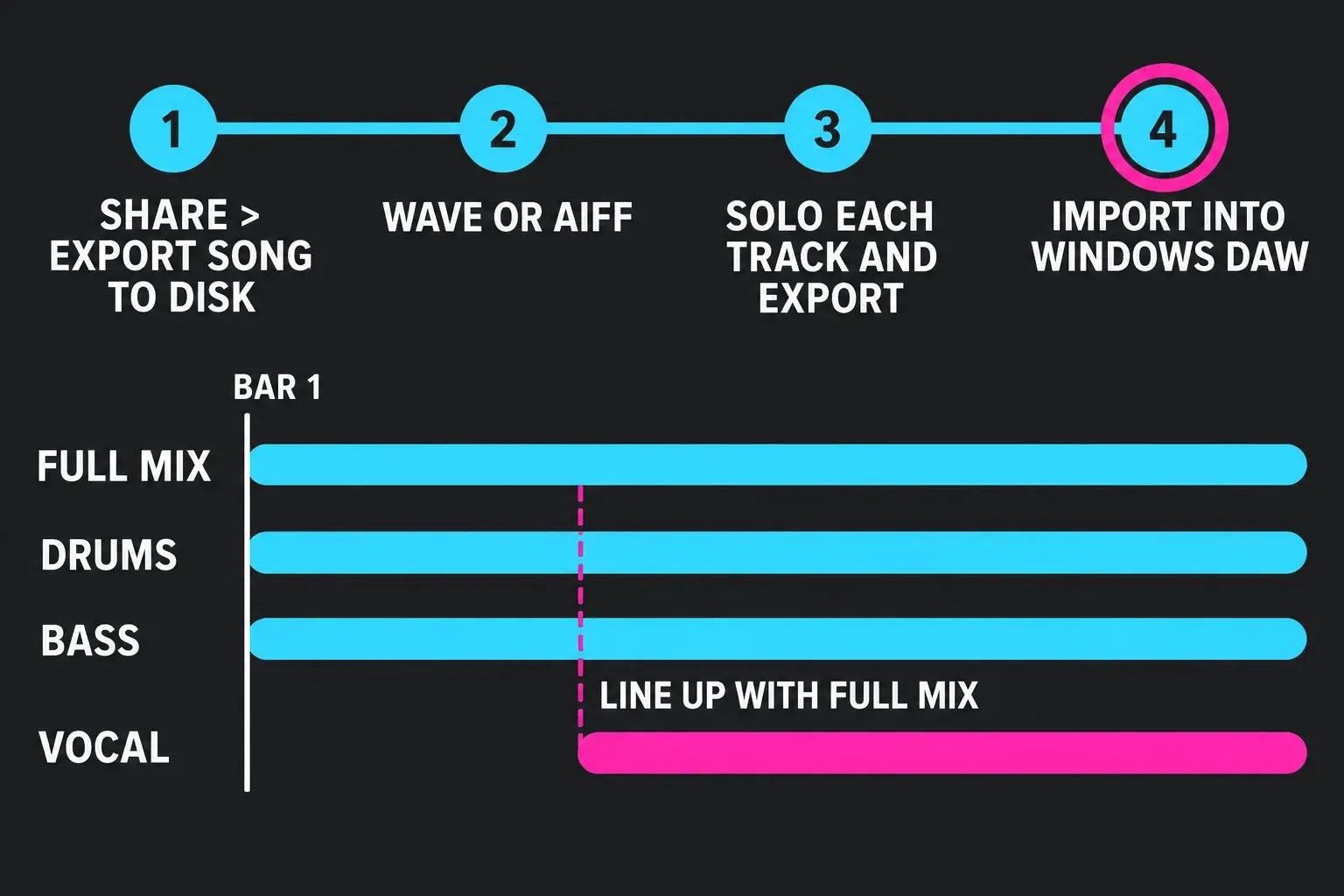
- In GarageBand for Mac, choose Share > Export Song to Disk.
- Pick WAVE or AIFF for the copy you’ll keep working on and AAC or MP3 only for listening copies, then choose the highest setting in the Quality pop-up menu.
- For stems, solo one track at a time and export each with the same settings.
- Import the files into the Windows DAW at bar 1 and check each one against the full mix.
That last check matters because GarageBand trims any silence at the beginning or end of the project on export. When you solo a part that comes in late, its file may start at the first note rather than at bar 1, so line it up against the full mix by waveform before you build on it. Turn on the “Export cycle area” checkbox in the same dialog to export only the cycle area or the selected regions, which helps when you want one section.
This route gives you audio. Software instrument parts arrive as sound, not editable notes, which is fine for a backing loop and a reason to replay key parts on Windows if you want to change them.
When is a Mac the better fix?
If what you want is GarageBand itself, the answer is a Mac. Every Mac with Apple silicon, back to the MacBook Air (M1, 2020), can upgrade to macOS 27, and GarageBand 10.4.14 is free with a macOS 15.6 minimum. A used M1 Mac runs GarageBand today and leaves Logic open as the next step, which no Windows DAW can offer.
Logic Pro opens GarageBand projects from Mac, iPad and iPhone with no import or conversion step, and it costs $199.99 in the US Mac App Store, where version 13.0 needs macOS 26.1 or later. Weigh the jump in Logic Pro vs GarageBand, see what you pay in how much Logic Pro costs, try it with the Logic Pro free trial and pick hardware with the best Mac for Logic Pro.
Questions about GarageBand on Windows
Is GarageBand available for Windows 11?
No. Apple does not make GarageBand for any version of Windows, Windows 11 included. On Windows 11, Cakewalk Next and Sonar are the closest free picks, and both list Windows 11 in their suggested specs.
Is the GarageBand app in the Microsoft Store real?
The listing is real, and it’s a $9.99 video course from macProVideo.com that teaches GarageBand. It doesn’t install the app. Apple’s own Windows apps in the Store are Apple Music, Apple TV, Apple Devices, iTunes and iCloud.
Can I run GarageBand in a virtual machine on a PC?
Not within Apple’s terms. The macOS license does not allow macOS on a non-Apple-branded computer, and its virtual machine permission applies only on an Apple-branded computer that already runs macOS.
What is the closest free alternative to GarageBand on Windows?
For most GarageBand users it’s Cakewalk Next, which plays instruments from the computer keyboard and has a 16-pad controller. Pick Sonar for fuller recording and mixing, or Waveform Free if the PC still runs Windows 10.
Can I open a GarageBand project on a PC?
No. Export the song from GarageBand as WAVE or AIFF, plus one file per soloed track if you want stems, and import those into your Windows DAW. If you move to a Mac later, Logic Pro opens the original GarageBand project directly.


