Logic Pro System Requirements for Mac and iPad
Check current requirements for Creator Studio and standalone Mac editions, iPad compatibility, storage, practical RAM guidance and Intel uncertainty.

Apple’s current published requirement for Logic Pro on Mac is macOS 15.6 or later and Apple silicon. Logic Pro for iPad requires iPadOS 26 or later and A12 Bionic or newer. Plan memory and storage separately: Apple’s current Mac listings do not give a RAM minimum, and 6 GB covers only the minimum installation. Intel owners should read the edition-specific check below before paying for the app or removing a working copy.
Checked September 13, 2026. The U.S. App Store lists Logic Pro 12.3.1 for Mac and 3.3 for iPad. Requirements below distinguish current product guidance, each App Store listing, and practical buying advice.
Meeting the minimum does not tell you how a large session will run. Sample libraries, third-party plug-ins, recording buffer settings and other open apps change the memory and processing capacity you need. Check compatibility first, then test the workload you actually use.
Current Logic Pro system requirements at a glance
| Platform or edition | Current published minimum | Important limit |
|---|---|---|
| Logic Pro 12.3.1 via Creator Studio | macOS 15.6 or later; M1 or later | This edition is not offered for Intel |
| Standalone Logic Pro 12.3.1 | macOS 15.6 or later; web listing gives no chip minimum | Check the listing on the exact Intel Mac and Apple Account; the omission is not a guarantee |
| Mac storage | 6 GB available for the minimum installation | Apple says 44 GB or more in the App Store and approximately 72 GB in support |
| Mac memory | Apple publishes no current RAM minimum | Choose memory for the projects and sample libraries you use |
| Logic Pro 3.3 for iPad | iPadOS 26 or later; A12 Bionic or newer | Some features require newer hardware |
Apple’s Logic Pro product page and Creator Studio compatibility section specify Apple silicon. The Creator Studio App Store listing says M1 or later. The standalone Mac App Store listing gives macOS 15.6 or later but leaves out a chip minimum. That omission is not confirmation of Intel support. Apple’s shared 12.3 release notes include an Intel-specific Chord ID fix, but a fixed code path does not establish whether your Mac and account can obtain the current app.
For a new purchase, plan around Apple’s published Apple-silicon requirement. If you already use an Intel Mac, check the standalone listing on that exact Mac and Apple Account before changing anything. Storage needs a separate check: the App Store says 44 GB or more for the full Sound Library, while Apple’s additional-content support page says approximately 72 GB and still uses older Sound Library Manager instructions. Neither number is a precise inventory of the Logic Pro 12 packs you will install. Use the pack sizes shown in Logic and allow space for projects and downloads too.
Check your Mac before buying or updating
Open Apple menu > About This Mac. Apple’s chip identification guide explains the labels: an Apple-silicon Mac shows Chip followed by its chip name; an Intel Mac shows Processor followed by an Intel processor name. Read the exact chip name rather than relying on the purchase year or the MacBook name. Then compare the App Store requirements for the edition you intend to use.
Then check the operating system. Apple’s System Information guide gives two routes: About This Mac for the quick answer, or System Settings > General > About for more detail. Both current Mac listings require macOS 15.6 or later. Creator Studio also requires M1 or later.
- If you plan to use Creator Studio, confirm the Mac says Chip and names M1 or later. If the Mac says Processor, inspect the standalone listing on that Mac instead of assuming compatibility from a web page.
- Confirm macOS is 15.6 or later.
- Open System Settings > General > Storage and check actual free space.
- Check every essential audio interface driver and third-party Audio Unit against the macOS version you plan to use.
- Back up Logic projects and the working app before a major macOS or Logic update.
The last two checks are easy to miss. A Mac can clear Logic’s own requirements while an older interface driver or plug-in doesn’t support the same macOS release.
How much RAM does Logic Pro need?
Apple’s current Mac product and App Store pages do not publish a RAM minimum. Do not treat a third-party “8 GB minimum” or “16 GB minimum” table as an Apple specification. Memory demand depends on the sounds you load and the other software running beside Logic. A vocal edit built mostly from recorded audio is a different workload from an orchestral template with several large samplers.
| Workload | Sensible memory target when buying | Why |
|---|---|---|
| Learning, podcasts, modest audio recording, stock instruments | 16 GB unified memory | Leaves room for macOS and ordinary supporting apps without presenting 16 GB as Apple’s minimum |
| Regular song production, several software instruments, larger plug-in chains | 24 GB or 32 GB | More room for live instruments, browsers and plug-ins before swapping or freezing tracks |
| Large sample templates, scoring, many memory-heavy libraries | 32 GB or more, based on the actual template | Sampler preload and other applications can dominate memory use |
Treat these as buying recommendations rather than hard compatibility lines. A project can run on less once tracks are frozen or bounced. One demanding sampler can also make a supposedly “safe” specification uncomfortable. Apple notes that non-Apple sample instruments can materially affect RAM use in its Sampler memory guide.
If you already own the Mac, test the projects that matter. Open your heaviest session, play its busiest section and try the recording buffer you need. In Activity Monitor, click Memory and watch Memory Pressure, not just the amount marked free. Close unneeded apps before deciding that the machine needs replacing. A CPU or disk bottleneck needs a different fix; use the system overload diagnostic to separate those symptoms.
Logic Pro storage: 6 GB is not a complete studio
The current Mac App Store specifies 6 GB of available space for the minimum installation and 44 GB or more for the full Sound Library. The separate Apple support page gives approximately 72 GB for additional content, alongside older installation instructions. For Logic Pro 12, check the sizes in Manage Packs for the content you want; do not treat either published total as an exact target. Recordings, third-party sample libraries, exports and backups need their own space.
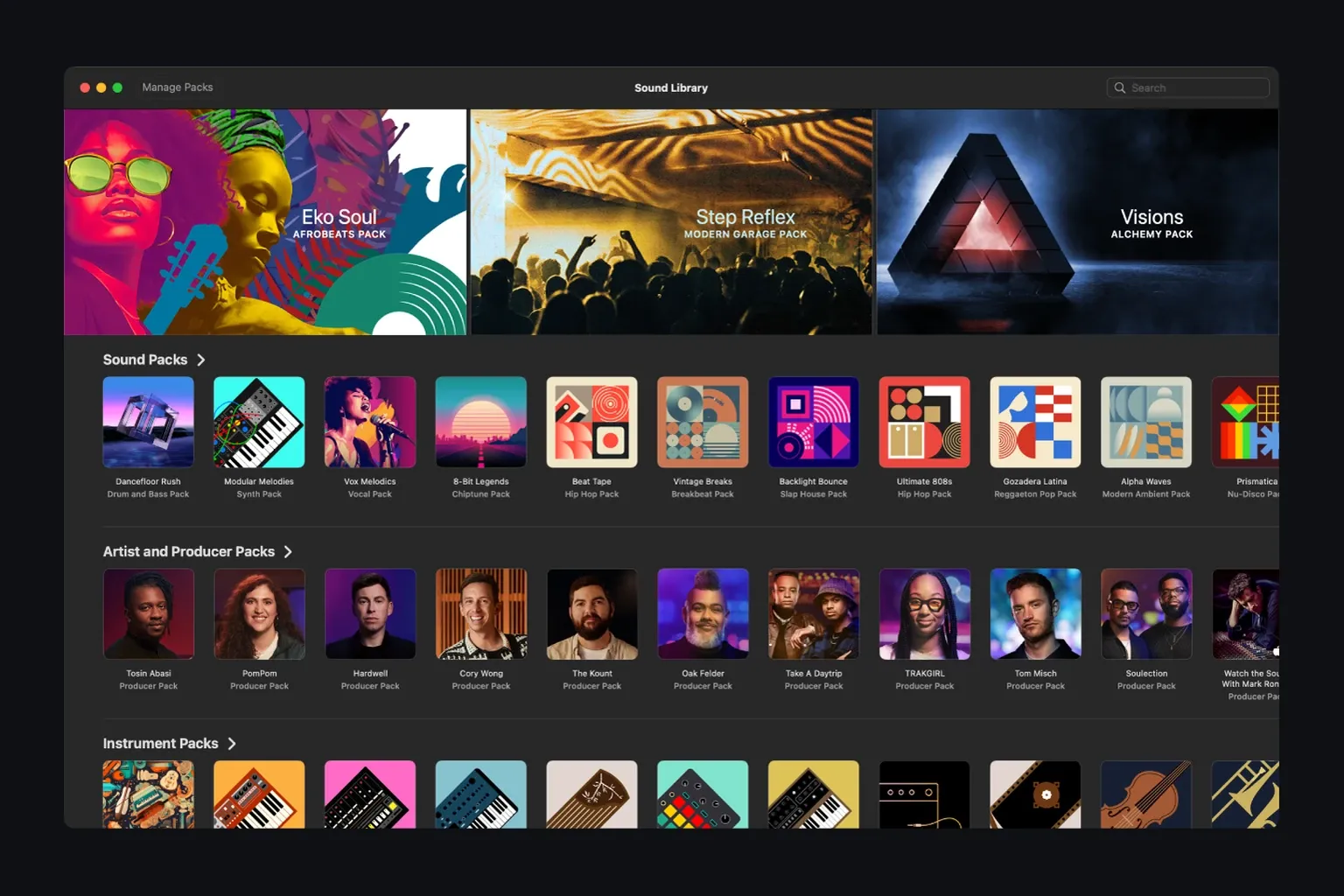
Open Logic Pro > Sound Library and install the packs a project needs. Apple’s Sound Library guide documents search, individual downloads and Manage Packs, which shows pack sizes. If you use only part of the collection, you do not have to download everything. The Logic Pro Sound Library guide covers incomplete downloads, external storage and missing content.
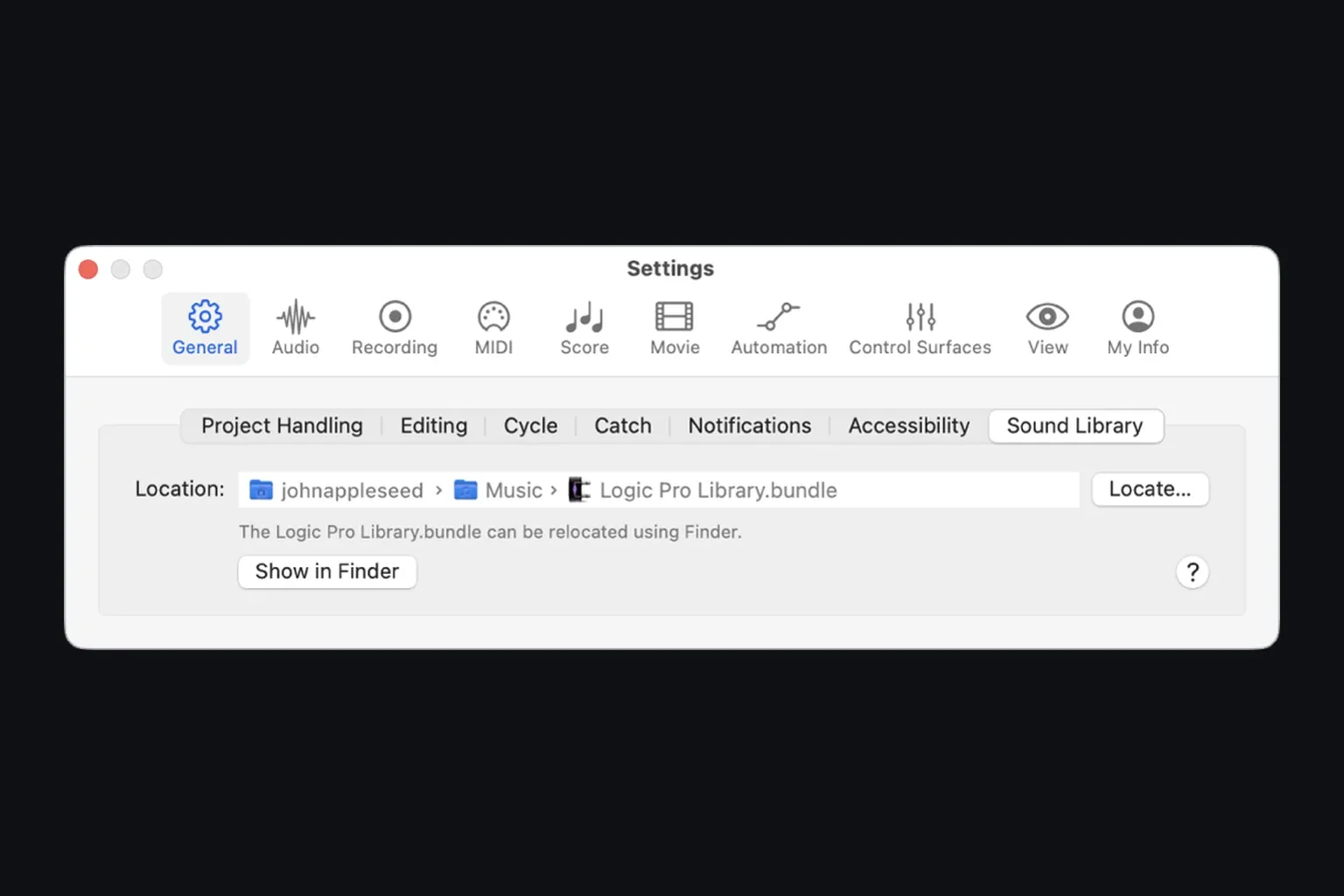
In Logic Pro 12, the default library is ~/Music/Logic Pro Library.bundle. Apple’s move guide distinguishes this bundle from the older Relocate Sound Library workflow used in Logic 11.2.2 or earlier. For a cautious move, quit Logic, copy the bundle to the intended drive and keep the original until the copy works. Reopen Logic, choose Logic Pro > Settings > General > Sound Library, and use Locate to select the copied bundle, as described in the Sound Library settings guide. Check that the location field names the intended file and that your sounds load. A library drive is not a backup of your recordings or projects.
Which iPads meet the current requirement?
Logic Pro for iPad 3.3 requires iPadOS 26 or later and A12 Bionic or newer. That is the app minimum, not a promise that every feature works on every qualifying iPad. For Stem Splitter, the U.S. App Store description names A17 Pro or later, while Apple’s Stem Splitter User Guide names M1 or later. Check the feature on the exact model before buying specifically for it; do not infer Stem Splitter support from the A12 app minimum.
The oldest common qualifying families are:
- iPad (8th generation) or later
- iPad mini (5th generation) or later
- iPad Air (3rd generation) or later
- 11-inch iPad Pro (1st generation) or later
- 12.9-inch iPad Pro (3rd generation) or later
A purchase year is not enough. The 2019 iPad (7th generation) uses A10 Fusion and misses the A12 requirement. Open Settings > General > About to read the model name and iPadOS version. Apple’s iPad information guide shows those fields, and its model list identifies the generations. Check Settings > General > iPad Storage for available space as well.
A12 is the compatibility floor. It isn’t a performance guarantee. Storage capacity, project content, Audio Unit extensions and feature-specific chip limits still matter. Once compatibility checks out, continue to the Logic Pro for iPad guide for touch workflow and subscription details.
Can an Intel Mac run Logic Pro?
For a new installation, Apple’s product page specifies Apple silicon, and the Creator Studio listing requires M1 or later. The standalone 12.3.1 web listing omits a chip minimum. Apple’s 12.3 notes also include an Intel-specific fix. Those details explain why you may find different answers online, but neither an omitted field nor a release-note entry guarantees an Intel download. Check the standalone listing while signed in on the Mac you actually plan to use.
Do not uninstall a working older copy assuming that the App Store will return the same build later. Apple’s instructions for reinstalling purchased Pro Apps explain how to find the app under your account, but do not promise a particular historical build for every Intel and macOS combination. Open the App Store, click your name and check the app on that exact Mac. Keep a recoverable backup of the working app and projects.
Rosetta translates Intel software for Apple-silicon Macs; it does not let an Intel Mac run Apple-silicon-only software. It cannot bypass Creator Studio’s chip requirement. For an existing Apple-silicon setup with older plug-ins, check for native or Universal versions: Apple says general Rosetta support will remain through macOS 27, with only limited older-game functionality from macOS 28. Do not build a long-term studio plan around an Intel-only plug-in with no update path.
Which Mac specification should you buy?
For a new Logic Pro Mac, choose Apple silicon and size the rest around your projects. The useful question is what you record, load and monitor—not whether “Pro” appears in the computer’s name.
- Recorded audio, editing and ordinary song projects: budget for enough memory and storage before paying for extra GPU capacity you may not use. If you also edit video or run other demanding apps, include their requirements in the choice.
- Large software-instrument projects: budget for more unified memory and fast sample storage. Ask the library vendor how much space and memory its actual template needs.
- Mobile recording: include the interface, hub, ports, external storage and power arrangement in the decision.
- Long sessions under sustained load: consider cooling and acoustic placement as well as headline chip performance.
The Mac buying guide for Logic Pro compares current form factors for those jobs. Choose a configuration that can handle your sessions with room for growth; a faster chip alone will not solve insufficient storage or an incompatible interface driver.
If the App Store says Logic Pro is not compatible
- Open About This Mac. Confirm macOS 15.6 or later; Creator Studio also needs M1 or later.
- Open the App Store while signed in to the Apple Account used for the purchase or subscription.
- Confirm you are looking at the intended entitlement: standalone Logic Pro or the Apple Creator Studio version. Apple allows both on one Mac and gives them different icons; the Logic Pro cost guide separates the one-time purchase from the subscription.
- Check available internal storage; downloading the app is separate from downloading sound packs.
- If the Mac is Intel, do not use the Creator Studio listing. Check the standalone listing while signed in to the relevant Apple Account. If the compatible build is not offered, preserve the working older setup or move the project to Apple silicon.
The official Logic Pro download for Mac guide opens both Apple listings, explains how to distinguish the editions, and covers redownloading and staged Sound Library installation. Avoid unofficial DMG files and “patched” installers. They don’t solve entitlement, hardware or operating-system compatibility. Use the Logic Pro download hub when compatibility is settled and the next decision is the correct App Store route, trial, price or edition.
Logic Pro system requirements FAQ
What macOS does Logic Pro 12.3.1 require?
Both current Mac App Store listings require macOS 15.6 or later. Apple’s product page specifies Apple silicon, and the Creator Studio listing says M1 or later. The standalone web listing omits a chip minimum; that omission is not proof of Intel compatibility. Check the listing on your exact Mac before changing a working installation.
Does Logic Pro require 8 GB or 16 GB of RAM?
Apple publishes no current RAM minimum for Logic Pro on Mac. For a new purchase, 16 GB is a sensible starting point for learning, recorded audio and modest stock-instrument projects; 24 GB or 32 GB gives more room for regular software-instrument work. Large sample templates should be sized from the libraries and sessions actually used.
How much storage does Logic Pro need?
The U.S. Mac App Store lists 6 GB for the minimum installation and 44 GB or more for the full Sound Library. Apple’s additional-content support page gives approximately 72 GB with older installation instructions. Check the sizes of your chosen packs in Logic Pro 12, then allow extra space for downloads, recordings, projects, third-party content and backups.
Can Logic Pro 12 run on an Intel Mac?
Creator Studio requires M1 or later. Apple’s current product page specifies Apple silicon, while the standalone 12.3.1 web listing omits a chip minimum and the 12.3 notes mention an Intel fix. Neither of those details guarantees purchase or redownload on Intel. Check the standalone listing on the exact Mac and preserve a working older version.
Which iPad is the oldest that runs current Logic Pro?
The answer depends on the family. The current app minimum is iPadOS 26 plus A12 Bionic or newer: examples include iPad 8th generation, iPad mini 5, iPad Air 3, 11-inch iPad Pro 1st generation and 12.9-inch iPad Pro 3rd generation. Feature requirements can be higher. Apple currently uses two different Stem Splitter formulations: A17 Pro or later in the App Store and M1 or later in the User Guide. Verify that feature on the exact model.
Does Logic Pro run on Windows?
No. Apple distributes Logic Pro for Mac and iPad, not Windows. The Logic Pro on Windows guide explains legitimate alternatives and why virtual-machine workarounds are a poor production setup.
Does Logic Pro need the internet all the time?
An Apple Account is required for Creator Studio, and subscribing, downloading apps or sound packs, and online features require a connection. Apple says some features may require internet access; it does not describe every edit or playback session as permanently online-only. This is not a guarantee of a particular offline subscription-validation period, which Apple does not specify in the cited compatibility guidance.
Are an audio interface and external SSD required?
No. An external interface and SSD are not base requirements. Built-in speakers can handle playback; recording without an interface depends on whether your Mac has a built-in microphone or you use another suitable input, such as a USB microphone. The library can stay on internal storage. Choose an interface for the microphones, instruments or monitoring connections you need, and external storage when your content needs more room.


