Logic Pro Student Discount: Education Options Explained
The current Logic Pro education routes, who qualifies, what happens after graduation, and why the old Pro Apps Bundle needs channel-specific verification.

In the United States, eligible college students and educators can get Logic Pro through Apple Creator Studio at $2.99 per month or $29.99 per year after verification. A one-time Logic Pro purchase for Mac remains $199.99, but Apple does not list a separate student price for that individual app.
The Pro Apps Bundle for Education uses a different purchase route. Apple’s current instructions say it can be added preinstalled when you buy a Mac from the Apple Store for Education or obtained through the Apple Store for Education Institution. It is not presented as a universal standalone checkout for every student. Confirm the route and price available to your buyer type before comparing it with the subscription.
Last verified September 17, 2026 against the current Apple documentation cited in this guide. Prices below are U.S. prices before applicable tax. Education eligibility, verification partners, currency, and store availability vary by country.
Current Logic Pro education options
| Route | Current U.S. price | What you get | Main limitation |
|---|---|---|---|
| Apple Creator Studio Education | $2.99/month or $29.99/year | Logic Pro plus Apple’s wider creative-app collection | Subscription; verified higher-education eligibility; no Family Sharing |
| Logic Pro for Mac, one-time purchase | $199.99 | Standalone Mac app tied to the purchasing Apple Account | No separately listed individual student discount; Mac only |
| Pro Apps Bundle for Education | Shown by purchase channel | One-time versions of Logic Pro, Final Cut Pro, Motion, Compressor, and MainStage | Available with an eligible education Mac purchase or through an institution route; verify the current checkout |
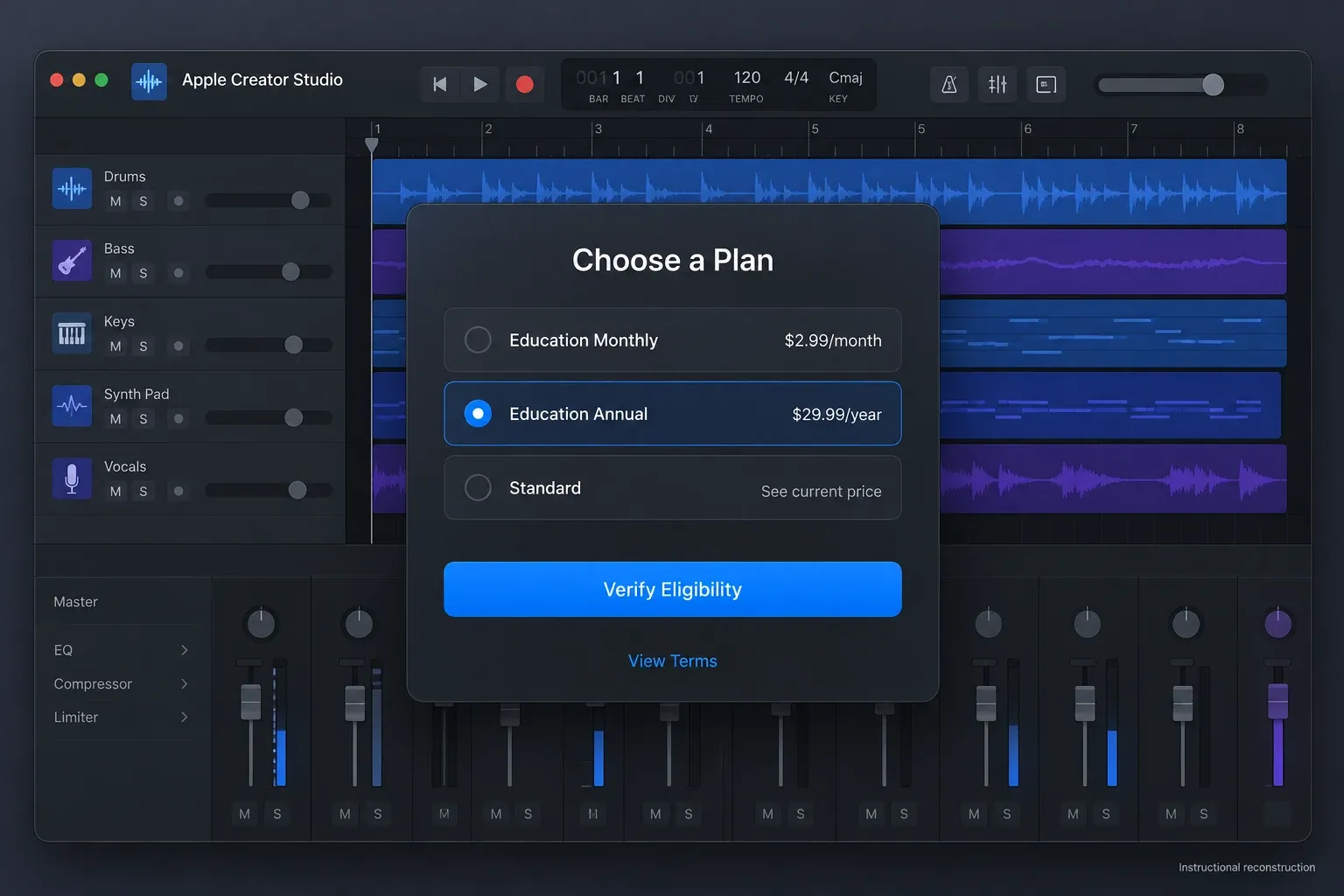
Apple’s current Creator Studio student page states the $2.99 monthly and $29.99 annual prices after a one-month trial. Qualified new or returning subscribers who recently activated an eligible new Mac or iPad can receive a three-month trial, subject to Apple’s device-offer terms. The education offer automatically renews, requires verification, is limited to eligible college students and educators, and may end. Record the terms shown at checkout instead of treating today’s price or trial as permanent. Cancel at least one day before renewal if you do not want to pay. The three-month device offer must be claimed within three months of activation and is limited to one per Apple Account or family. Prior acceptance of that offer, an active subscription or a subscription ended within the previous 30 days can make you ineligible.
Who qualifies for Apple Creator Studio student pricing?
Apple’s eligibility instructions define the education subscription narrowly. You must be either:
- a student attending a college or university and studying for an associate, bachelor’s, postgraduate, or equivalent higher-education qualification; or
- an educator employed by an accredited higher-education institution.
Have your institution ID number, accessible academic email and an Apple Account with a valid payment method ready. Verification is required once a year for students and educators. The education subscription cannot be shared with a Family Sharing group.
High-school students, parents buying for a school-age child, and K–12 educators should not assume they qualify for this subscription. Apple’s broader education purchasing programs may cover other buyers, but that’s a different route with different store access and terms.
How to get the education plan
Use a personal Apple Account for the subscription. Your school email helps prove eligibility, but a school-managed Apple Account is not supported for Creator Studio, as Apple explains in its subscription requirements.
Download a Creator Studio app from the App Store and open it. Choose Continue, then See All Plans → Education Monthly or Education Annual → Verify Eligibility. Select Student or Educator, complete verification, then confirm the trial and billing terms. Apple’s enrollment instructions also link the plan-change route for existing subscribers.
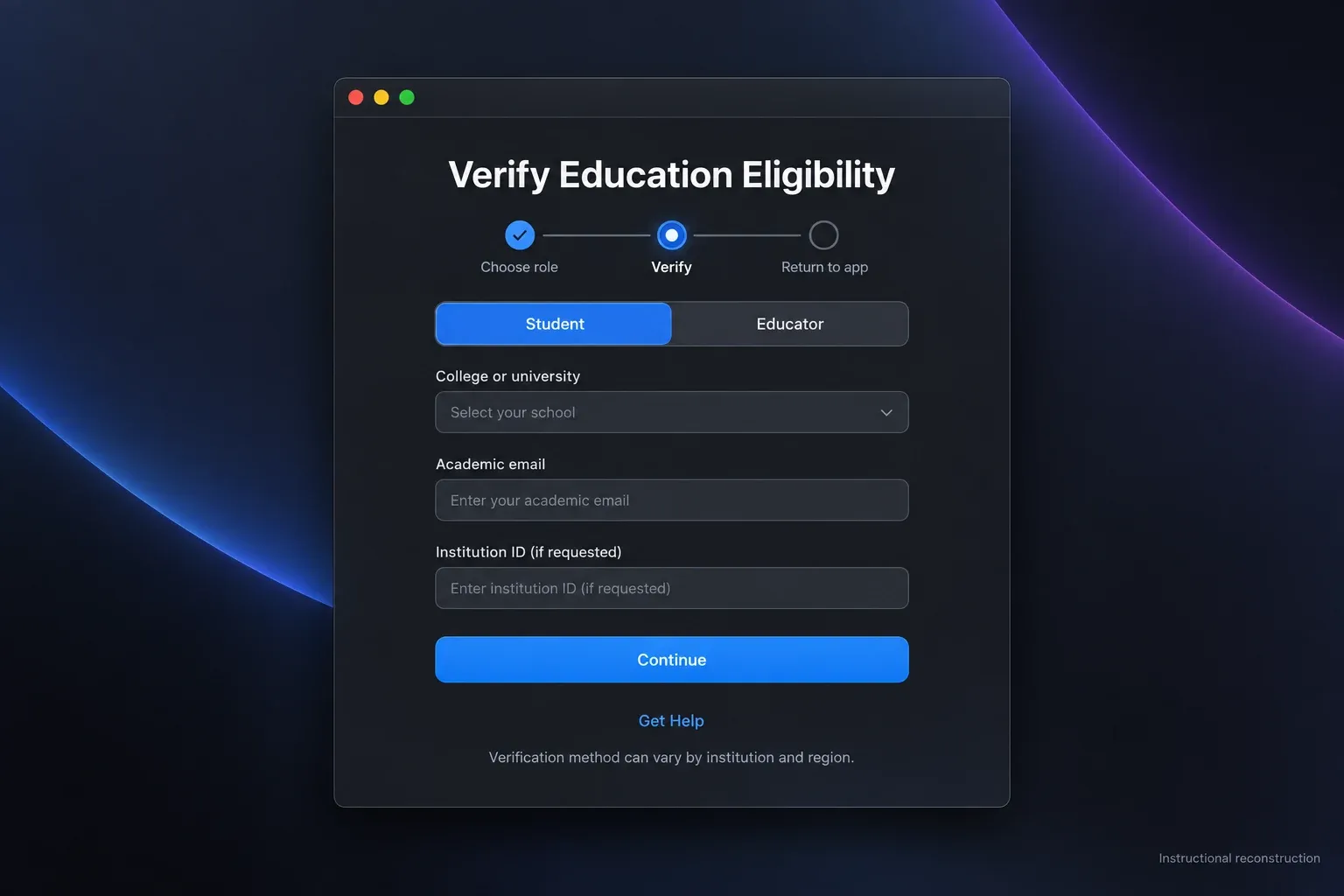
If verification is pending, follow the requested school sign-in, email-code or document check. For a SheerID review, use Get Help on the pending-review screen. Do not assume verification rules for another student-discount service apply to this one.
What the $2.99 education subscription includes
Apple Creator Studio includes Logic Pro and MainStage, plus Final Cut Pro, Motion, Compressor, Pixelmator Pro, and subscriber features or content across selected Apple productivity apps. Logic Pro access covers the supported Mac and iPad versions under the subscription. Device requirements and the current plan terms still apply.
The student version isn’t a cut-down Logic Pro edition. Apple says eligible students and educators receive the same Creator Studio apps, premium content, and included features as other subscribers. Some features still require newer hardware, an internet connection, or an Apple Intelligence-capable device.
Check our current Logic Pro system requirements before subscribing. A low monthly price doesn’t help if the Mac or iPad can’t run the current build or the particular feature you need.
Is there a one-time Logic Pro student purchase?
Apple continues to sell Logic Pro for Mac as a one-time purchase for $199.99 in the U.S. Apple’s June 2026 Creator Studio update announcement confirms both the standalone Logic Pro price and continued Mac availability.
That individual price is not presented as a student discount. It’s the standard one-time Mac price. The purchase lets you continue using the acquired Mac app without maintaining a Creator Studio subscription, subject to Apple’s App Store licensing, compatibility, and availability rules.
Do not translate “one-time purchase” into a promise of updates forever. Apple has historically delivered major Logic Pro updates to existing Mac owners without a new charge, but its current sales language does not guarantee every future update, feature, or compatible OS version. Check compatibility before updating the Mac or relying on an older installation.
How to buy the Pro Apps Bundle for Education now
The bundle contains one-time versions of Final Cut Pro, Logic Pro, Motion, Compressor, and MainStage. Apple does not currently present it as a normal standalone checkout beside the Creator Studio student plan.
Apple’s current bundle redemption guide, published April 14, 2026, names two routes. You can add the bundle preinstalled when buying a Mac from the Apple Store for Education, or buy it through the Apple Store for Education Institution. Apple’s Creator Studio support page describes the institution route for other students and educators. Neither page promises that every individual buyer or region sees the same standalone option.
If you want the bundle, use this verification order:
- If you are buying a Mac, check its education configuration for the preinstalled Pro Apps Bundle.
- If you are purchasing through a school or college, use the Apple Store for Education Institution or ask the institution’s procurement contact.
- Confirm the price, buyer eligibility, region and refund terms before paying.
- For a code-based order, wait for Apple’s two emails, normally within one to three business days. One contains a password; the other has the PDF with five codes. In the Mac App Store, click your name → Redeem Gift Card and enter each code manually using the account that should own the apps.
- For apps preinstalled on a new Mac, open the App Store, click your name and choose Accept for the unadopted apps. Sign in if prompted, then check Updates. Preinstalled purchases do not come with redemption codes.
Redeem all five codes so each app is associated with your Apple Account. Use Redeem Another Code for the next one. For a preinstalled purchase, follow Apple’s app-adoption instructions instead. Adoption or redemption gives access to distributed updates and installation on your other Macs under the purchase terms; it does not promise permanent compatibility. If a code order has not arrived after three business days, contact the Apple Online Store with your order number.
Subscription or one-time purchase?
Choose the education subscription when
- you are currently eligible and can complete verification;
- you need Logic Pro on both a supported Mac and iPad;
- you also use Final Cut Pro, Pixelmator Pro, MainStage, or other included apps;
- the low annual cost matters more than keeping app access after cancellation; or
- you need the current subscriber content or features.
Choose the one-time Mac purchase when
- you only need Logic Pro on Mac;
- you want the app to keep launching without an active Creator Studio subscription;
- you do not qualify for education pricing;
- you expect to use the same Mac purchase for many years; or
- you prefer a larger upfront cost to recurring billing.
At the current U.S. education annual price, several years of Creator Studio still cost less than the standalone Mac app. That comparison changes if the education offer ends, you stop qualifying, Apple changes prices, or you need standalone access after graduation. Our Creator Studio versus one-time Logic Pro comparison works through the crossover and ownership trade-offs.
What happens when you graduate?
The discounted subscription depends on continuing eligibility and annual reverification. Apple’s current instructions are specific: if you no longer qualify, the student subscription automatically renews as a standard Apple Creator Studio subscription. The same standard-plan renewal can happen if you’re still eligible but miss the reverification window. Check the next renewal price and cancel at least one day before renewal if you don’t want the standard plan.
To reverify on iPad or iPhone, open Settings → your name → Subscriptions → Apple Creator Studio → Verify Student Status. On Mac, use System Settings → your name → Media & Purchases → Manage beside Subscriptions, then select Creator Studio and Verify Student Status. Follow Apple’s student reverification steps if the prompt is missing or your status has changed.
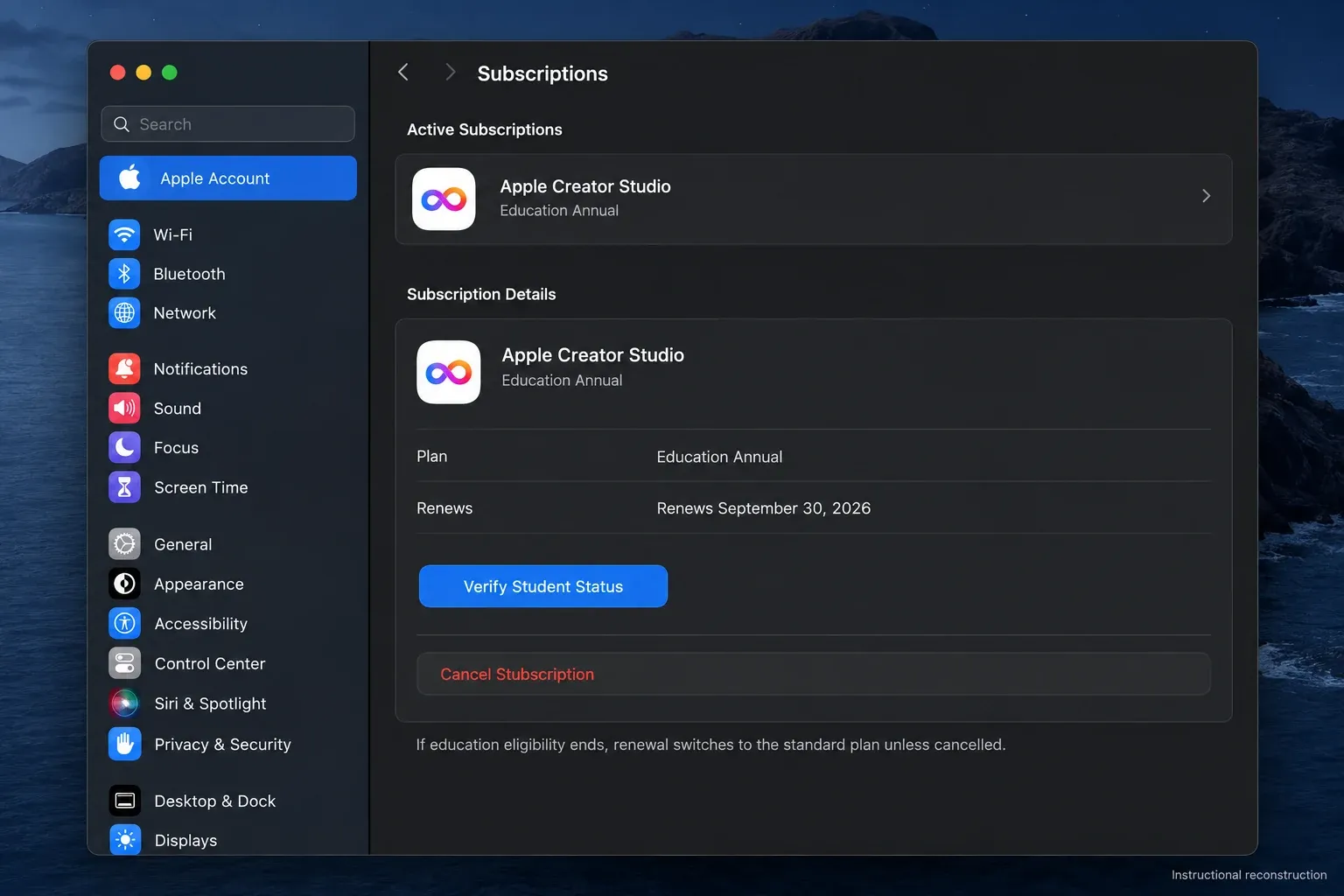
Apple’s subscription support page says files and projects created with the included apps remain after the billing period ends. You can work on them again after resubscribing, or in a separately purchased Logic Pro app on Mac. The Mac purchase does not restore iPad subscription access. That doesn’t make a closed Logic project independently playable. Keep project files, recorded audio, samples, custom patches, impulse responses, and final stems in an independent backup. Our Logic Pro backup guide covers project assets and recoverable copies.
iPad access needs separate attention
Creator Studio is Apple’s primary documented route for new Logic Pro for iPad access. Apple’s standalone subscription recovery instructions cover an existing iPad plan that stopped renewing after its owner joined Creator Studio: cancel Creator Studio, wait for it to expire, then open Settings → your name → Subscriptions and renew the expired standalone plan. That documented recovery case does not establish a new standalone signup for every new customer.
Do not buy the one-time Mac app expecting it to unlock the iPad version. The standalone $199.99 purchase is for Mac. If iPad production is essential, verify the exact plan shown inside the current App Store on your own Apple Account and region before choosing.
How to avoid fake student deals
- Subscribe or buy only through Apple, the App Store, or an identified education institution.
- Do not buy a shared Apple Account, redemption code from an unknown seller, or “preactivated” copy.
- Check whether the price is monthly, annual, one-time, or only a free-trial renewal rate.
- Verify that the app will be associated with your own Apple Account.
- Screenshot or save the terms shown at checkout, especially renewal and eligibility language.
For the standard installation routes, see Download Logic Pro. For a broader ownership comparison, use our Logic Pro comparisons hub.
Frequently asked questions
How much is Logic Pro for college students?
Eligible U.S. college students can currently get Logic Pro through Apple Creator Studio for $2.99 per month or $29.99 per year after the trial. Regional prices vary.
Is Logic Pro free for students?
No. New eligible education subscribers receive a one-month Creator Studio trial. A qualified new or returning subscriber who recently activated an eligible new Mac or iPad can receive three months under Apple’s device-offer terms. The plan renews at the selected education price unless cancelled at least one day before renewal.
Can high-school students get the Creator Studio education price?
Apple’s published subscription eligibility is for verified college or university students and higher-education educators. Other education buyers should check institution purchasing options.
Does the Logic Pro student plan support Family Sharing?
No. Apple states that Family Sharing is not available with the college student and educator Creator Studio plan.
Are all future Logic Pro updates guaranteed?
No. Apple sells Logic Pro for Mac as a one-time purchase, but it does not promise every future update or feature. Past free updates are not a contractual guarantee.
What happens to my projects if I cancel Creator Studio?
Apple says you retain access to the projects and files you created. The subscription apps stop providing their paid functionality after the billing period, so archive project assets and export stems before cancelling if you need an immediately usable fallback.


