Best iPad for Logic Pro: Air, Pro and Budget Choices
Start with the Air M4, then decide whether screen size, storage, memory or ports justify a different configuration. A practical buying guide with the feature limits checked.

The best iPad for Logic Pro for most buyers is an 11-inch iPad Air with M4 and 256GB of storage. That’s my starting recommendation because it combines an M-series chip, 12GB of memory and a practical amount of storage without making you pay for the Pro’s display and Thunderbolt port. Choose the 13-inch Air if you mainly work at a desk and want physically larger controls.
The iPad Pro M5 earns the extra money when you need its particular hardware advantages. A used M1 Air can be the better budget purchase. The iPad A16 and iPad mini need a closer look: being able to run Logic doesn’t mean that every advanced feature is available.
If you are still deciding whether the touch-first app suits your music, start with our Logic Pro for iPad review. This guide is about choosing the hardware, screen size and configuration.
Which iPad should you buy for Logic Pro?
iPad Air M4: the default choice
Apple’s current iPad Air specifications list the M4 chip and 12GB of unified memory in both the 11-inch and 13-inch models. Storage options are 128GB, 256GB, 512GB and 1TB. The USB-C port supports USB 3 at up to 10Gb/s.
For an iPad-native setup, I’d put the Air ahead of the Pro unless you can name a Pro feature you need. You get an M-series model covered by Apple’s feature guidance, a choice of screen sizes and a useful USB connection for compatible recording equipment. None of that promises that a particular song will run a particular number of plug-ins.
My preferred configuration is 11-inch, Wi-Fi, 256GB. Choose 512GB if you expect to keep a substantial collection of recordings, samples and project copies on the device. If your main frustration is fitting your hands and eyes around the workspace, choose 13-inch before a more expensive chip. Cellular is worth paying for only if you need mobile data away from Wi-Fi. It doesn’t improve Logic’s audio processing.
iPad Pro M5: pay for a specific advantage
The iPad Pro M5 specifications give you an OLED display with ProMotion, a Thunderbolt / USB 4 port and a different memory configuration depending on storage. The 256GB and 512GB models have 12GB of memory and a 9-core CPU. The 1TB and 2TB models have 16GB and a 10-core CPU.
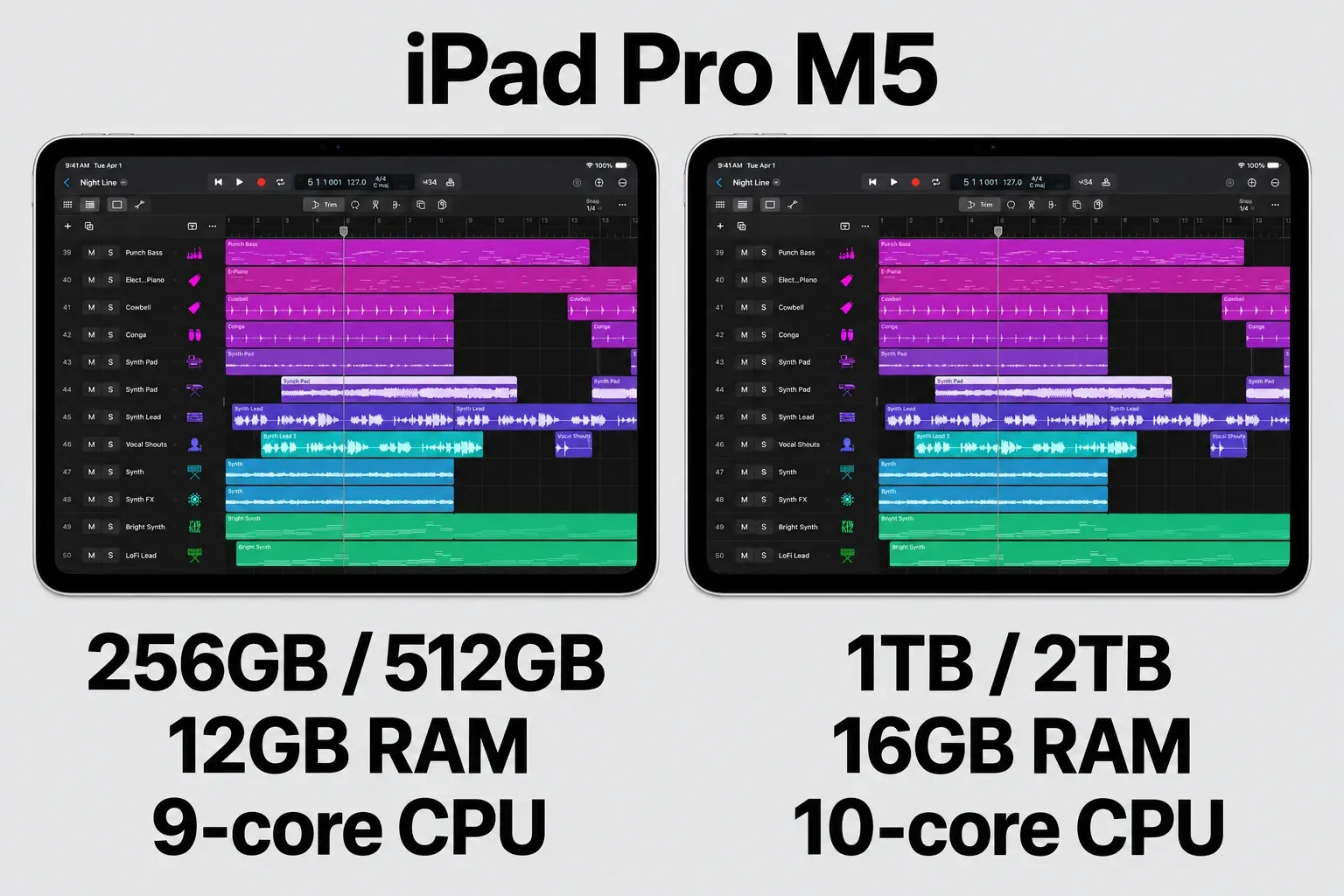
That distinction matters if you’re buying the Pro specifically for more memory. A 512GB Pro doesn’t give you more RAM than the current Air. The M5 chip and other hardware still differ, but don’t buy a storage upgrade on the assumption that every step increases memory.
I’d consider the Pro for an existing Thunderbolt accessory requirement, the higher-memory tier, or a display that you also value for other creative work. Check the accessory manufacturer’s iPadOS support even when the connector matches. Thunderbolt describes what the port can do. It doesn’t guarantee that a desktop interface and its control software will work on iPad.
For a like-for-like budget, these are Apple Store US prices in USD for new Wi-Fi models with 256GB storage. Pro prices use standard glass. Tax is additional where applicable. Trade-in, education and financing offers are excluded.
| Configuration | Observed US price |
|---|---|
| iPad Air M4, 11-inch, Wi-Fi, 256GB | $849 |
| iPad Air M4, 13-inch, Wi-Fi, 256GB | $1,049 |
| iPad Pro M5, 11-inch, Wi-Fi, 256GB, standard glass | $1,199 |
| iPad Pro M5, 13-inch, Wi-Fi, 256GB, standard glass | $1,499 |
At those configurations, the larger Air costs $200 more than the 11-inch Air. The 11-inch Pro costs $350 more than the 11-inch Air. Those differences pay for the stated hardware choices. None of them buys a guaranteed Logic track count, so weigh them against the recording and backup equipment your setup still needs.
Used M1 iPad Air: the budget candidate to compare
Look for the iPad Air, fifth generation, with 256GB. Apple’s fifth-generation Air specifications identify the M1 chip, 8GB RAM, a 10.9-inch display and a USB 3 port. This generation came in 64GB and 256GB configurations, so a listing that says only “M1 Air” leaves out a meaningful part of the purchase.
The appeal is an M-series iPad at a used price. That doesn’t mean old hardware performs like the current Air. Compare the actual offer with discounted M2 or M3 Air listings and a new M4 configuration. Condition, remaining battery life, return rights and included accessories can erase a small saving. I’d choose 256GB over 64GB for a device bought primarily to hold music projects and libraries.
iPad A16: suitable only if you accept the feature limits
The iPad A16 has an 11-inch display, 128GB, 256GB or 512GB storage, and a USB-C port limited to USB 2 speeds of up to 480Mb/s. A USB-C connector does not mean it has the Air’s USB 3 connection.
It meets the app’s published chip minimum, but neither Apple’s A17 Pro Stem Splitter wording nor its M1 guide covers A16. Apple’s Session Players hardware note also specifies M1 or later. Buy the A16 for a deliberately simpler workflow that does not depend on those features. If you want the fuller feature path on a tight budget, compare a used M-series Air before choosing it.
iPad mini A17 Pro: buy it for portability
The iPad mini A17 Pro has an 8.3-inch display and USB 3 at up to 10Gb/s. Its size is the reason to choose it: an easily carried writing companion can be more useful than a larger device left at home.
I wouldn’t make it the default main Logic workspace. Its screen is smaller, and Apple’s feature requirements need care: A17 Pro matches the App Store’s Stem Splitter note, while the separate M1 guidance doesn’t name the mini. Check the exact feature you depend on before buying. Do not treat A17 Pro as an interchangeable label for M1.
How the chips compare in published Geekbench 6 results
Geekbench 6 is the CPU test that shows up in most iPad reviews, so it’s the most consistent way to line these models up. The table pools the scores reviewers published and gives the median, the range and the number of results behind each row. Read it as processor headroom for instruments and effects, not as a track count.
| iPad | Single-core, median (range) | Multi-core, median (range) | Published results |
|---|---|---|---|
| iPad Pro M5, 1TB or 2TB (10-core CPU) | 4,136 (4,117–4,155) | 16,443 (16,369–16,517) | 2: Tom’s Guide, GeekCulture |
| iPad Pro M5, 256GB or 512GB (9-core CPU) | 4,175 | 15,659 | 1: SlatePad |
| iPad Air M4 | 3,735 (3,700–3,747) | 13,301 (12,978–13,987) | 5: AppleInsider, Notebookcheck 11-inch, Notebookcheck 13-inch, Creative Bloq, GeekCulture |
| M1 (iPad Air and iPad Pro results) | 2,326 (2,256–2,396) | 8,427 (8,086–8,767) | 2: iClarified Air average, SlatePad Pro |
| iPad A16 | 2,574 (2,535–2,598) | 6,239 (5,939–6,338) | 4: Engadget, Creative Bloq, Notebookcheck, AppleInsider |
The 256GB Pro in the price table above uses the 9-core M5. Its one published result runs about 18% ahead of the Air’s median on multi-core and about 12% on single-core. That’s a real margin, but I wouldn’t pay the $350 difference for it alone; buy the Pro for its display, port or higher-memory configuration. The A16 scores less than half of the Air on multi-core, so dense software-instrument projects reach its ceiling first. A used M1 trails the A16 slightly on single-core, yet it stays about 35% ahead on multi-core and lands just under two-thirds of the Air’s multi-core median. That’s why I’d price a used M1 before settling on a new A16.
Check the operating system and the features separately
The US App Store listing for Logic Pro 3.4 and Apple’s Creator Studio system requirements both specify iPadOS 26 or later and an A12 Bionic chip or later for Logic. Apple’s full-collection functionality statement gives iPadOS 26 or later, while the Creator Studio requirements page puts full functionality at iPadOS 27. Check individual apps and advanced features separately. The collection statement doesn’t promise that every compatible iPad has every feature.
The third-generation Air, fifth-generation mini, eighth-generation iPad, first 11-inch Pro and third-generation 12.9-inch Pro remain in Apple’s Logic-compatible families. For a used purchase, check the exact model, the app offered on it, and the features you need. I’d still choose an M-series iPad for a new long-term Logic setup.
The feature check is separate. Apple’s Stem Splitter guide specifies an M1 or later iPad, whereas the App Store description says A17 Pro or later. Apple’s Creator Studio hardware notes specify M1 or later for Session Players. That’s why I favor an M-series Air or Pro for a purchase built around those tools. Apple hasn’t explained the differing Stem Splitter wording.
There’s no useful universal answer to “how many tracks can this iPad handle?” A track playing one audio file and a track running several demanding instruments and effects are different workloads. RAM capacity, chip specifications and a model name can’t give you a reliable track limit for your session.
11-inch or 13-inch: choose the physical workspace
Both Air sizes use M4 and 12GB of memory. Buying the 13-inch model buys you a larger screen. It doesn’t add an extra RAM tier. Apple lists their body dimensions as 247.6 × 178.5mm and 280.6 × 214.9mm respectively in the Air specifications linked above.
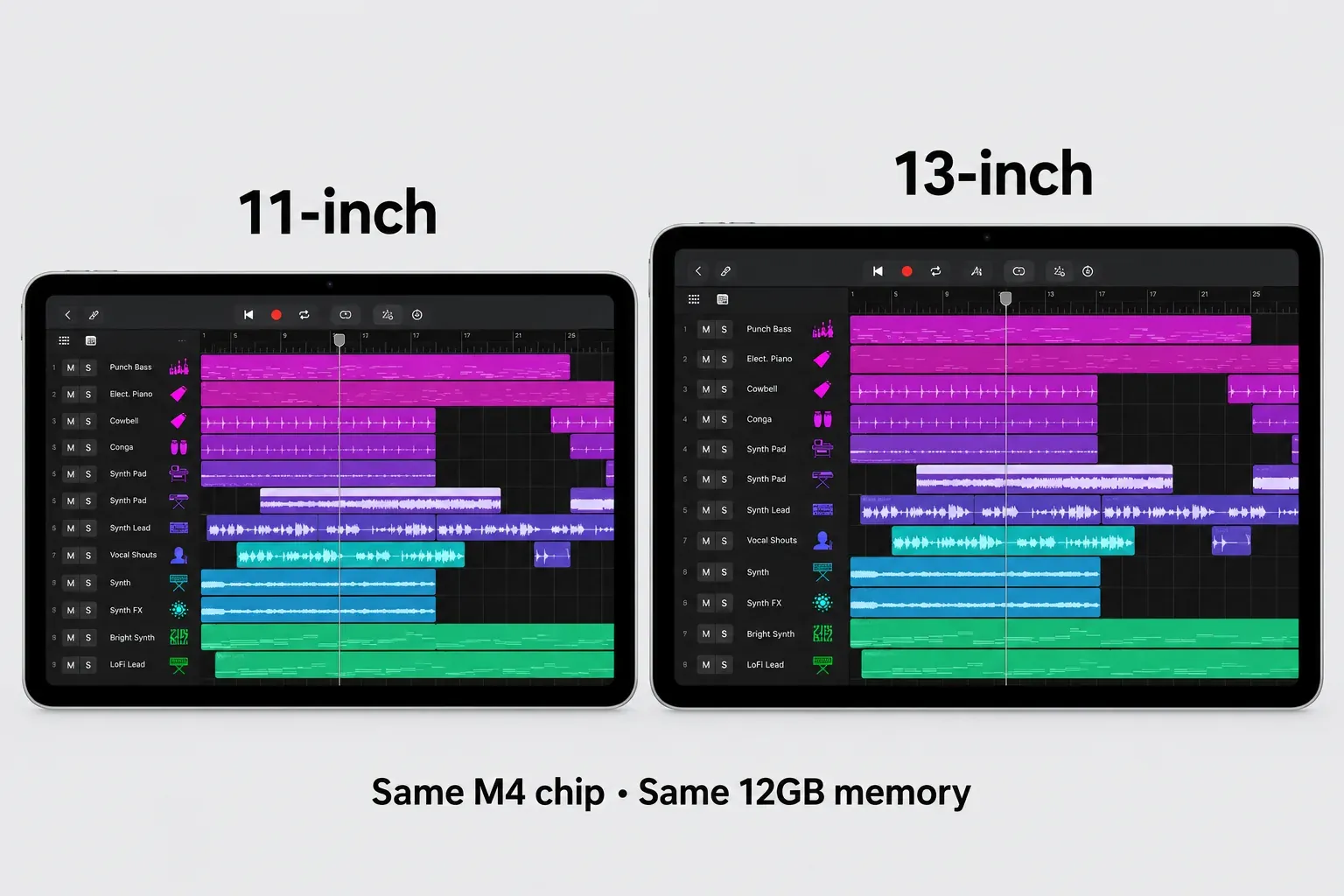
Choose 11-inch for regular travel, carrying alongside a laptop, or a setup where a MIDI controller handles much of the playing. Choose 13-inch for longer sessions at a stand, touch editing and mixing when you want a larger view of the arrangement and controls. Do not assume every app panel will show more tracks just because the screen is bigger. Layout and zoom matter too.
If you are choosing between a smaller Pro and a larger Air, put screen size against your actual working position. A faster chip does not make a small touch target physically larger. The larger device also needs more bag and stand space, so compare those dimensions before ordering.
How much storage should a music iPad have?
256GB is my practical starting point for a dedicated Logic iPad. That’s an editorial recommendation. Apple doesn’t list it as a minimum. The app download is only one part of the space you use: sound packs, third-party instruments, samples, recordings, project copies and exports all have to fit too.
128GB can make sense for a controlled library and projects that you regularly archive. Move to 512GB when you want more of your recordings and sample collection immediately available. A larger capacity reduces the housekeeping you need, but it doesn’t increase processor speed by itself. The M5 Pro memory tiers above are one specific configuration difference. Don’t read them as a general storage rule.
Budget for backup as well as capacity. A full internal drive is not a second copy, and a cloud storage subscription is a separate expense. Apple’s Mac-to-iPad project-transfer guidance allows projects to move through external storage, AirDrop or cloud services. It also explains the package and plug-in restrictions. Do not assume that buying an SSD moves every sound pack or third-party instrument library off the iPad.
Leave money for the recording setup
Price the whole setup before comparing the Air and Pro. Include the device at the storage capacity you want, Logic access, a stand or case, the necessary cables and any audio interface or hub. A keyboard case and Pencil are optional purchases. Neither should quietly eat into the recording budget.
Apple’s external-device guide recommends a powered USB-C hub or an interface with its own power supply for multiple devices or longer recording sessions. Confirm that the interface supports your iPadOS version and Logic, and that the hub’s data ports and charging input support the arrangement you plan to use.
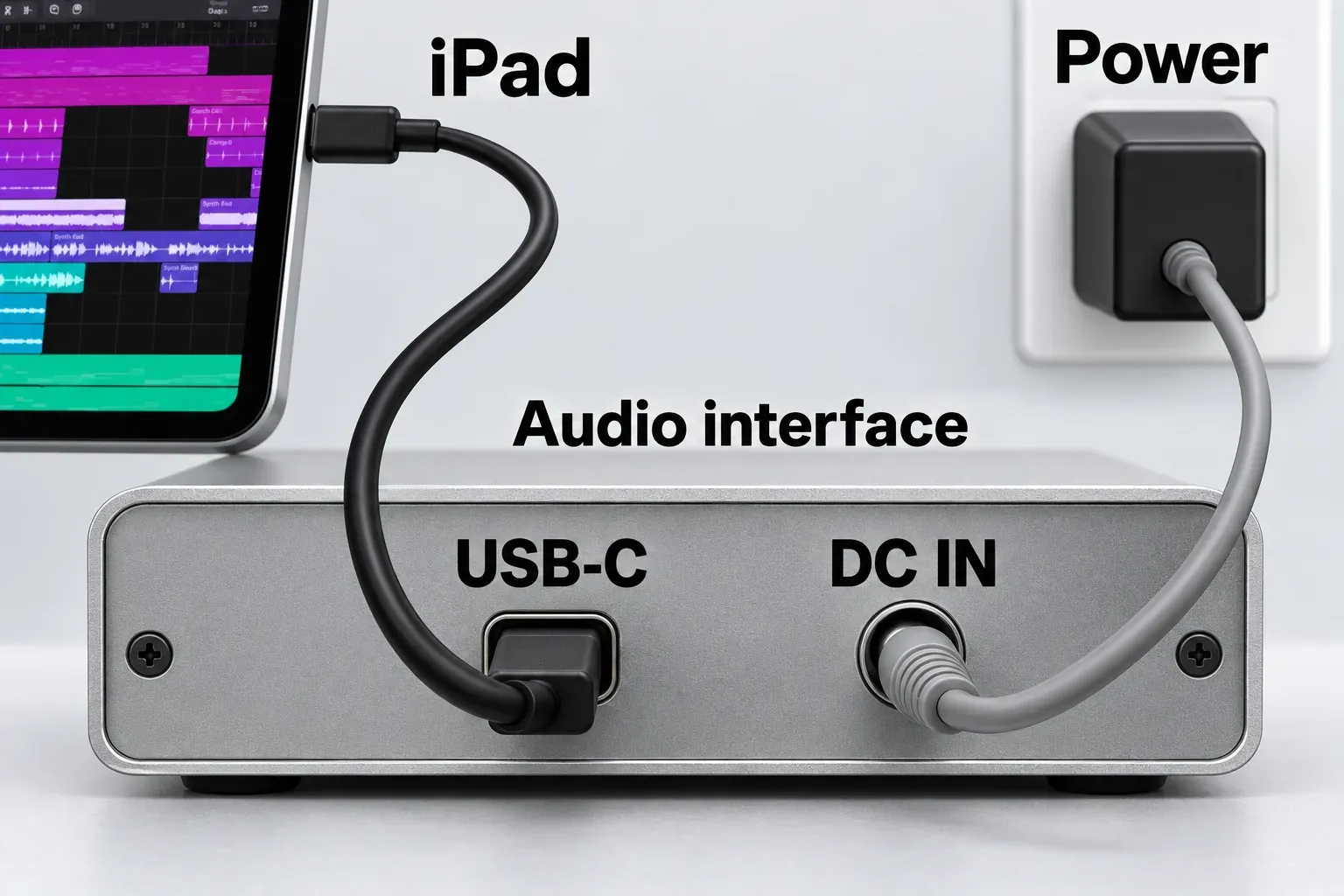
For guitar or microphone recording, spend time on the interface connection and monitoring path before buying premium tablet hardware. Our Logic Pro for iPad guitar-recording guide covers that setup in detail.
Check plug-ins before hardware, too. Apple’s Logic Pro for iPad plug-in guidance supports compatible AUv3 extensions installed separately from the iPad App Store. Owning a Mac Audio Unit does not guarantee an iPad version. If your template depends on unavailable instruments, compare the Mac options for Logic Pro before trying to solve the problem with a more expensive iPad.
For a new subscriber, Apple’s Creator Studio pricing documents US$12.99 per month or US$129 per year, with automatic renewal until canceled. Owning a standalone Mac license doesn’t include the iPad subscription. Check your account’s offered plan rather than budgeting around an old standalone price. The iPad pricing explanation covers that distinction.
What to check on a used or refurbished iPad
Ask for the exact model and storage capacity, not just “Air” or “Pro.” Apple documents Settings > General > About for identifying the model and iPadOS version. Check the current OS compatibility list, then the feature requirements you need. There is no guaranteed number of future Logic releases attached to an M1 label.
Inspect the display, USB-C socket, charging behavior and signs of damage. Ask about battery condition, repair history, the return period and what happens if the device cannot be activated. These purchase checks matter more than a small price difference between otherwise similar used listings.
Follow Apple’s Activation Lock checks for a used iPad: the device must be erased and removed from the previous owner’s account. Begin setup. If it asks for that owner’s Apple Account information, return it to the seller. Don’t accept a promise to fix it later.
Apple Certified Refurbished is a different offer from an ordinary second-hand sale. Apple’s refurbished-program terms include a new battery and outer shell for refurbished iOS devices and a one-year limited warranty. Stock and savings vary, so compare the exact configuration available.
The configuration I would start with
For a new main Logic iPad, start with Air M4, 11-inch, Wi-Fi, 256GB. Move to the 13-inch Air for a larger physical workspace or 512GB for a larger local library. Compare the exact configured price in Apple’s iPad Air store, then add the equipment and subscription you need.
On a tighter budget, compare a used M1 Air 256GB with newer discounted Air models after checking condition and current OS support. Choose Pro M5 when its display, port or higher-memory configuration justifies the extra cost. A16 is a deliberate feature compromise; mini is a deliberate size choice.
If you already own a supported iPad, begin there. Check its feature support and use the available trial with a representative project before paying for different hardware. For the remaining app, license and setup decisions, use the Get Logic Pro buying hub.


