Logic Pro for iPad Review 2026: Price, Features & Limits
A current Logic Pro for iPad review covering Creator Studio pricing, compatible devices, real Mac project limits and who should subscribe.

Quick verdict: Logic Pro for iPad is a complete music-production app, not a remote control for the Mac version. It records audio, hosts compatible Audio Unit extensions, sequences MIDI, mixes a song and exports the result. Beat making, songwriting and mobile editing are where it's strongest. It's a weaker fit when a project depends on Mac-only plug-ins, surround formats, complex external hardware or a desktop file workflow.
The buying decision is messier than the app itself. Apple clearly documents Apple Creator Studio at $12.99/month or $129/year in the US. Apple also documents a specific reactivation path for a prior standalone Logic Pro for iPad subscriber whose plan stopped renewing after starting Creator Studio. Apple does not give an equally explicit public answer about brand-new standalone eligibility. The current app requires iPadOS 26 and an A12 Bionic chip or later. Advanced features need newer hardware.
Checked September 20, 2026, against version 3.3 in Apple’s US App Store record and the Apple documentation linked below. This is a documentation-based buying review, not a measured iPad performance test.
Logic Pro for iPad at a glance
| Question | Answer |
|---|---|
| Is it a full DAW? | Yes. It records, edits, sequences, mixes, masters and exports on iPad. |
| Current version checked | Version 3.3 |
| Minimum requirement | iPadOS 26 and A12 Bionic or later |
| Clearly documented subscription route | Apple Creator Studio: $12.99/month or $129/year in the US after a one-month trial |
| Education price | $2.99/month or $29.99/year in the US for eligible college students and higher-education educators |
| Third-party plug-ins | Compatible AUv3 extensions from the App Store; Mac AU installers do not transfer automatically |
| Mac project transfer | Yes, with compatibility limits and package-format requirements |
| Best fit | Beat making, songwriting, recording a small setup, mobile editing and finishing an iPad-native project |
How much Logic Pro for iPad costs now
Apple’s documented signup route is Apple Creator Studio. The standard US plan includes a one-month trial for new subscribers, then costs $12.99 per month or $129 per year. The education offer is $2.99 per month or $29.99 per year for verified students enrolled at a college or university and educators employed at a degree-granting college or university. That plan is individual, excludes Family Sharing and is described as a limited-time offer. Regional pricing and eligibility vary.
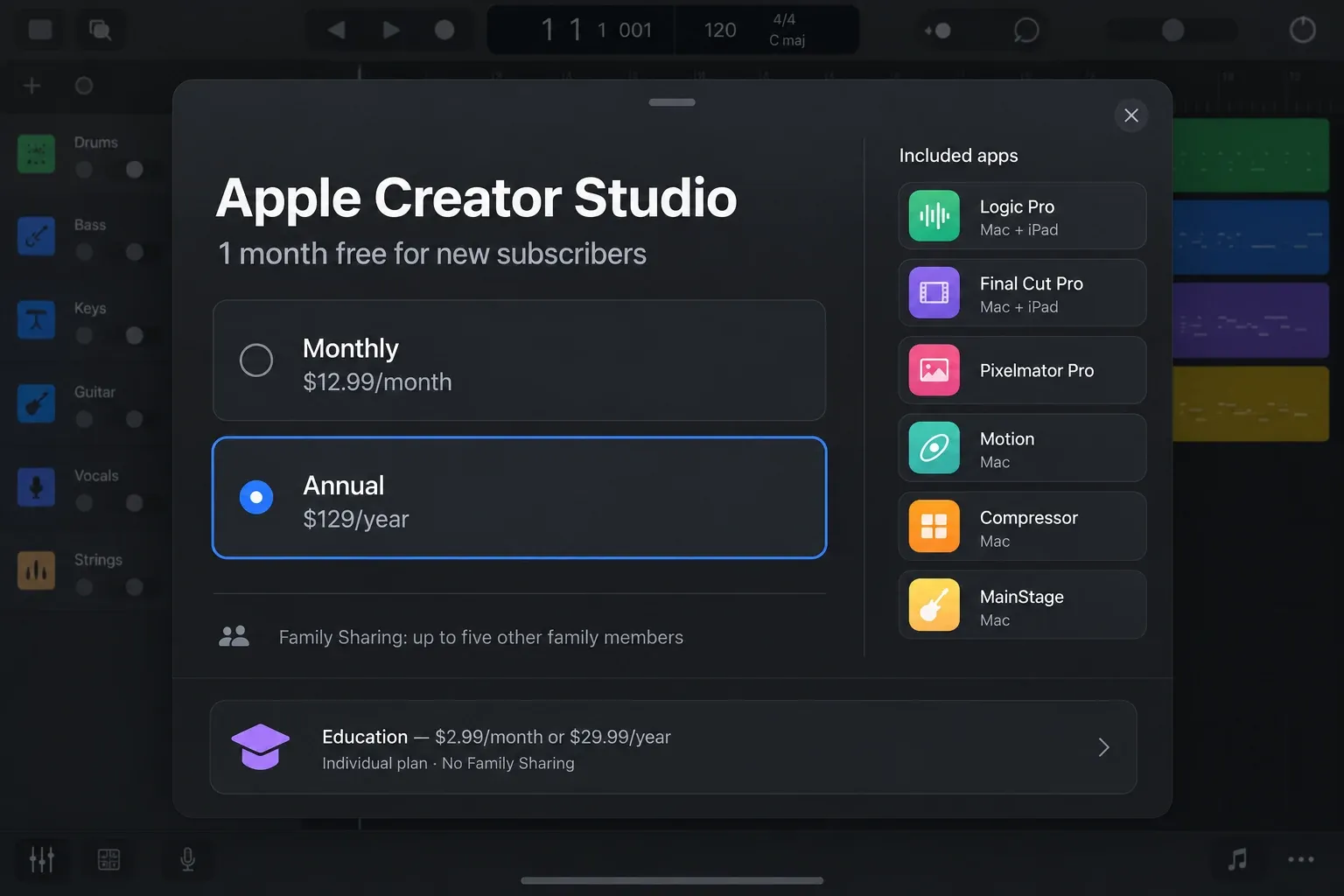
The bundle includes Logic Pro on Mac and iPad, plus other creative apps. Not every app runs on iPad: Motion, Compressor and MainStage are Mac-only. The standard plan can be shared with five other family members. It makes more financial sense if you need several included apps or Logic on both platforms. If you cancel, Apple says projects remain available to copy and share, but editing requires an active subscription. Export listening copies and stems before the subscription ends if you need usable audio outside Logic.
What happened to the old standalone iPad subscription?
The US App Store still displays older Logic Pro for iPad in-app-purchase rows at $4.99 and $49. Apple's standalone-subscription support page confirms a narrower fact: a subscriber whose standalone plan stopped renewing after starting Creator Studio can cancel Creator Studio, wait for it to expire and renew the expired standalone subscription in Settings.
Apple’s Creator Studio FAQ says the suite cannot be subscribed to one app at a time. That is different from renewing an older standalone plan. The reactivation instructions do not establish whether an Apple Account with no prior standalone subscription can start that old plan. Do not budget around $4.99 just because it appears in the App Store: check the plans offered to your account. Creator Studio is the fresh-signup route Apple documents.
Which iPads can run Logic Pro?
Apple's current minimum is iPadOS 26 on an iPad with an A12 Bionic chip or later. Its compatible-device page translates that into these families:
- iPad Pro 11-inch, first generation or later;
- iPad Pro 12.9-inch, third generation or later;
- iPad Air, third generation or later;
- iPad, eighth generation or later;
- iPad mini, fifth generation or later.
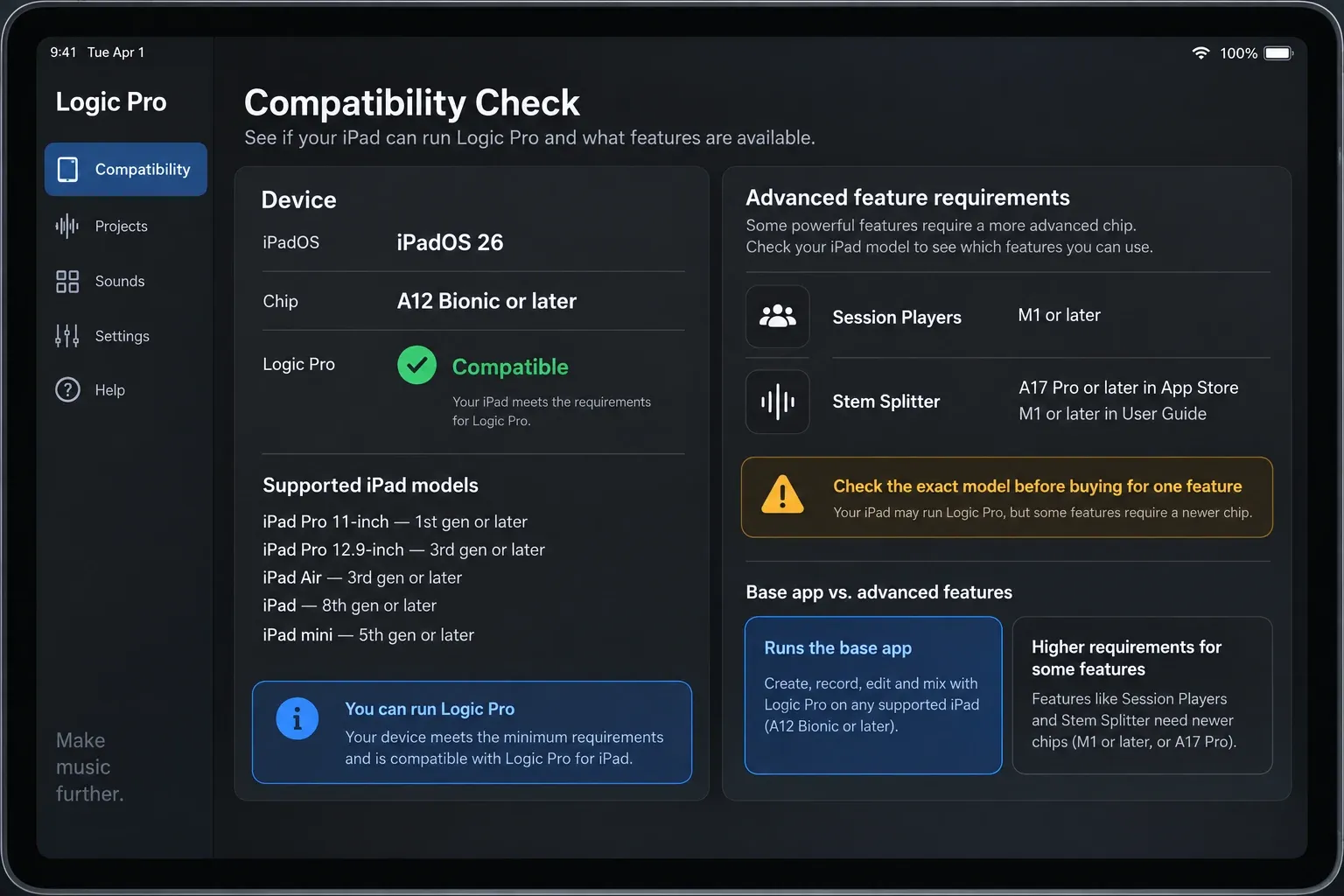
Minimum compatibility does not mean every feature is available. For Stem Splitter, the App Store listing says A17 Pro or later, while the iPad user guide says M1 or later. Those descriptions are not identical. Check your exact model before buying for that feature; an A12 iPad meeting the app minimum is not enough. Apple’s Creator Studio hardware notes also specify M1 or later for Session Players on iPad. Allow storage for recordings and sound packs as well as the app.
Which iPad should you buy for Logic Pro?
Already own a compatible iPad? Use the trial with a project you would actually work on. If buying mainly for Logic’s advanced features, an M-series iPad is the safer choice against Apple’s published Stem Splitter and Session Players requirements. An A17 Pro model is listed for Stem Splitter in the App Store, but that is not a promise that it supports every advanced feature. Choose storage around your recordings and libraries, not just the download size.
An iPad Pro isn't automatically required. A current iPad Air can be the more sensible music computer when you don't need the Pro display or ports. The right choice depends on project size, storage and accessories, not the word “Pro” on the case.
What the iPad app does well
Touch-first beat making and arranging
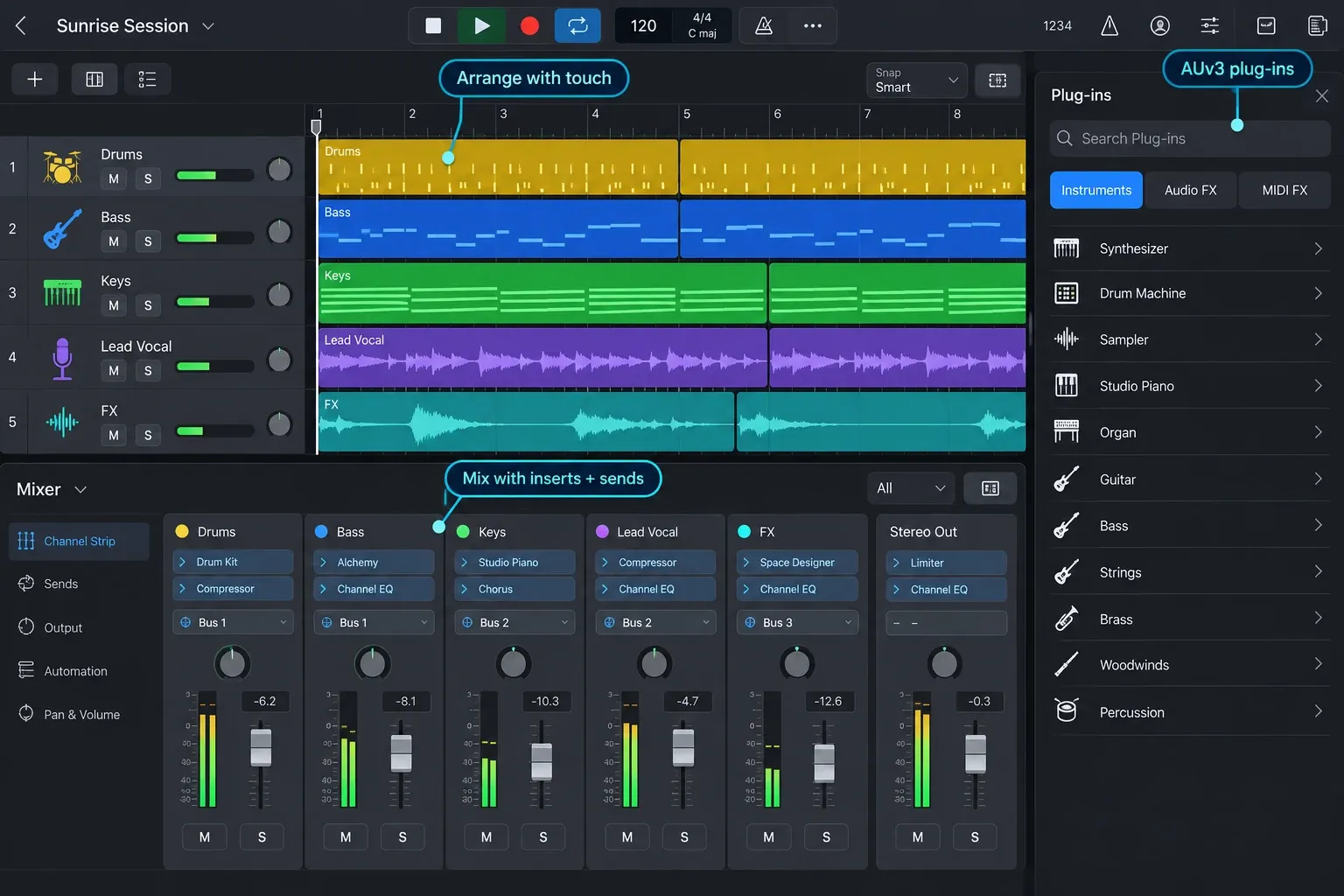
The interface was designed for Multi-Touch instead of being shrunk down from the Mac application. Pinch and swipe navigation, playable surfaces, Step Sequencer, Drum Machine Designer, Live Loops, Beat Breaker, Quick Sampler and Sample Alchemy all make sense under the fingers. Apple Pencil makes detailed automation and note editing more precise.
Apple’s version 3.3 feature notes document per-slice filter, resonance and pan editing in Beat Breaker, granular sync in Sample Alchemy, revised Flex controls and a Repeat command for MIDI notes. For recording, Quick Swipe Comping lets you combine chosen sections of several takes; Chord ID analyzes chords in audio or MIDI. These are useful reasons to move beyond GarageBand if take editing or building an arrangement is slowing you down.
Recording and external hardware
Logic records microphones and instruments through a compatible audio interface. Apple's external-hardware guidance covers compatible interfaces, microphones, USB MIDI and Bluetooth MIDI. The App Store listing narrows interface and MIDI support to class-compliant devices. Don't confuse the two: a controller plays instruments and maps controls, an interface gives you audio inputs and outputs.
Check the interface manufacturer's iPadOS compatibility page before buying an adapter. “USB” alone doesn't prove that an interface is class compliant, receives enough power or exposes every routing function on iPad. For a bus-powered setup, put the hub, power delivery and monitoring path in the test too.
Mixing and finishing on iPad
The mixer provides inserts, sends, automation and built-in effects. Mastering Assistant offers a starting point for final processing; you still need to listen and adjust the result. The iPad app exports stereo audio as AIFF, WAVE or M4A, as well as individual tracks and MIDI through their respective export options. It does not offer direct MP3 export. The Logic Pro MP3 export guide covers the Mac route and converting a lossless iPad export.
The stock tools are enough to finish an iPad-native song. The real question is whether your workflow depends on a specific Mac plug-in or hardware route, not whether the iPad version contains a mixer.
Third-party plug-ins
Look for an iPad-compatible Audio Units V3 extension (AUv3) on the App Store. A Mac AU installer cannot install that version for you. Some developers offer a universal purchase; others sell the iPad app separately. Check the developer’s listing before paying again. When a project uses an incompatible or uninstalled third-party extension, it can open with that plug-in disabled, so the sound may change.
Where the iPad version is limited
The biggest limitation isn't raw track count. It's compatibility with an existing Mac studio.
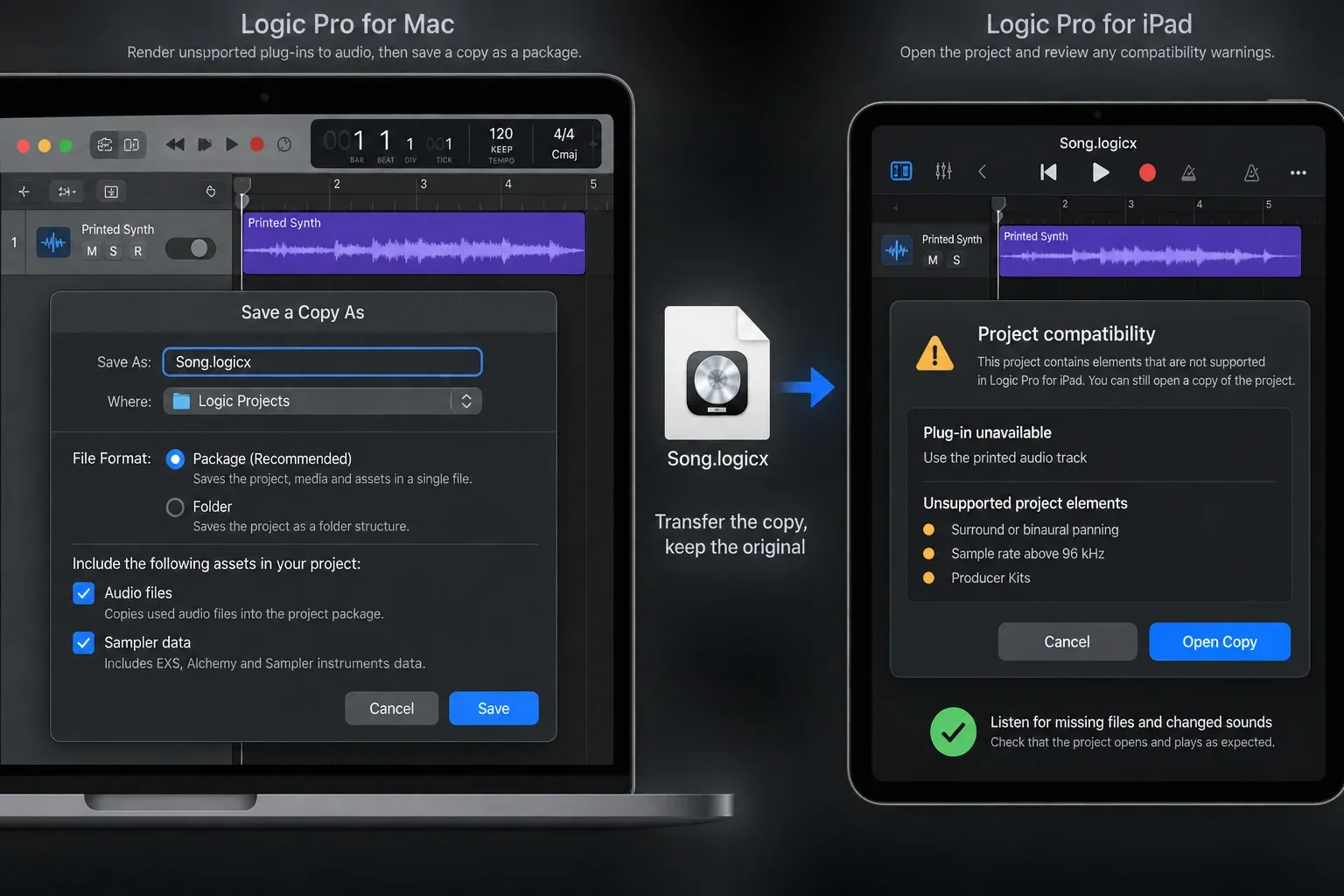
- Mac plug-ins: projects containing some Mac-only built-in instruments and effects can open on iPad, but their parameters cannot be edited. Unsupported third-party plug-ins are different: render the affected sound to audio before transfer instead of expecting the plug-in to run.
- Project formats: the iPad app opens project packages, not Mac projects saved as folders.
- Unsupported project elements: Apple's current list includes surround, binaural panning, sample rates above 96 kHz, Producer Kits, certain arrange folders and several routing or timeline configurations.
- Hardware workflows: class-compliant support does not guarantee that every desktop driver feature or interface mixer is reproduced on iPadOS.
- Direct MP3 export: Apple's current project export guide lists AIFF, WAVE and M4A, not MP3.
- Subscription: Creator Studio is the only fresh-signup route Apple clearly documents. Do not assume the old standalone price is available unless the exact Apple Account offers it.
If most of your projects start on iPad, these limits may rarely affect you. For an existing Mac template, test one copied project with its instruments and effects before moving a session you need to finish on a deadline.
How Mac and iPad project transfer actually works
Transfer a .logicx project package, not a Mac project folder. In File > Save a Copy As on Mac, choose Package and select the assets the copy must include. A package is not proof that every external recording or sample was copied. Keep the original and check the transferred copy for missing files.
- Save a copy as a package and include the required audio and other assets.
- Bounce tracks that depend on unsupported third-party plug-ins to audio, with their processing included.
- Check Apple’s unsupported-project list before transfer.
- Use iCloud Drive, AirDrop or external storage. For a third-party cloud service, compress the package to ZIP before uploading.
- Open the transferred copy and listen for missing files, disabled plug-ins or changed sounds before continuing work.
Apple’s Mac–iPad project-transfer instructions explain those restrictions. For Bounce in Place, leave Bypass Effect Plug-ins off if their processing must be preserved. Transfer has limits in both directions: some iPad-only built-in plug-ins can play back and load presets on Mac, but their parameters cannot be edited there. Keep both the original project and a rendered audio copy when those sounds matter.
Logic Pro for iPad vs GarageBand
| Choose GarageBand if… | Choose Logic Pro if… |
|---|---|
| You want a free first DAW | You need a full mixer, deeper editing and automation |
| You are learning basic recording and arranging | You want Beat Breaker, Sample Alchemy, Session Players or Stem Splitter |
| Your projects are simple and self-contained | You need more control over routing, plug-ins and export |
| You do not want a subscription | You also value the other Creator Studio apps |
Logic Pro for iPad can open GarageBand for iOS projects, so starting free doesn't trap the song in GarageBand. See the full Logic Pro vs GarageBand comparison for the Mac and iPad buying paths.
Who should use Logic Pro for iPad?
It makes sense for:
- a beat maker who prefers touch surfaces to a mouse;
- a songwriter who wants to record and arrange away from a desk;
- a musician building an iPad-native setup with class-compliant hardware;
- a Creator Studio subscriber who wants Logic on both Mac and iPad;
- a GarageBand user who has outgrown the free app's editing and mixing depth.
Stay with the Mac version if:
- your templates rely on Mac-only Audio Units;
- you need surround mixing, Dolby Atmos production or projects above 96 kHz;
- you need desktop-style file management and several screens;
- your interface or outboard workflow depends on a vendor desktop driver or mixer;
- you prefer a one-time Logic Pro purchase and do not need the Creator Studio bundle.
If the Mac route fits better, compare the current Logic Pro prices and license options and use the Logic Pro trial guide before buying.
Logic Pro for iPad FAQ
Can Logic Pro for iPad replace a Mac?
It can replace a Mac for an iPad-native workflow built around compatible Audio Unit extensions and class-compliant hardware. It is less suitable when the project needs Mac-only plug-ins, unsupported project formats, surround work or desktop interface drivers.
How much is Logic Pro for iPad in 2026?
For new subscribers, Apple documents a one-month Creator Studio trial, then US$12.99 per month or US$129 per year. Eligible college students and educators employed at degree-granting colleges or universities can get the limited-time US$2.99 monthly or US$29.99 annual education offer. The education plan is individual and excludes Family Sharing. Prices and eligibility vary by region.
Can a new user buy only Logic Pro for iPad for $4.99 per month?
Do not assume so. Apple documents Creator Studio signup and reactivation for previous standalone subscribers whose plan stopped renewing after starting Creator Studio. Its suite FAQ says you cannot subscribe to the suite one app at a time. The old App Store purchase rows do not establish new standalone eligibility; check the options offered to your Apple Account before relying on $4.99 per month.
What iPad does Logic Pro require?
Logic Pro requires iPadOS 26 and an iPad with an A12 Bionic chip or later. Apple's supported families begin with the 11-inch iPad Pro, third-generation 12.9-inch iPad Pro, third-generation iPad Air, eighth-generation iPad and fifth-generation iPad mini.
Does Stem Splitter work on every supported iPad?
No. The App Store specifies A17 Pro or later for Stem Splitter, while Apple’s iPad guide specifies M1 or later. These are different descriptions, so verify your model rather than assuming every iPad that runs Logic includes the feature. An older A12-based iPad meeting the app minimum is not enough.
Can Logic Pro for iPad use third-party plug-ins?
Yes, through compatible AUv3 extensions installed from the App Store. Mac AU installers do not transfer to iPad. Some developers offer universal purchases, but check the listing. Incompatible or missing third-party plug-ins can be disabled when a project opens.
Can Logic Pro for iPad open Mac projects?
Yes, if saved as a project package and free of unsupported project elements. Include the required assets, bounce unsupported third-party plug-in tracks with their processing, and keep the original. Compress the package to ZIP when using third-party cloud storage. Check the transferred copy for missing files and changed sounds.
Do I need a Mac to use Logic Pro for iPad?
No. The iPad app can create, record, edit, mix and export by itself. A Mac is optional for round-tripping or for work that needs Mac-only tools.
Is it worth subscribing?
Logic Pro for iPad is worth using when touch, portability and an iPad-native session matter more than desktop plug-in compatibility. It can finish a song on its own. The purchase becomes less attractive if you want only one app, already own Logic on Mac or depend on Mac-only Audio Units.
Before subscribing, check three things in order: whether your exact iPad supports the features you want, whether your interface and plug-ins have iPad-compatible versions, and whether Creator Studio's price makes sense for the apps you'll actually use. For the broader setup path, continue to the Logic Pro download and buying hub.


