Logic Pro Review 2026: Price, Features and Verdict
Evidence-led Logic Pro 12.3.1 review: current price, Creator Studio, Mac requirements, key features, limits, alternatives and exactly who should buy it.

Logic Pro is a strong $199.99 choice for recording, songwriting and mixing on a compatible Mac. The current standalone release is 12.3.1. You can buy the Mac App Store version once or subscribe through Apple Creator Studio. For a new setup, choose Apple silicon; existing Intel owners should check their exact Mac and available build before changing a working installation.
Checked September 12, 2026 against Apple and vendor documentation. This is a buying review based on documented features and limitations; we have not run a reproducible performance benchmark. For other DAW choices, use the comparisons hub. Release-specific guides are in Logic Pro Features.
Short verdict: buy the standalone version if Logic is the main Apple pro app you need and you expect to keep using it for several years. Consider Apple Creator Studio if you also need Final Cut Pro, Pixelmator Pro, or the iPad editions. Choose another DAW if Windows support, clip-first live performance, or routine Pro Tools session exchange matters more than Logic’s bundled instruments and Mac integration.
Logic Pro pros and cons
Pros
- The standalone Mac app costs $199.99 as a one-time purchase.
- The included instruments, samplers, effects and mixer let you produce a song without buying third-party plug-ins.
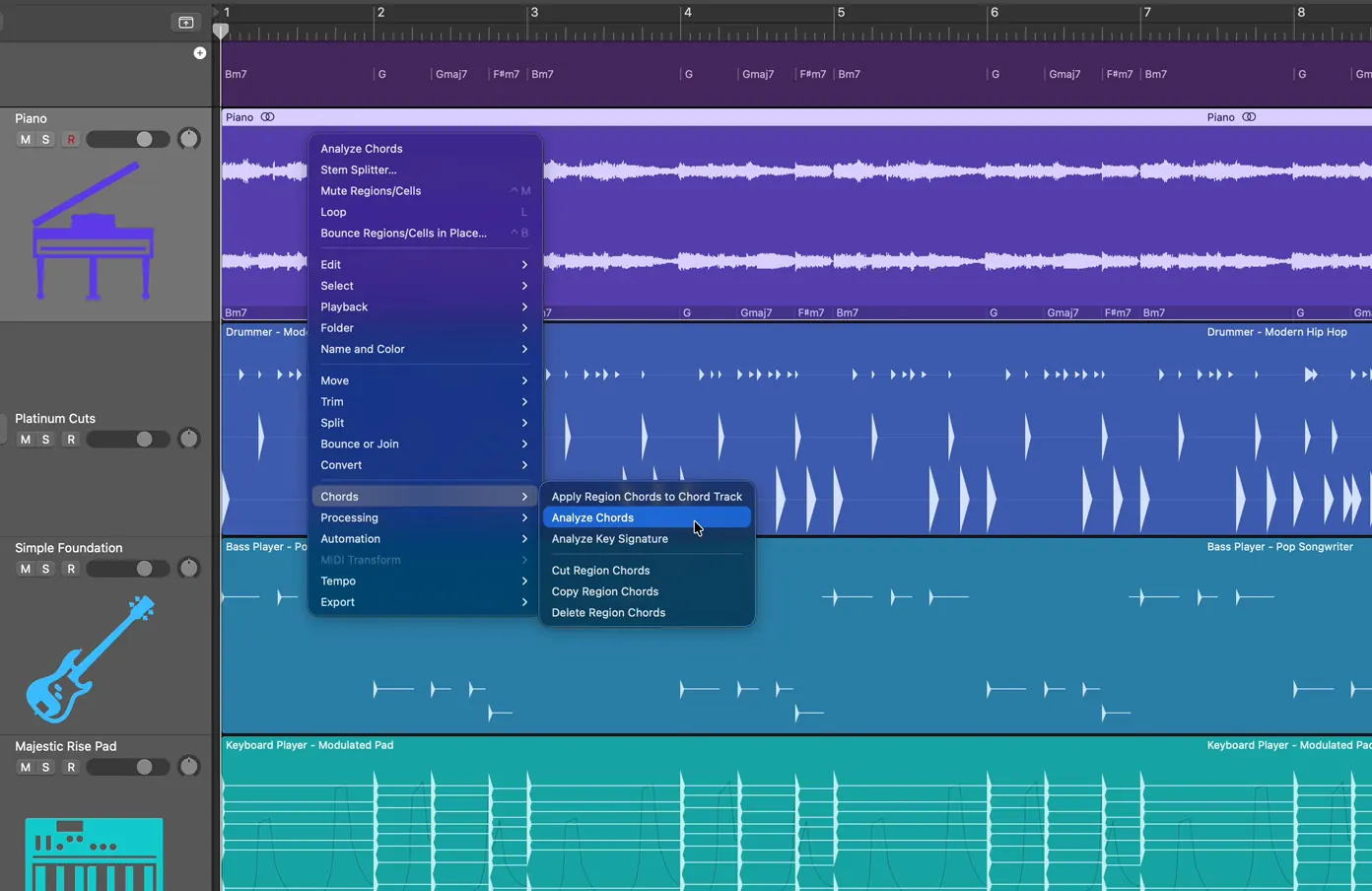
- Chord ID can analyse audio or MIDI and feed the detected harmony to Session Players.
- Stem Splitter, Flex Time, Flex Pitch, Smart Tempo, Dolby Atmos tools, and Mastering Assistant are included.
- GarageBand projects open directly in Logic Pro.
Cons
- There is no Windows version.
- Apple currently specifies Apple silicon for Logic. Existing Intel installations need an exact-build check; Stem Splitter, ChromaGlow and three Mastering Assistant Character choices are unavailable on Intel or under Rosetta.
- Logic Pro 12 initially omitted legacy content; version 12.2 added three packs for reinstalling it.
- The old standalone 90-day trial is no longer Apple’s documented route. New users get a one-month Creator Studio trial, or three months with an eligible device.
- Logic uses Audio Units rather than VST plug-ins.
Logic Pro price and licensing in 2026
Logic Pro for Mac is $199.99. Apple Creator Studio is $12.99 per month or $129 per year in the United States. It includes Logic Pro, Final Cut Pro and Pixelmator Pro on Mac and iPad, plus Motion, Compressor and MainStage on Mac. The $2.99 monthly or $29.99 annual education rate requires Apple’s qualifying college student or educator status. Apple says both Mac editions of Logic have the same features and can be installed separately.
At the regular annual rate, two years of Creator Studio cost $258, compared with $199.99 for standalone Logic. That comparison excludes education discounts, promotions and applicable taxes. A subscription can make sense when you use several included apps or need access for a short project. Compare Apple’s current bundle offer with the purchase options in our Logic Pro pricing guide.
Apple has supplied major updates free to existing owners: its May 2025 announcement explicitly made Logic Pro 11.2 a free update. That is a historical example, not a commitment covering every future release. Current purchase information contains no lifetime-update promise.
Apple currently advertises a one-month Creator Studio trial for new subscribers, or three months with an eligible new Mac or iPad. Its iPad subscription support article also explains how a previous standalone subscriber can reactivate after cancelling Creator Studio and waiting for it to expire. It does not establish that every new customer can start the old standalone iPad plan. Our Logic Pro trial guide separates those cases.
What Logic Pro 12 adds, through 12.3.1
Logic Pro 12 introduced Synth Player, Chord ID and a new Sound Library. Synth Player’s six styles sit inside Keyboard Player and Bass Player: Simple Pad, Modulated Pad and Rhythmic Chords for keyboards; 808 Bass, Pump Bass and Sequenced Bass for bass. They are additional playing styles, not six new independent musicians.
Chord ID can turn audio or MIDI material into chord events that Session Players follow. Use it to sketch the harmony, then listen through and correct any misidentified chords before generating accompaniment. The 12.3 App Store notes describe improvements to inversions, richer chords and recordings with modest tuning differences; they do not promise error-free transcription.
Apple’s Logic Pro release notes document the recovery path for an awkward part of the 12.0 launch. Logic Pro 12.2 added Logic Pro Legacy Patches, Legacy Instruments, and Legacy Loops packs for content missing from the initial release. If an older project depends on that material, install the legacy packs before a deadline. Then check the project copy rather than assuming every sound has returned automatically.
Logic Pro 12.3 added Beat Breaker filter, resonance, panning and randomisation controls, granular sync in Sample Alchemy, formant shifting in Alchemy and the Granular Alchemy sound pack. Version 12.3.1 is a bug-fix release. Its notes identify fixes for crossfade editing, pinned channel strips, Chord Track crashes and other issues; that does not establish reliability with every third-party plug-in. For the full update rather than this buying verdict, see what changed in Logic Pro 12.3.
Where Logic Pro is strongest
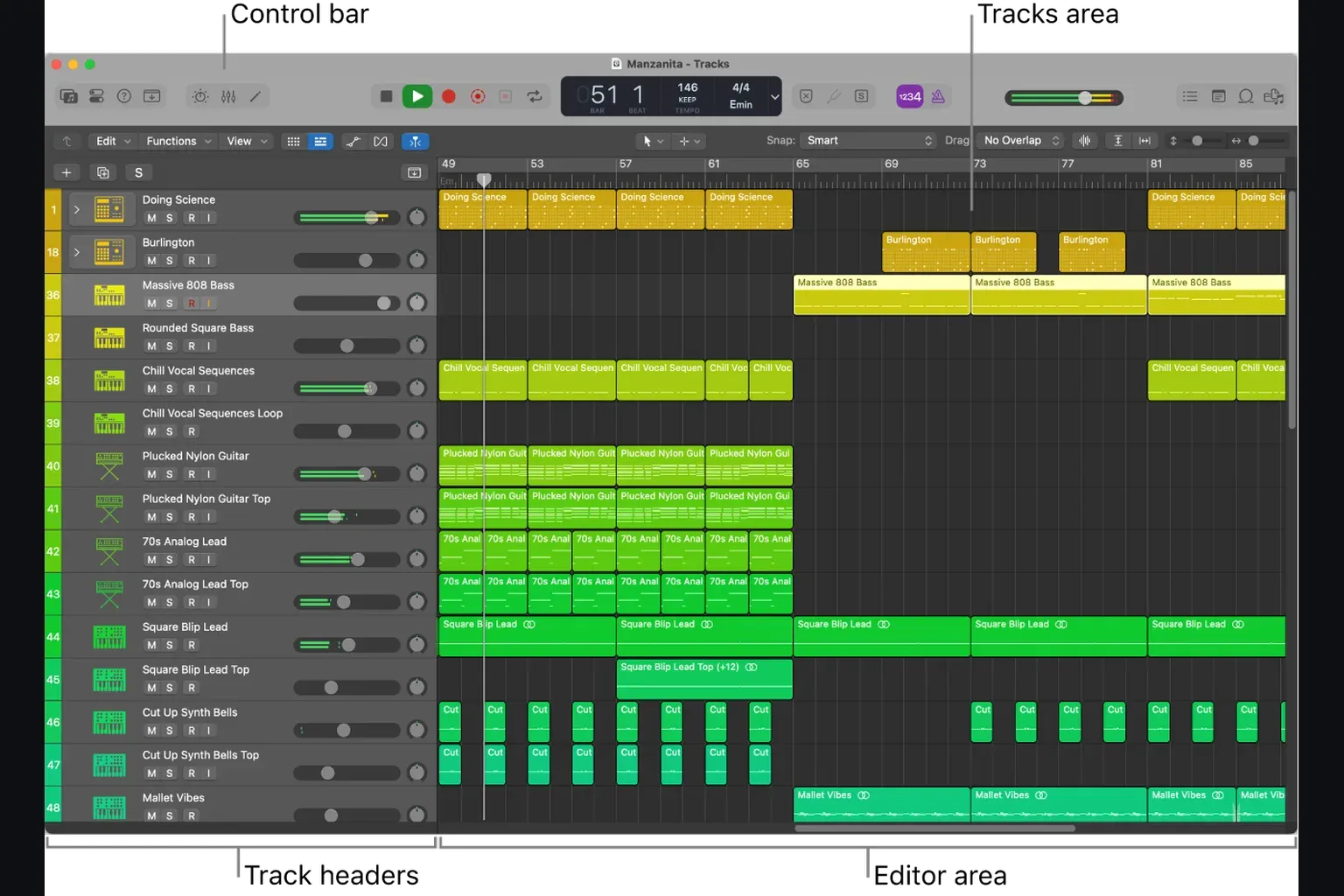
Logic works especially well for musicians who move between recording, MIDI arrangement, editing, and mixing in the same project. The Tracks area stays conventional. The Piano Roll is deep without forcing a separate editing application, and the mixer exposes buses, sends, automation, track stacks, and plug-in latency compensation. A songwriter can begin with a microphone or MIDI keyboard and finish a release without changing software.
Flex Time and Flex Pitch remain central advantages. Flex Time changes timing inside an audio region. Flex Pitch edits detected note pitch and related properties. Smart Tempo can adapt project tempo to recorded material or analyse material against an existing grid. These tools aren’t automatic permission to skip listening: grouped drums, phase relationships, breaths, and sustained notes still need careful review after editing.
Session Players are useful for arranging and auditioning parts because they follow the project’s chords and give editable performance controls. Treat them as arrangement tools, not proof that a part is musically finished. Establish harmony and structure first. Then generate or sketch a performance, and edit the resulting region or replace it with a played part.
Stem Splitter separates a mixed audio file into vocals, drums, bass, guitar, piano, and other instrumental parts. It’s practical for extracting a guide, muting an element in a rehearsal mix, or creating material for an edit. Separation quality depends on the source, so exposed stems can contain bleed and artifacts. See Apple’s Stem Splitter instructions and our step-by-step Logic Pro Stem Splitter guide.
Apple silicon, Intel, and current compatibility
For new hardware, choose an Apple-silicon Mac. Both Apple’s Logic product page and its Creator Studio requirements specify Apple silicon and macOS 15.6 or later. The standalone App Store listing omits a processor requirement, while the 12.3 release notes include an Intel-specific Chord ID fix. These documents do not settle every existing Intel installation. An omitted App Store processor line is not an exemption from the published requirements; check the build offered on your exact Mac before paying or updating.
Apple explicitly says Stem Splitter, ChromaGlow, and the Valve, Transparent, and Punch Character presets in Mastering Assistant are unavailable on Intel-based Macs or when Logic runs under Rosetta on Apple silicon. An Intel Mac may continue running an older compatible Logic version, but buyers should not purchase old Intel hardware on the assumption that current or future Logic releases will support it. Check the exact Mac and OS in the App Store before updating, and use our Logic Pro system requirements guide for a purchase check.
There’s no meaningful universal “track count” for a Mac. Instrument choice, oversampling, sample libraries, buffer size, sample rate, plug-in latency, live inputs, and memory pressure change the result. Any review that gives one impressive track number without a reproducible session and settings is describing an anecdote, not a benchmark.
Stock plug-ins and the Sound Library
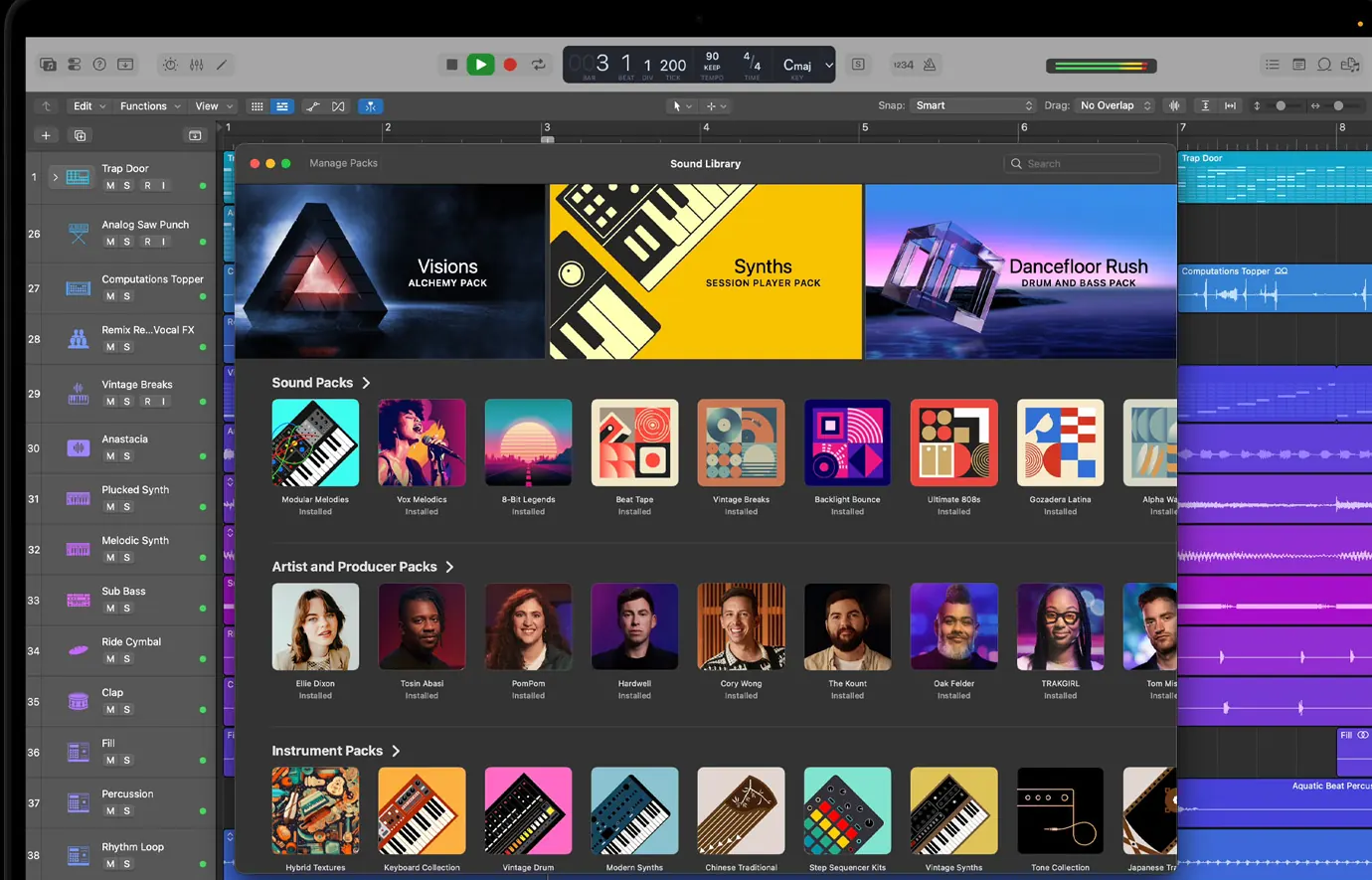
Logic’s stock tools cover synthesis, sampling, drum programming and mixing. Alchemy and Retro Synth handle synth parts; Sampler and Quick Sampler turn recordings into playable instruments; Drum Machine Designer and Step Sequencer handle programmed drums. For mixing, the included EQs, compressors, delays and reverbs let you finish a track before deciding whether a third-party effect solves a specific problem. Audition the sounds you need instead of judging the library by a preset count.
Apple publishes different storage estimates: the App Store lists 6 GB for a minimum installation and 44 GB or more for the Sound Library, while its additional-content support page says about 72 GB with all additional content. Treat those as estimates, not a ceiling for your projects and samples. Install the packs you need and leave working space. For external storage, follow the version-specific library move instructions and use an APFS-formatted drive as Apple currently recommends. Check the relocated library before deleting a copy. During an upgrade, non-APFS library migration can need space for both copies; keep the older library if you still use an older Logic version.
Mastering Assistant analyses a stereo output and proposes a processing starting point with adjustable character, dynamics, width, and loudness controls. It’s useful for a quick listening master or a consistent demo. It can’t judge release context, repair a poor mix, clear samples, or replace a mastering engineer’s monitoring and decision-making.
Logic Pro limitations that matter
Apple offers no native Windows version of Logic. For cross-platform collaboration, agree on consolidated audio, MIDI, AAF where supported, or the destination DAW’s native session. Do not assume another application or a converter will preserve a .logicx project’s plug-ins, routing and edits. Keep the original project and compare the imported result with a reference mix; the Logic alternatives guide includes a migration checklist.
Logic loads Audio Units, not VST plug-ins directly. Before buying a plug-in, check the developer’s AU download, supported macOS versions, processor compatibility and activation terms. A wrapper is an extra compatibility dependency, not a guarantee that a VST-only product will work. Use the AU installation guide for setup and validation.
Live Loops gives Logic a clip grid, but Ableton Live remains designed around clip launching and performance from the start. Logic’s score editor can produce notation and parts, but people whose main deliverable is engraved notation should compare it with dedicated notation software. Neither limitation prevents professional work. Each changes how many workarounds a specific job needs.
Logic Pro vs Ableton, Pro Tools, and GarageBand
| Choose | When this is the deciding need |
|---|---|
| Logic Pro | Mac-based songwriting, recording, MIDI, mixing, and a broad included library |
| Ableton Live | Clip launching, live performance, cross-platform use, and an Ableton-centred workflow |
| Pro Tools | Session exchange with Pro Tools facilities, large tracking workflows, or audio post pipelines built around Avid |
| GarageBand | A free and simpler Mac starting point before advanced routing, editing, and production tools are needed |
Ableton Live is available for Windows and macOS. Intro has 16 audio/MIDI tracks in total; Standard and Suite have unlimited tracks, with different instruments and effects. Compare the current editions and checkout price rather than treating Live as one package. Suite’s rent-to-own plan also needs periodic online verification; saving and exporting stop after more than three days offline until it reconnects. Our Logic Pro vs Ableton Live comparison focuses on the workflow decision.
Choose Pro Tools when your receiving studio or client requires an editable Pro Tools session. Confirm the version, plug-ins and delivery format before starting. If the deliverable is only consolidated audio or a final mix, the studio’s DAW preference may not require you to switch. Our Logic Pro vs Pro Tools guide explains the handoff and workflow differences.
GarageBand is free and its projects open directly in Logic without a separate conversion step. Apple’s GarageBand project transfer guide says project tempo and key are carried over, track types are mirrored, and Software Instrument and Apple Loops tracks can bring mixing data, effects, and GarageBand patches into Logic. That makes GarageBand a sensible start rather than a dead end. The exact differences are in our Logic Pro vs GarageBand comparison.
Who should buy Logic Pro?
Buy Logic Pro if you own a compatible Apple-silicon Mac and want one application for songwriting, recording, MIDI programming, editing, mixing and delivery. The standalone purchase fits long-term use when Logic is the only paid Creator Studio app you need. If you are keeping an Intel Mac, verify the current offer and back up your working Logic app and projects before updating.
Use GarageBand first if you’re new, haven’t yet hit a routing or editing limit, and want to learn the basic Apple workflow without paying.
Choose Apple Creator Studio if you’ll use Logic Pro and at least one other included creative app regularly, or if you need both Mac and iPad versions under one subscription. Compare the recurring cost with standalone purchases over the period you expect to use them.
Choose another DAW if Windows is part of the workflow, clip launching is the centre of live performance, or clients require native Pro Tools sessions. The best DAW is the one that removes handoff and compatibility friction from the work you actually deliver.
Before paying, use a project copy to test the work you actually do: record through your interface, load essential plug-ins, edit a take, bounce a mix, then reopen the saved project. Listen for missing sounds, timing changes and monitoring delay. If something fails, compare a small project using built-in audio and Apple plug-ins as described in Apple’s troubleshooting checks. A feature list cannot establish whether your particular recording setup is ready.
Logic Pro FAQ
Is Logic Pro easy to learn?
Logic is approachable if you learn it around a small project rather than every window at once. GarageBand users get the gentlest transition because projects open directly and the basic Apple workflow is familiar. Advanced routing, Flex modes, automation, and Alchemy take longer to master.
Is Logic Pro better than Ableton Live?
Logic is the stronger fit for a Mac-only timeline workflow with a large included library and one-time price. Ableton Live is the stronger fit when clip launching, live performance, or Windows support decides the purchase. Compare the edition and workflow instead of the brand.
Does Logic Pro support VST plug-ins?
Not directly. Logic Pro uses Audio Units. Check that a plug-in developer provides a current AU build for your macOS version and processor before buying.
Does Logic Pro work on Windows?
No. Apple offers Logic Pro for Mac and iPad, not Windows. Ableton Live, Pro Tools, FL Studio, and Fender Studio Pro are current cross-platform alternatives.
Does Logic Pro 12 run on Intel Macs?
Apple’s current Logic product page and Creator Studio requirements specify Apple silicon. The standalone App Store listing omits a processor line, and the 12.3 release notes mention an Intel fix. Do not infer guaranteed current support from that omission. Keep a backup of your working app and check the exact Mac and build before updating. On Intel or under Rosetta, Stem Splitter, ChromaGlow and the Valve, Transparent and Punch Mastering Assistant Character choices are unavailable.
Is Logic Pro worth it over GarageBand?
Yes when GarageBand’s editing, routing, mixer, automation, or instrument controls block a real project. If those limits have not appeared, staying with GarageBand costs nothing and preserves a direct upgrade path.
Can Logic Pro replace Pro Tools?
Logic can handle professional recording, editing, mixing, and composition. It does not replace a required Pro Tools session format. Ask what the studio, client, or post-production handoff needs before choosing.
Do Logic Pro updates cost extra?
Apple has provided free major updates to existing owners, including Logic Pro 11.2 in May 2025. Its current standalone purchase information makes no lifetime-update commitment. Check the terms of a future release rather than assuming every update will always be free.
Is Logic Pro for iPad the same as the Mac version?
The Mac and iPad apps exchange projects, but their interfaces and some workflows differ. Apple currently lists iPadOS 26 and an A12 Bionic chip or later, with newer hardware required for some features. The Logic Pro for iPad guide covers the tablet-specific choice.
Is Logic Pro good for beat making?
Yes. Drum Machine Designer, Step Sequencer, Quick Sampler, Sample Alchemy, Beat Breaker, Live Loops, and Stem Splitter provide a complete beat-production toolset. Producers whose entire process centres on clip triggering should compare Ableton Live before deciding.


