Logic Pro vs Pro Tools: Which DAW Fits Your Work?
A current, workflow-first Logic Pro vs Pro Tools comparison covering price, platforms, editing, MIDI, plugins and session exchange.

Short answer: choose Logic Pro if you make music on a Mac and want an all-in-one package for writing, arranging, recording and mixing. Choose Pro Tools if you work on Windows, exchange editable sessions with Pro Tools rooms, or spend most of the day cutting recorded audio and dialogue. Neither choice makes a mix sound better by itself.
The useful question isn't “Which DAW is more professional?” It's “What has to happen to this project after I finish my part?” A solo producer can stay in Logic for an entire release. An editor receiving native Pro Tools sessions can avoid an interchange step by working in Pro Tools from the start. This comparison is based on documentation, not a timed DAW benchmark.
Source-checked September 14, 2026 against Logic Pro 12.3.1, Pro Tools 2026.4.1, and current Apple and Avid pricing and support pages. US prices are shown before tax and can change by plan, promotion or region.
Logic Pro vs Pro Tools at a glance
| Decision | Logic Pro | Pro Tools |
|---|---|---|
| Best fit | Songwriting, beat making, composition and complete music production on Mac | Audio editing, facility handoff, dialogue, post and mixed Mac/Windows teams |
| Platforms | Mac; a related iPad version is also available | Mac and Windows |
| US price route | $199.99 one-time Mac purchase, or Apple Creator Studio at $12.99/month or $129/year | Intro free; annual subscriptions: Artist $99, Studio $299, Ultimate $599 before tax; verify checkout terms |
| Third-party plug-ins | Audio Units | AAX Native and AAX AudioSuite; some tiers/hardware add AAX DSP |
| License layer | Apple Account/App Store | iLok account; Intro supports computer activation; compatible paid licenses support a key or iLok Cloud |
| Session exchange | Logic projects; exports audio, stems and AAF | Pro Tools sessions and audio; AAF/OMF/MXF interchange requires Studio or Ultimate |
| Built-in creation tools | Large instrument, loop and effect library plus Session Players | Useful included tools, with the exact bundle and limits changing by tier |
The practical verdict: Logic is the easier recommendation for a Mac-based musician buying one DAW. Pro Tools earns its place when compatibility with a team, facility or post workflow is worth more than the software price.
Price and licensing: compare the route, not one headline number
Apple currently offers two Mac routes. The one-time-purchase version of Logic Pro is $199.99 in the US Mac App Store. Logic Pro is also included in Apple Creator Studio, which Apple lists at $12.99 per month or $129 per year for a standard US plan. Creator Studio includes Logic Pro for Mac and iPad while subscribed, plus other Apple creative apps. The $199.99 purchase covers the Mac app only, not iPad. Apple offers a one-month trial for eligible new Creator Studio subscribers; check the offer shown for your account.
Do not turn Apple's update history into a promise it hasn't made. Mac App Store buyers have received major Logic updates without a separate upgrade charge for years, including the move to Logic Pro 12, but Apple doesn't advertise “lifetime updates” as a contractual entitlement. Our Logic Pro pricing guide tracks the standalone and Creator Studio routes separately.
Avid's current US Pro Tools page shows four levels. The paid figures below are its displayed US annual subscription prices, not monthly installments or perpetual-license prices:
- Intro: free, with 8 audio tracks and 4 simultaneous recording inputs.
- Artist: $99 per year, with 32 audio tracks and 16 simultaneous inputs.
- Studio: $299 per year, with 512 audio tracks and 64 simultaneous inputs.
- Ultimate: $599 per year, with 2,048 audio tracks and up to 256 simultaneous inputs, depending on supported hardware.
Avid also points buyers to perpetual licenses, upgrade plans, education pricing and annual subscriptions. That makes a universal four-year cost table misleading: the answer changes with tier, billing term, upgrade coverage, tax and promotion. Price the exact license you'd buy at checkout. Intro is useful for learning on a new small session. Do not treat it as a complete viewer for a larger session: tracks beyond its limits are omitted. Keep the original protected and use Save As to save a separate copy. Avid's current page also warns that displayed discounts can apply only to the first year of a new paid-upfront plan and renew at standard pricing. Do not treat a promotional monthly equivalent as a permanent rate. See Avid's Intro session and activation FAQ for the truncation warning.
Platform and hardware can settle the decision immediately
Logic Pro is Mac-only on desktop. The one-time Mac purchase lists macOS 15.6 or later. Apple's Creator Studio requirements specifically require macOS 15.6 or later and Apple silicon for the subscription version. Do not apply that CPU requirement indiscriminately to the standalone listing; check the exact Mac and feature requirements for the edition you intend to install. Check the live requirements before you upgrade macOS or Logic. That matters most if an older interface or plug-in still depends on an Intel-era driver. Our Logic Pro system requirements page keeps the hardware question separate from the DAW comparison.
Pro Tools supports qualified Mac and Windows configurations. Avid's compatibility chart currently qualifies Pro Tools 2026.4.1 for macOS Tahoe 26.3.x, Sequoia 15.7.x and Sonoma 14.8.x, plus Windows 11 25H2 or 24H2, while also flagging known issues on Sequoia and Tahoe. A compatible operating system isn't the whole story. Check the exact interface, control surface, plug-ins and video hardware you plan to use.
If your production computer is Windows, Logic isn't an option. If you own a recent Mac and never exchange native sessions, platform support no longer decides the contest. Workflow does.
Recording and comping: both can finish a record
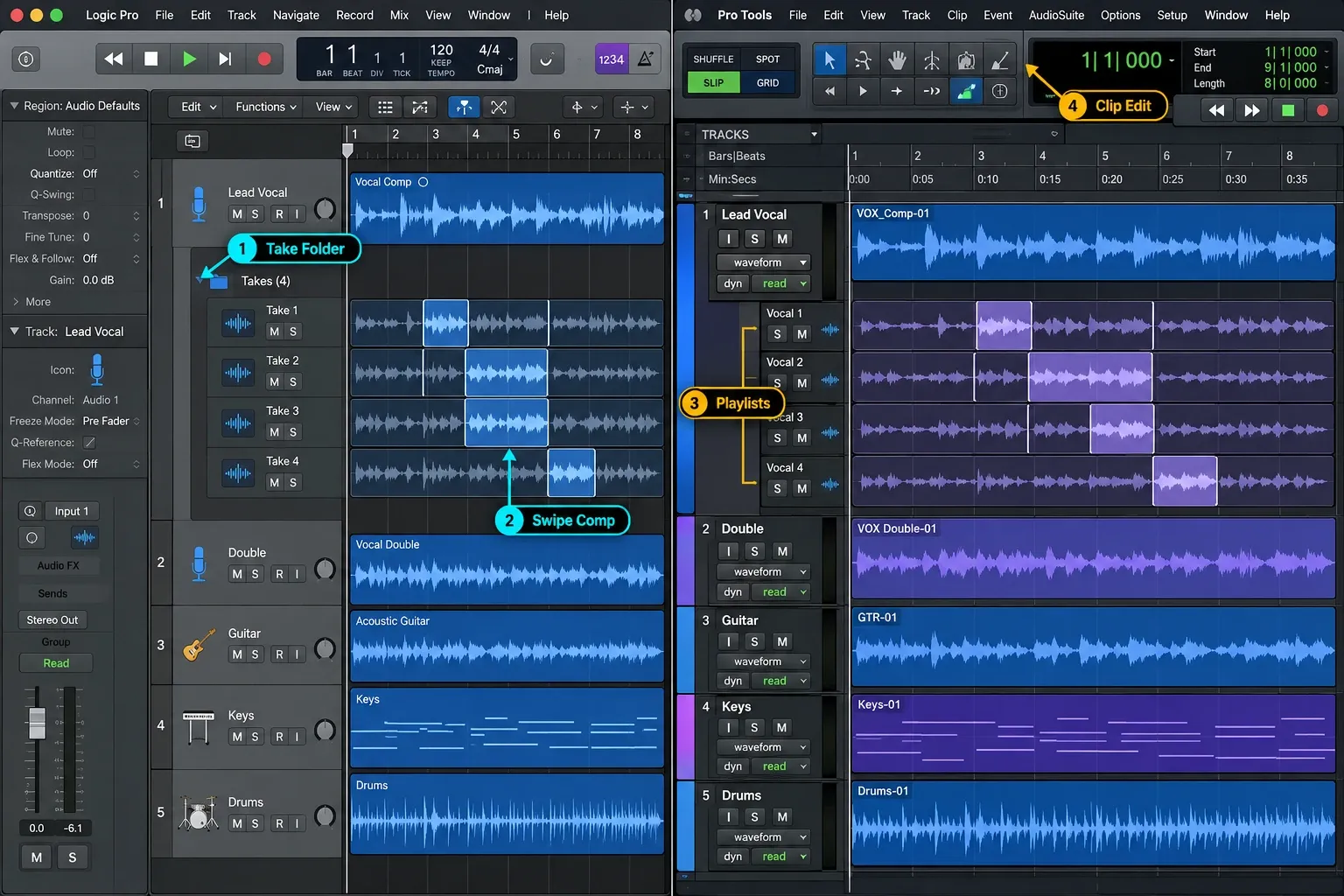
Logic handles serious music recording with audio tracks, take folders, Quick Swipe Comping, Flex Time, track alternatives, buses and detailed automation. It isn't a sketchpad that has to hand the project to another DAW before release. A songwriter can record vocals, comp takes, edit timing, mix and master without leaving the application.
Pro Tools approaches the same work from an audio-editing desk. Playlists, clip-based editing, keyboard-focused tools and tiered input/track limits are central to the product. That can be a better fit when a session starts with dozens of microphones or ends as tightly edited dialogue rather than a MIDI arrangement.
The track-count numbers need context. Avid's current tier comparison specifies fixed software limits. Both DAWs have software ceilings, and practical performance also depends on the computer, sample rate, buffer, instruments, plug-ins and routing. A licensed track count is not a benchmark of how many demanding tracks your machine can play.
MIDI, instruments and songwriting
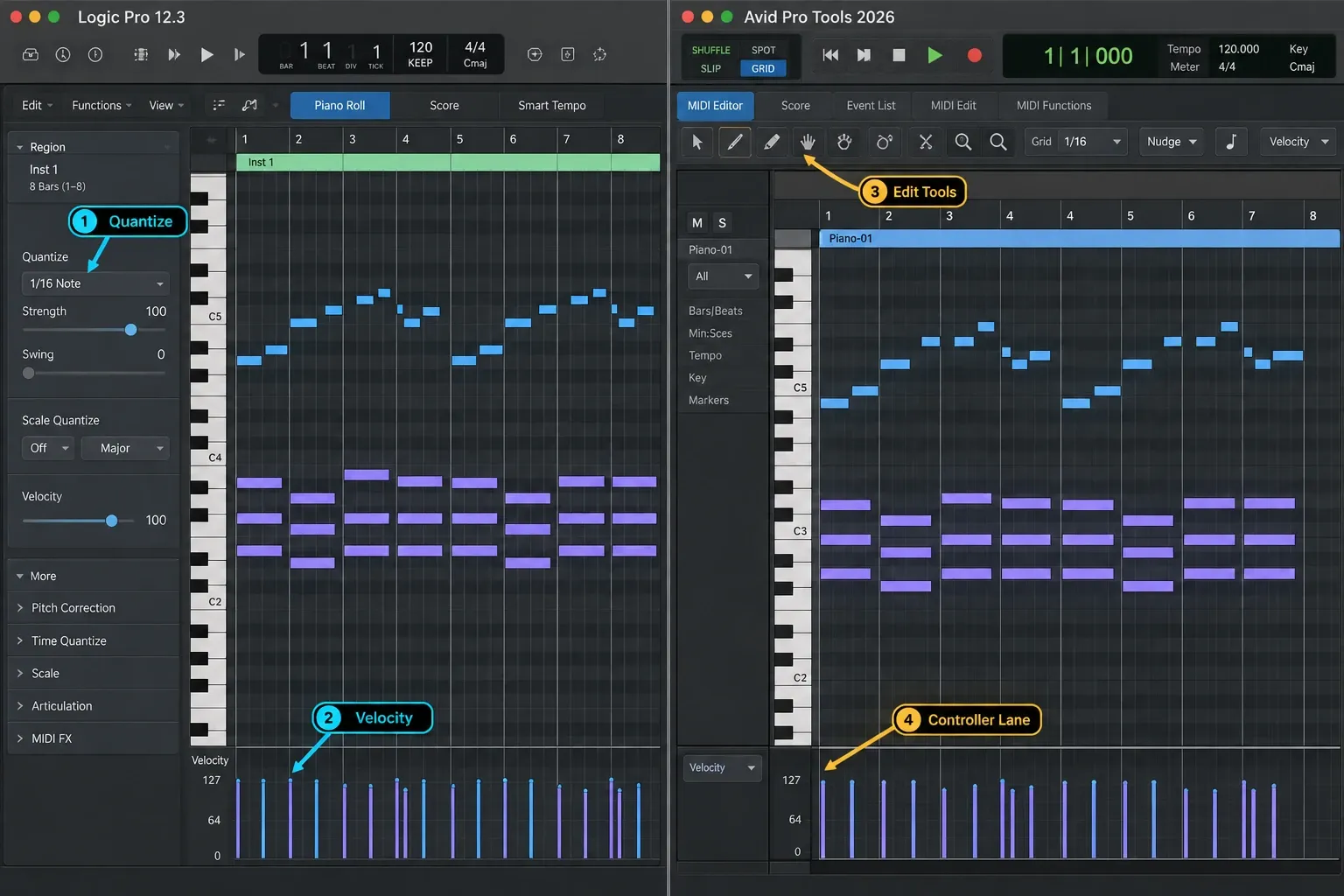
This is the clearest Logic advantage for many musicians. Logic combines a piano roll, score editor, Step Sequencer, Live Loops, Sampler, Quick Sampler, Alchemy, Drummer and the current Session Players inside one project. You can start with a chord idea, build drums and bass, record audio, then move into a conventional linear arrangement without assembling a separate instrument bundle first.
Pro Tools isn't audio-only. Avid lists MIDI and instrument tracks, retrospective MIDI recording, audio-to-MIDI support with the required ARA plug-in, Sketch, included instruments and beat-making tools. The difference is emphasis, not a missing checkbox. Logic's default environment feels designed around creating the arrangement. Pro Tools feels designed around managing and refining a session.
If most of your tracks begin as MIDI, loops or software instruments, Logic is a sensible starting point because the instruments and arrangement tools are included. If MIDI is a supporting layer around recorded performers or post audio, Pro Tools can cover it without forcing a second DAW.
Mixing and post-production
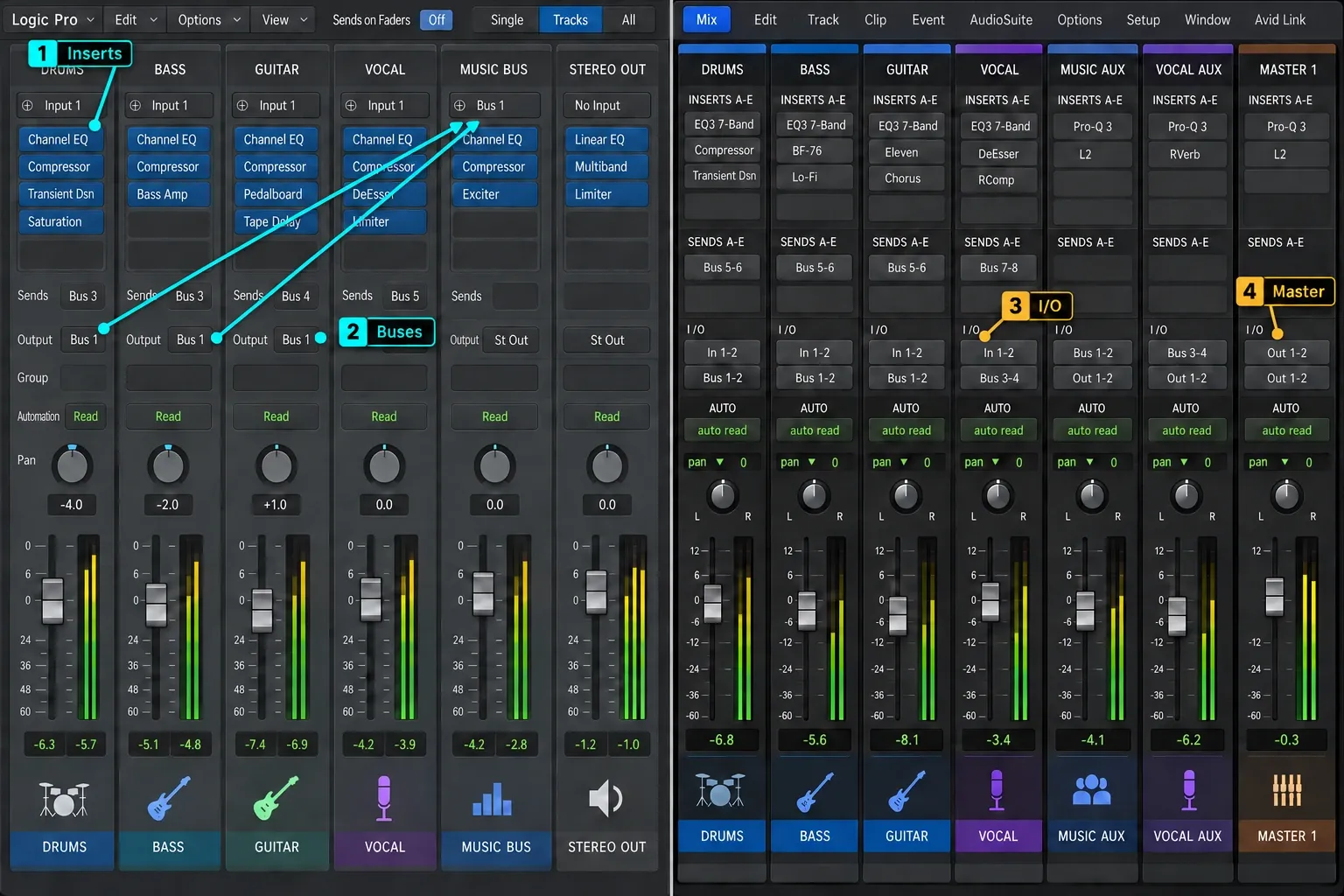
Both applications provide routing, buses, automation, plug-in delay compensation and the tools required for a stereo music mix. Logic adds a substantial stock effect collection and a built-in workflow that moves naturally from arrangement to mix. Pro Tools Studio and Ultimate include delivery features absent from Intro and Artist: advanced automation, AAF/OMF/MXF interchange, VCA mixing, surround and immersive workflows. Which ones you get depends on the tier.
That tier distinction matters. It's easy to read a Pro Tools Ultimate feature on a comparison page and assume it exists in Artist. Avid's table currently reserves several post and immersive features for Studio or Ultimate. Start with the deliverable: stereo master, stems, picture, timecode, surround, Atmos or a facility's session template. Then choose the tier that actually includes it.
Logic can mix Dolby Atmos and export ADM BWF, but a receiving stage may still specify Pro Tools, an Avid control surface or a facility template. Software capability doesn't override a delivery requirement. Apple documents Dolby Atmos and ADM BWF export in Logic.
Plug-ins: Audio Units and AAX are not interchangeable
Logic loads Apple's built-in plug-ins and third-party Audio Units. Pro Tools uses AAX Native and AAX AudioSuite. Supported Pro Tools hardware and tiers can add AAX DSP. Many major developers supply both AU and AAX installers, but owning a plug-in license doesn't guarantee that both formats are installed, current and authorized on the destination system.
Before switching, audit the plug-ins that carry the sound of the session. Check:
- whether the developer supplies both AU and AAX;
- whether the same version and preset format are available;
- whether Apple-silicon native support is current;
- whether the license allows activation on the required computer or iLok;
- which tracks should be committed or printed before handoff.
Native Logic and Pro Tools projects don't translate their full plug-in chains into each other. Print anything essential, and keep a dry or lightly processed version when the recipient may need to rebuild the mix.
iLok is a workflow choice, not automatically a dongle
Logic itself uses the Apple purchase/account system and does not require iLok; third-party Audio Units may have their own iLok requirements. Pro Tools uses an iLok account. Intro supports disk-based activation on the computer and does not require a USB key or an ongoing cloud connection. iLok Cloud is not available for Intro. Compatible paid licenses support a physical key or iLok Cloud. Avid distinguishes Intro from cloud-eligible licenses.
The trade-off is straightforward. A USB iLok can suit a room that needs predictable offline authorization and moves licenses between systems. Avid's iLok Cloud documentation says the cloud route removes the physical key but requires a continuous internet connection, and only one Pro Tools system can use those cloud licenses at a time per iLok account. Pick the authorization method that matches the room. Do not buy a key merely because an old comparison says it's mandatory.
Moving a project between Logic Pro and Pro Tools
Sending someone the Logic project isn't a Pro Tools handoff. A broadly compatible package is consolidated audio that starts at the same time on every track, plus tempo, sample-rate and reference-mix notes. Our Logic Pro stem export guide covers the preparation.
Logic can also export AAF. Pro Tools AAF interchange requires Studio or Ultimate, not Intro or Artist. Agree the receiving tier before choosing this route. Apple's AAF export guide says the export can carry used audio regions, track and position references, and volume automation into applications such as Pro Tools. That's useful, but it isn't a clone of the Logic project. Software instruments, Drummer/Session Player behavior, Audio Unit plug-ins, complex routing and every automation detail shouldn't be assumed to survive.
- Save a protected copy of the original project.
- Confirm sample rate, frame rate if picture is involved, and session start.
- Commit virtual instruments or supply MIDI plus printed audio.
- Print creative effects that define the sound; also send dry versions when useful.
- Export consolidated audio or an agreed AAF package; for Pro Tools AAF delivery, confirm Studio or Ultimate.
- Include a reference mix and a short text file describing tempo, markers and unusual routing.
- Open the delivery on the receiving system before the deadline.
Which one should you choose?
Choose Logic Pro if…
- you work on a compatible Mac and mainly produce your own music;
- songwriting, MIDI, sampling and built-in instruments are central;
- you want a $199.99 one-time Mac purchase or already value Creator Studio;
- collaborators accept stems, audio exports or occasional AAF handoffs;
- you want one application to cover creation through final stereo delivery.
Choose Pro Tools if…
- your computer or team is on Windows;
- a studio, broadcaster or post team explicitly requires Pro Tools sessions;
- your work is dominated by recorded audio, dialogue and repeatable edit handoffs;
- you need a specific Studio or Ultimate feature and have verified it in Avid's tier table;
- the subscription, perpetual license or upgrade plan fits a paid workflow.
Use both if the handoff justifies it
A hybrid setup is reasonable: write and arrange in Logic, then move consolidated audio or AAF into Pro Tools for a facility mix or post stage. Use the second DAW when the receiving team requires its native session or delivery tools.
If you're still learning basic recording and arrangement, changing DAWs is usually a distraction. Finish a small project with the Logic Pro beginner workflow first. If you're comparing a more performance-oriented production environment, read Logic Pro vs Ableton Live.
Logic Pro vs Pro Tools FAQ
Is Logic Pro or Pro Tools better for beginners?
For a beginner making music on a Mac, Logic usually provides the simpler all-in-one purchase and a larger built-in creation toolkit. Pro Tools Intro is a useful free way to learn the Pro Tools workflow, especially if a school, studio or employer uses it.
Does Pro Tools sound better than Logic Pro?
Do not choose a DAW on that claim. Recording quality depends on the source, room, microphone, interface, gain staging and processing; the final mix depends on the decisions and export settings. Choose by workflow, compatibility and required deliverables.
Can Logic Pro open a Pro Tools session?
No. Logic does not open a native Pro Tools session as a fully editable Logic project. Exchange consolidated WAV files or use an agreed interchange format such as AAF, then verify what transferred.
Can Pro Tools open a Logic project?
No. A Pro Tools user cannot open a Logic project and expect its instruments, plug-ins and routing to appear. Export audio, stems or AAF and include a reference mix and session notes.
Is a physical iLok required for Pro Tools?
No. Pro Tools Intro supports disk-based computer activation through an iLok account; iLok Cloud is not available for Intro. Compatible paid licenses can use a physical iLok or iLok Cloud. The cloud option requires a continuous internet connection.
Are Logic Pro updates free forever?
Apple has provided major Mac App Store Logic updates without a separate upgrade charge for a long period, but it does not advertise a binding lifetime-updates promise. Treat that as purchase history, not a guarantee about every future release.
Which Pro Tools tier is closest to Logic Pro?
There is no exact match. Artist has tighter track and input limits, while Studio is the more relevant comparison for larger recording, mixing and immersive work. Logic bundles a different set of instruments and creation tools, so compare the features you will actually use rather than tier names.
Final verdict
For a Mac-based songwriter, producer or composer, Logic Pro is the better default buy. Its instruments, MIDI tools, audio workflow and one-time Mac price cover more of a complete music project without requiring a higher tier.
For Windows users and teams that exchange Pro Tools sessions, Pro Tools is the safer operational choice. The deciding factor is compatibility with the people, templates, hardware and delivery process around the session.
For more decision-led comparisons, use the Logic Pro comparisons hub or see the wider best DAWs for Mac guide.


