Logic Pro vs FL Studio (2026): Which Is Better for You?
A practical Logic Pro vs FL Studio comparison for beat making, recording, MIDI, mixing, platforms, pricing, updates and day-to-day workflow.

Pick FL Studio if you write pattern-first, live in the Piano roll or need one DAW on both Windows and macOS. Pick Logic Pro if you have a compatible Mac and want recording, comping, editing, arranging, mixing and mastering inside one track-based project. Buying new for an Intel Mac? Read the hardware section first, because Apple’s current pages don't clearly guarantee standalone Logic support there. Neither DAW sounds better out of the box, so choose the workflow that suits the sessions you run.
This comparison covers Logic Pro 12.4 and FL Studio 26.1.7 (Windows build 26.1.7.5654; macOS build 26.1.7.5421). Prices are U.S. prices where stated, and FL Studio’s regional checkout sets the current amount for each edition. For every edition limit and price, see Image-Line’s pricing and editions page.
FL Studio vs Logic Pro: the quick verdict
| What matters most | Better fit | Why |
|---|---|---|
| Fast pattern and drum programming | FL Studio | Channel Rack, Step Sequencer, patterns, Playlist, and Piano roll are the center of the workflow. |
| Recording vocals, guitars, or a band | Logic Pro | Linear tracks, take folders, Quick Swipe Comping, Flex editing, routing, and mixing live in one consistent project view. |
| Windows and Mac support | FL Studio | One Image-Line license works on both platforms. Logic Pro is not available for Windows. |
| Mac and iPad continuity | Logic Pro | Logic projects can move between Mac and iPad, and Logic Remote controls the Mac app from iPhone or iPad. |
| Lowest entry price | FL Studio Fruity | Image-Line advertises FL Studio from $99 in the U.S. Fruity omits audio recording and Stem Separation; compare Producer for recorded vocals or instruments. |
| Complete Mac package at one fixed price | Logic Pro | The $199.99 standalone Mac app is a complete one-time-purchase route; Creator Studio is the separate bundle route. |
| Free future DAW updates | FL Studio | Lifetime Free Updates cover future versions and additions delivered to the edition you own; optional products and higher editions can still cost extra. |
Weighing more than these two? The best DAW for Mac guide covers the other main options for recording, beat making, live performance and scoring.
Which DAW fits your next session?
Start with the computer and the project you need to deliver. On a supported Mac, I would start with Logic for repeated recording and comping, or FL Studio for pattern-first writing. An editable project requirement can settle the choice before either preference matters.
Platform checks: Apple’s Logic Pro requirements currently call for Apple silicon; Image-Line’s installer requirements cover Intel/AMD Windows PCs and Intel or Apple-silicon Macs, with Windows ARM excluded. For an existing Intel Logic setup, check that installed version separately.
For Mac/Windows collaboration in FL Studio, Image-Line’s project-sharing guidance calls for compatible plug-ins on both systems. Use matching VST, VST3 or CLAP versions and include samples; Mac-only AU instances cannot carry over to Windows.
Compare one short project: a worksheet
Before you start: keep an untouched project copy and render important sounds. The FL Studio trial saves and exports, but cannot reopen saved projects until purchase. Reopening and resaving a project with unlicensed trial plug-ins before unlocking them can lose their settings. Choose the edition you intend to buy; audio recording needs Producer or above.
- Build the same small drum part. Note how you add a sound, draw notes and make a second variation.
- Add one audio part. Record if your edition permits it, or import the same file. Compare trimming, timing edits and another take.
- Turn the loop into an arrangement. Add automation and route two parts to one bus. Write down every point where you have to stop and look something up.
- Prepare a handoff. Export aligned audio from the same start point and record the tempo. MIDI preserves notes, not the original instrument sound, mixer routing or a complete editable session. Keep the native project too.
- Choose the bottleneck you can live with. Which sequence could you repeat tomorrow? If collaborators need a native project, verify their DAW version, plug-ins and samples before committing.
These notes stay in this page only. Copy them before leaving or reloading; nothing here sends or stores them.
The workflow difference that matters
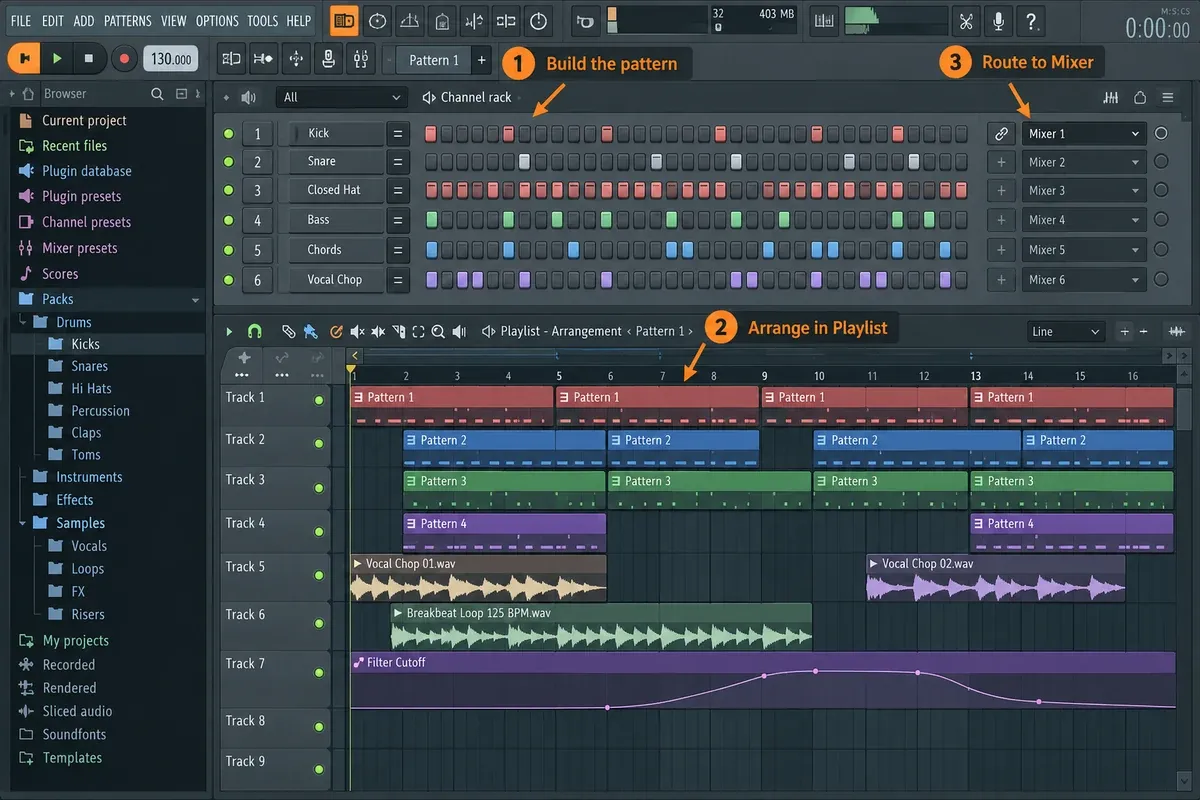
FL Studio’s basic pattern workflow spreads across several windows: a sound starts in the Channel Rack, its notes live in the Piano roll and the patterns go into the Playlist. Mixer routing can be independent of where things sit in the Playlist, but you can change that. Playlist Track Mode links an instrument or audio track with its mixer destination, and name and color changes then follow the linked components. Try that mode before you decide FL’s routing feels too scattered.
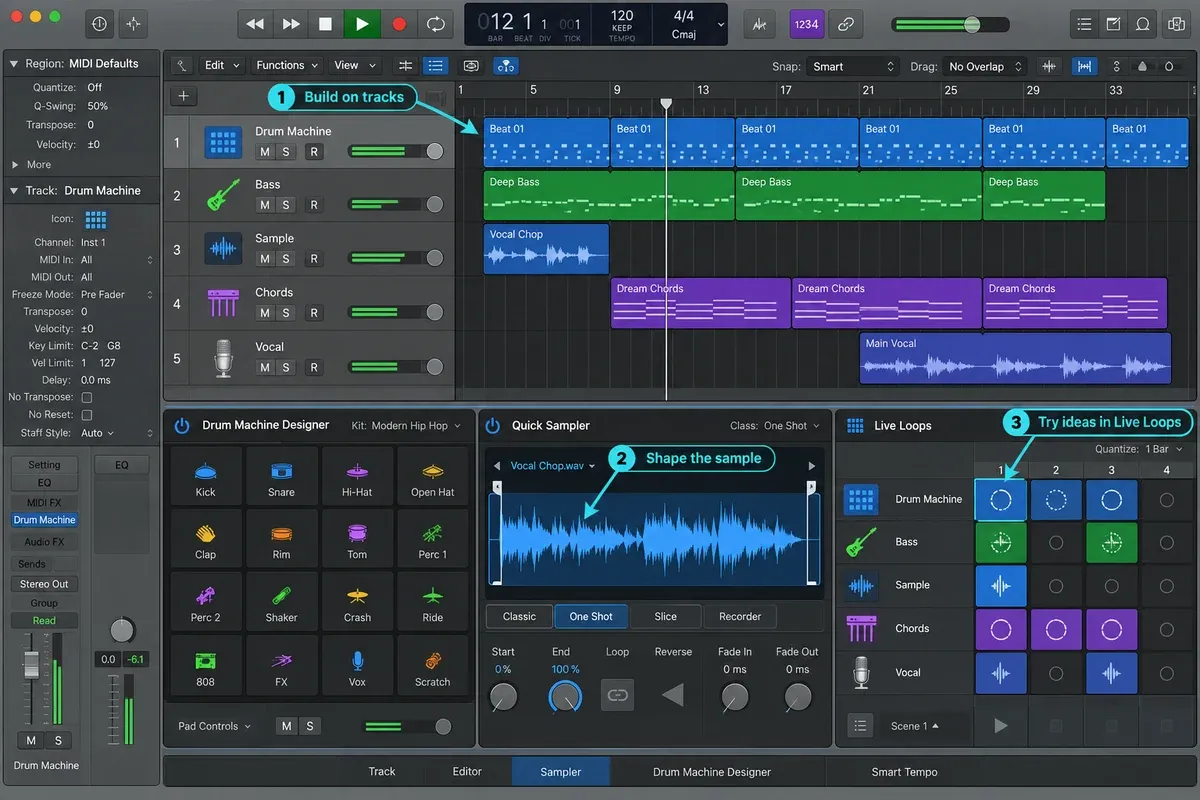
Logic Pro starts from tracks and the timeline. An audio or software-instrument track already comes with a channel strip, mixer path, automation lane and a place in the arrangement, so recording, editing and mixing all follow a signal flow you can trace on the same track. Logic also has pattern regions, a Step Sequencer, Live Loops, Drum Machine Designer and Quick Sampler, which means it handles far more than traditional recording. It just asks you to think in tracks earlier.
“FL for beats, Logic for recording” is a fair place to start, and it's no more than that. FL Studio Producer Edition and above can record and mix full songs, and Logic can build hip-hop, trap and electronic tracks. The useful comparison is what happens after the first loop: arranging, recording another take, swapping a sound or handing the session to someone else.
Price, editions, subscriptions, and updates
Apple now sells Logic Pro for Mac two ways. The standalone Mac App Store version costs $199.99. Apple Creator Studio costs $12.99 per month or $129 per year in the U.S. and bundles Logic Pro with Final Cut Pro, Pixelmator Pro, Motion, Compressor, MainStage and premium features in Apple’s productivity apps. Apple says Logic Pro has the same features in the subscription and one-time-purchase versions. What changes is the license scope: Creator Studio also covers Logic Pro on iPad and the other bundled apps, while the standalone purchase gets you the Mac app.
Image-Line advertises FL Studio from $99 on its U.S. pricing page. Producer Edition, the first edition that records audio, is listed there at $179, Signature at $269 and All Plugins at $449, so Producer comes in about $21 under Logic's one-time $199.99. Sales can push any edition's price lower, Fruity's included. Check the current regional price for the edition you need, because the differences below decide whether that edition is a fair match for Logic:
| FL Studio edition | What you get—and what to check |
|---|---|
| Fruity Edition | Pattern and Piano roll production, with up to eight Audio Clips. No audio recording or Stem Separation. |
| Producer Edition | Audio recording, full Playlist functionality, Stem Separation, Edison and Newtime. The sensible starting point if you record vocals or instruments. |
| Signature Bundle | Producer features plus tools including Newtone, Gross Beat, Hardcore and Pitcher. Compare the specific extras you will use. |
| All Plugins Edition | The broadest native Image-Line instrument and effect package, including Transmitter. FL Cloud subscriptions and optional products are separate. |
Fruity can arrange a limited number of existing audio clips, but it can't record your microphone or guitar, and Image-Line’s edition and trial guide spells that out. If the song needs recorded vocals, price Producer against Logic. Fruity's lower entry price is a false saving for that job.
Image-Line also offers Rent-to-Own Plus where available. After 12 payments, the selected FL Studio edition becomes a perpetual license with Lifetime Free Updates, but FL Cloud continues billing until cancelled. Image-Line says the payment plan costs more than buying outright, so compare the totals at checkout. If you pause or cancel, access runs to the end of the paid billing cycle and FL Studio then drops back to Trial mode. Earlier payments can still count when you restart on the original account, as long as you log in within 18 months of the plan ending and within each 18-month period after that.
Lifetime Free Updates cover future FL Studio versions and additions delivered to the edition you own. They do not promise every optional Image-Line plug-in, sound, FL Cloud service or higher-edition product, though you can upgrade by paying the edition difference shown at checkout. On the Apple side, the Logic Pro cost guide covers purchase and subscription options, education pricing and the iPad route.
Beat making, hip-hop, trap, and electronic production
FL Studio still wins clearly when the first useful result is a four- or eight-bar pattern. Load a sound, place steps, open the Piano roll for detail, duplicate or vary the pattern and arrange it in the Playlist. Per-note controls, ghost notes, note labels, chord tools and Piano roll scripts keep a lot of the editing right next to the notes.
Logic doesn't copy FL's workflow. It covers the same jobs from a track-based project with Drum Machine Designer, Step Sequencer, pattern regions, Live Loops, Quick Sampler, Beat Breaker and a large sound library, and Logic Pro 12 adds Chord ID and Synth Player to the existing Session Players. If you want a beat to grow into recorded vocals, comped instruments, detailed automation and a mix without changing the project’s basic structure, Logic can be the faster route from start to finish on a Mac.
Piano roll and MIDI editing
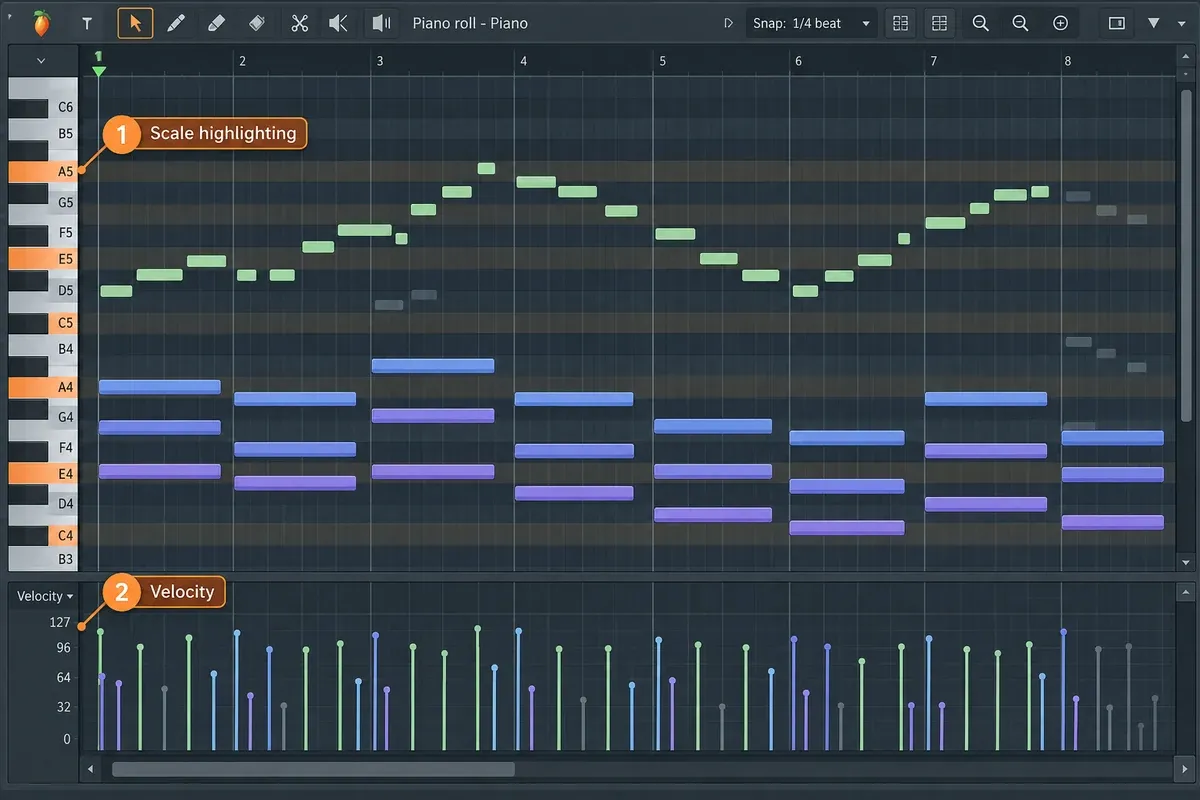
FL Studio’s Piano roll is one of the best reasons to choose it. Note drawing, chord and scale helpers, strumming, arpeggiation, per-note properties, ghost channels and scripting are all built for composing with a mouse. FL Studio 2026 adds chord detection in the Chord Panel and lets Gopher generate Piano roll scripts on request. Plenty of edits still take work by hand, but an already deep MIDI workflow gets deeper.
Logic’s Piano Roll works alongside regions, track automation, Smart Quantize, MIDI Transform, articulation data, Step Input and the Chord Track. If you write MIDI parts next to recorded performances or work with notation, try that whole combination along with note drawing. The Logic Pro Piano Roll guide covers those editing jobs.
Recording vocals and live instruments
Take folders and Quick Swipe Comping make Logic a natural home for repeated vocal or instrument takes. Its track controls handle record arming and input monitoring, while Flex Time and Flex Pitch deal with timing and pitch. The edited regions stay on the timeline and channel strip you'll mix with.
FL Studio Producer Edition and above can record straight into the Playlist. In Audio Track mode, the track header gives you input selection, recording and monitoring options and record arming for the linked mixer track. Edison handles waveform recording and editing, Newtime handles timing, and Signature Bundle adds Newtone for pitch and time editing. FL Studio 2026 also adds Audio Logger, which recovers the last 60 seconds of the Master output. It won't give you separate dry microphone takes.
For one singer over a beat, either DAW is fine. For frequent vocal comping, live drums, guitars or sessions other engineers need to read at a glance, Logic’s recording model usually gets you there faster. If that’s your priority, look at the full Logic Pro recording and editing workflow and ignore feature counts.
Mixing, stock plug-ins, and included sounds
Both DAWs give you mixers, automation, sidechains, buses, third-party plug-ins and enough stock processing to finish a release. Both offer stem separation too, though FL Studio needs Producer Edition or above for it, and in Logic you should check the hardware requirements for Stem Splitter and the other intelligent tools.
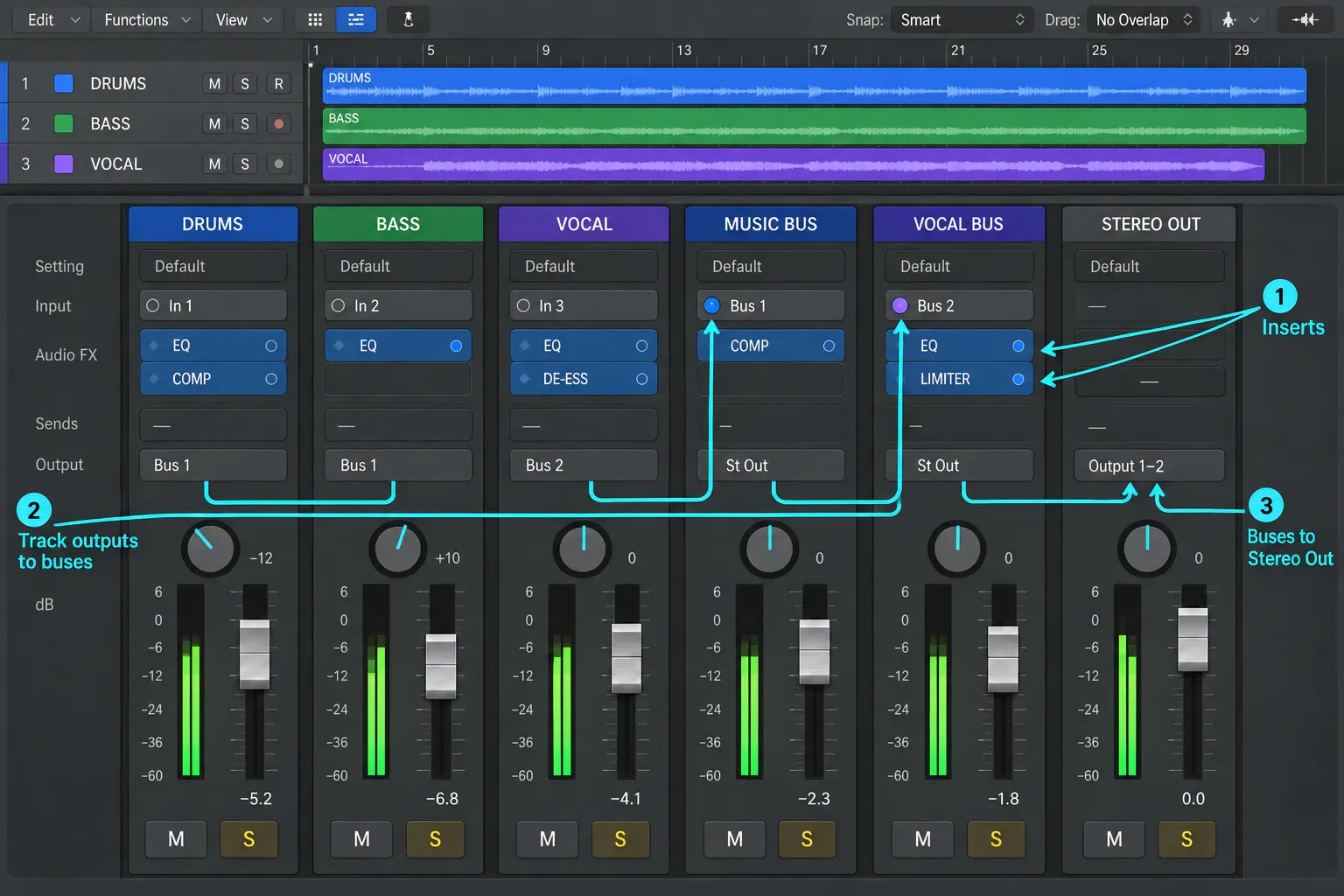
Compare a filter sweep you need in several sections. In FL Studio, a supported control can create an Automation Clip in the Playlist, which you arrange alongside the music; some third-party controls need Last tweaked. If you use Make unique, recheck the target link: the new clip does not retain the original targets. In Logic, region automation travels with its region; for track automation, inspect Move Automation with Regions: Never, Always or Ask. Compare how you reuse the move and revise one occurrence, rather than assuming either layout is always quicker.
Logic Pro comes as a single edition. Channel EQ, Compressor, Space Designer, ChromaVerb, guitar and bass tools, Alchemy, Sampler, Quick Sampler, Drum Machine Designer, Session Players, Stem Splitter, ChromaGlow and Mastering Assistant all live in the same app, and there's no higher Logic tier to buy for any of them. Their hardware and OS requirements still apply, so owning the license doesn't make every feature run on every machine.
FL Studio’s core routing and effects are solid in every edition, but the instruments and processors change by tier. Producer is enough for full audio recording and mixing, while Signature and All Plugins add specific creative tools. FL Cloud is a separate optional service for sounds, plug-ins, mastering, distribution and extra project storage. Keep that subscription separate in your head from the one-time FL Studio license.
Logic is simpler if you want one purchase and a broad, fixed toolbox. FL Studio gives you more say over the starting price, the edition you keep on Lifetime Free Updates, and which Image-Line tools or cloud services you add later.
Mac, Windows, iPad, and hardware requirements
Apple’s Logic Pro product FAQ and Creator Studio support page both call for a Mac with Apple silicon; the product page gives macOS 15.6 or later, while the support page, which lists Logic Pro 12.4, gives macOS 15.4 or later. The standalone U.S. App Store listing lists macOS 15.4 for compatibility but doesn't explicitly confirm Intel support. Don't read that silence as a promise that the current standalone app supports your Intel Mac.
Image-Line’s current installer requirements explicitly support macOS 10.15.7 or later on Intel and Apple-silicon Macs. On Windows they list Windows 10 or newer with Intel or AMD processors, and Windows ARM is not supported. One FL Studio license covers Windows and Mac for its owner, but your plug-ins also have to support the platform you pick.
For a new purchase of a current release on Intel, FL Studio has the clearer documented support. An older copy of Logic already installed on an Intel Mac doesn't suddenly stop working because of that. For Mac/iPad work, Logic offers project exchange, subject to plug-in and project compatibility. On the FL side, FL Studio Mobile is a separate app, and FL Studio Remote controls the desktop DAW, so phone or tablet control isn't unique to Logic Remote.
There's also a browser version. Image-Line's FL Studio page describes FL Studio Web as a simplified set of tools made as a place to start, and it's still in beta. You can begin a track there and open it in desktop FL Studio, but projects don't travel back the other way, so treat it as a sketchpad, not a replacement for the desktop app or for Logic.
Moving projects and plug-ins between DAWs
To hand a session between Logic and FL Studio, plan on aligned WAV files or stems, plus MIDI for any part that still needs note editing. Export all the audio from the same start point and note the tempo. MIDI carries the performance data only, so the original instrument sound, mixer routing and a fully editable session stay behind. Keep the native project too, because a shared audio folder is a delivery format and can't stand in for it.
Logic uses Audio Units plug-ins and extensions. FL Studio for Mac supports AU, VST/VST3 and CLAP among its supported plug-in formats. Buying a plug-in doesn't guarantee you get every format and operating system. For FL-to-FL collaboration between Mac and Windows, Image-Line says to use matching VST, VST3 or CLAP versions and include the samples, because an AU instance won't turn into its Windows equivalent. If the other person can't run an instrument, bounce that part to audio.
You don't always have to pick one or the other. Image-Line's manual for running FL Studio as a plugin says FL Studio loads in macOS hosts as an AU plugin, sending its audio to the host and following the host's play/stop and tempo. That lets an FL Studio owner keep building patterns in FL while recording and mixing in Logic. Anyone who opens that Logic project also needs FL Studio installed to hear or edit those parts, so bounce them to audio before you hand the session on.
What is actually current in 2026
Logic Pro 12 builds its current story around Apple-silicon features: Synth Player, Chord ID, expanded Session Players, Stem Splitter, Mastering Assistant, ChromaGlow and the redesigned Mac/iPad experience. Several of those depend on specific Apple hardware or OS support, so “it runs on a Mac” no longer tells you enough.
FL Studio 2026 brings the rebuilt FLEX, project backup through FL Cloud with a free 500 MB tier, a more capable Gopher assistant, chord detection, Audio Logger, Audio Clip gain controls and other workflow changes. Transmitter is limited to All Plugins Edition, and expanded Loop Starter content and larger cloud storage depend on paid FL Cloud tiers.
Older comparisons still use the old names. FL Studio started out as FruityLoops. Image-Line's company history says the name changed after about four years and lists several reasons for the switch, including that Kellogg's challenged Image-Line's U.S. trademark application for FruityLoops and that the word “Loops” suggested music built from pre-canned loops. Fruity Edition still carries part of the old name. Logic Pro X is the earlier name of the Mac app Apple now sells as Logic Pro, currently version 12.4. If a Fruity Loops or Logic Pro X comparison quotes prices or editions, check them against Image-Line's and Apple's current pages before you budget.
Which one should you choose?
- Choose FL Studio if you use Windows or move between Windows and Mac. It also suits pattern-first writing, long Piano-roll sessions and buyers who put a high value on Lifetime Free Updates.
- Choose Logic Pro if you have a compatible Mac and regularly record vocals or instruments. It also suits take comping, detailed audio editing, a conventional channel-strip mixer and moving projects between Mac and iPad. Creator Studio requires Apple silicon.
- Choose FL Studio Producer over Fruity if audio recording is part of the plan.
- Buy Logic standalone if it's the only paid Apple creative app you expect to use for years. Look at Creator Studio if you also need Final Cut Pro, Pixelmator Pro, MainStage or Logic on iPad.
- Don't switch for sound quality. Both record, process, mix and export professional audio. Switch when the other workflow clears a bottleneck you keep hitting.
Make the same short piece in both DAWs: program drums, record one audio part, fix its timing, automate an effect, create a bus and export. Notice every place you had to stop and look something up, then ask whether you could repeat those steps tomorrow without the instructions.
Image-Line’s standard FL Studio trial has no time limit. It saves projects and exports audio, but reopening saved projects requires buying and unlocking FL Studio. Pick the edition you plan to buy in the Welcome window so you're testing the right tools. Keep an untouched project copy and render important sounds before closing. Image-Line’s trial plug-in warning explains that if you reopen a project containing unlicensed trial plug-ins and save it again before unlocking them, their settings are lost. Buy and unlock the tools you need before reopening, or hold on to the original backup while you replace them.
Apple’s one-month Creator Studio trial is for new subscribers and renews at the selected U.S. plan price of $12.99 per month or $129 per year unless you cancel. Check eligibility and renewal terms before you start, and remember the subscription is separate from the standalone Mac purchase.
If Logic is still on your shortlist, the official Logic Pro download guide sorts out the standalone Mac purchase, Creator Studio and trial routes. If FL’s pattern model appeals but live performance matters too, read the Logic Pro vs Ableton Live comparison before you commit.
For other pairings, the Compare DAWs hub groups the guides by platform, recording, live performance and the cost of switching.
Logic Pro vs FL Studio FAQ
Is Logic Pro better than FL Studio?
For many compatible-Mac users who record, comp, edit, arrange and mix in one track-based project, Logic Pro is the better fit. For many pattern-based producers, Piano roll users and anyone who needs Windows, FL Studio is. Neither DAW has a built-in sound-quality advantage.
Is FL Studio or Logic Pro better for beginners?
Start with FL Studio if you want to build patterns and draw notes with a mouse. Try Logic if you already know GarageBand or want to record performances onto tracks. Neither has a fixed learning time, so build the same small project in both and compare the steps it takes. A generic “easiest DAW” label won't tell you that.
Is Logic Pro or FL Studio better for beat making?
FL Studio has the clearer edge when drum patterns, samples and Piano roll composition sit at the center of the session. Logic is fully capable too, through Drum Machine Designer, Step Sequencer, pattern regions, Quick Sampler, Beat Breaker and Live Loops, and it may be faster when the beat goes straight into heavy recording and mixing.
Can FL Studio record vocals?
Yes, in Producer Edition and above. Fruity Edition has no audio recording. Producer adds recording into the Playlist as Audio Clips plus Edison and other audio tools, and higher editions add products such as Newtone and Pitcher.
Does Logic Pro work on Windows?
No. Logic Pro isn't available for Windows. Apple’s product page gives macOS 15.6 or later and Apple silicon, its Creator Studio support page gives macOS 15.4 or later for Logic Pro 12.4, and the standalone App Store listing gives macOS 15.4 but doesn't explicitly confirm Intel support, so don't read compatibility into that shorter line. FL Studio supports Intel and AMD Windows PCs and Intel or Apple-silicon Macs, though its current Windows installer doesn't support ARM. One Image-Line license covers both platforms for its owner.
Do professionals use Logic Pro and FL Studio?
Yes. Apple publishes complete producer projects made in Logic Pro, and Image-Line documents commercial releases made with FL Studio. That shows both DAWs earn money in real work. It doesn't tell you which one will be faster for your sessions, so let platform, recording workflow, collaborators and project exchange decide.
Do rappers use FL Studio?
Yes, many hip-hop producers do. Image-Line says Southern US producers built the trap sound on FL Studio's step sequencer, and its FL Studio showcase lists records such as Future's “Mask Off,” produced by Metro Boomin. The same page says Soulja Boy took a beat made in the trial version, using only its stock sounds, to No. 1 on the Billboard Hot 100 in 2007. That's Image-Line's own showcase, not a survey of producers, and Logic can build hip-hop beats too. Pattern-first beat making plays to FL Studio's strengths; frequent vocal comping plays to Logic's.
Are FL Studio updates really free forever?
Image-Line promises Lifetime Free Updates for FL Studio: future versions and additions delivered to the edition you own are free. The promise doesn't automatically cover every optional plug-in, a higher edition or paid FL Cloud services.
Is Logic Pro a subscription now?
It can be, but it doesn't have to be. Apple Creator Studio includes Logic Pro for $12.99 per month or $129 per year in the U.S., and the Mac app is also sold on its own for a one-time $199.99. Apple says the Logic Pro feature set is identical in both versions. Creator Studio adds Logic Pro on iPad and the other bundled apps, while the one-time purchase gets you the Mac app.


