Logic Pro Alternatives in 2026: What to Use Instead
Compare Logic Pro alternatives for Windows, Mac and Linux by workflow, current price, licence, free tier, live use, podcast editing and project migration.

The best Logic Pro alternative depends on the job you need to keep doing. Start with Fender Studio Pro or Cubase for a familiar linear workflow on Windows, Cakewalk Sonar or GarageBand when the budget is zero, REAPER for a low-cost cross-platform licence, Ableton Live for clip-based performance, and Hindenburg PRO for dialogue-first podcast editing. If live patch changes are the only problem, MainStage may let you keep Logic.
Checked September 12, 2026. Prices below are US-dollar reference prices, not guaranteed checkout quotes. Edition limits and transfer instructions follow the Apple and vendor documents linked beside the relevant advice.
For narrower Logic-versus-DAW decisions, the comparisons hub links each direct matchup.
Use the table for a shortlist, then read the matching section before paying. The migration checklist matters if you already have .logicx projects, stock instruments or Logic-only effects in active sessions.
| Your situation | Start here | Cost |
|---|---|---|
| You are on Windows and want Logic's feel | Fender Studio Pro or Cubase | Fender: $199.99 regular price; Cubase: check the edition and current offer. |
| You want to spend nothing on Windows | Cakewalk Sonar free tier | Free |
| You want to spend nothing on a Mac | GarageBand | Free |
| Your Mac is Intel | Keep your working setup; compare REAPER, Ableton Live or Waveform Free against the exact Mac and macOS version | Free to $749 |
| You perform live | MainStage first, Ableton Live if the set is improvised | $29.99 or $99 to $749 |
| You edit podcasts | REAPER or Hindenburg PRO | $60 qualifying REAPER licence; check Hindenburg’s tier |
| You are on Linux | Waveform Free, REAPER, Ardour or Bitwig Studio | Waveform Free: free; Ardour: free source; REAPER: $60 qualifying; Bitwig: from $99 |
| You want a low-cost paid DAW across Windows, macOS and Linux | REAPER | $60 discounted licence |
Pros of switching away from Logic Pro
- A supported Windows or Linux installation, which Apple does not currently offer for Logic Pro
- Clearer Intel Mac choices when your exact Logic purchase route or macOS version is no longer supported
- A clip-based performance workflow if launching and rearranging clips is the reason to switch
- Editing tools shaped around dialogue, which Logic Pro does not prioritise
- A $60 qualifying REAPER licence that covers Windows, macOS and Linux, subject to Cockos's single-user terms
Cons of switching away from Logic Pro
- Leaving a current $199.99 standalone purchase may cost more than staying with the Logic version you already own
- Apple has historically delivered major Mac App Store updates to existing owners without a new charge, although it does not promise that policy forever
- Free alternatives have different instruments, editing tools and limits; check the features your current projects actually use
- MainStage costs $29.99 and can handle patch, set-list and backing-track work without replacing the production DAW
- Templates, key commands, routing and Logic-only channel strips must be recreated or printed before the move
Why Producers Look for Logic Pro Alternatives in 2026
Switch when your operating system, collaborators or editing workflow makes staying in Logic impractical. A cheaper licence alone will not recover the time spent rebuilding instruments, routing and templates.
For a new purchase, Apple’s current Logic Pro page specifies macOS 15.6 or later and Apple silicon. Its release notes also describe an Intel-specific Chord ID fix in Logic 12.3. These pages do not give one consistent answer for every Intel installation. Check the exact version offered on your Mac before paying or replacing a working setup; the Intel section below explains the alternatives.
The $199.99 standalone Mac purchase remains available in the Mac App Store, which currently lists version 12.3.1. Apple's current Logic page sends new trial users to the 30-day Creator Studio trial and no longer presents the former 90-day standalone trial. Existing owners have received major App Store updates without another purchase so far. Apple publishes no lifetime-update promise. If price is the only reason you're looking elsewhere, the Logic Pro pricing guide separates the standalone app, Creator Studio and iPad routes.
Logic Pro Alternatives for Windows: What Comes Closest
Apple offers Logic Pro for Mac and iPad, not a native Windows edition. Use a supported Windows DAW if you need to work on a PC. The Logic Pro on Windows guide explains the platform and migration boundaries.
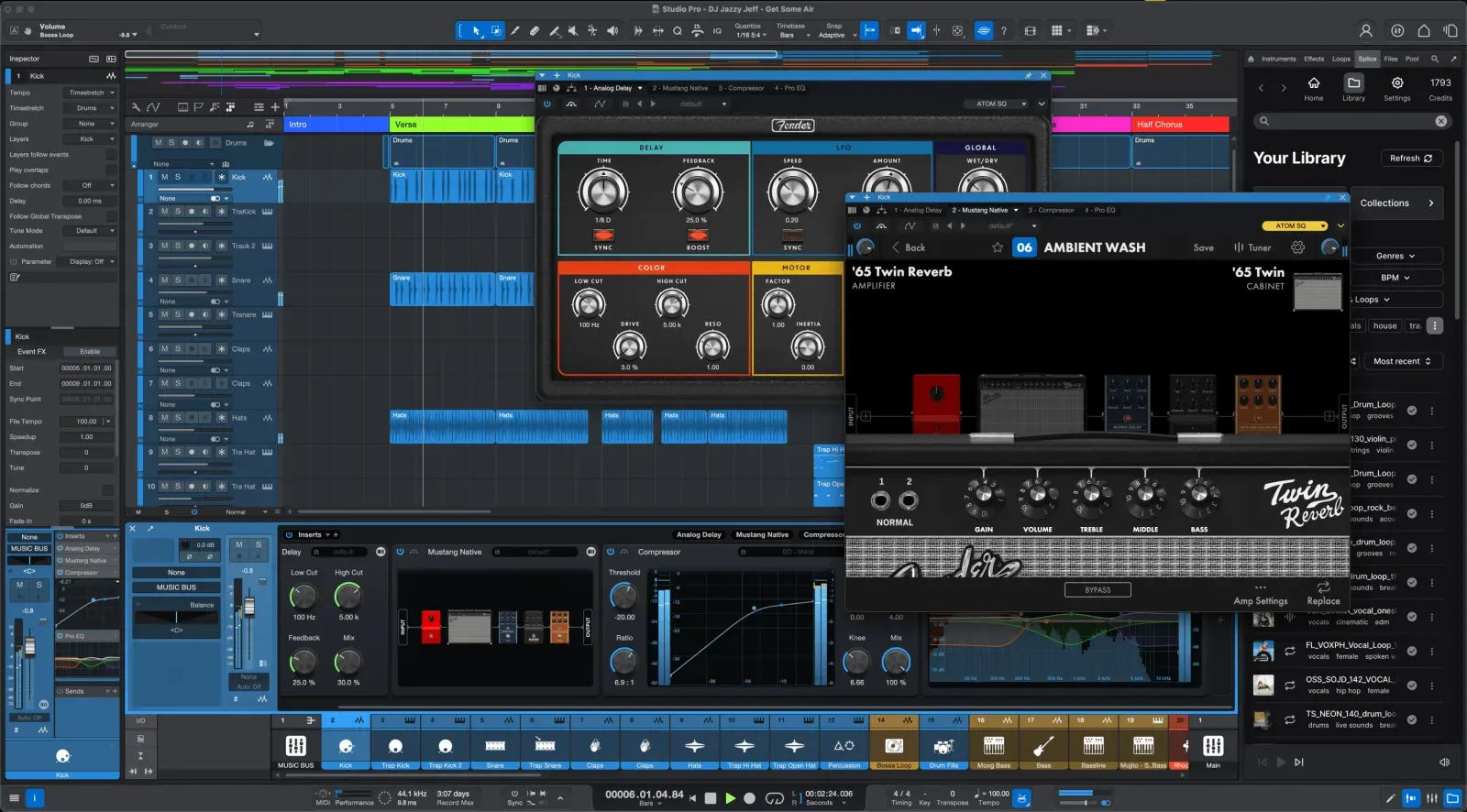
Start with Fender Studio Pro or Cubase if you want a track-based timeline for recording, arranging and mixing. Fender Studio Pro continues the Studio One product line. Its regular perpetual licence is $199.99 with one year of new feature releases. The $179.99 annual Pro+ option includes a perpetual licence and annual extras; the $19.99 monthly plan is subscription access, not the same ownership offer. Cubase has Elements, Artist and Pro editions; compare the current price and feature table rather than buying Elements for a Pro-only tool.
FL Studio belongs on the Windows shortlist when pattern sequencing and Piano Roll editing are the priority. Its Channel Rack and pattern-first workflow don't mirror Logic's track-first arrangement, so record-and-mix users should trial it against Cubase or Fender Studio Pro with the same small project.
REAPER is a low-cost paid option for Windows, macOS and Linux: $60 if you qualify for the discounted licence. Its configurable editing and routing suit users who want to build their own setup. Budget for the instruments you need rather than assuming it supplies Logic’s stock library. Use the full evaluation to try a small project before paying.
Free Logic Pro Alternatives Worth Installing
Use Cakewalk Sonar rather than looking for a new Cakewalk by BandLab activation. Cakewalk says the older product’s activation renewals have ended. Existing projects can open in Sonar; keep a backup before migrating them.
Cakewalk Sonar has a free Windows tier with unlimited tracks, take lanes, comping and VocalSync. Its free licence is currently indefinite but still needs periodic activation, with an offline activation route available. Paid Membership adds tools including plug-in oversampling and Elastique Pro. BandLab Sounds access is limited in the free tier, not wholly absent. Check the specific tool you need in Cakewalk’s current comparison.
On a Mac, start with GarageBand if its limits fit the project. It's free, and GarageBand projects can be opened in Logic later. The current GarageBand 10.4.14 listing requires macOS 15.6 but doesn't state processor compatibility in the public requirements, so verify the exact Mac and App Store offer rather than assuming every Intel model qualifies. GarageBand omits Logic's deeper mixer, Flex Pitch, Stem Splitter and its bass, keyboard and synth Session Players. The beginner DAW guide helps decide whether those differences matter yet.
Waveform Free is another option for recording and sequencing with third-party plug-ins. Tracktion now offers Waveform Free 14 for Windows, macOS and Linux. Its requirements list macOS 13 or later with 64-bit Intel or Apple silicon, Windows 10/11, and testing on Ubuntu 24.04 64-bit. The vendor also says Pro features are unlocked when this version runs on Linux. Check the Linux installer and your audio hardware before moving a working session.
Pro Tools Intro is free, with 8 audio tracks, 8 instrument tracks, 8 MIDI tracks and 4 Aux tracks. When a larger session is opened, Avid says the additional tracks are ignored. Use Import Session Data when you need to choose which tracks come across. REAPER isn't free software, but Cockos provides a 60-day fully functional evaluation.
Logic Pro Alternatives for Intel Macs and Linux
Intel Macs and Linux machines create two different compatibility problems, so they need separate answers.
Keep a working Intel setup intact while checking replacements. Apple’s current marketing requirements specify Apple silicon, but its Logic 12.3 release notes still mention Intel; an App Store listing without a processor line is not a compatibility guarantee. REAPER’s download page explicitly offers Intel Mac builds. Ableton Live 12 lists Intel Core i5 and macOS 11 or later; Waveform Free 14 lists 64-bit Intel and macOS 13 or later. Check your audio interface and essential plug-ins too. The Logic Pro system requirements guide covers the Logic-specific checks.
For Linux, start with Waveform Free if you want a ready-made free installer, or Ardour for audio/MIDI recording and mixing. Ardour’s download options distinguish free source code from paid ready-to-run builds. REAPER provides native Linux builds under the same licence terms as its other platforms. Bitwig Studio offers Linux support and a clip/modulation-focused workflow: Essentials is $99, Producer $199 and the full edition $399 at the checked US prices. LMMS is worth considering for pattern-based composition; it is not the first substitute to trial for a Logic project built around multitrack microphone recording.
Logic Pro Alternatives for Live Performance
Don't replace a DAW before defining the live job. A keyboard player who needs patches, splits, set lists and backing tracks should compare MainStage first. A performer who builds or rearranges the song from clips should compare Ableton Live.
MainStage is Apple's live rig application. It costs $29.99 standalone, carries your Logic instruments, Smart Controls and Audio Units plugins onto stage, supports Ableton Link, and is included in Creator Studio. It'll display scores or lead sheets and let you map a foot pedal to page turns. If your live need is patches, splits and a set list, you don't need a second DAW.
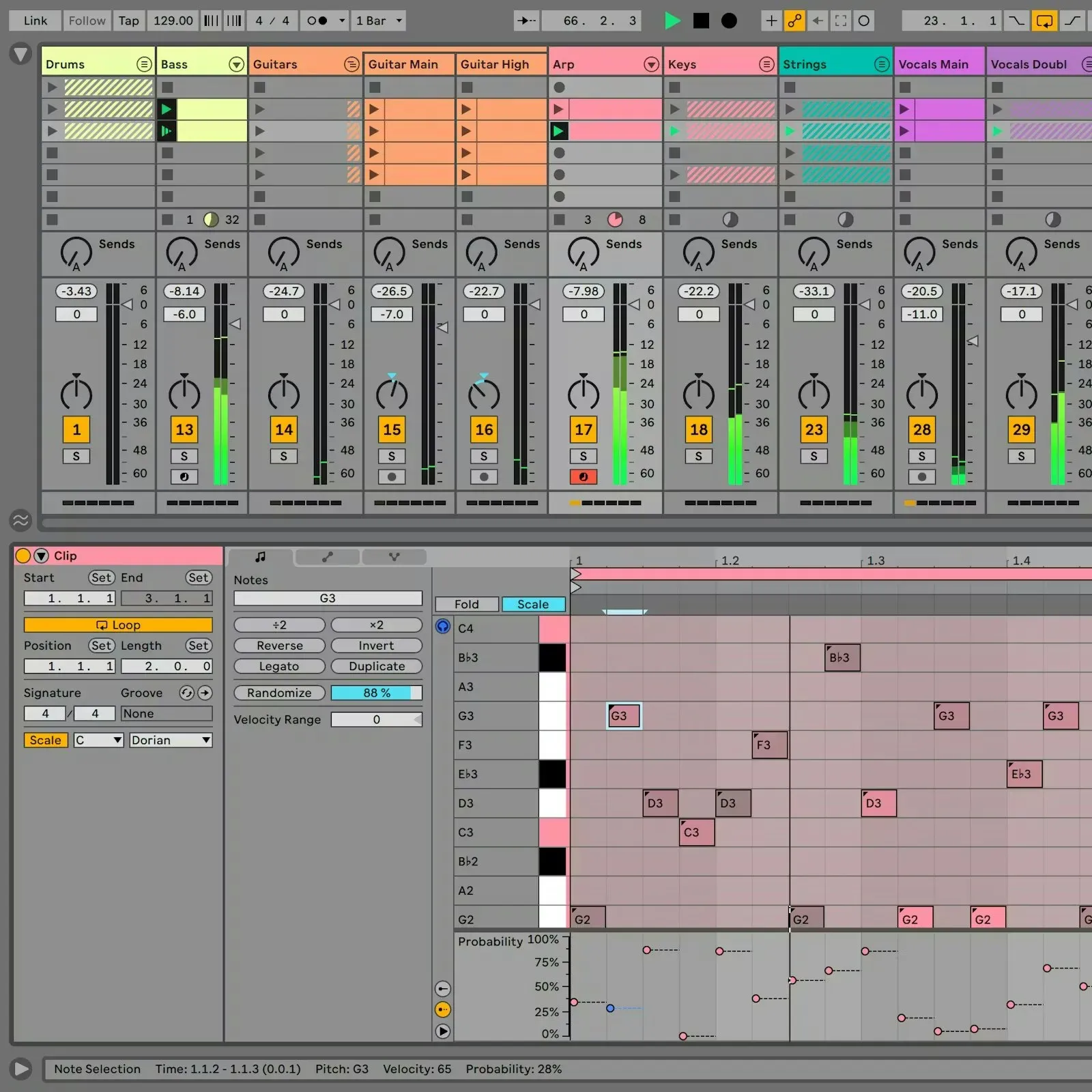
Try Ableton Live when you want to launch and rearrange clips during the performance. Session View puts clips in tracks and scenes, while Arrangement View provides a timeline. Logic’s Live Loops is worth testing first if you already own Logic. Compare the actual set you need to perform, including controller mapping and transitions, rather than switching because one product is labelled a live DAW.
Ableton’s current shop lists Live 12 Intro at $99 with 16 audio/MIDI tracks total, Standard at $349 with unlimited tracks, and Suite at $749. Suite also offers rent-to-own. That plan needs periodic online verification; Ableton says saving and exporting are disabled after more than three days offline until it can verify again. Check that restriction if you tour without reliable internet.
Logic Pro Alternatives for Podcasts and Spoken Word
Logic Pro can record and edit a podcast, but its workflow is designed around music production rather than transcript-led spoken-word editing and direct publishing.
Logic doesn't provide transcript-linked editing or a built-in podcast-host publishing step. You can still edit dialogue, automate levels and measure loudness, but you must build that workflow from its general audio tools.
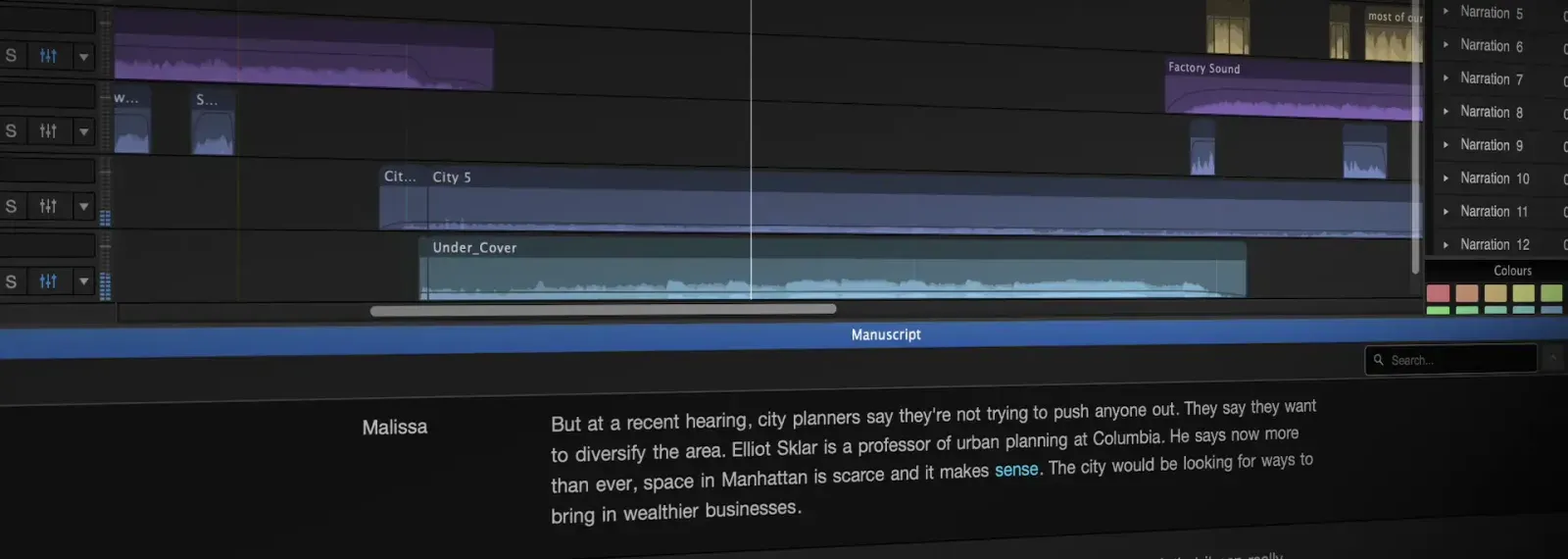
REAPER suits an editor who wants configurable multitrack editing at a low licence cost. Hindenburg PRO is the more focused option for searching interviews by transcript, cutting dialogue and preparing multiple delivery targets. Its current personal comparison separates Standard, Plus and Premium; transcription allowances differ. Test it with a real interview and check the licence tier, rather than paying for music-production tools you will not use.
Audacity is free and can record, edit and mix a straightforward spoken-word show. Start there if your job is cutting recordings and exporting an audio file. If you need a transcript-led edit, complex routing or a specific publishing integration, test that exact workflow before deciding which editor to use.
Logic Pro Alternative Prices and Update Models
Compare the entry price with what you keep. A perpetual licence and a year of updates are different things. Optional major upgrades, additional instruments and subscriptions can change the total, so this table lists the purchase model rather than predicting five years of spending.
| Option | Platform | Entry price | Ownership and update model | Best for |
|---|---|---|---|---|
| Logic Pro | Mac; verify your model and build | $199.99 once | Perpetual App Store purchase; Apple publishes no lifetime-update promise | Mac owners who want everything in one purchase |
| Apple Creator Studio | Mac and iPad | $12.99/mo or $129/yr | Subscription access while active; price can change | Anyone also using Final Cut Pro or Logic on iPad |
| REAPER | Windows, macOS, Linux | $60 discounted licence | Perpetual licence; current purchase covers updates through version 8.99 | Configurable recording and mixing on a budget |
| FL Studio | Windows and macOS | From $99 | Perpetual edition with Lifetime Free Updates for that edition | Beat makers who want edition updates included |
| Ableton Live Standard | Windows and macOS | $349 | Perpetual licence; future major upgrades are optional and separately priced | Live performers and electronic producers; see the Ableton Live workflow test |
| Fender Studio Pro | Windows and macOS | $199.99 regular perpetual price | Perpetual licence includes one year of feature releases; Pro+ is the continuing subscription route | Windows users who want Logic's linear feel |
| Cubase Elements 15 | Windows and macOS | Check Steinberg’s current offer | Perpetual licence; future major upgrades are optional and separately priced | Basic scoring and MIDI production on a budget |
| Pro Tools Artist | Windows and macOS | Check Avid's current checkout | Check the edition, ownership option and included update term before buying | Students heading into commercial studios |
| Cakewalk Sonar free tier | Windows | Free | Periodic activation required | Windows users spending nothing |
| GarageBand | Mac and iOS | Free | $0 | Mac users starting to record and arrange songs |
REAPER's current licence covers updates through 8.99, not a fixed number of years. Fender's perpetual licence includes one year of feature releases and keeps the version you own after that window. Apple has historically updated the standalone Logic purchase without another charge but doesn't promise lifetime updates. Image-Line does make that promise for the FL Studio edition you buy. These differences matter more than a speculative five-year total.
How to Move a Logic Pro Project to Another DAW
Back up the complete Logic project and its audio assets before preparing a transfer. Keep the working Logic installation until you have opened and checked the replacement project. Do the preparation on a copy, especially when applying MIDI parameters permanently.
Do not expect a destination DAW to reopen every part of a .logicx session natively. Third-party converters exist: logic2ableton’s documented limitations include missing automation, bus/send routing and plug-in parameters. We have not tested that converter. DAWproject interchange supports participating applications, including Cubase 15, but does not turn Logic’s native project into a lossless cross-DAW format. Keep consolidated audio, MIDI and notes as your fallback.
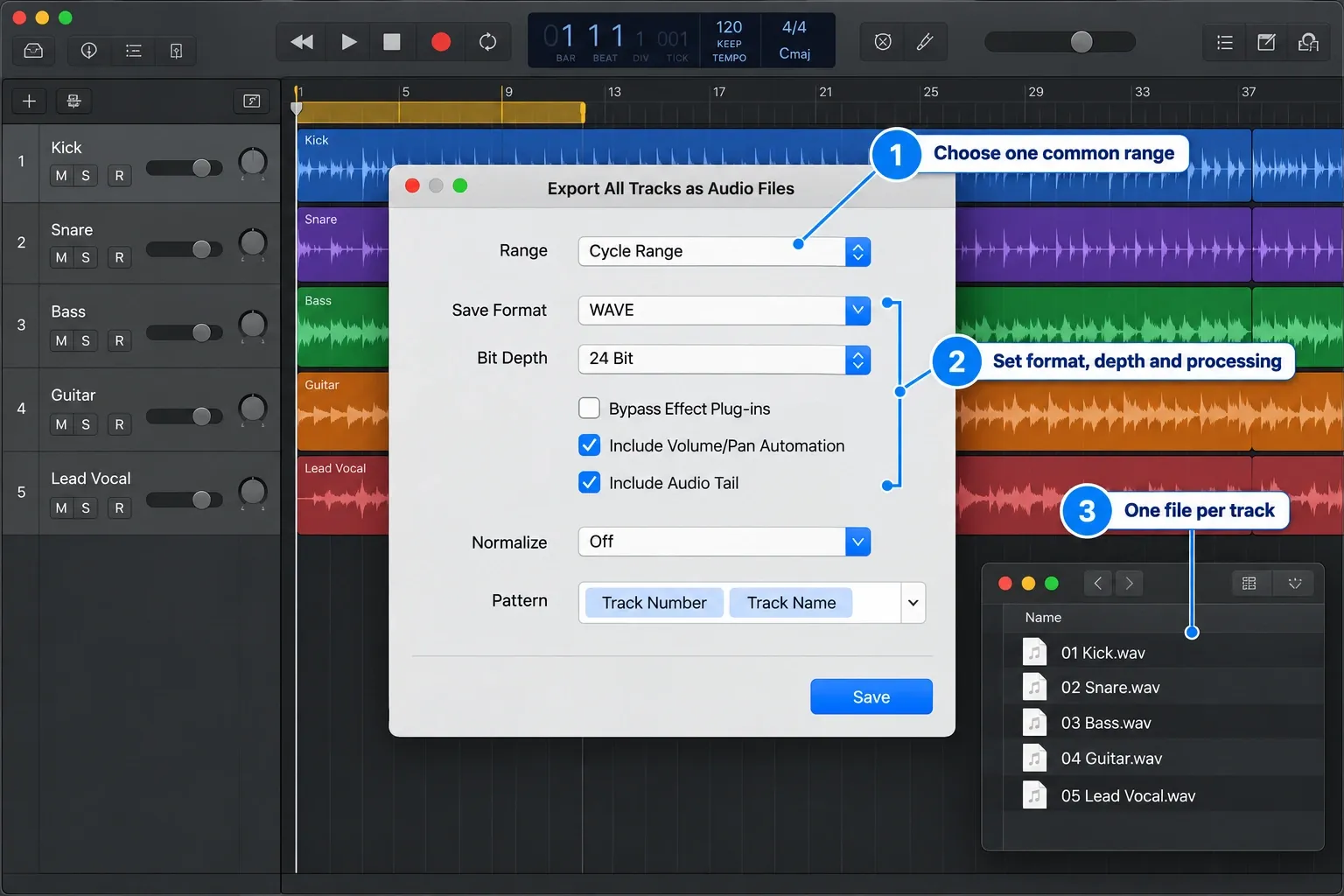
- Export track audio with a common start. Apple’s track-export instructions use File → Export → All Tracks as Audio Files. Choose WAV or AIFF and an agreed bit depth; keep the project sample rate consistent with the destination. Set Normalize to Off. Use a common export range covering the whole arrangement, including any pickup before bar 1, and check the first and last file before importing the set. Include Audio Tail preserves release, reverb and delay tails. A processed set and a set with Bypass Effect Plug-ins selected require separate exports. For a remix, leave Include Volume/Pan Automation off unless the recipient requests printed level moves. Ordinary track exports are not a guarantee that shared send effects or output-bus processing are included; bounce those separately when needed. Individual tracks and grouped stems are different deliverables: the stem-export guide explains that distinction.
- Export editable MIDI separately. Prepare the MIDI regions on your project copy: apply playback parameters and quantization permanently, convert aliases and loops to real regions, join regions per track where needed, and insert instrument MIDI settings as events. Then select the regions and choose File → Export → Selection as MIDI File for Format 1. If exporting one region, ensure the single-region Format 0 option in Settings → General → Project Handling is off. Apple’s Standard MIDI file documentation lists events, track names, markers and tempo changes. These files do not preserve the instrument sound or plug-in chain. Check how the receiving DAW imports tempo and markers; do not assume they arrived correctly.
- Write down the session settings. Record the sample rate, bit depth, tempo and time-signature changes, routing, plug-in versions and automation that must be rebuilt. Audio files do contain format information and can include extra metadata: Logic’s Include Tempo Information option is on by default. That does not guarantee another DAW will recreate the session’s tempo map or routing. Keep readable notes alongside the files.
- Print sounds that will not load in the destination. Bounce or export instrument performances and effects to audio; freezing a track inside Logic is not a portable replacement. Keep processed versions for the original sound, plus unprocessed versions when you may want to remix. Retain a full reference mix and the original project. MainStage shares many Logic sounds, but this does not provide standalone Logic plug-ins for a third-party DAW.
Before retiring the Mac, reopen the imported project in the destination DAW and compare its track count, start positions, tempo changes, markers and audible result with a reference bounce. The licence is only one part of the switching cost. The manual recreation is the part that can break an active project.
Logic Pro Alternatives Compared: Seven Short Verdicts
Logic Pro vs Ableton Live
Choose Ableton Live when Session View, clip triggering and performance arrangement are central. Choose Logic when take comping, score work and Apple's included instruments matter more and you already work on a compatible Mac. Compare both with the same project in the full Logic Pro vs Ableton Live guide.
Logic Pro vs FL Studio
FL Studio covers Windows and macOS and suits producers who build from patterns and detailed Piano Roll editing. Image-Line's current edition table says the $99 Fruity Edition has eight Audio Clips but no direct audio recording. Recording vocals requires Producer Edition or higher. The Logic Pro vs FL Studio guide compares the full workflows.
Logic Pro vs Fender Studio Pro
Fender Studio Pro is a close candidate for Windows users who prefer a linear recording and mixing workflow. It includes Mustang Guitar and Rumble Bass plug-ins, plus dedicated mastering and live-performance pages. Its regular $199.99 perpetual licence includes one year of feature releases. You retain the purchased version after that period; new feature access beyond it requires a qualifying upgrade or plan. Compare that update window with the version of Logic you already own, not just the two entry prices.
Logic Pro vs Cubase
Cubase belongs on the shortlist for notation and detailed MIDI editing on Windows or Mac. Cubase 15 supports DAWproject interchange with participating applications. Check edition boundaries before buying, especially if an advanced MIDI or score feature is your reason for switching. The Logic Pro vs Cubase comparison covers the narrower choice.
Logic Pro vs Reaper
REAPER’s $60 discounted licence covers personal use, educational and nonprofit organisations, and commercial use where annual gross revenue does not exceed $20,000. Other commercial use requires the $225 licence. Both prices buy the same program; the current purchase includes updates through version 8.99. Budget separately for any instruments and sounds you need. The best DAW for Mac guide covers the broader Mac shortlist.
Logic Pro vs GarageBand
GarageBand is the simplest free starting point on a compatible Mac, and its projects can move into Logic later. The current public App Store requirements state macOS 15.6 but don't spell out processor support, so check the exact Mac rather than treating it as a universal Intel fallback. What you give up includes Flex Pitch, Stem Splitter, bass/keyboard/synth Session Players and Logic's deeper mixer. See Logic Pro vs GarageBand.
Logic Pro vs Pro Tools
Choose Pro Tools when the receiving studio asks for an editable Pro Tools session. Ask for the required version, plug-ins and delivery format before starting; a DAW name alone does not guarantee that everything transfers. Where both ends support AAF, test which edits survive. Consolidated WAV or AIFF tracks plus a reference mix are a practical fallback, but they do not preserve every editable decision. See Logic Pro vs Pro Tools.
How Logic Pro Alternative Prices and Compatibility Were Checked
This comparison is based on current Apple and vendor documentation, not a claim that we tested every DAW. Prices and purchase models were checked on September 12, 2026. Test one small project before committing, and verify checkout prices and your exact system requirements. If you are still deciding whether to leave Logic, the Logic Pro review covers its own workflow and limitations.
Logic Pro Alternatives FAQ
Is Logic Pro better than Ableton Live?
Trial Ableton if launching clips and rearranging a set live are your main tasks. Keep Logic on the shortlist if you want its recording, comping and included instruments on a compatible Mac. Both can produce finished music; compare the same short project rather than assuming one is better for an entire genre.
Does Logic Pro work on Windows?
Apple offers no native Windows edition of Logic Pro. Choose a Windows DAW or use Logic on a compatible Mac. An unofficial workaround is not equivalent to a supported Windows release.
What DAW feels most like Logic Pro on Windows?
Start by comparing Fender Studio Pro and Cubase. Their track-based timelines suit recording and mixing, although neither reproduces all of Logic’s controls or stock instruments. REAPER is another low-cost candidate if you are willing to configure its workflow.
Can another DAW open a Logic Pro project?
A converter may recover parts of a .logicx project, but do not assume lossless native import. Keep the original, export consolidated audio and a Format 1 MIDI file, and document routing and plug-in settings. Verify the destination’s tempo, markers, track positions and audible result against a reference mix before retiring the Logic setup.
Can I use Logic Pro plugins in another DAW?
Logic’s bundled instruments and effects are not supplied as a separate plug-in collection for third-party DAWs. MainStage does share many Logic instruments and effects. For third-party plug-ins you own, check the destination host, operating system, processor support and licence. An AU installation does not automatically work in every Mac DAW; Pro Tools uses AAX plug-ins. On Windows, install the vendor’s supported Windows format for your chosen host rather than copying the Mac AU file.
Is Logic Pro worth it over free GarageBand?
Stay with GarageBand until a specific limit blocks the project, commonly mixer routing, MIDI depth or Flex Pitch. Its projects can open in Logic later. On older hardware, check the current GarageBand App Store requirement and your exact Mac first; the public listing requires macOS 15.6 but does not state a processor requirement.
Can a Logic Pro alternative replace Pro Tools in professional studios?
It depends on the studio’s delivery requirements. If it needs a native Pro Tools session, agree on that before starting. Otherwise, ask whether it accepts your DAW’s native project, AAF, or consolidated WAV/AIFF tracks. Test the hand-off; an audio export will not preserve all routing, plug-in settings or editable instruments.
Are Logic Pro updates really free forever?
Do not buy Logic on the assumption that all future major versions are guaranteed free. Apple offers a standalone Mac purchase, but the current purchase information makes no lifetime-update commitment. Image-Line explicitly promises Lifetime Free Updates for the FL Studio edition a customer owns; moving to a higher edition is a separate purchase.
Is Logic Pro for iPad the same as the Mac version?
Logic Pro for iPad is a separate touch-first app, with project exchange between iPad and Mac. It is included in Apple Creator Studio. Apple documents reactivating a previous standalone iPad subscription after cancelling Creator Studio and waiting for it to expire. That document does not establish that every new customer can start a standalone subscription. Check the offer in your regional App Store.
Is Logic Pro good for hip hop and beat making?
Yes. Logic includes Step Sequencer, Live Loops, Quick Sampler, Drum Machine Designer and Stem Splitter. Choose FL Studio instead when its pattern workflow, Piano Roll and cross-platform project exchange better match the people you work with.
What is the best free alternative to Logic Pro?
For Windows, start with Sonar’s free tier if its activation requirements suit you. For a compatible Mac, GarageBand offers a simple route into recording and its projects can open in Logic. For Linux, Waveform Free 14 provides a ready-made option; Ardour is free to build from source, while its official ready-made builds ask for payment. The free DAW comparison covers the wider shortlist.


