Logic Pro vs Cubase (2026): Which DAW Fits You?
Choose Logic Pro for a complete Mac studio at a lower one-time price, or Cubase for Windows support, edition choice and deeper articulation workflows.

Choose Logic Pro if you own a compatible Mac and want one complete desktop edition for a US $199.99 one-time price. Choose Cubase if you work across Windows and Mac computers, collaborate in Cubase, or rely on Cubase Pro tools such as Expression Maps and its deeper scoring workflow. Both can record, edit MIDI, tune vocals and mix a full song. On supported hardware, Logic Pro and Cubase Pro can also separate stems and build Dolby Atmos projects. The useful difference is how each one fits your work.
Versions compared: Logic Pro 12.4, Cubase 15.0.30. Platform, price, edition limits and workflow decide this choice, so the rest of the page focuses on them.
Logic Pro vs Cubase: quick comparison
| Decision point | Logic Pro 12.4 | Cubase 15 | What it means |
|---|---|---|---|
| Desktop platform | Mac only; the App Store listing and Creator Studio support page give macOS 15.4 or later, while the Logic product page gives 15.6 or later. The product and Creator Studio pages require Apple silicon; the standalone listing omits a processor minimum | Mac and Windows | Windows makes the decision immediately |
| US prices | US $199.99 one-time Mac purchase; also in Creator Studio at $12.99 monthly or $129 yearly | Launch suggested retail: Elements $99.99; Artist $329.99; Pro $579.99 | Elements is cheaper to enter, but it is not equivalent to the full Logic feature set |
| Current trial path | One month for new Creator Studio subscribers; qualifying new-device offer: three months | 60 days, no credit card | Compare trial eligibility as well as duration |
| Third-party plug-ins | Audio Units and Audio Unit Extensions | 64-bit VST3; legacy VST2 is unofficial and unavailable in native Apple silicon | Check format and license before moving a plug-in collection |
| Songwriting tools | Session Players, Chord Track, Chord ID, Live Loops, Step Sequencer | Chord Track and Pads; Pattern Sequencer in Artist/Pro; Modulators in Pro | Both cover full song production with different starting points |
| Vocal editing | Quick Swipe Comping, Flex Time and Flex Pitch | Comping, AudioWarp and VariAudio in Artist and Pro | Neither requires a third-party tuner for basic correction |
| Orchestral and score work | Piano Roll and a capable Score Editor | Score Editor and MusicXML exchange; redesigned Expression Maps in Pro | Cubase Pro has the clearer edge for large articulation maps |
| Stem separation | Stem Splitter; requires Apple silicon | Stem Separation in Cubase Pro; check current Windows on Arm limitations | Hardware and edition both matter |
| Dolby Atmos | Integrated Dolby Atmos tools | ADM authoring and Dolby Atmos renderer in Cubase Pro | Both can handle immersive music; compare the complete delivery workflow |
The decision in one minute
- You use Windows: choose Cubase. Logic Pro for Mac does not run on Windows.
- You have an Apple-silicon Mac and are buying your first serious DAW: Logic Pro is the simpler complete-package purchase at the current one-time price.
- You compose with large orchestral libraries and constantly manage articulations: trial Cubase Pro, not Elements, and test Expression Maps inside one real cue.
- You record vocals and bands: either DAW can do the job. Keep the one whose comping, monitoring and editing shortcuts already make sense to you.
- You collaborate with Cubase users on Mac and Windows: native Cubase projects remove handoff work that no comparison table can price.
- You already own years of Logic projects and AU-only plug-ins: stay with Logic unless the reason to move is specific enough to justify rebuilding that archive.
A broader best DAW for Mac comparison helps if Cubase and Logic aren't your only candidates. This page stays on the direct Cubase versus Logic Pro decision.
Platform is the first hard filter
Apple sells Logic Pro 12.4 through two current Mac routes, and its requirement pages do not agree. The standalone US Mac App Store listing asks for macOS 15.4 or later and does not state an Apple-silicon minimum, while Apple’s Logic Pro product page lists macOS 15.6 or later and Apple silicon. Apple's current release notes and user guide still include Intel-specific behavior. The Creator Studio version requirements list macOS 15.4 or later and a Mac with Apple silicon for Logic Pro 12.4. Some features, including Stem Splitter, are unavailable on Intel Macs and when Logic runs under Rosetta. That rules out Windows for certain; on an Intel Mac, check the one-time App Store listing and the feature you need before paying.
Cubase 15 supports Windows and macOS, including qualifying Intel Macs and Apple silicon. Steinberg's current Cubase 15 system requirements are the page to check against the exact computer before you buy; the edition comparison answers a different question. Cross-platform support matters when one license has to follow a desktop PC and a MacBook, or when your collaborators do not all use Apple hardware.
Platform support doesn't make existing third-party hardware automatic. Audio interfaces, MIDI drivers, control-surface software and plug-ins still need current support for the operating system and processor. Check the whole studio, including its hardware and plug-ins.
Tablets change the comparison. Logic Pro for iPad is part of Apple Creator Studio, and it can open projects made in Logic Pro for Mac, unless they use features it doesn't support, such as surround or Spatial Audio, external MIDI tracks or sample rates above 96 kHz. On Steinberg's side, the tablet option is Cubasis 3, a separate iPhone and iPad app that can export projects to Cubase.
Price, licenses and trials
Logic Pro is the lower-cost complete desktop package in this comparison. The standalone US Mac App Store listing lists $199.99 as a one-time purchase. Logic Pro is also available through Apple Creator Studio, listed in the United States at $12.99 per month or $129 per year. You don't need the subscription to keep using a separately purchased Mac copy. It's a bundle choice.
Do not turn “one-time purchase” into “lifetime updates.” Apple has delivered substantial updates to paid owners, but it does not publish a promise that every future major version will always be free. The current trial route Apple promotes is a one-month Creator Studio trial for new subscribers, and that version requires Apple silicon on Mac. Old pages mentioning a 90-day standalone Logic trial should not drive a 2026 decision. Apple also offers a three-month trial with qualifying new Mac or iPad purchases; check eligibility and renewal terms before subscribing.
At the Cubase 15 launch, Steinberg set US suggested retail prices of $99.99 for Elements, $329.99 for Artist and $579.99 for Pro. Store prices vary by region and change during promotions, so check the current store price for your country before buying. These are list prices for full licenses, and your checkout total can differ. Elements costs less than standalone Logic, but the edition grid matters: it does not include every tool described for Artist and Pro.
The Cubase 15 trial lasts 60 days and requires no credit card. Steinberg says trial projects and settings remain after the trial. Its current licensing FAQ says a single-user license can activate Cubase on three computers, but only one person may use it, on one computer at a time. Initial online activation is required; it can then run offline indefinitely. The old USB eLicenser is no longer required. Multiple Macs alone are not a unique Cubase advantage: Apple’s Logic installation terms allow a copy on each Mac you own or control for personal, non-commercial use, with separate business and education terms. Cubase’s platform flexibility matters when your computers include Windows.
Already bought Logic? Check the Cubase Pro competitive crossgrade before paying full price. Steinberg advertises savings of up to 40% and lists Logic Pro 9 or later as eligible, with proof of purchase required. Do not assume a Creator Studio subscription alone meets that requirement; confirm the offer terms.
Writing and arranging music
Logic encourages a fast route from an empty project to a shaped arrangement. Session Players can create controllable drum, bass, keyboard and synth parts. Chord ID can detect harmony from audio or MIDI and place it on the Chord Track. Live Loops supports non-linear sketching, while Step Sequencer and Drum Machine Designer cover programmed beats.
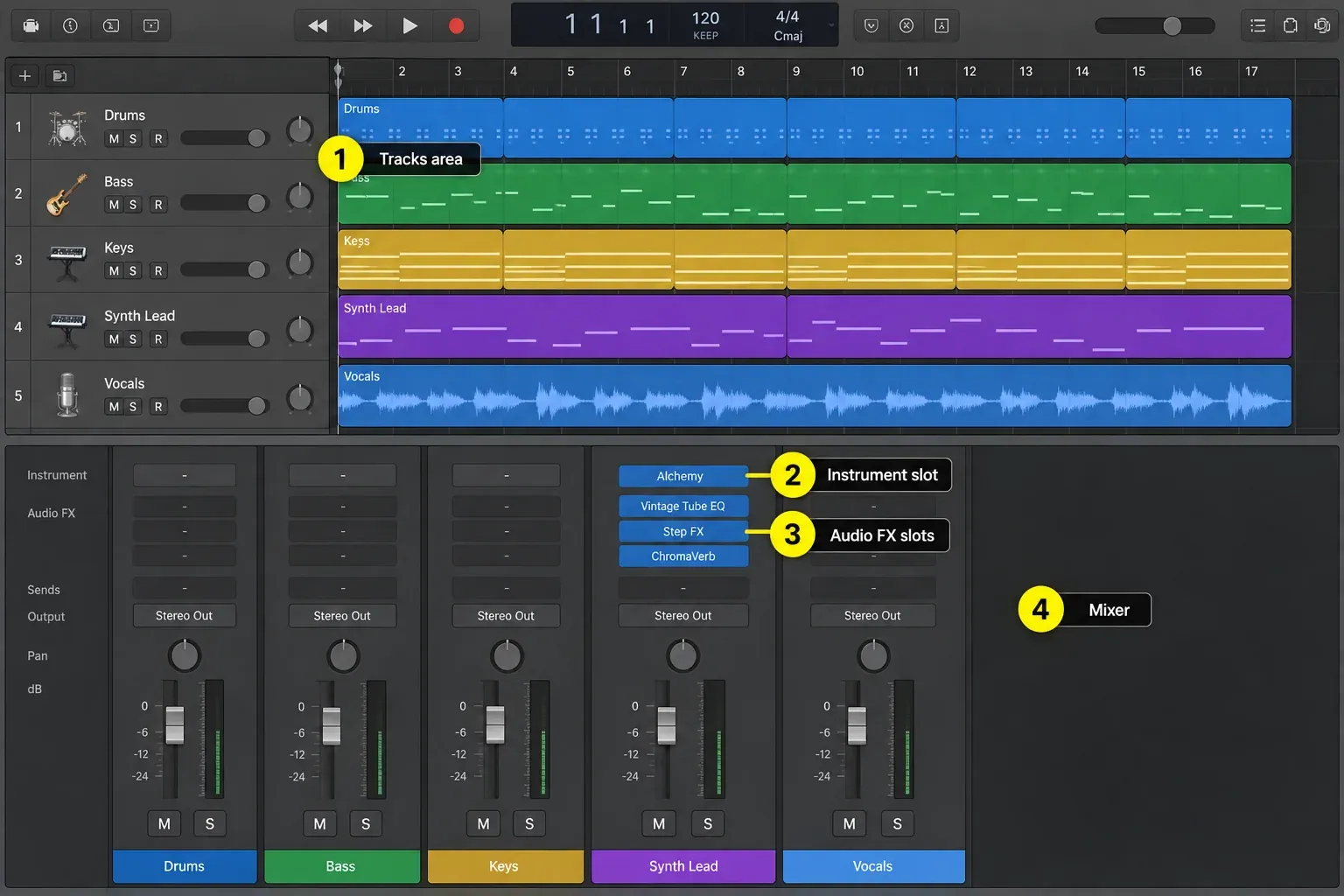
Cubase provides Chord Track and Chord Pads alongside its MIDI editors. Pattern Sequencer is included in Artist and Pro; Modulators requires Pro. Cubase 15 expanded melodic pattern creation, while its folder and routing tools suit arrangements that grow into many tracks. Neither approach writes a better song for you. The question is whether you'd rather have Logic's guided players and loop grid or Cubase's configurable editors and project structure.
A concrete Cubase Pro 15 advantage is the Project Logical Editor: its Name/Contains filter can find tracks sharing a fragment such as “voc,” and track operations can change visibility or mute state. Separately, Cubase macros combine commands in order. Logic’s MIDI Transform works on MIDI events; Logic also has track-hiding commands. Compare the scope of a repeated job, and don’t assume Logic can’t hide tracks or that Cubase is automatically faster.
For a first DAW, I'd lean toward Logic for a reason that has nothing to do with menu design: there's one full Mac edition to learn. Cubase gives you a cheaper starting edition and a 60-day trial, but you have to work out whether Elements, Artist or Pro holds the tools you expect to use.
Recording vocals, instruments and bands
Logic's Quick Swipe Comping turns a take folder into a composite performance without copying every phrase onto new tracks. Flex Time handles timing edits, and Flex Pitch handles note-level pitch work. The Logic Pro vocal-recording workflow shows how those tools connect from input setup to a finished comp.
Cubase also supports lane-based comping, timing work and pitch editing. Steinberg's current Cubase Artist highlights include advanced comping, multi-track AudioWarp and VariAudio pitch correction. Cubase Pro includes the deeper full feature set. Either DAW can fix a vocal; the difference is workflow and, on Cubase, which edition you buy.
For a band session, the decisive differences are often outside the edit tool itself: the audio-interface driver, cue-mix routing, control room setup, engineer shortcuts and whether the next studio can open the native project. Cubase Pro's Control Room can be valuable in a complex monitoring setup. Logic remains fast for a Mac room built around take folders and familiar key commands. It also handles multi-mic drums: group the kit tracks with Editing (Selection) and Quantize-Locked (Audio) selected, mark kick and snare as Q-Reference tracks, and one quantize value moves the whole kit phase-locked.
MIDI, orchestral writing and film scoring
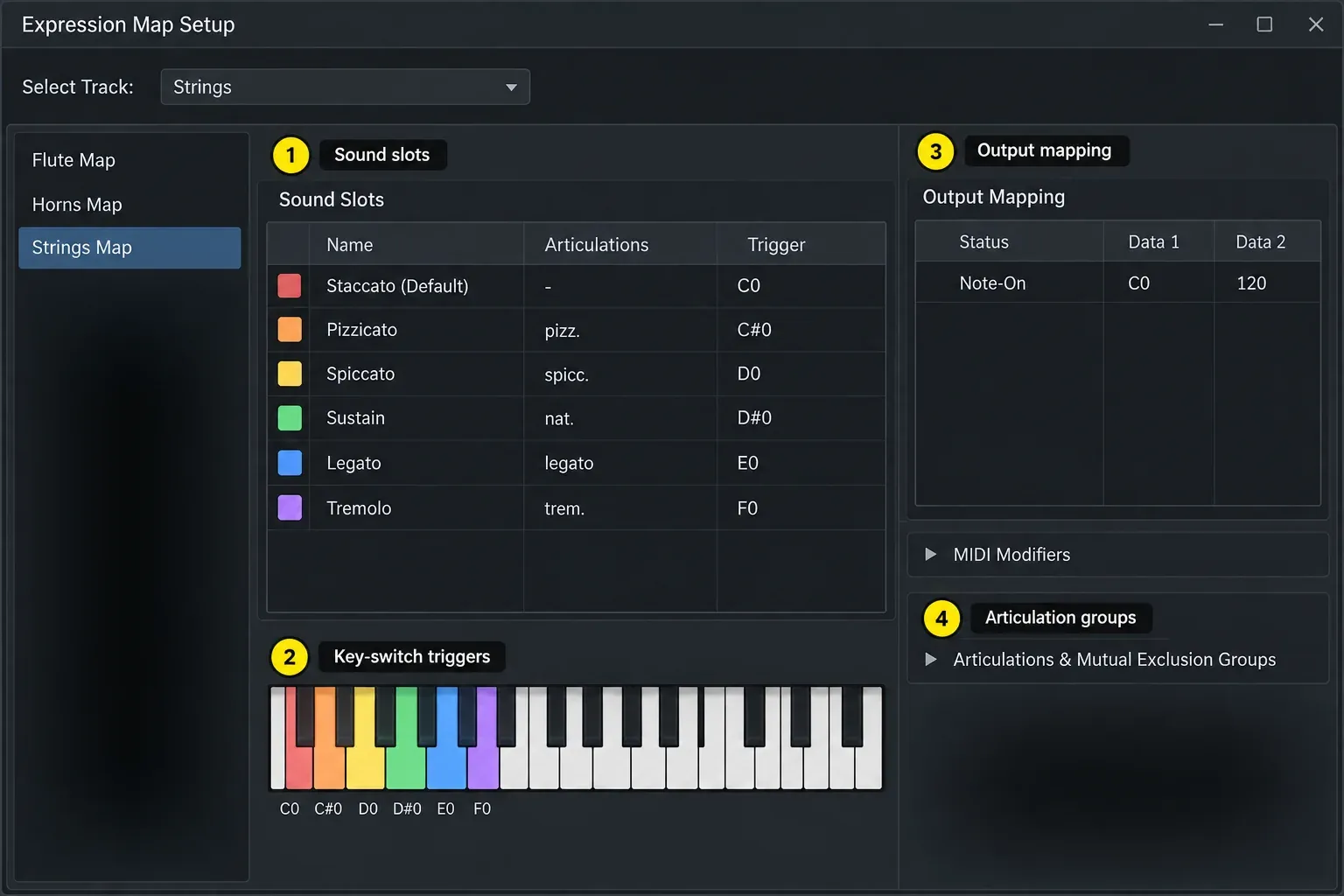
Cubase Pro is the more compelling option when articulation management is central to the job. Its redesigned Expression Maps connect named articulations with MIDI triggers and integrate with the Key Editor and Score Editor. A template can expose staccato, pizzicato, legato and other techniques as musical choices rather than loose key switches hidden below the playable range.
Both applications can exchange notation through MusicXML. Logic can import and export MusicXML; Steinberg also lists it across the Cubase editions in its edition comparison. MusicXML support alone isn't a reason to pay for Cubase Pro. Check the imported score before handing it to a player, because notation exchange doesn't guarantee that every layout or playback setting survives.
Logic isn't weak at MIDI. Its Piano Roll, Event List, MIDI Transform functions, MIDI plug-ins, articulation sets and Score Editor can run a serious composition. The Logic Pro MIDI recording guide covers capture and cleanup, while the Piano Roll guide handles note editing. Cubase's advantage becomes meaningful when large templates and per-articulation timing compensation are daily work rather than an occasional requirement.
Plug-ins, instruments and file formats
Logic hosts Audio Units and Audio Unit Extensions. Cubase 15 hosts 64-bit VST3 plug-ins and can expose VST2 only as legacy compatibility. Steinberg's current plug-in manual documents both formats, but its Cubase 15 FAQ says VST2 is not officially supported and cannot load when Cubase runs natively on Apple silicon. Prefer VST3. The installed component, preset location and activation still need checking before a move.
A Logic project that uses an AU instrument won't load that AU instance in Cubase. Even when the matching VST3 is installed, the DAWs make no promise to translate the plug-in state. Save portable presets where the vendor supports them, print important software-instrument parts to audio, and keep screenshots or notes for settings that cannot move. The Logic Pro plug-in guide explains the AU side and Plug-in Manager.
Both DAWs include enough instruments and effects to finish music without buying a third-party bundle. Logic's current collection includes Alchemy, Quick Sampler, Drum Machine Designer, studio instruments and a broad effect set. Cubase's content varies by edition, which is another reason to compare the exact Elements, Artist or Pro column instead of treating “Cubase” as one package.
Mixing, routing and Dolby Atmos
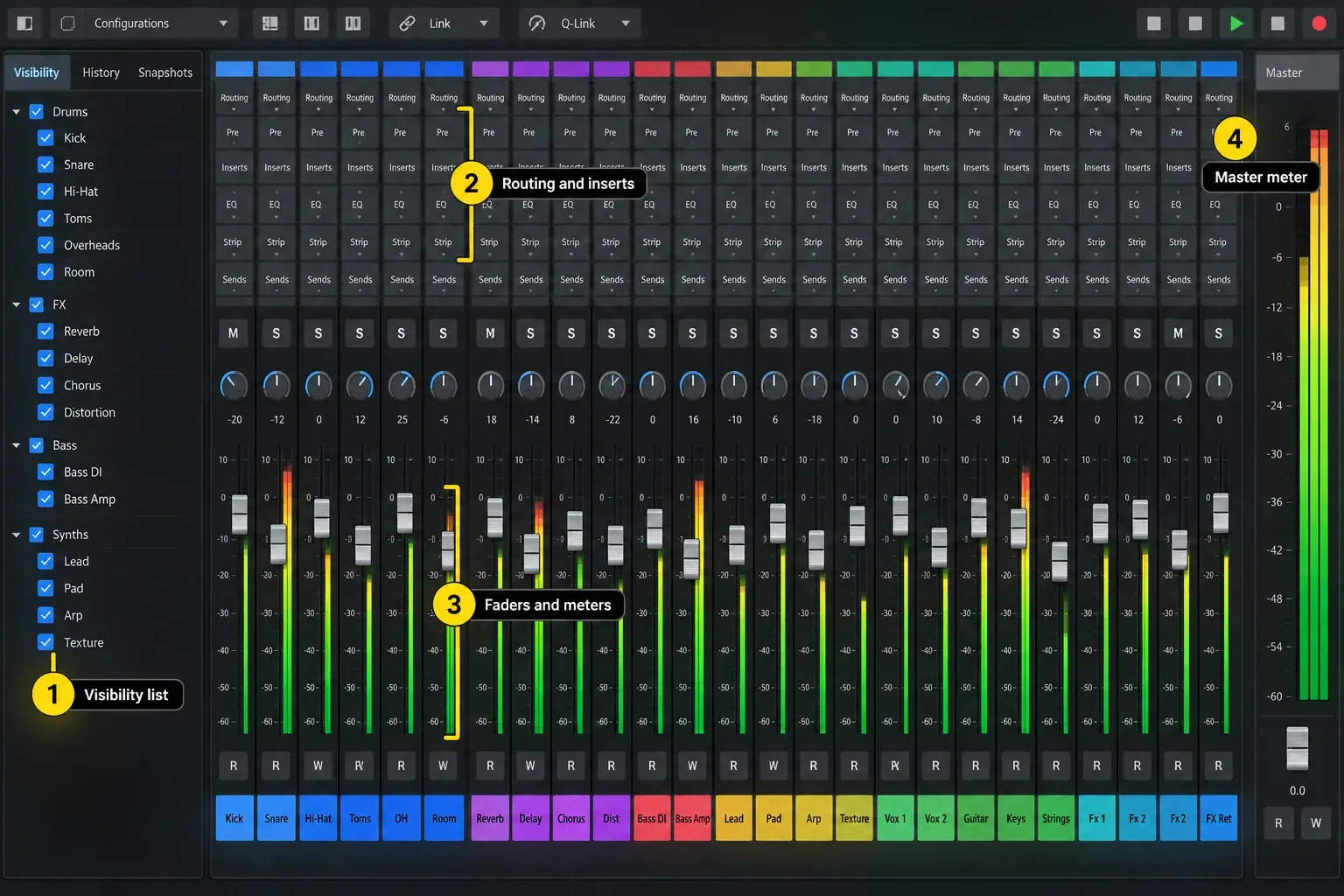
Both DAWs provide mixer channels, sends, automation and plug-in delay compensation. In Cubase, check the edition: MixConsole History is in Artist and Pro, while Control Room and surround/Atmos tools require Pro. MixConsole brings the available routing and metering controls together. Logic's Mixer follows the same project channel-strip model used across its instruments, aux channels and outputs.
Logic includes integrated Dolby Atmos creation and rendering tools. Cubase Pro includes ADM authoring and its Dolby Atmos renderer. That doesn't make the two delivery pipelines identical. If immersive work pays the bills, build a short test project and confirm bed limits, object routing, export requirements, external renderer needs and the downstream mastering workflow before choosing.
Don't choose a DAW from a claim that its mix engine “sounds better.” With equivalent source files, gain, pan law, processing and export settings, meaningful differences come from the decisions and tools in the project. A listening impression without matched settings says nothing reliable about the software itself.
Stem separation and modern production tools
Logic Pro includes Stem Splitter, which separates vocals, bass, guitar, drums, piano and other material into project tracks, but Apple says the feature requires Apple silicon. Cubase 15 added Stem Separation to Cubase Pro; Steinberg's release notes record a Windows on Arm limitation at launch. Check them for the current status before choosing an Arm PC for this feature. Both can help with remix preparation, practice parts, sampling and repair, but neither can recover information that no longer exists cleanly in a dense master.
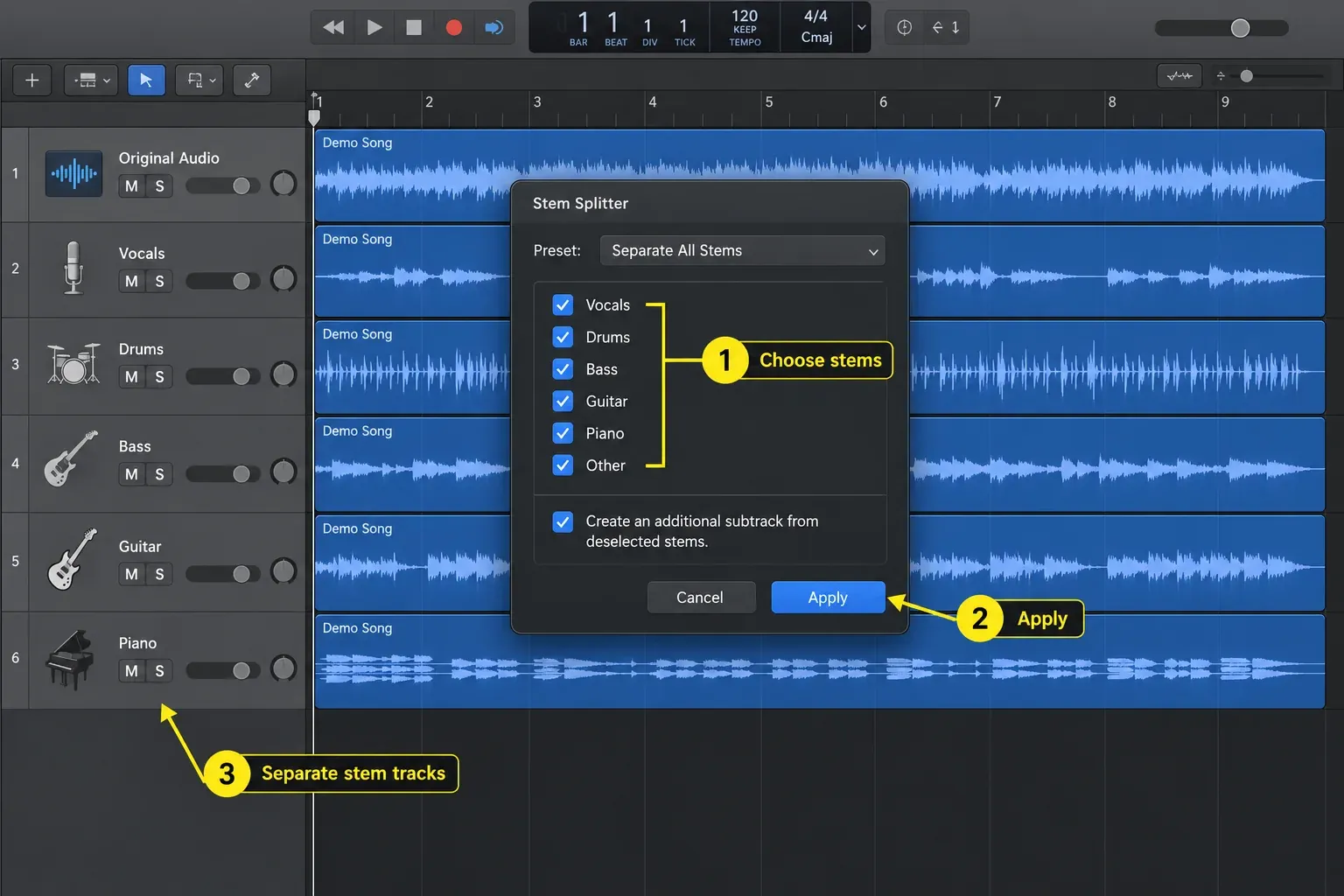
The Logic Pro Stem Splitter guide explains the practical limits. Compare the result against the original, listen for cymbal and reverb artifacts, and keep the source file. A marketing checkbox doesn't guarantee an isolated vocal clean enough for release.
Collaboration can outweigh the feature list
A collaborator using the same DAW can exchange the native project, provided both sides have compatible versions, plug-ins and sample libraries. A mixed Logic and Cubase team needs a neutral handoff. That's more preparation, but it can be reliable.
- Save an untouched copy of the original project.
- Bounce a reference mix. It gives the receiver a target for timing, balance and arrangement.
- Export consolidated audio from the same start point. Include dry tracks and committed effect returns when the sound depends on them.
- Export MIDI for editable instrument parts. Also print the audio in case the receiving system lacks the instrument.
- Write down tempo, meter, sample rate, bit depth and marker positions.
- Use AAF only for the material it can carry. Logic can export AAF with used audio regions, positions and volume automation, and Cubase Pro 15 can import AAF. Plug-ins, instruments, every routing choice and every automation type will not arrive intact.
- Open the transfer on the receiving computer before archiving anything. Check the first downbeat, song length, phase relationships and the reference mix.
The Logic Pro stem-export guide covers naming, range, normalization and re-import checks. Native project compatibility is still the strongest reason to choose the DAW already used by the people who must open your sessions.
Should you switch from Logic Pro to Cubase?
Switch for a named bottleneck, not for a longer feature list. Windows compatibility, daily Expression Map work, a Cubase-based team or moving between your own Windows and Mac computers can justify the move. Curiosity about a different mixer rarely repays the work of rebuilding templates, shortcuts, plug-in states and years of project knowledge.
Use the 60-day Cubase trial for one complete piece of work. Don't judge it from a blank project or a tutorial demo. Import MIDI, rebuild a vocal chain, create headphone routing, automate a mix, export the final file, then repeat one revision after a few days. If the specific bottleneck disappears and the rest of the job remains comfortable, the switch has evidence behind it.
The same rule works in reverse. A Cubase user with an Apple-silicon Mac can trial Logic through the current Creator Studio route and finish one song before moving an archive. An Intel-Mac user should not assume that subscription trial is compatible. The lower standalone purchase price is real, but migration time is also a cost.
Frequently asked questions
Is Cubase better than Logic Pro?
Not in every workflow. Cubase is the practical choice for Windows, and Cubase Pro has an advantage for articulation-heavy orchestral work. Logic Pro is a lower-cost complete package for a compatible Mac, but Apple silicon is required for the Creator Studio version and features such as Stem Splitter. Recording, MIDI, vocal editing, mixing and mastering are possible in both.
Is Logic Pro or Cubase better for beginners?
Logic Pro is the simpler complete-package decision for a new Mac user because one desktop edition includes the full feature set. Cubase Elements costs less and Cubase offers a 60-day trial, but a beginner should confirm that the chosen edition includes the tools they expect to learn.
Which is better for MIDI and film scoring?
Both have deep MIDI editing and score tools. Cubase Pro is the stronger fit when large orchestral templates, redesigned Expression Maps and articulation timing are central to the work. Logic remains capable for MIDI production, notation and picture work, especially when the rest of the studio is already Mac-based.
Can Cubase open a Logic Pro project?
No, Cubase does not natively open a Logic project with its complete plug-ins, instruments, routing and edits. Transfer consolidated audio stems, MIDI, tempo and marker notes, a reference mix, and AAF where its supported contents help. Keep the original Logic project.
Does Logic Pro sound better than Cubase?
No, neither one wins on the DAW name alone. Source files, gain, pan law, plug-ins, routing and export settings must match before comparing output. Choose by workflow and verified features, and ignore uncontrolled summing claims.
Is Cubase worth buying if I already own Logic Pro?
It can be worth it when Windows support, Cubase-based collaboration or Cubase Pro's Expression Maps and score workflow solve a recurring problem. If Logic already finishes the work efficiently, keep it and trial Cubase on a complete project before paying and migrating.
Which DAW is cheaper, Logic Pro or Cubase?
Cubase Elements has the lowest entry price, with a US suggested retail price of $99.99 at the Cubase 15 launch. Logic Pro's complete standalone Mac edition is $199.99, below the Cubase Artist and Pro suggested prices of $329.99 and $579.99. Compare the required feature set rather than the cheapest edition alone.
The final choice
Buy Logic Pro when a compatible Mac is already part of the plan and you want a complete writing, recording and mixing package at the lower one-time price. Buy Cubase when a mixed Windows and Mac setup, Cubase-based collaboration, edition choice or Cubase Pro's articulation and score workflow changes what you can deliver.
If neither condition is decisive, keep the DAW that already lets you finish music. Familiar shortcuts, working templates and sessions your collaborators can open can save more time than a new feature.
Continue through the Logic Pro Comparisons hub for the other direct DAW matchups.


