Best Orchestral Plugins for Logic Pro: 8 Picks
Choose the right orchestral library for Logic Pro by workflow, budget and storage, from stock instruments and free starters to detailed scoring tools.

Quick answer: Start with Logic Pro’s Studio Strings and Studio Horns if you need strings or brass in a song. BBC Symphony Orchestra Discover is a free, small-install orchestra with its own player. Spitfire Symphony Orchestra Discover gives you more instruments and dynamic layers in Kontakt Player. Nucleus is the first paid cinematic library I'd compare. For separate instrumental lines, look at Synchron Prime Orchestra and Berlin Orchestra: Created with Berklee. Albion ONE is built around ensemble film cues. Hollywood Orchestra Opus offers a much larger scoring collection, but demands substantial storage.
Each pick is weighed on its manufacturer’s instrument list, player requirements, licensing terms and storage figures. The useful question is what you're writing: orchestral parts behind a song, independent lines for a score, or broad ensemble-based film cues. Choose the parts first, then check the Mac, license and budget.
This shortlist is deliberately narrow. If the gap in your session is an EQ, reverb, synth or metering tool rather than an orchestra, use the broader best Logic Pro plugins guide instead.
The best orchestral plugins for Logic Pro at a glance
| Pick | Best for | Player in Logic | Main compromise |
|---|---|---|---|
| Logic Studio Strings and Horns | Learning and occasional orchestral layers | Native Logic instruments | Less depth than a dedicated full orchestra |
| BBC Symphony Orchestra Discover | Free first orchestra | Spitfire dedicated AU | One mix, one dynamic layer and no legato |
| Audio Imperia Nucleus | First paid cinematic all-rounder | Free Kontakt Player | Two supplied mixes rather than individual microphone positions |
| Synchron Prime Orchestra | Detailed orchestration around 30 GB | Synchron Player AU | Flow and Precision views take time to learn |
| Berlin Orchestra: Created with Berklee | Classical-style section writing | SINEplayer AU | One mix; independent parts need more MIDI editing |
| Hollywood Orchestra Opus | Large cinematic scoring collection | Opus AU | 944 GB for the full product; plan storage carefully |
| Albion ONE | Fast ensemble film and trailer cues | Free Kontakt Player | Grouped sections limit independent instrumental lines |
| Spitfire Symphony Orchestra Discover | Free orchestra with more expressive control | Free Kontakt Player | 5.68 GB and some reduced key ranges |
Before you buy another orchestra
First decide whether you need separate instruments or grouped ensembles. Individual patches let a flute, oboe, viola or horn play its own line. An ensemble patch combines players, often by range, so one MIDI part covers several instruments. That is useful for broad chords and sketches, but less flexible when one inner voice needs to move independently. Many libraries mix both approaches. Check the patch list before you trust the word “orchestra.”
Logic Pro hosts Audio Units (AU), not VST or VST3. Install the Mac AU version of Kontakt, SINEplayer, Opus, Synchron Player or the dedicated Spitfire player. Our Logic Pro plugin installation guide covers installation and validation. If a player disappears after an update, use the missing-plugin checks before downloading the samples again.
Check the exact edition before comparing prices. An instrument sold for a notation program is not necessarily an AU library for Logic, even when its name resembles the Kontakt or SINE edition. Also check your macOS version and whether the player supports your Intel or Apple silicon Mac. A library’s minimum Kontakt version is not a promise that today’s Kontakt installer runs on the same older Mac: Native Instruments lists macOS 14 or later for Kontakt 8.8 onward.
Price check: on September 30, 2026, the linked product pages list Nucleus and Albion ONE at US$449 each, Berlin Orchestra: Created with Berklee at €299 and Synchron Prime Orchestra at €579. These are the named full libraries, not crossgrades or individual sections. The currencies and tax treatment differ. Check your regional checkout instead of reading this as a cheapest-to-most-expensive ranking. Hollywood Orchestra has both purchase and subscription options; see its section below.
Leave time for MIDI editing as well as installation. A sustained note may need a changing dynamic level, a different attack or a legato transition. Before expanding the template, make one short phrase work with the library’s articulation and expression controls. A price or sample count cannot tell you how much editing your music will need.
1. Logic Studio Strings and Studio Horns: best place to start
Logic includes Studio Strings for solo and section strings, and Studio Horns for solo and section brass. Both support multiple articulations, keyswitching and MIDI-controlled dynamics. No third-party player or library license is required, but included sounds may still need downloading through Logic’s Sound Library.
A string layer behind a vocal or a brass part in a pop, rock or electronic track is a good reason to start with Logic's own instruments. They let you work on voicing and dynamics before you buy a complete orchestra. Strings and Horns alone won't supply a matched woodwind and percussion collection.
Look elsewhere when: the score needs one matched recording space for strings, brass, woodwinds and percussion, more detailed legato choices, or microphone control for a feature-score mix.
2. BBC Symphony Orchestra Discover: best free full-orchestra starter
BBC Symphony Orchestra Discover is a free alternative to Logic’s stock sections. Spitfire lists 34 instruments, one mix signal and a dedicated player with an AU build. It does not require Kontakt. Its separate instruments let you give orchestral lines their own tracks rather than play everything through one ensemble patch.
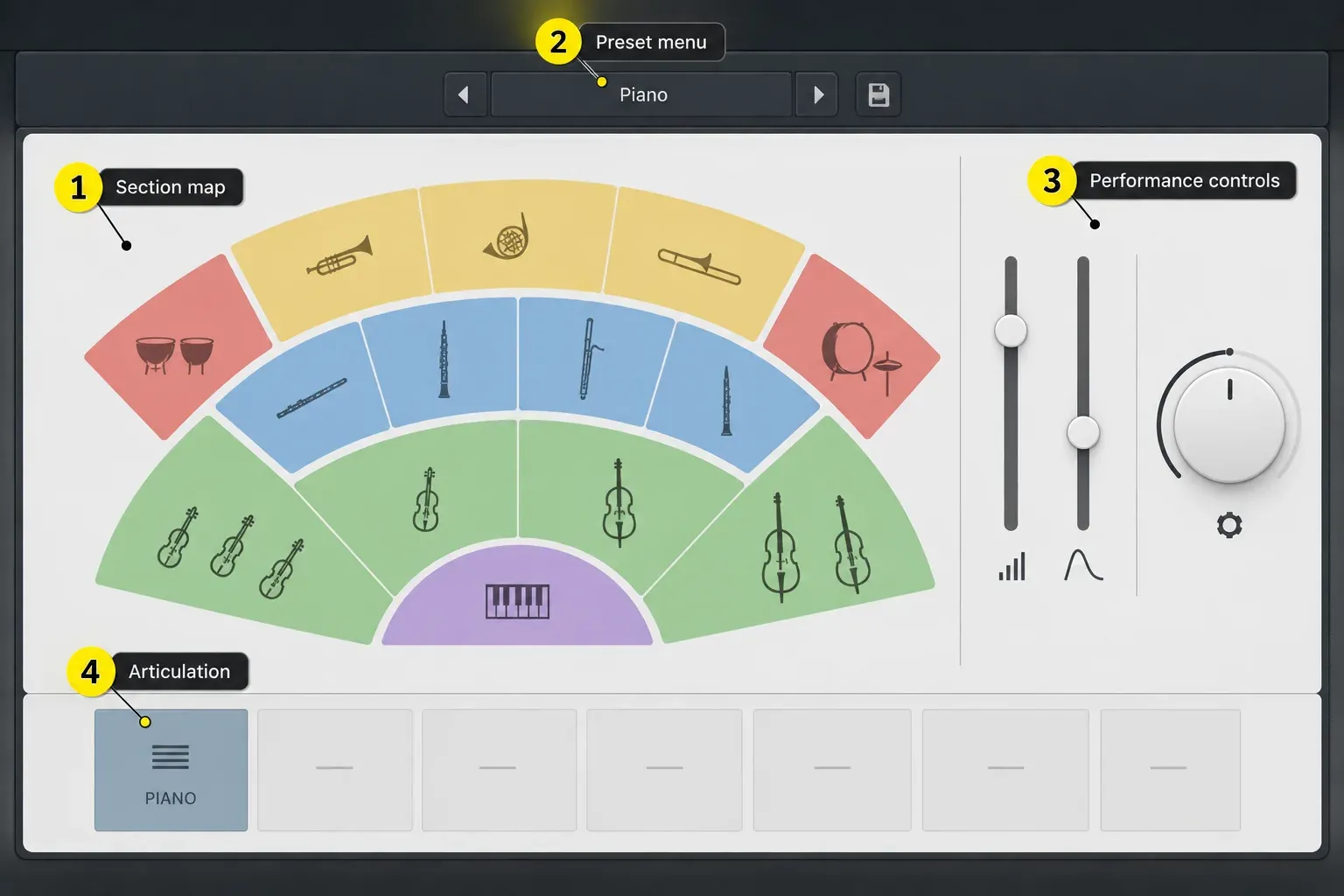
Discover has one dynamic layer and no legato patches, unlike the more detailed paid BBC editions. It is useful for learning instrumentation and arranging, but do not expect the same control over connected solo phrases or soft-to-loud timbral changes. One supplied mix also means there are no microphone positions to balance.
Choose it for: a free first template, basic classical arrangements, game-music sketches and orchestral layers in songs. Skip it for: detailed solo writing or a cue whose realism depends on nuanced legato and repeated-note behavior.
3. Audio Imperia Nucleus: best first paid cinematic orchestra
Nucleus combines strings, brass, woodwinds, percussion, choir, soloists and pre-orchestrated ensembles. Audio Imperia lists two microphone mixes, true legato for selected instruments, and about 30 GB installed. It runs in the free Kontakt Player 6.7.1 or later and requires Native Access 2 for installation. Full Kontakt is not an extra purchase.
Nucleus puts separate sections and broad ensembles in the same library. Write independent lines when the music needs them, and save the combined patches for sketches or larger gestures. Classic and Modern are supplied microphone mixes. You can't pick individual microphone positions. You get fewer ways to reshape the space, but less mic balancing to manage.
Before buying Nucleus, hear an exposed woodwind or string demo alongside the loud full-orchestra examples. Its two supplied mixes limit how much you can reshape the recording space. Make sure they also suit a quiet passage. An ensemble demo can't tell you how every solo instrument behaves.
4. Vienna Synchron Prime Orchestra: detailed orchestration around 30 GB
Synchron Prime Orchestra provides solo instruments and ensembles in Synchron Player, with AU support and a 30.2 GB installed size. That is close to Nucleus’s roughly 30 GB, not smaller. Previously called Synchron Prime Edition, the collection now uses the Prime Orchestra name.
Flow View can select articulations from playing speed and velocity. Precision View exposes the deeper Synchron Player controls when you want to choose articulations yourself. Vienna also supplies orchestral DAW templates under “Additionals” in Vienna Assistant. For licensing, budget for an iLok 2 or 3 USB key if you need offline use; the alternative, iLok Cloud, requires a constant internet connection.
Choose it for: traditional sections, detailed score writing on a sensible SSD budget, and a route from simple performance controls to deeper editing. Look elsewhere if: you want a ready-made trailer wall from a few held chords.
5. Berlin Orchestra: Created with Berklee: best for traditional section writing
Berlin Orchestra: Created with Berklee draws its instruments from the larger Berlin Series and presents strings, harp, woodwinds, brass and percussion in SINEplayer. Orchestral Tools lists a 40.7 GB SINEarc compressed footprint, one mix, 24-bit/48 kHz patches and current AU support.
It's a good fit when you think in separate orchestral lines. It includes solo instruments and sections rather than pushing the whole arrangement through broad high and low ensembles. SINE lets you download individual instruments instead of the whole orchestra, which helps when one project needs only part of the library. This edition provides one mix, so it does not offer a menu of microphone positions to download.
Independent parts take more writing and editing. That's the point if you need an oboe melody against a moving viola line. For a broad cinematic gesture from one held chord, compare an ensemble-focused library such as Albion instead.
Before paying for Berklee, try Berlin Free Orchestra in SINEplayer. It includes strings, winds, brass and percussion, with a single mix and a reduced articulation set. It's a separate free collection, smaller than the Berklee edition. Orchestral Tools also provides a free Logic template for it.
6. EastWest Hollywood Orchestra Opus: a large cinematic scoring collection
Hollywood Orchestra Opus Edition combines strings, brass, woodwinds, percussion and solo instruments in the Opus engine. Hollywood Orchestrator adds more than 600 customizable presets for ensembles, ostinatos and score-style patterns. You can program individual sections or use Orchestrator to develop a chord-based sketch.
The collection is also included in ComposerCloud+, listed at US$19.99 per month for individuals. A subscription can cover a short project, but downloaded libraries are not yours to keep using after the license expires. Bounce or export the parts to audio before cancelling. Existing audio exports remain usable; reopening the sampled instruments requires a valid license, such as a renewed subscription or the appropriate purchase.
Plan storage before committing: EastWest lists 944 GB for the full product. Its current Opus requirements specify at least 16 GB RAM, with 32 GB recommended. Disk size is not RAM usage, and the full download does not have to become one loaded template. Check the sections you intend to install, your available SSD space and the memory needed by the rest of your Logic project.
7. Spitfire Albion ONE: best for fast ensemble film scoring
Albion ONE is built from a 109-player orchestra, organized into high, mid and low brass, high and low woodwinds, and strings. Spitfire lists four microphone positions, 63 articulations, cinematic percussion, loops and synth material. It uses the free Kontakt Player. Allow 111.4 GB free during installation; the installed library is 55.7 GB. Those are different storage requirements.
Albion's grouped sections let a few MIDI tracks carry a large-room cue. That makes it useful for film sketches, trailers and hybrid scoring when you need momentum quickly and exposed counterpoint matters less.
Look elsewhere when: the writing needs separate flutes and oboes, independent first and second violins, or fine control over an inner orchestral voice. Albion is a cinematic toolbox built around groups. It won't give you a chair-by-chair symphonic template.
8. Spitfire Symphony Orchestra Discover: best free step up in detail
Spitfire offers this free library exclusively to its email subscribers. Spitfire Symphony Orchestra Discover lists 44 instruments, 74 techniques, up to four dynamic layers, one signal and 5.68 GB of samples. Its listed minimum is the free Kontakt Player 7.5.2. The three legato patches are specifically solo violin, solo horn and cor anglais—not legato for every orchestral section.
Spitfire’s Discover comparison explains the tradeoff: BBCSO Discover has full key ranges and a smaller footprint; SSO Discover adds dynamics and techniques, but reduces some key ranges. For effects and ensemble colors, ProjectSAM The Free Orchestra 2 is another free companion. It contains 12 instruments and 10 multis for Kontakt Player 6.6 or later, with 8.6 GB uncompressed and 4.3 GB on disk. It is a selection of instruments and textures, not a complete conventional orchestra.
How orchestral plugins fit into Logic Pro
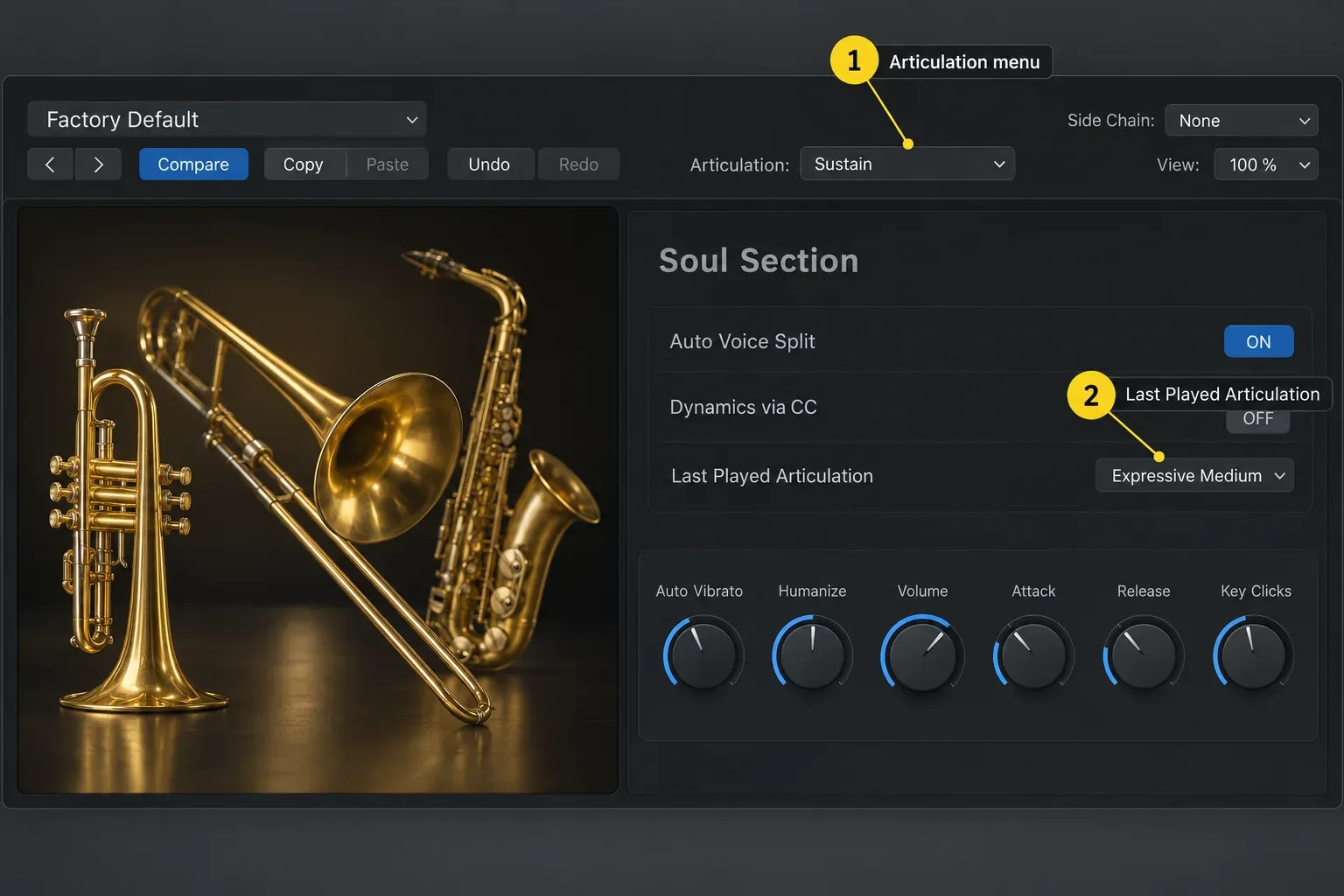
With a matching Articulation Set loaded, the plug-in header lets you choose a named playing style. Apple makes an important distinction in its articulation instructions: changing that header menu affects notes played live, not previously recorded notes. For an existing phrase, select its notes in the Piano Roll and change their articulation there.
Keyswitches can also appear in Smart Controls; its MIDI Remote button turns keyswitch input on or off. Use the library’s matching Articulation Set or create a map for its actual keyswitches and controllers. The same keyswitch note or controller number is not guaranteed to mean the same thing in another library. Recorded notes keep their articulation IDs, though. Give the new library's Articulation Set the same IDs for the same playing styles, with its Output settings sending that library's keyswitches, and an existing part can move to the new library without re-entering every articulation.
- Create one Software Instrument track for each section or musical role.
- Load the library’s AU player, then choose one patch before expanding the template.
- Load the vendor’s Articulation Set if one is supplied, or create one that matches the library’s keyswitches. Test sustain and a short articulation before recording.
- Record the notes, then edit their articulations, dynamics and expression. Check the patch’s manual: dynamics and expression controls are not interchangeable, and not every library uses the same MIDI CC assignments.
- Use Track Stacks and section buses to organize strings, brass, woodwinds and percussion.
For detailed note editing, our Logic Pro Piano Roll workflow covers velocity, note length and controller lanes. If a keyboard's faders or expression controls aren't reaching the instrument, set them up with the MIDI controller guide.
What makes an orchestral mockup sound real
A more expensive library can't repair impossible writing. Keep parts inside realistic ranges, leave room for players to breathe, and avoid stacking every section on every chord. Then shape three layers of performance:
- Articulation: choose the playing style that matches the phrase, rather than leaving every note on sustain.
- Dynamics: draw or perform a musical arc with the library's documented dynamics controller.
- Timing: preserve small differences between sections. Brass attacks, string spiccatos and woodwind legato do not speak at the same speed.
A full-orchestra demo can hide the weak spots. Before buying, listen to an exposed instrument, repeated short notes, a soft-to-loud phrase and a legato line. Those tell you more about the library's limits than a mastered trailer cue.
Which orchestral plugin should you choose?
- No budget: start with Logic’s strings and brass. Choose BBCSO Discover for a small dedicated-player setup, SSO Discover for more dynamic control in Kontakt, or try Berlin Free Orchestra in SINE.
- First paid cinematic library: consider Nucleus for separate sections, ensembles and choir in one package.
- Traditional orchestration: compare Synchron Prime Orchestra and Berlin Orchestra: Created with Berklee for independent instrumental lines.
- Ensemble film cues: consider Albion ONE when grouped sections suit the writing.
- Large cinematic collection: consider Hollywood Orchestra Opus only after checking storage, memory and licensing.
Check the exact player version, macOS support and license before paying. Listen to exposed instrument demos alongside finished scores. Then return to the Create Music in Logic Pro hub for the next writing task. Another library won't finish an arrangement for you.
Frequently asked questions
Does Logic Pro come with orchestral instruments?
Yes. Logic includes Studio Strings and Studio Horns with solo and section presets, multiple articulations and MIDI-controlled dynamics. Some included sounds may need downloading through the Sound Library. These two instruments are a starting point for strings and brass. On their own they don't make a complete matched orchestra.
What is the best free orchestral plugin for Logic Pro?
BBC Symphony Orchestra Discover suits a small installation with a dedicated player and full key ranges. Spitfire Symphony Orchestra Discover needs 5.68 GB and Kontakt Player, but adds more instruments, techniques and dynamic layers; its three legato patches are solo violin, solo horn and cor anglais. Berlin Free Orchestra is another free option if you prefer SINEplayer.
Do orchestral VSTs work in Logic Pro?
Logic Pro hosts Audio Units on Mac, not VST or VST3 plug-ins. Install the Mac AU version of the library’s player, such as Kontakt, SINEplayer, Opus, Synchron Player or a dedicated Spitfire instrument. A VST-only or notation-only edition will not load directly in Logic.
Do I need full Kontakt for orchestral libraries?
Not for the Kontakt libraries in this guide. Nucleus, Albion ONE, Spitfire Symphony Orchestra Discover and ProjectSAM The Free Orchestra 2 are licensed for the free Kontakt Player. BBC Symphony Orchestra Discover uses Spitfire's dedicated player. Check the current requirement before downloading because other Kontakt libraries may require the paid full version.
How much RAM do I need for orchestral plugins in Logic Pro?
For Opus, the largest library here, EastWest specifies 16 GB minimum and 32 GB recommended. Smaller libraries have different requirements. More articulations, mic positions and tracks can increase memory use. Check the vendor minimum for your chosen library, leave room for Logic and effects, and freeze or bounce finished sections if the project runs short of resources.
Are ensemble libraries good enough for classical orchestration?
Ensemble patches can sketch harmony and large gestures, but grouped high and low sections restrict independent voicing. Exposed classical writing needs separate instruments and sections for counterpoint, balance and orchestral color.


