How to Make House Music in Logic Pro
Start with a 124 BPM groove, give the bass and kick their own space, then turn two chords into a house arrangement with a proper break and return.

To make house music in Logic Pro, start with a four-on-the-floor kick, put the main hats between those kicks, and write a bassline whose rests help the drums move. Add a short chord part, then arrange a break that makes the full groove worth bringing back. You can build that foundation with Drum Machine Designer, Step Sequencer, Retro Synth and a stock piano.
This lesson develops an original example at 124 BPM in 4/4, using A minor and F major harmony. I’d keep the first version small: drums, bass and one chord instrument. Another synth is rarely the answer to a loop whose existing parts are fighting each other. What follows is a musical exercise you can build and change. It isn’t a remake or a downloadable finished project.
Set up three musical jobs
Open an empty project and set the tempo to 124 BPM. Create a Drum Machine Designer track for the kit, a software instrument track with Retro Synth for bass, and another with a stock piano or electric piano for chords. Choose a dry electronic kit with a kick, clap and open hat you can clearly identify. If a patch needs additional sounds, let the Library download finish before diagnosing silent pads.
Apple’s Drum Machine Designer overview explains how its pads and subtracks fit together. Our Drum Machine Designer guide covers loading and replacing kit pieces. You don’t need an exact preset name to follow the rhythm below.
Keep the chord instrument above the bass in register. Leave long reverbs and master-bus loudness processing out for now. Those choices make it easier to hear whether the notes and sample lengths fit. For a first tour of tracks and recording, use the separate beginner beat-making workflow. The decisions here are about the house groove itself.
Program one bar you can count
Control-click an empty area of the Drum Machine Designer track and choose Create Pattern Region. In Step Sequencer, set the pattern to 16 Steps and its step rate to /16. Keep the rows at the same length and rate, with Forward playback. Apple’s pattern-length explanation matters here: sixteen sixteenth notes make one bar of 4/4 only when the row and playback settings agree.
Use On/Off mode to enter this starting pattern. Count steps from the left:
- Kick: 1, 5, 9, 13. These land on beats 1, 2, 3 and 4.
- Clap: 5, 13. The clap reinforces beats 2 and 4.
- Open hat: 3, 7, 11, 15. These are the “and” between each pair of kicks.
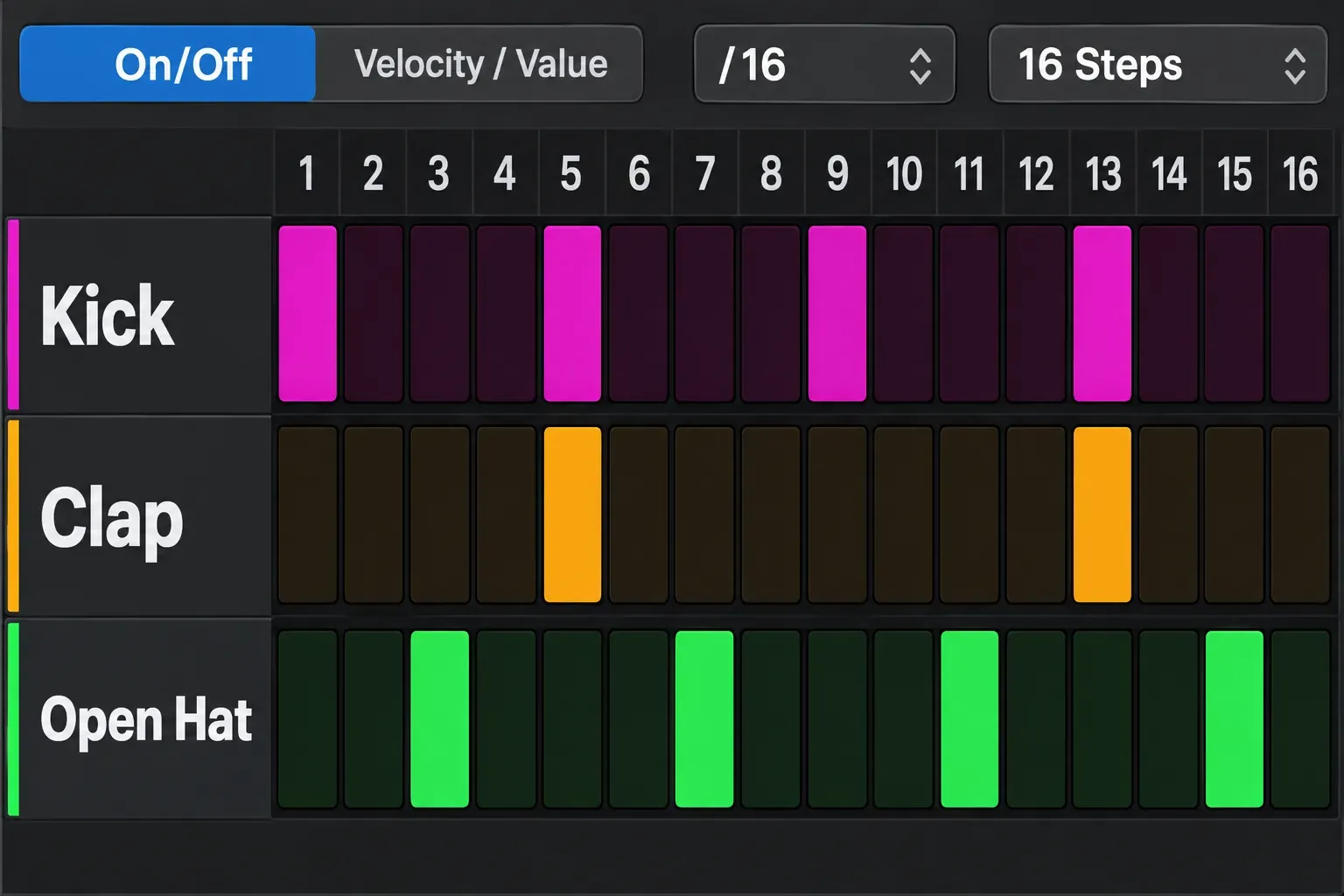
With a Drum Machine Designer patch, the rows use kit-piece names. Changing a step’s Note value transposes that pad’s sound. It doesn’t select a different drum pad. Apple documents that distinction in Step Sequencer’s Drum Machine Designer behavior. Choose the right kit-piece row before entering its steps.
Now listen to the kick and hat together. If the hat smears across the next kick, use a shorter sound or shorten its envelope. A different sample can solve this more directly than adding a compressor. Keep the kick steady while you decide how busy the top end needs to be.
Give the top line an accent pattern
A shaker or quiet closed hat can add motion between the main hits. Start with sixteenth notes, then lower every other hit in Velocity mode. As an initial contrast, try stronger hits around 75 and softer ones around 45, then adjust for the chosen sound. Velocity response depends on the patch, so those numbers are starting values rather than a loudness specification.
Use the documented Velocity edit mode: choose it in the selector and drag vertically on a step. If the quieter hits still crowd the pattern, delete some. A shaker can suggest continuous movement without demanding equal attention on every sixteenth note.
Leave swing at its straight setting for the first pass. If you want more lilt, compare a modest amount of 16th-note swing with the straight version. The Pattern inspector has a Swing value and separate 8th/16th-note buttons, described in Apple’s pattern and row settings. Pattern swing affects the timing relationship. It isn’t a substitute for choosing accents. Keep the kick and clap landing clearly, and don’t assume every house style needs the same shuffle.
Write the bass around the kick
Start Retro Synth in Analog mode with a simple, low bass sound. Favor one oscillator and keep detuning restrained while finding the part. Its Mix slider balances the two oscillators, and a centered mix isn’t mandatory. The Retro Synth guide handles the deeper sound-design controls.
Create a four-bar MIDI region and use the Piano Roll for this line. All note names below are pitch classes: choose a low register for the bass, then move the whole part by octaves if the patch is too deep or too high. Logic’s displayed octave names can depend on its settings, so don’t place the bass just by matching an octave label from someone else’s screen.
Each bar has four short notes at the same positions. “2a” means the final sixteenth of beat 2; the matching one-bar step numbers are 3, 8, 11 and 15:
- Bars 1 and 2: A on 1&, A on 2a, E on 3&, G on 4&.
- Bars 3 and 4: F on 1&, F on 2a, C on 3&, E on 4&.
- Initial lengths: about one sixteenth each. Keep notes separate while establishing the rhythm.
The roots follow the two chords you will add next. The other notes create small movements within each chord rather than a second busy melody. Duplicate the four-bar idea for an eight-bar phrase, but change or omit the last note of bar 8 so the repeat has a small point of interest.
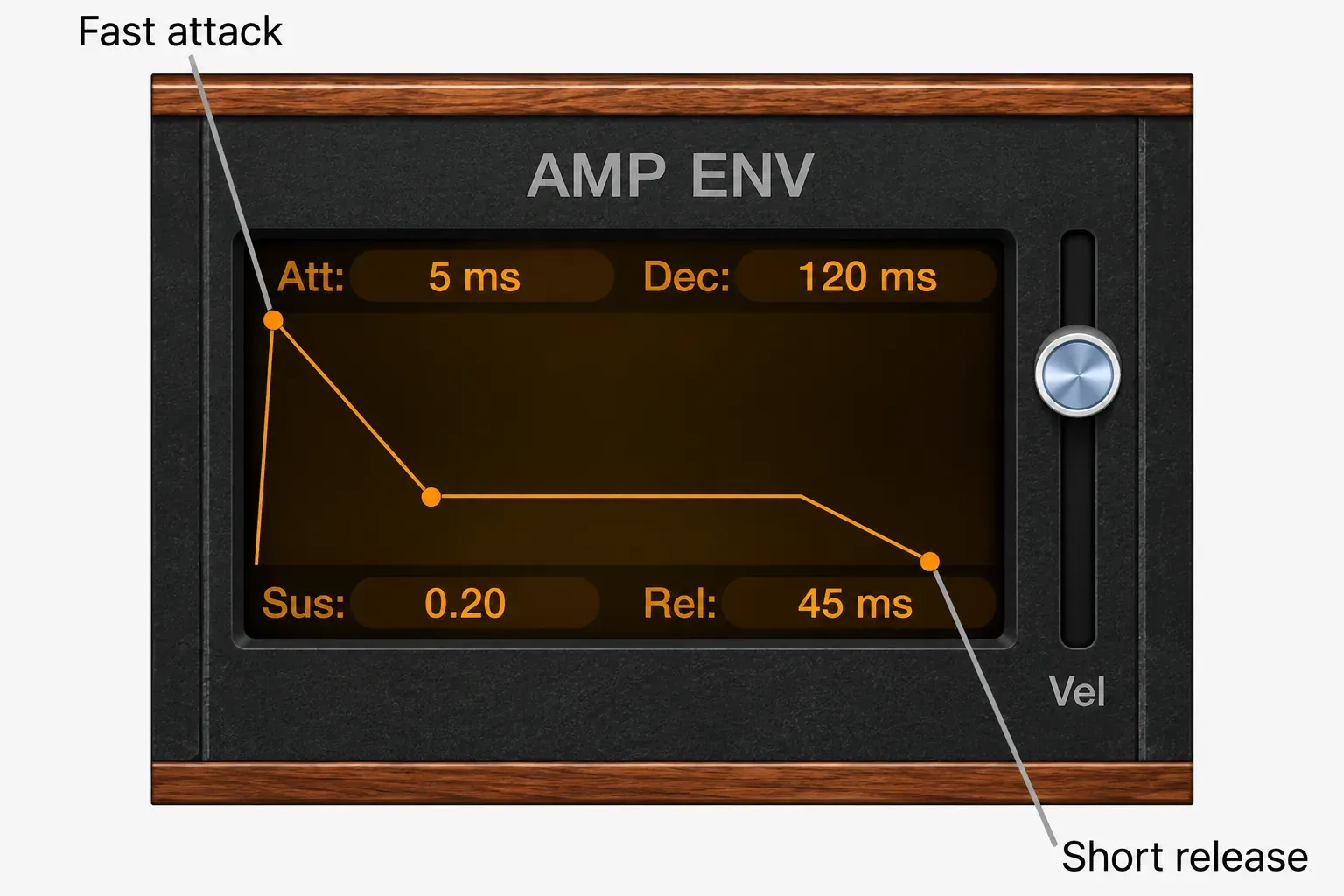
Shape the AMP ENV with a fast attack, a short decay, a low held level and a short release. Apple’s Retro Synth envelope guide separates sustain level from release time: release continues after note-off. That’s why shortening a MIDI note may still leave too much bass under the next kick.
Listen to just kick and bass, then bring the hats back. First adjust the bass note lengths, its amp release and the kick’s tail. If you want deliberate pumping after those choices, use the separate sidechain-compression workflow. Ducking is an arrangement and envelope choice. It isn’t a compulsory fix for every low-end problem.
Make two chords answer the drums
Use Am7 for bars 1 and 2, then Fmaj7 for bars 3 and 4. Am7 contains A, C, E and G; Fmaj7 contains F, A, C and E. Enter those notes above the bass register on the piano track. If four notes sound heavy, start with three and leave the root to the bass.
Place a short chord on 2& and 4& in each bar. Begin with sixteenth-note stabs and a dry sound. The chord rhythm now leaves the beat for the kick and answers the clap half a beat later. You can lengthen one stab for contrast once the short version makes sense.
Do not add a separate lead just because the track list looks small. The top note of a chord, a repeated stab and the bass response can already give the phrase an identity. If the harmony needs more movement, change the voicing or omit one stab before adding a new chord every beat. Our chord-progression guide covers expanding the harmony without turning this example into a theory detour.
A little reverb or delay can give the piano space, but keep the bass out of that long tail. Compare the part with the effect bypassed at a similar listening level. When the rhythm becomes harder to follow with the effect on, reduce the tail or the send before reaching for more processing.
Turn the phrase into a 64-bar sketch
Stop looping eight bars once the parts have distinct jobs. Lay out a short form in the Tracks area. This starting arrangement fits the example. It isn’t a rule for club mixes:
- Bars 1 to 8, Intro: kick and restrained hats. Bring in the clap or shaker toward the end.
- Bars 9 to 24, Groove: add bass and chords. Leave something out for a bar at the end of each eight-bar phrase.
- Bars 25 to 32, Break: remove kick and bass. Let the chord part carry the harmony, with fewer percussion hits.
- Bars 33 to 56, Return: restore the complete groove. Add one meaningful change in the later phrase, such as a different top note or a hat accent.
- Bars 57 to 64, Outro: remove chords and bass, leaving the drums to make a clear rhythmic ending.
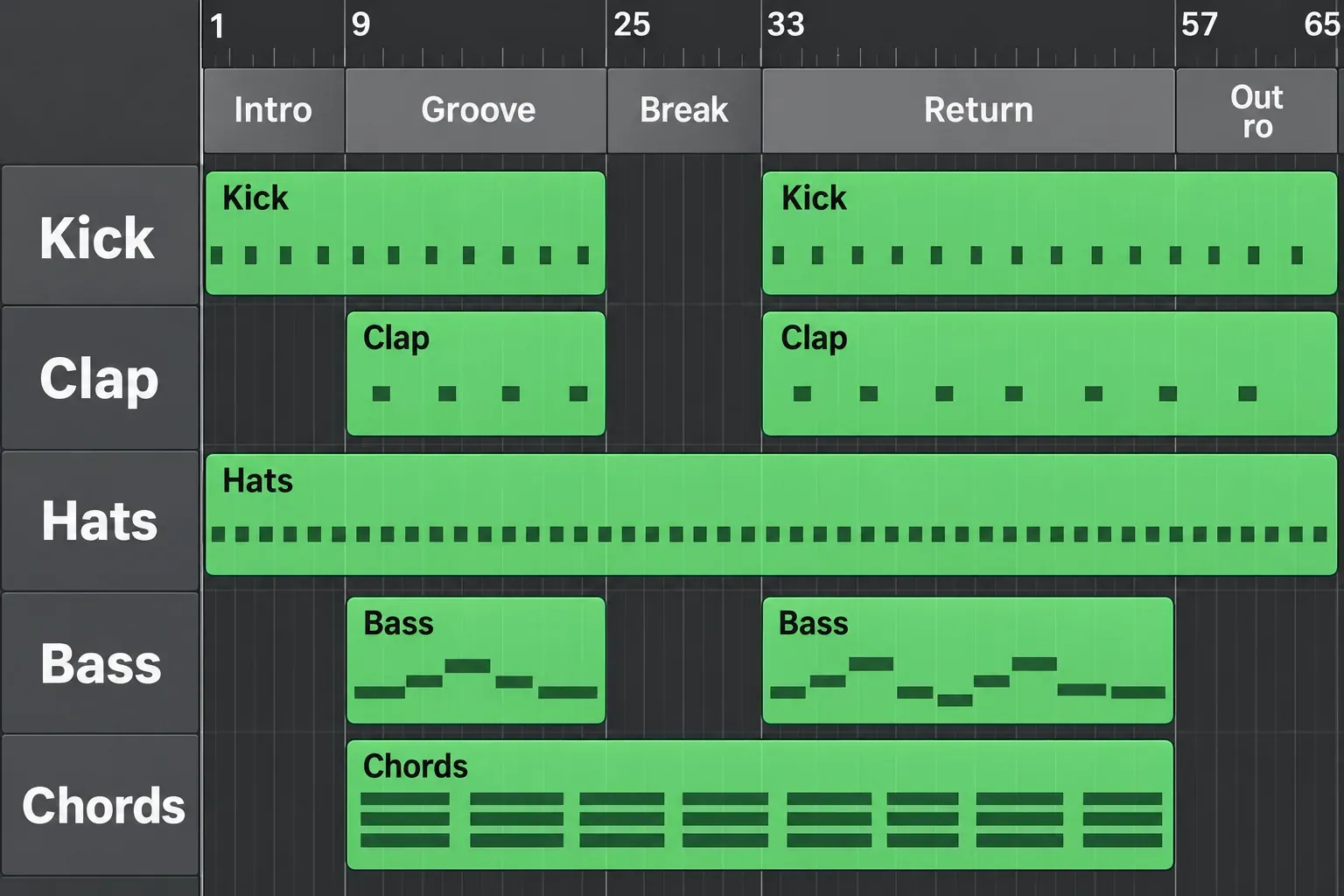
Use arrangement markers to label the form. Apple’s marker instructions explain that a new marker starts eight bars long. Resize it for the sixteen- and twenty-four-bar sections above. Labeling a section doesn’t create the music inside it. The song-arrangement guide covers moving from repeated regions to a fuller song.
Keep one obvious transition: in the final bar of the break, thin the chord rhythm and leave a short gap before bar 33. Bring kick and bass back together at the return. You can add a clap pickup if the section needs a cue, but don’t bury the return under several risers. Contrast comes from what disappears as much as from a new effect.
Choose the version’s purpose before extending that sketch. For DJ mixing, leave an entry and exit whose rhythm and section changes make sense beside another track; repeat or thin parts where that helps the handoff. For a listening version, bring the defining bass or chord idea forward and shorten returns that no longer earn their time. Those are different arrangement decisions, even when both versions use the same groove.
Check the movement before chasing loudness
Play from the intro through the return without stopping to change sounds. Notice where the energy stalls, where a new section is unclear and whether the bass still leaves space for each kick. Compare one reference for a specific question, such as hat level or the length of a break, using the reference-track routing guide. Match listening levels before judging the louder version as better.
If the groove is stiff, change the shaker accents or remove hits. A blurred low end calls for checking note lengths and tails. When every section feels equally busy, subtract parts from the break and intro. Those are three different problems. Putting the same compressor on everything won’t answer them.
For a listening copy, choose File > Bounce > Project or Section. Check the Start and End range: an active cycle can limit the bounce to your old loop. Leave space for the ending’s release and effects. Apple’s bounce procedure explains range, tails and normalization. Keep an uncompressed copy and retain the editable project. This bounce is a rough arrangement. It hasn’t been mastered.
Once the sketch holds together, choose the next job from the Create Music hub. I’d finish the bass-and-chord conversation before shopping for another plug-in.


