Best Logic Pro Plugins (2026): Free and Paid Picks
Ten useful Audio Unit plugins for Logic Pro, chosen by the job they solve and compared with the stock tools you may already have.

You do not need third-party plug-ins to finish a song in Logic Pro. The stock instruments, EQs, compressors, reverbs, delays and meters are already capable of taking a project from an empty session to a finished master. Add another plug-in only when you can name the job it will do better or faster.
These ten Audio Unit plug-ins cover specific additions to Logic: five free options and five paid ones. Each entry explains the job it suits, the stock alternative and when the extra tool is worth considering.
Quick choice: try TDR Nova for dynamic EQ, Supermassive for creative echoes, Vital for wavetable synthesis, or Youlean and SPAN for additional metering views. For paid tools, the useful distinctions are deeper editing, repair, faster control or monitoring calibration. Buying one won't improve every mix by itself.
The quick picks
| Plug-in | Best for | Cost | Try this Logic tool first | Skip it when |
|---|---|---|---|---|
| TDR Nova | Dynamic EQ and frequency-conscious compression | Free | Channel EQ and Multipressor | You only need ordinary static EQ |
| Valhalla Supermassive | Creative delay and reverb | Free | ChromaVerb, Space Designer and Delay Designer | A stock room or delay already fits |
| Youlean Loudness Meter 2 | Integrated loudness and delivery checks | Free tier | Loudness Meter + Level Meter (True Peak) | Logic's meter already shows every value you need |
| Voxengo SPAN | Detailed spectrum inspection | Free | MultiMeter | You are using the graph instead of listening |
| Vital Basic | Wavetable sound design | Free | Alchemy and Retro Synth | You have not explored Logic's synths |
| FabFilter Pro-Q 4 | Fast, advanced corrective and dynamic EQ | US$199 | Channel EQ and Linear Phase EQ | You need only a few broad EQ moves |
| iZotope RX 12 Standard | Repairing clicks, noise and damaged audio | US$399 | Editing, fades and available restoration tools | You can re-record the source cleanly |
| Melodyne 5 | Detailed note-level pitch and timing work | From US$99 | Flex Pitch | Flex Pitch already handles the correction |
| Valhalla VintageVerb | Algorithmic reverb, vintage or clean | US$50 | ChromaVerb and Space Designer | Your stock reverb already fits |
| SoundID Reference | Headphone or measured-room calibration | From €99 (EU) | No direct stock calibration equivalent | Your headphones lack a supported profile and your room is not measured |
SoundID prices are European-store offers in euros; the other listed prices are in US dollars. Check the seller’s current price, tax and upgrade eligibility before paying.
Before you install anything: Logic uses Audio Units
Logic Pro for Mac loads Audio Units, usually shown as AU or AUv2, plus supported Audio Unit Extensions. It doesn't load VST or VST3 directly. That matters, because plenty of “best VST for Logic” lists use the wrong format name. When a developer's installer offers AU, VST3 and AAX, include AU for Logic. Install the other formats only if another host on the same Mac needs them.
Apple documents third-party Audio Units in the current Logic Pro User Guide. Once installed, effects belong in an Audio Effect slot and synths belong in the Instrument slot. Our Logic Pro plug-in installation guide covers the whole AU setup and validation process. Installed but not showing up? Use the separate missing plug-in troubleshooting path instead of reinstalling at random.
Best free Logic Pro plug-ins
1. TDR Nova: free dynamic EQ that solves a real gap
TDR Nova combines a parametric EQ with dynamics on the bands. A normal EQ cut stays fixed. A dynamic band reacts when its threshold is exceeded: useful for harshness on a few vocal words, a bass note that booms or an occasional resonant peak. It changes the level of a frequency range, not the pitch of a sung note.
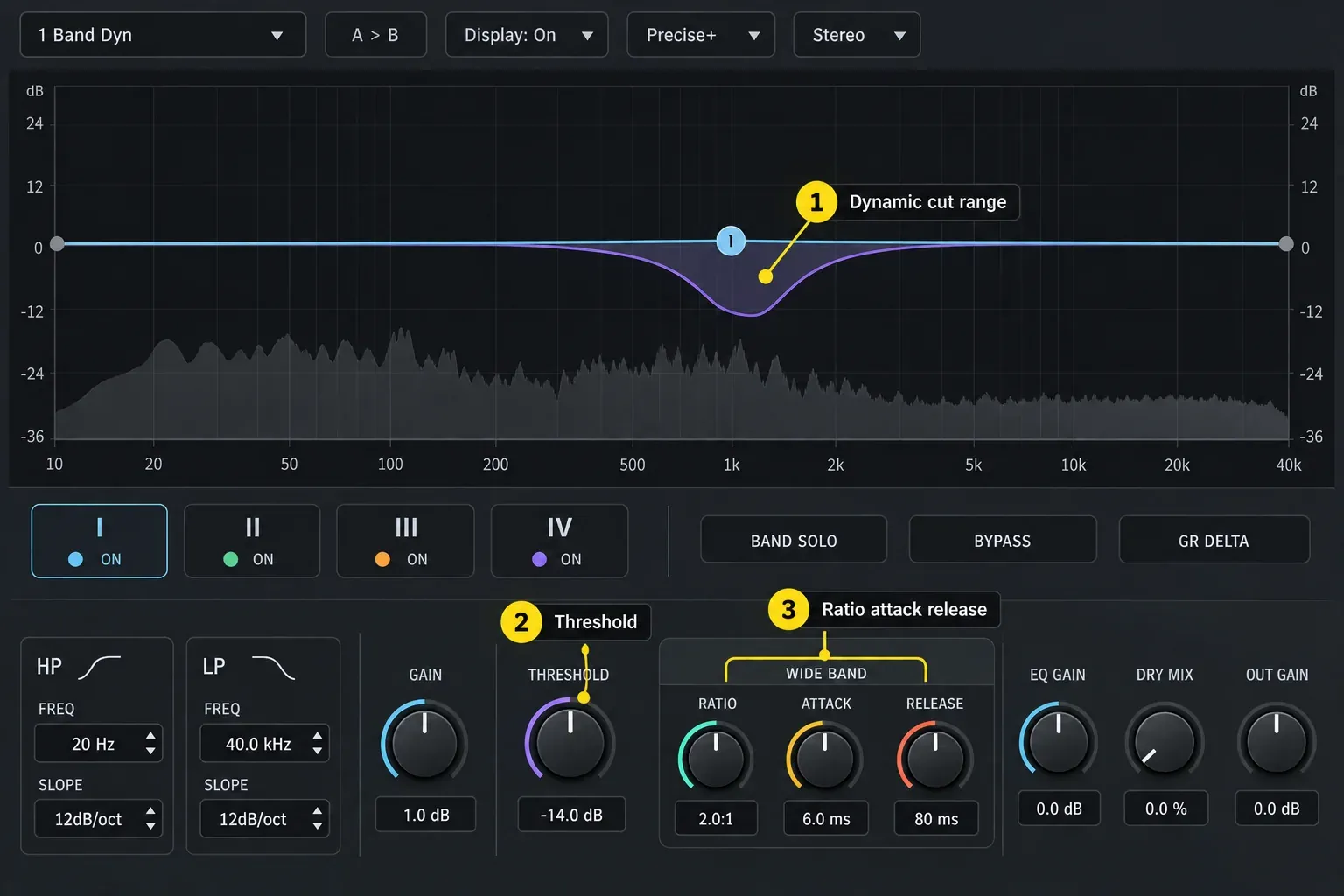
Try Logic first: use Channel EQ for ordinary tonal moves. Multipressor controls ranges dynamically too, though the workflow is different. Nova earns the download when you specifically want EQ-shaped dynamic control in one window.
Skip it if: a static cut already fixes the problem. Use dynamic control when the unwanted energy comes and goes; otherwise Channel EQ may be quicker to set.
2. Valhalla Supermassive: creative delay and reverb
Valhalla Supermassive is a free 64-bit AU for delays and reverbs. Its evolving repeats and long tails suit transitions, pads and sound design. It is not limited to giant spaces: current modes such as Sirius and Pleiades also cover smaller, more natural reverbs.
Try Logic first: ChromaVerb covers algorithmic reverbs, Space Designer uses impulse responses, and Delay Designer gives you detailed taps. Compare the particular Supermassive mode with the stock effect at the same listening level; choose the one whose decay and repeats fit the part.
Skip it if: you already have the room or delay you need in Logic. Add it for a particular mode or texture rather than replacing every stock reverb.
3. Youlean Loudness Meter 2: a clearer delivery check
The free version of Youlean Loudness Meter 2 doesn't expire, and it comes as an Audio Unit. It gives you an alternate view of integrated loudness, short-term loudness, loudness range and true peak values. Handy when a delivery brief names specific loudness measurements, or when you want a bigger history view than your current Logic metering layout gives you.
Try Logic first: Apple’s Loudness Meter measures momentary, short-term and integrated loudness, plus loudness range. For true peak, use Level Meter in True Peak mode. Youlean puts these checks in a different interface. That doesn't mean the stock meters are inaccurate.
Skip it if: you don't have a delivery target and you're chasing a streaming “magic number.” Loudness normalization policies change, and one meter reading cannot decide whether a master sounds good.
4. Voxengo SPAN: deeper spectrum analysis
Voxengo SPAN is a free FFT spectrum analyzer available as a Mac Audio Unit, and the developer lists native Apple silicon support. Useful for comparing broad tonal balance, spotting persistent low-frequency energy and checking whether a suspected resonance is present.
Try Logic first: MultiMeter already combines analysis and metering. SPAN is useful if its grouping, display and analysis controls make comparisons easier for you; it is not a required insert on every track.
Skip it if: the moving graph keeps overriding your ears. Use an analyzer to confirm a suspicion, then bypass it and listen again.
5. Vital Basic: a capable free wavetable synth
Vital Basic is the free tier of Vital: the full synth with a smaller preset and wavetable library than the paid packages. Vital’s published formats and requirements include AU and macOS 10.15 or later. Check the current installer against your Mac before relying on it in a project.
Try Logic first: Alchemy is already a deep sample-manipulation and synthesis instrument, and Retro Synth covers subtractive, FM and wavetable-style work in a simpler layout. Vital earns its slot when you prefer its modulation system, or when you need to swap Vital presets with users of other DAWs.
Skip it if: Alchemy or Retro Synth already gives you the sound and editing controls you need. Try Vital when its wavetable editing or drag-and-drop modulation suits the part you are making.
Best paid Logic Pro plug-ins
1. FabFilter Pro-Q 4: advanced EQ with a fast workflow
FabFilter Pro-Q 4 is a paid equalizer with dynamic and spectral processing, mid/side options, detailed analysis and tools for working across several instances. Its value isn't that an ordinary bell filter suddenly sounds magically better. The gain is speed, on sessions that need precise corrective moves, dynamic bands or comparisons across many tracks.
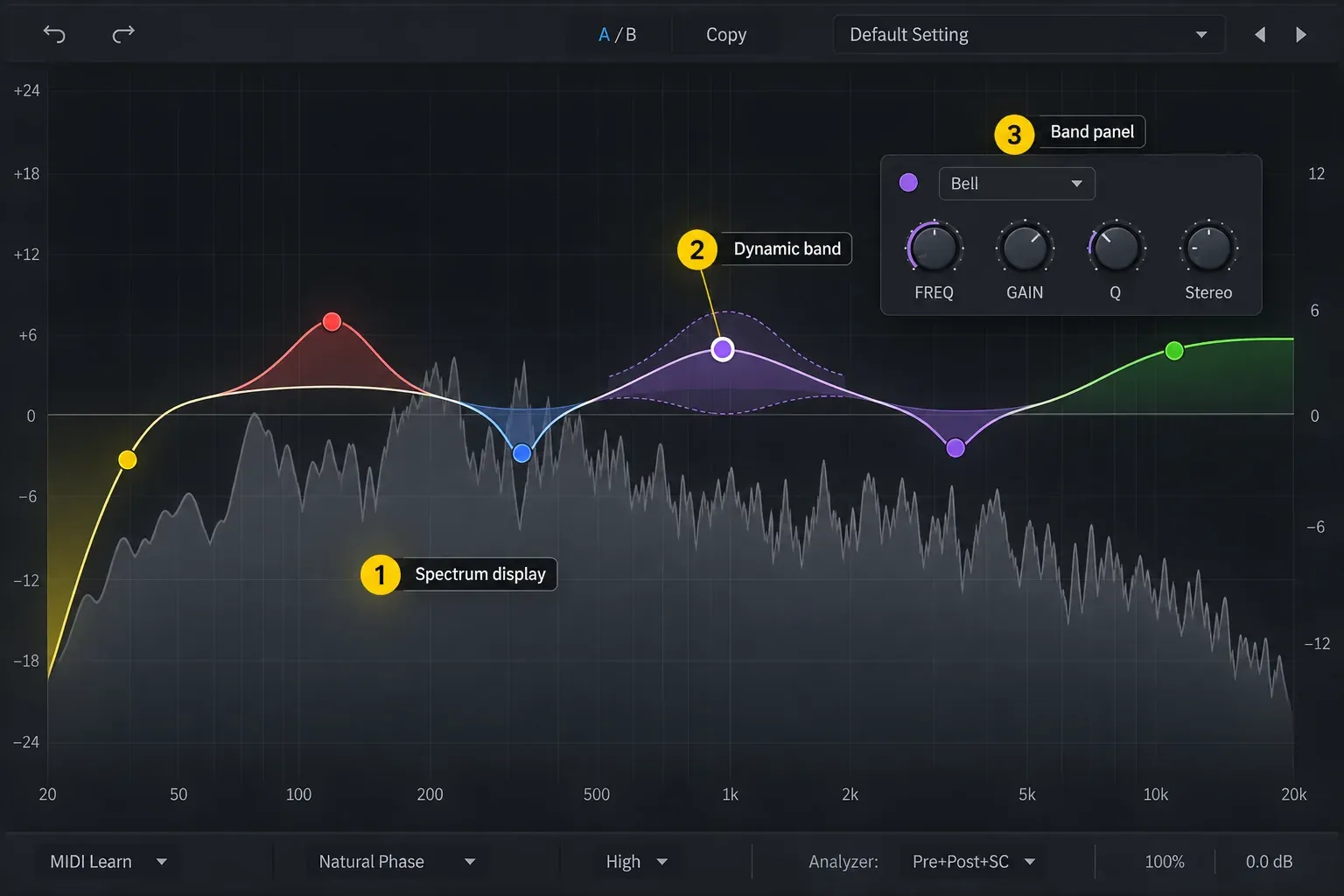
Try Logic first: Channel EQ handles routine filtering and tone shaping well, and Linear Phase EQ is there when that processing model fits. If you can finish the move quickly with the stock tool, Pro-Q 4 isn't a necessary upgrade.
Buy it when: complex EQ work is frequent enough to justify the cost. FabFilter’s new Pro-Q 4 license is listed at US$199. The 30-day trial lets you compare it in a copied session before paying. It includes a 64-bit AU for Intel and Apple silicon; the product page lists macOS 10.13 or later. FabFilter supplies a license key to enter in the plug-in.
Skip it if: your EQ decisions are mostly high-pass filters and two broad tonal moves. Better monitoring and better decisions will matter more.
2. iZotope RX 12 Standard: repair work, not everyday polish
iZotope RX 12 Standard is an audio-repair suite with a standalone editor and included plug-ins, listed at US$399 for a new license on September 7, 2026. Consider it for recordings with clicks, hum or noise that ordinary editing cannot remove cleanly. Not every tool in the editor is a separate Audio Unit; check the module/plug-in comparison before buying it for one task. The RX Editor vs plugins vs Connect guide explains which of the three routes to use from Logic.
Try Logic first: cut around the problem, use short fades, automate silence, replace a damaged section or re-record. Those fixes are often quicker and cleaner than heavy restoration. RX earns its cost when repair jobs keep coming back and the source can't be captured again.
Check the workflow before buying: RX 12’s product page lists macOS Sonoma 14.7, Sequoia 15.8 and Tahoe 26.x for Mac. Its Spectral Editor ARA integration in Logic requires Rosetta on Apple silicon; that restriction is not the same as ordinary AU or standalone support. The RX 12 Standard download page describes serial-number authorization and a 10-day trial with export disabled. Do not assume a trial can deliver a repaired file. Heavy restoration can also leave artifacts; audition the affected section in context.
3. Melodyne 5: detailed pitch and timing editing
Melodyne 5 offers note-level pitch and timing editing. Essential provides basic correction; Assistant adds deeper monophonic tools, including vibrato and formant editing; Editor adds DNA access to notes inside polyphonic audio. Match the edition to the editing you need. The Melodyne name alone won't tell you which one that is.
The Celemony store lists new licenses at US$99 for Essential, US$249 for Assistant and US$399 for Editor; promotional and upgrade prices can differ. Its technical notes cover a 30-day trial, Mac AU support and computer-based activation. Essential uses computer activation; other editions also support an iLok USB option.
Try Logic first: work through our Flex Pitch guide. For ordinary monophonic vocal correction, the stock workflow is often enough on its own.
ARA warning: Celemony says native Apple silicon Logic hosts third-party Audio Units out of process, which does not fully support Melodyne’s ARA integration. Run a supported Logic setup under Rosetta for ARA, or use Melodyne’s ordinary AU transfer workflow in native Logic. Check the current host-specific compatibility notes for your exact versions; native plug-in support alone does not establish ARA support. Before Logic Pro 12.4, switching Logic back from Rosetta to native Apple silicon mode could trigger a new AU scan; the 12.4 release notes list that as fixed.
Skip it if: the vocal needs only a few transparent corrections that Flex Pitch already handles. Editing every note because the tool makes it possible can flatten a performance.
4. Valhalla VintageVerb: characterful algorithmic reverb
Valhalla VintageVerb offers era-inspired algorithmic reverbs, but not every setting is colored: its Now mode is clean and full-bandwidth. Valhalla lists it at US$50 and supplies a 64-bit Mac AU for Intel and Apple silicon. Its product page lists macOS 10.9 or later; check your specific OS against the current release. Authorization uses a downloaded Valhalla key file.
Try Logic first: ChromaVerb covers algorithmic spaces, and Space Designer uses impulse responses. VintageVerb is worth comparing if its modes, era settings and controls give you a reverb you prefer in the mix.
Skip it if: you need one realistic chamber or room and already have a stock preset that sits correctly. Buying another reverb won't replace setting pre-delay, decay and send level in context.
5. SoundID Reference: monitoring correction with a hard bypass rule
SoundID Reference applies a calibration profile to supported headphones or a measured speaker setup. It includes an AU plug-in and a standalone app. Choose the headphone-only edition if you do not need speaker measurements; the speaker edition needs a measurement microphone and a suitable audio interface. It corrects your monitoring and never belongs in a printed master.
Sonarworks’ European pricing page lists Headphones at €99 and Speakers & Headphones at €249. These are software-only prices; a measurement microphone is separate. Currency, promotions and checkout totals vary by region.
There is no direct stock equivalent: Logic can host metering and analysis, but it does not provide Sonarworks' headphone-profile and measured-room correction system. The benefit depends on using the correct profile or measurement. It is not a generic “make my speakers flat” switch.
Sonarworks’ current requirements list macOS 11 or later and a stable internet connection; offline use is not supported. Speaker measurement needs an omnidirectional measurement microphone and an interface with 48V phantom power, using the same interface for input and output. Register the key in your Sonarworks account and activate the device before use.
Before export: if SoundID is on the output you are bouncing, put it last—after meters and analyzers—and bypass the entire plug-in. Switching off only its Calibration control is not enough. Sonarworks’ monitoring-bus guidance explains the distinction. Lower your physical monitor volume before bypassing: removing Safe Headroom attenuation can make playback louder. A separate monitor-only path avoids printing it only when that path is excluded from the render; verify the actual routing.
Skip it if: there is no supported profile for the headphones you want to use, or you cannot measure the speakers you want to calibrate. Calibration also cannot remove severe room reflections or replace sensible speaker placement.
Sampled orchestras aren't ranked here because they're a separate buying decision. They usually load inside a player: Audio Imperia says Nucleus is made for the free Kontakt Player, and Berlin Free Orchestra runs in Orchestral Tools' free SINEplayer. Check the player's Mac AU support before you buy the library. Our orchestral plugins guide for Logic Pro compares eight picks by player, storage and license.
Choosing plug-ins for a vocal mix
Suppose a vocal has a few harsh words but the rest sounds balanced. Start with a narrow dynamic cut in Nova and compare at a matched listening level. That is a different problem from an out-of-tune note, which calls for Flex Pitch or Melodyne, or a click between phrases, which may need only an edit and short fades.
Keep reverb on a send when you want independent control of the dry vocal and its ambience. Compare ChromaVerb with the Valhalla options in the song, not just in solo. At delivery, check loudness and true peak against the recipient’s specification. This example does not require all ten plug-ins—or a paid plug-in at every stage.
Before you buy or commit a project
- Identify the task. Decide whether you need a different sound, more precise editing, repair, metering or monitoring correction.
- Compare with a stock tool. Match the listening level so that the louder option does not win by default. Keep the tool that gets the result with fewer complications.
- Check the exact AU build. Confirm product version, macOS support, Apple silicon status, authorization and any Logic-specific limitation. ARA support needs its own check.
- Try it in a copied project. Check CPU use, automation, preset loading and recall after reopening. There is no universal CPU ranking here: settings, instance count and buffer size affect the result.
- Save audio as well as the editable project. Export or bounce important processed tracks, include the required audio files and check that the renders play correctly before handing them off. Freeze is useful while working, but is not a substitute for a verified audio handoff. Keep license records and permitted installers for later recall.
Before an OS or plug-in update, keep a recoverable copy of a working project and its audio. Test the updated setup on that copy before changing the sessions you need to deliver.
Frequently asked questions
Can Logic Pro use VST or VST3 plug-ins?
Logic Pro for Mac loads Audio Units, not VST or VST3. If an installer offers several formats, include AU for Logic Pro. You can install VST3 as well if another DAW on the same Mac needs it.
Are Logic Pro's stock plug-ins enough?
Yes. Logic includes the instruments, EQ, dynamics, reverb, delay, metering and mastering tools needed to finish a professional production. A third-party plug-in makes sense when it solves a named problem faster, adds a sound you cannot make efficiently with the stock set, or improves compatibility with collaborators.
What is the best free plug-in for Logic Pro?
I'd install TDR Nova first, because dynamic EQ is the clearest gap in Logic's stock set. Valhalla Supermassive covers spacious creative delay and reverb, Youlean Loudness Meter 2 helps with delivery checks, Voxengo SPAN adds detailed spectrum analysis, and Vital Basic is a capable wavetable synth.
Which Logic Pro plug-ins are useful for vocals?
Start with Logic's Channel EQ, Compressor, DeEsser 2, Flex Pitch and reverbs. Melodyne becomes useful for deeper note-level pitch and timing work, while RX is aimed at repair problems such as noise, clicks and damaged dialogue or vocal recordings.
Where do installed plug-ins appear in Logic Pro?
Effects appear in an Audio Effect slot and instruments appear in the Instrument slot on a software instrument channel strip. Third-party products are normally grouped under Audio Units by manufacturer. Plug-in Manager shows whether Logic validated them.
How do I check Apple silicon compatibility before buying?
Check the developer's current system requirements for the exact product and version, confirm that a 64-bit AU build is included, and read any host-specific note for your Logic and macOS versions. Test the demo in a copy of a project before relying on it in paid work.
For help turning these choices into a track, use the Create Music guides. For levels, routing, EQ and compression, follow the Mixing & Mastering workflow.


