Logic Pro vs Studio One: Choosing Fender Studio Pro or Logic
Studio One is now Fender Studio Pro. Here is how its current pricing, platform support, arrangement tools and project handoffs compare with Logic Pro.

Choose Logic Pro if you work on a supported Mac and want a substantial songwriting, sampling and mixing toolkit in one purchase. Choose Studio One’s successor, Fender Studio Pro, if you need Windows support or its Browser, Arranger and dedicated mastering workflow solves a specific problem for you. If your existing DAW already gets songs finished, a longer feature list is a poor reason to move.
There’s a naming change behind this comparison: Studio One Pro became Fender Studio Pro in January 2026. This guide compares current Logic Pro with that continuing product and doesn’t treat old Studio One 5 or Artist pricing as today’s offer. The free Fender Studio recording app is a separate product.
The choice that matters before features
| Need | Logic Pro | Fender Studio Pro |
|---|---|---|
| Windows desktop | No | Yes |
| One-time U.S. license | $199.99 | $199.99 |
| GarageBand projects | Open directly | Plan an audio handoff |
| Third-party plugins | Audio Units | VST; AU on Mac |
| Distinct attraction | Included creative tools | Cross-platform workflow |
The table uses U.S. list prices before any applicable tax. Regional prices and account offers can differ. The details below explain the ownership and compatibility limits behind those short answers.
Price: both have a $199.99 purchase option
The old argument that Logic is a $200 purchase while Studio One requires a much more expensive edition no longer describes the current comparison. Apple’s standalone Logic Pro for Mac listing is $199.99. Apple also offers it through Creator Studio at $12.99 a month or $129 a year, alongside other creative apps. Apple says the subscription and purchase versions of Logic have the same features. MainStage is a separate standalone purchase or part of the bundle.
Fender’s current U.S. license options are $199.99 perpetual, $179.99 a year for a perpetual license with the Pro+ annual plan, or $19.99 a month for Pro+ access. The perpetual purchase includes one year of new feature releases that you keep. That’s an update window. It doesn’t promise every future release. An upgrade price isn’t the new-customer price.
I’d compare the plain purchases first if all you need is a desktop DAW. Consider a bundle when you’ll use its other apps or services. A smaller monthly payment can be useful while deciding, but it shouldn’t be confused with owning the software.
There’s an offline-use wrinkle, too. Fender’s version 8 activation guidance specifies a yearly activation requirement for perpetual offline use and an online check at least every 30 days for Pro+ subscriptions. “Perpetual” doesn’t mean the authorization process disappears. Our Logic Pro pricing guide covers the Apple purchase routes in more detail.
Mac, Windows and the computer you already own
For desktop work, Logic Pro runs on Mac. Fender Studio Pro supports Mac and Windows, with Linux in public beta, so a Windows studio immediately makes the decision simpler. Its version 8 setup guide lists Intel and Apple-silicon Macs on macOS 13 or later. Check the current installer requirements for your operating system, interface driver and plugins before buying.
Logic’s purchase route needs attention on an older Mac. Apple’s Creator Studio compatibility page requires Apple silicon for Logic. Its support page and standalone App Store listing currently show macOS 15.4, while the product-page FAQ says 15.6. I’d use 15.6 as the conservative planning requirement and check the exact app listing before committing an older machine. Do not read a one-time price as confirmation that your Mac can run the current release.
Cross-platform software doesn’t make every session portable, either. A Windows collaborator needs Windows versions of the same plugins, compatible versions of those plugins, the required licenses and the audio or sample content. A Mac-only Audio Unit remains a problem even when the DAW itself runs on both systems.
Writing songs and building sounds in Logic
Logic is a strong starting point when you need instruments as well as an audio recorder. Its included Alchemy, Sampler, Quick Sampler and beat-making tools cover different jobs: synthesis, multisampling, single-file sampling and pattern creation. That gives a songwriter room to develop an arrangement before deciding which extra plugins are worth buying.
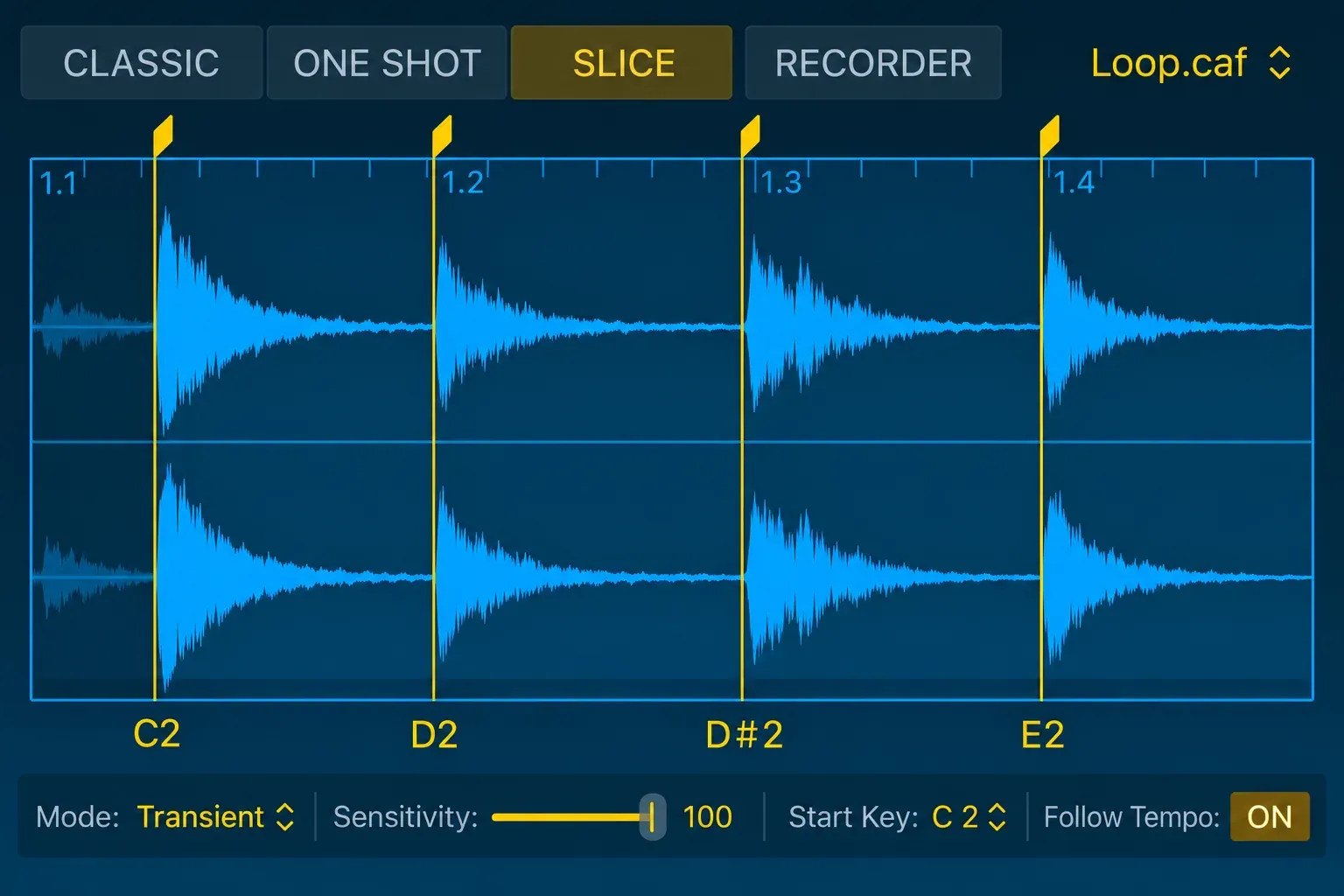
Quick Sampler works with one audio file, with sample controls above its pitch, filter and amp sections. For a producer turning a recorded phrase into a playable part, that’s a concrete reason to choose Logic, and a more useful one than comparing the total number of presets.
There is another practical advantage for an existing GarageBand user: Logic opens GarageBand projects directly and translates their tracks, patches and supported mixing data. Moving those projects to an unrelated DAW calls for a different handoff. Preserve your original project either way.
Fender has its own instruments, samplers and guitar tools. I’d lean toward Logic for an all-in-one Mac writing setup. When recording guitar and arranging conventional songs are the main work, I’d give Fender serious consideration. That recommendation comes from the documented tools and platform needs. It isn’t a claim that one application can write a better song.
Where Fender’s arrangement workflow earns a look
Fender’s Browser workflow lets you drag an instrument into empty arrangement space to create an instrument track, or drag an effect onto an existing track or console channel. Its Arranger track treats defined song sections as movable sections across the session. Scratch Pads hold alternate material beside the main arrangement.
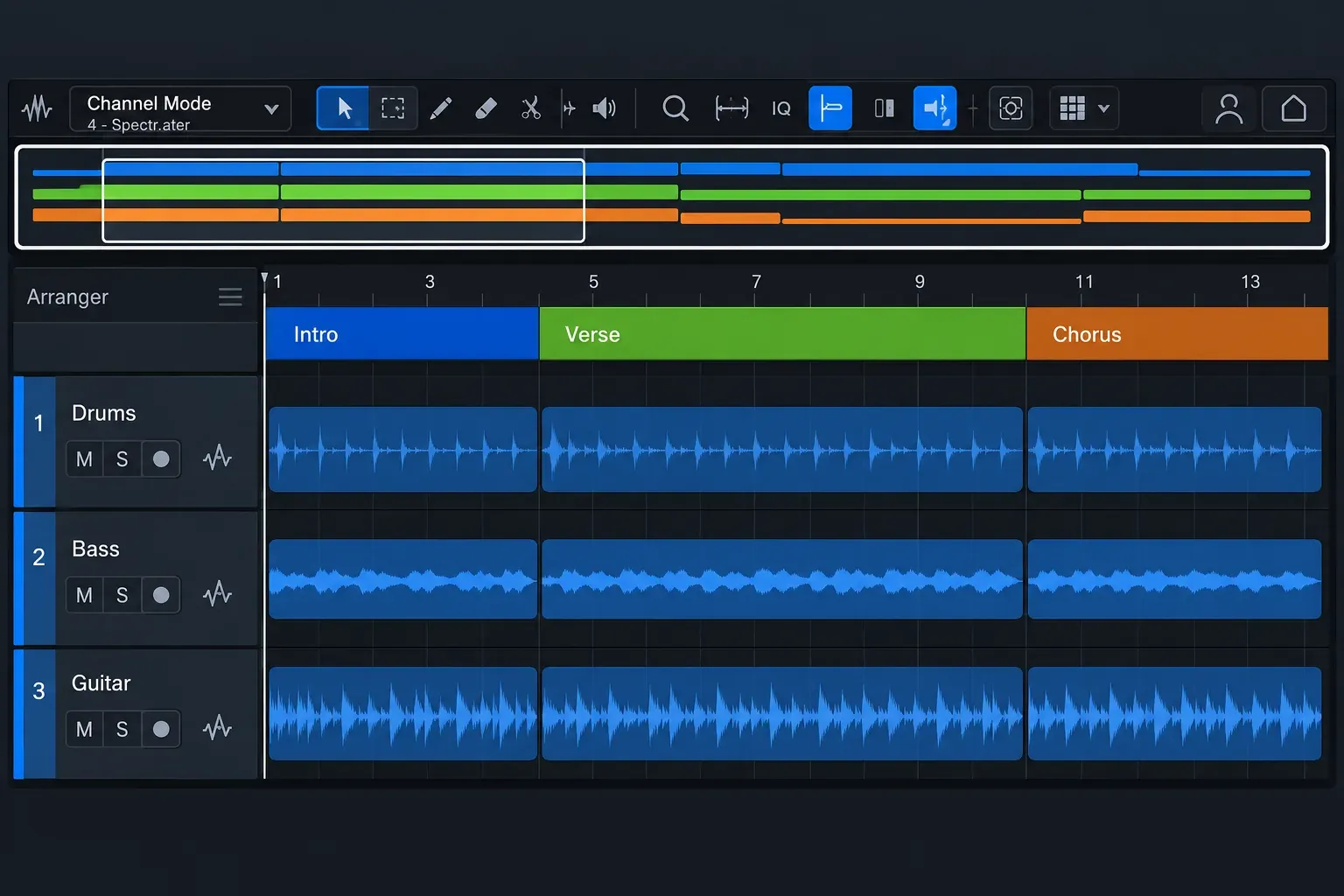
Those are useful differences if you repeatedly rebuild choruses, try alternate song orders or prefer reaching for devices through a Browser. They don’t prove that every edit takes fewer clicks. Your selection habits, shortcuts and templates change that comparison considerably.
Logic’s Quick Swipe Comping and Flex tools cover take selection and timing or pitch work. If those already solve your recording tasks, identify the exact missing operation before switching. “Studio One edits faster” is too broad to help you choose.
Fender also separates recording sessions, live Shows and Mastering Projects. Its setup guide describes a Mastering Project as a timeline for assembling multiple sessions or audio files. That can matter when you finish a collection of songs. It is a different organizational approach from inserting a mastering processor on an individual mix.
Check your plugins before changing DAWs
Logic’s documented third-party format is Audio Units, including AUv2 and AUv3. A VST-only plugin isn’t a native Logic insert. Fender’s manual lists VST2, VST3 and Audio Units in its Browser. Audio Units are a Mac format. Check the vendor’s supported host, operating system and processor architecture for each plugin you rely on.
Owning a plugin in both formats doesn’t mean its saved state will transfer between DAWs. Nor does a Logic channel strip become a Fender preset. Keep a short inventory of essential instruments, sample libraries, tuning tools and effects, then decide which sounds need to be printed to audio before a handoff.
If you depend on Melodyne ARA, check integration separately from the plug-in format. Celemony’s current compatibility page lists native Apple-silicon Studio Pro 8.1 ARA-VST3, but its tested Logic entry is still 11.2.2 under Rosetta, rather than Logic 12.4. Melodyne itself can run natively. That doesn’t establish native ARA in every host. Apple’s Logic/Rosetta guidance also warns that Stem Splitter, ChromaGlow and most Mastering Assistant presets become unavailable there. For Studio Pro, select an audio event and choose Audio > Edit with Melodyne for the documented ARA route, rather than an ordinary mixer insert. Before moving a working setup, confirm your exact host, Melodyne and OS versions.
Fender’s own Mustang guitar and Rumble bass tools may remove the need for some extra purchases. Still, do not count an integrated third-party service as an unlimited subscription to that service. Check its account terms and included access separately.
Can Studio One open a Logic Pro project?
Do not plan on opening a .logicx package as a fully editable Fender session. Fender’s manual documents several interchange formats, including AAF and DAWproject, but doesn’t list native Logic projects. One DAW supporting a file format doesn’t make it a shared format with the other.
For a dependable delivery, agree on aligned audio first. Apple documents File > Export > All Tracks as Audio Files, including choices for effect processing, tails and volume/pan automation. Those choices change what the recipient receives. Exported audio preserves the rendered sound. It doesn’t preserve an editable software instrument or plugin chain.
- Keep the native project and collect its assets before preparing a separate delivery.
- Agree on a common start, sample rate and the parts to supply as individual tracks or grouped stems.
- Decide which effects and automation should be printed. Include dry alternatives where the next engineer needs them, and retain essential instrument sounds as audio.
- Supply a reference mix plus tempo, time-signature and arrangement notes. For tempo changes, agree on the map rather than sending only one BPM number.
- Have the recipient check alignment and missing content before you retire the source session.
Logic’s AAF export carries audio-region position information and volume automation, and Fender documents AAF import. That can be useful when the recipient requests it. AAF is audio interchange, and it doesn’t guarantee that instruments, plugins, routing and every edit survive intact. Our bounce versus export guide explains which kind of output fits the next job.
Sound quality and CPU: avoid the false shortcut
I wouldn’t buy either DAW because a forum says its engine sounds warmer. A meaningful sound comparison needs the same source audio, processing, routing, level and export settings. Different stock instruments or amp models can plainly produce different sounds. That’s a tool choice. It doesn’t prove the whole DAW has a superior sound.
One engine difference is documented. According to Production Expert’s look at DAWs on Apple silicon, Studio One picked up efficiency-core support in version 7.2, while Logic Pro still can’t address those cores. That gap matters most on chips that have efficiency cores. Real headroom still depends on the machine, audio driver, buffer, plugins and session layout, so ask whether your own recording or mixing workload fits. An unrelated track-count video is no promise.
My recommendation
For a supported Mac and a new production setup, I’d start with Logic. The included instruments, sampling tools and GarageBand path make the purchase easy to justify. Choose Fender Studio Pro when Windows compatibility, section-based arranging, its mastering workspace or the guitar tools answer a need you can name.
If you already finish work comfortably in Studio One, the Fender rename alone is no reason to abandon it. If you already finish work in Logic, switch only when the benefit is worth rebuilding your working setup. For other matchups, the Logic Pro comparisons hub keeps the platform and workflow decisions together.


