Logic Pro vs REAPER: Which DAW Fits Your Work?
Logic gives a Mac songwriter a complete sound toolkit. REAPER offers flexible recording, routing and delivery across platforms. Here is where each earns its place.

Choose Logic Pro if you have a supported Mac and want instruments, drum parts, loops and recording tools in one purchase. Choose REAPER if you need Windows or Linux, already have your sounds, or want to shape recording, routing and repeated exports around your own workflow. Neither choice makes a vocal recording good by itself.
For a Mac songwriter starting with few plug-ins, I’d take Logic. For someone recording bands with a settled instrument and effect collection, REAPER deserves a serious look. The useful question is what the new DAW removes from your workload. A cheap license is less compelling if you spend the next month shopping for sounds you already had.
Logic Pro vs REAPER at a glance
| Decision | Logic Pro | REAPER |
|---|---|---|
| Desktop | Mac | Mac, Windows, Linux |
| US price | $199.99 standalone Mac app; subscription option | $60 if eligible; $225 commercial |
| Sounds | Broad instrument, patch and loop collection | Basic instruments; bring the libraries you need |
| Comping | Audio take folders and Quick Swipe Comping | Takes, fixed item lanes and lane comping |
| Setup | Assignable key commands and established editors | Custom actions, mouse modifiers, themes and scripts |
| Plug-ins | Audio Units | VST, VST3, CLAP, LV2; AU on Mac, DX on Windows |
| Delivery | Track audio export and project bounce | Render queue, regions, matrix and filename wildcards |
| Projects | Keep editable Logic work in Logic | Use REAPER projects with compatible media and plug-ins |
Taxes, regional stores and eligibility can change the amount you pay. The comparison covers Logic Pro 12.4 and REAPER 7.82, and the workflow details come from Apple’s Mac guide and the REAPER 7.81 user guide. It’s about desktop production. Logic Pro for iPad is a separate app with its own purchase or subscription route.
Compare the license and the tools you still need
Cockos’ REAPER licensing terms put the discounted license at US$60 and the commercial license at US$225, before local taxes. The discounted price covers personal use, educational or nonprofit organizations, and commercial use where yearly gross revenue does not exceed US$20,000. Both prices buy the same application, and paying $225 doesn’t get you a better audio engine.
A new REAPER license includes updates through version 8.99. It’s not a promise of every future major version. The full-function evaluation lasts 60 days. Continued access to an evaluation dialog doesn’t turn REAPER into a permanently free DAW.
Apple’s current Logic Pro purchase options include the $199.99 standalone Mac app and Apple Creator Studio at $12.99 per month or $129 per year for the standard US subscription. Apple says the Logic feature set is the same in the subscription and one-time purchase versions. The subscription also bundles other creative apps and the iPad version, which counts only if you use them.
I’d choose the standalone Logic purchase when Logic on Mac is the only app I need. Don’t infer a lifetime update guarantee from Apple’s history of releases. For the broader ownership decision, our Logic Pro review’s pricing section separates the purchase routes.
Then price the missing pieces. A REAPER setup for recorded guitar and vocals may need few additions. A composer wanting acoustic drums, orchestral instruments and a large preset collection should budget for those sounds. If you own suitable plug-ins already, buying another bundle to duplicate them is poor value.
Writing songs, beats and MIDI parts
Logic’s advantage is the collection around the editor: Alchemy, Sampler, Quick Sampler, Session Players and Apple Loops give you several ways to start a part. Apple’s instrument and sound-library overview shows the breadth of that toolkit. A MIDI keyboard and a musical idea can take you a long way before a third-party purchase.
REAPER isn’t empty. Its included instrument and effect list contains ReaSynth, ReaSamplOMatic5000 and ReaSynDr, alongside ReaEQ, ReaComp, ReaVerb and many JSFX processors. Those basic instruments don’t form a Logic-sized ready-made sound collection. That distinction matters more than the misleading claim that REAPER has no instruments or plug-ins.
If your existing synths and drum libraries already make the music you want, REAPER’s smaller bundle can be an advantage: there’s less paid-for content to ignore. If you’re starting from GarageBand, Logic has another benefit. Apple supports opening GarageBand projects in Logic, so your existing work becomes a useful place to learn the expanded tools.
Both applications edit MIDI. I wouldn’t buy either on a claim that its piano roll is universally better. Look at the changes you make repeatedly: moving notes, altering velocities, programming articulations or editing several parts together. Familiarity and the sounds attached to those notes can outweigh an impressive feature list.
Vocals, guitars and multitrack recording
Logic is a strong choice when your main job is recording several performances and assembling a convincing vocal or guitar part. In an audio take folder, Quick Swipe Comping selects sections from different takes. The overview lane shows the assembled result, which gives the editing decision a clear visual home.
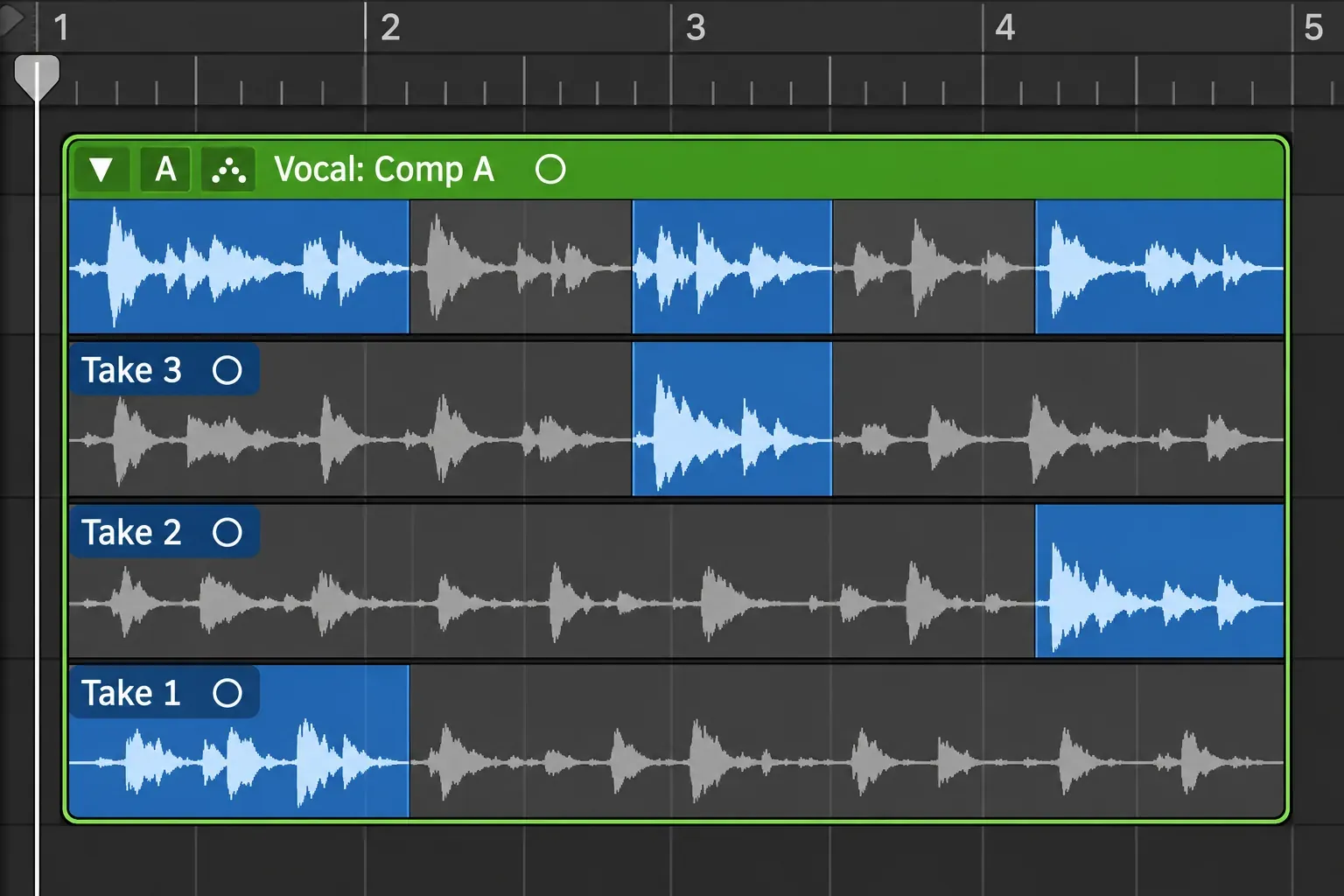
REAPER has conventional takes and a separate fixed-item-lane workflow. The current REAPER user guide’s comping chapter explains how selected source-lane areas become new items in a comp lane, leaving the original source items unchanged. You can then edit the comp items independently. So this is a genuine recording choice rather than a contest between one DAW with comping and another without it.
For dense multitrack work, decide whether you prefer Logic’s take-folder organization or REAPER’s item and lane controls. Check how you would group related microphones, keep edits aligned and change a comp later. A genre label such as “best for metal” tells you less than those operations. Neither application removes the need to listen for bad edit boundaries or damaged timing.
Routing and customization: how much do you want to control?
REAPER lets one track carry audio and MIDI, and its send controls expose channel mapping alongside the send level and mode. Cockos documents its multichannel routing and track capabilities. That flexibility is valuable when you build reusable recording templates, unusual parallel chains or multichannel sound-design sessions.
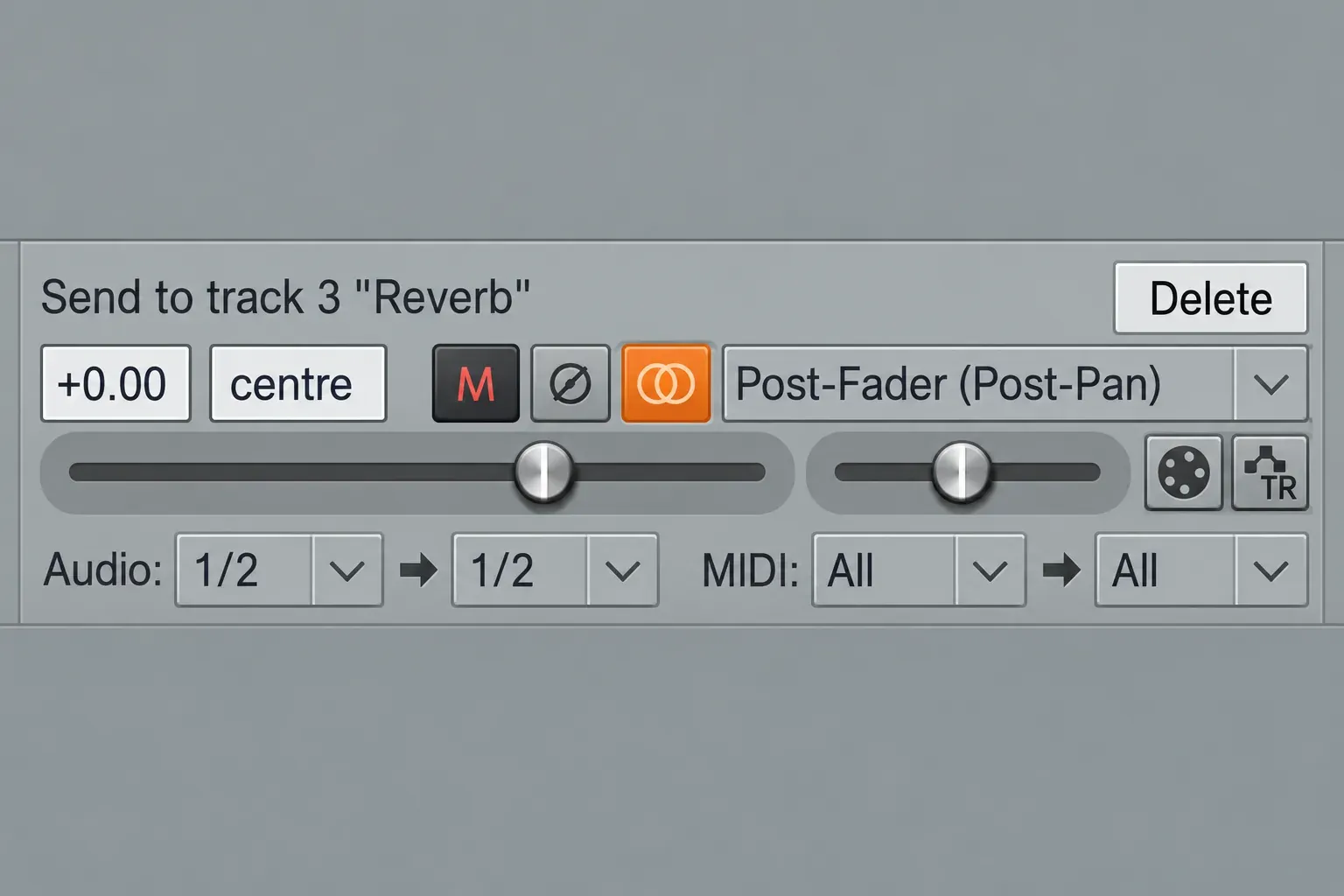
Logic also has buses, aux channel strips, sends and multi-output instruments. For a normal song mix, those are substantial tools. REAPER’s attraction is the freedom to change how repeated work happens, rather than exclusive access to parallel processing.
REAPER’s user guide describes custom action macros and editable mouse modifiers. A custom action combines a sequence of existing actions under one command. Scripts extend that idea, but you don’t have to write code to record or mix. I’d make one useful shortcut for a repeated task before spending days rebuilding the interface.
If you work at several compatible computers, REAPER’s portable installation and separate configuration settings offer another reason to consider it. The setup differs between Windows and macOS. Check the appropriate REAPER build, audio devices and drivers, file paths, plug-ins, sample libraries and their licenses at each workstation. Carrying the configuration doesn’t supply those dependencies.
Logic isn’t locked to its default shortcuts. Apple documents assigning key commands and controller messages. The practical choice is between a more established layout and REAPER’s wider invitation to shape the application. If your current shortcuts already let you finish projects comfortably, changing DAWs adds a cost as well as a possibility.
Your computer and plug-ins can settle the decision
If you need Windows or Linux, choose REAPER from these two desktop DAWs. Its current download page offers those platforms plus macOS Universal for Intel and ARM64, with separate legacy Mac builds. The universal Mac download is recommended for modern macOS systems. An old operating-system route does not guarantee that your audio interface or plug-ins support it.
For current Logic, check the exact store and purchase route against your Mac. Apple’s product page requires Apple silicon and lists macOS 15.6 or later, while its Creator Studio support requirements and the standalone App Store listing list macOS 15.4 or later. That published discrepancy needs an exact compatibility check. A store listing with no processor detail isn’t confirmation of Intel support.
Logic hosts Audio Units. REAPER hosts VST, VST3, CLAP and LV2 as well as Audio Units on Mac and DX on Windows. Before switching, list the instrument and effect versions in your important projects. A Windows machine cannot load a Mac AU build, and a matching plug-in name does not guarantee that an AU preset or saved state will transfer to its VST3 version.
If you depend on VoiceOver, audition your own recording, comping and automation tasks before committing. REAPER’s OSARA accessibility extension is a relevant resource. Older user discussions are useful warnings about particular tasks, but they cannot certify every current control or third-party plug-in as accessible.
Moving between Logic and REAPER
Plan on an audio handoff, not a fully editable translation of the native project. Keep the original Logic project or REAPER .RPP project with its media. An exported WAV preserves the sound you print. It doesn’t preserve a take folder, software instrument or editable plug-in chain.
- Agree on a common start point. Export the required tracks across the same range so the recipient can line them up without guessing.
- Print the sounds that must survive. This is especially useful for Logic instruments and platform-specific plug-ins. Keep a dry alternative when the other person needs to remix.
- Decide where shared effects belong. Include appropriate bus or effect-return files rather than assuming that individual track exports reproduce the entire mix.
- Include a reference mix and session notes. State tempo changes, sample rate and any deliberate silence at the start. Supply MIDI separately if note editing matters, while recognizing that MIDI does not carry the instrument sound.
- Check the imported result. Listen at the beginning, at an edit and near the end. Confirm alignment and effect tails before archiving either native project.
Apple’s track-audio export options distinguish effect tails, plug-in bypass and volume/pan automation. Our Logic export guide covers the delivery details. In REAPER, the user guide distinguishes consolidated source media from rendered tracks with track processing: use the appropriate Render source when those effects must be printed.
REAPER’s render queue, Region Render Matrix and filename wildcards are a substantial reason to consider it if each project produces many named variations. For one stereo song mix, that capability may solve a problem you don’t have.
Which one would I choose?
Logic: a supported Mac, a limited existing sound collection, songwriting or beats, and a wish to spend less time assembling a toolkit. It is also the straightforward next step when you want to develop existing GarageBand songs.
REAPER: cross-platform recording, a settled plug-in collection, flexible item editing, deliberate customization or repeated file delivery. Its low eligible price helps, but the application earns its place through those jobs.
Don’t switch solely for a promised CPU or sound-quality win. There’s one documented engine difference: REAPER can use Apple silicon’s efficiency cores for audio work, while Logic Pro still can’t address them, according to Production Expert’s look at DAWs on Apple silicon. That helps on chips that have efficiency cores, but buffer size, plug-ins, routing, gain and the project itself still decide how a session runs. If your current DAW does the work, identify a specific missing capability before moving. For other choices, use the Logic Pro comparison library or our DAWs for Mac guide.


