Best Free DAWs in 2026: 10 Picks by Workflow
Choose a genuinely useful free DAW by computer, workflow and the restriction you can live with, with current limits checked against official sources.

The best free DAW depends on what you need to record. On a compatible Mac, start with GarageBand. For a full Windows studio, try Cakewalk Sonar Free; for recording and mixing on Mac or Windows, consider LUNA. BandLab suits browser-based projects, while LMMS suits pattern-based music on Linux. For beats, compare MPC Beats’ pad workflow with Reason Free’s rack and 16-track sequencer.
Checked September 7, 2026 against current developer documentation. These recommendations compare the tools, platform support and limits of the free editions. They are not a measured ranking of sound quality, CPU use or latency. The numbers below identify entries, not a universal best-to-worst order.
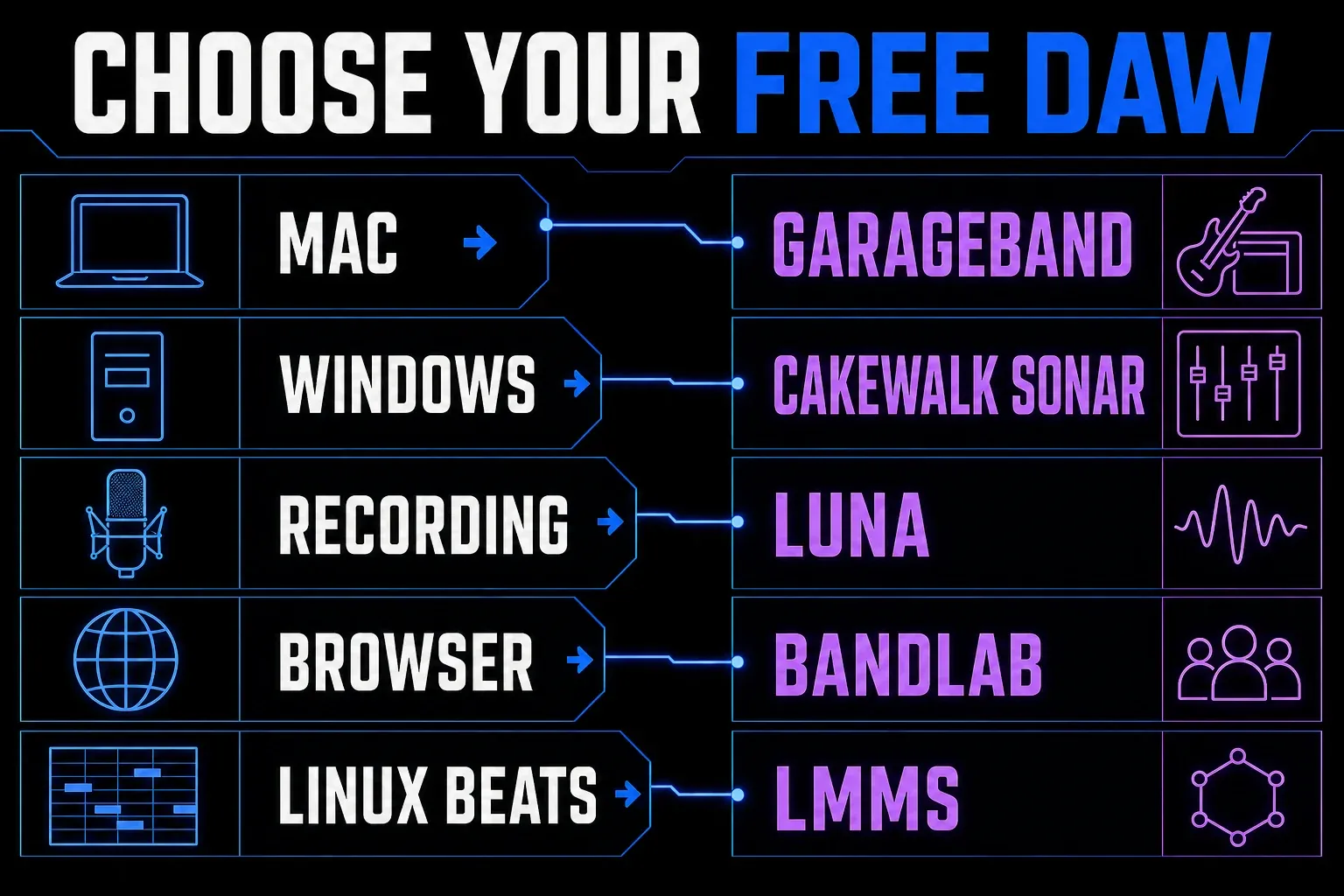
Best free DAWs: quick comparison
| Free DAW | Best for | Platform | Free status | Main limit or requirement |
|---|---|---|---|---|
| GarageBand | Mac beginners and a future move to Logic | macOS | Free app | Current installer: macOS 15.6+; AU plug-ins, not VST |
| Cakewalk Sonar Free | Full recording and mixing on Windows | Windows 11+ | Free tier | BandLab account and periodic reactivation; Windows 10 unsupported |
| LUNA | Audio recording and studio-style mixing | macOS, Windows | Free version | UA Connect and free iLok account; Hardware Inserts require LUNA Studio |
| Waveform Free 14 | Conventional audio and MIDI production | macOS, Windows, Linux | Free tier | Linux build tested on Ubuntu 24.04 unlocks Pro features; paid feature expansions exist |
| MPC Beats | Sample-based beatmaking | macOS, Windows | Limited free version | 8 MIDI and 2 audio tracks per Sequence; no VST3 hosting |
| Cakewalk Next | Simple songwriting and beat sketches | macOS, Windows | Free tier | BandLab account; membership expands Sounds and Splitter access |
| Pro Tools Intro | Learning the Pro Tools editing model | macOS, Windows | Limited free version | 8 audio, 8 instrument, 8 MIDI tracks; 4 recording inputs; AAX plug-ins |
| BandLab Studio | Browser and mobile collaboration | Web, iOS, Android | Free tier | 16 tracks and 15 minutes per project |
| LMMS | Open-source beatmaking, especially on Linux | Windows, macOS, Linux | Free and open source | No live audio-recording workflow and no VST3 support |
| Reason Free | Rack-based songs and smaller arrangements | macOS, Windows | Limited free version | 16 audio/instrument tracks combined; account; older Rack overwrite warning |
What “free” actually means
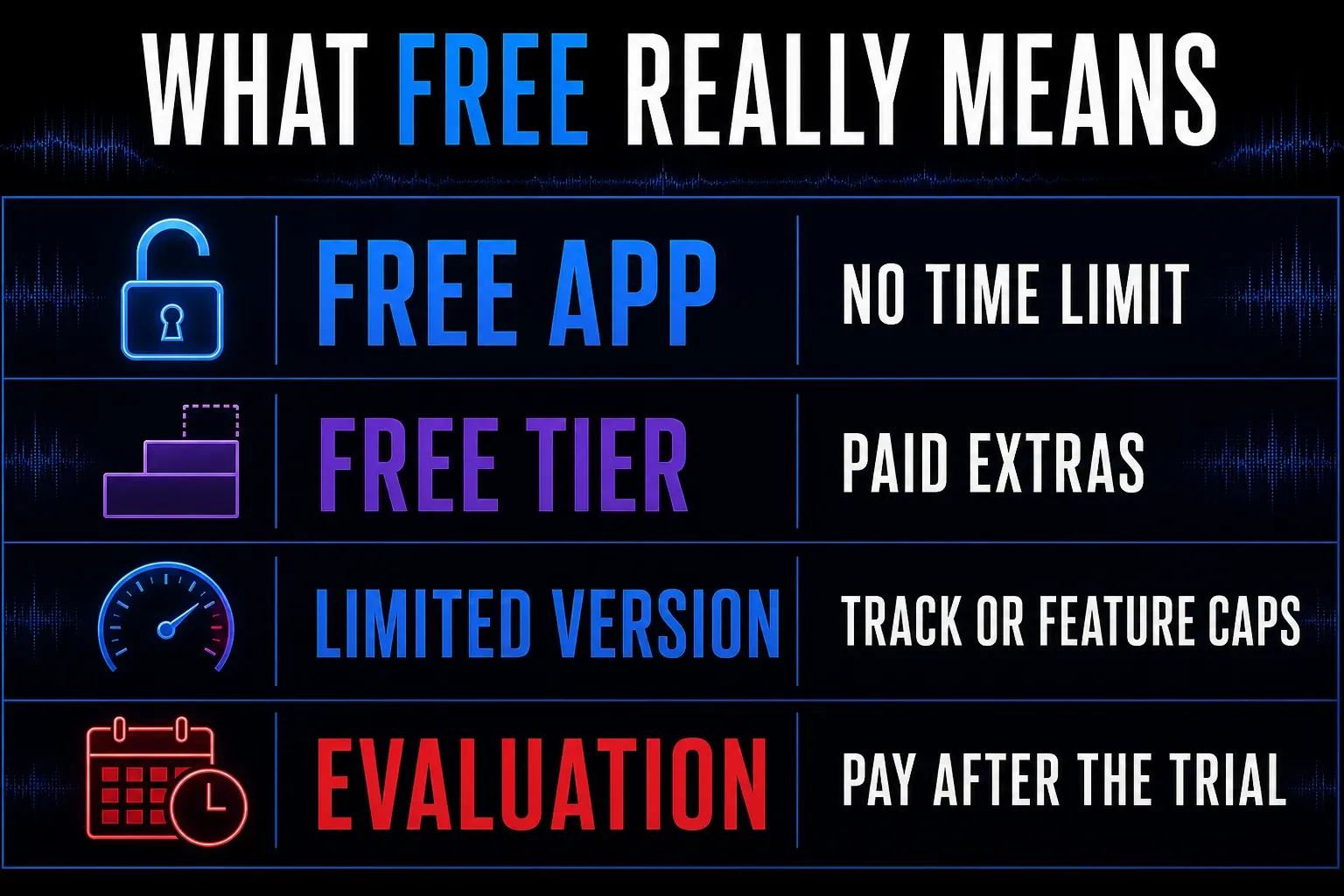
A permanent free app and a time-limited evaluation are different commitments. Before installing anything, check which of these four labels applies:
- Free app: no trial deadline. GarageBand and LMMS fit this category.
- Free tier: recording and editing remain usable, while some tools, content or services cost extra. Sonar, Waveform Free, Cakewalk Next and BandLab use this model.
- Limited free version: a non-trial edition with a track cap, such as Pro Tools Intro, MPC Beats or Reason Free.
- Evaluation: payment is required for continued use after the trial. REAPER belongs here, despite appearing in many free-software lists.
Check the restriction against a real session. Two audio tracks may cover a vocal and guitar but not a separately miked drum kit. Periodic activation matters on an offline computer. A browser editor may suit a shared demo but not a recording you must keep entirely local.
1. GarageBand: best free DAW for Mac
GarageBand is a useful starting point for recording, beats and a later move to Logic Pro. Apple’s Mac app includes audio recording, software instruments, Drummer, guitar and bass rigs, Flex Time and MIDI editing. The current Mac App Store listing allows up to 255 tracks and requires macOS 15.6 or later. Check that installer requirement before choosing it for an older Mac.
The value is the complete starting environment. You can connect a microphone or guitar, play built-in instruments from a MIDI keyboard, arrange Apple Loops and finish a stereo mix without hunting for a separate instrument bundle. GarageBand also uses Audio Unit plug-ins, so the project can grow beyond the stock library.
The limit is workflow depth, not whether it can finish a song. Logic provides deeper routing, editing, automation and production tools. If you already know those are necessary, compare the two directly in our Logic Pro versus GarageBand guide. If you’re choosing among every serious Mac DAW, including paid software, use the broader best DAW for Mac comparison.
Choose GarageBand if your Mac supports the current app and you want built-in instruments and a straightforward recording setup. Skip it if you need Windows or Linux, deep mixer routing, or plug-ins available only in VST format.
2. Cakewalk Sonar Free: best full DAW for Windows
Cakewalk Sonar Free is the current Windows answer, not the discontinued Cakewalk by BandLab application still named in older lists. Cakewalk’s current Sonar comparison says the free tier can record, edit, mix, save and export projects with unlimited audio, MIDI and instrument tracks.
Sonar’s free tier includes AudioSnap, ARA support, articulation maps and a limited set of ProChannel modules. The free-versus-membership comparison separates those tools from paid extras such as plug-in oversampling, additional Arranger tracks and custom workspaces. ARA compatibility does not mean every compatible third-party editor is included for free.
Cakewalk’s supported Windows version is Windows 11 or later; Windows 10 may run Sonar but is unsupported. A free BandLab account is required. Sonar can work offline after activation, but both free and paid editions require periodic reactivation. Cakewalk documents online renewal and an offline activation route through Product Center. It does not specify a fixed renewal interval on the product page, so do not assume one initial activation lasts indefinitely.
Choose Sonar Free for full-scale Windows recording and mixing without a track cap. Skip it for macOS or Linux, or if you cannot maintain its activation requirements. Use the current Sonar download, not an archived installer for discontinued Cakewalk by BandLab.
3. LUNA: best free recording and mixing environment
LUNA suits recording and mixer-led work on macOS or Windows. Universal Audio’s current Free/Studio comparison lists unlimited tracks, ARA support, multi-output plug-ins and four-track stem separation in LUNA Free. The paid tier is now called LUNA Studio. It adds hardware inserts, Audio-to-MIDI, six-track stem separation, lyric transcription, chord extraction and additional instruments, extensions and plug-ins. The free tier remains useful for recording and mixing; compare the current feature table before paying for an extra tool.
You don’t need Universal Audio hardware. You do need UA Connect, which must remain installed, plus a free PACE iLok account. The current LUNA requirements cover macOS 11 through macOS 26 and Windows 10 or 11. A solid-state drive and 16 GB of RAM are recommendations, not hard guarantees of a particular session size.
Choose LUNA for vocals, instruments and studio-style mixing when its account and authorization setup suits your computer. Skip it if you need to avoid additional license-management software. Compare the included instruments with what you actually need before paying for a bundle.
4. Waveform Free 14: best conventional free tier
Waveform Free 14 handles audio and MIDI production without a track cap. Tracktion’s current product page lists VST and VST3 hosting, plus AU on Mac, along with stock effects and instruments. The stated requirements are 64-bit Windows 10 or 11, macOS 13 or later on Intel or Apple silicon, or Linux, with Ubuntu 24.04 listed as tested.
Linux support has changed. Tracktion’s current requirements list Waveform Linux 14, tested on Ubuntu 24.04 (64-bit), and say Waveform Pro features unlock automatically while running on Linux. Other distributions aren’t named as tested, so treat Ubuntu 24.04 as the documented baseline and check that your plug-ins have Linux versions before moving a project across.
Tracktion sells feature expansions as well as Waveform Pro. For example, the clip Launcher is an expansion, not part of the base free feature set. Choose Waveform Free for audio, MIDI and third-party plug-ins on a supported Mac, Windows or Linux computer. Skip it on Mac or Windows if a paid expansion or Pro feature is essential to your work.
5. MPC Beats: best free DAW for sample-based beats
MPC Beats is a free Mac and Windows production DAW built around pads, samples and short sequences. Akai’s current setup guide confirms that it works as a standalone DAW and can also run as a plug-in inside another host.
The limits matter more than the marketing. Akai documents up to eight MIDI tracks and two audio tracks per Sequence. That is enough for a drum-and-sample sketch or a compact beat, but it is restrictive for a band session, layered vocal production or a dense arrangement.
Akai’s plug-in scanning guide lists VST2 hosting on Windows and Mac, plus Audio Units on Mac. MPC Beats does not host VST3. Do not confuse it with MPC 3 Desktop, whose plug-in support differs.
Choose MPC Beats when beatmaking, sampling and pad-based sequencing are the job. Skip it when you need many recorded audio tracks or VST3 hosting.
6. Cakewalk Next: best simple desktop songwriting path
Cakewalk Next is the simpler sibling to Sonar, available for Mac and Windows. Its product FAQ lists unlimited tracks, virtual instruments, built-in effects, VST support and AU support on Mac. A free BandLab account is required.
Next is aimed at quick song construction, beatmaking and lyric-led writing. It’s easier to recommend to someone who finds Sonar’s traditional studio layout excessive. Membership expands BandLab Sounds and stem-separation access, while the core creation app stays usable without paying.
Choose Cakewalk Next for songwriting, MIDI parts and beat sketches if you prefer its layout to Sonar’s traditional mixer. Skip it if the deeper recording and mixing controls in Sonar are the reason you are choosing a Windows DAW.
7. Pro Tools Intro: best for learning Pro Tools
Pro Tools Intro is a free edition with specific limits. Avid’s current comparison lists 8 audio, 8 instrument and 8 MIDI tracks, plus 4 Aux Input tracks and 4 Routing Folder tracks as separate allowances. It can record from 4 simultaneous inputs. Plug-ins need an AAX version; AU and VST files do not load directly.
Those limits can still cover a vocal production, small acoustic session, editing practice or a compact beat. The attraction is learning Pro Tools editing, playlists, routing language and session handling without beginning a paid plan.
Avid’s Intro licensing FAQ explains the free iLok account and disk-based activation. You need an internet connection to download and authorize it, but a physical iLok USB key is not required for computer-based Intro activation. Check the supported OS for the current Pro Tools installer before installing.
The risk appears when a larger Pro Tools session arrives. Avid says Intro opens only the supported number of tracks and ignores the remainder. Use a copy or import selected session data instead of treating the free version as a transparent viewer for every studio session.
Choose Pro Tools Intro when learning Pro Tools itself is the goal. Skip it when eight audio tracks are gone before the arrangement is half built.
8. BandLab Studio: best free browser DAW
BandLab Studio lets you record, edit and mix in a browser or on a phone. The current Studio guide describes a free cloud-based DAW with 16 audio and MIDI tracks combined and a 15-minute project limit. Sign up for an account to start a project.
The browser model is useful for collaboration, quick demos, school computers and moving between devices. It can record audio, use virtual instruments, import audio or MIDI and pull material from BandLab Sounds. It’s less suitable for a long multitrack production, detailed offline editing or a studio that must keep every session local.
Choose BandLab when access and collaboration matter more than session depth. Skip it when a 16-track or 15-minute ceiling is likely, or when the project must remain independent of a cloud account.
9. LMMS: best open-source pick for Linux beats
LMMS is free, open source and available on Windows, macOS and Linux. The official LMMS source repository documents the free cross-platform project, while the current installation manual lists the supported desktop platforms. Its Piano Roll, Beat+Bassline Editor, built-in synths and SoundFont support make it useful for electronic music and pattern-based beatmaking without an account.
LMMS can arrange imported samples, but it is not a substitute for a microphone-recording DAW. Its Song Editor documentation distinguishes arranging samples from recording audio. The settings manual also says VST3 is not supported. Check plug-in compatibility for your OS rather than assuming every VST instrument will load.
The official release history separates the old 1.2.2 stable branch from newer 1.3 pre-release development. A pre-release is not a newer stable release. Try the build, interface scaling and plug-ins you need in a small project before relying on them for a delivery.
Choose LMMS for open-source, pattern-based production on Linux or for a no-account MIDI sketch environment. Skip it when microphone recording, modern VST3 hosting or a recent stable-release cadence is required.
10. Reason Free: rack instruments and a 16-track DAW
Reason Free includes both a standalone DAW and a Reason Rack plug-in. The DAW permits 16 audio or instrument tracks combined and includes sequencing, Blocks song arrangement and comping. Its rack includes 15 devices; it is not the complete paid Reason library.
The formats describe two different uses. The standalone DAW hosts VST2 and VST3 plug-ins. Reason Rack Free can run inside another compatible DAW as VST3, AU or AAX. You do not need another DAW to use the standalone sequencer. A free Reason account is required; the listed desktop minimums are macOS 11 or Windows 10 version 1607, with Windows 11 also supported.
Existing Reason users: check before installing. Reason Studios warns that Reason Free can overwrite the older Reason Rack plug-in from Reason 10–13. Do not install it over a working setup if you need to retain that plug-in. For a new user, choose Reason Free if its rack and 16-track limit suit the song; choose an uncapped option for larger sessions.
REAPER and Audacity: useful, but different choices
REAPER is an evaluation, not a free DAW
REAPER is excellent value, but value and free aren’t synonyms. Its official download page provides a fully functional 60-day evaluation, and the license page asks the user to purchase after that period. It belongs in a low-cost DAW comparison, not a list of permanent zero-cost tools.
Audacity 4 is an audio editor, not a conventional MIDI DAW
Audacity is free and open source, and version 4.0 is a substantial audio-editing update. Its current release notes cover multitrack clip editing, recording and real-time effects, but also say Note/MIDI tracks are not available in Audacity 4.0. Use it for recording, cleanup, podcast work and waveform editing. Choose a conventional DAW when the project depends on MIDI instruments and sequencing.
Before you commit a whole song
- Check installation and licensing. Confirm your exact OS, processor, account requirements and whether an offline computer needs later reactivation. Use the developer’s download, not a repackaged installer.
- Try your actual inputs and instruments. Record a short take, play a MIDI part and load a plug-in you rely on. AU, VST2, VST3 and AAX are not interchangeable formats.
- Build a representative session. Include enough vocal layers, drum inputs or instruments to expose a track or input limit before you arrange the whole song.
- Save, close and reopen it. Check that audio, instrument sounds and plug-in settings return. Export a stereo file and listen to it outside the DAW. If offline work matters, verify it after the required activation.
If that test works, continue the song in the same app. Change tools when a specific limit prevents the work, not because another comparison has more checkmarks.
Moving a free DAW project to Logic Pro
Logic can open GarageBand projects, making GarageBand a direct route into Logic. Keep a backup and check version compatibility first. For another DAW, export audio tracks or stems from the same start point, with the tempo information and MIDI files you need. Do not expect a native project, plug-in state or automation to translate automatically. Import the files into a new test project and check alignment, tails and missing sounds before handing them off; keep the source session intact.
If both applications and editions support AAF, our Logic Pro handoff guide explains its uses and limitations. For paid as well as free options, compare the DAWs for beginners or browse our DAW comparisons.
Frequently asked questions
What is the best free DAW in 2026?
For a first Mac project, consider GarageBand if your Mac supports the current installer. For Windows recording and mixing, consider Cakewalk Sonar Free; LUNA is another option on Mac or Windows. Reason Free suits smaller rack-based productions. Choose by platform, track needs and activation requirements rather than expecting one app to be best for everyone.
What is the best free DAW for Windows?
Cakewalk Sonar Free suits full recording, MIDI and mixing on Windows 11 or later, with unlimited core tracks. It requires a free BandLab account and periodic reactivation, available through online or offline methods. Compare LUNA and Waveform Free if their workflow or system support fits your computer better. MPC Beats suits pad-based beats on Windows, and LMMS covers pattern-based MIDI work without an account. Cakewalk Next, Reason Free and Pro Tools Intro also run there, though the last two cap the track count. GarageBand is the only pick on this list without a Windows option; BandLab Studio works in a browser.
What is the best free DAW for Mac?
GarageBand is a useful complete starting point and can lead directly into Logic Pro. Its current Mac App Store installer requires macOS 15.6 or later. LUNA and Waveform Free are alternatives with different system requirements; check the current installer and your plug-ins before choosing one for an older Mac.
What is the best free DAW for Linux?
LMMS suits pattern-based electronic music and MIDI work on Linux without an account. It does not provide live audio recording or VST3 hosting. For conventional audio and MIDI recording, Waveform Free 14 now has a Linux build that Tracktion tests on Ubuntu 24.04, with Pro features unlocked there.
Is REAPER free forever?
No. REAPER’s official download is a fully functional 60-day evaluation. The developer sells a license for continued use after the evaluation period. It is affordable compared with many paid DAWs, but it is not a permanent free app.
Can music made in a free DAW be released commercially?
The software price does not decide whether you own the music. Your rights depend on the recordings, samples, loops, collaborators and licenses used in the project. Read the DAW’s content license and the license for every third-party sample pack before release.


