Logic Pro 12.2: What Changed and Should You Update?
The exact Logic Pro 12.2 changes, the fixes worth testing, and the features that actually arrived later in Logic Pro 12.3.

Logic Pro 12.2, released April 9, 2026, restored missing legacy sounds, added Spatial Audio MP4 export, and fixed problems with Chord Track, Flex Pitch, saving and crashes. It was a useful update for reopening older projects, not a guarantee that every project or plug-in problem was solved.
This is a guide to the April release. Logic Pro 12.3 followed on June 30, and 12.3.1 on August 13. If you are deciding whether to update today, check compatibility with your Mac, interface and plug-ins before changing a working setup.
Checked September 20, 2026 against Apple’s release notes, dated App Store version entries and User Guide. The App Store lists 12.3.1 as current on that date.
Logic Pro 12.2 at a glance
| Area | What changed in 12.2 | Who should care |
|---|---|---|
| Legacy sounds | Legacy Patches, Instruments and Loops became downloadable from Sound Library. | Projects created with content from earlier Logic versions. |
| Spatial Audio export | Logic could export MP4 using Dolby Digital Plus with Dolby Atmos or Dolby AC-4 L4. | Creators delivering playable immersive files as well as ADM masters. |
| Project reliability | Apple fixed missing audio regions in some existing projects and improved recovery of plug-in settings from autosave. | Anyone reopening or recovering active sessions. |
| Editing | Chord analysis, Flex Pitch in take folders and Step Sequencer received targeted fixes. | Users working with Session Players, vocal tuning or patterns. |
| Later release | Step Reflex: Modern Garage arrived with Logic Pro 12.3, not 12.2. | Readers comparing the April and June 2026 updates. |
Logic Pro 12.2 release date and current status
Apple’s Mac App Store version history dates Logic Pro 12.2 to April 9, 2026, 12.3 to June 30, and 12.3.1 to August 13. This page documents the 12.2 changes, not everything available in the current app. You do not need to find an old 12.2 installer to understand which release fixed a problem.
Before any update, back up the Logic app and important projects and check third-party compatibility. Apple puts backup advice at the top of its Logic Pro release notes. If you have a session due soon and no time to test, keep the working setup until you can check a copy of the project.
Restore missing Logic Pro legacy sounds
The most useful 12.2 change for older projects was the return of three optional downloads that were absent from the initial Logic Pro 12 release:
- Logic Pro Legacy Patches
- Logic Pro Legacy Instruments
- Logic Pro Legacy Loops
Apple’s missing legacy content instructions are short: update to Logic Pro 12.2 or later, choose Logic Pro > Sound Library, search for “Logic Pro Legacy,” select the packs you need, and install them. Apple doesn’t publish one combined download size on that page, so don’t plan storage around an unverified figure. Read the size Logic shows for the selected packs.
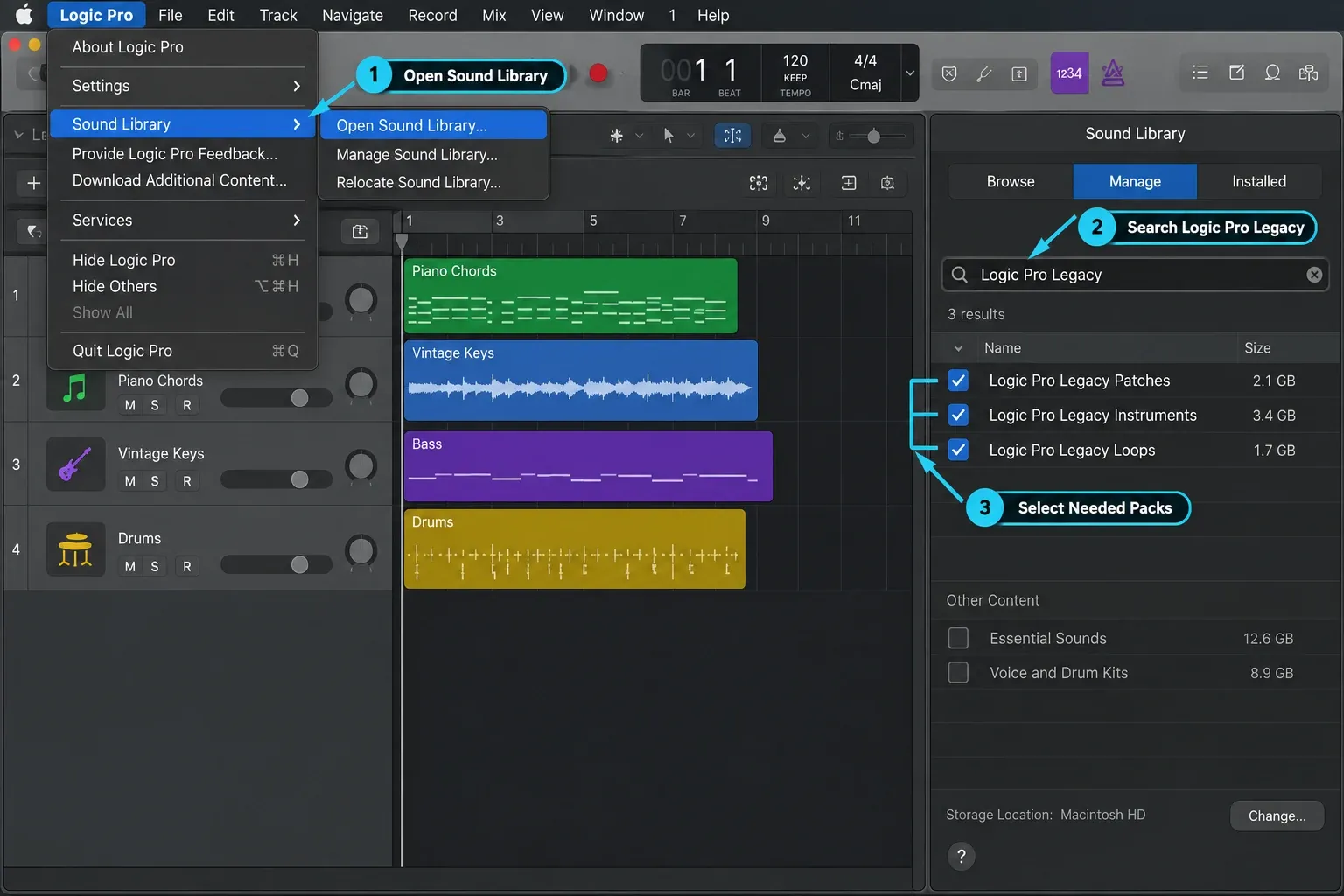
This fix covers Apple’s missing library content. It doesn’t reinstall a third-party Audio Unit, repair an expired license or make an incompatible plug-in pass validation. If the project reports a missing vendor plug-in rather than a missing Apple patch or loop, use the separate Logic Pro plug-in troubleshooting path.
Spatial Audio MP4 export arrived in 12.2
Logic Pro already had an ADM BWF route for delivering an immersive master. Version 12.2 added encoded MP4 exports using Dolby Digital Plus with Dolby Atmos and Dolby AC-4 L4. Those are delivery files. They aren’t interchangeable names for the ADM master.
In Apple’s current Spatial Audio export workflow, choose File > Export > Project as Spatial Audio, then select the required format. ADM BWF is the master-file option; Dolby Digital Plus with Dolby Atmos and Dolby AC-4 L4 produce MP4 files. Where available, select a bit rate and the option to export an uncompressed ADM BWF master at the same time.
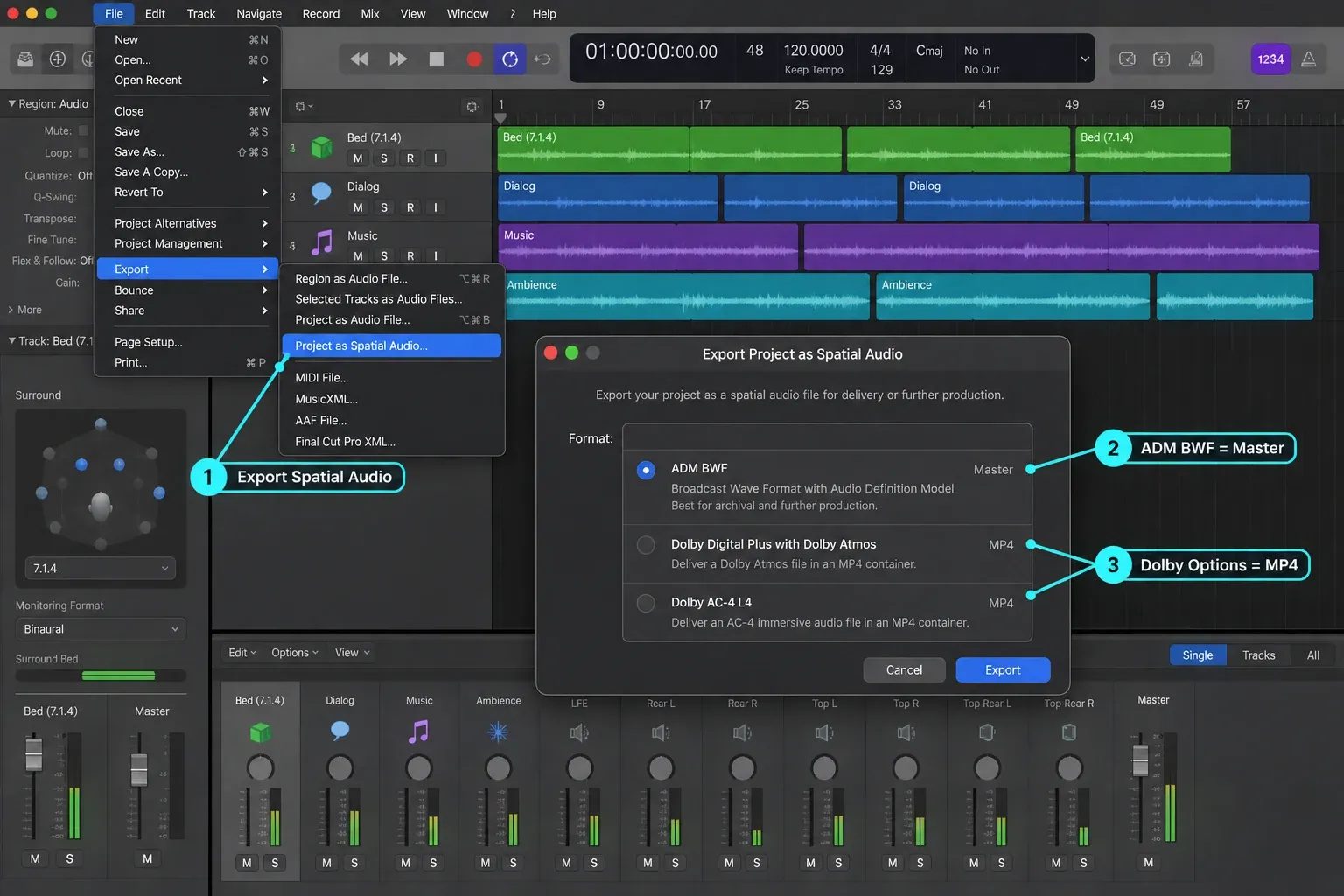
The practical choice comes from the recipient’s delivery specification. Do not substitute an MP4 because it’s easier to audition, and do not send an ADM file when a platform or reviewer explicitly requests an encoded MP4. The 12.2 change gave Logic users both paths inside the application. It didn’t make the formats equivalent.
Chord Track and Session Player fixes
Logic Pro 12.2 corrected three specific Chord Track behaviours in Apple’s notes:
- Running Analyze Chords on a region a second time no longer unexpectedly adds its chords to the Chord Track.
- Using Apply Region Chords to Chord Track on an empty region now gives a root value of No Chord.
- Using Apply Region Chords to Chord Track on two selected regions now includes both regions.
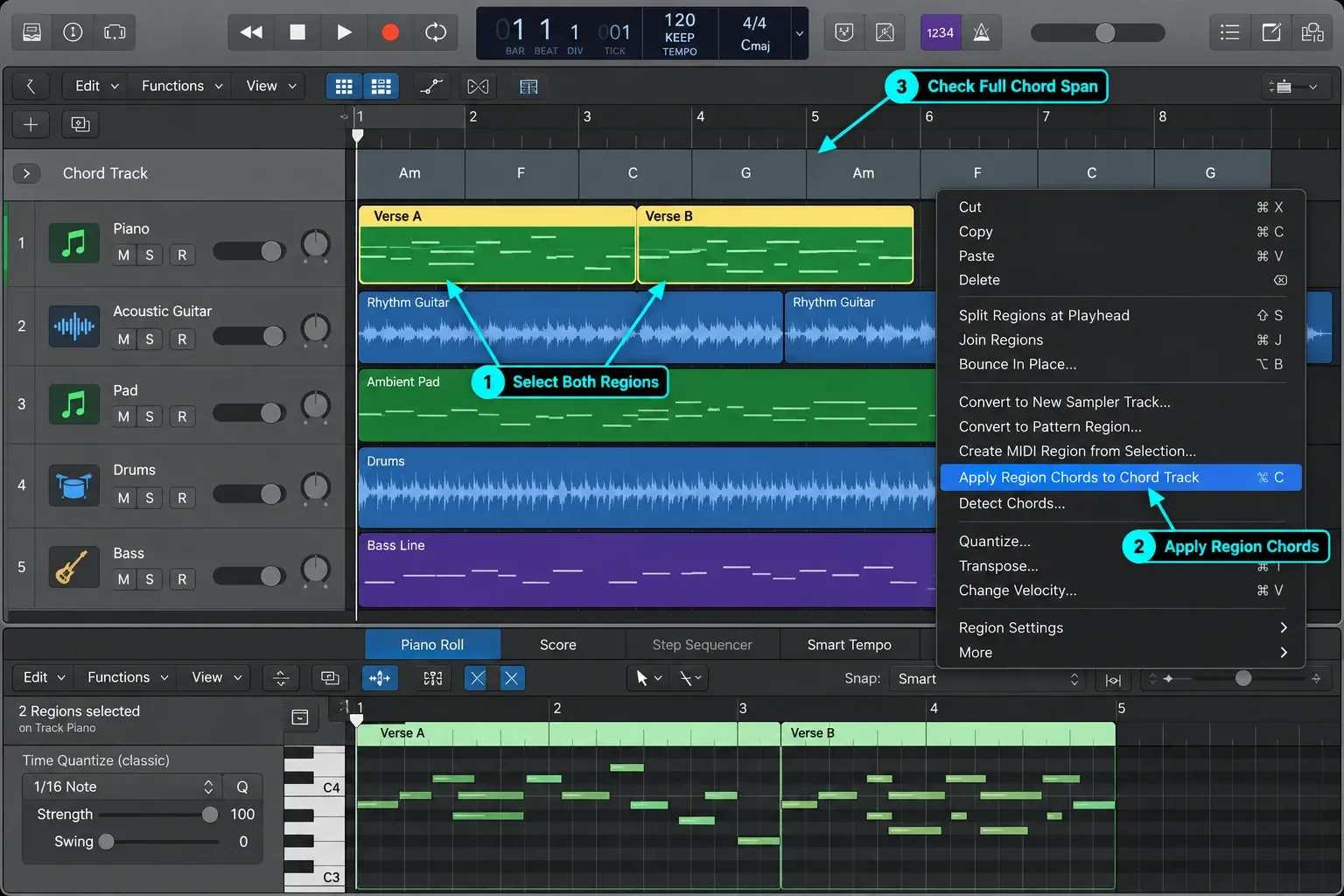
Apple also fixed a Sequenced Bass Session Player fault that could produce notes in the wrong key, and a character picker that could fail to open. These were fixes to existing players, not new player models. The Session Players and Chord ID guide explains how those tools work together.
Test the operation that failed on a duplicate project. Analyze Chords and Apply Region Chords to Chord Track are separate commands. Apple’s chord-analysis instructions explain that the latter adds a chord group for each selected region. After applying the region chords, inspect the Chord Track and listen to any Session Player parts following it. A release note is evidence of a shipped fix, not a test of your particular session.
Flex Pitch and take-folder corrections
The 12.2 Flex fixes were narrow, but they mattered for vocal editing. Flex Pitch notes inside a take folder could now be edited the first time you opened the folder, without closing and reopening it. Changes to Flex marker positions in takes also started showing up correctly in the Audio Track Editor.
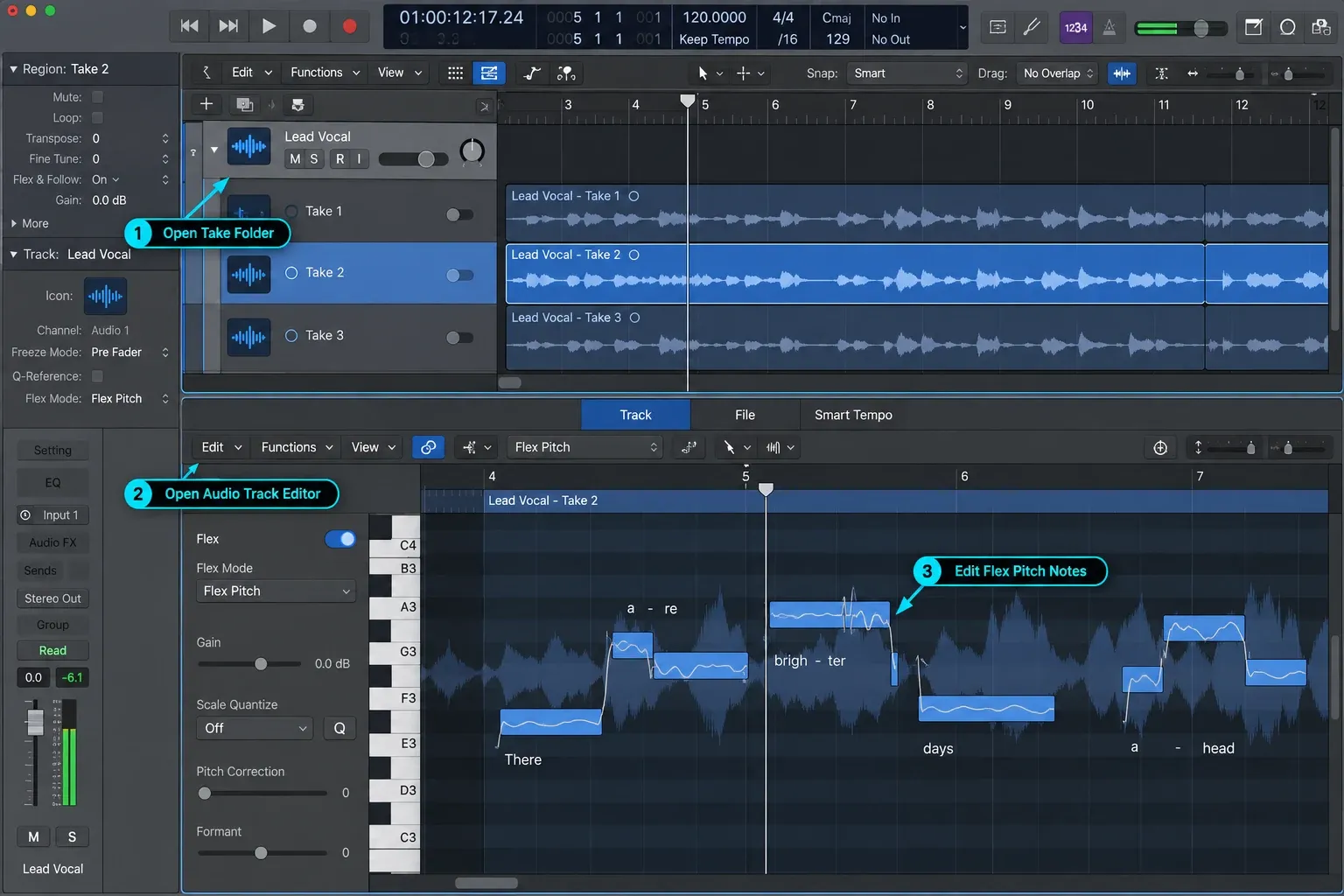
A separate fix addressed a crash when opening the Audio Track Editor from a take with Flex Pitch enabled. It does not promise to fix every tuning artifact or detection error. If the app stays open but the edit sounds wrong, the Flex Pitch guide covers the editing workflow.
Project recovery and crash fixes worth knowing
Two fixes deserve attention before the smaller interface items. First, Apple says audio regions that were missing in some existing projects would again appear. Second, when reopening a project from autosave, Logic would recall plug-in setting changes made before the last manual save. That wording is precise. It describes two identified faults, not a guarantee that any damaged or incomplete project can be recovered.
The 12.2 notes also list fixes for crashes or hangs when:
- clicking the Program slot on an External MIDI channel in the Mixer;
- zooming in some Intel-Mac or Rosetta situations;
- Control-clicking a region in a take folder;
- setting the number of steps in a Pattern Region;
- opening the Audio Track Editor from a take with Flex Pitch enabled;
- launching Logic in Rosetta.
Apple also fixed SysEx faders losing data after being unpacked from Macros, which could cause a crash when they were edited. Another fix restored File-menu Export commands on the first launch after a restart. If a crash remains, note the exact action, project and plug-in involved; a fix for one crash does not diagnose another.
Other Logic Pro 12.2 fixes
The rest of Apple’s release list is best read by task, not as a wall of patch notes:
- Apple Loops: drag-and-drop into the Loops Browser worked again. Apple also fixed the browser appearing empty after importing several loops in column view.
- Plug-ins: Ultrabeat Voice Mute behaviour was fixed, as were octave clicks in ES1 when controlled by Modulator.
- Mastering Assistant: the Transparent character could work at a 192 kHz sample rate.
- Step Sequencer: patterns longer than 16 steps could be saved correctly.
- Editing: Global tracks could be reordered again, and the Audio Track Editor followed the selected region correctly. Control-surface fixes included FaderPort 2 Channel EQ access and Korg Keystage behaviour.
If one of those faults interrupted your work, repeat that specific operation on a project copy after updating. There is no need to change a stable session in the middle of a delivery just to check every item in the changelog.
Step Reflex: Modern Garage belongs to Logic Pro 12.3
Apple’s Mac App Store version history lists Step Reflex: Modern Garage under Logic Pro 12.3 dated June 30, 2026, not under Logic Pro 12.2 dated April 9. The sound pack includes UK garage two-step beats, synths, basslines and vocal chops.
That makes it part of the June release. For the pack and the other changes that arrived with Alchemy, Beat Breaker, Chord ID and tempo handling, see the Logic Pro 12.3 guide.
Does Logic Pro 12.2 support Intel Macs?
The historical answer and the current answer are different. Apple’s 12.2 notes mention a zoom crash on Intel Macs, a Rosetta zoom crash, and a Rosetta launch hang. That’s evidence that Apple fixed those configurations in the April 2026 build.
Do not use those historical fixes as a compatibility check for a new installation. Apple’s current Logic Pro requirements specify macOS 15.6 or later and a Mac with Apple silicon. Check the Logic Pro system requirements guide alongside the App Store on your own Mac before changing macOS or buying hardware. The April changelog does not establish which older installer your account can download today.
Should you update from Logic Pro 12.2?
Consider the update when a listed fix or later feature would help your work, but check the whole setup first. Apple’s troubleshooting guidance says to confirm compatibility with the makers of third-party devices and software. Back up, then test project copies with your actual plug-ins, interface and export format. The Logic Pro features hub links the working guides for these tools; this page keeps the 12.2 release history separate.
A session deadline is a valid reason to wait. Keep your known-working installation until you have time to test, especially if a required plug-in or driver has not been validated for the newer version. Record what is holding up the update so you can revisit it when the dependency changes. Do not overwrite the only working project copy during that test.
For an older project, download the necessary Legacy packs before the session, open a duplicate, and check instrument assignments, loop references, Flex edits, Chord Track playback and the final bounce. Compare the result with a known-good export if you have one. Keep the original and its backup until the updated copy passes those checks.
Logic Pro 12.2 FAQ
When was Logic Pro 12.2 released?
Apple released Logic Pro 12.2 on April 9, 2026. Version 12.3 followed on June 30 and 12.3.1 on August 13. As checked September 20, 2026, the App Store lists 12.3.1 as current.
What were the main changes in Logic Pro 12.2?
Version 12.2 restored downloadable Legacy Patches, Instruments and Loops and added Spatial Audio MP4 export using Dolby Digital Plus with Dolby Atmos or Dolby AC-4 L4. Fixes covered Chord Track, Flex Pitch, Session Players, Step Sequencer and project recovery.
How do I install Logic Pro legacy sounds?
In Logic Pro 12.2 or later, open Logic Pro > Sound Library, search for “Logic Pro Legacy,” then select Logic Pro Legacy Patches, Logic Pro Legacy Instruments and/or Logic Pro Legacy Loops and install the packs you need. Apple does not state a single combined download size, so check the size shown on your Mac before downloading.
Was Step Reflex included with Logic Pro 12.2?
No. Apple’s App Store entry dated June 30, 2026 lists Step Reflex: Modern Garage with Logic Pro 12.3, not with Logic Pro 12.2 dated April 9.
Does Logic Pro 12.2 support Intel Macs?
Apple’s historical 12.2 notes include Intel-Mac zoom fixes and Rosetta fixes. They do not establish current download eligibility for an Intel Mac. Apple’s current product page specifies macOS 15.6 or later and a Mac with Apple silicon; check the App Store on your Mac before changing a working installation.
Should I update from Logic Pro 12.2 to 12.3.1?
Check compatibility with your Mac, plug-ins and audio hardware first. If the newer release addresses a problem you have, back up the app and projects, update, and test project copies. The App Store lists 12.3.1 as current as checked September 20, 2026. Wait if an active session or an unvalidated dependency leaves no safe time to test.


