Logic Pro 12.3: What's New and Should You Update?
Logic Pro 12.3 adds useful Beat Breaker and granular tools, but its recording, plug-in and workflow fixes may be the better reason to update.

Logic Pro 12.3 added per-slice filtering and panning in Beat Breaker, Granular Sync in Alchemy and Sample Alchemy, and changes to Chord ID, Flex and Smart Tempo. Its follow-up, 12.3.1, fixes specific editing and stability problems. As of September 12, 2026, Apple’s Mac release notes and US App Store list 12.3.1 as the latest version.
Documentation checked September 12, 2026 against Apple’s release notes, User Guide, product requirements and App Store version histories. This is a documentation-based update guide, not a claim that we tested every plug-in or audio interface.
Update when a new control or documented fix solves a problem you have, your Mac is eligible, and your essential plug-ins and drivers support the combination of Logic and macOS you will use. Back up first, then test copies of real projects. Keep a working deadline machine unchanged unless you need a fix to finish the job. Coming from an earlier version? Read what changed in Logic Pro 12 and 12.2 first. This page separates the 12.3 feature release from its 12.3.1 maintenance update.
Logic Pro 12.3 at a glance
| Question | Current answer |
|---|---|
| Latest Mac version checked September 12, 2026 | Logic Pro 12.3.1 |
| 12.3 feature-release date | June 30, 2026 |
| Matching iPad feature update | Logic Pro for iPad 3.3 |
| Main 12.3 additions | Beat Breaker Cutoff, Resonance and Pan modes; Granular Sync and formant controls; Chord ID, Flex, Smart Tempo and grid improvements |
| How the Mac edition is offered | One-time Mac App Store purchase or Apple Creator Studio access; Apple says the same release notes apply to both |
| Current Mac requirement | macOS 15.6 or later; Creator Studio requires Apple silicon. Check standalone eligibility on the exact Mac. |
Apple’s Logic Pro for Mac release notes currently lead with 12.3.1 and say the notes apply to both the one-time-purchase and Apple Creator Studio editions. The Mac App Store version history lists 12.3 as the June 30 feature release. That covers today’s purchase and access paths. It isn’t a promise of lifetime updates.
What Logic Pro 12.3.1 changed after launch
Logic Pro 12.3.1 is a maintenance update, not a second feature release. Apple lists fixes for moving Beat Mapping transients, Score Staff Style controls and dragging the right side of a crossfade. It also covers immediate Cursor Tool mode changes and keeping Logic’s output choice synchronized with macOS System Settings.
Apple also lists a fix for project corruption involving a Channel Strip pinned to a track, crashes when double-clicking a chord in the Chord Track or playing MIDI in a project with video, and slowdowns on tracks with many regions. These are named fixes, not a guarantee that every crash or third-party compatibility problem is solved. Preserve a working app and project backup before installing the update.
Beat Breaker gets the most visible update
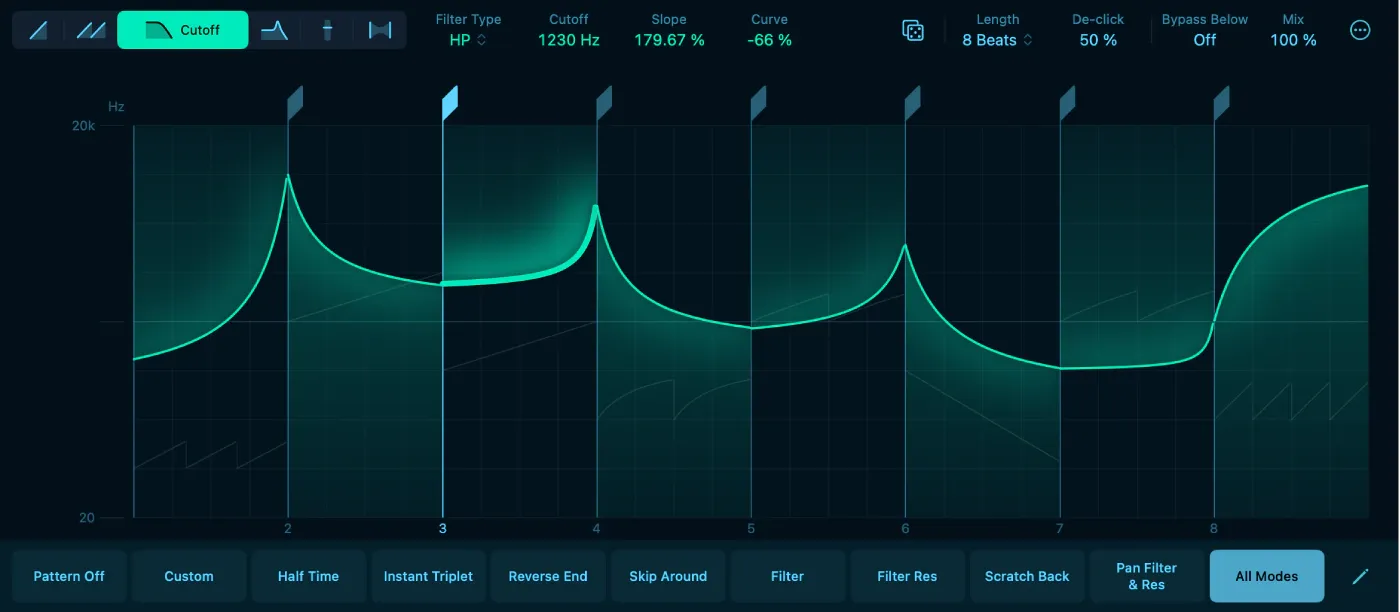
Beat Breaker now has Cutoff, Resonance and Pan modes for individual slices. Cutoff applies lowpass or highpass filtering, Resonance emphasizes the area around the cutoff, and Pan sets stereo placement. In Cutoff mode, Slope changes how quickly the cutoff moves across a slice; Curve changes the shape of that movement. Here, Slope describes the time ramp, not a filter’s dB-per-octave roll-off.
The Randomize button generates new effect values for the current mode or multiple modes, with separate probability and amount controls. Start with one mode so you can hear what changed, then keep or revise that pattern. Clicking Randomize creates a configuration; it is not a documented promise that each playback loop will generate another one. Apple’s Beat Breaker overview explains how patterns store the slice settings.
Granular Sync expands Alchemy and Sample Alchemy
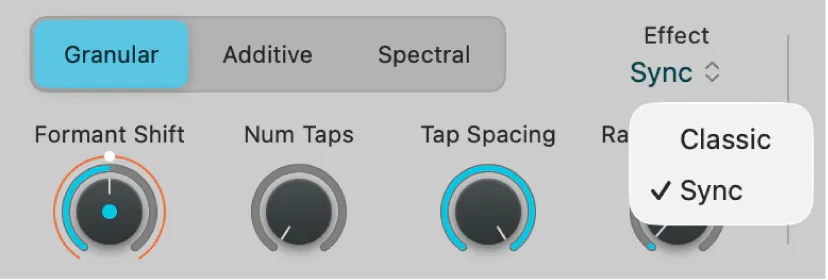
Granular Sync is a mode in the existing Alchemy and Sample Alchemy instruments, not a separate plug-in. It adds formant shifting and parallel streams of grains taken from different sample positions. In Sample Alchemy, Num Taps sets the stream count, Tap Spacing spreads their reading positions across the sample, and Random Time offsets the grain positions. These controls can make a sound denser or change its character; the name Sync does not mean that this panel automatically locks the sample to the song’s BPM.
Choose Granular, then Sync in the Effect menu to reach those Sample Alchemy controls. Apple’s granular parameter guide describes Formant Shift and the tap controls. The downloadable Granular Alchemy sound pack supplies loops, one-shots and field recordings made with the new processing. Get it through the Sound Library if you want examples; it is additional content, not another required app.
The 12.3 feature guide also lists the Shoulda Never demo project by Kehlani, Usher and Khris Riddick-Tynes. Download it from the Sound Library; it then appears in the Demo Projects area of the Project Chooser. It gives you an arrangement to examine rather than a collection of presets.
Chord ID, Flex, Smart Tempo and grid changes
Apple says Chord ID now handles solo instruments and full mixes more reliably. Its Mac App Store description specifically mentions modest tuning differences, distorted guitar, inversions and slash chords, plus 6th and 7th chords. Those are Apple’s product claims. They aren’t an independent promise of perfect recognition. Check the Chord track before letting Session Players follow the result.
Cycle-area analysis is more targeted: with Cycle active, dragging a region to the Chord track adds only the chords under the cycle range. That’s useful when you need one verse or chorus analysed instead of the entire file.
Audio regions now have a Flex checkbox, a Smart Tempo menu and a File Tempo field in the Region Inspector. You can enter file tempo manually; the new settings also let Flex ignore stored file-tempo information. When Logic detects an imported file as a loop, it can assign a constant tempo and put the file start on a downbeat. If that analysis is wrong, correct it before building further timing edits on it.
For grid visibility, the Placement menu in Tracks View settings lets vertical grid lines appear on top of regions instead of being covered by them. This helps when dense waveforms obscure bar and beat positions; you can keep the grid behind regions if you prefer.
The fixes that may justify updating
These are examples from Apple’s 12.3 release notes, not a list of every change since Logic Pro 12:
- Recording: a fix for recorded audio being placed significantly late when using built-in audio, plus a fix for silent playback after monitoring a missing input.
- Plug-ins: stability fixes for Audio Unit scanning and Plug-in Manager behaviour. If an existing plug-in still fails, use the Logic Pro plug-in troubleshooting sequence rather than deleting components at random.
- Large projects: significantly faster hiding and unhiding of tracks.
- Bounce and export: exporting multiple regions can be cancelled, Include Tempo Information is unavailable when no PCM format is selected, Export All Tracks no longer adds an unwanted _1 on the first export, and My Info fills ID3 tags.
- Stability: fixes for crashes involving Smart Tempo multitrack sets, Step Sequencer velocity randomisation, a missing file dragged to the Harmony track, and Audio Unit scanning.
The Stem Splitter tempo and Submix fixes, export naming elements, and mono M4A bit-rate display correction belong to the earlier 12.0 notes, not 12.3. For the separation workflow itself, use the Stem Splitter guide. If recording timing is your reason for updating, test a short recording after the backup and update. The Logic Pro latency guide covers buffer and monitoring problems an app update may not solve.
What changed in Logic Pro for iPad 3.3
The iPad 3.3 release carries over Beat Breaker’s new modes, Granular Sync, formant controls and the Granular Alchemy sound pack. It also redesigns Flex & Follow, brings copy and paste to Drum Machine Designer pads in Edit mode, folds Lessons into app-wide search, updates Piano Roll colours and adds Repeat in the Piano Roll.
Apple’s Logic Pro for iPad release notes also list stability and MIDI Learn fixes. The iPad and Mac editions are related but not identical, so don’t assume a named Mac fix applies to iPad unless Apple lists it there. For licensing and device limits, use the current Logic Pro for iPad guide. Once you’ve identified the version that introduced a tool, the Logic Pro features hub has the task-led guides.
Requirements and the confusing Intel note
Apple’s Logic Pro product page states Apple silicon and macOS 15.6 or later. The Creator Studio app listing explicitly requires an M1 or later for Mac. The separate one-time-purchase Mac listing specifies macOS 15.6 but does not give a chip minimum in its web compatibility section. That omission is not a guarantee that an Intel Mac will receive the update.
The 12.3 release notes also mention an Intel-specific Chord ID fix. Neither that bullet nor the standalone listing’s missing chip requirement resolves eligibility for every Intel Mac. Check the update offered to your Apple Account on that exact machine and preserve the working app. The Logic Pro system requirements guide separates the two Mac editions and feature-level limits.
Should you update to Logic Pro 12.3.1?
| Your situation | Best next step |
|---|---|
| Eligible Mac; no deadline; vendors confirm compatibility | If the changes help your work, back up, install and test project copies |
| Beat Breaker, granular synthesis or Smart Tempo is central to your work | Test on a compatible non-critical Mac first; keep the working app and project backups |
| A documented 12.3 or 12.3.1 fix matches your problem | Test 12.3.1 on a copy of the affected project and verify that exact workflow |
| A client deadline is in progress | Wait until delivery unless the documented fix is needed to finish safely |
| You depend on an old plug-in, driver or control surface | Confirm vendor compatibility and preserve the working app before updating |
| You use an Intel Mac | Do not assume eligibility; keep the compatible version and check the App Store on that Mac |
For a production Mac, the useful question is whether the update fixes a problem or adds a tool you need enough to justify testing your setup. If it does, keep a recoverable app and project copy and test before relying on it. If not, finish the current job first. Check the current release notes again before installing; a later build may supersede 12.3.1.
Back up and update safely
- Finish or archive any irreplaceable recording take.
- Quit Logic. In Finder, select the app in Applications and choose File > Compress “Logic Pro”. Put the ZIP in a folder labelled with the installed version; keep a separate backup of it.
- Consolidate each active project’s assets, save and close it, then copy the complete package or project folder to separate storage. Check that the copy includes the audio it needs.
- Confirm your Mac meets the update requirements and check vendor support for your essential plug-ins, interface drivers and control software. Record the versions that currently work.
- Use the App Store update offered to your Apple Account and Mac. Check its version and release notes before installing; do not obtain an old build from an unofficial download site.
- Open a copy of a representative project, then test playback, recording, automation, bounce, video or Chord Track work if relevant, and the plug-ins you cannot replace.
- Keep the earlier app copy until real sessions have passed those checks.
Apple places a backup warning at the top of its release notes and maintains a separate Logic Pro app and project backup procedure. The Logic Pro backup guide explains how to preserve the app and project assets. One copied project package isn’t a complete rollback plan.
Logic Pro 12.3 FAQ
What is new in Logic Pro 12.3?
Logic Pro 12.3 added Beat Breaker Cutoff, Resonance and Pan modes; Granular Sync and formant controls; Chord ID, Flex, Smart Tempo and grid changes; the Granular Alchemy pack; the Shoulda Never demo project; and a broad set of recording, plug-in, export and stability fixes.
What changed in Logic Pro 12.3.1?
Logic Pro 12.3.1 is a maintenance update. Apple lists fixes for Beat Mapping, Score Staff Style, crossfades, Cursor Tool modes, pinned Channel Strip project corruption, output-device synchronization, Chord Track and video-MIDI crashes, and performance on tracks with many regions.
When was Logic Pro 12.3 released?
The current US App Store histories list June 30, 2026 for Logic Pro 12.3 on Mac and Logic Pro for iPad 3.3. The Mac 12.3.1 maintenance update followed on August 13, 2026.
Does Logic Pro 12.3 require a new purchase?
Apple says the same release notes apply to the one-time Mac App Store purchase and the Apple Creator Studio edition. The 12.3 listing does not create a separate product, but access on a specific Apple Account and Mac is determined by the App Store. This is not a promise of lifetime updates.
Does Logic Pro 12.3 work on Intel Macs?
Creator Studio explicitly requires Apple silicon on Mac. The standalone Mac App Store web listing states macOS 15.6 or later without a chip minimum, while the 12.3 notes mention an Intel Chord ID fix. These do not guarantee update eligibility for your Intel Mac. Check the offer on that machine and keep the working app backed up.
Do I need to back up before updating?
Yes. Apple recommends backing up the Logic Pro app and projects before updating. Compress the installed app, preserve consolidated project copies on separate storage, and test copies after the update. Keep the earlier app and untouched projects until the workflows you need pass those checks.
What is new in Logic Pro for iPad 3.3?
The iPad update includes the Beat Breaker and granular changes, a redesigned Flex & Follow workflow, Drum Machine Designer pad copy and paste, Lessons in app-wide search, updated Piano Roll colours, Repeat in Piano Roll, and stability and MIDI Learn fixes.


