Apple Creator Studio vs Buying Logic Pro Once
A fact-checked comparison of Apple Creator Studio and the one-time Logic Pro Mac purchase, including iPad access, cancellation, education pricing and updates.

Apple Creator Studio and the one-time Logic Pro purchase solve different problems. Creator Studio is a subscription to a collection of apps across Mac and iPad. Buying Logic Pro once gives you the standalone Mac app without an ongoing Creator Studio plan. If you only produce music on a Mac, the one-time purchase is usually the cleaner long-term choice. If you need Logic Pro on iPad, or you’re using several Apple creative apps regularly, the subscription can justify its recurring cost.
In the United States, Apple Creator Studio currently costs $12.99 per month or $129 per year. New subscribers get a one-month trial. A qualifying new Mac or iPad can unlock three months for new and qualified returning subscribers, subject to Apple’s device-offer rules. Logic Pro for Mac costs $199.99 as a one-time purchase. Verified college students and educators can currently get Creator Studio for $2.99 per month or $29.99 per year, subject to verification and offer terms.
Last verified September 12, 2026 against the current Apple documentation cited in this guide. Prices, eligibility, included apps, and features can change; verify the checkout page in your country before buying.
Creator Studio versus Logic Pro at a glance
| Question | Apple Creator Studio | Buy Logic Pro once |
|---|---|---|
| U.S. price | $12.99/month or $129/year | $199.99 once |
| Logic Pro platforms | Supported Mac and iPad devices | Mac only |
| Other pro apps | Included while subscribed | Not included |
| After payments stop | Subscription-based pro-app access ends after the billing period; a separately purchased Mac app can still be used | Purchased Mac app remains available under App Store terms |
| Family Sharing | Standard plan supports up to five other family members | App Store listing supports up to six family members when Family Sharing is enabled |
| Education plan | $2.99/month or $29.99/year for eligible users | No separate individual Logic student price listed |
| Best fit | Multi-app, Mac-and-iPad, or short-term workflows | Long-term Logic-only production on Mac |
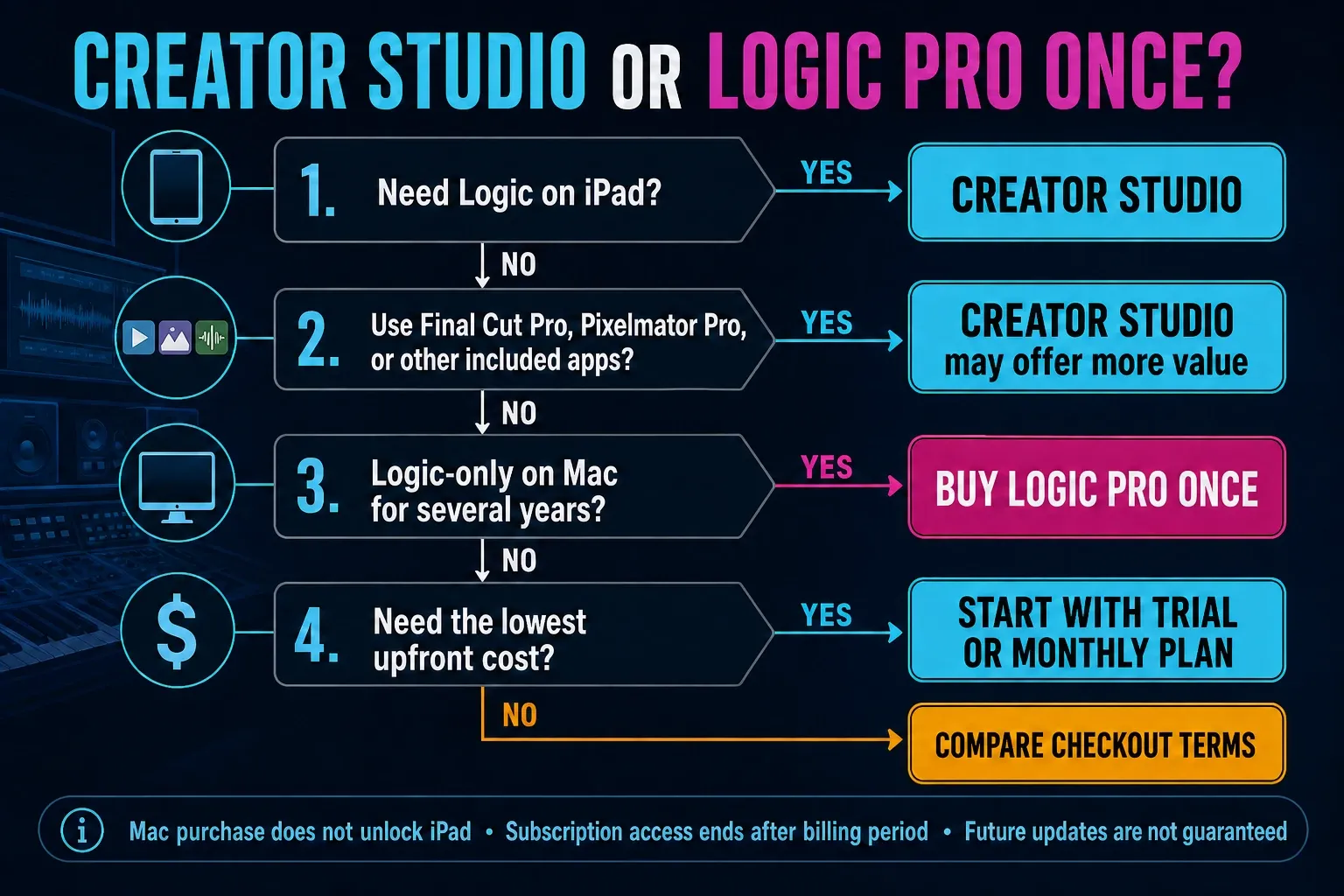
Apple’s current plan page lists the prices and included collection. The suite includes Logic Pro, Final Cut Pro, Pixelmator Pro, Motion, Compressor, MainStage, and subscriber content or features across selected Apple productivity apps. Not every app runs on every platform, and the one-time Logic Pro purchase covers the Mac app rather than the whole collection.
What you get when you buy Logic Pro once
The $199.99 one-time purchase is Logic Pro for Mac. You buy it through the Mac App Store using your Apple Account, install it on compatible Macs associated with that account, and don’t need a Creator Studio subscription to keep using that purchased app.
Apple’s Creator Studio support page is explicit. Logic Pro and the other named pro apps remain available as one-time Mac purchases. It also says people who already own the Mac version can keep using it and redownload it from the App Store. If you already own Logic Pro for Mac, you do not need to buy it again or subscribe just to keep using it.
One-time purchase doesn’t mean every future upgrade is contractually guaranteed. Apple has supplied substantial Logic Pro updates to existing Mac buyers without charging again, including current Logic Pro 12 releases, but it does not promise updates forever. Hardware, macOS compatibility, App Store availability, and future product policy can change.
What Creator Studio adds
Creator Studio gives you one subscription covering Apple’s wider creative collection. For a producer who also edits video, creates artwork, prepares presentations, or uses MainStage on stage, the bundle’s value comes from the whole app mix. The standard plan can also be shared with up to five other people through Family Sharing. The education plan cannot.
For Logic users, the main addition is Mac-and-iPad access under one plan. Apple’s project-sharing instructions require a .logicx project package, not a project folder. Include its audio assets and keep a separate backup. iCloud Drive requires the same Apple Account on both devices; AirDrop, third-party cloud storage and external drives offer other transfer routes. Some incompatible built-in plug-ins retain their sound on iPad, but their controls cannot be edited there. For unavailable third-party plug-ins, bounce a copy in place before transfer. Leave Bypass Effect Plug-ins unselected if you want the effects included in that audio.
New subscribers can try the collection for one month. Apple’s three-month device-offer terms cover eligible new Macs and iPads, not every device purchase. The offer must be claimed within three months of activation and is limited to one per Apple Account or family. Active subscribers, people whose subscription ended within the previous 30 days, and anyone who already accepted this three-month offer are excluded. Trials renew into a paid plan unless cancelled at least one day before renewal. Check the offer and renewal date shown on your account before accepting.
Are the two Mac versions of Logic Pro different?
Apple uses different app icons so the Creator Studio and one-time-purchase builds can coexist on a Mac. Its current app-identification page confirms both can be installed. Check the icon before you open or troubleshoot a project.
Apple’s Logic Pro FAQ explicitly says the Mac app has the same features whether accessed through Creator Studio or bought once. You are choosing a payment model and access to the wider collection, not a reduced edition of Logic Pro. That describes the current products; it does not guarantee that Apple’s future pricing or upgrade policy will never change.
Some Creator Studio benefits live outside Logic Pro: premium content and intelligence features in Keynote, Pages, Numbers, and Freeform, plus access to the other pro apps. Judge the two routes by the whole workflow, not by two differently colored Logic icons.
The cost comparison for a Logic-only Mac user
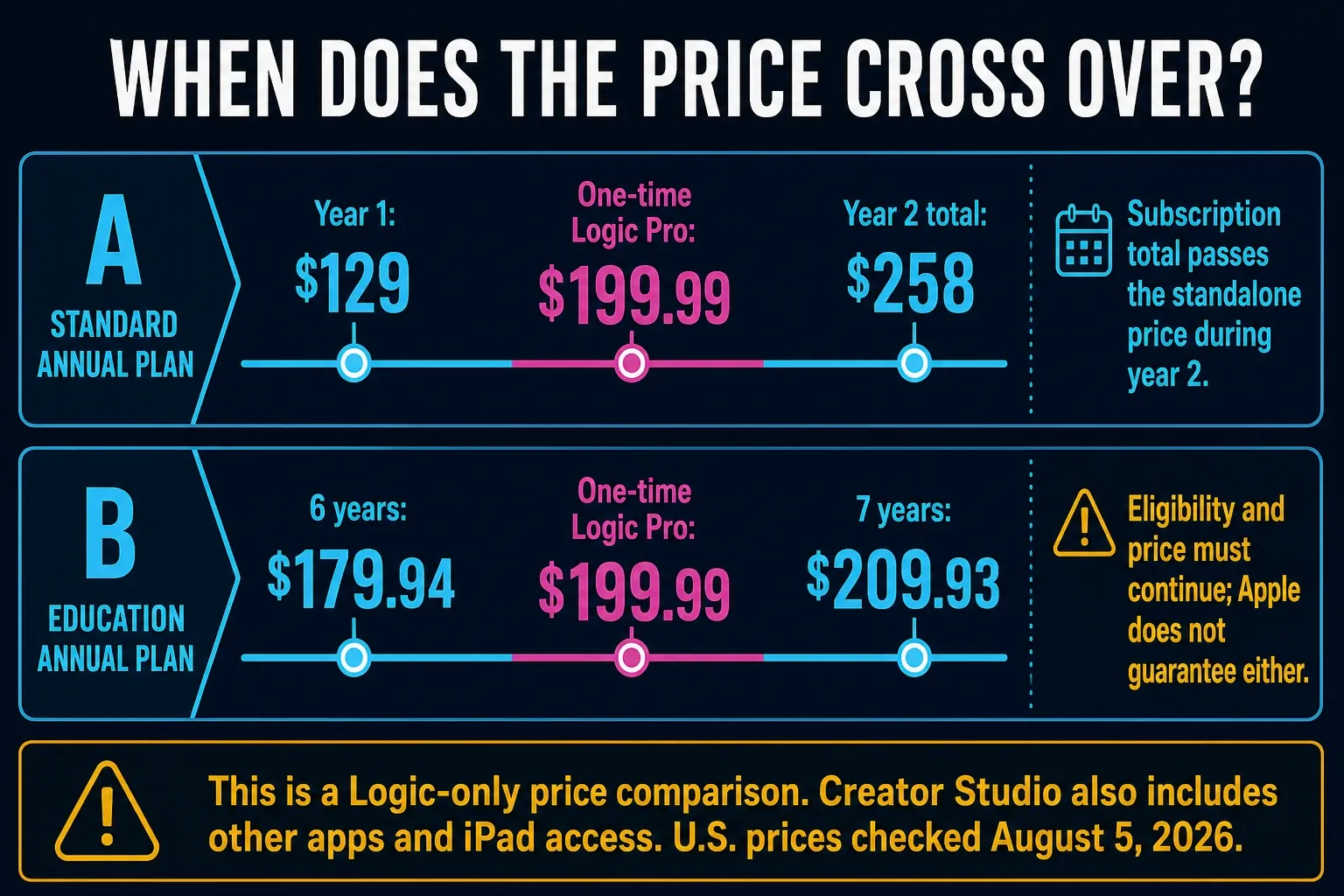
At current U.S. prices, one annual Creator Studio payment is cheaper than buying Logic Pro. The second annual payment brings the subscription total to $258, which is more than the $199.99 standalone Mac price. On the monthly plan, 15 payments total $194.85 and the 16th brings the total to $207.84. These are Logic-only crossover points, not a verdict on the bundle: the subscription also provides the other included apps and supported iPad access while it remains active. These totals count paid periods only, assume unchanged prices and exclude any applicable tax.
| Usage pattern | Likely better value | Reason |
|---|---|---|
| Already own Logic Pro for Mac | Keep the purchase you have | No new plan is needed just to continue using it |
| Logic only, Mac only, several years | One-time purchase | No recurring Creator Studio payment |
| Logic plus Final Cut Pro or Pixelmator Pro | Creator Studio often wins initially | Several paid apps are covered by one plan |
| Logic on both Mac and iPad | Creator Studio | The Mac purchase does not unlock iPad Logic |
| Eligible college student | Education subscription while eligible | Current annual education price is much lower |
| Occasional short project | Monthly subscription or trial | Lower initial commitment if files are exported before cancellation |
At the current education price of $29.99 per year, six payments total $179.94 and seven total $209.93. That is an illustration, not a seven-year price guarantee: Apple’s education offer is limited and requires annual eligibility verification for students and educators. Its student reverification instructions say the plan renews at the standard price if the student no longer qualifies or misses verification. Check eligibility in our Logic Pro student-pricing guide, and budget for the price you would pay after eligibility ends.
What happens to projects if you cancel Creator Studio?
Apple’s current cancellation guidance says your projects and files remain after cancellation. Access to the pro apps and their editing features continues until the paid billing period ends, then requires an active subscription to keep using the subscription apps. A separately purchased Mac app is another route to editing on Mac; that purchase does not unlock Logic Pro on iPad. Keynote, Pages, Numbers, and Freeform documents remain editable with their free features, while paid features are unavailable.
Before ending the plan:
- Open every important Logic project and resolve missing files.
- Save a project copy with its audio assets included.
- Bounce the final mix and instrumental, vocal, and stem deliverables.
- Export MIDI for irreplaceable software-instrument parts.
- Document third-party plug-ins, versions, presets, and external samples.
- Keep a second backup outside the working drive.
Use our Logic Pro backup workflow before changing access plans. A project file alone isn’t a dependable archive if its recordings and samples are scattered across the Mac.
The iPad subscription question
Creator Studio is Apple’s primary current route for new Logic Pro for iPad access, but categorical “Creator Studio is the only possible iPad subscription” claims go beyond Apple’s published evidence.
Apple’s June 2026 standalone iPad subscription instructions apply to someone whose existing Logic Pro for iPad subscription stopped renewing after they joined Creator Studio. Apple says that subscriber can cancel Creator Studio, wait for it to expire, open the expired standalone subscription in Settings, and tap Renew. The page does not establish a new standalone signup route for someone who never held that subscription.
The safe buying advice is therefore:
- new iPad users should treat Creator Studio as the documented primary offer;
- former standalone subscribers should check their Apple Account’s expired subscriptions for the Renew option;
- do not assume the $199.99 Mac purchase includes the iPad app; and
- verify the actual options shown in the App Store for your country and Apple Account.
Hardware and operating-system requirements
Do not apply one Mac requirement to both purchase routes. Apple’s Creator Studio support page says its Logic Pro for Mac build requires macOS 15.6 or later and Apple silicon. The current one-time Logic Pro Mac App Store listing states macOS 15.6 or later without making Apple silicon a whole-app requirement, although individual features such as Stem Splitter require Apple silicon. Logic Pro for iPad requires iPadOS 26 or later and an A12 Bionic chip or newer, with some features requiring later hardware. Other Creator Studio apps can have stricter requirements. The Creator Studio build of Pixelmator Pro for Mac, for example, requires macOS 26; do not apply that requirement to every standalone Pixelmator purchase. Apple also lists features unavailable on Intel Macs or under Rosetta, including Stem Splitter and ChromaGlow.
That means a compatible Logic Pro Mac isn’t automatically compatible with every Creator Studio feature. Check the exact apps you plan to use against Apple’s current requirements and our Logic Pro compatibility guide.
Who should choose Creator Studio?
- A musician producing on both Mac and iPad.
- A creator using Logic Pro with Final Cut Pro, Pixelmator Pro, Motion, or Compressor.
- An eligible college student or educator who can reverify each year.
- A household that can use standard-plan Family Sharing across several creative workflows.
- A new user who wants a lower-cost trial before making a larger one-time purchase.
Who should buy Logic Pro once?
- A Mac-only producer who does not need the other Creator Studio apps.
- A studio that wants Logic Pro available without an active consumer subscription.
- A long-term user who prefers predictable upfront software cost.
- An existing Mac owner adding Logic Pro to a stable, compatible production system.
- Someone who can use free or already-owned alternatives for video, image, and presentation work.
For current installation routes, use the Logic Pro download hub. Our Logic Pro cost guide tracks current U.S. pricing and trial terms, while the comparisons hub covers other buying decisions.
Frequently asked questions
Can I still buy Logic Pro without Creator Studio?
Yes. Apple currently sells Logic Pro for Mac as a $199.99 one-time purchase in the U.S. Creator Studio is an additional subscription option, not the only Mac route.
Does buying Logic Pro for Mac include the iPad version?
No. The one-time Logic Pro purchase is for Mac. Creator Studio includes access to supported Mac and iPad versions while the subscription is active.
Will my Logic projects disappear if I cancel Creator Studio?
No. Apple says your projects and files remain. Once the paid period ends, you need an active subscription to keep editing in the subscription apps, or a separately purchased Logic Pro app for editing on Mac. The Mac purchase does not provide iPad access.
Are all future Logic Pro updates guaranteed?
No. Apple sells the Mac app as a one-time purchase but does not guarantee permanent compatibility or every future update and feature. Past free updates are not a contractual promise.
Can an old standalone Logic Pro for iPad subscription be restored?
Yes, in the case Apple documents: an existing standalone subscriber whose plan stopped renewing after joining Creator Studio can cancel Creator Studio, wait for it to expire, and renew the expired standalone plan in Settings. Apple does not say this creates a new standalone signup for every new customer.
What happens when the Creator Studio student price ends?
Apple says the student subscription automatically renews as the standard Creator Studio plan if you no longer qualify or do not reverify in time. Check the new renewal price and cancel at least one day before renewal if you do not want the standard plan.


