Best DAW for iPad: Logic Pro, Cubasis and 7 More Picks
Logic Pro for iPad is the pick for most people, Cubasis 3 is the best one-time purchase and GarageBand is the free start. Nine iPad DAWs by job, with review scores, published load tests, three-year cost, plug-in support, the gear a small setup needs and the route to a desktop DAW.

I’d choose Logic Pro for iPad if you plan to finish songs in Logic on a Mac and want AUv3 instruments and effects. Choose Cubasis 3 when paying once matters more, or start with GarageBand when you want to learn without paying. Before buying, compare the subscription cost and how your project and plug-ins will reach the desktop.
Below are quick picks by job, what reviews and published load tests show, each app’s limits and plug-in support, the cost over three years, the iPad and gear a small setup needs, and how a project gets from the iPad to a desktop DAW.
Which DAW for iPad fits which job?
Nine apps make the list, and each one can record, arrange and mix a song on the iPad. Three more, Koala, Loopy Pro and AUM, work beside a DAW and get their own section further down. Prices and ratings come from the US App Store listings.
| Pick | Best for | US price | App Store rating | Plug-ins | To a desktop DAW |
|---|---|---|---|---|---|
| Logic Pro for iPad | Most people, finishing on a Mac | Creator Studio: $12.99 a month or $129 a year | 4.5 (6.5K) | AUv3 | Moves to Logic Pro for Mac |
| Cubasis 3 | Paying once, recording | $49.99 | 4.6 (3.5K) | Audio Unit, Inter-App Audio, Audiobus | Export to Cubase |
| GarageBand | Starting free | Free | 4.1 (118K) | Audio Unit extensions | Opens in Logic Pro |
| FL Studio Mobile | FL Studio users | $14.99 | 3.8 (664) | Inter-App Audio, Audiobus | .flp for FL Studio Desktop |
| BeatMaker 3 | Sample-based beats | $24.99 | 4.7 (4.5K) | AUv3, Inter-App Audio | Stem export |
| iMPC Pro 2 | MPC-style beats | $24.99 | 4.4 (1.1K) | Audio Units, Inter-App Audio | AudioCopy, YouTube sharing |
| Auria Pro | Multitrack recording | $24.99 | 4.6 (9) | AUv3 hosting; optional native plug-in purchases | AAF audio sessions |
| n-Track Studio | Low monthly cost | Free for 8 tracks, $1.49 a month standard | 4.4 (2.1K) | Built-in effects | WAV/MP3; DAWProject for compatible DAWs |
| BandLab | Free with cloud sync | Free | 4.7 (515K) | Built-in instruments and effects | Cloud sync across devices |
What do reviews and load tests show?
Logic Pro for iPad has the deepest review record. Six scored reviews covering different releases from three publishers give it a median of 9 out of 10, a mean of 8.7 and a range of 7 to 9 once each score is converted to a 10-point scale. MusicTech scored its first review and its follow-up 9 out of 10. MusicRadar’s review of the Creator Studio release gave 4.5 out of 5 for the third time and calls it “still an instant recommendation”, with a warning that experienced producers could feel uneasy about how heavily it leans on AI and Session Players. The low score is Macworld Sweden’s 3.5 out of 5.
Cubasis 3 has one scored review, 4.5 out of 5 from MusicRadar’s Cubasis 3 review, so it gets no composite. MusicTech’s unscored review calls its interface “utterly intuitive, highly responsive and a joy to work with”.
Two published load tests show how much an iPad carries. In a Loopy Pro forum test on an M1 iPad Air, one tester duplicated a track playing a Model D synth loop in May 2023. They reported 512 samples in Logic and 10 ms in Cubasis as comparable buffer settings; the post does not give a sample rate that would establish an exact match. Logic Pro and Cubasis 3 each held 19 instances steady. Past that, Logic showed overload warnings and stopped playback at about 25 instances with a prompt to turn on automatic freezing, while Cubasis kept playing with stutters. AUM, which had no multicore support at the time, held about 9.
The second set comes from The GarageBand Guide’s M5 iPad Pro review, which ran music-prod.com’s Logic Pro benchmark project at a 512-sample buffer on three iPads. The 11th-generation iPad (A16) ran 25 unmuted tracks before freezing, an M2 iPad Pro handled 84 before a software overload, and the M5 iPad Pro reached 116. That’s six load results from two sources, compared only within their own set because the projects differ.
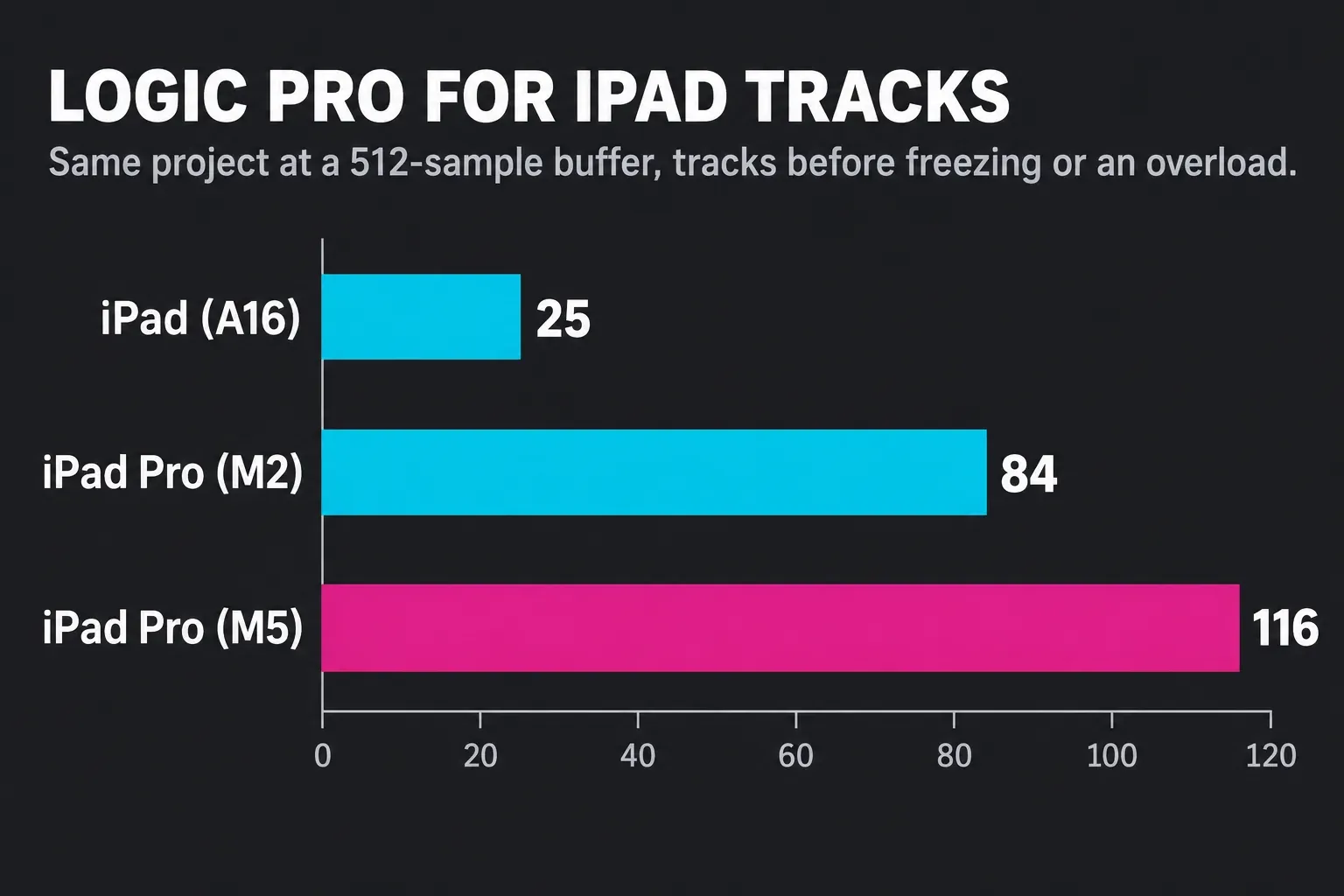
Logic and Cubasis tied in that Model D test, while the M5 ran 4.6 times as many tracks as the A16 in the other test. Those results describe these two workloads, not every plug-in or recording session. If playback overloads, I’d first try a larger buffer or freeze the heaviest tracks; I’d consider a faster iPad when the same project still exceeds its limits.
App Store ratings are a separate signal from a different crowd. BeatMaker 3 sits at 4.7 from about 4,500 ratings, Cubasis 3 at 4.6 from about 3,500, Logic Pro at 4.5 from about 6,500 and FL Studio Mobile at 3.8 from 664, the lowest on this list. Auria Pro’s 4.6 rests on nine ratings, too few to weigh.
Logic Pro for iPad: best for most people
Logic Pro for iPad is the one to beat if you own a Mac or expect to. Apple says you can move projects between Mac and iPad, and GarageBand projects open in it with the built-in editing tools and plug-ins. The Logic Pro App Store listing adds Stem Splitter, which separates a mixed recording into drums, bass, vocals, guitar, piano and other instruments, along with Quick Sampler, Step Sequencer and Live Loops. Mastering Assistant, Session Players and Chord ID round out the tools that set it apart from GarageBand.
Apple’s Logic Pro for iPad requirements call for iPadOS 27 or later and an iPad with an A12 Bionic chip or later, and some features need an A17 Pro chip or later. Our Logic Pro system requirements page covers the Mac side too.
New subscribers get the iPad app through Apple Creator Studio, at $12.99 a month or $129 a year after a one-month free trial. Students and educators pay $2.99 a month or $29.99 a year. The plan includes Logic Pro and Final Cut Pro for Mac and iPad, plus Motion, Compressor and Pixelmator Pro, and Family Sharing on the standard Creator Studio plan lets up to five other family members use it. Student and educator plans cannot be shared. Existing standalone Logic Pro for iPad subscribers can keep that subscription, and Apple says they can reactivate it if they leave Creator Studio. The one-time $199.99 price applies to Logic Pro for Mac only. Our Logic Pro for iPad review weighs the subscription in detail, and the Logic Pro free trial guide explains the longer trial some new devices get.
A Mac plug-in needs a compatible iPad AUv3 version; its Mac binary cannot run on iPad. Some developers offer universal purchases covering both platforms. Logic for iPad runs its own included plug-ins plus third-party Audio Units V3 extensions, and when a project uses a plug-in the iPad can’t run, that plug-in is disabled while the rest of the project stays editable. Each AUv3 has to be installed on the iPad first, and searching the App Store for “AUv3” finds them.
In November, Logic Pro 13.0 brought a Liquid Glass design, a unified Browser and a Play Surface window to the Mac app. Logic Pro for iPad 4.0 followed on November 18 with Liquid Glass, Audio Quick Look and expanded Stem Splitter parts.
Cubasis 3: best one-time purchase
I’d buy Cubasis 3 if you want to own your DAW outright and plan to record through a multichannel interface, because $49.99 gets unlimited audio and MIDI tracks and 24 assignable physical inputs and outputs. The Cubasis 3 App Store listing adds audio I/O up to 24-bit/96 kHz, 8 insert and 8 send effects, Audio Unit support including multi-out instruments, Inter-App Audio, Audiobus 3, Ableton Link and MIDI over Bluetooth LE. Projects export to Cubase, iCloud Drive, external hard drives, wireless flash drives, Dropbox, AudioCopy and email.
In the forum load test it matched Logic at 19 Model D instances on the same iPad, and it kept playing beyond that with stutters instead of stopping. Cubase users get the cleanest handoff to the desktop, and our Logic Pro vs Cubase comparison covers that choice on a computer.
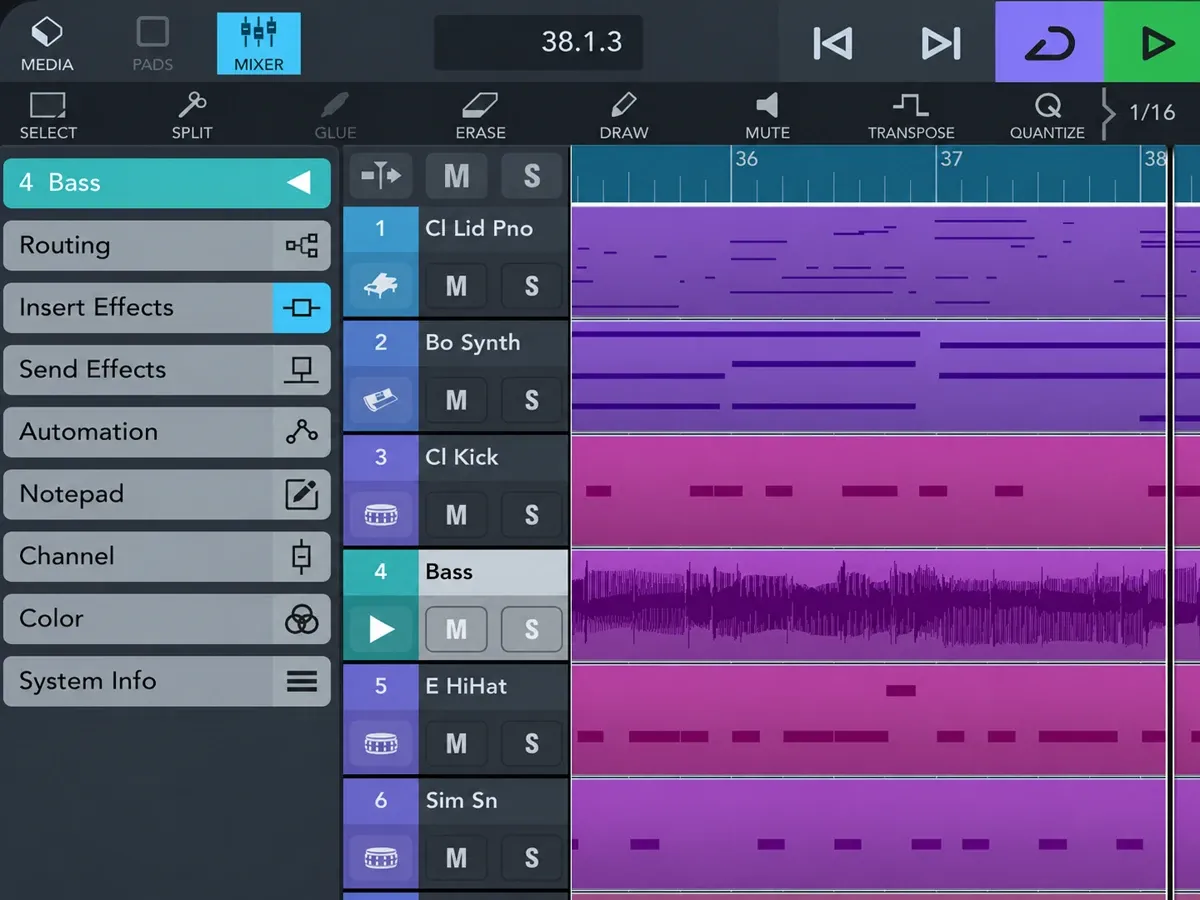
Cubasis LE 3 is free but needs a supported hardware device to unlock, otherwise it runs in demo mode. Once activated, it allows up to 4 audio and 4 MIDI tracks with 2 assignable physical inputs and a stereo output, and an in-app purchase upgrades it to the full Cubasis feature set. It’s worth checking whether your interface or keyboard unlocks it before you pay for the full app.
GarageBand: best free start
GarageBand costs nothing and gives you up to 32 tracks, Live Loops and recording from third-party music apps through Audio Unit extensions. Apple’s GarageBand for iOS page says multitrack recording needs a compatible third-party audio interface. When 32 tracks aren’t enough, the project opens in Logic Pro for iPad, so nothing you start here is wasted.
Its App Store rating, 4.1 from about 118,000 ratings, is the lowest of the three main picks. Our Logic Pro vs GarageBand comparison sets out what the upgrade adds, and the best free DAW guide covers free options on a computer.
FL Studio Mobile: best if you already use FL Studio
FL Studio Mobile is the bridge for FL Studio users. Image-Line says mobile projects export as .flp files to continue in FL Studio Desktop, or as WAV, MP3, AAC, FLAC or MIDI for any other DAW, and the app runs on iOS and Android. The FL Studio Mobile App Store listing names Inter-App Audio and Audiobus for working with other apps, class-compliant MIDI controllers and MIDI file import and export, and it doesn’t mention Audio Unit plug-ins.
The iOS app costs $14.99 without a separate app trial, which Hardware Busters lists as a con in a review that rates its value for money 3.5 out of 5. DirectWave Sample Player is included; optional sound packs and an FL Cloud plan cost extra. The listing also offers a way to try the Mobile plug-in inside the desktop FL Studio trial. At 3.8 from 664 ratings it has the weakest App Store score here, so I’d only buy it if you already think in FL Studio and want the .flp round trip to the desktop. Our Logic Pro vs FL Studio comparison covers the desktop side.
BeatMaker 3 and iMPC Pro 2: best for sample-based beats
BeatMaker 3 ($24.99) is the deeper sampler, with 128 banks of 128 pads, full AUv3 and Inter-App Audio hosting, multichannel recording and routing with USB audio interfaces, stem export and Ableton Link. Resident Advisor’s BeatMaker 3 review warns it’s “not the easiest app to get your head around” and says time spent with the manual pays off. It holds a 4.7 rating from about 4,500 App Store ratings.
iMPC Pro 2 ($24.99) suits anyone who learned on an MPC. It has vocal tracks and Audio Unit tracks that load any AU instrument, time-warps and pitch-shifts audio clips in real time, records from the built-in mic, external mics or an interface, and supports Inter-App Audio and Ableton Link. Beats leave the app through AudioCopy or YouTube sharing, so plan on moving audio, not a project, to a desktop DAW.
Auria Pro: best for multitrack recording
Auria Pro ($24.99 in the US App Store) is the recording-first pick. It runs unlimited audio and MIDI tracks, records up to 24 tracks at once with a compatible interface, mixes on a 64-bit double-precision engine and includes the FabFilter Twin2 and One synths. It supports third-party Audio Units; optional native plug-ins and instruments are sold separately. AAF import and export moves audio sessions to Logic, Pro Tools, Nuendo, Samplitude and other DAWs.
Its 4.6 App Store rating comes from only nine ratings, so the feature list tells you more than the score. I’d take Auria Pro over Cubasis 3 when the session has to continue in Pro Tools or another DAW that reads AAF, and stay with Cubasis when it ends in Cubase.
n-Track Studio and BandLab: cheapest ways in
n-Track Studio is free for up to 8 tracks and 2 effects per track. The standard subscription at $1.49 a month brings unlimited audio and MIDI tracks, all effects and WAV or MP3 export, and the extended plan at $2.99 a month adds a 64-bit audio engine, multichannel USB class-compliant interfaces and 24, 32 and 64-bit WAV export. Its effects are built in, from reverb and pitch shift to a tube amp and compressor.
The n-Track App Store version history also lists DAWProject import and export. That can keep a project editable in another DAW that supports the format, although matching plug-ins and supported features still matter; keep an audio export as a fallback.
BandLab is free with an unlimited number of multitrack projects and free cloud storage for songs; that is a project-count allowance, not an unlimited track count within one song. The listing counts 385+ instruments, a sampler with 250K+ royalty-free samples and 4 free mastering presets, and a paid membership adds more, such as 28 members-only instruments. Cloud sync is the draw, since projects follow you across devices, and its 4.7 rating from about 515,000 ratings is the biggest crowd on this list.
Koala, Loopy Pro and AUM: apps that work beside a DAW
I’d choose these for sampling, looping or routing rather than conventional multitrack recording. Start with the workflow you need; a second app is useful when your main app lacks it.
- Koala Sampler ($4.99) is a pocket sampler that also runs as an AUv3 inside GarageBand, Logic or Cubasis and, with its Mixer add-on on iOS, hosts AUv3 instruments on pads and effects in mixer slots when running standalone. Hosting isn’t available while Koala itself runs as an AUv3. It rates 4.8 from about 1,500 ratings.
- Loopy Pro blends looping, sampling, MIDI sequencing and full plug-in hosting. It’s a free download with a 7-day trial, then a $29.99 one-time purchase with 12 months of feature updates and lifetime bug fixes, plus an optional $14.99 upgrade later. There’s no subscription.
- AUM ($24.99) is a mixer, plug-in host, recorder and connection hub with 32-bit audio and support for multichannel audio interfaces. In that May 2023 forum load test it had no multicore support and held about 9 Model D instances against 19 in Logic and Cubasis.
What does each iPad DAW cost over three years?
Over three years, the standard Creator Studio yearly plan costs $387, nearly eight times the one-time price of Cubasis 3. That gap shrinks once you count what the plan includes, because it also covers Logic Pro and Final Cut Pro on a Mac and the standard plan can be shared with up to five other family members; the education plan is for one person. If the iPad is your only music machine and you don’t need the extras, a one-time app wins on cost.
| App | Pricing | Three-year cost |
|---|---|---|
| Logic Pro for iPad | Creator Studio: $129 a year or $12.99 a month | $387 yearly, $467.64 monthly |
| Logic Pro for iPad, student or educator | Creator Studio education: $29.99 a year | $89.97 |
| n-Track Studio | $1.49 a month standard, $2.99 extended | $53.64 standard, $107.64 extended |
| Cubasis 3 | One-time | $49.99 |
| Auria Pro | One-time | $24.99 |
| BeatMaker 3 | One-time | $24.99 |
| iMPC Pro 2 | One-time | $24.99 |
| FL Studio Mobile | One-time | $14.99 |
| GarageBand | Free | $0 |
| BandLab | Free, membership optional | $0 |
The table counts the app price only. In-app purchases such as FL Studio Mobile’s optional sound packs, Auria Pro’s optional native plug-ins and BandLab membership come on top. The companion apps add $4.99 for Koala, $24.99 for AUM and $29.99 for Loopy Pro.
Which iPad and gear does an iPad studio need?
Logic Pro requires an iPad with an A12 Bionic chip or later running iPadOS 27 or later. The processor affects how far a demanding session goes, alongside its plug-ins and buffer settings. The basic 11th-generation iPad uses an A16, so it misses the Logic features Apple reserves for A17 Pro and later, and it ran 25 benchmark tracks where the M5 iPad Pro ran 116. The iPad Air with the M4 chip, USB 3 at up to 10Gb/s and Bluetooth 6, in 11-inch and 13-inch sizes, is the middle ground, and our best iPad for Logic Pro guide compares the models.
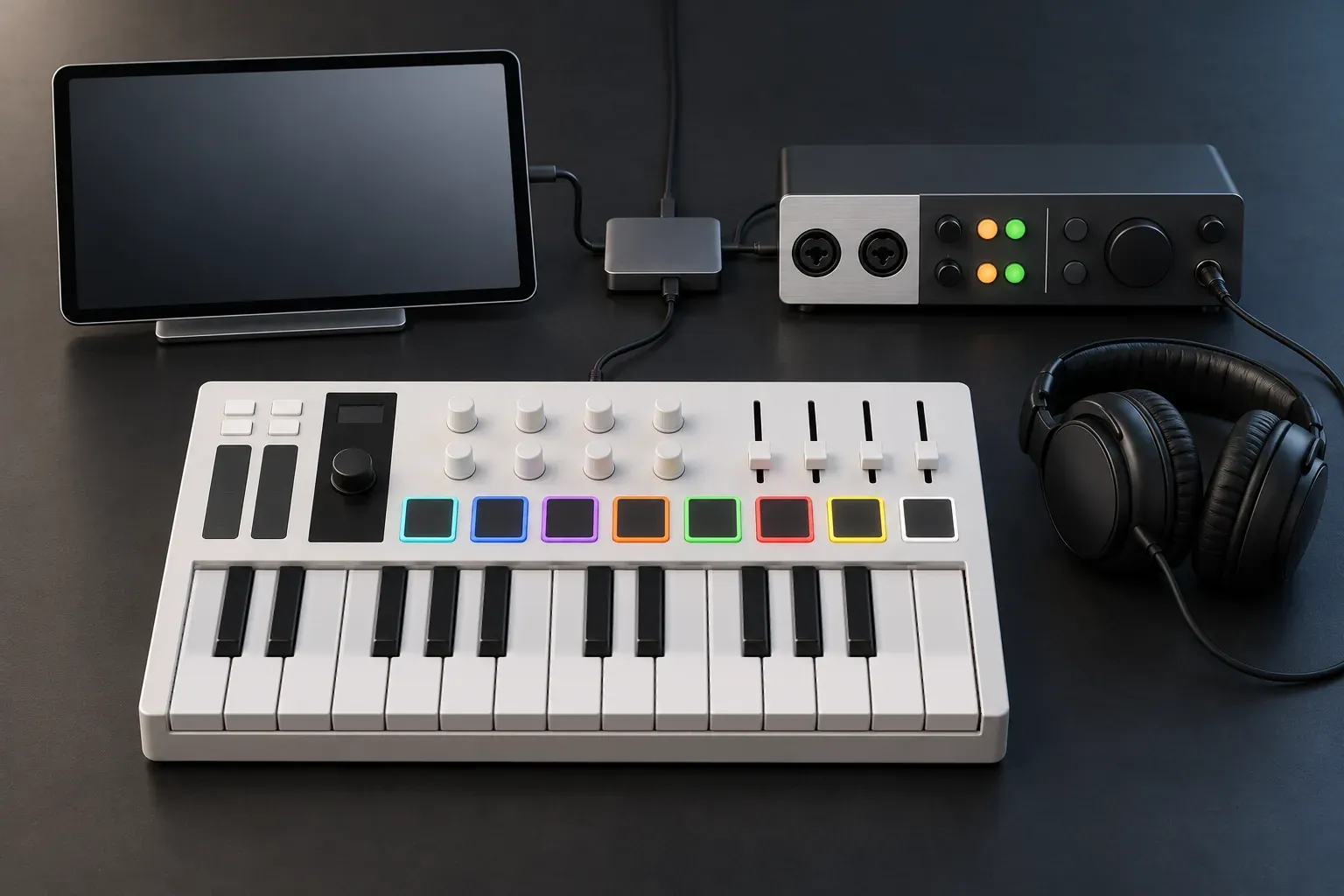
Apple’s guide to connecting external devices says audio interfaces and USB MIDI keyboards plug into the iPad’s USB-C port, the interface has to be compatible with iPad and Core Audio compliant, and Bluetooth MIDI devices connect wirelessly. The iPad powers whatever is plugged in, so for several devices or long sessions Apple recommends a powered USB-C hub or an interface with its own power supply.
Two pieces of gear cover a small setup. The Universal Audio Volt 2 is a 2-in, 2-out interface with 24-bit/192 kHz conversion, a Vintage Mic Preamp mode and a MIDI input and output, class-compliant for iPad and iPhone, with UA’s external-power and Lightning Camera Adapter footnote expressly excepting iPads with USB-C. The Arturia MiniLab 3 adds 25 velocity-sensitive slim keys, eight pads, eight encoders and four faders, and Arturia says its USB-C connects to computers and iPad as a bus-powered, class-compliant controller. I’d run both through a powered USB-C hub from the first session, to connect both devices and reduce the power drawn from the iPad.
If you play guitar, our guide to recording guitar in Logic Pro for iPad covers the input and monitoring settings.
How does an iPad project reach a Mac or PC?
Pick the iPad app by where the song will be finished, because each one hands off differently:
- GarageBand projects open in Logic Pro for iPad, which moves them on to a Mac.
- Logic Pro for iPad projects move between iPad and Mac, and plug-ins the iPad can’t run are disabled while the project stays editable.
- Cubasis 3 exports to Cubase.
- FL Studio Mobile saves .flp files for FL Studio Desktop, or WAV, MP3, AAC, FLAC and MIDI for anything else.
- Auria Pro exports AAF audio sessions for Logic, Pro Tools, Nuendo, Samplitude and other DAWs.
- BeatMaker 3 exports stems.
- iMPC Pro 2 hands audio over through AudioCopy.
- n-Track Studio exports WAV or MP3 on the standard plan and 24, 32 or 64-bit WAV on the extended plan. Its DAWProject import/export also offers a project route to compatible DAWs; check which destination features and plug-ins transfer before relying on it.
- BandLab syncs projects through its cloud to the app on your other devices.
Stems and WAV files open in any desktop DAW, so even the apps without a project format can hand off a song. You lose editable MIDI, plug-in settings and automation that way, which is why Logic, Cubasis and FL Studio Mobile make sense if you already know your desktop DAW. If you haven’t picked one yet, our best DAW for Mac guide covers the desktop side.
Best DAW for iPad FAQ
What is the best free DAW for iPad?
GarageBand, for most people. It’s free, gives you up to 32 tracks and Audio Unit extensions, and its projects open in Logic Pro for iPad. BandLab is the free pick for cloud sync and an unlimited number of multitrack projects, n-Track Studio’s free edition stops at 8 tracks, and Cubasis LE 3 needs supported hardware before it leaves demo mode.
Can you use Mac plug-ins on an iPad?
You need a compatible iPad version, not the Mac binary. Logic Pro for iPad runs its included plug-ins and third-party AUv3 extensions installed from the App Store; some developers provide a universal purchase for Mac and iPad. When you open a project that uses a plug-in the iPad can’t run, Logic disables that plug-in and keeps the project editable.
Which iPad do I need for Logic Pro?
An iPad with an A12 Bionic chip or later on iPadOS 27 or later, with an A17 Pro chip or later for some features. In the cited Logic benchmark project at a 512-sample buffer, the A16 iPad ran 25 tracks against 116 on the M5 iPad Pro. Those are workload results, not fixed track limits for the chips.
Can you record a full band on an iPad?
Yes, with a multichannel interface. Cubasis 3 handles 24 physical inputs, Auria Pro records up to 24 tracks at once, and GarageBand’s multitrack recording works with a compatible interface. MusicRadar’s guide to the best DAWs still recommends a laptop or PC-based DAW for full bands, and for regular band sessions that’s the easier path.
Is there a one-time purchase alternative to Logic Pro on iPad?
Cubasis 3 at $49.99 is the closest match, with unlimited tracks and export to Cubase. Auria Pro costs $24.99 and leans toward recording, BeatMaker 3 and iMPC Pro 2 cost $24.99 each for beat making, and FL Studio Mobile costs $14.99.
Should you start with Logic Pro or GarageBand on iPad?
Start with GarageBand if you’re new, because it’s free and its projects open in Logic later. Move to Logic Pro when you need more than 32 tracks or tools like Stem Splitter, Mastering Assistant and Session Players.


