Logic Pro Download for Mac: Official App Store Routes
Use the official Mac App Store, choose the standalone or Creator Studio edition, check compatibility, reinstall, and add only the sounds you need.

Download Logic Pro for Mac from Apple’s Mac App Store. Choose the standalone app ($199.99 in the U.S.) or the copy included with Apple Creator Studio. Apple says the two Mac editions have the same music-production features, but they use different purchase or subscription access and different icons. Both can be installed on one Mac.
“Free · In-App Purchases” on the Creator Studio listing means you can download that app before accepting a trial or subscription. It does not mean permanent free access. Pick the edition, check the Mac’s compatibility, install the app, then add the sounds you need. If you already bought Logic, start with the redownload section rather than paying again.
Checked September 13, 2026, against Apple’s U.S. App Store listings, Creator Studio documentation and current Sound Library guides. Both Mac listings show version 12.3.1. Prices and trial offers can vary by country and account.
Official Logic Pro download links for Mac
| Route | Official download | Best fit |
|---|---|---|
| One-time purchase | Standalone Logic Pro in the Mac App Store | You want Logic Pro for Mac without an ongoing Creator Studio subscription. |
| Apple Creator Studio | Creator Studio edition of Logic Pro in the App Store | You need Logic Pro on Mac and iPad or expect to use several included creative apps. |
| Previous purchase | Redownload from App Store purchase history | You already own the Mac app and are reinstalling it on a compatible Mac. |
Apple’s app-identification guide shows the two sets of icons. If you have both copies installed, check the icon before opening a project or troubleshooting access. Apple’s Logic Pro product FAQ confirms feature parity between the subscription and one-time-purchase Mac editions.
Still choosing between buying and subscribing? The Logic Pro cost guide covers prices, education options and what Apple actually promises about updates. The Get Logic Pro hub brings together requirements, trials and download routes. If you have already chosen your edition, follow its installation steps below.
Check the Mac before downloading
Both current Mac App Store listings require macOS 15.6 or later. Apple’s product page specifies Apple silicon, and the Creator Studio listing says M1 or later. The standalone listing omits a chip minimum, while Apple’s 12.3 release notes include an Intel-specific fix. Neither detail guarantees an Intel download. Before buying or removing a working older copy, check the standalone listing on that exact Mac and Apple Account.
Check Apple menu > About This Mac for the chip and macOS version, then compare them with the current Logic Pro system requirements. Do this before paying or starting a subscription. An App Store message that the app is incompatible isn't fixed by downloading a DMG from another site.
For storage, the current U.S. App Store says 6 GB for the minimum installation and 44 GB or more for the full Sound Library. Apple’s additional-content support page gives approximately 72 GB but still uses older Sound Library Manager instructions. In Logic Pro 12, check the actual sizes of your selected packs in Manage Packs. Leave room for downloads, projects, recordings and third-party content; neither published library total covers the whole studio.
Download the one-time-purchase Logic Pro app
- Open the App Store on the Mac.
- Sign in with the Apple Account intended to hold the purchase.
- Open Apple’s standalone Logic Pro listing, or search for Logic Pro and verify the developer is Apple.
- Choose the purchase button and complete the App Store confirmation.
- After installation, click Open in the App Store, or open Finder > Applications and double-click the intended Logic Pro copy.
A Mac App Store purchase is associated with the Apple Account used for it. Before paying, check the account shown in the App Store instead of assuming it matches iCloud, a work account or another user profile. Apple supports sharing eligible App Store purchases through Family Sharing, but that doesn't make every Apple Account an owner of the purchase.
Do not download a “Logic Pro trial DMG,” patched installer or older “Logic Pro X” package from a mirror. The current application is named Logic Pro, and Apple distributes the current Mac build through the App Store. Unofficial installers create security, licensing and update problems before a project even opens.
Download Logic Pro through Apple Creator Studio
- Open the official Creator Studio edition of Logic Pro in the App Store.
- Click Get to install the app. “Free · In-App Purchases” refers to the download; continued access requires a trial or subscription.
- Open that Logic Pro copy and click Continue.
- Choose Accept Free Trial or another available subscription option and complete the steps with the intended Apple Account.
Apple currently describes the same standard Creator Studio trial in two ways: the Logic Pro product page says 30 days, while the Creator Studio support page says one month. Treat the offer and renewal date shown in the App Store subscription screen for your account and region as controlling. Apple says a Managed Apple Account cannot subscribe. Old standalone trial DMGs are not the current supported trial route. For eligibility, the three-month device offer, cancellation and project access after expiry, use the Logic Pro free trial guide.
Apple’s Creator Studio support page explains how to change or cancel a subscription on Mac, iPad or iPhone. It says paid subscription access lasts until the end of the billing period after cancellation. For a trial, read the cancellation screen and its displayed expiry date before confirming. Your projects are not deleted when subscription access ends, but you need an entitled, compatible app to keep editing, plus any plug-ins or assets those projects use.
Redownload Logic Pro if you already bought it
Open the Mac App Store, click your name in the sidebar and find Logic Pro among your apps. Click its download button. Apple’s Pro App reinstall instructions use this route for an app you already purchased. If you are not signed in, use the Apple Account that made the purchase. Family Sharing users can select the relevant family member under Purchased by, as shown in Apple’s redownload guide.
If Logic Pro doesn't appear, verify the Apple Account, hidden purchases and Family Sharing context before assuming the purchase is gone. A receipt or App Store purchase history is stronger evidence than remembering which account was normally used on the Mac.
The App Store purchase list is the official redownload route, but it isn't a public version archive where any past Logic build can be selected. Apple's current pages do not promise a specific historical build for every Intel and macOS combination. Before a major update, back up a known-working Logic application when production depends on that exact build. The Logic Pro backup guide covers both the app and project assets.
Install essential sounds before the full library
Open Logic Pro and allow the essential content required by the first-run workflow to install. Then create or open a small project and use Logic Pro > Sound Library to choose additional packs. There's no need to install the entire library before recording a first audio or MIDI track.
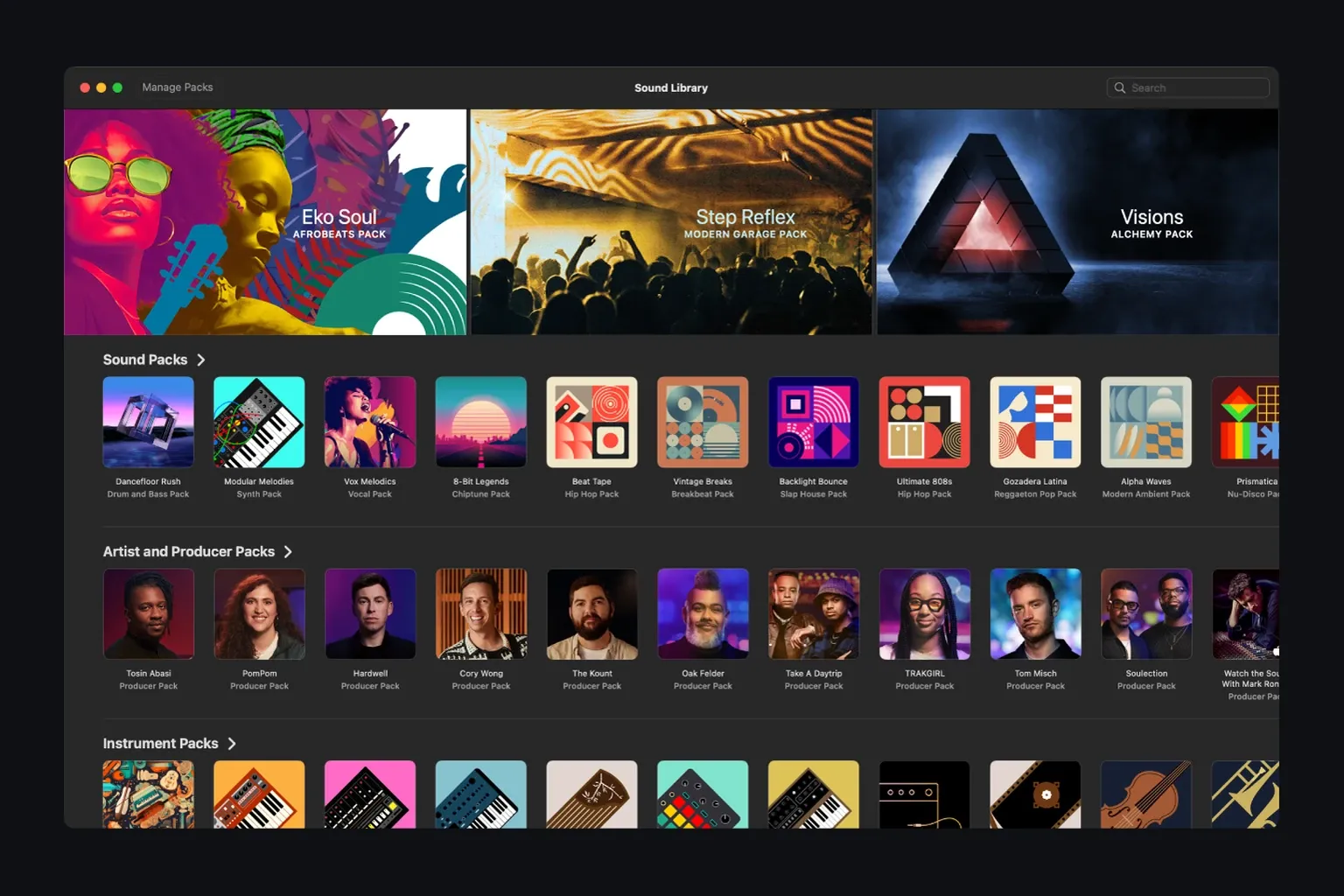
Apple’s current Sound Library guide lets you browse packs, search by name and manage installed content. Install what the next project actually needs: for example, the required producer pack, instrument family or legacy content for an older session.
If a large download fails, try one pack at a time from the Sound Library and check available space. Apple’s additional-content troubleshooting page recommends individual packages, but its Sound Library Manager menu labels describe the older interface. Use Sound Library and Manage Packs in Logic Pro 12 instead of searching for that older window.
Understand the Logic Pro 12 library bundle
Logic Pro 12 collects Apple’s patches, loops and samples in Logic Pro Library.bundle, normally in ~/Music/. Apple’s library upgrade guide says an existing internal library is cloned there on first launch without extra storage. An external APFS library can also be cloned without a second full copy. An external Mac OS Extended or Windows-formatted library needs enough free space for both the old files and new bundle. Keep the old library if you still use an earlier Logic version: those versions cannot use the new bundle.
New Apple sound content goes into the bundle. Install or remove individual packs through Logic rather than rearranging the bundle’s internal folders in Finder. Moving the whole bundle is a separate operation; use the steps below and keep the original until the new location works.
Move the Sound Library to external storage safely
For a cautious move, quit Logic and copy ~/Music/Logic Pro Library.bundle to the intended drive in Finder. Apple’s Logic Pro 12 move instructions cover moving or copying this file. Keep the original while you test the copy. Reopen Logic, choose Logic Pro > Settings > General > Sound Library, then use Locate to select the copied bundle, as shown in the Sound Library settings guide. Confirm the location field points to the intended drive and load the sounds in a test project before removing the original. The old Relocate Sound Library command is for Logic Pro 11.2.2 or earlier.
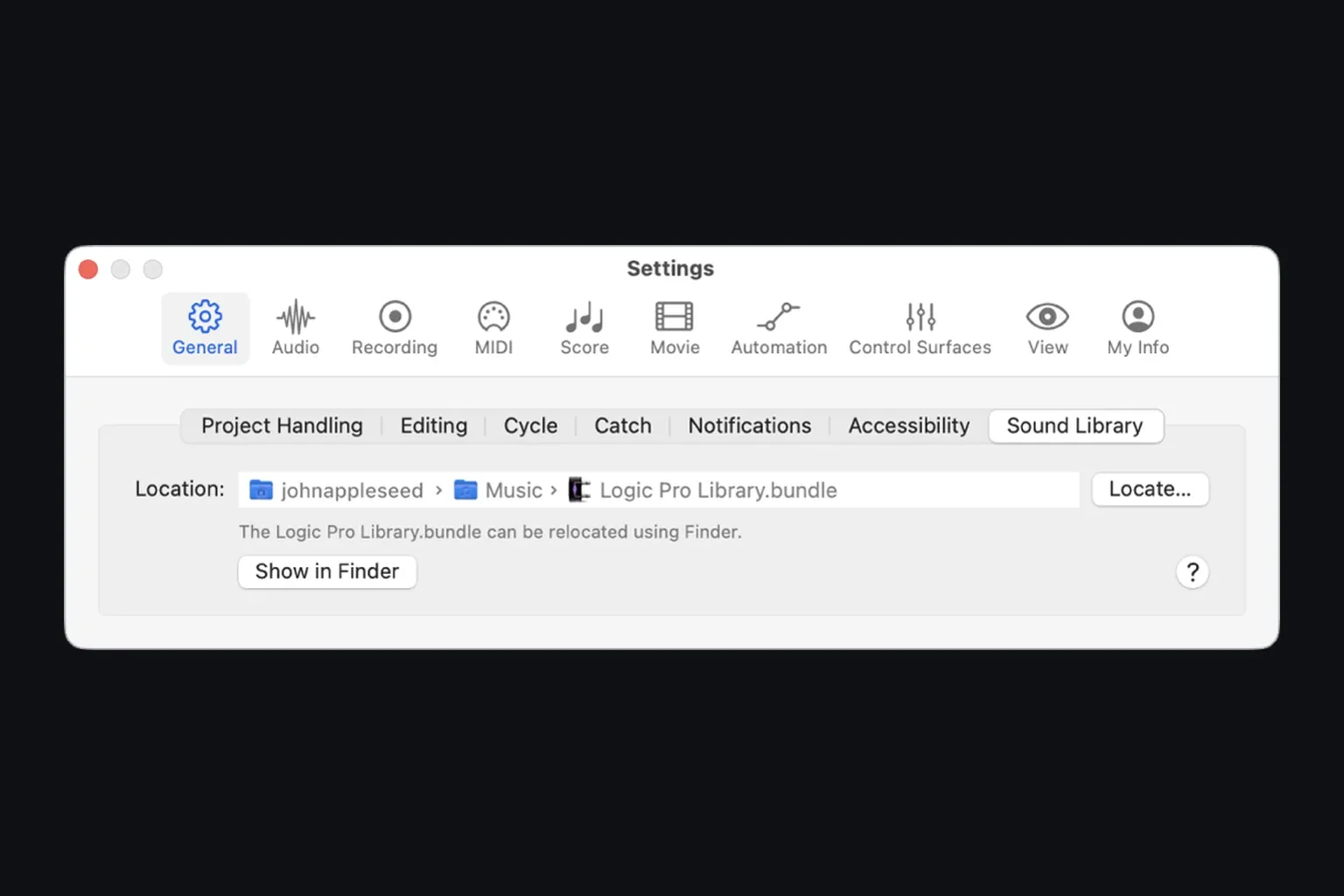
Connect that drive whenever a project needs its sounds, and keep project backups separately. APFS avoids a second full library copy during the older-library conversion described above. Do not erase an existing drive just to change its format: formatting deletes its contents. Back up the drive first, or use a separate drive with enough free space.
If a library-drive warning offers Retry and the drive is disconnected, reconnect it before retrying. If you changed the bundle’s path, use Locate in Sound Library settings to select it. Reset is not a way to find a moved bundle; it starts an internal library location. Check the location before downloading more packs so that they do not go to an unintended copy.
Verify the installation before a real session
- Choose Logic Pro > About Logic Pro and note the installed version.
- Create a blank project and confirm the intended input and output device.
- Create a software-instrument track and record a few MIDI notes, or add an Apple Loop to an audio track. Play the region and confirm you can hear it through the intended output.
- Open the Library and Loop Browser to confirm the required packs are available.
- Save the test project, quit Logic, reopen it, and play it once.
This is a small acceptance test, not a claim that every third-party plug-in or archived session is compatible. If an Audio Unit is absent, follow the plug-in validation checklist. If the audio device is missing, use the interface detection guide. Once the test project opens and plays correctly, the beginner workflow takes that clean installation from project setup to the first export. Keep installation, content and third-party problems separate.
Logic Pro download FAQ
Where can I safely download Logic Pro for Mac?
Use Apple’s Mac App Store. Logic Pro is available either as a one-time-purchase Mac app or as the Logic Pro app included with Apple Creator Studio. Do not use unofficial DMG files, torrents or download mirrors; Apple does not distribute the current Mac app through those routes.
Is Logic Pro free to download?
The Creator Studio edition is free to download from the App Store, but continued Logic Pro access requires an eligible trial or an active Creator Studio subscription. The standalone Mac edition costs $199.99 in the U.S. “Free · In-App Purchases” is not a permanent free Logic Pro licence.
Can I download Logic Pro on Windows or PC?
No official Windows version exists. Apple’s current Logic Pro download routes are for supported Macs and iPads. A site offering a Logic Pro EXE, Windows installer or patched macOS package is not an Apple distribution channel.
Can I download Logic Pro on an Intel Mac?
Creator Studio requires M1 or later. Apple’s product page specifies Apple silicon, but the standalone web listing omits a chip minimum and the 12.3 release notes include an Intel fix. Neither detail guarantees that your Intel Mac can obtain the current app. Check the standalone listing on the exact Mac and account, and keep a backup of a working older copy before making changes.
How much storage does Logic Pro need?
The U.S. Mac App Store lists 6 GB for the minimum installation and 44 GB or more for the full Sound Library. Apple’s additional-content support page gives approximately 72 GB with older installation instructions. In Logic Pro 12, check your chosen pack sizes in Manage Packs and allow extra space for downloads, projects, recordings, third-party content and backups.
Do I need to download the full Logic Pro Sound Library?
No. Install the app and the content your first project needs, then add individual packs through Logic Pro > Sound Library. In Logic Pro 12, use Manage Packs to check content and sizes. Apple recommends trying individual packages when a full-library download fails; its separate troubleshooting page still uses older Sound Library Manager labels.
Can I move the Logic Pro Sound Library to an external drive?
Yes. Copy Logic Pro Library.bundle from the Music folder to the external drive, then open Logic Pro > Settings > General > Sound Library and use Locate to select the copy. Keep the original until the location and sounds have been checked. The Relocate Sound Library command is for Logic Pro 11.2.2 or earlier.
Is there an official Logic Pro free trial for Mac?
Apple’s current trial route is Apple Creator Studio. The Logic Pro product page calls the standard trial 30 days, while Apple’s support page calls it one month. The old standalone 90-day Logic Pro trial is not the route Apple currently advertises. Check the offer and renewal date shown for your account before accepting.
Can the App Store and Creator Studio versions both be installed?
Yes. Apple says the one-time-purchase and Apple Creator Studio versions can both be installed on the same Mac. They use different icons so you can tell which entitlement and app copy you are opening or troubleshooting.


