How to Recover a Deleted Logic Pro Project
Find an intact copy of a deleted .logicx project, restore its media and understand the limits when Trash is empty and no backup survives.

If you deleted a saved Logic Pro project, look in Trash first for the whole .logicx project or its enclosing folder. If it’s gone, check a Time Machine backup from before the deletion and, if the project lived in iCloud Drive, its Recently Deleted area. Logic’s project alternatives and automatic backups cannot bring back an entire project container that has been deleted.
I’d check those existing copies before paying for a recovery utility. A folder of recovered WAV files can be useful, but it doesn’t give you back the song’s MIDI, arrangement, automation and mix settings.
Make sure the project itself is missing
Search Finder or Spotlight for the project name. Check the drive and folder where you saved it, including any external drive that’s currently disconnected. A broken recent-project entry only means you need to locate the file. It doesn’t prove the file was deleted. Apple recommends searching other storage locations and cloud services when a file appears to be missing.
Once you know what remains, choose the right recovery task:
- The project opens, but Logic asks for audio files: follow the missing-audio-file recovery steps. The project is still present; its referenced media may have moved or been deleted.
- The project opens, but a track or region is gone: inspect its edit history or an earlier saved version. Do not treat a deleted region as a deleted project.
- Logic quit unexpectedly: reopen the existing project. Apple documents an autosaved-version prompt after an unexpected quit. That is crash recovery, not an undelete service.
- The whole saved project or project folder is missing: continue below.
If the missing project was on a drive that’s failing or disconnecting, stop treating this as a Logic menu problem. Get advice about the storage device before you keep scanning or copying it. The recovery steps below assume the storage you need to access is working.
Recover the Logic project from Trash
- Click Trash in the Dock and look for the project name. If you deleted a whole song folder, look for that folder too.
- Select the project or folder, then choose File > Put Back. You can also drag it out of Trash to a known folder. These are Apple’s documented ways to return an item before emptying Trash.
- Keep the restored project together with any accompanying media folders. Make a separate copy before changing its contents.
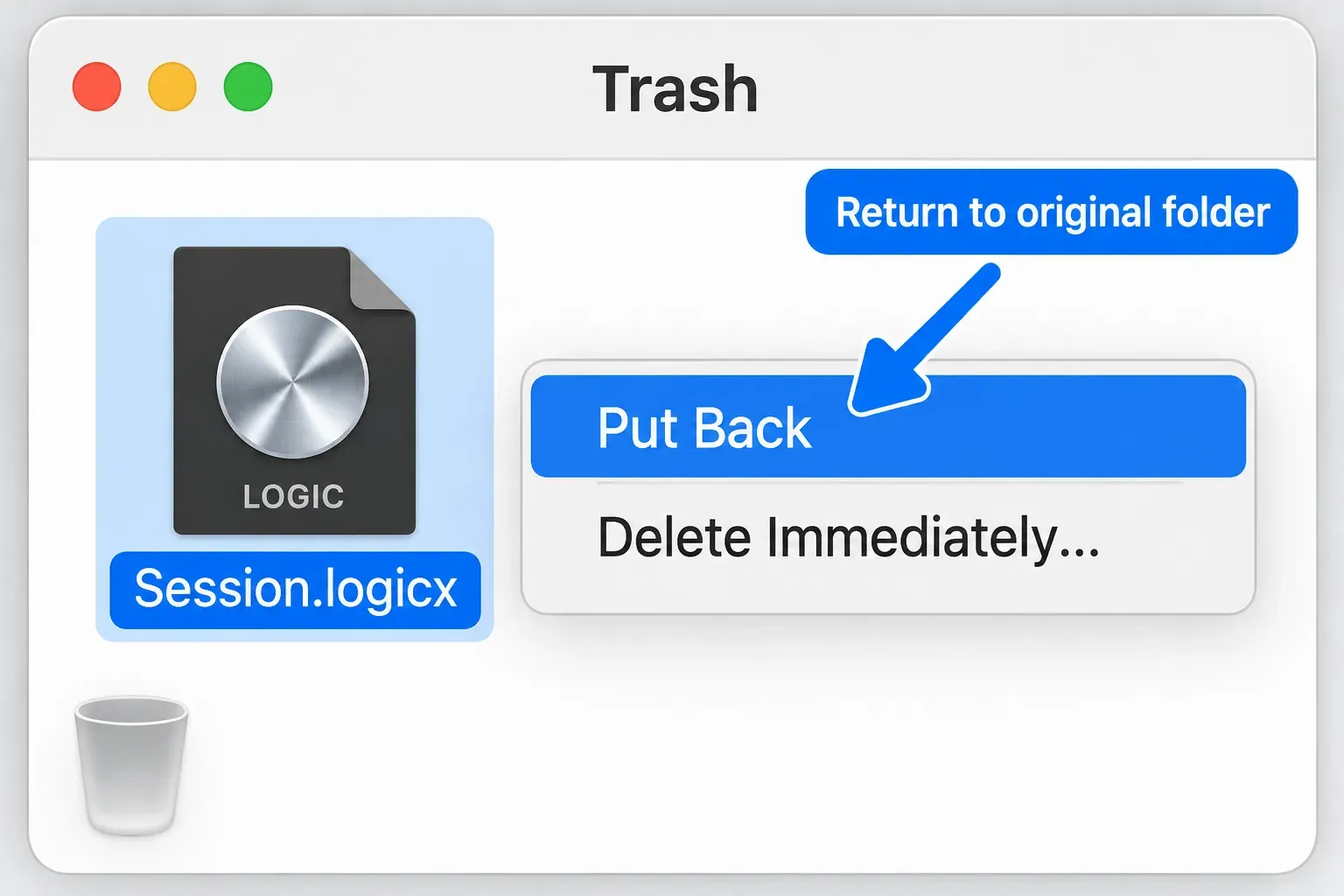
Do not choose Delete Immediately or Empty Trash while you look for the project. Once Trash has been emptied, its normal recovery path is closed. A separate backup may still contain the project, so move on to that copy.
Restore a copy from before the deletion with Time Machine
This works only if a retained backup contains the project. Turning on Time Machine now won’t recreate a song you deleted yesterday.
- Connect the backup disk if needed, then open the Finder folder where the project used to live.
- Open Time Machine using Spotlight.
- Browse the timeline or arrows to a backup made before the deletion. Look for the project name at that location.
- Select the complete project package or enclosing project folder and click Restore. Apple’s Time Machine restoration procedure returns selected files and folders to their original location.
If you’ve already created a replacement project with the same name, preserve it before you restore an older copy to that location. Keep both until you know which one holds the work you need. A backup from before the deletion can still be older than your last recording or edit.
For a folder-based project, restore the parent folder with its media subfolders when they’re in the backup. If audio was stored elsewhere, find the matching backed-up media too. Restoring only the project document won’t bring every externally referenced recording along with it.
Recover a project deleted from iCloud Drive
When the project was stored in iCloud Drive, open iCloud Drive on the web and choose Recently Deleted. Select the project and choose Recover. Apple permits recovery of retained deleted files within 30 days, but files that have been permanently removed can’t be restored this way.
If the file isn’t there, check iCloud’s Data Recovery > Restore Files area, which Apple’s missing-iCloud-file instructions name as another place to look. Don’t edit or delete iCloud Drive data while recovery is running. Those changes can interrupt the process.
The 30-day window doesn’t promise that every missing Logic project will appear. It covers files that were stored in the service and are still eligible for recovery. A project saved only on an external drive won’t gain an iCloud copy just because you use an Apple Account.
If you kept the project in another cloud service, check that service’s deleted-file history under its own retention rules. Also look for an intact copy or ZIP archive you previously sent to a collaborator. Preserve what you find before renaming or resaving it.
Why Revert To and Project Alternatives may not help
Apple states that project alternatives are saved as part of the project and share its assets. The Project Handling settings also describe automatic backups as backups saved with your project when you use Save. They protect earlier project states. They aren’t a separate rescue copy of a deleted container. The same applies to an alternative you removed in File > Project Alternatives > Edit Alternatives. Revert to lists backups only for the current alternative, so a removed one has to come back from a backup of the whole project made before the removal, such as Time Machine.
If you find an intact older copy that opens, File > Revert to may offer earlier saved versions of its current alternative. Work from a preserved copy before you revert. If no project survives, searching inside the Logic Pro application in Applications won’t recover your deleted song. The app and your project are separate items.
Check the recovered project and preserve its audio
Apple allows project assets to be stored inside the project or referenced from another location. Even a package can refer to external audio when those assets were not copied into it.
After restoring a copy, check its project name and saved state, then inspect the tracks, MIDI regions, automation and recorded audio you expected to recover. If Logic reports missing media, keep the recovery copy intact and locate the original recordings before substituting similarly named files. Getting the document open is only the first part of recovering the song.
When the required media is present, use File > Save As to create a separate working copy. Choose Package or Folder deliberately and select Audio files plus any other asset types the project needs. Apple explains how the Save dialog controls which assets are copied into the project. It can’t copy a recording that’s still missing.
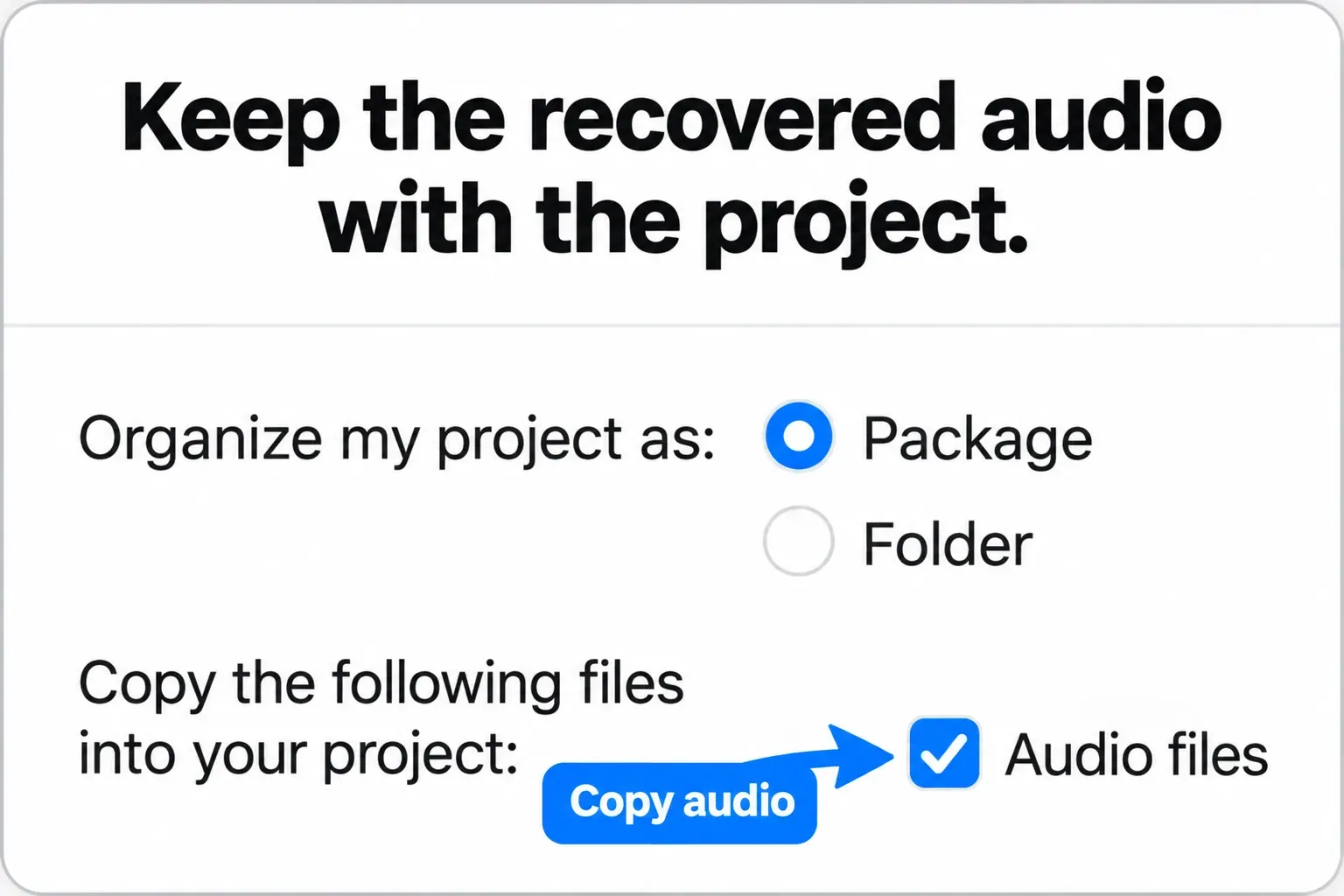
Keep the untouched recovery copy until the working copy has everything you need. Then set up an independent backup using the Logic project backup guide. Alternatives inside one project don’t replace it.
What if Trash is empty and there is no backup?
There’s no documented Logic command that reconstructs a permanently deleted whole project. You can ask a data-recovery specialist to assess the original storage, but recovery is uncertain. If a utility finds some recordings, that doesn’t prove it can rebuild a complete, usable Logic project.
Before installing recovery software on the affected drive or saving more projects to it, get advice on preserving that storage. Prosoft’s recovery guidance explains that continued disk use can overwrite recoverable data. Its guide is older and doesn’t establish a success rate for your Mac, so I wouldn’t turn that possibility into a promise.
If only exports survive, you may still have stems, a stereo bounce or separately exported MIDI to work from. Preserve those files. Rebuilding from them is a new arrangement task, and it won’t recover the original session.
Common recovery questions
Can I recover a Logic Pro project after emptying Trash?
Check a retained Time Machine backup, eligible cloud recovery or another intact copy. Emptying Trash removes that copy from the normal Finder recovery path. Without a surviving copy, storage recovery needs a separate assessment and has no guaranteed outcome.
Where are Logic Pro’s automatic backups?
They are saved with the project. For an existing project, open File > Revert to to inspect available backups of the current alternative. They cannot rescue an entire deleted project container on their own. Each Save adds one for the current alternative, and the Auto Backup pop-up menu in Logic Pro > Settings > General > Project Handling sets how many recent backups Logic keeps.
Does recovering WAV files recover the Logic project?
No. Recordings may help you rebuild, but they do not contain the original editable MIDI, arrangement, automation and plug-in settings. Look for the complete saved project as well as its media.


