Best Audio Interfaces for Logic Pro in 2026
Choose an audio interface for the sources you record now, the headphone mixes you need, and the inputs you may add later.

For one musician recording up to two sources at a time, Focusrite Scarlett 2i2 4th Gen is our starting pick for Logic Pro. Choose SSL 2+ MKII for separate performer and engineer headphone mixes, or Audient iD14 MKII for compact ADAT input expansion. Volt 276 adds optional analogue compression while tracking. RME Babyface Pro FS offers more flexible hardware routing; Scarlett 18i20 4th Gen provides eight microphone preamps for larger sessions.
Checked September 20, 2026 against current Apple and manufacturer documentation. This is a six-model buying shortlist, not a laboratory ranking or a test of every interface on the market. We have not bench-tested all six, so claims about the lowest latency, reliability or sound quality are not presented as our measurements.
Quick picks by recording job
On a phone, swipe the table horizontally to see every column.
| Audio interface | Best for | Physical analogue inputs | Monitoring and expansion | Main tradeoff |
|---|---|---|---|---|
| Focusrite Scarlett 2i2 4th Gen | Starting pick for a solo home studio | Two mic, line or instrument inputs | Direct monitor, one headphone output, loopback | No MIDI or digital expansion |
| SSL 2+ MKII | Best two-person desktop workflow | Two mic, line or instrument inputs | Two independent headphone mixes, four line outputs, MIDI, loopback | No ADAT input |
| Audient iD14 MKII | Best compact expandable interface | Two analogue channels; instrument socket shares input 1 | ADAT input, four line outputs, two headphone sockets sharing one mix | No MIDI and the headphone sockets share one mix |
| Universal Audio Volt 276 | Best for committing compression while tracking | Two mic, line or instrument inputs | Direct monitor, one headphone output, MIDI | Printed compressor choices cannot be removed later |
| RME Babyface Pro FS | Best professional portable system | Two mic/line plus two line/instrument inputs | ADAT I/O, MIDI, TotalMix FX; both headphone sockets share channels 3/4 | Higher cost and a deeper software layer |
| Focusrite Scarlett 18i20 4th Gen | Best for drums, bands and hardware | Eight mic/line inputs, two also accept instruments | Up to 26 × 26 I/O at 44.1/48 kHz; dual ADAT, two headphones, talkback | Rack-size unit with external power |
For a budget reference, Focusrite’s US store listed the 2i2 4th Gen at $239.99 and the 18i20 4th Gen at $829.99 on September 20, 2026. These are dated store prices, not promised checkout totals or the lowest available offers. Compare local prices for the exact generation, and include microphones, cables, headphones and any external preamp in the total. An ADAT socket alone does not add microphone inputs.
What Logic Pro needs from an audio interface
Logic does not need a Logic-branded interface. It needs a macOS/Core Audio-compatible device with enough inputs and the right monitoring options. Apple’s audio-device overview says to check the manufacturer’s specifications against the macOS version required by Logic. An interface supporting Intel Macs does not mean every current Logic feature or version supports that same Mac; check the application and interface requirements separately.
Apple's audio-interface connection guide says Logic supports plug-and-play detection and recommends connecting an interface directly to the Mac while troubleshooting. Some units are class compliant on macOS. Others use a manufacturer driver or control app for routing, firmware and lower-level device features. A USB-C socket alone tells you the connector shape, not the driver quality, roundtrip latency or number of channels.
Count what you need to record together. A microphone and a guitar take two inputs; a stereo keyboard plus a vocal takes three. Two people may also need different headphone mixes, not just different volume controls. For drums, count the microphones you want on separate tracks. You can record a drum kit with two microphones; what a two-input interface cannot do is capture a larger close-mic setup as separate channels in one take.
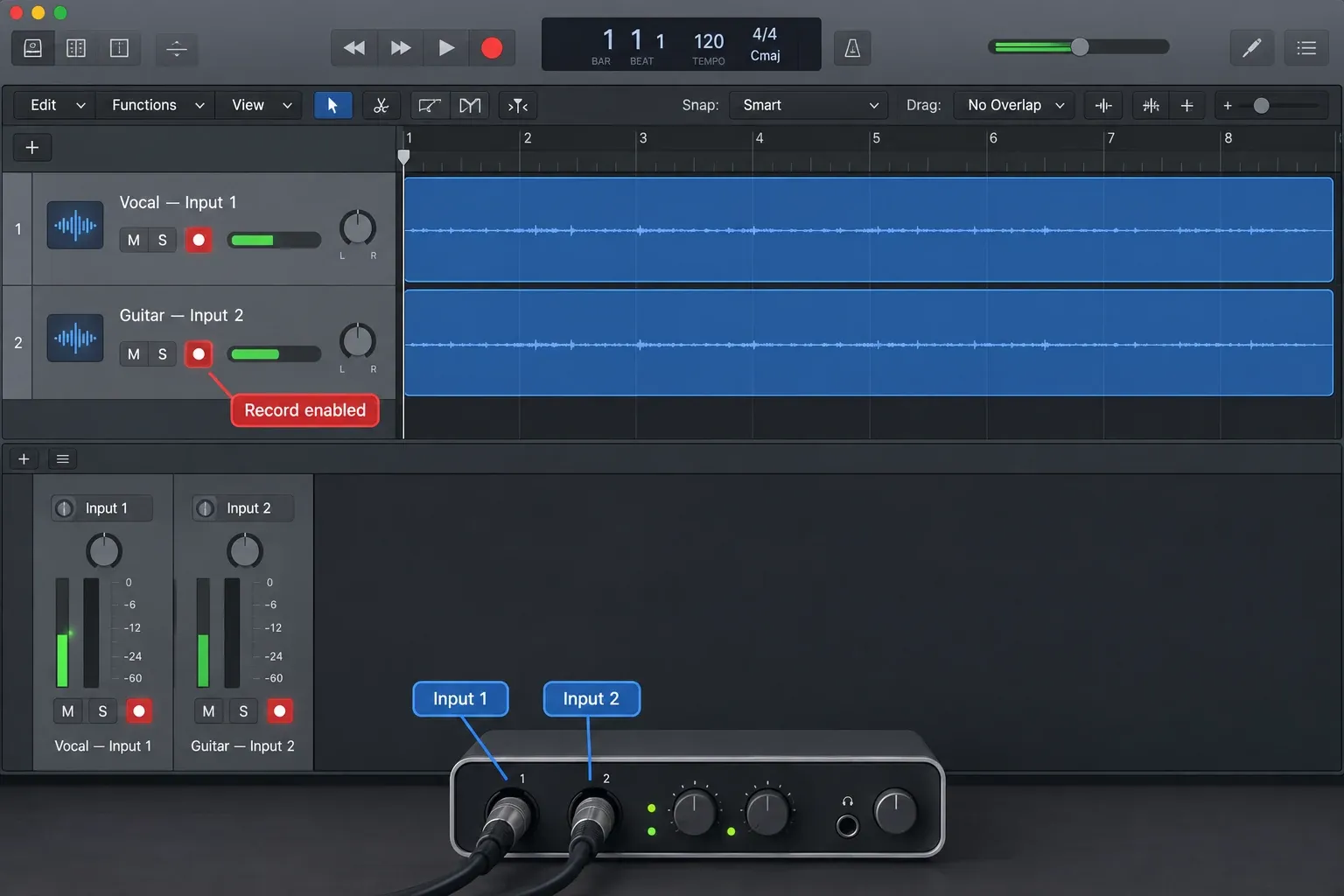
Focusrite Scarlett 2i2 4th Gen: best default for most solo users
Choose Scarlett 2i2 when you record one or two sources at once and want the simplest current path into a serious Logic project. Focusrite's current 2i2 specifications list two microphone preamps, two line or instrument inputs, 24-bit/192 kHz conversion, one headphone output, loopback, USB-C connectivity and USB 2.0 protocol. The interface is bus powered.
Auto Gain can set a starting gain level, while Clip Safe can reduce gain when the input approaches clipping. Those features are useful for a musician working without an engineer, but they don't replace watching the performance and meter. The fourth-generation 2i2 also provides two Air modes. Treat those as optional input colours, not proof that every source should use them.
Two analogue inputs cover a vocal and guitar, a stereo keyboard or a two-microphone recording. For three or more separate microphone tracks recorded together, choose more preamps. The 2i2 has no MIDI port or ADAT input, so an eight-channel ADAT preamp cannot expand it. Owning several instruments is not itself a reason to upgrade if you are happy to record them one at a time.
Skip the 2i2 when you need separate headphone mixes or more than two simultaneous external sources. For overdubbing, its two inputs can still build a large multitrack song.
SSL 2+ MKII: best two-person desktop workflow
Choose SSL 2+ MKII when two analogue inputs are enough but the output side needs to be more flexible. The current SSL 2+ MKII product page specifies two mic, line or instrument inputs, four balanced line outputs, two independent headphone outputs, five-pin MIDI I/O and stereo loopback. It is class compliant on macOS and bus powered over its USB-C connector.
The SSL 2+ MKII manual explains how to make the second headphone mix: build an aux-send cue in Logic, route that aux to outputs 3–4, and engage 3&4 beside Phones B. Otherwise both headphones hear the same mix. With 3&4 engaged, B normally hears only DAW playback; holding the button until it flashes also lets B follow the MIX control for direct input monitoring. The physical line outputs 3–4 share that playback pair, so they cannot simultaneously carry an unrelated hardware-effects send. MIDI I/O is useful for instruments with five-pin connections.
The Legacy 4K switch changes the input path with a high-frequency lift and added harmonic content. That's a recording choice, not a universal quality setting. Leave it off when you want a neutral capture or when the source is already bright.
SSL lists macOS 12 and later on its product page, but its compatibility notice also limits support to macOS releases still maintained by Apple. Its September 18 compatibility notice lists M1–M4 as tested, while M5 is untested and currently unsupported. It also lists macOS 27 Golden Gate as untested and currently unsupported. Those are support-status warnings, not proof that the interface cannot pass audio on an untested Mac or OS. Recheck the live notice for your exact Mac before buying or updating macOS.
Audient iD14 MKII: best compact interface with room to expand
The Audient iD14 MKII suits a small desk that may later need more microphones. It has two simultaneous analogue input channels, four line outputs and an optical input. Its front JFET instrument socket overrides input 1; it is not a third analogue recording channel. Audient’s compatibility page, updated August 29, lists Intel and Apple silicon Macs through macOS Tahoe.
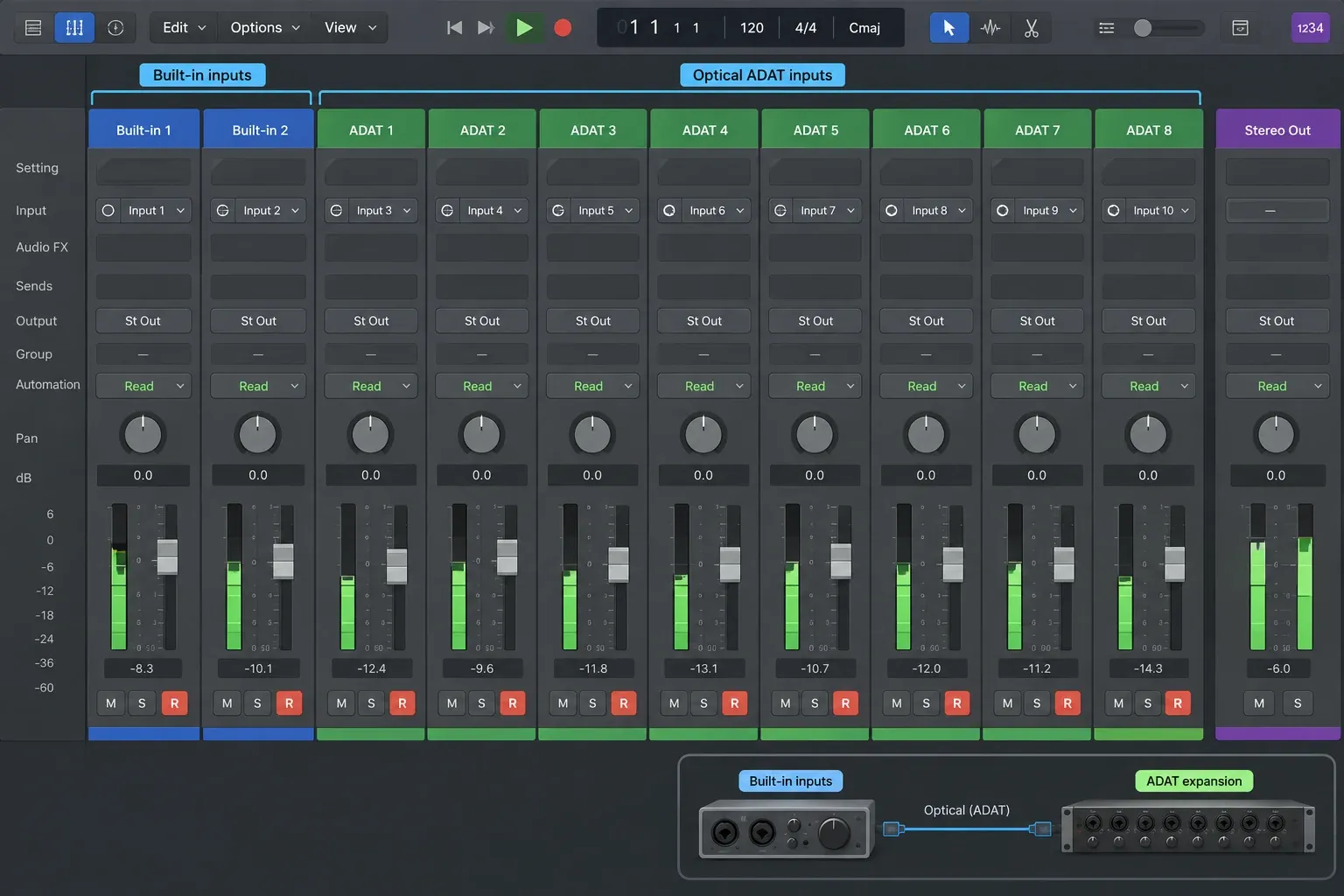
According to the iD14 MKII manual, pages 16–17, ADAT adds eight channels at 44.1/48 kHz or four at 88.2/96 kHz. Its maximum sample rate is 96 kHz, not 192 kHz. With an external eight-channel ADAT preamp at 48 kHz, the two built-in inputs become ten total recording inputs. Budget for that preamp and optical cable, and configure the digital clock before recording.
The two headphone sockets are useful for different plug sizes, but they carry the same headphone mix. That isn't the same arrangement as SSL 2+ MKII's two independent headphone outputs. If you need a second physical cue feed, the iD14's extra line outputs can feed an external headphone amplifier. The iD14 has no five-pin MIDI ports.
Skip iD14 MKII if you need two separate headphone mixes without extra hardware, or a built-in five-pin MIDI port. It is a better fit when compact input expansion matters more than those features.
Universal Audio Volt 276: best for printed compression
Choose Volt 276 when you want two inputs, direct monitoring, MIDI and a simple analogue compressor in the recording path. Universal Audio's current Volt 276 details list two mic, line or instrument inputs, 24-bit/192 kHz conversion, direct monitoring, one headphone output, MIDI I/O and a class-compliant Mac connection. The built-in 76 Compressor offers source-oriented presets, and Vintage mode changes the preamp character.
When enabled, the analogue compressor acts before recording: Logic receives the compressed take, and you cannot remove that processing afterward. But compression is optional. The Volt 276 manual describes cycling the 76 Compressor through VOC, GTR, FAST and OFF. Vintage can be switched off too. Disable both for an uncoloured capture, then add compression inside Logic if you want to keep that decision reversible.
UA’s Volt desktop FAQ confirms that these interfaces do not run UAD DSP plug-ins onboard. The 76 Compressor and Vintage mode are analogue input features; native plug-ins run on the Mac. If you want Apollo-style DSP tracking, Volt 276 is not a substitute. Skip it if you will never use the analogue processing, or need independent headphone mixes or ADAT expansion. For a used unit, do not assume the seller’s bundled software transfers: UA says it does not.
RME Babyface Pro FS: best professional portable system
Babyface Pro FS is worth considering when hardware routing and digital expansion matter more than a simple two-input setup. RME’s product and download page lists two XLR mic/line inputs, two line/instrument inputs, ADAT I/O, MIDI via the included breakout cable, bus power and TotalMix FX. Its macOS 11-and-later DriverKit and kernel-extension downloads were updated in June 2026. Use the driver instructions for your actual Mac and OS, not simply whichever download appears first.
TotalMix FX can create different submixes for distinct hardware outputs, but the two built-in headphone sockets share output channels 3/4. They have separate driver circuits for different headphone loads, not independent cue mixes; see page 10 of RME’s manual. A second independent headphone feed needs another output pair plus a headphone amplifier, or an ADAT output converter. Check which outputs your speakers already occupy. TotalMix is useful when you need this routing; it also takes more setup than a simple direct-monitor switch.
Four analogue inputs are available without an expander. ADAT adds eight channels at 44.1/48 kHz, four at 88.2/96 kHz or two at 176.4/192 kHz. The external converter must support the selected mode. RME also documents standalone and class-compliant operation, but their available controls and effects are not identical to a Mac running its driver and TotalMix. Skip Babyface Pro FS if you will not use the routing or expansion that distinguishes it.
Focusrite Scarlett 18i20 4th Gen: best for drums, bands and hardware
For several microphones at once, the Scarlett 18i20 4th Gen has eight mic/line preamps. Two of those channels also accept instruments; they are not two additional analogue inputs. It provides ten line outputs, two independently routable headphone paths, talkback, MIDI, S/PDIF, dual ADAT I/O and word clock output. The advertised maximum is 26 × 26 simultaneous I/O at 44.1/48 kHz, including digital channels—not 26 microphone sockets. Focusrite lists Apple silicon and Intel Mac support, subject to its current OS requirements.
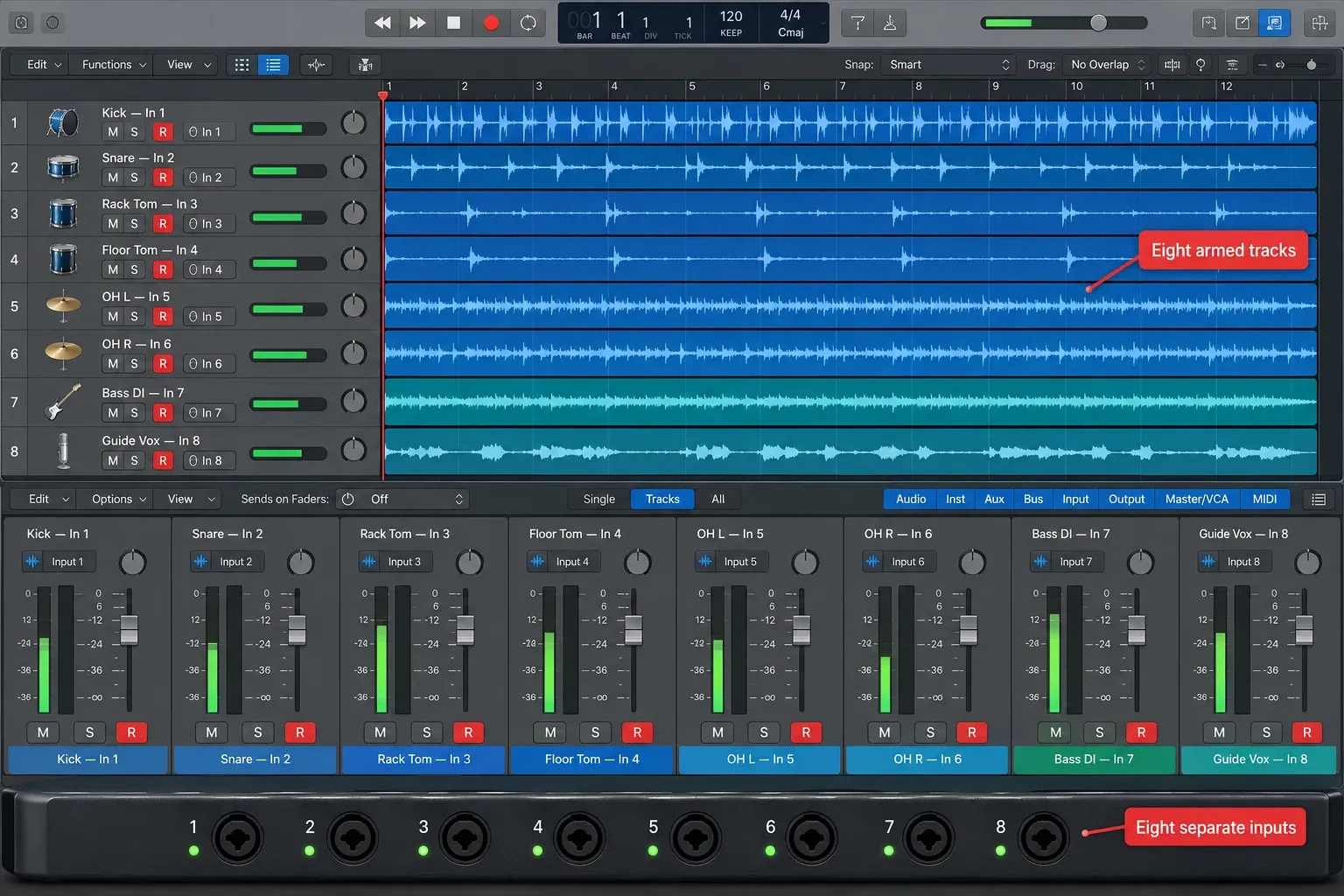
Eight preamps let you record a compact drum setup or several musicians to separate Logic tracks in one take. Focusrite Control 2 manages routing, cue mixes, Auto Gain and Clip Safe. In Dual ADAT mode, the optical ports carry up to 16 channels in each direction at 44.1/48 kHz, or eight at 88.2/96 kHz. At 176.4/192 kHz the digital I/O is disabled. Focusrite’s input-channel table includes two loopback channels in the 26-input total. S/PDIF and full Dual ADAT are alternative configurations, not extra channels to add together. Check that table and the digital-routing instructions before buying expansion hardware.
It's a rack-width interface that uses external power. It takes up more space than the other choices and makes little sense for a single vocal microphone. Skip it if the extra preamps will remain empty. Buy the number of simultaneous channels the sessions actually require, plus a small margin for the next realistic setup.
Count simultaneous sources before comparing converter specs
An input list can be misleading unless you separate physical analogue inputs from digital expansion and virtual loopback channels. Scarlett 2i2 is listed as 4 x 2 simultaneous I/O because the count includes two loopback inputs, but only two external analogue sources can be recorded at once. iD14 reaches ten inputs only when an external ADAT device supplies the extra channels. Babyface and 18i20 totals also include digital I/O.
- One vocal or one guitar: one input works, but two inputs avoid replacing the interface when you want a stereo keyboard or a second microphone.
- Vocal and guitar together: two inputs.
- Stereo keyboard plus vocal: three inputs.
- Two-person recording with separate cue mixes: two inputs plus two independently routed headphone outputs.
- Drum kit or live band: count the microphones and line sources that must be isolated on separate Logic tracks.
A combo socket accepts more than one connector type, but it remains one channel. A condenser microphone may also require 48V phantom power. Confirm that the selected input provides it before the session. And a microphone and a guitar cannot use the same combo input simultaneously.
Latency, direct monitoring and the USB-C label
No interface removes every source of recording latency. Apple's current latency guide separates Logic's I/O buffer, plug-ins, project sample rate, interface conversion and interface software. A smaller buffer reduces Logic's software-monitoring delay but increases CPU pressure. Low Latency Mode can bypass or change latency-producing plug-in paths.
Direct monitoring sends the interface input to headphones or speakers without travelling through Logic’s plug-in chain. For example, the Volt FAQ explains its DIRECT button. This avoids Logic’s software-monitoring delay, but you will not hear Amp Designer or another Logic effect on that direct signal. Use software monitoring when the performer needs those effects. Avoid listening to both paths at once unless intentional: the delayed copy can sound doubled or phasey.
USB-C doesn't guarantee Thunderbolt performance. Scarlett 2i2, SSL 2+ MKII, Volt 276 and Scarlett 18i20 all use a USB-C connector while their documented protocol is USB 2.0. That's enough for their specified I/O, but the label cannot predict driver behavior. Compare current Mac support, buffer stability, direct-monitor features and the actual input count instead of buying by connector shape.
Compatibility check before buying
- Check the exact model generation. Scarlett 2i2 4th Gen and 3rd Gen use different control software and specifications. SSL 2+ MKII is not the original SSL 2+.
- Check the current macOS support page. Do this again before a major macOS update, even if the interface worked on the previous release.
- Check required control software. Routing, loopback, firmware, cue mixes and Auto Gain may depend on a vendor app even when audio is class compliant.
- Check the included cable against the Mac. USB-C on the interface does not mean every box includes the cable or adapter your Mac needs.
- Connect directly for the first test. Apple recommends avoiding an unverified hub or daisy chain while diagnosing latency or detection.
- Keep the old setup until the new one is stable. Test input, output, headphones, sample rate and a short recording before changing a working project room.
Once the interface arrives, the Logic Pro audio-recording guide covers device selection, track input, gain and a first take. If Logic doesn't list the hardware, use the audio-interface detection checklist. For a delay while monitoring, follow the Logic Pro latency signal path before assuming the interface is defective.
Frequently asked questions
What is the best audio interface for Logic Pro?
For one musician recording up to two sources, Scarlett 2i2 4th Gen is our starting pick. Choose SSL 2+ MKII for separately routed headphone mixes, iD14 MKII for ADAT input expansion, Volt 276 for optional analogue compression, Babyface Pro FS for more flexible hardware routing, or 18i20 for eight built-in microphone preamps. There is no single winner for all recording setups.
Does any audio interface work with Logic Pro?
No. Logic uses audio devices supported by macOS and Core Audio, but the exact interface still needs a compatible driver or class-compliant path for the Mac and macOS version. Check the manufacturer's current compatibility page for the exact generation before buying or updating macOS.
Is Scarlett 2i2 good for Logic Pro?
Yes, when two physical inputs, one headphone mix and two monitor outputs cover the session. The fourth-generation model supports macOS, 24-bit/192 kHz recording, direct monitoring, loopback, Auto Gain and Clip Safe. It has no MIDI ports or ADAT expansion.
How many inputs do I need for Logic Pro?
Count the external sources that must be recorded to separate tracks at the same time. One vocal and one guitar need two inputs. A stereo keyboard plus a vocal needs three. A drum kit or live band usually needs several microphone preamps. Loopback and ADAT channels do not count as built-in analogue sockets.
Does USB-C mean lower latency in Logic Pro?
No. USB-C describes the connector. Roundtrip latency also depends on the interface driver or firmware, conversion, Logic's I/O buffer, project sample rate, plug-ins and monitoring path. Several current interfaces use USB-C connectors with USB 2.0 protocol.
Should I use direct monitoring or Logic effects while recording?
Use direct monitoring when a clean cue with minimal software-path delay is enough. Use Logic software monitoring when the performer needs Amp Designer or another plug-in in the cue, then lower the I/O buffer and use Low Latency Mode when needed. Do not monitor through Bluetooth headphones.
Buy for the next real session
Buy for the session you can describe. Two sources and one headphone mix point to 2i2. Separate performer and engineer cues point to SSL 2+ MKII. iD14 provides ADAT input expansion, with a preamp purchased separately. Volt 276 offers optional compression on the way in. Babyface Pro FS earns its place when you need TotalMix and digital routing; its headphone sockets still share one mix. Choose 18i20 when you need eight built-in microphone preamps together.
The Logic Pro Recording and Editing hub takes the next step from interface choice to microphones, tracking, comping, timing and delivery.


