Best Control Surfaces for Logic Pro in 2026
Choose a Logic Pro control surface by the work it removes: one-fader automation, an eight-channel mix, EUCON post work, or no new hardware at all.

For most Logic Pro users who want eight moving faders and clear track feedback, the SSL UF8 is the strongest current all-round surface. For a less expensive full MCU-style layout, look at Behringer X-TOUCH. The other choices solve narrower problems. SSL UF1 gives you one motorized fader and a jog wheel, Nektar CS12 concentrates on the selected channel and plug-ins, and iCON P1-M keeps an expandable setup compact. PreSonus FaderPort 8 offers a straightforward eight-fader MCU surface, while Avid S1 earns its extra setup when you need EUCON and post-production workflows. If you already have an iPad, try Logic Remote before buying hardware.
Quick picks by workflow
| Control surface | Best for | Logic connection | Useful hardware | Main tradeoff |
|---|---|---|---|---|
| SSL UF8 | Best overall eight-fader surface | Dedicated Logic profile in SSL 360, MCU-based DAW control | Eight 100 mm touch-sensitive motorized faders, eight color displays, eight encoders, 43 assignable keys | Premium purchase and requires SSL 360 software |
| Behringer X-TOUCH | Best value full-size surface | Mackie Control mode | Nine 100 mm motorized faders, eight scribble strips, eight encoders, jog wheel | Large desk footprint and a less tailored Logic layer |
| SSL UF1 | Single-fader control with a jog wheel | Dedicated Logic profile in SSL 360 | One 100 mm motorized fader, two color displays, weighted jog wheel, five encoders | Only one channel under the fader at a time |
| Nektar Panorama CS12 | Selected-channel plug-in control | Nektar ControlCore integration | One 100 mm motorized fader, 3.5-inch display, dedicated plug-in controls | Requires ControlCore; one physical fader |
| iCON P1-M | Best compact expandable surface | MCU/HUI plus a current Logic script listed as public beta | Eight motorized faders, eight encoders, touchscreen, jog wheel, optional extenders | Optional display hardware adds cost; Logic script is still labelled beta |
| PreSonus FaderPort 8 | Best straightforward eight-fader MCU layout | Mackie Control mode | Eight 100 mm motorized faders, eight scribble strips, transport and Session Navigator | Its deepest native integration is not for Logic |
| Avid S1 | Best for EUCON and audio post | EUCON through current EuControl software | Eight motorized faders, eight encoders, OLED feedback, optional tablet views, expandable system | Higher system cost and Logic does not support EUCON monitoring control |
| Logic Remote | Best first test if you own an iPad | Apple's Logic Remote connection | Mixer, transport, automation, Smart Controls, key commands and Touch Instruments | No physical fader resistance or motorized position recall |
For a cash comparison, these were US retail prices for new hardware on October 18, 2026, in USD. Promotions can change, and tax and shipping depend on checkout. The workflow recommendations above do not change with a temporary discount.
| Surface | Observed US price | Offer basis |
|---|---|---|
| SSL UF8 | $1,199.99 | Sweetwater new unit; advertised $100 off |
| Behringer X-TOUCH | $419.00 | Sweetwater new unit |
| SSL UF1 | $649.99 | Sweetwater new unit; advertised $50 off |
| Nektar Panorama CS12 | $399.00 | Sweetwater new unit |
| iCON P1-M | $549.00 | B&H controller only |
| PreSonus FaderPort 8 | $499.99 | Sweetwater sale; previously $524.99 |
| Avid S1 | $1,295.00 | Sweetwater new unit; advertised $200 off |
| Logic Remote | Free app | US App Store; compatible iPad or iPhone separate |
The P1-M plus D4T bundle was $669 at B&H: $120 above its controller-only offer, not a standalone D4T price. SSL 360 is free; CS12’s ControlCore installer and P1-M’s iMap are included with their packages. S1 includes EuControl access, power supply and an Ethernet cable and can work standalone. A tablet, Dock and expanders are optional. Allow for the network connection or adapter your Mac needs rather than assuming every accessory is compulsory.
Do you need a control surface for Logic Pro?
Buy one when you can name the repeated mouse job it will replace. The clearest case is volume automation. A touch-sensitive motorized fader lets you ride a vocal or dialogue track and see the channel level reflected physically. What happens after you release it depends on the automation mode, so test Touch before using Latch or Write. Eight faders make sense when you balance several channels together or move through large sessions in banks.
Do not buy one because it resembles a console. The dedicated controllers below don't process your audio or improve the recording signal. They send commands and receive feedback. Your audio still travels through Logic, the Mac and the audio interface. SSL states this directly for UF8: it's a controller, not an audio interface.
Apple's current control-surface overview explains how dedicated surfaces and MIDI keyboards with assignable controls can both operate Logic. Supported surfaces can control transport, tracks, channel strips, automation and plug-in parameters. Bidirectional communication sends values back to displays, LEDs and motorized faders. That feedback is the practical reason to pay more than you would for a row of generic MIDI knobs.
A keyboard controller is the better purchase when playing software instruments is the main job. Our MIDI-controller buying guide covers keys, pads and Live Loops. This page compares hardware for mixing, transport, editing and automation.
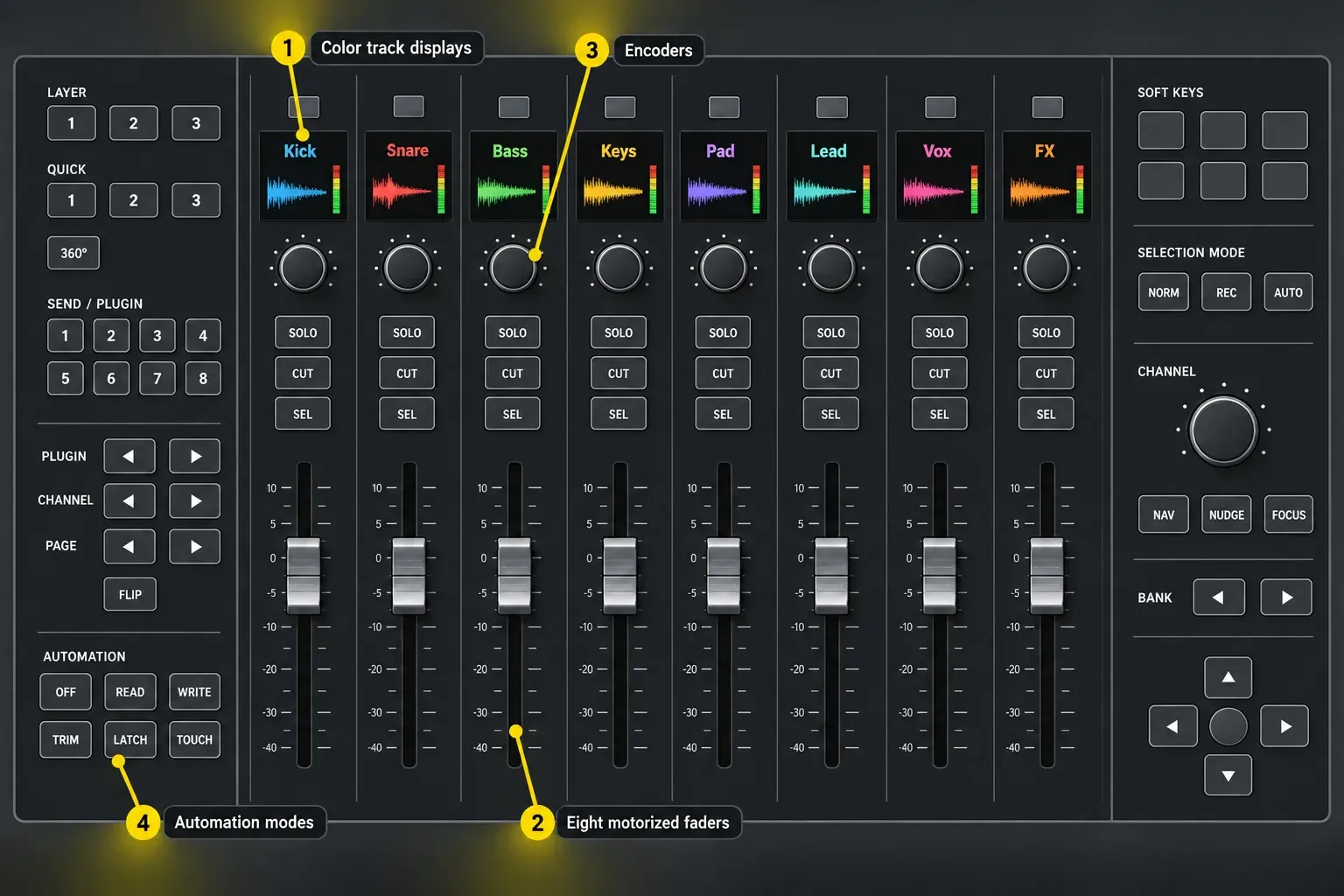
SSL UF8: best overall control surface for Logic Pro
Choose UF8 when eight simultaneous faders, readable track feedback and a current manufacturer-maintained Logic profile are worth paying for. The official SSL UF8 page lists eight 100 mm touch-sensitive motorized faders, eight high-resolution color displays, eight endless encoders and 43 assignable keys. Up to four units can form a 32-fader system.
SSL provides a dedicated Logic profile in SSL 360. Its UF8 compatibility notes distinguish the MCU-based DAW layer from the separate Plug-in Mixer layer. For ordinary DAW control, install SSL 360, select the Logic layer and configure its matching virtual MIDI ports.
For the enhanced Logic OSC integration, SSL specifies v2.1.12 with updated firmware and 360-enabled plug-ins. Development and testing used Logic Pro 12. The SSL 360 OSC device must be automatically discovered, not manually added. If the Plug-in Mixer shows tracks in the wrong order, follow SSL’s ordering and compatibility checks rather than rebuilding your entire controller setup.
The surface is strongest when you need to see track names and values without reading the main display constantly. Its separate automation controls, banking, encoders and user keys cover more than volume. The tradeoff is cost and software dependence. UF8 needs SSL 360 for configuration and updates. It also lacks a dedicated jog wheel, which is one reason a single-fader UF1 can be the better editing controller.
Skip UF8 if you expect eight faders to map every third-party plug-in perfectly without configuration, or if your real need is a single vocal ride a few times per month. One good fader can remove that bottleneck with far less desk space.
Behringer X-TOUCH: best value full-size surface
Choose X-TOUCH when the goal is a complete motorized Mackie Control layout at a lower price tier than the premium surfaces. Behringer's current X-TOUCH page specifies nine touch-sensitive 100 mm motorized faders, eight LCD scribble strips, eight encoders, per-channel meters, a jog wheel, transport controls and support for Mackie Control and HUI.
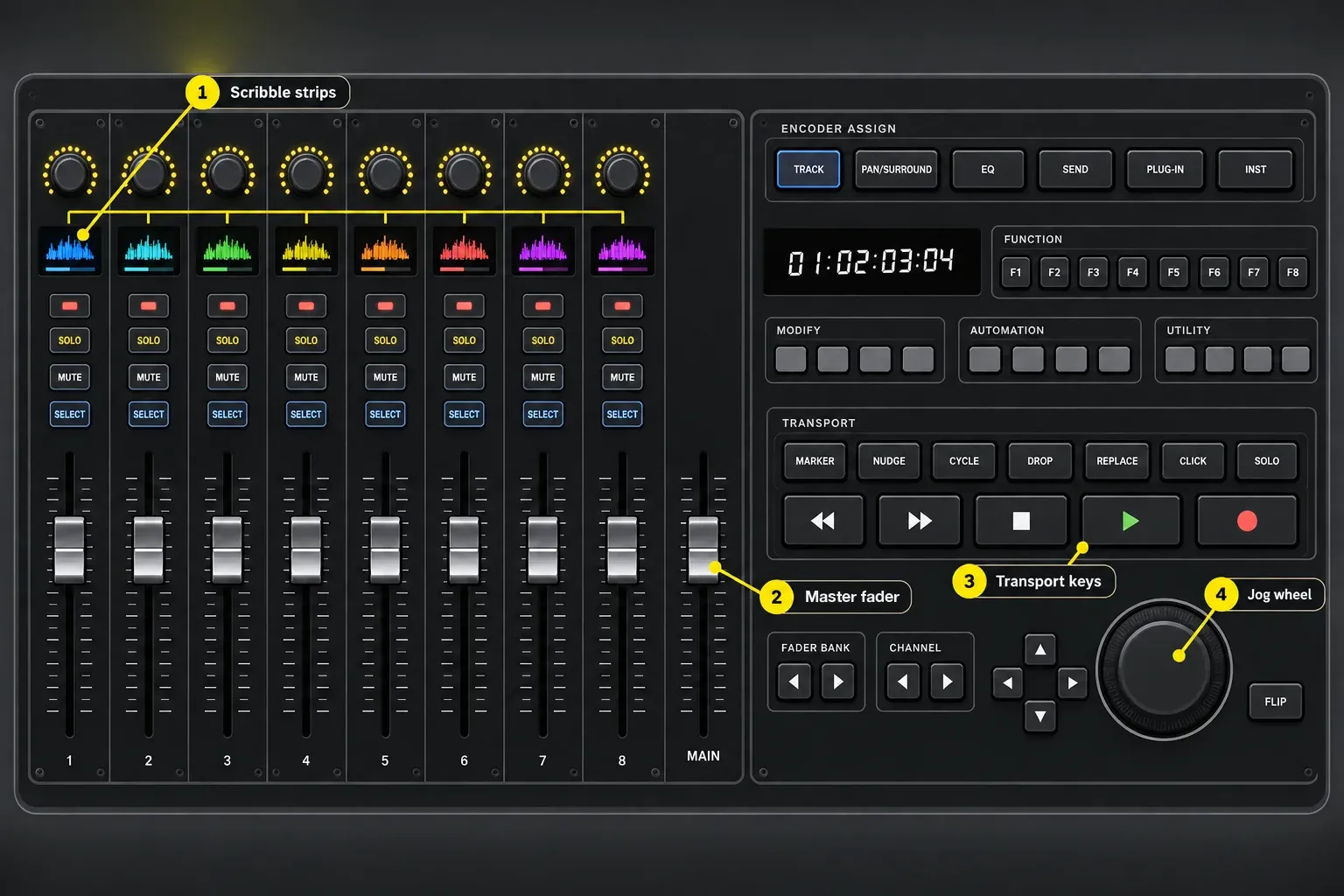
For Logic, use Mackie Control mode and verify the MIDI input and output ports. Apple's Mackie Control support is detailed, which is why the layout maps more coherently than an arbitrary MIDI mixer. The X-TOUCH also includes USB, MIDI and Ethernet connections, but a normal Logic setup doesn't need every port at once.
X-TOUCH earns its place for the controls it offers at this price tier. Check fader noise, response and feel during the seller’s return window. Long-term reliability needs more than a specification sheet. Confirm local stock and measure the desk too. This is a full-width surface, not a laptop accessory.
Skip it if its full-size layout crowds your desk or you only need one automation fader. For focused channel and plug-in work, compare UF1 and CS12 before paying for a bank of faders.
SSL UF1: best single-fader option with a jog wheel
Choose UF1 when you want one long-throw automation fader, strong visual feedback and a real jog wheel rather than eight channels at once. SSL's current UF1 specifications list one 100 mm touch-sensitive motorized fader, a 4.3-inch main display, a second 1.77-inch display, five push encoders, transport keys and a weighted jog wheel.
The Logic profile provides track feedback, pans, sends and automation controls. To make the UF1 fader follow track selection, SSL specifies Control Surface Follows Track Selection in Logic and SSL 360 v1.6 or later. Do not assume every single-fader controller follows selection automatically. UF1 can also target the master, so check the active mode if the wrong level moves.
UF1 and UF8 can work together, but don't buy the pair by default. Start with the actual constraint. UF1 is enough when the missing tool is one physical automation lane and faster timeline navigation. UF8 is the stronger first purchase when simultaneous channel balance is the goal.
Nektar Panorama CS12: for channel and plug-in control
Compare Panorama CS12 with UF1 if your main job is adjusting a selected channel and its plug-ins. It combines a 100 mm motorized fader, a 3.5-inch display and dedicated plug-in controls. Nektar uses its ControlCore integration rather than asking you to treat it as a generic MCU box.
The current requirements are macOS 11.5 or later and Logic Pro 10.7.8 or later, plus ControlCore and a Nektar account. Those are integration minimums. Each later Logic release sets its own macOS requirement. Check your installed Logic version separately. Our CS12 setup and mapping guide covers installation and the selected-channel workflow. Choose eight faders instead if you need to balance several channels with both hands.
Before an update, read Nektar’s Logic 12 compatibility notes. They document focused-view behavior and the need for associated tracks when controlling bus or output channels. Use them as a setup checklist. They can't promise that every Logic release behaves the same way.
iCON P1-M: best compact expandable surface
Choose P1-M when eight motorized faders must fit into a shallower, modular system. The current iCON P1-M page lists eight 12-bit touch-sensitive motorized faders, eight dual-function encoders, a programmable touchscreen, jog wheel, transport, automation buttons, USB-C, Mackie Control and HUI support. Optional P1-X units add more banks of physical faders.
The important qualification is on the same manufacturer page: iCON lists its Logic Pro official script as a public beta. MCU can provide the normal mixer layer, but if you need the custom script, check its current release notes before ordering. The optional D4T display adds channel names and values. Check whether the seller includes it in a bundle. The base controller's touchscreen isn't that channel display.
The P1-M body measures 405 × 204 × 61 mm according to iCON. That 204 mm depth is useful on a shallow desk, but allow extra space for cables and any optional display.
PreSonus FaderPort 8: best straightforward MCU layout
Choose FaderPort 8 when you want eight long-throw faders, scribble strips and a clear transport and navigation section, and you accept that Logic uses MCU rather than the device's deepest native mode. The live PreSonus product page lists eight touch-sensitive 100 mm motorized faders, eight scribble strips, transport controls, automation modes and Session Navigator. It explicitly supports Logic through Mackie Control Universal emulation.
PreSonus also keeps a Logic setup article, though the company warns that its screenshots are from 2017 and current Logic looks different. The durable part hasn't changed: switch FaderPort to MCU mode, add a Mackie Control device in Logic, then assign the FaderPort input and output ports.
Logic uses a different integration mode here. The current FaderPort 8 page names its customized modes for Fender Studio Pro and Ableton Live, while Logic uses Mackie Control Universal emulation. SSL's Logic DAW profile is MCU-based too. Avid uses EUCON. Compare the controls you need in Logic. Whether a manufacturer calls its integration native tells you much less.
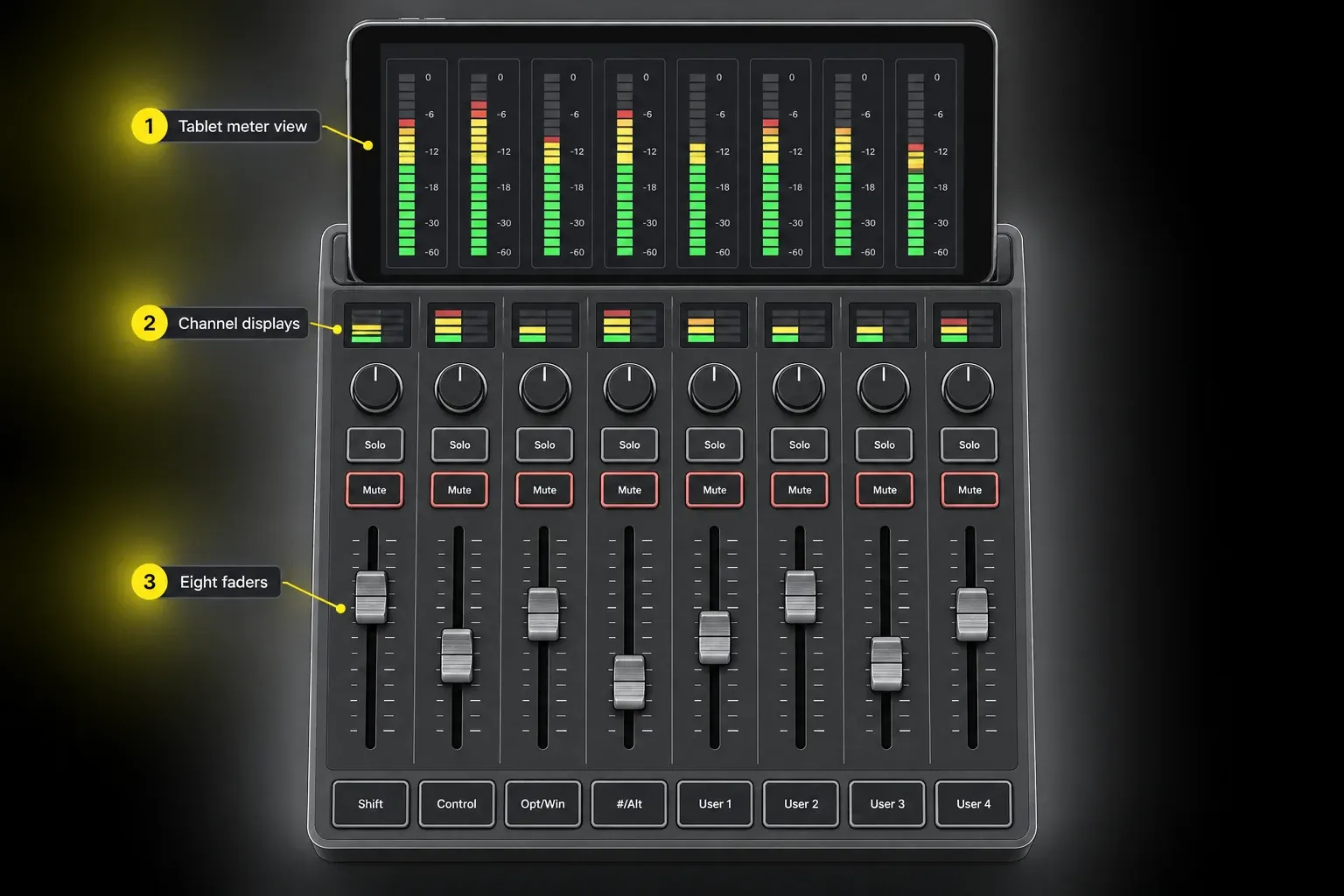
Avid S1: best for EUCON and post-production
Choose Avid S1 when EUCON, layouts, detailed feedback and expansion into a larger post-production system matter more than purchase price and setup simplicity. Avid's current S1 page names Logic Pro as a supported application and lists eight touch-sensitive motorized faders, eight encoders, OLED displays and integration with the Avid Control app. Up to four S1 units can be combined, with Avid Dock available for transport, a jog wheel and a focus fader.
Current compatibility matters here. Avid's live EUCON compatibility matrix lists Logic Pro 10.7.5 and later and recommends current DAW versions. Install current EuControl, add the S1 to My Surfaces, then open Logic. EUCON devices don't appear in Logic's normal Control Surfaces Setup window.
Check Logic-specific limitations before choosing S1. Apple's current EUCON feature page says Logic doesn't support EUCON monitoring control. Use the S1 for track, plug-in, automation and layout work, but don't assume every Pro Tools monitoring function carries into Logic.
Avid S1 is overkill for a producer who wants one vocal fader. It becomes rational when you need saved channel layouts and expansion, or the room already uses EUCON across more than one application. Do not buy it for a Pro Tools demonstration of VCA or Folder Spill without checking that exact function in your Logic version.
Logic Remote: the best first test if you own an iPad
Try Logic Remote before buying hardware when the real need is remote transport, mixer access, Smart Controls, key commands or Live Loops. Apple's current Logic Remote guide covers playback, navigation, recording, patches, plug-ins, mixing and automation. It can connect wirelessly or by cable.
An iPad gives you more labels and context than a cheap generic MIDI mixer, and the layout can change with the job. What it can't give your finger is a physical fader cap, fixed travel or motorized recall. That difference matters for fine rides, and for working by touch without looking down. Apple maintains separate iPad and iPhone guides; check the controls for the device you own, particularly before buying it for a specific view.
In this LogicPro discussion about control surfaces one participant preferred an iPad partly because of desk space, while the person asking still wanted physical controls. That's a useful distinction to test for yourself. One thread can't show that touchscreens suit everyone.
MCU, EUCON or a vendor profile?
Mackie Control, usually called MCU, is the broad compatibility route. Logic has detailed Mackie Control assignments for faders, V-Pots, transport, automation, markers, navigation and function keys. X-TOUCH and FaderPort 8 use this path. So a current device can work well even when Logic isn't its deepest native integration, though button labels and advanced functions may not match perfectly.
EUCON is the Avid route. It uses EuControl and Ethernet rather than appearing as a normal MCU device in Logic's Setup window. It can expose richer track and layout behavior, but Logic doesn't inherit every function available in Pro Tools.
Vendor profiles sit on top of the hardware and protocol. SSL 360 provides dedicated Logic profiles for UF8 and UF1. iCON offers MCU/HUI and currently lists a public-beta Logic script. These software layers can add labels, shortcuts and workflow-specific behavior, but they also create an update dependency. Check the current manufacturer support page for the exact model, macOS and Logic version before buying.
How to set up a control surface in Logic Pro
- Check compatibility before updating. Install the manufacturer software and firmware supported by your Mac and Logic version: SSL 360, EuControl, iCON iMAP or Nektar ControlCore as appropriate.
- Connect the surface directly while testing. Use the supplied power supply where required and avoid troubleshooting through an unverified hub.
- For Avid S1, skip the MCU mode and MIDI-port steps. In EuControl Settings > Surfaces, add it from All Surfaces to My Surfaces, then open Logic. EUCON devices do not appear in Logic’s normal Setup window.
- Choose the correct hardware mode. X-TOUCH and FaderPort use Mackie Control for Logic. Do not choose HUI merely because it is another DAW option.
- For MCU devices, open Logic Pro > Control Surfaces > Setup. Choose New > Install, select the supported model, then Scan or Add as the manufacturer instructs. Do not add a duplicate if Logic already detected it.
- Assign the exact input and output ports. A one-way port can make the faders send data without receiving track names or saved positions.
- Test a disposable project. Verify bank left and right, track select, mute, solo, pan, transport and Touch automation before opening paid work.
- After setup is stable, quit Logic so assignments are stored, then back up the control-surface preferences file at ~/Library/Preferences/com.apple.logic.pro.cs. Keep vendor maps separately; that file is not a backup of every companion application.
Apple's add-a-control-surface instructions recommend scanning when possible, because Logic can gather more device information that way. Manual installation is still valid when scanning isn't supported. You just set the MIDI input and MIDI output ports yourself. Before Logic Pro 12.4, adding a supported surface could also change the MIDI ports of other, unconnected devices in Setup. The 12.4 release notes list that as fixed, so on an older version recheck those ports after adding a new surface.
Buying checklist before you order
- Name the repeated job. One vocal ride, eight-channel balance, dialogue editing, plug-in control and remote transport lead to different hardware.
- Decide whether faders must be motorized. Non-motorized faders cannot move to show saved values after a bank or project change.
- Count channels honestly. A single fader handles one assigned channel at a time; selection-following depends on the device and settings. Eight faders allow simultaneous control but still require banking in larger sessions.
- Check feedback. Track names, parameter values and meters reduce screen switching. An optional display is not the same as an included one.
- Check the protocol and current software. MCU, EUCON and a vendor profile have different setup and update paths.
- Measure the desk. Include the typing keyboard, mouse, audio interface, wrist space and cable exits.
- Check noise in the recording room. Apple provides a Bypass All Control Surfaces command partly so motorized faders can be silenced while recording in the same room.
- Confirm the return window. Fader feel, motor noise, button resistance and display readability are best judged in person.
Buying a used or older surface? Apple distinguishes MIDI Device Plug-ins (MDPs) from MIDI Device Scripts (MDSes): Logic’s built-in support works on both Intel and Apple silicon Macs, but an old third-party MDP working on Intel does not establish Apple silicon compatibility. If the surface lacks built-in support on your Apple silicon Mac, check whether its manufacturer supplies a compatible MDS and current setup instructions before buying.
After the surface is working, use the Logic Pro automation guide for Touch, Latch, Write and Read modes. For the mixer behind the hardware, the buses, sends and aux guide explains what the faders and encoders are controlling.
Frequently asked questions
What is the best control surface for Logic Pro?
SSL UF8 is the strongest current all-round choice in this guide for users who want eight motorized faders, color track feedback and a maintained Logic profile. X-TOUCH is the value alternative, UF1 is better when one fader is enough, and Avid S1 is the specialist choice for EUCON and post-production.
Does Logic Pro support Mackie Control?
Yes. Logic has detailed built-in Mackie Control support for channel strips, V-Pots, transport, automation, navigation and other functions. Devices such as X-TOUCH and FaderPort 8 can use Mackie Control mode, although device-specific features and labels still vary.
Are motorized faders worth it for Logic Pro?
They are worth it when you record automation, change fader banks or reopen mixes often. A motorized fader can return to the current Logic value. A non-motorized surface may cost less, but its fader position may not match the saved channel level.
Can I use Avid S1 with Logic Pro?
Yes. Current Avid and Apple documentation supports S1 through EUCON and EuControl. EUCON devices are configured in EuControl rather than Logic's normal Control Surfaces Setup window. Apple also states that Logic does not support EUCON monitoring control.
Is Logic Remote a control surface?
Yes. Logic Remote provides mixer, transport, automation, key-command and Touch Instrument functions on iPhone and iPad. The layouts and available controls differ; use the guide for your device. A touchscreen can replace some hardware tasks, but not physical fader travel or motorized fader feedback.
Will a control surface improve sound quality?
Not by itself. The dedicated controllers compared here send commands and display feedback rather than processing the audio signal. They may help you perform more deliberate automation or work faster, but the hardware itself does not change Logic's audio quality.
Choose the surface that removes a bottleneck
I'd start with Logic Remote if an iPad is already on the desk: it's free, and it shows which physical controls you still miss. Choose UF1 for one motorized fader and navigation, X-TOUCH for a broad MCU layout at a value price, UF8 for a current premium eight-fader Logic workflow, P1-M for compact expansion, FaderPort 8 for a straightforward MCU surface, and S1 when EUCON is part of a larger professional system. Consider CS12 alongside UF1 when plug-in control is the priority.
The hardware should remove a repeated action, not create a new setup hobby. Once the choice is clear, the Logic Pro Mixing hub connects the surface to gain staging, routing, EQ, compression, sidechain work, automation and mastering.


