Best MIDI Controllers for Logic Pro in 2026
Choose a current Logic Pro controller by the work you do: compact writing, full-size playing, software instruments, piano action or Live Loops.

For most Logic Pro users who want one controller for playing, drums and mixer control, the Novation Launchkey 49 MK4 is our all-round default. It pairs 49 semi-weighted keys with 16 pads, eight encoders, nine faders and a current vendor-supported Logic setup path. Buy the Akai MPK Mini IV instead if the controller has to live in a backpack. Choose Nektar, Arturia or Native Instruments when their control model fits your work better, and go for Launchpad X when Live Loops matters more than piano keys.
Quick picks by workflow
| Controller | Best for | Logic-relevant hardware | Main tradeoff | US price, Oct. 18, 2026 |
|---|---|---|---|---|
| Novation Launchkey 49 MK4 | Best overall for one-controller studios | 49 semi-weighted keys, 16 pads, eight encoders, nine faders, vendor Logic script | Too wide for a travel rig; no hammer action | $279.99 |
| Akai MPK Mini IV | Small desks, travel and first controllers | 25 mini keys, eight pads, eight knobs, transport, physical pitch/mod wheels, Logic script | Mini keys and no faders | $99.00 (black; backordered) |
| Nektar Impact LX49 mk3 | Full-size keys with many Logic controls | 49 synth-action keys, nine encoders, eight faders, eight pads, custom Logic integration | No 5-pin MIDI output on the 49-key model | $199.99 |
| Arturia KeyLab 49 mk3 | Arturia instruments and a premium control layout | Semi-weighted aftertouch keys, 12 pads, nine encoders, nine faders, color screen, Logic script | Its strongest value depends on using Arturia software | $479.00 (black) |
| Native Instruments Kontrol S49 MK3 | Kontakt, NKS and per-note expression | Fatar semi-weighted keys with polyphonic aftertouch, color screen, Light Guide, eight encoders | Expensive if you rarely use NKS-compatible instruments | $749.00 |
| Arturia KeyLab 88 mk3 | Pianists and full-range parts | Fatar TP/110 hammer-action keys with aftertouch, 12 pads, nine encoders and nine faders | 15.7 kg and nearly 1.3 m wide | $999.00 (black) |
| Novation Launchpad X | Logic Pro Live Loops | 64 velocity-sensitive RGB pads, dedicated Live Loops support, eight Custom Modes with firmware 2.0 | No keyboard, pitch wheel or faders | $219.99 |
Prices are Sweetwater US advertised offers in USD for new standalone controllers, checked October 18, 2026. They exclude tax, shipping and retail bundles. The black MPK Mini IV was backordered; confirm availability before ordering. Keep the workflow choice separate from a changing offer price.
Don't pick by the longest specification sheet. Decide first whether your hands spend more time on keys, drum pads, plug-in browsing, mixer controls or Live Loops. The right answer changes with that one decision.
Decide how many keys you need before choosing a brand
Choose 25 or 37 keys when the controller travels, lives beside a laptop or mainly enters bass lines, drums and short melodic ideas. The compromise is octave switching and cramped two-hand parts. Mini keys save more space, but their dimensions and action differ from a normal piano keyboard.
Choose 49 keys for the most balanced home-studio layout. Four octaves let you play many chord-and-melody parts without hitting the octave buttons constantly, but measure your desk before buying: the Launchkey 49 MK4 is 730 mm wide. That's why the default pick in this guide is a 49-key model rather than the smallest or largest version.
Choose 61 keys if two-hand voicings, split parts or wider keyboard performances are common and the desk can take the extra width. Compare the exact model rather than the family name, because faders, pedal sockets and key action can change with size.
Choose 88 keys only when full range or piano technique is the reason for buying. Key count and action are separate specifications. Some 88-key controllers use synth or semi-weighted action. A pianist after acoustic-style resistance should confirm hammer action, pedal support, stand depth and total weight before ordering.
Try the action in person when touch is decisive. “Synth action,” “semi-weighted” and “hammer action” describe mechanisms. They can’t tell you whether your fingers will prefer a particular spring tension or return speed.
How these picks were chosen
The main list includes current models with live manufacturer pages and documented Logic support. Working keys alone do not prove that transport, faders or the display will work as intended. Apple's current automatic MIDI controller assignment guide explains that supported USB controllers can map knobs, sliders and buttons to Smart Controls and other Logic functions. A generic controller can still play software instruments, and Logic's Controller Assignments can map MIDI messages manually. That's a different thing from a maintained vendor script and readable hardware feedback.
Each recommendation here has a single job. Current Logic support, useful control coverage, key range, footprint, connectivity and software-library fit decide the category. Retail prices and stock change by country, so the ranking doesn't pretend one dated sale price is permanent. Check the current regional price once the workflow choice is clear.
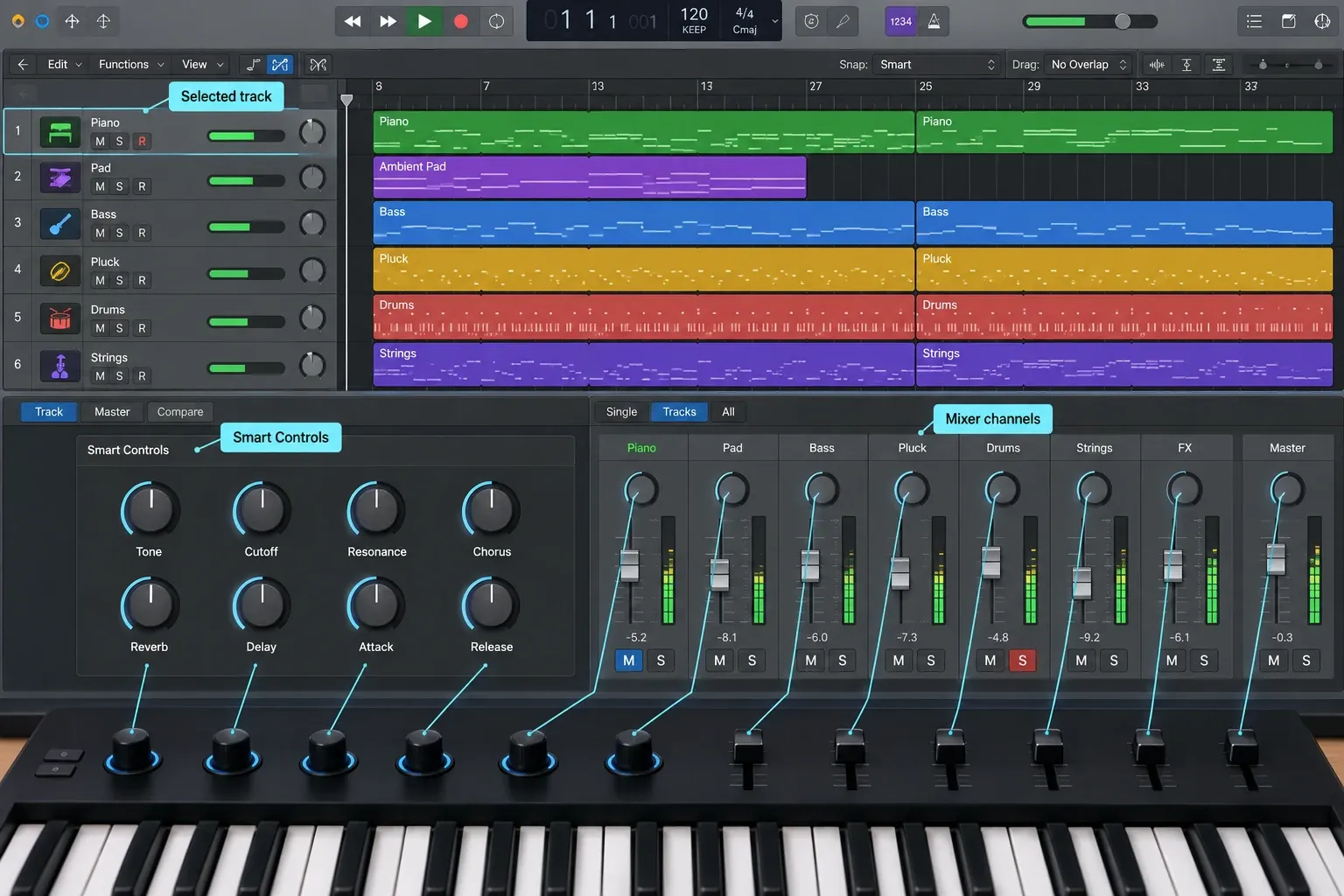
Novation Launchkey 49 MK4: best overall
Choose it if you want one controller to cover software instruments, drums, transport, mixer moves and basic hardware MIDI. Novation's current Launchkey 49 MK4 specifications list 49 semi-weighted keys, 16 velocity-sensitive pads, eight endless encoders, nine faders, a sustain input, USB-C and a 5-pin MIDI output. Scale, Chord and arpeggiator tools work away from the computer screen, and the physical control count is high enough to make Logic's mixer and Smart Controls worth using.
For Logic control, follow Novation’s Launchkey MK4 setup guide. It specifies Logic 10.8.1 or later and a controller script. Quit Logic before installing it. Use the DAW ports for the control-surface connection. For Logic 12, Novation recommends turning off Follow Focused View in the control-surface settings. Apple’s Logic Pro 12.4 release notes list a Follow Focused View fix for Audio FX, MIDI FX and Instruments on control surfaces, but follow Novation’s setting unless its guide changes. This Mac integration is not an iPad script.
The 49-key version is the default because it keeps the full fader layout and offers enough range for two-hand writing without the footprint of a 61- or 88-key board. The 25- and 37-key models make sense when desk width is tight. The 61- or 88-key versions make sense when performance range matters more than portability.
Skip it if you need hammer action, motorized fader recall or a controller built mainly around Kontakt browsing. Its faders are useful for control, but they won't move to show saved Logic levels.
Akai MPK Mini IV: best compact controller
Choose it if the controller needs to fit in a backpack or share a small desk with an audio interface. The current MPK Mini IV has 25 velocity-sensitive mini keys, eight velocity- and pressure-sensitive pads, eight assignable encoders, a color screen, physical pitch and modulation wheels, transport buttons, USB-C, a sustain input and a full-size 5-pin MIDI output. Those wheels and the MIDI output are real upgrades if you've only ever seen older MPK Mini recommendations.
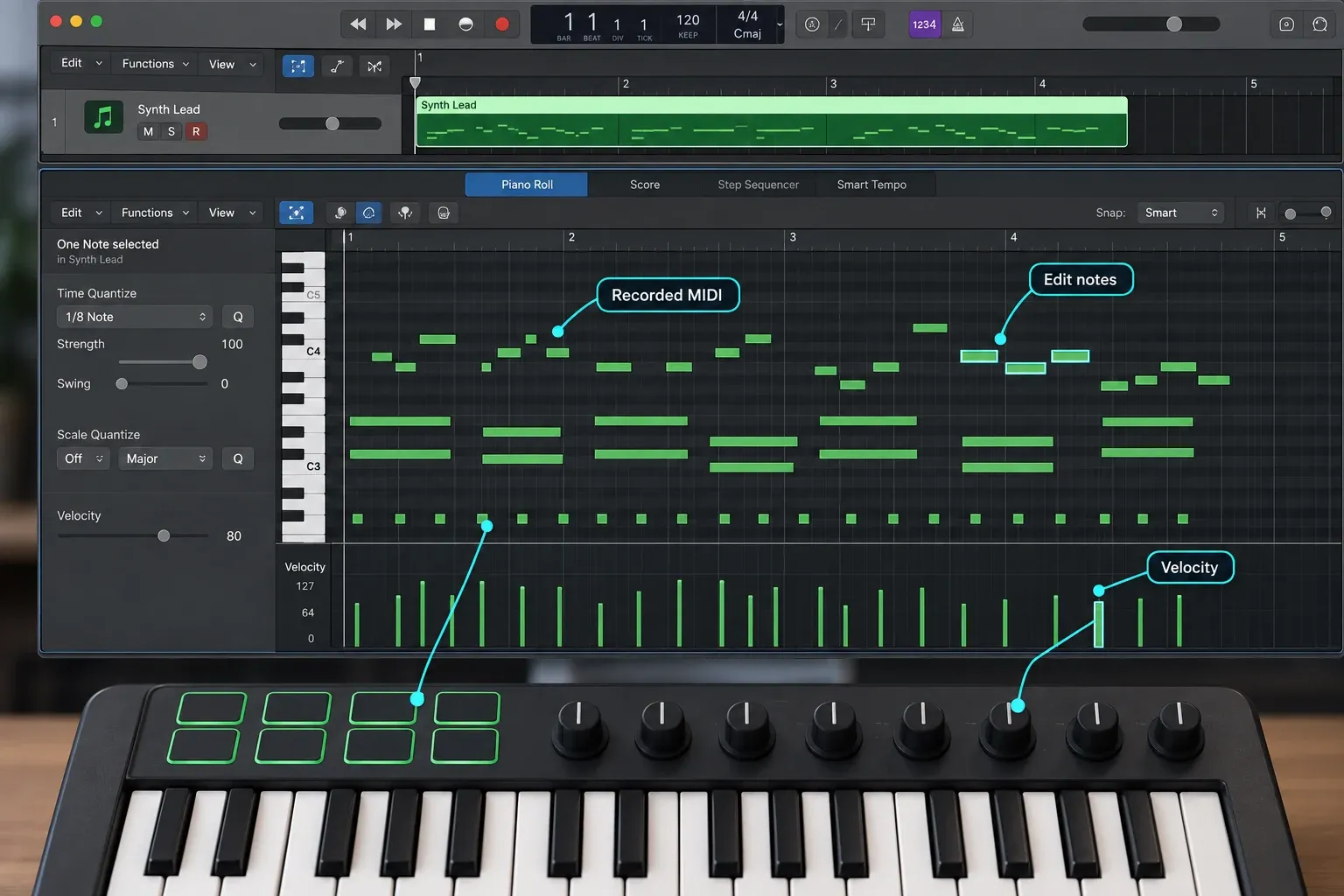
Akai’s Logic setup guide specifies firmware v01.31 or later, its Logic script and DAW mode, in which the Plugin/DAW button is red. Its compatibility FAQ lists Logic 10.7 or later for mapping. Use the MPK Mini IV DAW Port for control-surface input and output; the MIDI Port carries performance notes. Hearing a software instrument play does not prove that transport and display feedback are mapped correctly.
The limits are physical. Twenty-five mini keys are practical for drum programming, bass lines, one-hand melodies and travel sketches. They're a poor substitute for a main keyboard once you're voicing chords with both hands. There are no faders either, so this isn't the compact choice for anyone who wants to ride several Logic channels.
Once the notes are recorded, use the Logic Pro Piano Roll workflow for timing and articulation rather than expecting a small controller to replace detailed editing.
Nektar Impact LX49 mk3: best full-size control layout
Choose it if you want full-size keys plus many dedicated Logic controls and do not need 5-pin MIDI output. Nektar's current Impact LX mk3 family includes 25-, 49-, 61- and 88-key models; the specifications below are for the LX49 mk3. The 49-key model uses synth-action keys and includes one large encoder, eight regular encoders, eight faders, eight velocity-sensitive pads, transport and navigation buttons, a footswitch input and USB-C power.
Nektar lists custom integration for Logic Pro 10.8 or later. Its documented Logic-facing functions include mixer banking, pan and sends, Smart Controls or instrument macros, track navigation and control of the selected parameter. Its eight faders give you separate physical controls for a bank of channels; the large encoder provides another way to adjust the selected parameter. You still need to learn the active control mode. Before using it with Logic 12, check Nektar’s focused-view and bus/output notes. Those settings can affect which channel responds.
The missing 5-pin MIDI output is the decision point. If the controller will drive a hardware synth without the Mac in the middle, choose Launchkey 49, KeyLab 49 or another model with DIN MIDI. If the controller stays connected to Logic and software instruments, the LX49 mk3 is the more relevant Nektar comparison than the older LX49+.
Arturia KeyLab 49 mk3: best for Arturia instruments
Choose it if Analog Lab or V Collection is already central to your Logic sessions. Arturia's current KeyLab 49 mk3 pairs 49 semi-weighted velocity-sensitive keys with aftertouch, 12 velocity- and pressure-sensitive pads, nine touch-sensitive encoders, nine 50 mm faders and a 3.5-inch color screen. It also has USB-C, 5-pin MIDI output and a configurable pedal input.
The reason to pay for this layout is the combination of DAW control and Arturia instrument control. Arturia documents preset browsing and mapped parameters for its instruments. Its current Logic Pro integration guide sets Logic Pro 10.7.4 as the minimum for the external script and explains the DAW-port setup. Current Logic Pro 12 clears that floor. Install the script for Arturia’s intended Logic mapping rather than assuming basic MIDI input includes that control layer. Arturia also warns that its Logic and MainStage scripts can’t be installed together, so check this before setting up a Mac used for both.
Skip it if you don't use Arturia instruments and only need basic keys, pads and transport. Launchkey or Nektar cover more of that general job with less of the purchase tied to one software library. Choose KeyLab when the color screen, aftertouch, touch-sensitive controls and Analog Lab browsing earn their keep every week.
Native Instruments Kontrol S49 MK3: best for Kontakt and NKS
Choose it if Kontakt libraries and NKS-compatible instruments are the center of the rig. Native Instruments lists a 49-key semi-weighted Fatar keybed with polyphonic aftertouch, a 1280 by 480 color screen, Light Guide, eight touch-sensitive encoders, USB-C power, MIDI input and output and four assignable pedal inputs on the current Kontrol S49 MK3 product page.
Polyphonic aftertouch sends pressure separately for individual held notes. That only pays off when the instrument and patch respond to it. The screen, Light Guide and mapped browsing earn their cost when Kontakt or NKS presents articulations, key switches and parameters on the hardware. A producer who mostly plays Logic's stock instruments may use only a fraction of that layer. NKS support alone is not exclusive to Kontrol: current Launchkey, Impact LX mk3 and KeyLab mk3 models also offer NKS workflows. The S49’s particular appeal is the combination of polyphonic key aftertouch, Light Guide and direct Kontakt integration.
Native Instruments’ current DAW integration requirements list Logic Pro 11 or later for the advanced Kontrol S-Series integration. Logic Pro 12 clears that requirement. On an older Logic installation, confirm the exact macOS, Komplete Kontrol software and firmware combination before buying. Basic MIDI note input doesn’t guarantee the screen, transport and mapped controls will provide the intended integration.
Arturia KeyLab 88 mk3: best for piano action
Choose it if you need full piano range and hammer action. The current KeyLab 88 mk3 uses an 88-note fully weighted Fatar TP/110 hammer-action keybed with aftertouch. It keeps the 3.5-inch screen, 12 pads, nine encoders, nine faders, DAW commands, MIDI input/output and four pedal connections.
The size is part of the purchase. Arturia lists it at 1295 mm wide and 15.7 kg, or 50.98 inches and 34.61 pounds. Measure the stand and the path into the room before ordering. A sliding computer-keyboard tray is rarely a suitable support for a controller in this class.
Don't buy 88 keys just to avoid octave buttons if your normal parts fit inside two or three octaves. A smaller board leaves room for an audio interface, typing keyboard and mouse. Buy this model when piano technique, wide scoring parts or a full-range performance setup will use the mechanism.
Novation Launchpad X: best for Live Loops
Choose it if cells and scenes are the instrument. Launchpad X is a grid controller rather than a MIDI keyboard. Novation's current Launchpad X page lists 64 velocity-sensitive RGB pads and explicit Logic Pro Live Loops support. Its original four Custom Modes expand to eight after the current 2.0 firmware update. The physical 8 by 8 grid mirrors the part of Logic you are performing more clearly than a row of keyboard pads can.
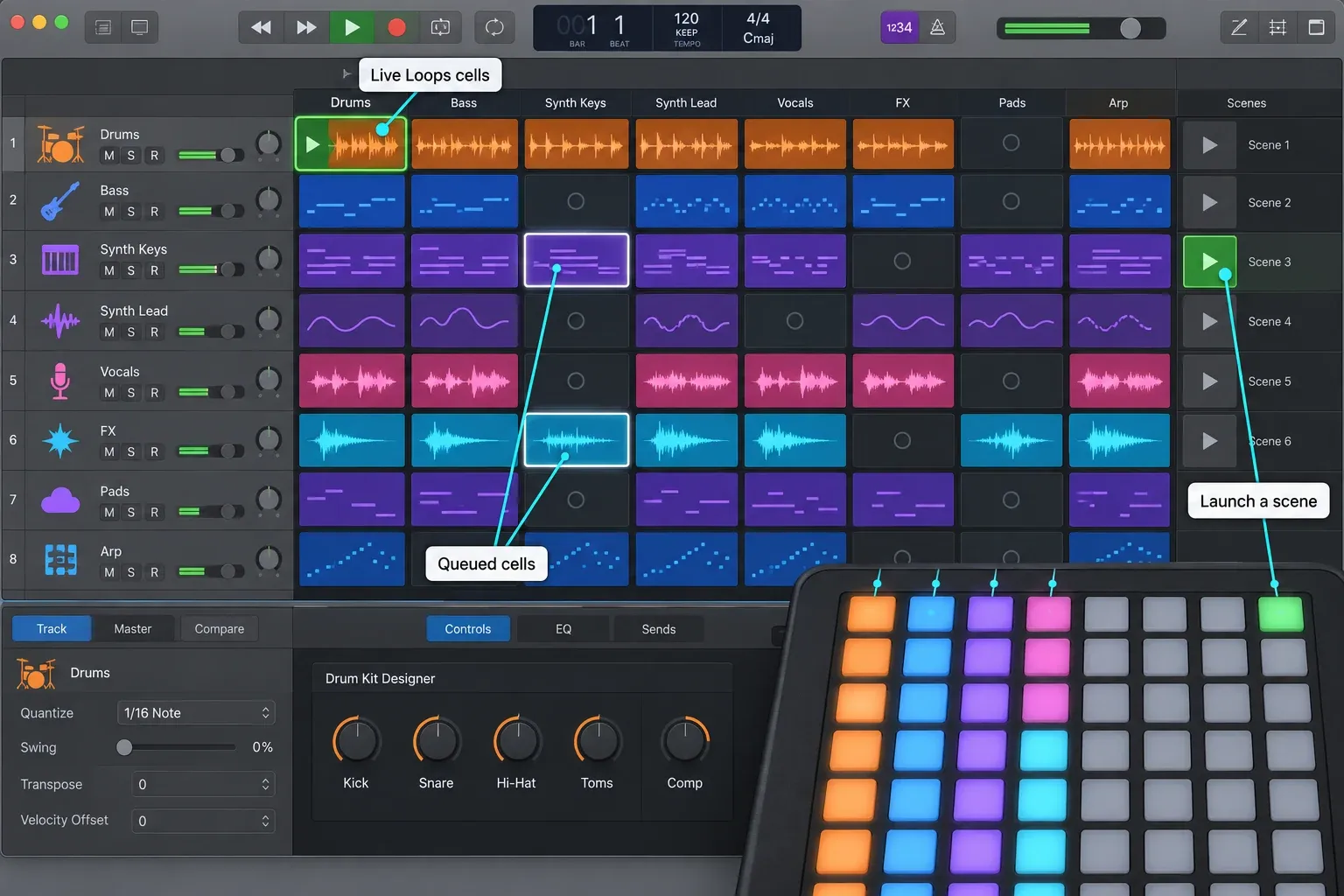
Novation also maintains a Logic Pro Live Loops guide. This is the right controller when scene launches, cell triggering and pad performance come first. It's the wrong single purchase when you need pitch and modulation wheels, two-hand keyboard parts or channel faders.
For beat programming without a grid performance, a keyboard with pads may be simpler. The Logic Pro beat-making guide separates Drum Machine Designer, Step Sequencer and live pad recording so the hardware follows the method rather than choosing it for you.
MIDI keyboard or motorized control surface?
A keyboard controller can send fader movements to Logic, but most keyboard faders aren't motorized. Open a saved project or bank to another set of tracks and the physical position may no longer match the software value. Where the controller and assignment support them, pickup or relative modes can reduce value jumps. They don't create moving-fader recall.
Buy a keyboard controller for playing instruments, recording MIDI, shaping Smart Controls and programming drums. For multi-channel volume automation and physical feedback of saved levels, compare motorized control surfaces for Logic Pro instead. Nine non-motorized keyboard faders can still be useful, but they will not move to recall a mix.
Compatibility checklist before you buy
- Confirm the exact model and generation. Launchkey MK4, MPK Mini IV, Impact LX mk3 and KeyLab mk3 are not interchangeable with earlier products that share most of the name.
- Read the current Logic support page. A generic “works with Mac” badge proves less than a maintained controller script and setup guide.
- Check the ports on your Mac. USB-C on the controller does not guarantee that the supplied cable matches the Mac or hub you plan to use.
- List the pedal and hardware connections you need. Sustain, expression, MIDI input and 5-pin MIDI output differ across models and sizes.
- Measure the desk or stand. Leave space for the Mac keyboard, mouse, interface cables and comfortable wrist position.
- Check your instrument library. NKS, Kontakt and Analog Lab integration are valuable only when those instruments appear in real projects.
- Try the key action or confirm the return window. Published action types cannot tell you whether the spring tension, key width or return speed will suit your hands.
- Allow time for setup. Check compatibility before installing firmware or vendor scripts, then verify transport, knobs, faders and pads before creating custom assignments. Back up Logic and your projects before an app update, as Apple recommends.
Test basic MIDI notes before troubleshooting the DAW-control layer. Create a software-instrument track, play across the whole keybed, check velocity and sustain, then test transport and Smart Controls. The Logic Pro MIDI recording guide covers the recording path. If notes fail or hang, use the MIDI keyboard troubleshooting checks before remapping every control.
This ranking is for Logic Pro for Mac. Many class-compliant controllers can send MIDI to an iPad, but power, hub, cable and app-level control differ. Check the manufacturer for the exact model and use the separate Logic Pro for iPad guide for the platform decision.
USB-C MIDI controllers: cables, adapters and power
Every pick in this guide has a USB-C socket, so the socket doesn’t tell you whether you need an adapter. The cable does. Apple’s guide to adapters for Thunderbolt and USB-C ports puts the rule at the computer end: check the plug on the end of the cable that goes into your Mac. A USB-C plug connects to a Thunderbolt or USB-C port without an adapter. A USB-A plug needs a USB-C to USB-A adapter to reach the same port.
| Controller | Socket on the controller | Cable in the box | Power |
|---|---|---|---|
| Novation Launchkey 49 MK4 | USB-C | USB-C to USB-A | USB bus power; no power supply included |
| Akai MPK Mini IV | USB-C | USB-C to USB-C | A USB 3.0 port on the computer or a USB-C wall adapter |
| Nektar Impact LX49 mk3 | USB-C | Not named on Nektar’s product page | Over the USB-C connection |
| Arturia KeyLab 49 mk3 | USB-C | USB-C to USB-A | USB bus power |
| Native Instruments Kontrol S49 MK3 | USB-C host socket, plus a flat USB-C socket for power only | USB-C, for a USB-C port on the computer | From a USB-C port; from a USB-A port, add a 5 V USB-C supply rated 7.5 W and 1.5 A or higher |
| Arturia KeyLab 88 mk3 | USB-C | USB-C to USB-A | USB bus power |
| Novation Launchpad X | USB-C | USB-C to USB-A | USB bus power |
Four picks ship with a USB-C to USB-A cable: the Launchkey 49 MK4, both KeyLab mk3 models and the Launchpad X. A Mac with a USB-A port takes that cable as it is. On a Mac with only Thunderbolt or USB-C ports, keep the supplied cable and add an adapter such as the Apple USB-C to USB Adapter. Apple says the adapter needs no power to operate, though a device plugged into it might draw power from your Mac. A bus-powered controller does exactly that. For Novation hardware, the company’s support article on USB cables lists a USB-C to USB-C cable, sold separately, for computers with only type-C ports, and recommends Apple’s adapter on a Mac. The same article recommends the shortest cable you can use, nothing longer than two meters, and advises against USB extension cables.
Akai supplies a USB-C to USB-C cable with the MPK Mini IV, so it plugs straight into a Thunderbolt or USB-C port. Akai’s MPK Mini IV FAQ says it can be powered from a USB 3.0 port on the computer or a USB-C wall adapter. The same cable connects it to a USB-C iPad or phone for basic note triggering in third-party apps, but the software bundled with the controller doesn’t run on iOS or iPadOS.
The Kontrol S49 MK3 has two USB-C sockets. Native Instruments’ Kontrol S MK3 setup instructions run the included USB-C cable from the HOST socket to a USB-C port on the computer. Through a USB-C hub, the hub port has to transfer both power and data. A computer with only USB-A ports needs two items that aren’t in the box: a USB-C female to USB-A male adapter or cable, and a USB-C power supply rated 5 V, 7.5 W or higher and 1.5 A or higher, which goes into the flat, power-only socket.
An older controller with a USB-B socket, such as the MPK Mini MK3, which Akai’s comparison lists with USB-B, follows the same rule: the plug at the Mac end decides whether you need an adapter. Novation names a USB-B to USB-C cable, not supplied, for its older USB-B products on computers with only type-C ports.
If a bus-powered controller doesn’t appear in Logic or keeps dropping out, plug it straight into a port on the Mac with the shortest cable you have before you suspect the controller. Novation recommends a direct connection where possible and a mains-powered hub when you need one. Then run the basic MIDI note test above.
Frequently asked questions
What is the best MIDI controller for Logic Pro?
The Novation Launchkey 49 MK4 is the best all-round default in this guide because it combines 49 semi-weighted keys, 16 pads, eight encoders, nine faders, 5-pin MIDI output and a maintained Logic setup path. Choose another pick when portability, Kontakt/NKS, Arturia instruments, hammer action or Live Loops is the main job.
Will any MIDI controller work with Logic Pro?
Most class-compliant USB MIDI controllers can send notes and velocity to Logic Pro. Automatic transport, mixer, Smart Control and display mapping varies. Look for current vendor Logic documentation or use Logic's Controller Assignments for manual mapping.
Should I buy 25, 49, 61 or 88 keys?
Choose 25 or 37 keys for travel and short parts, 49 keys as the normal home-studio balance, 61 keys for wider two-hand playing, and 88 keys when full range or piano technique is a real requirement. Check key action separately because 88 keys does not automatically mean hammer action.
Is Launchkey MK4 or KeyLab mk3 better for Logic Pro?
Launchkey MK4 is the simpler all-round choice for Logic control, pads, chord tools and several size options. KeyLab mk3 is the stronger fit when its aftertouch keybed, color screen, touch-sensitive controls and direct Arturia instrument browsing will be used often. Both have vendor-supported Logic integration.
Do I need a control surface instead of a MIDI keyboard?
Buy a MIDI keyboard when playing and recording instruments is central. Buy a motorized control surface when multi-channel mix automation and stored fader recall are central. Non-motorized faders on a keyboard are useful for control but do not move to show the saved Logic mix.
Is Launchpad X useful with Logic Pro?
Yes, when you use Live Loops. Its 8 by 8 velocity-sensitive pad grid can trigger cells and scenes, and Novation publishes Logic-specific guidance. It has no piano keys or faders, so many studios pair it with a keyboard rather than use it as the only controller.
Choose the controller that removes a real limit
Start with the constraint you can name. Use Launchkey 49 MK4 when one device must cover most writing jobs. Use MPK Mini IV when space is the constraint. Use Nektar when physical control of Logic matters more than DIN MIDI. Use KeyLab or Kontrol when a software library shapes the session. Use KeyLab 88 when piano action is non-negotiable. Use Launchpad X when the grid is the performance.
After the hardware choice, the Create hub connects the controller to MIDI recording, Piano Roll editing, Drum Machine Designer, Step Sequencer, Drummer, Apple Loops and arrangement. Buy for the job you'll repeat next. A long list of controls is a poor reason on its own.


