Panorama CS12 for Logic Pro: Setup, Mapping and Review
Set up Panorama CS12 in Logic Pro, learn its fader, plug-in and automation workflow, and decide whether ControlCore fits your studio.

Panorama CS12 is built for the Logic Pro user who wants one selected channel to behave like a physical channel strip. The 100 mm motorized fader follows the active track, 12 illuminated pots control plug-ins, and dedicated buttons reach sends, automation, transport and insert slots. It's better at writing rides and working one channel at a time than at controlling eight motorized parameters simultaneously.
The buying verdict draws on Nektar’s current documentation, its April 2026 software update, the Sound On Sound review from July 2024 and dated owner reports.
Quick verdict: is Panorama CS12 worth it for Logic Pro?
| Buy it if | Skip it if |
|---|---|
| You write volume or plug-in automation with a long touch-sensitive fader. | You want several motorized plug-in controls moving at the same time. |
| You work mainly on one selected channel and want deep insert control. | You need a controller that works without companion software. |
| You prefer pre-mapped Logic and third-party plug-ins. | You will not grant macOS Input Monitoring or maintain ControlCore. |
| You want transport, markers, sends and plug-ins in one compact surface. | Logic Remote and a mouse already feel faster for your sessions. |
CS12 belongs in the Logic Pro control-surface category, not the keyboard-controller category. If you need keys and pads as well, start with our MIDI controller guide.
What changed with ControlCore 1.2 in 2026
Launch reviews focused heavily on mixing and insert effects. Nektar's April 2026 ControlCore 1.2 update added Logic Pro instrument control and premapped Logic's stock instruments. So older claims that CS12 can't control instruments are incomplete today.
Nektar’s current CS12 specification lists Logic Pro 10.7.8 or later and macOS 11.5 or later. Those are integration requirements. Later Logic releases have their own. Check the macOS version required by your installed Logic and the current ControlCore installer before updating. USB class compliance covers the connection, but the intended DAW integration still requires ControlCore and Nektar’s control-surface component.
| Hardware or workflow | Current specification |
|---|---|
| Main fader | 100 mm ALPS motorized fader with touch sensing, up to 14-bit control |
| Plug-in controls | 12 illuminated rotary controls plus four buttons |
| Display | 3.5-inch TFT color display |
| Logic plug-in depth | Up to 256 parameters per plug-in |
| Size and weight | 39 x 18.5 x 6.5 cm; 0.49 kg |
| Power | USB, minimum 500 mA; high-power port recommended |
How to set up Panorama CS12 in Logic Pro 12
Register CS12 in your Nektar account and download its current support package. Close Logic before installing. Use the current Logic-specific CS12 manual instead of a launch-era setup video, and follow the package’s firmware-update instructions if an update is required.
- Download the newest Panorama CS12 support package from your Nektar account.
- Run the ControlCore installer with Nektar Mapfiles, Nektar ControlCore and Nektar Apple Control selected.
- Connect CS12 by USB and power it on. Use a port supplying at least 500 mA.
- In System Settings > Privacy & Security > Input Monitoring, enable ControlCore. Nektar’s connection guide also specifies Logic Pro and Nektarine when installed.
- Restart the Mac after installing the components and granting the required permissions.
- Open a Logic project and accept the Panorama CS12 Auto Assign prompt. Confirm its icon appears in Control Surfaces > Setup.
- Open Logic Pro > Control Surfaces > Settings > MIDI Controllers. Enable Panorama CS12; if already enabled but unresponsive, untick and retick its entry. Leave other controllers unchanged.
- Select a track in a small project and verify the fader follows its level. Test transport and one plug-in control before editing maps.
In Logic Pro 12, the complete feature set is always available. On older releases with an Advanced pane, enable Complete Features there if control-surface commands are hidden. Rebuild Defaults is a later recovery step, rather than a required reset after every successful installation.
Do not apply an old manual-copy workaround to a new installation
Older CS12 instructions involved replacing files in ~/Music/Audio Music Apps/Plug-In Settings. That isn’t a step in the current installation sequence above. Do not overwrite your plug-in settings to follow an old video. If Nektar support gives you a specific migration procedure, copy the existing folder to a dated backup first and keep the original files available for restoration.
Use the selected-channel workflow first
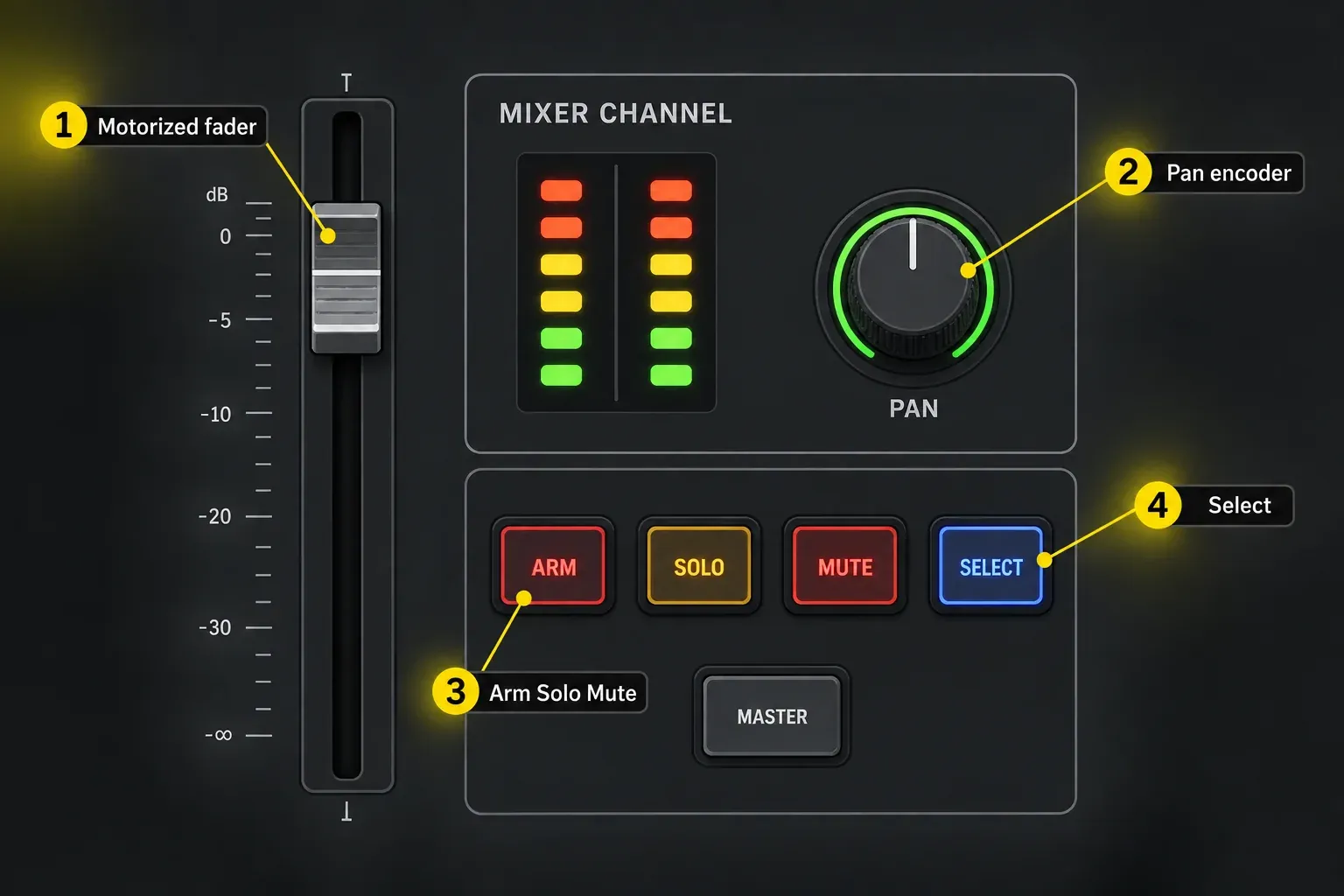
The motorized fader follows the selected mixer channel. Dedicated pan, arm, solo and mute controls stay available, while the six-segment meter gives quick level feedback. The fader can also control master volume or a selected parameter on the current channel.
Press SELECT, click a parameter in Logic, then use the fader or pan control to adjust it. Logic’s Click-and-Control scope stops at the currently selected channel, so you can’t grab a parameter anywhere else in the project. Select the intended channel first.
Hold Auto and turn Data/Menu to choose the current track’s automation mode. Record a short ride, return to Read and replay it before recording a full pass. Our Logic Pro automation workflow explains how the playback and writing modes differ.
Nektar’s product page calls its touch-gated option Auto-touch, while page 21 of the Logic manual labels it Auto-latch. Both descriptions make writing conditional on touching the fader, but the naming differs. Check the mode shown by your installed integration and test the release behavior. Don’t assume it’s ordinary Logic Latch.
Control plug-ins and save your own maps
Eight slot buttons select insert positions and can also bypass a slot or open its window. Parameter names, values and page names appear on the CS12 display. The 12 pots are arranged to match the screen, which reduces the hunt between label and control.
ControlCore 1.2 includes stock Logic instrument maps as well as effects maps. The native Logic integration exposes only the first 256 parameters of a plug-in. Extra map pages don’t extend that range. Nektar documents hosting a large instrument inside Nektarine when you need parameters beyond the native limit.
For one assignment, select the plug-in on CS12, hold Shift, move its on-screen parameter, then move the destination hardware control. For several assignments, enter Learn with Shift + Data/Menu. You no longer need to hold Shift for each pair.
In Learn mode, press the fourth display button, Save. Unsaved changes last only while ControlCore is running. Save before restarting it, then reopen the plug-in and confirm your assignments return.
The fader normally works at 10-bit resolution, and Fine raises it to 14-bit. The 12 pots also offer 14-bit Fine control. Nektar notes that a full rotary sweep may then require nine or ten turns. Use Fine for small adjustments, and turn it off when you need to cross the whole range quickly.
Build one plug-in page around a decision
A useful map follows the way you listen. Put threshold, ratio, attack, release, knee and makeup gain together for a compressor. For an EQ, group frequency, gain and Q by band and keep the colors consistent with the plug-in when possible. A page that mirrors parameter order from the automation list may be technically complete and still be awkward under the fingers.
Before editing a map in Nektarine, save its initial map from Logic. Map the same AU version used in Logic, not its VST or VST3 counterpart. Start from the included layout and change the labels or grouping that slow you down. Save, reopen the plug-in in Logic and test every changed assignment before relying on it in a session.
Sends, transport and navigation are part of the value
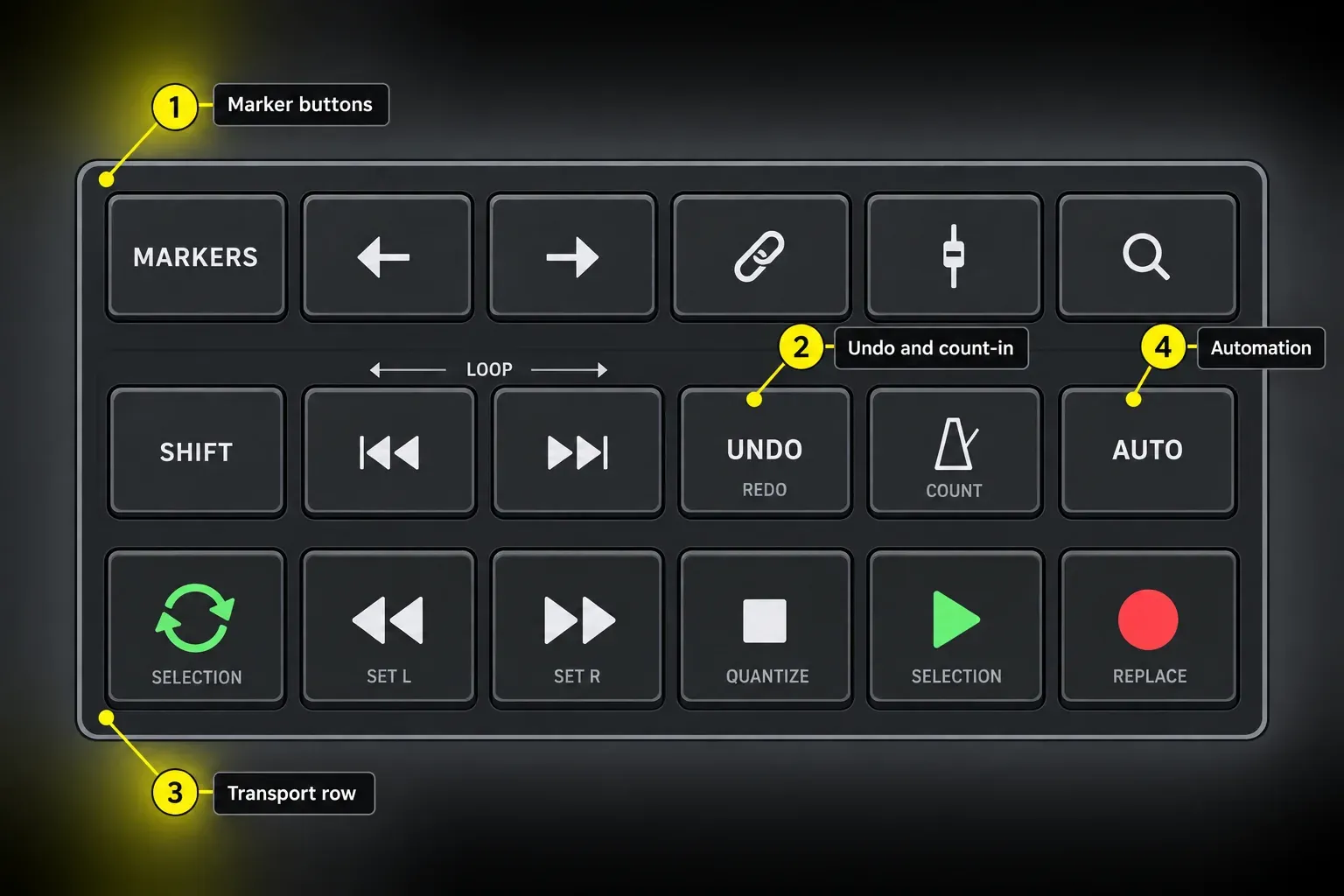
The CS12 is larger than a one-fader box for a reason. The rest of the surface keeps routine Logic navigation off the keyboard. The Sends page controls levels for the selected channel and exposes routing choices such as destination and pre/post position. Transport buttons handle play, stop, record, rewind and forward, and shifted functions reach loop points, count-in, undo and other timeline commands.
The marker buttons can create, delete and select markers, and Nektar says they can be reassigned to Logic commands. Start with a small set of jobs that repeatedly pull your hands away from the controller, such as opening the mixer or toggling automation view. Add more assignments only after the first set earns its place.
The two function encoders can handle horizontal or vertical zoom, playhead movement, nudge, loop movement, clip gain or plug-in preset selection. The preset function reads presets available through Logic’s browser. Save third-party presets in Logic if you want to browse them that way.
Smart Controls and Nektarine solve different problems
Logic Smart Controls are useful for a small musical layer across an instrument and its effects. CS12 can reach them from the Channel menu. User pages can also learn temporary assignments through Logic, but Nektar warns that those assignments live in Logic's control-surface preferences and can disappear if preferences are cleared.
Nektarine can host instruments and effects as well as edit maps. Editing a map for a plug-in loaded directly in Logic is different from running that plug-in inside Nektarine. I’d keep ordinary mapped controls on the native route, because it skips the extra hosting layer. Consider the hosted route for a large instrument whose needed parameters fall outside Logic’s exposed range.
Keep three backups, not one fragile control-surface state
Back up the files for the customization you made: Nektar maps in ~/Documents/Nektar/Nektarine/Mapping Files, Smart Controls in saved Logic patches, and Logic controller assignments before resetting preferences. Nektar’s manual describes Save/Import Custom Assignments in Logic 12.2, so check whether your version offers it. A saved Smart Controls patch isn’t a backup of every User-page controller assignment. Keep any migration backup of Plug-In Settings separately. Before Logic Pro 12.4, rebuilding defaults in the Controller Assignments window could delete assignments that were Pinned to Project. The 12.4 release notes list that as fixed.
Where CS12 helps, and where it adds work
The fader is the reason to buy it
A 100 mm touch-sensitive motorized fader gives a repeatable gesture for level rides and selected parameters. The physical position follows the active channel, and the touch state supports automation. If that gesture isn't central to your work, much of the value proposition disappears.
Pre-mapped plug-ins reduce setup, but ControlCore remains a dependency
Current stock maps and instrument support make CS12 faster to start than a blank generic MIDI surface. The cost is reliance on registration, ControlCore, macOS permissions and update compatibility. This is integrated hardware, and it won’t behave like a standalone MIDI box.
The rotary controls do not motorize
The 12 plug-in pots offer color, labels and high-resolution Fine mode, but they don't physically move when values change. ROTO-CONTROL takes the opposite approach with eight motorized knobs and no long fader. Choose CS12 for channel-strip gestures and ROTO-CONTROL for simultaneous motorized parameter recall. Our ROTO-CONTROL setup and review explains that tradeoff in detail.
Owner reports show both strong integration and occasional recovery work
The dated Sweetwater owner reviews are mixed. A May 24, 2024 Logic account mentions audible fader movement. A December 30, 2024 Logic account describes fader and connection trouble. January 7 and March 20, 2026 Logic reviews are more positive, though the latter still describes a mapping learning curve. Cubase and Reaper reports aren’t evidence of a Logic-specific fault. These individual accounts can’t establish a failure rate or show that an old issue remains in current firmware.
If you record beside an open microphone, test a slow automated move before the take. Nektar documents temporarily disabling the motor with Select + a touch of the fader. Touching it again reactivates it.
On September 7, 2026, Sweetwater listed CS12 at USD 399. Check the current price, tax and return terms in your region before ordering.
If Panorama CS12 is not connecting to Logic Pro
- Open ControlCore Panel in
/Applications/Nektar/ControlCore. Start ControlCore means it is stopped; Stop ControlCore means it is already running. Reinstall the current package if the panel is missing. - Check Input Monitoring for ControlCore, Logic Pro and Nektarine when installed, then restart affected apps. The Nektar recovery guide gives the locations for adding missing entries.
- A green connection icon means CS12 is linked to ControlCore. Check Panorama CS12 is enabled under Logic Pro > Control Surfaces > Settings > MIDI Controllers.
- If you use Karabiner-Elements, disable Modify Events for CS12 only. Other keystroke-interception tools may have an equivalent per-device setting.
- If the device is still stuck, try Control Surfaces > Rebuild Defaults and retest a small project. On older releases with an Advanced pane, check Enable Complete Features if that command is hidden. Logic Pro 12 exposes these features automatically.
Only after those checks, consider Nektar’s preference-file recovery: quit Logic, back up ~/Library/Preferences/com.apple.logic.pro.cs and move that file aside rather than deleting it. Logic will forget its MIDI-learn assignments, but Nektar plug-in maps are separate. Keep the original file so you can restore the previous state with Logic closed.
If Logic detects MIDI but not the integrated surface, our general MIDI controller checks help separate the USB/MIDI connection from ControlCore.
Final verdict
Panorama CS12 is a focused purchase. It's compelling for Logic users who want one physical channel, a real automation fader and fast access to plug-ins, sends and transport. ControlCore 1.2 makes instrument work materially better than it was at launch. The same integration also creates the main risk: when permissions, support files or a Logic update break the link, the hardware loses much of its purpose until the software path is repaired.
Buy it for the fader and selected-channel workflow. If the fader is merely a nice extra, test whether Logic Remote or a smaller controller already solves the actual problem.
Frequently asked questions
Does Panorama CS12 work with Logic Pro 12?
Yes. Nektar lists Logic Pro 10.7.8 or later, including the Logic 12 line. Its macOS 11.5 integration minimum is not the requirement of every Logic version. Check your Logic release and current ControlCore installer, grant the required permissions and enable CS12 in MIDI Controllers.
Can Panorama CS12 control Logic software instruments?
Yes. Nektar says ControlCore 1.2, released in April 2026, added instrument control and premapped Logic's native instruments. Third-party instruments can use included maps, Learn mode, Smart Controls or Nektarine.
Does Panorama CS12 work without ControlCore?
No for the intended deep DAW workflow. The hardware is USB class compliant, but Nektar states that ControlCore is required and the unit does not operate on its own.
How many plug-in parameters can CS12 control in Logic Pro?
The native Logic integration exposes the first 256 parameters per plug-in. More pages do not bypass that ceiling. Nektar documents hosting a large instrument in Nektarine to control parameters beyond the native range; editing an AU map for direct use in Logic still has to respect Logic’s limit.
Is Panorama CS12 better than ROTO-CONTROL?
CS12 is better suited to one motorized fader, channel-strip work and pre-mapped plug-ins. ROTO-CONTROL offers eight motorized knobs for simultaneous parameter recall. The better unit depends on the gesture you repeat most.
Why does Panorama CS12 stop connecting to Logic?
Check ControlCore is running, Input Monitoring is granted and CS12 is enabled in Logic’s MIDI Controllers. If installed, check Karabiner or another event-interception tool. Rebuild Defaults is a later recovery step; preserve assignments before moving preferences. An owner report alone cannot diagnose your Mac.


