ROTO-CONTROL for Logic Pro: Setup, Mapping and Review
Set up ROTO-CONTROL in Logic Pro, understand its motorized knob workflow and decide whether the mapping work and hardware limits fit your studio.

ROTO-CONTROL suits Logic Pro users who want several plug-in or mixer parameters under their fingers at once. Its eight knobs move to the current software values when you change tracks or plug-ins. Their haptics can feel smooth, stepped or centered. The tradeoff is straightforward: plug-in layouts take time to map, there is no motorized fader, and the Logic integration needs the correct ROTO-SETUP installation.
The setup steps and specs follow Melbourne Instruments’ own documentation, and the buying verdict weighs dated reviews and owner reports against the software version each one used.
Quick verdict: who should buy ROTO-CONTROL?
| Buy it if | Skip it if |
|---|---|
| You shape synths, EQs, compressors and sends with several parameters at once. | Your main need is writing rides on one long motorized fader. |
| You want values recalled physically when focus changes. | You refuse to build and maintain third-party plug-in maps. |
| You use Logic Smart Controls and want them on hardware automatically. | A mouse, keyboard and Logic Remote already cover your workflow. |
| You also control external MIDI hardware. | You need MIDI 2.0 or two identical units working together. |
ROTO-CONTROL sits between a conventional MIDI knob box and a full control surface. If you're still deciding which form factor you need, compare our broader guide to the best control surfaces for Logic Pro. Keyboard players should also check the MIDI controller guide, because ROTO-CONTROL has no keys or pads.
What ROTO-CONTROL actually gives Logic Pro
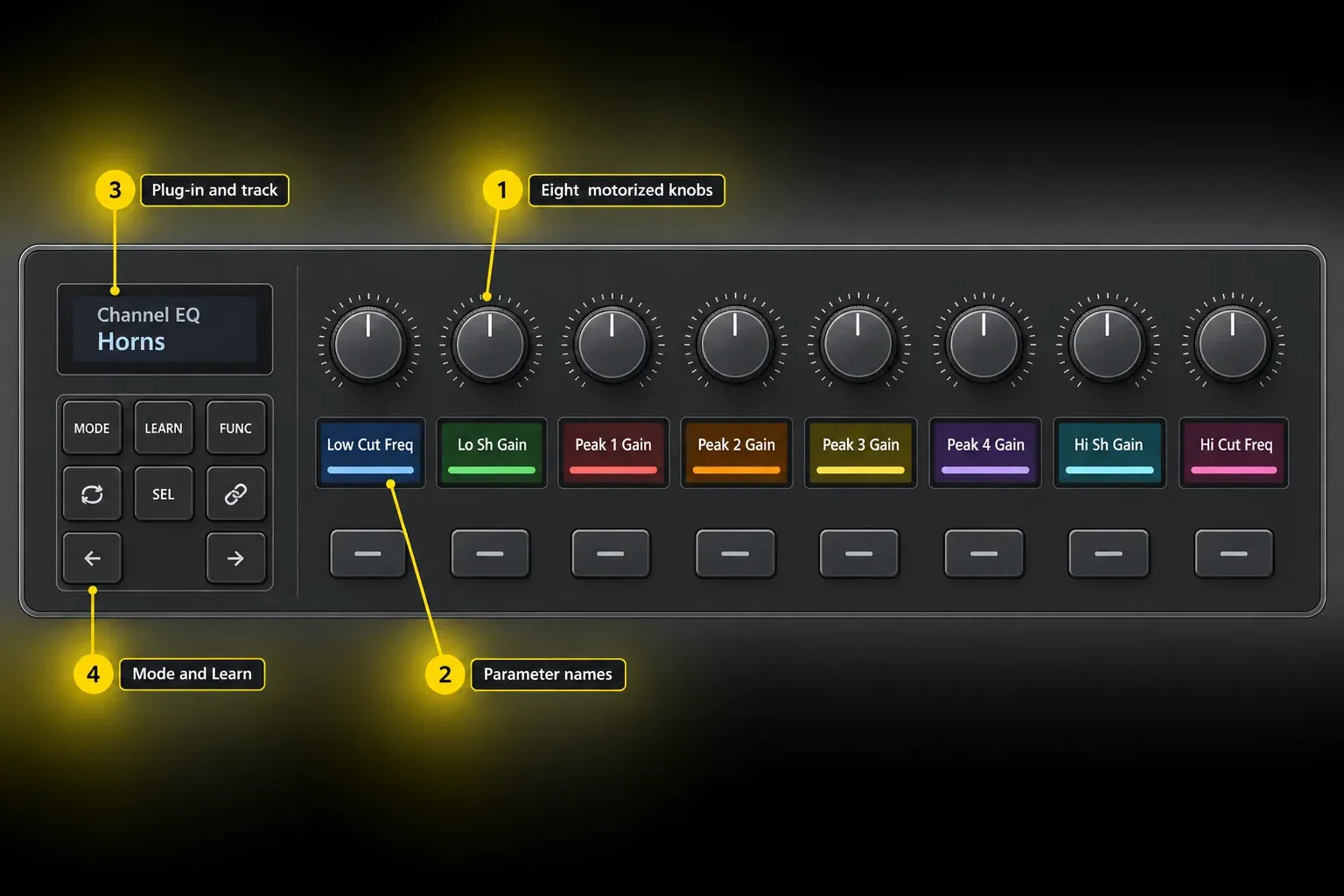
The hardware is built around eight touch-sensitive motorized knobs, nine IPS displays and 16 backlit buttons. When a Logic parameter changes, the relevant knob can move to the current position. You're not left chasing an invisible software value. Haptics add end stops, center indents or discrete steps where the mapped control calls for them.
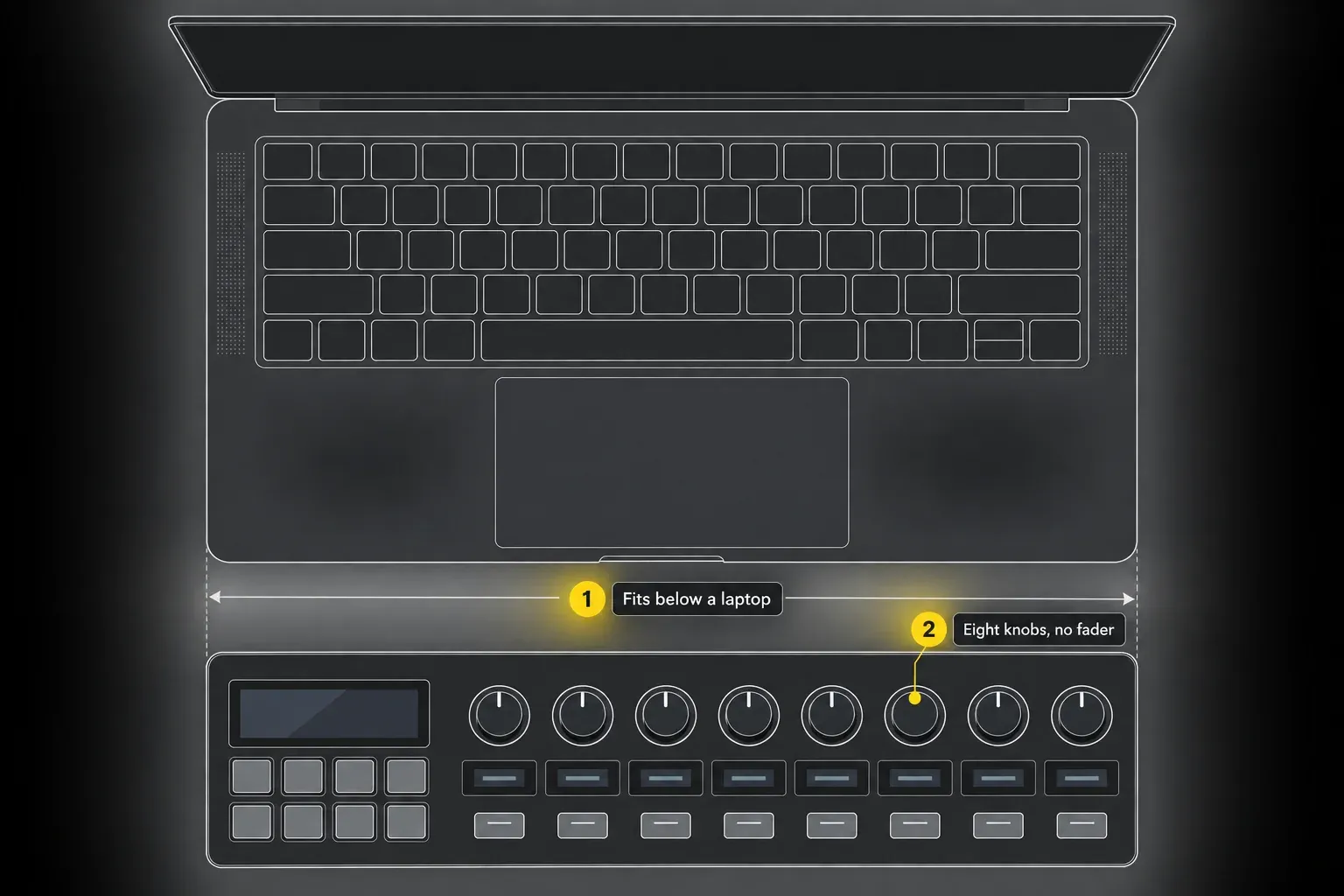
The Melbourne Instruments specifications list a 341 x 112 x 44 mm chassis weighing 715 g, two USB-C ports for data and power, and 5-pin MIDI in, out and thru. MIX and PLUGIN integration requires Logic Pro 10.7 or later. The companion ROTO-SETUP app requires macOS 12 or later; check the separate macOS requirement of your Logic release as well.
The official download page carries the ROTO-SETUP installers for Mac, Windows and Linux, and its newest listed build is ROTO-SETUP 3.2.1 from June 24, 2026. The separate 3.3.0 firmware release notes are dated October 2, 2026. The June updates matter in daily use: displays now show numerical values with units when a value changes. Tap a knob to read its value without changing it; the label returns after a short time. In PLUGIN Mode, the display also shows the value of the button below that knob.
The June release notes also add per-channel VU meters in MIX Mode and selected-track output meters in Track Focus. Their VU peak-hold indication is not the same as the DAW peak indicator used to assess clipping. Keep checking Logic’s meters for clipping. Version 3.2.1 fixes a case where learned controls saved the wrong number of steps; version 3.2.0 fixed missed button presses in some Logic instruments, including Retro Synth.
| Mode | What it controls in Logic Pro | Setup cost |
|---|---|---|
| MIX | Track volume, pan, sends, mute, solo, record arm, input monitoring and track focus | Low after the control surface is installed |
| PLUGIN | Instrument and insert plug-in parameters across up to eight pages | Manual learning for the controls you want |
| SMART | Up to 16 Logic Smart Controls across two pages | Automatic after integration is working |
| MIDI | External hardware or any MIDI-compatible target, plus Motion Recorder | Build or import a MIDI setup |
How to set up ROTO-CONTROL in Logic Pro 12
Use the current ROTO-SETUP download page for the Mac installer. Separate Apple silicon and Intel builds are listed. The February Logic guide below still links to an older 3.0.1 installer. Use that guide for the Logic-specific controls and take the installer from the download page. Before a firmware update, preserve existing controller mappings with EXPORT ALL.
- Connect the controller’s data USB-C port to the Mac and connect the supplied 5 V, 15 W USB-C power adapter.
- If the controller already holds mappings, open your existing ROTO-SETUP installation and use EXPORT ALL before updating firmware. Keep the exported backup.
- Install and open the current ROTO-SETUP build for your Mac. Let the app detect the controller and follow its firmware-update instructions.
- Open Logic Pro and choose Logic Pro > Control Surfaces > Setup. Confirm that Roto-Control appears as a control surface.
- Open Logic Pro > Settings > MIDI > Inputs and enable Roto-Control in the MIDI Inputs list.
- Open Logic Pro > Settings > Control Surfaces > MIDI Controllers and select Melbourne Instruments Roto-Control.
- Before rebuilding defaults, back up any custom Logic control-surface assignments you need to keep. Before Logic Pro 12.4, a rebuild could also delete Pinned to Project assignments; Apple lists that bug as fixed in the 12.4 release notes. On first setup, choose Control Surfaces > Rebuild Defaults. The manufacturer’s Logic Pro getting-started guide explicitly includes this step.
- In Settings > Control Surfaces, set Multiple Controls per Parameter to 1, as the Logic-specific guide recommends.
- In Logic Pro 12, leave Control surface follows focused view unticked. Melbourne Instruments says this option can interfere with PLUGIN Mode.
Before building maps, check that MIX Mode shows your track names and colors. Change the level of a test track and confirm that its knob follows. A missing track list points to integration setup; a single wrong parameter on an otherwise working controller points toward that plug-in’s mapping.
Use MIX Mode before building plug-in maps
Press MODE and choose MIX. If setup is correct, the controller mirrors the tracks, labels, colors and order in Logic's main window. In Logic's Mixer, use the Tracks view when you want the hardware order to follow the main Tracks area rather than a different mixer scope.
The knobs control volume by default, and the buttons start on mute. Hold SEL to switch the knobs among volume, pan and sends, or the buttons among mute, solo, record arm and input monitoring. The vendor documents 14-bit knob control in this mode. That's control-message resolution rather than audio bit depth.
Track Focus is the useful shortcut for one-channel work. Press FUNC to reach volume, pan and the sends on the currently selected track. If your job is a vocal ride rather than simultaneous plug-in shaping, pair the controller with a clear Logic Pro automation workflow, then decide whether missing a long fader bothers you.
For an automation check, use a copy of a project. Choose Touch on the test track, play a short section and move its volume knob. Stop, switch to Read and replay the section to check the recorded movement. Apple’s automation-mode guide explains which modes write data; do not test a writing mode over an irreplaceable automation pass.
Map a plug-in once, then keep the layout stable
PLUGIN Mode opens on the instrument slot of the selected track. To change tracks, press FUNC, then the button below the required track. Hold SEL and press the button below an instrument or insert to select it. The Logic guide documents one instrument plus 15 insert slots across two slot pages. Once a plug-in is selected, the arrow buttons navigate up to eight parameter pages. Slot pages and parameter pages are different lists.
Before learning every control, check the official Melbourne Exchange and its import instructions for a suitable community map. Match the DAW, AU format, mono/stereo variant and listed firmware. For example, the Logic ChromaVerb map is stereo AU and lists firmware 3.2.1. Back up your existing setups with File > Export All, then follow that entry’s PLUGIN-mode and File > Import instructions. Check labels and mapped parameters afterward, because a community file is only a starting layout and may not match every plug-in version or firmware.
- Open the plug-in and press LEARN on ROTO-CONTROL.
- Touch the hardware knob firmly, or press the button you want to assign.
- Move the target control in the plug-in briefly. For a switch or menu, change its value once.
- Wait for the controller to show LEARNED. Stepped controls can take a little longer while the unit reads labels and configures haptics.
- Map the remaining controls, then press LEARN again to exit.
Mapped controls are saved automatically on ROTO-CONTROL; there is no separate Save step for each learned assignment, and ROTO-SETUP does not need to stay open during the session. Switch to another track and back, then reopen a project using the same plug-in format. Check that labels, knob positions and assignments return before relying on the map in a session. The maps travel with the unit to another Mac, but that Mac still needs the compatible ROTO-SETUP integration installed.
To clear a learned plug-in knob in version 3.3.0, hold LEARN, then turn the knob slightly or touch it firmly. Press the button below that knob when it shows CLEAR to confirm, as described in the 3.3.0 release notes. The update also requires a firmer touch in LEARN mode. Then learn the intended parameter. If selecting a plug-in keeps opening its window when you do not want it to, press LOCK (+) to disable that behavior.
Melbourne Instruments specifies storage for up to 64 plug-in mappings, with 128 parameters each. Start with the plug-ins you use regularly rather than trying to map every Audio Unit installed on the Mac.
One more planning detail. Logic can expose mono and stereo versions of the same plug-in as separate devices, and ROTO-CONTROL treats those as separate mappings. Build the version you use in templates first, then duplicate the idea deliberately rather than wondering why a Channel EQ map appears missing on another channel format.
Smart Controls are the fastest path
Logic Smart Controls map automatically, with up to 16 controls across two pages. In PLUGIN Mode, press both arrow keys together to enter the Smart Control view, then press them together again to return. The dedicated SMART Mode reaches the same mapping directly.
This is the lowest-maintenance part of the integration. A carefully designed Smart Control page can expose the musical choices you use across an instrument and its effects without maintaining a deep 128-parameter map. MIDI FX need an extra step: map the MIDI FX parameters to Logic Smart Controls first, then let SMART Mode mirror them.
Use ROTO-SETUP for labels and feel, not basic operation
Once a parameter is learned, ROTO-SETUP can change its label, display color, haptic response, minimum and maximum values, step count and indent behavior. This is where the controller becomes more useful than eight generic encoders. A pan control can have a center detent, a waveform selector can use discrete steps, and a frequency sweep can stay smooth.
MIDI Mode is separate from Logic's integrated MIX, PLUGIN and SMART modes. Use it for external hardware, generic MIDI targets or the controller's Motion Recorder rather than expecting it to mirror the focused Logic plug-in automatically.
Keep labels short enough to read. Within one plug-in, place related controls together: compressor threshold, ratio, attack, release and makeup gain make a useful page. Native PLUGIN mappings belong to that plug-in. For one control that affects several plug-ins, build the macro in Logic Smart Controls and use SMART Mode instead.
What works well, and what takes time
The motorized knobs solve a real recall problem
A conventional encoder can send a value, but it can't show position through touch. ROTO-CONTROL's knobs physically follow the active track or mapped plug-in, while the displays keep labels visible. That combination is the product's clearest advantage. It suits sound design, EQ, compression, sends and instrument macros where several related values matter at once.
Mapping is work, even when recall is good
The current integration doesn't turn every third-party plug-in into a perfect control surface automatically. You choose and learn the parameters, organize pages and sometimes build separate mono and stereo maps. The reward comes later, once the small set of plug-ins you use has a consistent layout.
Eight knobs are not a fader replacement
If you mostly write vocal rides or level automation on one selected track, a long motorized fader may suit your hand better. Nektar Panorama CS12 takes that channel-strip approach. ROTO-CONTROL suits adjusting several related parameters on motorized knobs. Choose the physical controls you'll use. The longer specification list isn't the deciding factor.
There are operational limits worth knowing
- Melbourne Instruments does not currently recommend running two ROTO-CONTROL units together because MIX and PLUGIN modes can conflict.
- The controller does not currently use MIDI 2.0.
- The vendor says a small amount of motor noise may be audible in a very quiet room.
- Touch sensitivity can depend on using the supplied USB-C power supply rather than bus power alone.
- Thomann’s German listing for the standard ROTO-CONTROL lists EUR 425 including VAT; the Bitwig Edition is a separate listing at EUR 499. Check tax, delivery and return terms for your location.
The January 15, 2026 Why Logic Pro Rules review reports continued use after a month. Its disclosure says the publisher received compensation and a review unit. That makes it a useful account of the workflow. It isn't an independent reliability test.
A February 9, 2026 review by TinySoup on the Thomann product page describes using Logic for recording, levels, sends and learned marker jumps. Thomann says it accepts reviews only from customers who bought the equipment there. This remains one owner’s account, not a promise about every setup.
The MusicRadar review from April 19, 2025 reported little success with Logic. It tested the earlier, Ableton-focused software. Do not use that result to judge the current dedicated Logic integration.
If ROTO-CONTROL is not working in Logic Pro
- Confirm the current ROTO-SETUP build and firmware are installed. Export existing mappings before a firmware update.
- Confirm the device is enabled under Settings > MIDI > Inputs and selected under Settings > Control Surfaces > MIDI Controllers.
- Back up any custom Logic control-surface assignments you need to keep before running Control Surfaces > Rebuild Defaults, then restart Logic and the controller. Before Logic Pro 12.4, a rebuild could delete assignments pinned to the project; the 12.4 release notes list that as fixed.
- On Logic Pro 12, untick Control surface follows focused view.
- Set Multiple Controls per Parameter to 1.
- Test MIX Mode in a small project before diagnosing one plug-in.
- If touch sensing is erratic, connect the included 5 V, 15 W power adapter. If it remains unreliable, contact Melbourne Instruments support.
If Logic can't see any MIDI from the unit, work through the same device and input checks in our guide to using a MIDI controller in Logic Pro. That keeps a general MIDI routing problem separate from ROTO-CONTROL's deeper control-surface integration.
Final verdict
ROTO-CONTROL makes sense when you want eight physical knobs to follow your mix or plug-in. MIX Mode handles routine channel work, Smart Controls provide automatic assignments, and PLUGIN Mode lets you arrange the controls you need. The cost is time spent learning and maintaining those maps. With a large plug-in collection, a fader-first mixing style or little patience for configuration, you may still prefer the mouse.
I'd start with one mix template and a few frequently used plug-ins, since mapping takes time and a small trial shows quickly whether it's worth it. Check that switching tracks, recalling maps and adjusting the controls feels useful in that small project. Expand only after the layout works for you; adding more maps will not fix an awkward choice of hardware.
Frequently asked questions
Does ROTO-CONTROL work with Logic Pro 12?
Yes. Melbourne Instruments lists Logic Pro 10.7 or later for MIX and PLUGIN integration, and macOS 12 or later for the ROTO-SETUP app. Your Logic release may require a newer macOS. Install the matching Mac build. In Logic Pro 12, leave Control surface follows focused view unticked, as the vendor recommends for PLUGIN Mode.
Does ROTO-CONTROL map every Logic Pro plug-in automatically?
No. Logic Smart Controls map automatically, but individual plug-in parameters need learning. Learned mappings are saved automatically on the controller and recalled in other projects. To use them on another Mac, install the compatible ROTO-SETUP integration there as well.
How many plug-in mappings can ROTO-CONTROL store?
Melbourne Instruments currently specifies up to 64 plug-ins with 128 parameters each. A plug-in can use up to eight parameter pages. Logic's mono and stereo versions of the same plug-in are treated as separate mappings.
Can ROTO-CONTROL control Logic Pro volume, pan and sends?
Yes. MIX Mode follows Logic track names, colors and order and can control volume, pan and sends, plus mute, solo, record arm and input monitoring. Track Focus exposes volume, pan and sends for the selected track.
Does ROTO-CONTROL need its power supply?
Use the supplied 5 V, 15 W USB-C power adapter for the documented setup. Melbourne Instruments specifically recommends connecting it when touch sensitivity is unreliable, which removes power delivery as an early troubleshooting variable.
Is ROTO-CONTROL better than Nektar Panorama CS12 for Logic Pro?
They solve different physical-control problems. ROTO-CONTROL offers eight motorized knobs for simultaneous parameters, while Panorama CS12 centers its workflow on one long motorized fader and a selected channel strip. Choose by the gestures you repeat most.


