Linear Phase EQ in Logic Pro: When to Use It
Choose Linear Phase EQ only when phase coherence wins the A/B. Compare transient onset, pre-ringing, latency and parallel or multi-mic behavior.

Use Linear Phase EQ in Logic Pro when an EQ move changes the blend between related signals, such as two microphones or a dry track and its filtered parallel path. Start with Channel EQ for ordinary tone shaping. Linear Phase EQ preserves phase relationships, but adds latency and can soften the start of a sharp transient.
The useful comparison is the same curve at similar loudness, with every related path playing. A clearer-looking analyzer or a more technical plug-in name cannot choose the better sound for you. This guide covers Logic Pro for Mac.
Linear Phase EQ vs Channel EQ
Both have eight bands: high-pass and low-pass filters, two shelves and four parametric bands, plus an analyzer. Apple’s Channel EQ overview confirms that replacing either EQ with the other in the same insert slot transfers its settings.
| Decision | Channel EQ | Linear Phase EQ |
|---|---|---|
| Most track and bus EQ | Start here | Use only for a demonstrated phase problem |
| Phase response | Frequency-dependent phase shift | Preserves phase coherence |
| Transient onset | Often natural and immediate | Can be affected by steep or strong narrow moves |
| Latency | Lower workflow cost | Greater latency |
| Typical candidate | Vocals, guitars, drums, buses | Phase-related multi-mic, parallel or mastering work |
Channel EQ changes phase around its filters. That isn’t automatically a fault. Apple’s Linear Phase EQ overview notes that the audible effect can be desirable. Linear Phase EQ avoids those frequency-dependent phase changes, not all delay or all changes to the waveform.
Insert it and check the controls
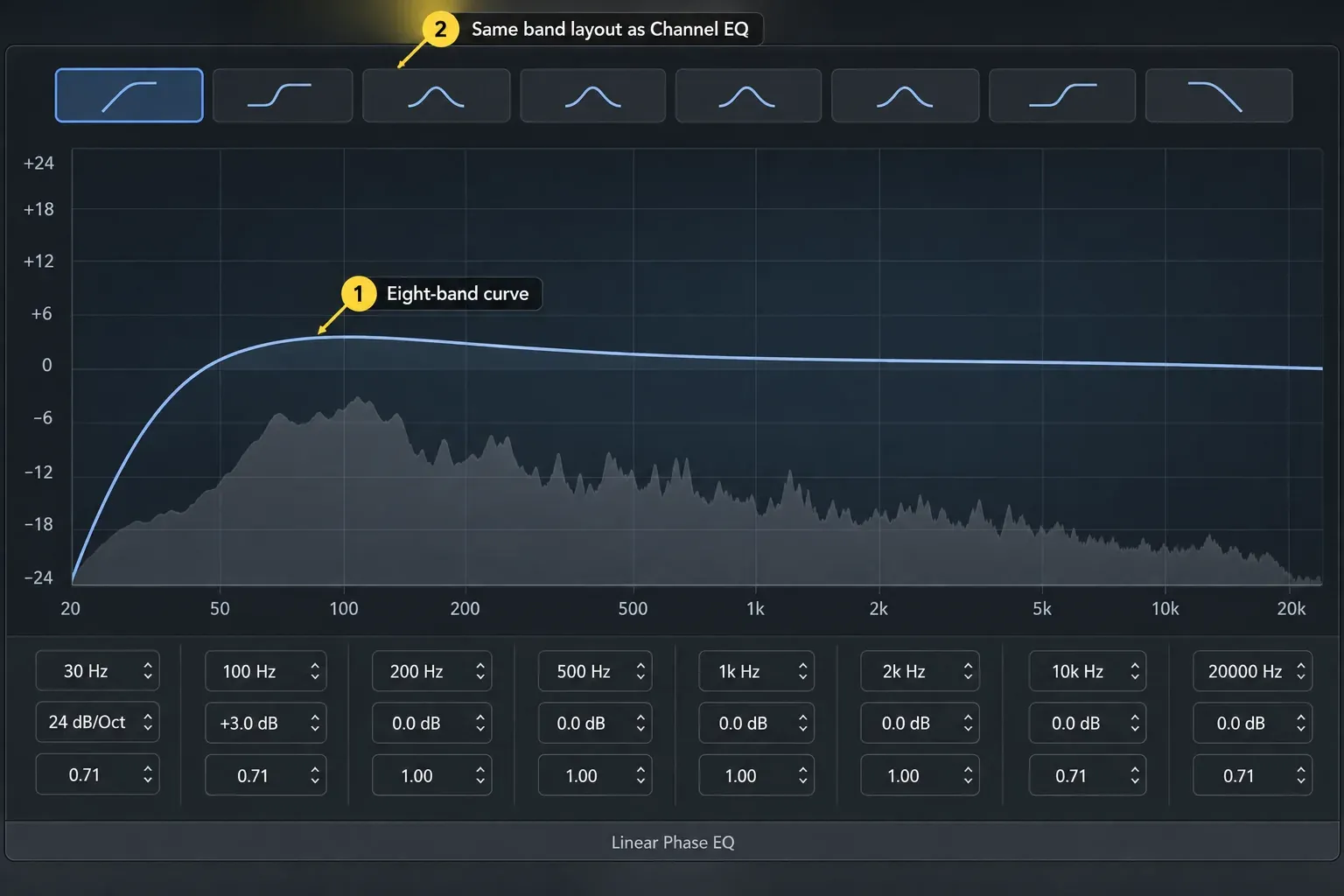
In a channel strip’s Audio Effect slot, choose EQ > Linear Phase EQ. Start with a flat response and enable only the bands you need. For a comparison with an existing Channel EQ curve, replace that insert rather than adding a second EQ in series.
Frequency sets the center or cutoff; Gain sets a band’s boost or cut. For the high-pass and low-pass bands, Gain/Slope controls the slope instead. Q controls bandwidth or resonance. Use Master Gain to adjust the overall output after changing the curve. Apple’s parameter reference explains each control.
A high-pass or low-pass filter can still remove frequencies when the other bands are at 0 dB. Switch off an unwanted filter rather than assuming the graph is neutral. Turning bands off avoids unintended filtering. Apple says Linear Phase EQ’s CPU allocation remains fixed regardless of the number of active bands, so it won’t lower the CPU load. The Analyzer is the part you control: Apple says it uses extra processing power while the EQ window is visible, and high Analyzer resolutions need significantly more, so switch it off once you’ve read the curve.
The two EQ images on this page use different curves and band values, so they’re no guide to phase mode or a preset. The same-curve comparison below is the one that counts.
Why Channel EQ is usually the starting point
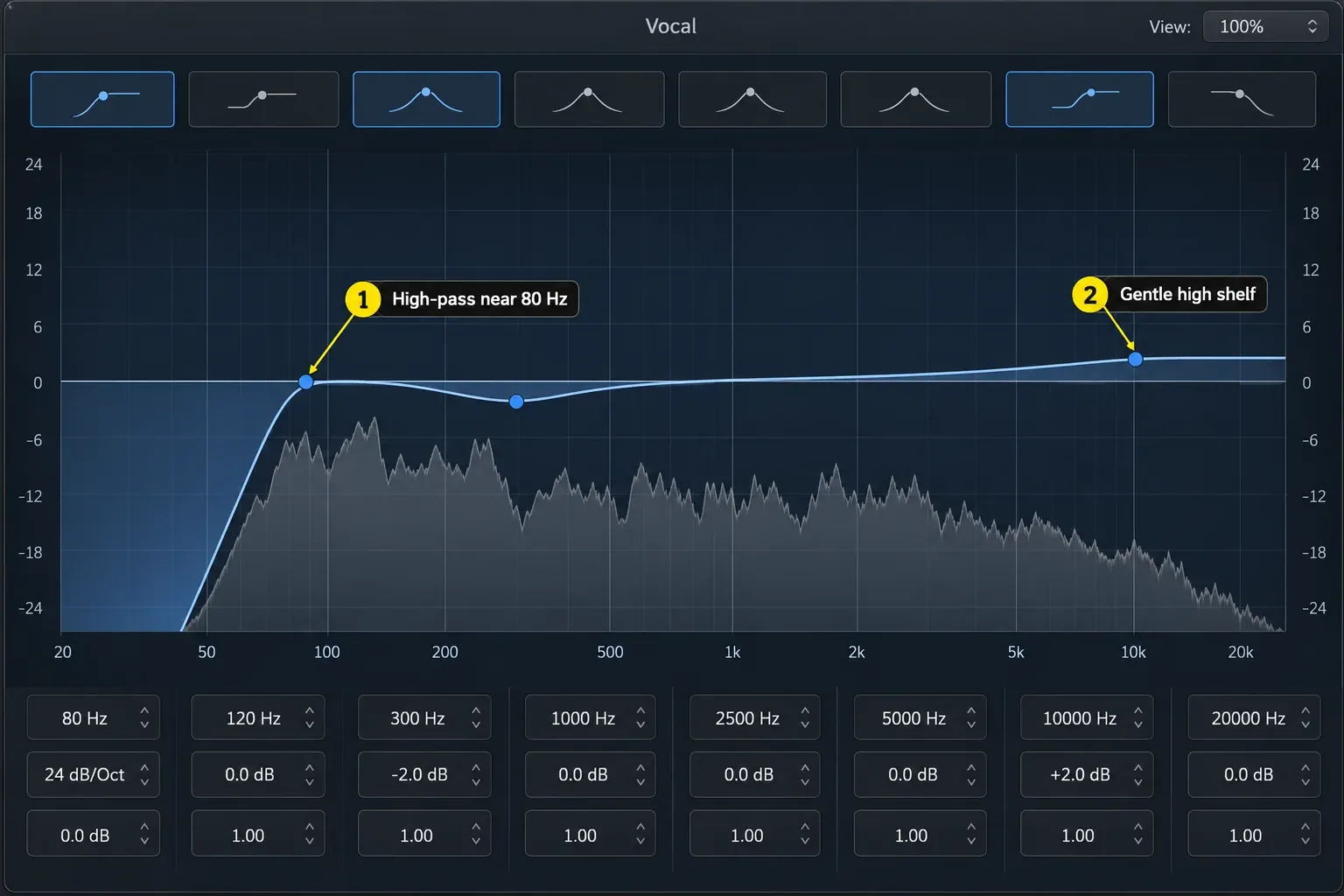
For a vocal or guitar playing through one path, there may be no filtered duplicate to cancel against. If Channel EQ already gives the tone you want, there is no need to replace it. Check the attack as well as the tonal change when you do compare them.
Two microphones on the same instrument are different: changing the phase of one signal can change how the pair combines. The same applies to a filtered copy mixed with a related dry signal. That’s a reason to audition linear phase, though it can’t promise to repair the recording. The Channel EQ workflow covers everyday band choices without turning each EQ move into a phase-mode test.
What pre-ringing sounds like
Pre-ringing is energy before the main transient in a filter’s impulse response. It can make a kick, snare, pluck or consonant seem to swell into its attack. FabFilter’s processing-mode documentation explains this tradeoff, including why greater low-frequency resolution can increase pre-ringing. Its resolution settings and latency numbers belong to Pro-Q, not Logic’s stock EQ.
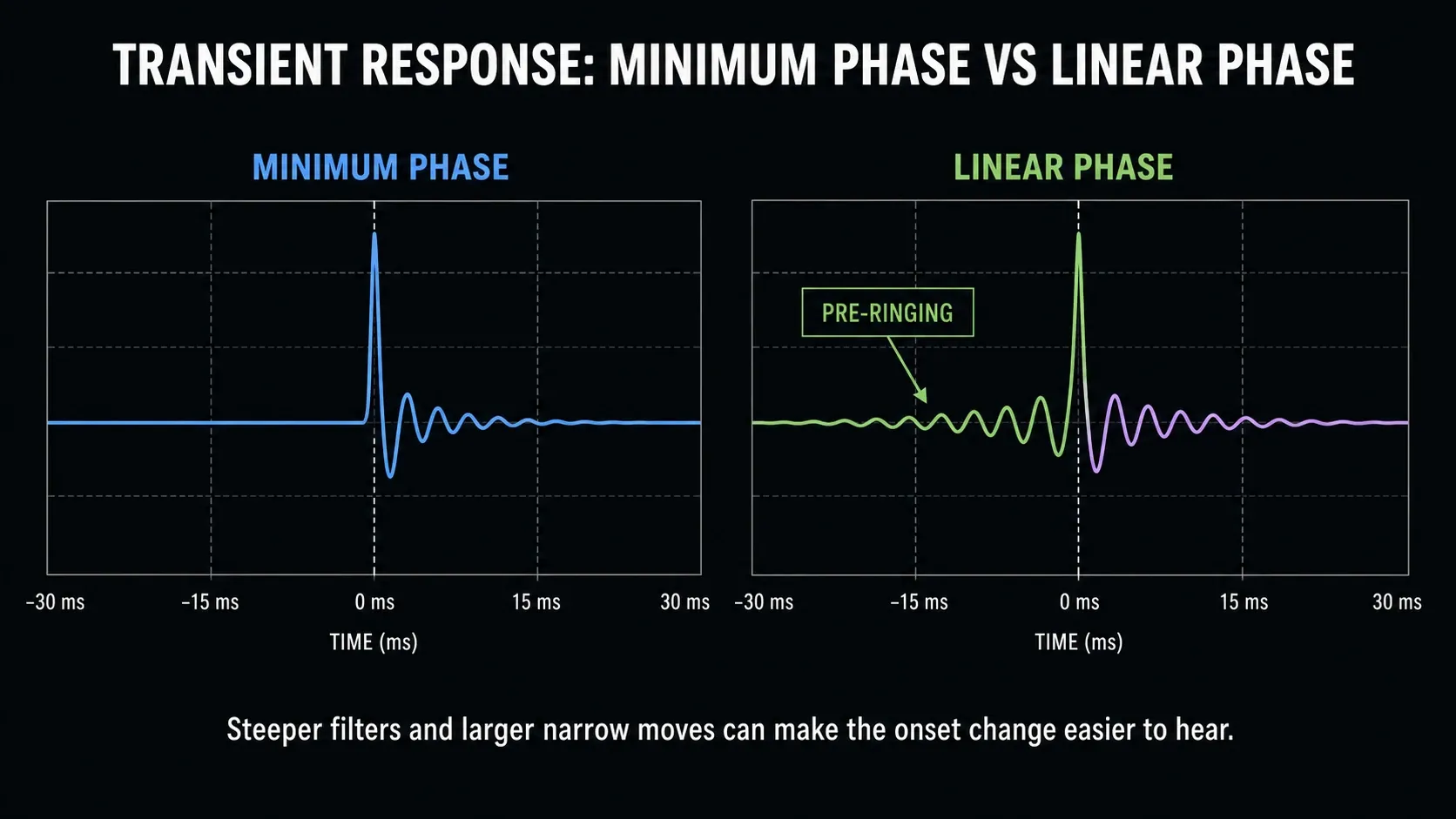
The diagram shows the shape of that difference. For your plug-in’s real latency, read the insert slot as described below. Apple warns that Linear Phase EQ can alter transient onset, especially with steep cuts or large boosts and cuts in narrow bands.
Listen to an exposed hit after silence, then to that hit in the arrangement. If the attack becomes less distinct, compare a gentler slope, a smaller move, Channel EQ and no filter. Do not keep a steep low cut merely because it makes the spectrum look tidier. A subtle move on sustained material may have no troublesome audible pre-ringing.
Where linear phase can help
Two microphones on one instrument
Listen to each microphone, then both together before adding EQ. If the untreated pair already sounds hollow, investigate polarity, arrival time and other processing first. Preserve the original and test adjustments only when you hear a problem. Don’t automatically align every waveform peak. Natural arrival differences can be part of the recording’s sound.
For example, if the kick-in microphone needs a cut, compare both EQs on that channel with kick-out still playing. Keep the mode that improves the combined low end without spoiling the onset. Soloing only kick-in cannot tell you whether the pair blends better.
A filtered parallel path
When EQ on a duplicate changes the combined tone unexpectedly, linear phase may avoid the additional filter-phase mismatch. It does not remove an existing polarity inversion or undo changes from compression and saturation. Check the entire dry-and-processed blend, with latency compensation covering the aux. The buses, sends and aux guide helps trace which paths reach the output.
Mastering and Mid/Side EQ
Apple’s use tips describe mastering as a typical application, not an exclusive one or a requirement. Compare a broad shelf in both EQs across a dense chorus and a sparse section. Choose the result that works at matched loudness; neither mode wins every master.
For different Mid and Side curves on a stereo strip, insert two Linear Phase EQ instances. Set the first instance’s Processing menu to Mid Only and the second to Side Only, then adjust each curve separately. A single instance has one selected processing mode, not independent per-band Mid/Side assignments. Leave Stereo selected if you want the same curve on both channels.
Make a Side low cut or high shelf only when the mix needs it. Reducing low Side energy can change width and balance; boosting high Side energy can make ambience too prominent. Compare stereo and a deliberate mono monitor sum, then restore stereo monitoring before delivery.
Set up latency compensation before the A/B
In Logic Pro > Settings > Audio > General, set Compensation to All when the signal path includes aux or output plug-ins. Apple’s latency instructions explain that this includes those strips as well as audio and software instrument tracks. Compensation aligns playback; it does not make a high-latency monitoring path instantaneous.
For this playback comparison, turn Low Latency Monitoring Mode off in the same settings pane. When enabled, it can bypass high-latency effects and turn off sends on affected input-monitored, record-enabled or focused instrument tracks. Gray slots with orange text indicate those bypasses. Comparing a bypassed EQ or a missing return is not a phase-mode comparison.
Start playback before the hit you are judging. If an attack right at the start position is missing or seems to fade in, check Playback pre-roll in General Audio settings before blaming pre-ringing. Apple documents this specific start-position issue.
Hold the pointer over your Linear Phase EQ insert slot to read its reported latency in samples and seconds. Check it with the settings and sample rate you’ll use for the session.
For recording, avoid a high-latency monitor chain when it interferes with performance; audition the EQ during playback afterward. The Logic Pro latency guide separates plug-in delay from buffer, interface and routing issues.
Run a fair Channel EQ vs Linear Phase EQ test
- Save the project, configure latency compensation as above and turn Low Latency Monitoring Mode off for the playback test.
- Build the needed curve in Channel EQ. Note active bands, frequency, gain, Q, slope, Processing mode and Master Gain.
- Play a passage with exposed attacks and a dense section. Include both microphones or the dry and parallel paths when those are the reason for the test.
- Replace Channel EQ with Linear Phase EQ in the same insert slot so Logic transfers the settings. Verify the curve and processing mode; do not run both EQs in series for this comparison.
- Compare at similar loudness, adjusting Master Gain if needed. Leave the other plug-ins and routing unchanged.
- Listen for the onset of hits, low-end weight and the blend of related signals. Use solo briefly to diagnose a difference, then return to the full mix.
- Check a deliberate mono monitor sum for the multi-mic, parallel or Mid/Side result, then restore stereo monitoring.
- Keep the EQ that solves the audible problem with acceptable transient behavior and latency. If there’s no useful improvement, I’d keep Channel EQ for its lower latency.
If switching makes the difference hard to judge, bounce two versions from identical start and end points, leaving room before the first tested hit. Keep export settings and other processing unchanged, level-match the files and compare without the EQ windows open. Low Latency Monitoring is inactive during a bounce, so do not compare a bypassed live-monitoring chain against a fully processed file.
Frequently asked questions
Is Linear Phase EQ better than Channel EQ?
No. It avoids additional filter-phase shifts but adds latency and can alter transient onset. Use Channel EQ for ordinary tone shaping; compare Linear Phase EQ when preserving the blend of related signals matters.
Is linear-phase pre-ringing always audible?
No. It depends on the source and filter move. Sharp attacks, steep cuts and large narrow changes can make it easier to notice. Compare an exposed hit and the full arrangement, not just the graph.
Should I always use Linear Phase EQ for mastering?
No. Apple describes mastering as a typical use, not a rule. Compare the same curve at similar loudness and choose by the actual tone, attack and stereo result.
Does Linear Phase EQ fix multi-mic phase problems?
It can avoid adding filter-phase shift to one microphone path. It does not repair microphone polarity or arrival-time differences. Check the untreated pair first and test corrections only when needed; automatic sample alignment is not a required starting point.
Should parallel EQ always be linear phase?
No. It can help with filter-phase mismatch, but delay compensation and the other processing still affect the blend. Compare both paths together and make sure Low Latency Monitoring has not bypassed the effect or its send.
Can I copy Channel EQ settings to Linear Phase EQ?
Yes. Replacing one with the other in the same effect slot transfers the current settings. Verify the curve and output level before judging the difference.
For the next stage of the mix, the Logic Pro Mixing hub connects EQ with routing, compression and mastering. You do not need to change EQ modes before moving on if the current result already works.


