Logic Pro Sampler vs Quick Sampler: Which to Use?
Quick Sampler is not a cut-down mistake, and Sampler is not automatically the better choice. Pick from the job your sound actually needs.

In Logic Pro for Mac, choose Quick Sampler for a single hit, pitched sample or sliced loop. Choose Sampler when you need key zones, velocity layers, round robin groups or separate audio outputs. Quick Sampler uses one source file per instance; Sampler can use one or many. Sampler can also turn parts of one recording into separate zones, so file count alone does not decide which instrument to use.
A kick that only needs trimming and tuning is a good Quick Sampler job. A piano assembled from recordings of different notes and playing strengths needs Sampler’s mapping controls. If the source is still a playable software or hardware synth, Auto Sampler can capture the notes and build a Sampler instrument before you refine the map. For a drum kit you want to edit on named pads, consider Drum Machine Designer; its individual pads can use Quick Sampler.
Sampler vs Quick Sampler at a glance
| Question | Quick Sampler | Sampler |
|---|---|---|
| How many source files? | One audio file | One or many audio files |
| Fast one-shot or playable sample? | Best fit | Possible, usually more setup |
| Slice one loop across keys? | Built-in Slice mode | Convert region transients to zones, or map samples manually |
| Record an input directly? | Recorder mode | Use recorded or imported files |
| Key and velocity mapping? | One source across the keyboard or slices from it | Graphical zones, key ranges, velocity ranges, groups |
| Alternate takes on repeated notes? | No multi-file round robin inside one instance | Round robin cycles across groups |
| Modulation capacity? | Two LFOs, dedicated envelopes, up to four Mod Matrix routings | Four LFOs, envelopes, up to twenty Mod Matrix routings |
| Multiple outputs? | No per-slice multi-output routing | Multi-Output instance: route zones or groups, then add Mixer aux channels |
| Open one format in the other? | Can be transferred to Sampler | Cannot be opened in Quick Sampler |
Apple’s Quick Sampler overview documents the single-file design and the option to transfer its content to Sampler. The comparison below concerns these Mac instruments; it is not a comparison of third-party sampler plug-ins.
Choose Quick Sampler for one source and fast decisions
Quick Sampler keeps the waveform, playback modes and sound-shaping controls together. Classic responds to held notes and the amplitude envelope, with looping available. One Shot starts playback when triggered; the Amp envelope controls its duration. Slice maps sections of the file to notes, with chromatic, white-key or black-key mapping. Recorder captures an audio input. Apple’s mode descriptions explain the four choices.
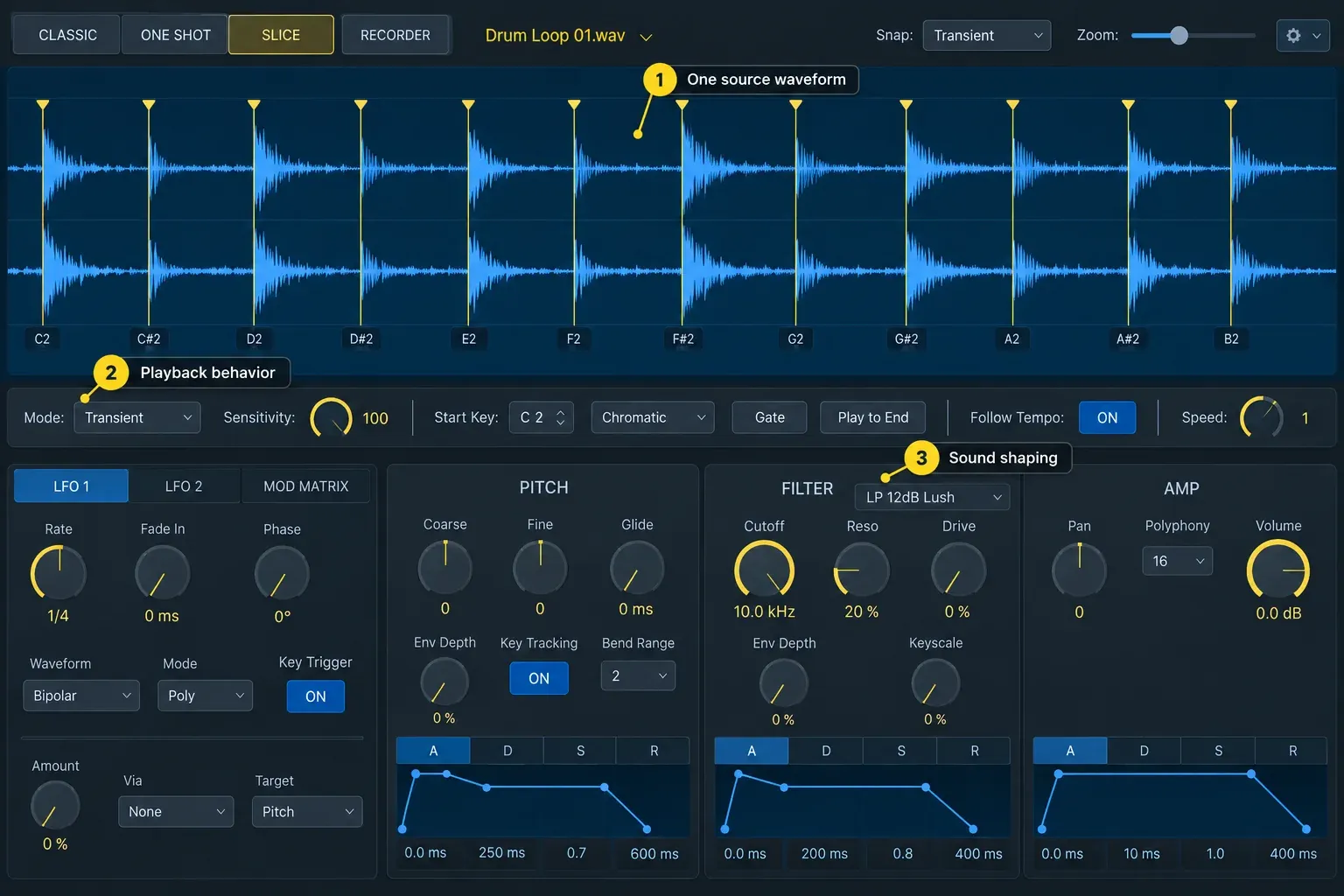
It is the better first choice for:
- a kick, snare, impact, or other complete one-shot;
- a vocal word or phrase you want to repitch;
- one bass, synth, or found-sound note played across the keyboard;
- a drum loop or phrase you want to slice and reorder;
- a sound you want to record and play immediately.
For loading a file, choosing a playback mode and saving the sound, follow the Quick Sampler tutorial. Start there if you have already chosen Quick Sampler and need the steps rather than another comparison.
Choose Sampler for zones, layers, groups, and outputs
A Sampler zone loads a sample and defines where and how it plays. You can assign a key range and a velocity range, then organize related zones into groups. Several zones can reference different parts of the same recording; they do not have to use different files. This structure also lets you combine recordings of different piano notes or soft and hard snare hits into one instrument.
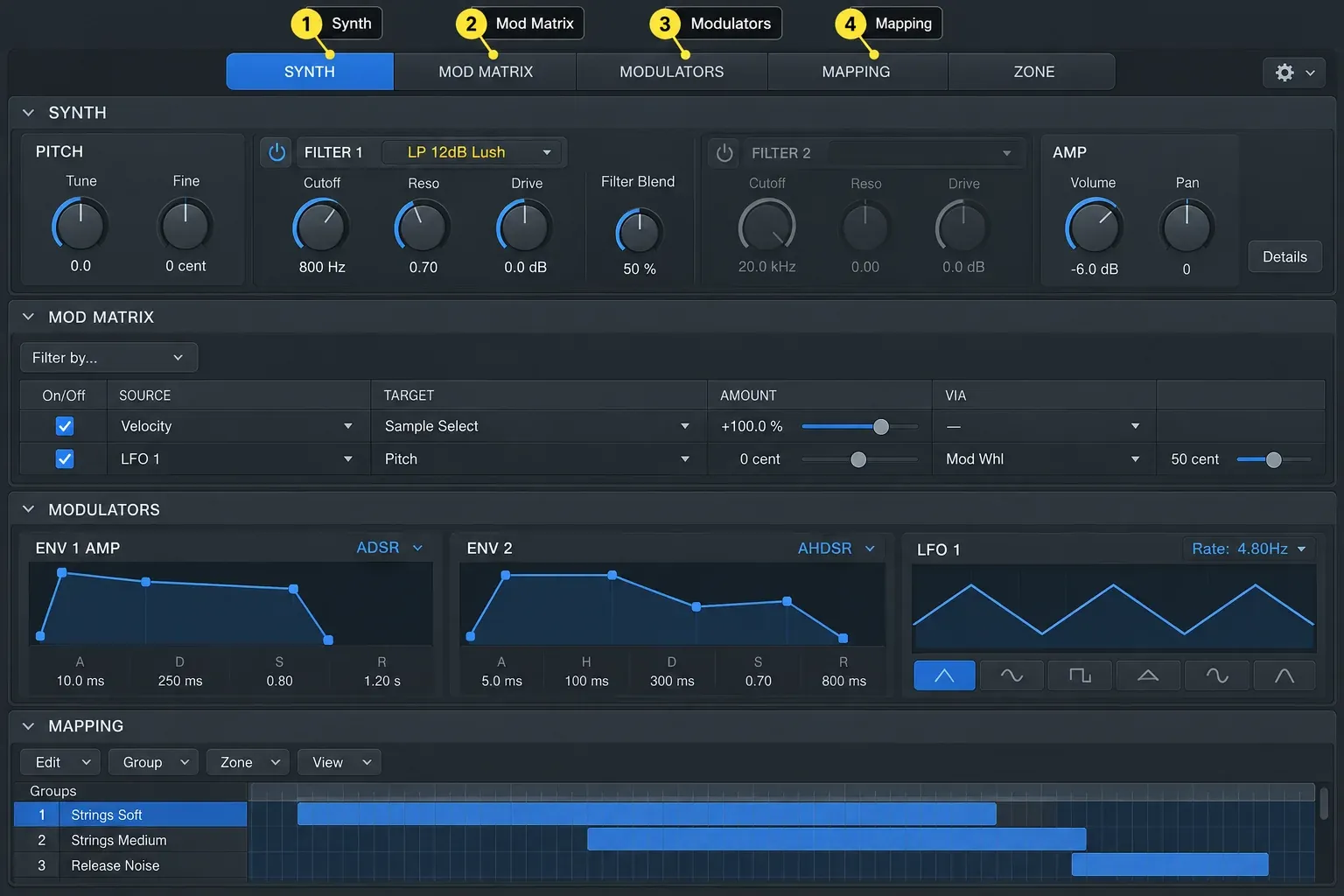
Choose Sampler when you need:
- different recordings for different keyboard ranges;
- soft, medium, and hard velocity layers;
- round robin variations that alternate when the same note is repeated;
- groups with shared output routing, key or velocity limits, and filter or envelope offsets;
- individual zone tuning, start, end, loop, pan, or level;
- multiple outputs for separate processing;
- more modulation sources, destinations, and routings;
- an existing EXS library, or a SoundFont2, DLS, or Gigasampler instrument.
Sampler also opens EXS instruments. Apple documents SoundFont2, DLS and Gigasampler import through the Sampler Instruments folder and conversion process. That support does not mean every third-party sampler library can be opened: check the library’s actual format before choosing an instrument for it.
For separate processing in Sampler, load a Multi-Output instance in the Instrument slot, assign the required zone or group outputs, then use the instrument channel strip’s + button in the Mixer to add aux channels. Choosing a Multi-Output instance alone does not create all those channels. Apple explains the multi-output setup and the zone output controls.
The decisive difference is mapping
Quick Sampler spreads one source across the keyboard or assigns slices of that source to notes. Sampler gives each zone its own key and velocity ranges in the Key Mapping Editor. For a soft/hard snare pair, assign both zones to the same key but different velocity ranges. Harder MIDI notes then select the harder recording. Round robin is different: it cycles variations on repeated notes rather than selecting a recording solely by playing strength.
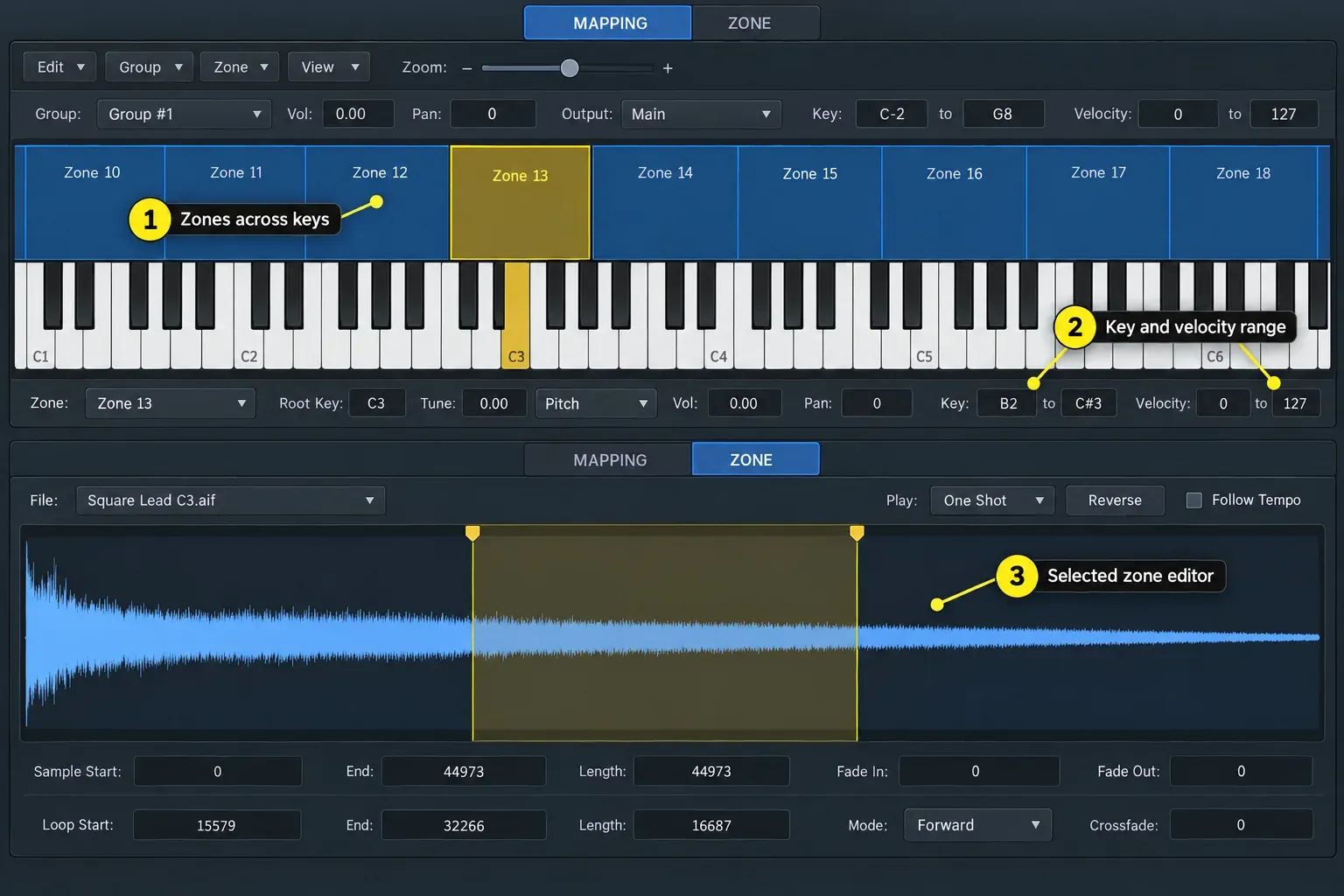
For import, Chromatic mapping places files on successive keys. Optimized mapping detects root notes and can assign files with the same root to velocity layers. The drop targets differ: Chromatic offers Zone per File or Split at Silence; Optimized offers Zone per File or Zone per Note for suitable pitched recordings. Apple’s Sampler instrument creation guide shows these choices. Check the detected notes and layer transitions before relying on automatic mapping.
For round robin, put alternate recordings in separate groups that respond to the intended note. Select the groups in the Mapping pane and choose Group > Create Round Robin. They enter the cycle in top-to-bottom order. Apple’s group-selection reference explains the sequence. Quick Sampler does not offer this multi-file group structure inside a single instance.
Modulation: four routes or twenty
Quick Sampler has two LFOs, dedicated pitch, filter and amplitude envelopes, and up to four independent Mod Matrix routings. You can use those routes for controls such as velocity-to-filter movement or a mod wheel changing the loop position. Apple’s Quick Sampler Mod Matrix reference lists the sources and targets.
Sampler offers up to four LFOs and twenty modulation routings. Its zone and group controls also let you adjust parts of the instrument without rebuilding the sample mapping. Group filter and envelope controls include offsets; they should not be confused with a completely independent copy of every global synthesis control.
If the sound only needs an LFO on filter cutoff and velocity controlling amplitude, Quick Sampler already covers those changes. The larger matrix becomes useful when you run out of routes or need a control relationship it cannot provide.
Do they sound different?
Do not choose Sampler on the assumption that it automatically improves audio quality. This is a comparison of documented features and workflows, not a measured test proving that the two instruments sound identical. Their playback and processing settings affect the result.
Optimized import can change tuning, level, loop points and silence trimming; Apple describes those adjustments for Quick Sampler loading and Sampler mapping. When comparing a sound, start from the same file, match playback markers and level, and check tuning, filters, envelopes and Flex. A difference after import is not enough to establish that one instrument has better audio quality.
Loops, tempo, and slicing
Flex keeps sample playback duration consistent while notes change pitch. To synchronize suitable tempo-aware audio to the project, turn on Flex and then Follow Tempo; Flex alone is not the project-tempo switch. Quick Sampler exposes these controls alongside the waveform, while Sampler provides them in the Zone pane for the selected zone. Apple documents the metadata requirements for Quick Sampler Flex and Sampler Flex, including Apple Loops and audio analyzed with Smart Tempo.
Quick Sampler’s Slice mode is convenient for chopping one break. Sampler can also map region transients: Control-click an audio region, choose Convert > Convert to new Sampler Track, then choose Create Zones From Transient Markers. Logic creates a Sampler track and a MIDI region with trigger notes. Apple’s audio-region conversion instructions cover this alternative; it is separate from Quick Sampler’s Slice mode.
If you need separate processing for Quick Sampler slices, use its Action menu in Slice mode and choose Create Drum Machine Designer Track. The slices become individual pads, with a MIDI region that can play the pattern. The Drum Machine Designer guide covers the pad-based workflow; Apple documents the slice-to-kit conversion.
Move a Quick Sampler sound into Sampler safely
Apple confirms that replacing Quick Sampler with Sampler in the same instrument channel strip transfers the current content. Sampler can also load saved Quick Sampler settings. The reverse is not supported: a Sampler setting cannot be opened in Quick Sampler. Keep the original before you convert.
- Save a copy of the working project and the Quick Sampler setting before changing instruments.
- Replace Quick Sampler with Sampler in the same Instrument slot, or open the saved Quick Sampler setting from Sampler.
- Confirm the sample, root note, tuning, playback markers, loop, Flex behavior, envelope, and output level.
- Add new zones or mapping only after the transferred sound plays correctly.
- Save the new Sampler instrument under a new name so the working Quick Sampler version remains easy to recover.
Keep the source audio files available too. A saved instrument setting is not a reason to delete its samples: Sampler instruments reference audio files. After the transfer, audition the MIDI phrase before adding layers or changing the mapping.
Seven common jobs and the right choice
| Job | Choose | Why |
|---|---|---|
| Trigger one kick | Quick Sampler | One Shot and visible trim controls |
| Chop one drum break | Quick Sampler | Slice mode maps events from the same file |
| Play one vocal phrase at several pitches | Quick Sampler | Fast root-key, Flex, envelope, and filter control |
| Build a piano from notes recorded across the keyboard | Sampler | Key zones and optimized mapping |
| Build soft and hard layers of the same instrument | Sampler | Velocity ranges and groups |
| Alternate several takes on repeated notes | Sampler | Round robin cycles can step through groups |
| Create a pad-based drum kit with separate channels | Drum Machine Designer | Named pads, subtracks, choke groups, and kit routing |
Frequently asked questions
Is Quick Sampler lower quality than Sampler?
More mapping controls do not establish better audio quality. This guide does not claim a measured sound-quality difference or identical output. Compare the same source with matched markers, tuning, Flex, filters, envelopes and level before drawing conclusions.
Can Quick Sampler use multiple samples?
A Quick Sampler instrument is built from one audio file. Slice mode can divide that file into several playable slices, but it does not become a multi-file zone and group instrument.
Can Sampler open a Quick Sampler setting?
Yes. Sampler can load saved Quick Sampler settings, and replacing Quick Sampler with Sampler in the same instrument channel strip transfers the current content. A Sampler setting cannot be opened back in Quick Sampler. Save the original before converting.
Which sampler is better for drums in Logic Pro?
Use Quick Sampler for one hit or one sliced break, Sampler for key and velocity mapping across multiple files, and Drum Machine Designer when you want named pads, separate subtracks, and choke groups.
Does Sampler have more modulation than Quick Sampler?
Yes. Quick Sampler supports two LFOs and up to four Mod Matrix routings. Sampler supports four LFOs and up to twenty modulation routings.
Which one supports round robin samples?
Sampler. It can place alternate recordings in groups and step through those groups when the same note is repeated. Quick Sampler uses one source file per instrument, so it does not provide the same multi-file round robin structure.
Can both Sampler and Quick Sampler follow project tempo?
Yes, with suitable tempo-aware material. Enable Flex and then Follow Tempo to synchronize playback to the project. Flex alone preserves duration while changing pitch; it does not by itself enable project-tempo following. Sampler provides these controls for the selected zone.
When to switch
Keep a single-source sound in Quick Sampler while its controls cover the changes you need. Switch to Sampler when you need extra zones, velocity layers, round robin groups, more modulation routes or separate outputs. For the next stage of the song, the Create Music hub has guides to instruments, beats and arrangement.


