How to Share a Logic Pro Project: Handoff Checklist
A producer-to-producer Logic Pro handoff checklist covering packages, assets, plug-ins, versions, open-testing, compression and delivery notes.

Sharing a Logic Pro project only works when the other person can open it, press Play, and hear the intended arrangement without hunting for audio files or guessing which plug-ins are missing. Sending the project item alone isn’t enough unless Logic has copied every required asset into its package or project folder.
Checked September 12, 2026 against Apple’s current Logic Pro documentation cited in this guide. This workflow covers a full Logic-to-Logic handoff. If the recipient uses another DAW, send consolidated audio files or grouped stems, or use AAF as the agreed interchange format instead of assuming the project will translate.
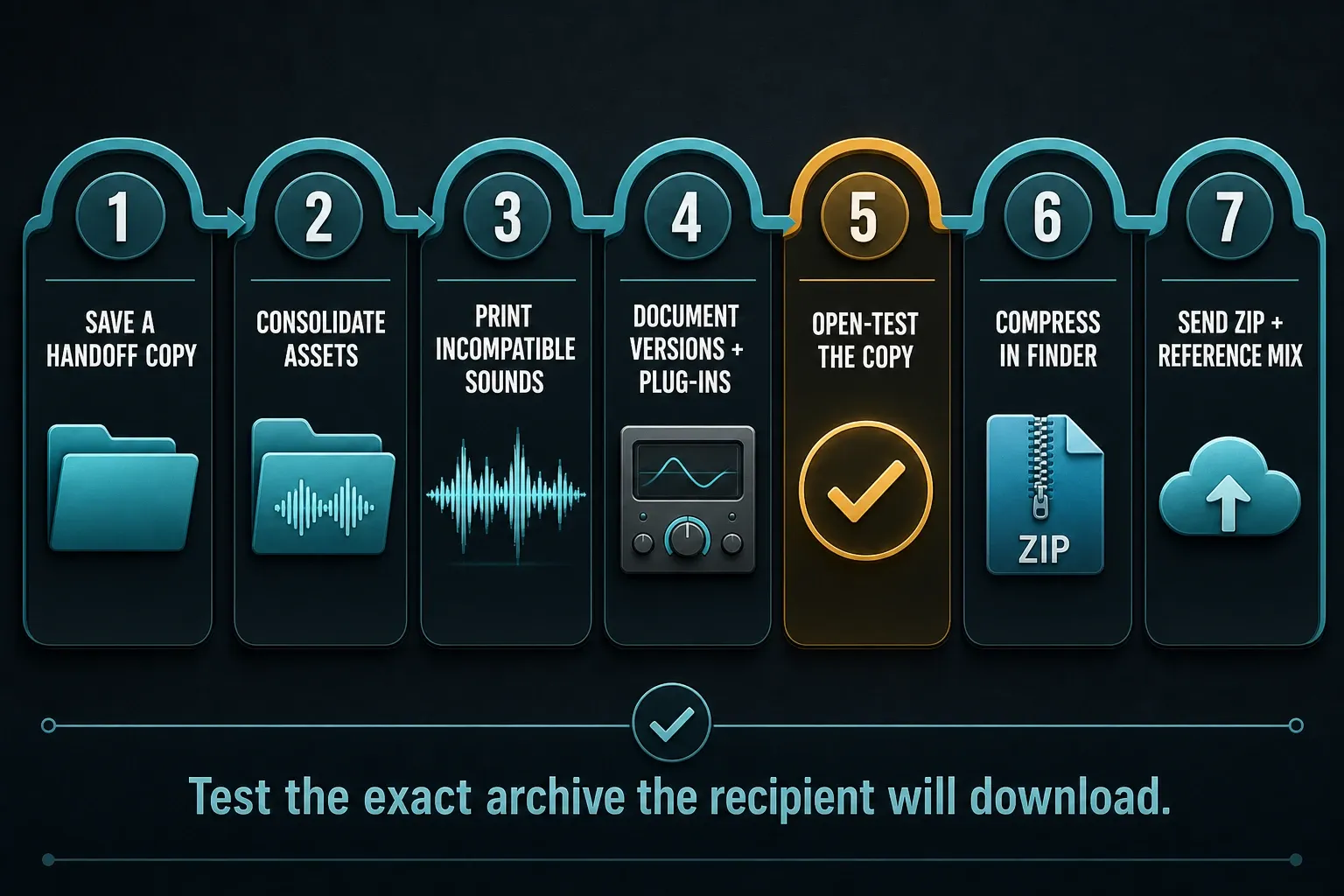
Fast answer: save and open a separate handoff copy, consolidate the required assets, document versions and plug-ins, print sounds the recipient cannot recreate, then save and test that copy. Compress it in Finder and send the ZIP with a reference bounce and notes.
Choose the right deliverable first
| Recipient | Primary deliverable | Include as safety |
|---|---|---|
| Logic Pro collaborator | Consolidated Logic project package or folder | Reference mix and plug-in notes |
| Engineer in another DAW | Consolidated multitracks or grouped stems | Reference mix, tempo, sample rate, notes |
| Pro Tools editor requesting session data | AAF if explicitly requested | Consolidated audio and reference mix |
| Client giving feedback only | Stereo bounce | Version label and time-coded notes |
Do not send an entire production project when the recipient needs only a listening copy. Do not send an MP3 when a mixer needs every source. One short confirmation about the deliverable prevents most handoff failures.
Package or folder: which is safer?
A Logic project can be saved as a package, which appears in Finder as one .logicx item, or as a folder, where the project file and asset folders remain visible. Either can work when managed correctly.
Packages are convenient for transfer because the project and copied assets travel as one Finder item. The distinction matters: the .logicx extension doesn’t prove that every imported recording, sample, impulse response, or video has been copied inside. Folders make the asset layout easier to inspect and can be practical for long-term shared workflows. The decisive step isn’t the container type. It’s whether Logic has copied the required assets into that container.
Use a package for a simple one-file Mac handoff and for every Mac/iPad roundtrip. Use a folder when an established Mac-only collaboration depends on visible media folders and strict version ownership. In either case, send a compressed snapshot rather than asking two people to edit the same live project at the same time.
Apple’s current Assets settings guide explains that audio, sampler data, impulse responses, and other selected assets can be copied into the project package or project folder. If you use the Assets settings checkboxes, save the project afterward: Apple says the selected files are copied when the project is saved.
How to prepare a Logic Pro project for handoff
- Choose File → Save a Copy As and name the handoff copy. Close the original and open that exact copy before changing assets or tracks.
- Choose File → Project Management → Consolidate.
- Select every asset type the recipient needs and confirm the copy.
- Document Logic Pro, macOS, sample rate, tempo, and third-party plug-ins.
- Print or bounce tracks that cannot be recreated on the recipient’s system. Keep the original source tracks muted and labeled, then save the handoff project.
- Close Logic and open the handoff copy from its new location.
- Play-check the beginning, a dense section, and the ending.
- Save and quit Logic, then compress the package or complete project folder in Finder before uploading.
- Send the ZIP with a reference bounce and a short handoff note.
Apple’s Consolidate documentation lists audio files, Sampler, Alchemy and Ultrabeat data, Space Designer impulse responses, video, Apple Loops, and other Sound Library content among the assets Logic can copy into the project.
What Consolidate does and what it cannot do
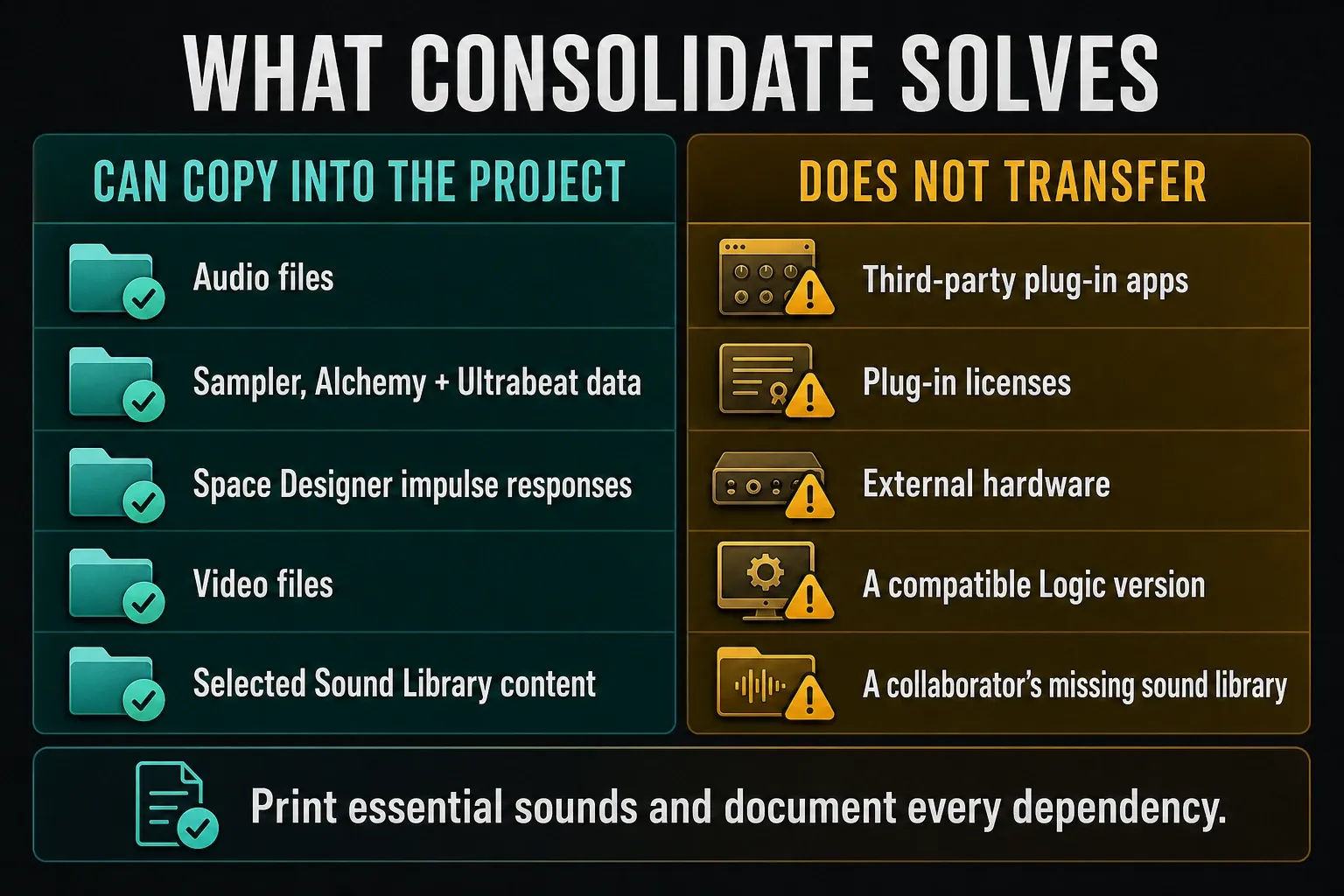
Consolidate copies selected external assets into the project’s Media location. It does not install third-party Audio Units, transfer licenses or guarantee compatibility with an older Logic version. A third-party sampler may still depend on its own library: confirm that dependency or print the sound as audio.
Consolidation also copies assets used by project alternatives in the current project. That can make the handoff larger than expected. Check the final archive size, but do not delete alternatives or run cleanup solely to make the ZIP smaller unless the handoff copy is protected and you understand what will be removed.
Why “audio files not found” still happens
Common causes include imported audio that was never copied into the project, renamed or disconnected external drives, assets referenced by a sampler, and uploading an uncompressed package through a service that doesn’t preserve macOS package behavior.
Apple’s sharing overview specifically recommends compressing a project package before copying or uploading it. Non-Apple-formatted drives and internet services may not support the package directly.
Make plug-in compatibility explicit
Create a short inventory of every third-party instrument and effect that is essential to playback. Include the vendor, product, version where practical, and whether the sound is committed. Do not send license files or installers that you are not authorized to distribute.
When to leave a plug-in live
Leave it editable when the collaborator has confirmed the same plug-in and compatible version. Save any custom preset inside the handoff notes or project assets when the plug-in permits it.
When to print audio
Print or bounce software instruments, amp simulations, vocal tuning, sound-design chains, and external hardware when those sounds are approved and can’t be reconstructed reliably. Keep the original source track muted and clearly labeled rather than deleting it. Name the print so the relationship is obvious: Lead Synth PRINT beside Lead Synth MIDI.
What to do with shared reverbs and sidechains
Include an audible reference bounce and explain any routing that defines the mix. A printed source won’t always show how it interacts with a sidechain compressor or a shared return. When exact sonics matter more than editability, send additional wet prints or stems agreed with the recipient.
Version and system compatibility
Record the Logic Pro and macOS versions used for the handoff. Agree on the receiving version before either person saves over a working copy. Apple’s Save Projects guide warns about opening saved projects in earlier versions. That warning is not a compatibility table for every pair of minor releases: keep a recoverable copy and test on the recipient’s actual version before relying on backward compatibility.
For Mac-to-iPad roundtrips, Apple currently requires Logic Pro for Mac 10.7.8 or later, and the project must be saved as a package. Logic Pro for iPad can’t open a project saved as a folder. Apple’s current Mac and iPad roundtrip guide also documents compatibility and plug-in considerations. Check the receiving device before promising that a desktop project is fully editable on iPad. For an unsupported third-party plug-in, Apple recommends bouncing in place before transfer; leave Bypass Effect Plug-Ins unselected if the effect must be included. Keep the production original and check the resulting audio on the iPad.
Apple’s July 2026 guidance lists nine Mac project elements that prevent an iPad open: surround, binaural panning, sample rates above 96 kHz, Producer Kits, a primary ruler set to time, a project start before 1 1 1 1, Arrange folders containing multiple tracks, external MIDI tracks without External Instrument plug-ins, and projects with no output tracks. Do not simplify the production original to meet those limits. Make an iPad handoff copy, preserve the source, then adjust or print only what the recipient needs.
For a wider compatibility check, use the current Logic Pro system requirements guide.
Prevent version collisions during collaboration
Do not plan a Logic handoff around automatic reconciliation of two separately edited copies. Logic can import tracks and settings from another project, but that’s a selective import workflow, not conflict resolution for two competing versions. Use a simple ownership protocol:
- One person is the project owner and names the current approved version.
- The owner sends a closed, compressed snapshot such as
Song_v12_to-Alex_YYYY-MM-DD.zip. - The recipient works locally, never inside the ZIP or a partially synced cloud placeholder.
- The recipient saves a new version instead of overwriting the received archive.
- The returned file identifies the editor and change:
Song_v13_from-Alex_vocal-edits.zip. - The owner open-tests, compares with the reference, accepts the return, and declares the new current version.
For parallel creative work, exchange audio or MIDI parts and let one owner integrate them. Treat each cloud upload as a named snapshot rather than assuming that two edited project copies will reconcile themselves. When using File → Import → Logic Projects, inspect the import choices before confirming. Apple distinguishes Add from Replace and advises turning off Keep Bus Number if the destination already uses those buses. Do not let an import silently change the receiving project’s routing.
Open-test the exact copy you will send
Test the handoff copy, not just the original project. Save and close Logic, safely eject any external drive the recipient should not need, then open the copy from its new location. Do not resolve missing files by browsing back to the original. A successful test on your Mac is still only a first check: the recipient must open the downloaded archive on their own system.
- Confirm there is no missing-file dialog.
- Check that every software instrument produces the intended sound.
- Look for unavailable plug-ins and compare against the inventory.
- Play the first downbeat, a dense middle section, and the complete ending.
- Check tempo changes, markers, track alternatives, take folders, and automation.
- Bounce a quick test and compare it with the approved reference.
If the copy opens but plays silently, work through the Logic Pro no-sound checks before sending it. A muted output, wrong audio device, or unavailable instrument is easier to correct before upload.
Compress and transfer without corrupting the package
- Quit Logic Pro so the project is not changing during compression.
- In Finder, select the
.logicxpackage or the complete project folder. - Choose File → Compress.
- Rename the ZIP with project, version, and date.
- Upload the ZIP; do not upload the open package’s internal contents separately.
- After upload, confirm the file size and, for critical work, download and open-test the archive once.
A cloud link is a delivery mechanism, not a backup. Keep the protected source and handoff copy according to the project backup guide.
Verify a critical archive after upload
For a deadline-critical or very large handoff, compare more than the filename. Confirm the uploaded byte size against the local ZIP. You can also create a SHA-256 fingerprint in Terminal:
shasum -a 256 Song_v12_to-Alex_YYYY-MM-DD.zipThe recipient runs the same command on the downloaded ZIP and compares the SHA-256 value, not the filename beside it. Matching hashes provide a strong file-integrity check. They do not establish that the project contains every required asset or plays correctly, so the recipient still needs to open and listen to it.
What to put in the handoff note
- Project and version name
- Logic Pro and macOS versions
- Sample rate, tempo, meter, and pickup/start information
- Required third-party plug-ins and which tracks are printed
- Known substitutions or missing optional content
- Reference bounce filename
- The next action: edit, mix, record, approve, or return notes
Make the next person’s job explicit. For example: “Lead Vocal PRINT contains the approved tuning; Lead Vocal RAW is muted and remains editable.” Name the track and its state instead of writing “everything should work.”
Recipient return check
The recipient should confirm the archive name and hash or file size, unzip locally, open the project without browsing to unrelated media, compare playback with the reference mix, and list every unavailable plug-in or substituted sound before editing. On return, the same consolidation, open-test, ZIP, reference, and note steps apply again. A handoff is complete only when the receiving side has verified it.
More project setup and delivery workflows are organized in the Logic Pro tutorials hub.
Frequently asked questions
How do I send a Logic Pro project with all audio files?
Save a separate handoff copy and open it. Choose File → Project Management → Consolidate, select the required asset types and save. Test that copy, then compress the package or complete project folder in Finder before uploading.
Should I send a Logic project as a package or folder?
Either can work on Mac when all assets are consolidated. A package is simpler to transfer; a folder is easier to inspect. Logic Pro for iPad requires a package.
Why should I zip a Logic Pro project before uploading?
A Logic package is a special macOS bundle. Compressing it preserves that structure across internet services and non-Apple-formatted storage more reliably than uploading the raw package.
Does Consolidate include third-party plug-ins?
No. It copies selected project assets, not plug-in applications or licenses. Document required plug-ins and print essential sounds when the recipient cannot recreate them.
What should accompany a Logic Pro project handoff?
Include a reference bounce and a note listing project version, Logic and macOS versions, sample rate, tempo, required plug-ins, printed tracks, known exceptions, and the requested next action.
Can I share only the .logicx project file?
Only if required assets were copied into that package and the recipient has compatible plug-ins, content and Logic version. Consolidate first, print unavailable sounds, compress the package, and test the exact archive rather than assuming the extension makes it self-contained.


