How to Upload Music to Spotify: Independent Artist Guide
Send a finished release to Spotify through a distributor, claim the right artist profile and pitch one unreleased song without missing the real deadline.

You do not upload an ordinary music release directly inside Spotify for Artists. You send the finished audio, artwork and metadata through a music distributor or label. That provider delivers the release to Spotify, and Spotify for Artists becomes the place where you claim the profile, inspect the upcoming release and pitch one unreleased song.
Before opening the distributor’s form, put the approved master, artwork and release sheet in one folder. If you only want to play a file on your own devices, use Spotify Local Files; that does not publish a release for other listeners.
The shortest reliable route to Spotify
- Finish one release-ready lossless master and approve the artwork.
- Choose a distributor by contract, fees and catalog policy, not by one headline price.
- Upload the audio, artwork and complete metadata through that distributor.
- Set a future release date with enough time for delivery, profile checks and a Spotify pitch.
- Confirm the release in Spotify for Artists, then pitch one eligible song at least seven days before release.
Spotify's current Get Started page uses the same order: choose a distributor, upload through it, access the dashboard and prepare for release.
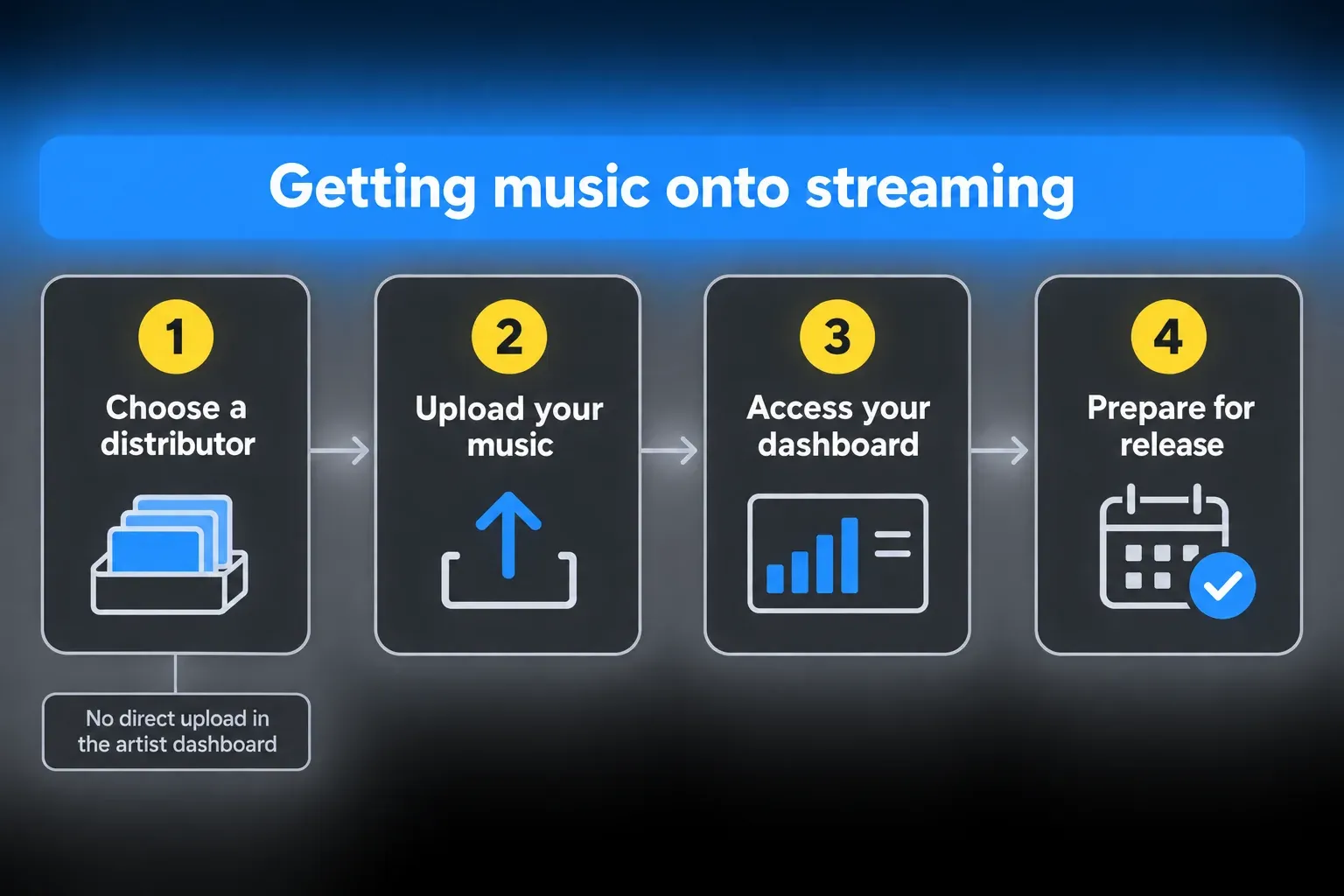
Can an independent artist upload directly to Spotify?
Not for a normal audio release under the current process. Spotify's current instructions say music is delivered through labels and distributors so licensing and delivery stay consistent. The artist profile is created automatically after music is first delivered. You can't create an empty artist profile manually and then drag a WAV into it.
Spotify also offers a separate direct full-length video upload beta for eligible artist teams. That video feature does not replace distributor or label delivery for an ordinary audio release.
Choose a music distributor without trusting the slogan
Spotify maintains a preferred and recommended provider directory. Inclusion means the provider meets Spotify's delivery standards. It doesn't tell you which contract fits your catalog.
| Question | What to verify before paying |
|---|---|
| How are you charged? | Annual subscription, per-release fee, royalty commission, optional extras and withdrawal costs. |
| What happens if you stop paying? | Whether the catalog stays live, is removed, or needs a paid legacy option. |
| Can you use an existing ISRC? | Essential for a previously released master or distributor transfer. |
| Who gets paid and when? | Payout threshold, currency, tax forms, split payments and statement detail. |
| Which stores and territories are included? | Spotify may be covered while a store or country important to you is not. |
| How are corrections handled? | Metadata updates, wrong-profile fixes, takedowns and support response path. |
| Who controls the rights? | Read the actual license and term. A marketing phrase such as “keep 100%” is not the contract. |
Spotify notes that most distributors charge a fee or commission and that services differ. Prices change too often for a permanent winner. Compare the total cost over two or three years and the exit path for the catalog you expect to keep online. I’d weigh that exit path heavily, because a plan that removes releases when you stop paying can cost more than its headline price suggests.
Prepare the audio, artwork and release metadata
Export the approved lossless master
Spotify advises artists to export the highest-quality lossless files and follow the chosen distributor's upload guidelines. Do not copy a bit depth, sample rate or file-size limit from another distributor and call it a Spotify rule.
Spotify’s audio-delivery requirements call for one native-resolution stereo master per track, at 44.1 kHz or higher. FLAC is strongly preferred; compliant PCM WAV is also accepted. Deliver 24-bit if that is the native master. Use 16-bit only when no higher-bit-depth master exists. Do not reduce a 24-bit master to 16-bit or downsample a higher-rate master just to make a CD-quality copy. Your distributor’s intake form may have its own requirements, so check those before export and ask support if they conflict with the master you have.
Loudness normalization is a playback feature, not an upload pass/fail number. Spotify’s mastering guidelines recommend -14 integrated LUFS and a True Peak maximum below -1 dBTP, or below -2 dBTP for masters louder than -14 LUFS. A louder master is not automatically rejected. Normalization also depends on the playback context: Spotify says its web player and third-party devices do not use it. Finish a master that sounds right, check its true peaks and audition it with and without normalization rather than forcing every song to one number.
Finish the master before you create the release. Our Logic Pro mastering guide covers the final signal chain. Bounce in Place vs Export explains why an internal production bounce isn't the same job as a delivery master. Listen to the exported file start to finish, check the beginning and tail, and keep the approved filename unchanged. For the platform targets themselves, see the streaming loudness standards reference.
Use artwork you can legally distribute
Prepare one square cover that stays readable as a thumbnail and doesn't contain assets you lack permission to use. Cover art dimensions, color mode, file type and text rules vary by provider, so use the current specification inside the distributor's form. Do not enlarge a tiny image and assume it has become a high-resolution master.
Spotify also publishes its own cover art requirements: a 1:1 image in TIFF, PNG or JPG with lossless encoding, between 640 and 10,000 pixels wide and tall, at the highest resolution you have. It needs the sRGB color space at 24 bits per pixel with the color profile applied directly, because Spotify doesn’t support embedded color profiles or orientation metadata.
Write metadata once, then copy from one source
Keep a release sheet with the exact primary artist name, featured artists, title, version label, songwriter and producer credits, explicit flag, release date, label name, rights lines, language, genre, ISRC and the release's UPC or EAN. This becomes the reference for the distributor form, Spotify pitch and later catalog transfer.
If the recording already has an ISRC, keep that code. The ISRC code guide explains when a remix, edit or creatively changed remaster needs a new identifier and when the same recording must retain the old one.
Copy this starting sheet for one track, then adapt it to your distributor’s form. Repeat the track-specific fields for an album. The blanks are your working record; your distributor’s form decides which fields are required.
Release title:
Track title / version:
Primary / featured artists:
Writer / composer / producer:
Label / owner / rights lines:
Explicit flag / language / genre:
Release date:
ISRC (existing or newly assigned):
Release UPC or EAN:
Approved master filename:
Approved artwork filename:
Artist profile URL or URI:
Form checked by / date:
Delivery confirmation / notes:
Separate the identities that look similar in an upload form
A release can involve a primary artist, featured artist, songwriter, composer, producer, label and copyright owner. Those aren't interchangeable credits. Put the performer in the artist field, the songwriter in the composition credits and the company or person named in the agreement in the correct rights field. Do not add a famous artist to a title or artist field merely because the track is a cover, remix or stylistic reference.
Be equally careful with version labels. “Radio edit,” “acoustic,” “live” and “remastered” describe a specific recording version. They're not search phrases to bolt onto every title. A clean, consistent artist name matters more than squeezing extra words into the metadata.
How to upload music to Spotify through a distributor
- Create the release in the distributor dashboard and select every store and territory you want.
- Upload the approved lossless master and the final square artwork using that provider’s current specifications.
- Enter artist names, titles, credits, explicit status, rights lines and other metadata from the release sheet.
- Reuse the existing ISRC for the same recording. If it has never had an ISRC, arrange one through your distributor or an authorized assignment route.
- Choose a future release date that leaves time for review and delivery, with the aim of pitching at least seven days before release.
- For an existing artist, enter the correct Spotify artist URL or URI. For a genuinely new artist, identify it as a new artist in the distributor’s form; Spotify creates the profile after delivery.
- Submit the release and confirm delivery to Spotify. For a first release, request the new artist URI and release UPC or EAN after delivery, then use them to request Spotify for Artists access.
- With access approved, open Music > Upcoming, verify the release details and pitch one eligible unreleased song. Leave time for corrections before release day.
Stop before Submit and run one release-sheet check
Open the final audio folder, artwork file, release sheet and distributor form side by side. Compare the track order, filenames, titles, artist roles, explicit flags, ISRCs, release date and rights lines character by character. Then preview the cover at thumbnail size and play the actual file selected in the form, not a similarly named bounce elsewhere on the Mac.
This catches mistakes while the release is still editable. A wrong mix may require a takedown and redelivery, and a mismatched artist name can create a second profile. For a distributor move, preserve the existing ISRC for the same recording, but do not assume the code alone guarantees continuity: Spotify’s track-linking guidance also requires matching audio and metadata, including duration, title and artist name. Save the distributor confirmation and a copy of the submitted metadata so support can see exactly what was sent.
How early should you upload before release?
Allow at least seven days between delivery to Spotify and release. Spotify’s song-pitch guidance asks for that lead time so editors can listen. Its Release Radar rules also require a pitch at least seven days ahead if you want to select the song for followers’ playlists. Leave the pitch until the last week and you risk missing that lead time. The firm cutoff for a song pitch is when the song goes live.
Seven days is not a promise that a distributor can review, deliver and correct a release in time. Spotify says music can take around 48 hours to appear in Music > Upcoming after delivery. Distributor review comes before that. If fewer than seven days remain, check whether the unreleased song is available to pitch, but do not count on timely editorial review or selecting its first-week Release Radar placement.
For a planned campaign, I’d build in three to four weeks. Spotify doesn’t require that much; it’s a working buffer. It gives you time to fix a rejected cover, wrong artist mapping, metadata typo or missing Upcoming release without turning release day into a support ticket.
Claim Spotify for Artists before the first release
Your artist profile is created automatically when the distributor first delivers music. Spotify says you can't create the profile yourself. Once delivery has happened, ask the distributor for the artist link or artist URI and the release UPC or EAN, then follow Spotify's access and verification process.
For a normal claim, Spotify reviews your request manually and says approval can take a few days. Add official website or social links that help verify your identity. If you delivered through a preferred provider, Spotify documents an automatic-access route when you submit the request.
If the artist team has already been claimed, ask its Admin to invite you. Contact Spotify support if you cannot reach that Admin. Only one claim request can be active for an artist profile at a time, so do not submit competing requests while one is under review.
If the release is missing from Music > Upcoming, confirm that the distributor has delivered it to the correct profile. Compilations, featured-only releases and releases where you are credited only at track level rather than release level do not appear there. A missing row is not always a failed upload.
Check the release time as well as the date. Upcoming can show a different date because of time zones; ask the distributor to confirm whether the release uses one worldwide time or local midnight in each territory. Titles, credits, cover art and release-date corrections still need a distributor or label update.
Do not merge two different artists because their names match
A same-name artist is a routing problem, and renaming your project in a rush won’t solve it. Give the distributor the exact existing Spotify artist URL when the release belongs there. For a genuinely new project, mark it as a new artist and request the new URI after delivery. If the music lands on the wrong profile, use Spotify for Artists support and ask the distributor to correct its mapping too.
Artist-team Admins and Editors who have access can turn on Artist Profile Protection from the avatar’s user menu. The limited beta now defaults to Review releases: go to Music > Review to remove yourself from an incorrect eligible release before it appears or within 28 days after it goes live. If you take no action in Review mode, the release goes live as scheduled with you listed as an artist.
Some teams also have Block releases in Advanced settings. In that mode, check Music > Approvals before release day: a release needing approval will not list you as an artist if you leave it unapproved, and a main artist’s block can delay the whole release. Approvals can take up to 24 hours. Artist keys are available only in Block mode and let trusted distributors send pre-approved releases; keep the key private. Approval does not fix titles, credits or artwork, and provider eligibility limits still apply.
Once your claim is approved, add a profile image and biography. Those profile edits do not repair release metadata; keep the distributor involved in corrections to the release itself.
Pitch one unreleased song without promising a playlist
Spotify allows Admins and Editors to pitch one upcoming, unreleased song at a time. Open Music > Upcoming, choose the eligible track, and complete the form with accurate genre, mood, culture, instrumentation and release context. More useful detail gives editors a better basis for deciding. A pile of adjectives doesn't.
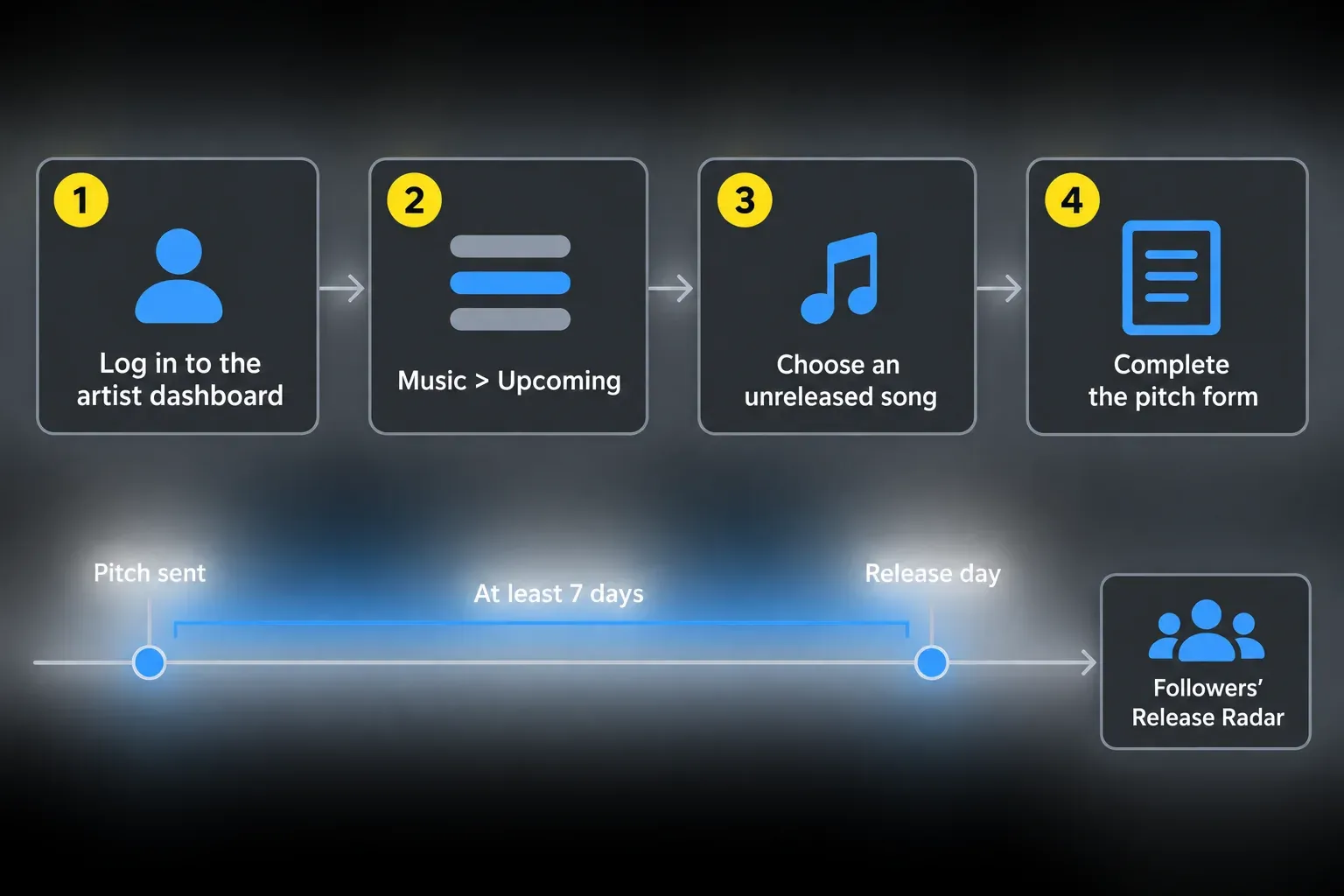
You cannot pitch a released song, a compilation, or a song on which you are only the featured artist. Once the pitched song goes live, you can pitch another eligible unreleased song. An editorial pitch does not guarantee playlist placement.
For Release Radar, pitching at least seven days early lets you choose the song, subject to Spotify’s eligibility rules. Spotify excludes songs a listener has already heard, re-releases already on Spotify, Various Artists releases and some alternative versions, such as acoustic, karaoke or live versions. Each listener gets at most one song per artist per week. Main and featured artists can qualify for Radar, but being credited only as the remixer does not qualify you. That is different from the featured-artist restriction on editorial pitching.
Check the live release like a listener and a rights owner
- Play the beginning, a middle section and the ending of every track.
- Confirm the primary artist, featured artists, title, version and explicit marking.
- Open the credits and compare names with the release sheet.
- Check that the single or album landed on the intended artist profile.
- Save the Spotify release and track links beside the ISRC and UPC.
- Verify that the distributor dashboard shows the same live release.
If the release is on the wrong profile, report it in Spotify for Artists and tell the distributor. Spotify's current Upcoming-release guidance says content mismatches usually appear across streaming services and that reporting the problem to Spotify fixes only Spotify.
Understand who pays you and reject guaranteed streams
Spotify pays recording rightsholders through the licensor that delivered the music, usually the label or distributor. The distributor then pays you under its agreement. Songwriting and publishing royalties follow a separate path. The Spotify royalties guide explains that flow and doesn't promise a fixed per-stream rate.
Spotify’s track monetization rules add a floor: a track has to reach at least 1,000 streams in the previous 12 months, from a minimum number of unique listeners that Spotify doesn’t publish, before it’s included in the recorded royalty pool. The threshold doesn’t change how publishing royalties are calculated.
Do not buy “guaranteed streams” or paid guaranteed Spotify playlist placement. Spotify's artificial-streaming warning says those services violate its terms and can lead to corrected counts, withheld royalties, playlist removal, distributor action or content removal. Artificial streaming isn't promotion. A legitimate release plan can buy advertising or hire transparent promotion. It can't buy fake listening intent.
Frequently asked questions
Can I upload a song directly to Spotify for free?
Not for an ordinary public audio release under Spotify's current workflow: use a distributor or label. Some distributors offer free tiers, while others charge a subscription, per-release fee or commission. Direct full-length video upload exists only as a separate limited beta for eligible artist teams.
Do I need Spotify for Artists before uploading?
No. Deliver the first release through your distributor; Spotify creates the artist profile after delivery. Ask the distributor for its artist link or URI, then request Spotify for Artists access before the release goes live.
How long does Spotify take to show an upcoming release?
Spotify says it can take around 48 hours after the distributor has delivered the music. That estimate starts after delivery to Spotify, not when you first upload files to the distributor.
How many days before release should I pitch a song?
Aim for at least seven days before release to allow editorial lead time and select the eligible song for Release Radar. If less time remains, check whether the unreleased song is available to pitch, but do not count on timely review or first-week Radar selection. Once the song is live, you cannot pitch it. Three to four weeks is a planning buffer; Spotify doesn’t require it.
Can I pitch more than one song from an album?
Only one unreleased song can be pitched at a time. After that song goes live, you can pitch another future release. Spotify editors may still choose a different song from the release.
Does a Spotify playlist pitch guarantee placement?
No. Editorial placement is not guaranteed. Pitching at least seven days early selects an eligible song for followers’ Release Radar, subject to its rules. Already-heard songs, re-releases and some alternative versions are excluded, so do not promise every follower will receive the track.


