What Is an ISRC Code? How to Get One for Your Song
Get an ISRC for a finished recording, avoid duplicate codes, and know when a remix, remaster or distributor change needs a different decision.

If you are releasing one finished master, you need one ISRC for that recording. The simplest route for most independent artists is to let their distributor assign it during upload, save the code in a release record, and reuse that same code whenever the unchanged master appears again.
An ISRC is an identifier, not an audio fingerprint, copyright registration or royalty account. Keep it attached to the correct recording: a second code for the same master can split records, while reusing one code for two different versions makes them harder to identify.
The quick answer: how should you get an ISRC?
| Your situation | Best starting route |
|---|---|
| You are releasing a single or occasional EP through a distributor. | Use the distributor's assignment if it is included, then keep the code in your own records. |
| You want one or a few codes recorded directly in the international database. | Use IFPI's online assignment service after checking that the recording does not already have a code. |
| You run a label or assign many codes to recordings you own. | Apply through the official agency for your territory for an ISRC Prefix and maintain an assignment ledger. |
| The same master was released before. | Find and reuse its existing ISRC. Do not create another one. |
Lock the recording you plan to release before assigning its code. Finish the master with a controlled Logic Pro mastering workflow, then keep that version identified in your release record. A later mix edit may leave you with a different recording.
What is an ISRC code?
ISRC stands for International Standard Recording Code. It identifies one sound recording or one music video—not the composition, lyrics, album, product barcode or artist as a person.
Think in layers. A songwriter's composition can be identified by an ISWC. Your finished studio master of that composition has an ISRC. A live take, radio edit, remix and music video are separate recorded assets and can need their own codes. A single or album as a commercial release normally uses a product identifier such as a UPC or EAN in addition to the track-level ISRCs.
The US Copyright Office's music guide separates these identifiers for the same reason: musical works and sound recordings are different rights objects. An ISRC can help systems match usage to the right recording. The characters don't prove who owns it.
How the 12-character ISRC format works
IFPI’s ISRC structure has three elements: a five-character Prefix Code, a two-digit Year of Reference and a five-digit Designation Code. The illustrative example AA6QZ2600047 may be printed as ISRC AA-6QZ-26-00047. Do not use this example for your recording. The ISRC label, spaces and hyphens aren’t part of the 12-character value supplied in a data feed.
| Part | Example | What it means |
|---|---|---|
| Prefix Code | AA6QZ | Five characters allocated through the ISRC system. Do not invent your own prefix. |
| Year of Reference | 26 | The last two digits of the year the ISRC is assigned. It is not necessarily the recording or release year. |
| Designation Code | 00047 | A unique five-digit number from the range available to the registrant for that year. |
The code can’t tell a distributor who owns the recording now. Keep the artist, title, version, rights owner and publication year in the metadata beside it. The prefix and year aren’t a substitute for those records. The prefix’s first two characters were once called the Country Code, but they don’t reliably name a country. The US agency, for example, issues prefixes that begin with US, QM, QZ or QT.
How to get an ISRC code for your song
- Check your previous distributor dashboard, label copy and the International ISRC Search before requesting a code. A missing search result does not prove that no ISRC exists.
- Confirm who may assign it: the recording rights owner, a long-term exclusive licensee, an appointed ISRC Manager or an authorized assignment service.
- Choose distributor assignment, IFPI online assignment or a registrant prefix from the official agency for your territory.
- Prepare the artist, title, version, first-publication year, duration, asset type and explicit-content status for the final recording.
- Accept one code and save its 12-character value in your release record as soon as it is available. A distributor may assign it during its upload or submission process; follow that service’s timing.
- Reuse that code for later deliveries of the same recording. Assess an edited or remastered version under the rules below before requesting another code.
Route 1: let your distributor assign it
For most independent releases, I’d start here because it’s the lowest-friction route. Spotify says labels or distributors typically assign ISRCs. The Spotify for Artists glossary tells artists to hold onto that identifier for the life of the recording, including future distribution changes.
Don't assume every plan includes assignment, or that every dashboard exposes the code at the same stage. Before you pay or submit, check three things: whether assignment costs extra, where the final code appears, and whether the service lets you enter an existing ISRC for a previously released master.
A distributor-assigned code doesn't transfer ownership of the recording by itself. Your distribution agreement controls the service relationship. Rights data stays separate from the identifier.
Route 2: assign one through IFPI online
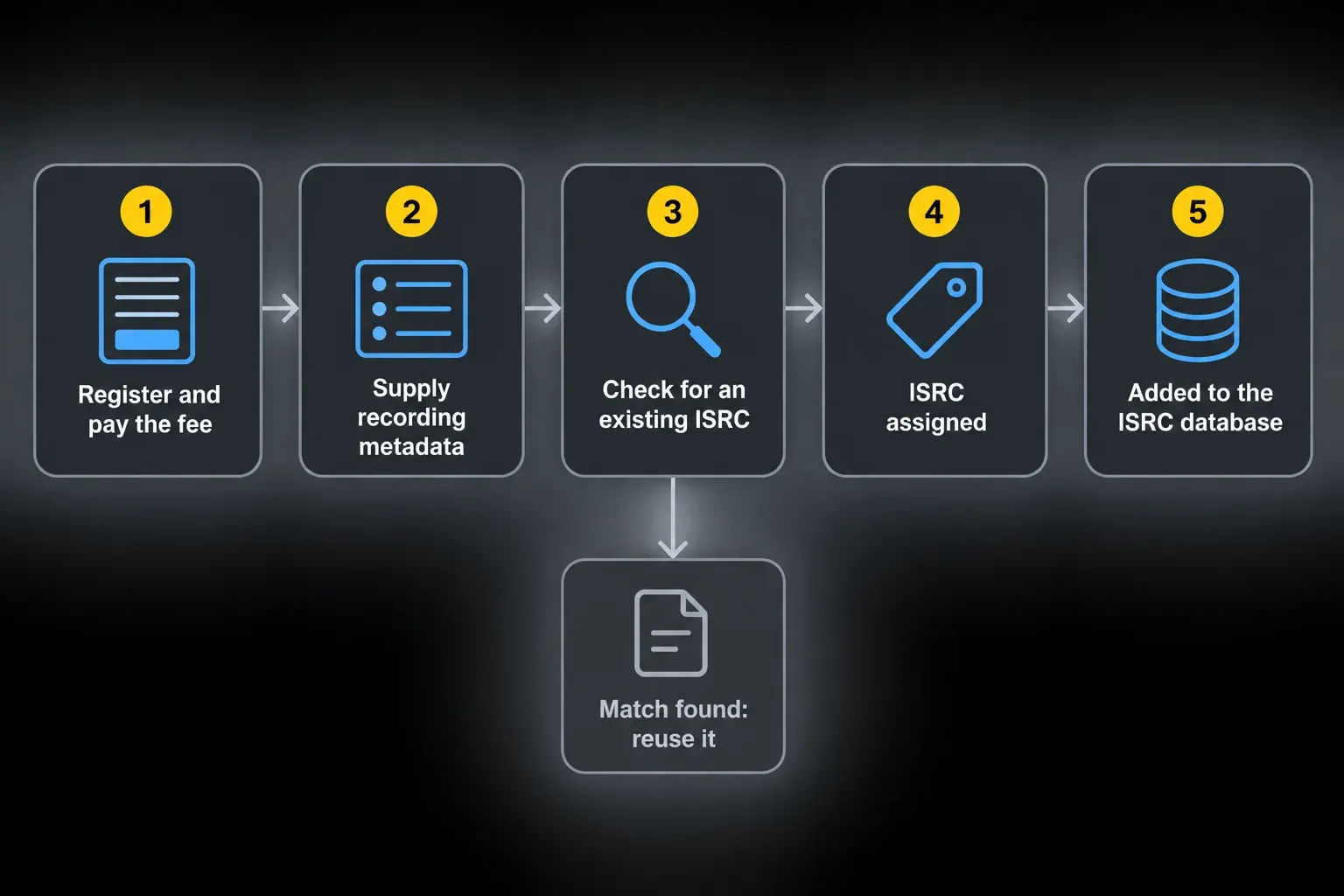
IFPI’s online assignment service provides a code after you register, enter the recording metadata and complete its lookup and assignment process. Assignment and public search visibility are different: IFPI’s database FAQ says these assignments appear in the International ISRC Database after around 10 days.
IFPI’s online service charges £15 plus UK VAT where applicable for 30 credits. A new assignment uses three credits: one for lookup and two for assignment. An existing match uses only the lookup credit. Confirm the current fee on the linked assignment page before paying. It isn’t a universal price for every distributor or national agency.
Route 3: obtain your own ISRC Prefix
An ISRC Prefix suits a label or catalog owner prepared to track assignments and maintain accurate metadata. Apply through the official agency for your territory. Procedures and fees vary. If your territory has no listed agency, contact the International ISRC Registration Authority through IFPI’s prefix application guidance.
Use your allocated prefix and range for recordings you own or control as a long-term exclusive licensee. Assigning codes for unrelated clients is a separate role: IFPI requires specific appointment as an ISRC Manager. A studio or distributor doesn’t gain that authority just by handling the audio.
Check for an existing code before assigning a new one
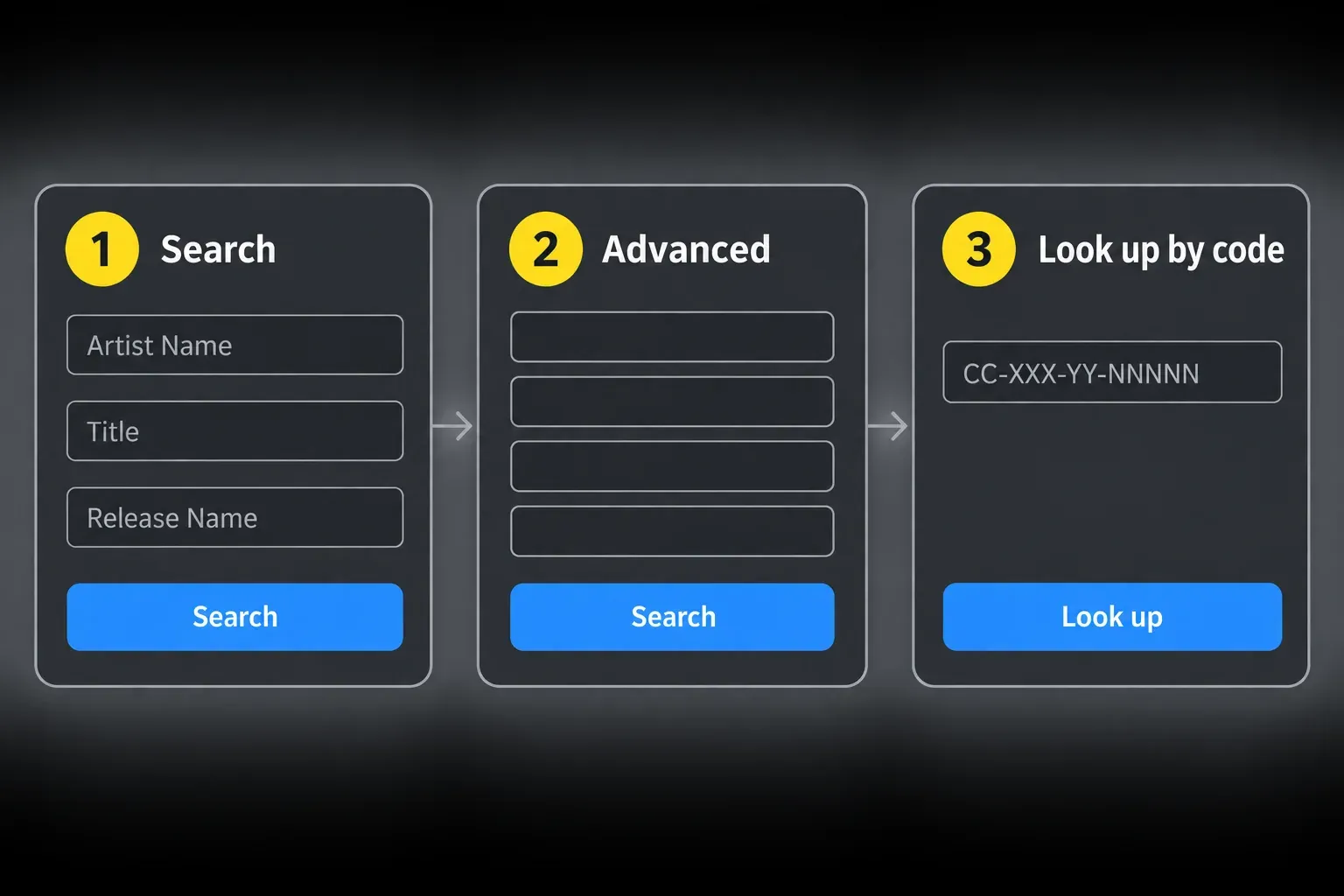
Check your distributor, label or prior release paperwork first. Then use the International ISRC Search by artist, title, release or code. No result is not proof that the recording has no ISRC. The data may not have been submitted or become searchable yet. Confirm with the original issuer before requesting another code.
If you find a plausible match with different metadata, don't guess. Compare duration and version details, then ask the original label, distributor or rights owner. A duplicate ISRC can split reporting. Attaching an unrelated existing code can misidentify the recording.
What if the recording has two ISRCs?
Do not request a third code. Under IFPI’s error-recovery rules in Annex A.13, the registrant selects a preferred ISRC, retains the others in its records and informs delivery partners. If different parties assigned the codes, the first assigning owner should coordinate the choice. If one code identifies two different recordings, contact the ISRC agency and distributor for correction.
A wrong assignment-year field alone isn’t a reason to replace an existing code. The registrant must first check whether it conflicts with another recording or rights holder.
Keep the old ISRC or assign a new one?
| Situation | ISRC decision |
|---|---|
| The exact single master appears later on an album. | Keep the existing code. |
| You change distributor, label, territory, file format or bitrate without changing the recording. | Keep the existing code. |
| Ownership of the unchanged recording changes. | Keep the existing code and update rights metadata separately. |
| You make a remix, radio edit, new performance or surround mix. | Assign a new code. |
| You add or remove a verse, chorus or other performance section. | Assign a new code; duration alone does not decide this. |
| A speed or fade change alters length without substantively changing creative input. | Keep the code for a difference under 10 seconds; assign a new one at 10 seconds or more. |
| You only add or remove noncreative silence, ambience or applause. | Keep the code, even when the duration difference exceeds 10 seconds. |
| You apply a routine remaster without new creative input. | Keep the existing code. |
| The remaster adds significant creative input or materially changes the recording. | Assign a new code for a creatively changed recording; ask the agency if the classification is uncertain. |
| You create a music video using the same audio. | Assign a separate code to the music video. |
The duration exceptions come from Annex A.10 of the ISRC Handbook; there is no blanket ten-second rule. A level adjustment or unchanged EQ/compression treatment across the whole recording isn’t, by itself, new creative input under those rules. IFPI’s When To Assign and When Not To Assign pages cover the broader reuse principles.
Can you generate an ISRC code yourself?
To construct codes yourself, you need a prefix and designation range allocated by an official agency. A generator or spreadsheet can check the format, but it can’t grant assignment authority. Never make up a prefix: it may belong to someone else.
Use the allocated range, the two-digit assignment year and a unique designation number for each recording. Reject duplicate numbers within the same prefix and year. Keep an assigned code reserved even if its release is cancelled.
Without a prefix, use an authorized distributor, ISRC Manager, national agency or IFPI’s online service. Before buying from another provider, check its assignment authority, existing-code lookup and metadata records. A valid-looking string alone isn’t enough.
Five ISRC mistakes to catch before release
- Assigning before the version is locked. Decide which mix and edit is the release master first. A later radio edit or replaced performance is a different asset, however you name the file.
- Letting a second distributor create a new code. When moving an existing release, choose the option for a previously released track and enter the old ISRC.
- Using the release year in a self-assigned code. The Year of Reference is the year of assignment. A 2024 recording given its first code in 2026 uses
26. - Giving an album one track code. Each distinct recording needs its own ISRC. The release itself uses a separate product identifier.
- Keeping the only copy inside a vendor dashboard. Export your codes and metadata before closing an account or transferring a catalog.
Before delivery, compare the chosen master, version label and ISRC record. Resolve a code that belongs to a different recording before submitting. If your distributor assigns the code during submission, check and save the returned value rather than creating a second one yourself.
Does an ISRC collect royalties?
No code collects money by itself. The ISRC lets services, labels, distributors and rights organizations refer to the same recording in usage reports. Payment still depends on delivery, rights ownership, registrations and the agreements between the platform, licensor, label, distributor and artist.
Spotify's royalties guide explains that recording royalties go to the rightsholder through the selected licensor, usually a label or distributor. Publishing royalties follow a separate path for the composition. An accurate ISRC helps identify the recording in that chain. It doesn't replace songwriter, publishing, neighboring-rights or copyright work.
US artists have one more registration to consider. The US ISRC Agency’s assignment guidelines recommend registering each recording and its ISRC with SoundExchange, the performance rights organization for sound recordings rather than songwriters. That matters if you’re eligible for public-performance royalties from satellite radio and internet streaming. Outside the US, look for the local organization that handles sound and video recording rights.
Save a release record before you upload
Create one plain spreadsheet or label-copy document that outlives any distributor account. For each master, keep the ISRC, exact artist and title spelling, version label, duration, explicit flag, first release date, rights owner, distributor, source master filename and the date the code was assigned.
Store the final master and that record beside a recoverable project archive. Our Logic Pro backup guide covers the project side. The metadata sheet covers the release identity. Handing the project to another engineer? Include the chosen master and label copy rather than a folder of ambiguous bounces. The Logic Pro handoff checklist helps keep that delivery readable.
Once assigned, an ISRC stays reserved for that recording even if the release is cancelled. Mark the release as cancelled or unreleased and keep the code recorded as used. Never recycle it for another recording.
When the master and its metadata agree, follow the Spotify release workflow for delivery. The Recording & Editing hub covers the recording and handoff steps before that point.
Frequently asked questions
Can I get an ISRC code for free?
Many distributors include ISRC assignment in their release service, but plans and fees vary. IFPI's direct online service is paid, and national-agency procedures differ by territory. Check the exact service before submission rather than assuming every route is free.
Do I need a new ISRC when I change distributors?
No, not for the same recording. Give the new distributor the existing ISRC and keep the title, artist, version and other core metadata consistent. Changing the delivery company does not create a new master.
Does a remaster need a new ISRC?
Not automatically. A routine remaster without new creative input keeps its ISRC. A creatively changed recording needs a new one under IFPI’s Handbook. Document the changes and ask your ISRC agency if their classification is unclear; the “remastered” label alone does not decide it.
Is an ISRC the same as an ISWC or UPC?
No. ISRC identifies a sound recording or music video. ISWC identifies the underlying musical work, and UPC or EAN identifies a commercial release such as a single or album product.
Can the same ISRC be used for a single and an album?
Yes, when both contain the exact same recording. Reuse the single's code on the album. If the album uses a different edit, mix or performance, assign a code for that different recording.
Should I put the ISRC inside my WAV file?
Follow your distributor’s delivery specification. For example, Symphonic does not require ISRC inside the WAV; it sends the identifier in delivery metadata. IFPI recommends carrying the code with the recording where supported. A missing file tag is not a reason to invent another code or change the audio.


