Change Time Signature in Logic Pro: 6/8, 7/4 & Mid-Song
Change the whole project meter or add 6/8 and 7/4 sections with the Signature track, then restore the old meter and verify the grid.

For a song that stays in 6/8 or 7/4, set its initial time signature in the LCD. For a mid-song change, add an event in the Signature track and another where the original meter returns. A 7/4 event does not stop after one bar by itself.
This guide covers both jobs in the current Logic Pro for Mac workflow. It also explains what the numbers mean, why 6/8 can feel wrong even when the project says 6/8, and what to check before changing the grid under an existing arrangement.
If you're building the arrangement from an empty project, the meter map is one step in a larger Logic Pro songwriting and production workflow. Set it before recording when you can. Edit it later only with a clear backup and boundary check.
One meter throughout: use the LCD. A section that changes meter: use the Signature track. Check exact event positions: use the Signature List. The Score Editor edits the same global meter events, not a separate meter for one staff.
Change the time signature for the whole project
For a new song that stays in one meter, use the project setting rather than drawing a change later in the timeline:
- Move the playhead to the start of the project.
- Click the down arrow at the right side of the LCD and choose Beats & Project if the meter is hidden.
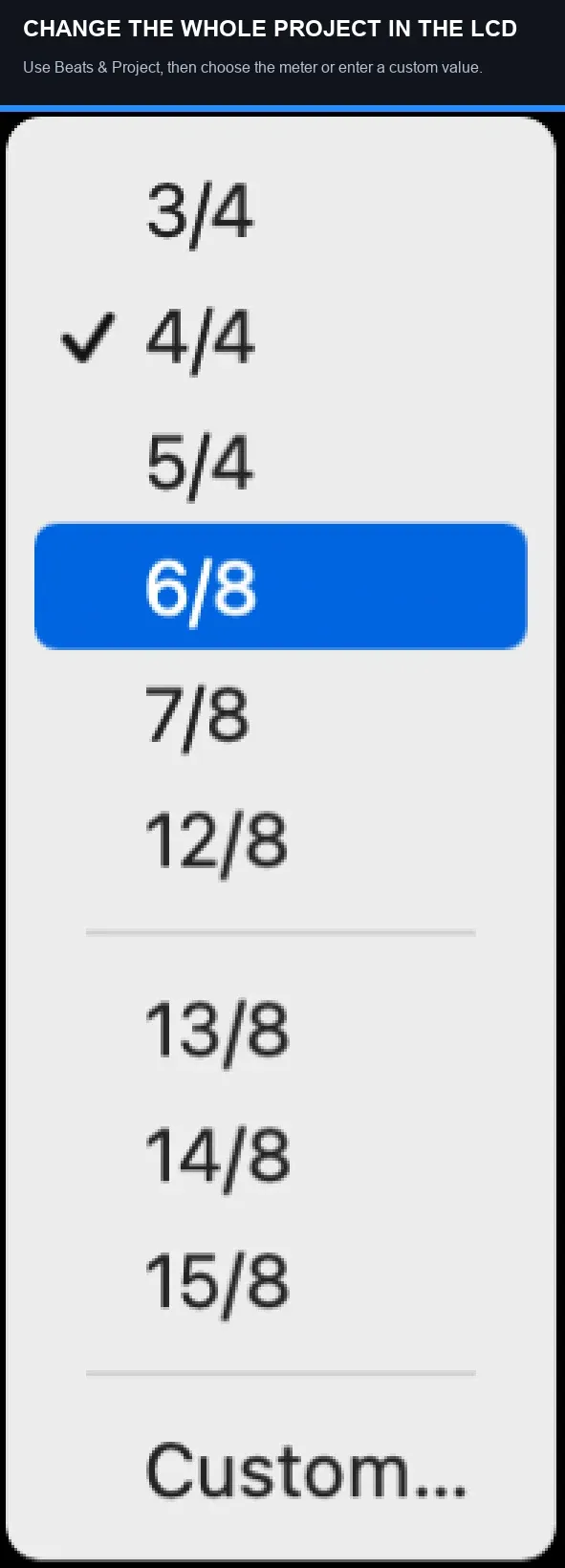
- Click the time signature and choose a preset. For a custom meter, choose Custom.
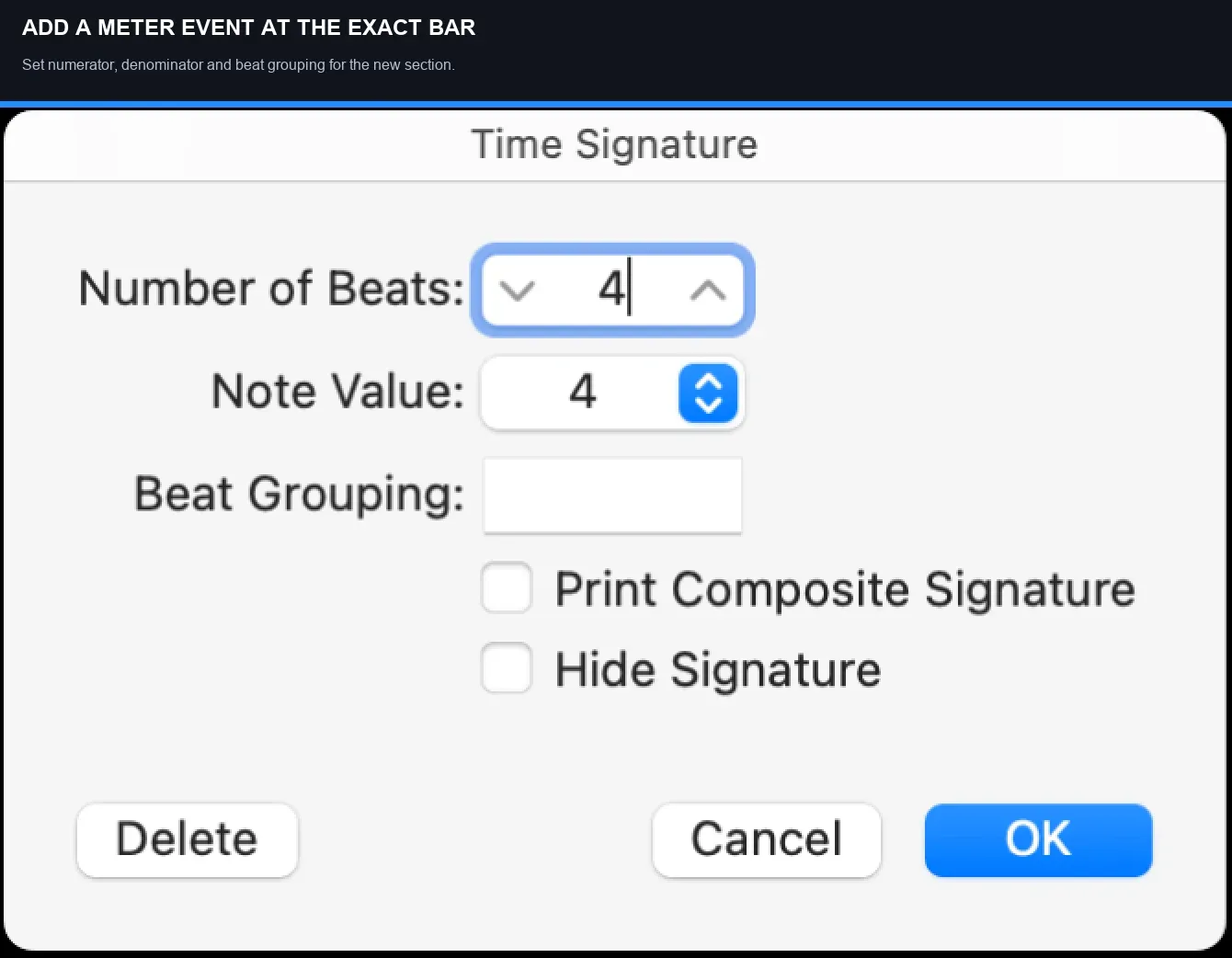
- If you chose Custom, Number of Beats is the numerator and Note Value is the denominator in the illustrated dialog. Enter 6 and 8 for 6/8, or 7 and 4 for 7/4, then click OK. A preset does not need this extra entry.
- Play with the metronome and check that the downbeat matches the start of the phrase.
Apple's current guide confirms that the project meter can be edited from the LCD, Signature List, or Signature track. The LCD is the cleanest choice when there's only one time signature.
If the project already has meter changes, editing the initial event will not remove the later ones. Review them in the Signature List before deciding which to keep or delete. With multiple signatures, the LCD edits the event at or most recently before the playhead; moving the playhead alone does not create a new event. Apple explains this in its time-signature editing instructions.
The top number counts the note units in a bar. The bottom number names that unit: 4 means quarter notes, 8 means eighth notes. Changing meter redraws bar lines and the editing grid; it does not by itself stretch recorded audio or rewrite existing MIDI notes. This is different from changing the tempo or regenerating a performance.
Set up 6/8 without confusing meter and BPM
For 6/8, enter 6 as the numerator and 8 as the denominator. A common feel is two larger pulses, each containing three eighth notes: 1-2-3, 4-5-6. Count those larger pulses as dotted quarters; do not confuse them with the six written eighth-note units.
Logic’s LCD tempo is measured in quarter notes per minute, including when the meter is 6/8. For a reference marked dotted quarter = 80, enter 120 BPM: one dotted quarter lasts three eighth notes, or 1.5 quarter notes, so 80 × 1.5 = 120. Changing the meter alone does not perform that tempo conversion. First check which note value the reference means.
To hear two grouped clicks per 6/8 bar, set the grouping and metronome together:
- Double-click the relevant time signature in the Signature track. Set Number of Beats to 6 and Note Value to 8.
- Enter 33 in Beat Grouping for two groups of three. Check that the resulting numerator is still 6, then click OK.
- Open File > Project Settings > Metronome. If Simple Mode is hiding the detailed controls, Control-click the Metronome button and turn Simple Mode off in its shortcut menu.
- Enable Audio Click and Click while playing. Turn Group on and Beat and Division off. Keep Bar on if you want a separate downbeat accent; adjust its note or velocity against Group.
- Play a few bars and count 1-2-3, 4-5-6. The grouped pulses should fall on 1 and 4. At 120 quarter-note BPM, those dotted-quarter pulses run at 80 per minute.
Apple’s metronome project settings define Bar, Group, Beat and Division separately. For six individual eighth-note clicks instead, enable Beat. That changes the click pattern, not the project tempo.
Set up 7/4 so the accents follow the riff
For 7/4, enter 7 over 4. The bar now contains seven quarter-note units. There's no universal accent pattern. A riff may feel like 4+3, 3+4, or 2+2+3. Use the grouping that matches the phrase, not the grouping that looks most symmetrical.
Count the riff out loud before touching the grid. If the musical reset comes after four beats and then three, choose 4+3. If the last four beats form the obvious answer, choose 3+4. Logic's Time Signature dialog includes a Beat Grouping field for composite meters, as documented in Apple's guide to creating time-signature changes. Enter the grouping as 43, 34 or 223 in the field; Logic interprets these as 4+3, 3+4 or 2+2+3. The group total sets the numerator, so check that it still totals seven before confirming.
Grouping changes how the bar is understood and displayed. It doesn't add or remove notes. If recorded MIDI still accents the wrong beats, edit the performance or its velocity pattern. If the audio phrase is the wrong length, changing the meter label won't repair it.
Add a time-signature change in the middle of a song
Time signatures are global events in Logic Pro, so one change applies to every track from that position. Use the Signature track when the arrangement moves from one meter to another:
- Save a project alternative or duplicate. Choose Track > Global Tracks > Show Global Tracks. If Signature is hidden, Control-click the global-track header area and select Signature.
- Place the playhead at the first bar of the new meter. Confirm the intended musical downbeat before creating the event.
- Click that position in the time-signature area of the Signature track with the Pencil tool, or use Add Signature. If the reduced-height track offers a choice, select a time signature change, not a key signature change.
- Set Number of Beats and Note Value (the numerator and denominator), enter the desired Beat Grouping, check the total, and click OK.
- If the original meter returns, create another event for it at the first downbeat after the changed section. Check the revised ruler rather than copying an old bar number blindly.
- Open the Signature List and confirm the new event and the returning meter have the intended positions.
- Play across both boundaries with the metronome enabled. Check the phrase endings and later edit points, then save the project.
The Signature track instructions show how its time and key lanes change with track height. If the Protect button is active, turn protection off before editing the meter map.
For one bar of 7/4 inside a 4/4 song, add 7/4 at the first beat of the odd-meter bar. Then add 4/4 at the first beat of the following bar. Think of each event as a sign that stays in force until another sign replaces it.
Do not place the return event by guessing from the old bar numbers. Inserting a shorter or longer bar changes the musical grid after that point. Zoom in, check the ruler, and place the return where the musical downbeat actually belongs.
Use the Signature List when the timeline feels wrong
The Signature List shows every time and key signature event with its project position. Open it from the List Editors button in the control bar, then choose Signature. Apple's current Signature List reference confirms that you can create, copy, move, and delete events there.
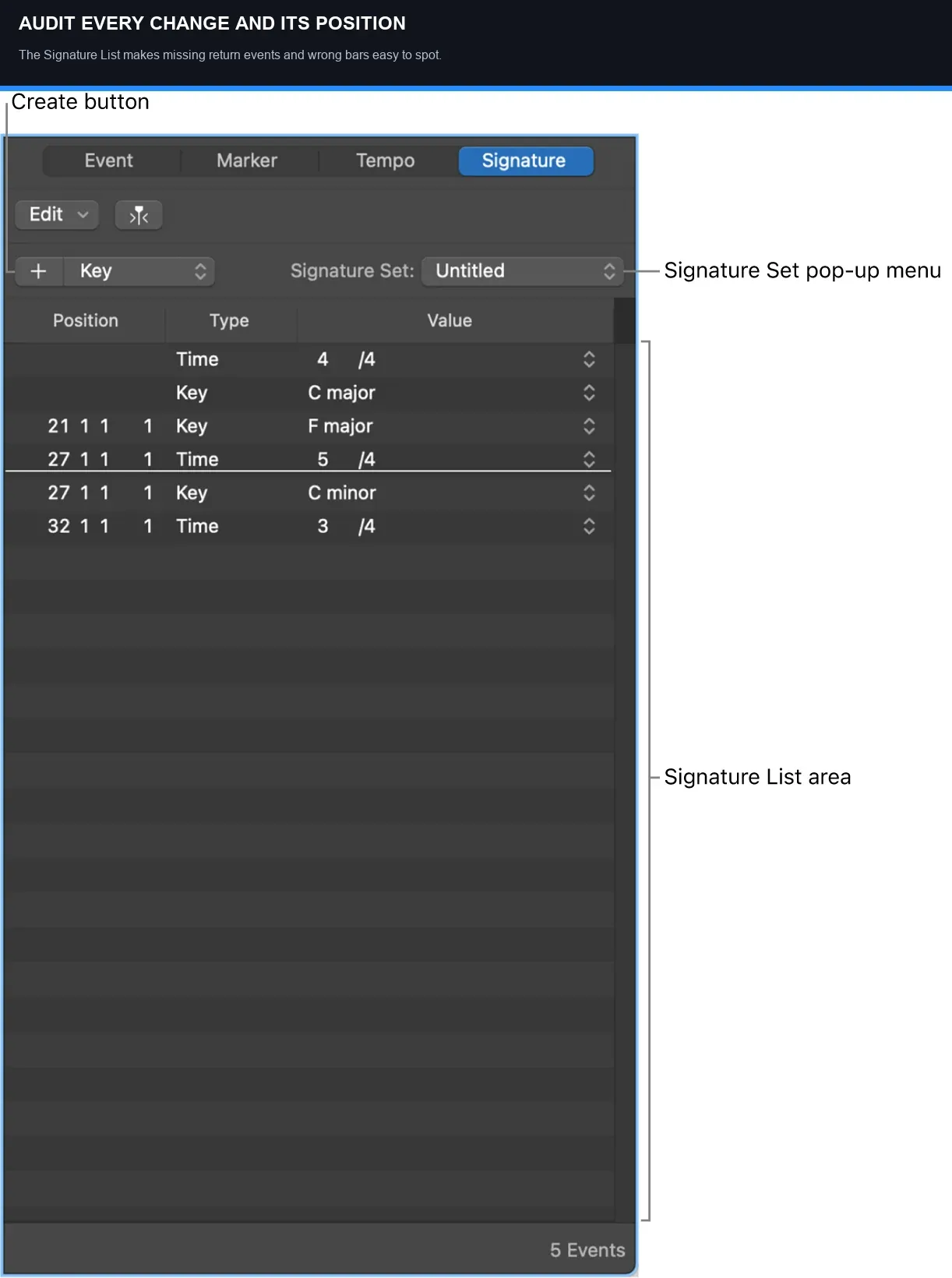
Use it to catch three common mistakes:
- The new meter starts one bar early or late.
- A temporary 6/8 or 7/4 section has no event that restores 4/4.
- Two signature events occupy nearly the same position after copying or rearranging a section.
You can delete later changes by selecting the intended time-signature event and pressing Delete. Do not select an adjacent key-signature event by mistake. Apple’s signature deletion instructions confirm that the initial time and key signatures cannot be deleted; edit the initial meter instead.
Do not confuse time signature, tempo, division and cycle length
These controls can change how the same section looks or feels, but they do different jobs:
- Time signature defines the number and type of beat units in each bar.
- Tempo controls how quickly the reference pulse runs.
- Division controls the subdivision used by position displays and many grid operations. It does not change the meter.
- Cycle length defines the section Logic repeats. A seven-beat cycle is not automatically a 7/4 time-signature event.
Suppose a loop lasts six eighth notes at the current project tempo and begins on a downbeat. Its repeats will cross bar lines in 4/4, because each bar contains eight eighth notes. In 6/8, that same duration fits one bar. The audio has not stretched: the ruler describes its length differently. An imported loop at a different tempo still needs a separate timing check.
Changing from 4/4 to 7/4 does not turn an eight-quarter-note phrase into seven quarter notes. The next bar begins after the seventh quarter-note beat; the phrase’s eighth quarter-note beat now falls in that next bar. Edit the phrase only if that is not the intended result.
When a reference track seems to “switch feel,” count the downbeats before adding signature events. A half-time drum pattern can remain in 4/4. A triplet feel can also remain in 4/4. Change the time signature only when the bar structure itself changes, not whenever the groove or subdivision changes.
Change meter safely in an existing Logic Pro song
Back up an existing arrangement before changing its meter map. A meter edit alone does not stretch recorded audio or rewrite existing MIDI notes, but their relationship to bars, beats and grid-based edits changes. Check the actual phrase boundaries before applying any further quantization or time-stretching.
- Save a project alternative or duplicate before editing the global meter map.
- Turn off cycle mode and note the absolute start of the important downbeats.
- Add the signature events from the beginning of the song toward the end.
- Check region boundaries, markers, automation moves, and edit points at every change.
- Revisit quantize settings only where the performance is actually off the intended grid.
- Bounce a short reference and listen without looking at the ruler.
Check markers, locators and automation against audible landmarks, not only their displayed bar numbers. Listen across volume and pan moves that were meant to land on a downbeat. Compare the original and edited projects from the same audible start point; do not assume every marker or automation event shifts in the same way.
If the performance needs a different tempo map rather than a different meter, use Logic Pro tempo and BPM controls. If imported audio drifts against a known tempo, the better tool may be Smart Tempo. Meter, tempo, and tempo detection solve different problems.
Fix the problems that appear after a meter change
The whole song changed instead of one section
The LCD edits an existing signature rather than inserting a new one at the playhead. Undo the unwanted change, open the Signature track, and create an event at the first bar of the section. For a temporary change, create the returning meter too.
The click is correct on paper but feels wrong
For two pulses in 6/8, use Beat Grouping 33 with Group enabled and Beat and Division disabled in the metronome settings. For individual eighth-note clicks, enable Beat instead. In 7/4, choose the grouping that follows the riff, such as 43 or 34. Check the reference tempo’s note value before changing BPM.
MIDI notes look off-grid
The notes may still play at the same time while the bar-and-beat grid underneath them has changed. Do not quantize the whole project blindly. Select the affected passage, confirm the intended subdivision, and use the workflow in our audio and MIDI quantize guide only where correction is needed.
The song does not return to 4/4
Add a 4/4 signature event at the first downbeat after the changed section. A time-signature event continues forward until a later event replaces it.
The return lands halfway through a phrase
Inspect the Signature List and ruler at high zoom. A one-bar 7/4 section is one quarter note shorter than two bars of 4/4, so later bar numbers and downbeats may not be where you expected from the old grid. Place the event at the musical boundary, not an old visual reference.
Three quick setups
| Song structure | Signature events | What to verify |
|---|---|---|
| Entire song in 6/8 | Initial event: 6/8, usually grouped 3+3 | Tempo note value and two-pulse feel |
| One 7/4 bar inside 4/4 | 7/4 at the odd bar, 4/4 at the next downbeat | Grouping, return event, later edit points |
| Verse 6/8, chorus 4/4 | 6/8 at verse, 4/4 at chorus, repeat as needed | Click accents and every section boundary |
Check each transition by starting playback one bar before it and listening through the following bar. Then inspect the same events in the Signature List. The click, ruler and intended downbeat should agree.
Keep the Signature track visible while arranging sections that change meter. Copying a chorus without its return event can leave the next section under the wrong grid. After any structural edit, scan the Signature List from top to bottom and confirm that every meter change has a deliberate musical reason and an exact boundary.
Frequently asked questions
How do I change the whole song from 4/4 to 6/8 in Logic Pro?
Move the playhead to the project start, show Beats & Project in the LCD, and choose or enter 6/8. If later time-signature events exist, review them in the Signature List: changing the initial meter does not remove them. Then check the grouping and the note value used by your reference BPM.
How do I change time signature for only one bar?
Add the new meter at the start of that bar in the Signature track, then add the previous meter at the start of the next bar. Without the second event, the new meter continues.
Does changing time signature change the tempo in Logic Pro?
No. Meter defines how beats are grouped into bars; tempo defines the rate of the pulse. Logic's tempo display still relates to quarter notes even when the time-signature denominator is 8.
Why did all my MIDI move after changing from 4/4 to 6/8?
Changing meter alone does not move the recorded performance; it changes how the bar-and-beat grid describes it. Check the intended musical positions before quantizing. If playback speed also changed, inspect the tempo map and any other edits separately.
Should 7/4 be grouped 4+3 or 3+4?
Either can be correct. Count the riff and place the stronger internal accent where the phrase naturally turns. Other groupings, including 2+2+3, are also valid.
Can I delete the first time signature in a Logic Pro project?
No. Logic Pro requires an initial time and key signature. You can edit the first time signature and delete later signature changes.


