Track Alternatives vs Project Alternatives in Logic Pro
Track Alternatives are for different versions of one track. Project Alternatives are for separate versions of the whole Logic Pro project. Here is how to choose between them.

If you are comparing different takes, arrangements, or mix decisions in Logic Pro, the name “alternative” can make the choices sound more similar than they are. The useful dividing line is simple:
- Track Alternatives change the versions of one track.
- Project Alternatives preserve different versions of the whole project.
- Automatic backups give you recovery points for earlier saved states.
- Save a Copy or a project package creates a separate file you can archive or hand off.
Once you keep those four levels separate, versioning in Logic Pro becomes much easier to manage. It also fits naturally with the rest of the site’s Logic Pro recording and editing guides. You can keep vocal takes together without cloning a complete project, branch a song arrangement without disturbing the working version, and make a self-contained handoff when the project needs to leave your Mac.
Track Alternatives are for one track
A Track Alternative is a different version of a single track. Each alternative can hold its own regions, so it is a good fit when the rest of the arrangement should stay in place while you compare performances or treatments. Apple’s Track Alternatives documentation describes the commands for creating, duplicating, renaming, switching and removing them.
Imagine a lead vocal track with three viable performances. You could keep the clean take active, duplicate it before trying a more aggressive edit, and keep another alternative for a looser double. The project still has one lead vocal track in the arrangement; the alternative menu is where you decide which version is currently active.
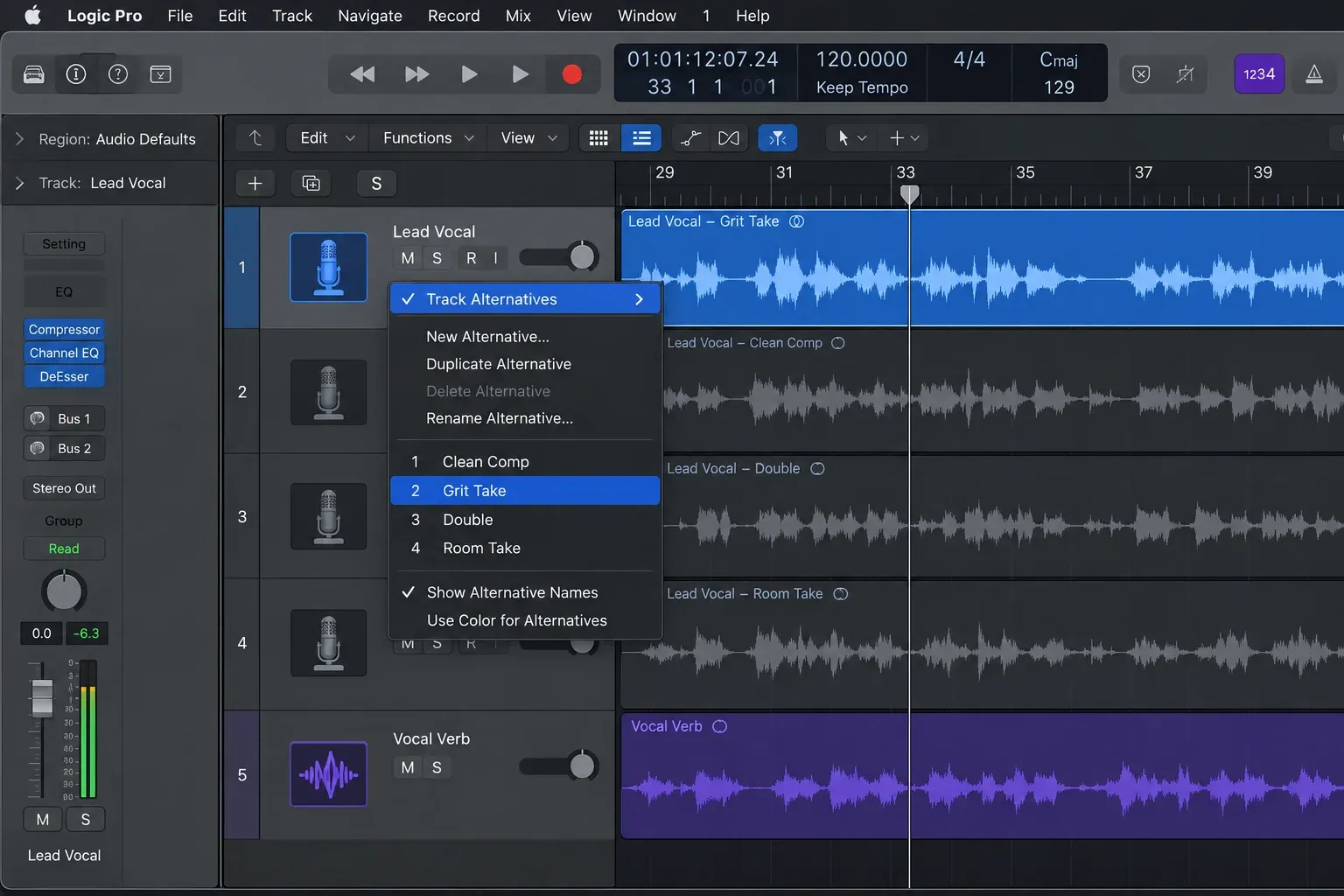
What Track Alternatives are useful for
- Different takes: keep several performances available without stacking every take in the main arrangement.
- Comping decisions: compare a comp against another edit while keeping the track’s place in the song.
- Track-level sound choices: preserve different edits, fades, regions or processing ideas for one instrument or vocal.
- Low-risk experiments: try a new edit without immediately throwing away the version that was working.
You can create an empty alternative when you want a clean version of the track, or duplicate the current alternative when the next version should start from what is already there. Rename alternatives as soon as they become meaningful. “A,” “B” and “C” are useful while recording, but names such as Lead Vocal — clean comp, Lead Vocal — grit and Lead Vocal — double are much easier to understand later.
Track Alternatives are a poor place to store a completely different arrangement. If the change affects many tracks, markers, routing choices and plug-in decisions, you are moving beyond a track-level problem.
Project Alternatives are for the whole project
A Project Alternative is a separate version of the entire Logic Pro project. It is the right level when the song itself is branching: one version has a shorter intro, another has a different chorus arrangement, and a third is a print-oriented mix with different balance decisions.
Apple’s Project Alternatives and Backups guide treats project alternatives as separate project versions, alongside the automatic backups that let you return to earlier saved states. That distinction matters because switching a Project Alternative can change the complete project context rather than just the contents of one track.
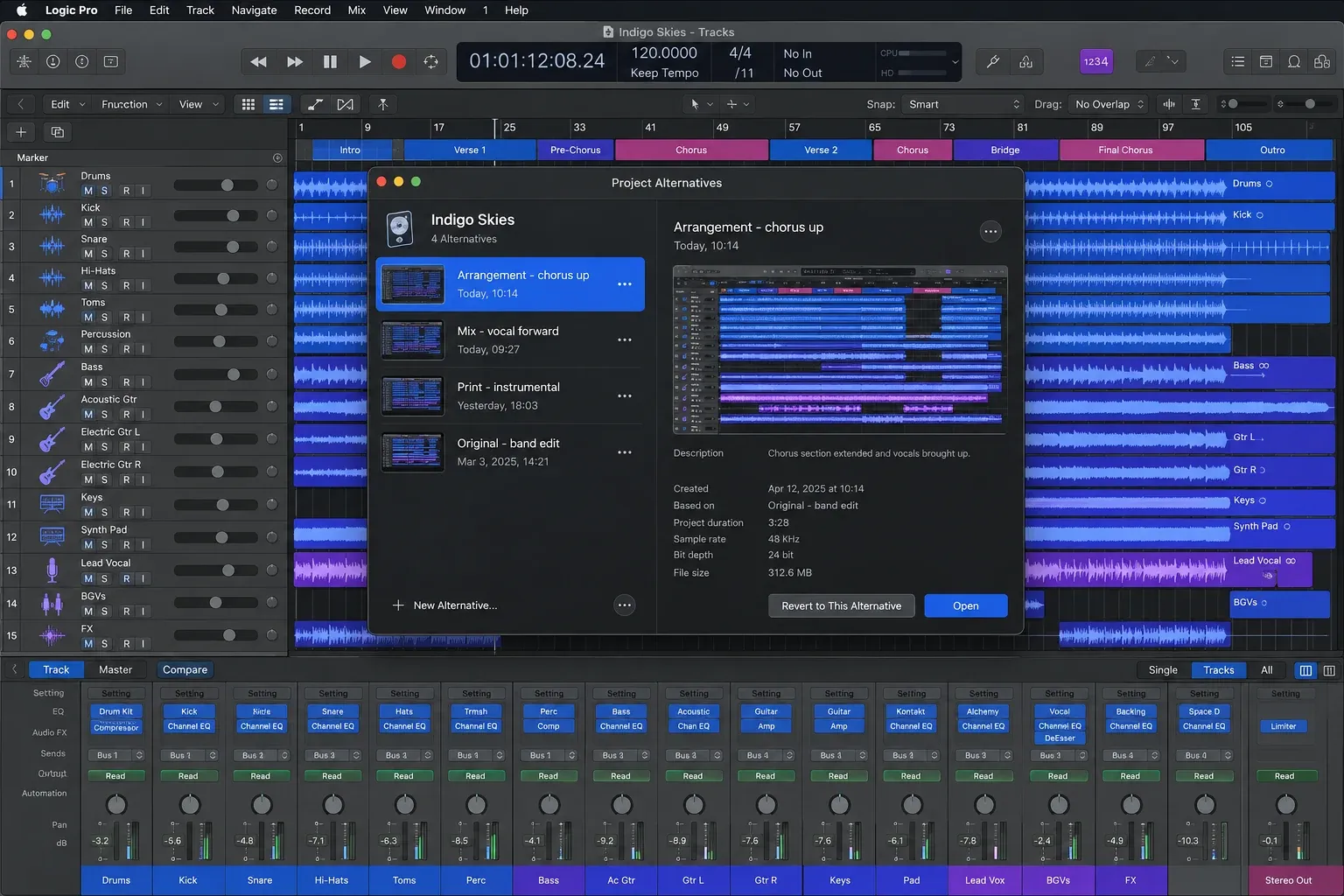
Good uses for Project Alternatives
- Arrangement branches: keep a chorus-up version separate from a version with a longer intro or a stripped-down section.
- Mix revisions: preserve named balance decisions such as vocal-forward, instrumental or reference-ready.
- Editorial versions: keep an explicit version for a shorter cut, alternate ending or different delivery requirement.
- Major production experiments: protect the current song while changing routing, structure or many tracks at once.
Project Alternatives help you branch inside the same project context. They do not replace an external backup strategy, and they do not automatically give another person a portable copy of every asset. When a collaborator needs a file they can open independently, use the save and sharing workflow that matches the handoff. The LogicPros guide on sharing a Logic Pro project is the next step when the project is leaving your current workspace.
Track Alternatives vs Project Alternatives
The fastest decision rule is to ask where the change lives.
| What changed? | Use | Example name |
|---|---|---|
| One track or one performance | Track Alternative | Lead Vocal — clean comp |
| Many tracks or the song structure | Project Alternative | Arrangement — chorus up |
| A previous saved state you may need to recover | Automatic backup | Use the dated recovery point |
| A separate handoff or archive file | Save a Copy / project package | Song Title — mix handoff |
There is no prize for forcing every version into one feature. A clean project can use all four levels at once: Track Alternatives for takes, Project Alternatives for song branches, automatic backups for recovery, and a project package for the version you send away.
Automatic backups are recovery points
Automatic backups solve a different problem from alternatives. They give you a way back after an unwanted edit, a mistaken save or a project change you decide to undo later. They are safety nets, not a naming system for creative branches.
That difference changes how you should use them. If you intentionally want two versions of a chorus, create and name a Project Alternative. If you want protection while you work, leave backups available and use them as recovery points. For a broader backup routine, keep the LogicPros guide to backing up Logic Pro projects alongside your session checklist.
Do not treat a backup as the clean handoff version. A recovery point answers “what did this project look like earlier?” A handoff copy answers “which exact project should another person open?” Those are different questions.
Save a Copy and project packages are separate files
Save a Copy is the choice to make when you need a distinct saved file for an archive, a client handoff, a long-term milestone or a branch that should live outside the current working project. Apple’s Logic Pro project-saving guidance and its documentation on managing project assets explain why the file and its media need to be considered together.
A project package is especially useful when the recipient needs the project assets gathered with the project. The exact contents still depend on the save option and the project’s asset settings, so check the package before sending it. If you are moving a large project to another location, consolidating the project assets can help you avoid a handoff that opens with missing files.
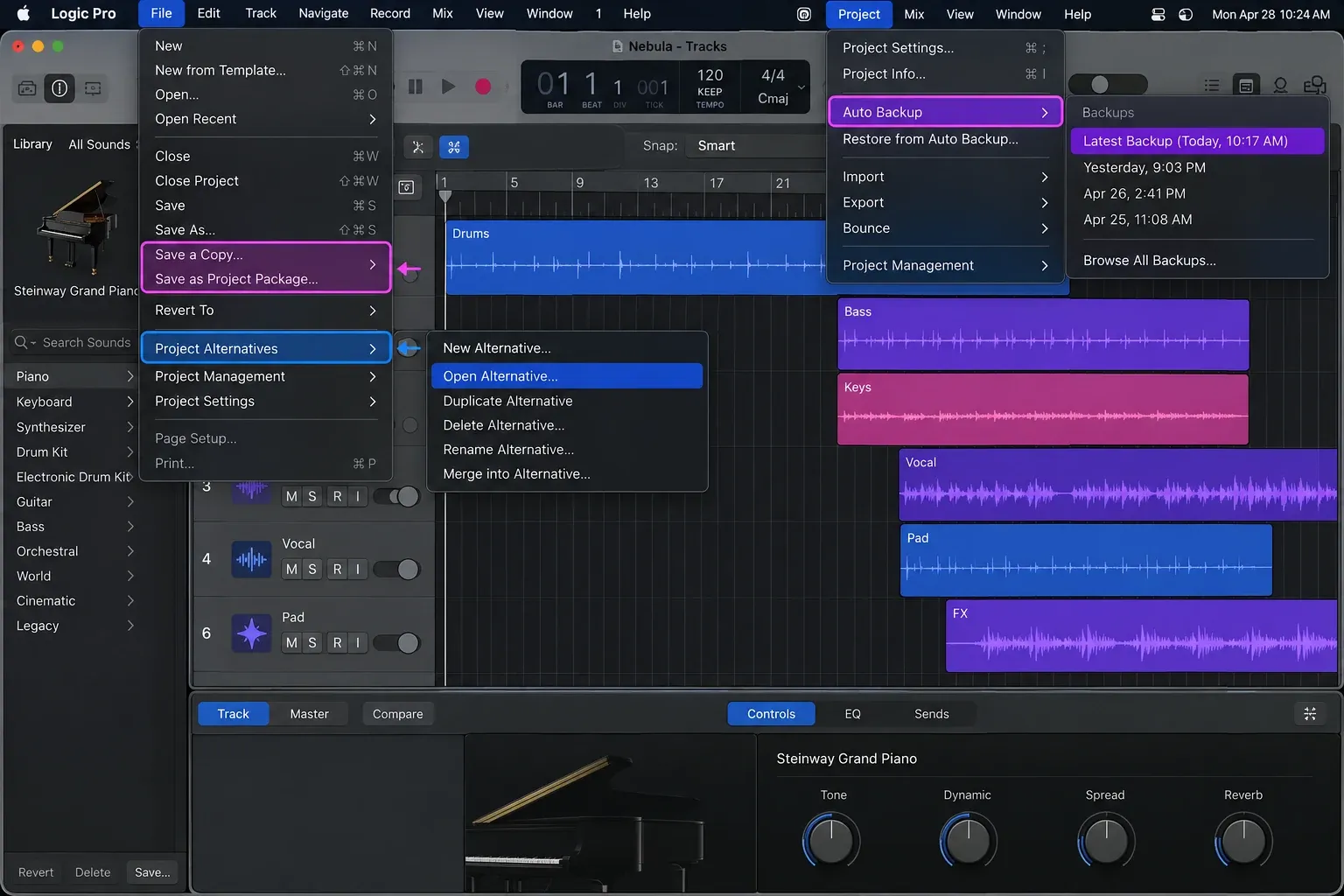
A naming system that stays readable
Names should tell you both the level and the reason for the version. Keep the first part stable so related versions group together, then add the decision that makes the version different.
- Track Alternatives: Lead Vocal — clean comp, Lead Vocal — grit, Guitar — octave take.
- Project Alternatives: Arrangement — chorus up, Mix — vocal forward, Print — instrumental.
- Save a Copy files: Song Title — 2026-09-24 — mix handoff, Song Title — archive — drums edit.
Use a consistent separator and avoid names that depend on memory. “Final,” “final 2” and “new final” stop being useful as soon as the project comes back a week later. A short description of the actual decision is more durable than a promise about its status.
Which option should you choose?
Choose a Track Alternative when the rest of the song should remain unchanged and you are comparing versions of one track. Choose a Project Alternative when the branch changes the arrangement, several tracks, the mix context or the delivery version. Use automatic backups for recovery. Use Save a Copy or a project package when the version needs its own file, archive location or handoff.
That workflow also keeps your main project easier to read. Recording and editing decisions stay close to the track, song-level branches stay at the project level, and portable milestones become explicit files. If you are building a repeatable starting point for sessions, keep your versioning scheme alongside your Logic Pro templates. For a related track-level safeguard, see the comparison of Track Protect and Freeze.
The practical rule is simple: use the smallest versioning level that matches the change. That keeps alternatives useful, backups understandable and handoff files deliberate.


