Can You Use Logic Pro on Windows?
Learn why Logic Pro does not run on Windows, what virtual machines cannot solve, how to move projects, and which Windows DAWs are closest alternatives.

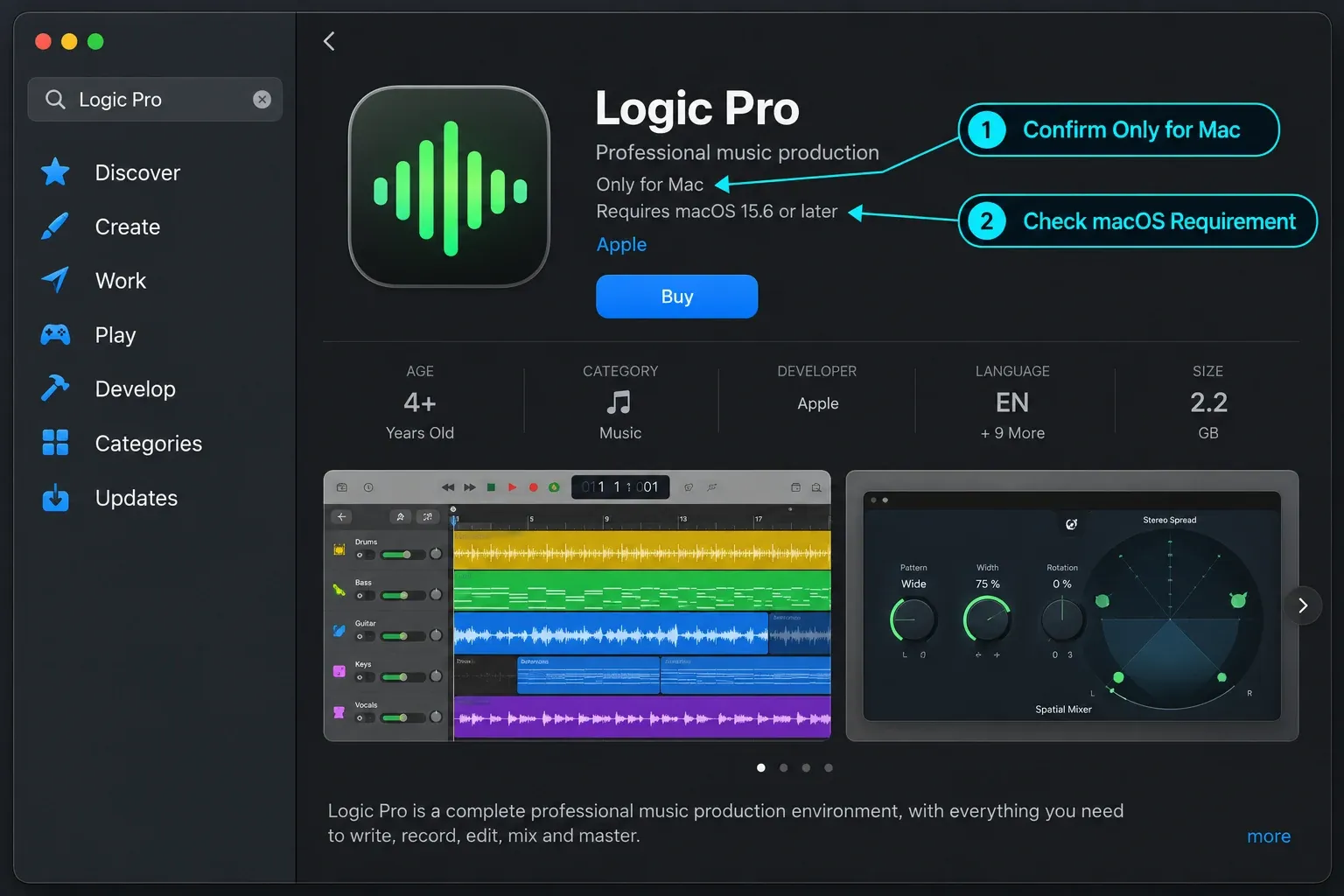
No. Logic Pro does not run natively on Windows 10 or Windows 11. It’s made only for macOS and iPadOS. Apple sells the current Mac edition through the Mac App Store, and Apple’s Logic Pro page lists macOS and a Mac with Apple silicon among its requirements. The iPad version is a separate app for iPadOS. A Logic Pro for Windows download doesn’t exist on Apple’s site. There’s no official Windows installer, browser version or PC license.
Documentation rechecked October 8, 2026. Apple’s availability and system requirements, the virtualization limits, Logic’s audio-export options and the licensing notes for the Windows alternatives below were checked against current Apple and vendor documentation.
If you only need the decision: keep your PC and choose a native Windows DAW unless Logic itself is essential to your work. If you already have Logic projects, export them on a Mac before changing platforms. If you need Logic occasionally, use a real Mac as a second machine. Remote control doesn’t turn the Windows computer into the Logic host.
Once you know which Windows workflow you need, the DAW comparisons hub handles the deeper product-by-product choice.
Can You Download Logic Pro for Windows?
Not from Apple. A file advertised as “Logic Pro for Windows,” “Logic Pro.exe” or a cracked PC port isn’t an official build. Logic Pro is a macOS application, so changing the installer name or using Windows compatibility mode can’t make it run.
Wine explains its own role as a compatibility layer for running Windows applications on POSIX systems such as Linux and macOS. It isn’t a translator for macOS applications on Windows. Wine and similar Windows-app compatibility tools don’t solve this problem.
Apple could change its platform policy in the future, but as of the verification date it has announced no Windows edition. That’s the useful boundary: “not available now” is supportable. Predicting that it will never happen is not.
Why Did Logic Pro Stop Supporting Windows?
Logic once existed on both platforms under its original developer, Emagic. Apple announced the Emagic acquisition on July 1, 2002 and said the company’s Windows products would be discontinued on September 30, 2002. That three-month notice matters: the old version wasn’t ended on the acquisition day, as many retellings suggest.
The historical Windows release isn’t a practical route today. It predates current plugin formats, Windows audio setups, Apple silicon-era Logic projects and the present Mac App Store licensing model. Downloading Logic 5-era files from an archive won’t give you the current Logic Pro.
Do Virtual Machines or a Hackintosh Make Logic Pro Usable?
They may produce a technical experiment, but neither is a supported Windows production setup.
There’s a hardware mismatch as well. Apple’s Logic Pro page names a Mac with Apple silicon in its requirements, and Apple’s macOS 27 compatibility list includes only Macs with Apple silicon. A Windows PC doesn’t have Apple silicon, so a VM or Hackintosh starts from hardware Apple doesn’t list for current Logic Pro or for the newest macOS.
macOS virtual machine on a Windows PC
VMware Workstation and VirtualBox don’t provide an Apple-supported path for hosting current macOS on an ordinary PC. Apple publishes the applicable macOS software license, and Broadcom’s own macOS guest guidance limits supported virtualization to Apple-labeled hardware.
Even if someone gets a guest system to boot, that doesn’t establish dependable audio-interface drivers, hardware acceleration, plugin authorization or low-latency monitoring. Those are the parts a recording session depends on. Which is why a VM doesn’t count here as a working Logic-for-Windows method.
Hackintosh
A Hackintosh installs macOS on non-Apple hardware. It sits outside Apple’s supported hardware and licensing path, and compatibility can change with the bootloader, macOS release, graphics hardware, audio interface and plugins. That makes it a poor recommendation for a session that needs predictable updates or vendor support.
If your goal is learning rather than maintaining an experimental computer, put the same time into a native Windows DAW or a supported Mac. The project files and audio hardware matter more than proving that the application can open once.
A real Mac controlled from Windows
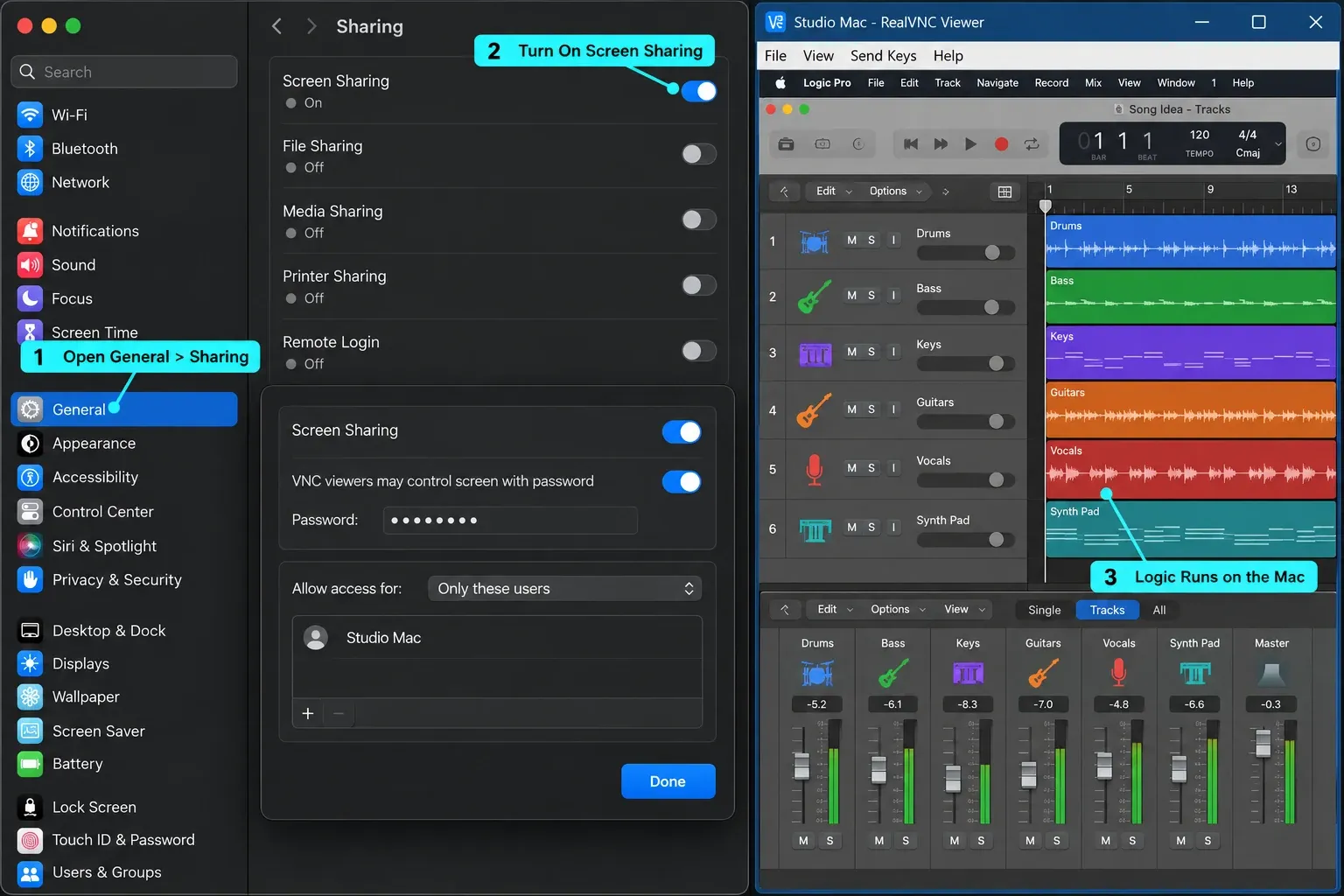
This is the legitimate middle ground. Logic still runs on the Mac. The Windows PC only controls or views it remotely. It can be useful for editing, bouncing and opening an old project. For recording, connect the audio interface and monitoring path to the Mac itself, because the remote desktop connection isn’t a substitute for the local audio path.
Can a Windows DAW Open a Logic Pro Project?
Do not plan on opening the .logicx project directly. Apple describes Logic projects as packages, and mainstream Windows DAWs don’t advertise native import of the complete Logic project with its arrangement, routing, stock instruments and plugin state.
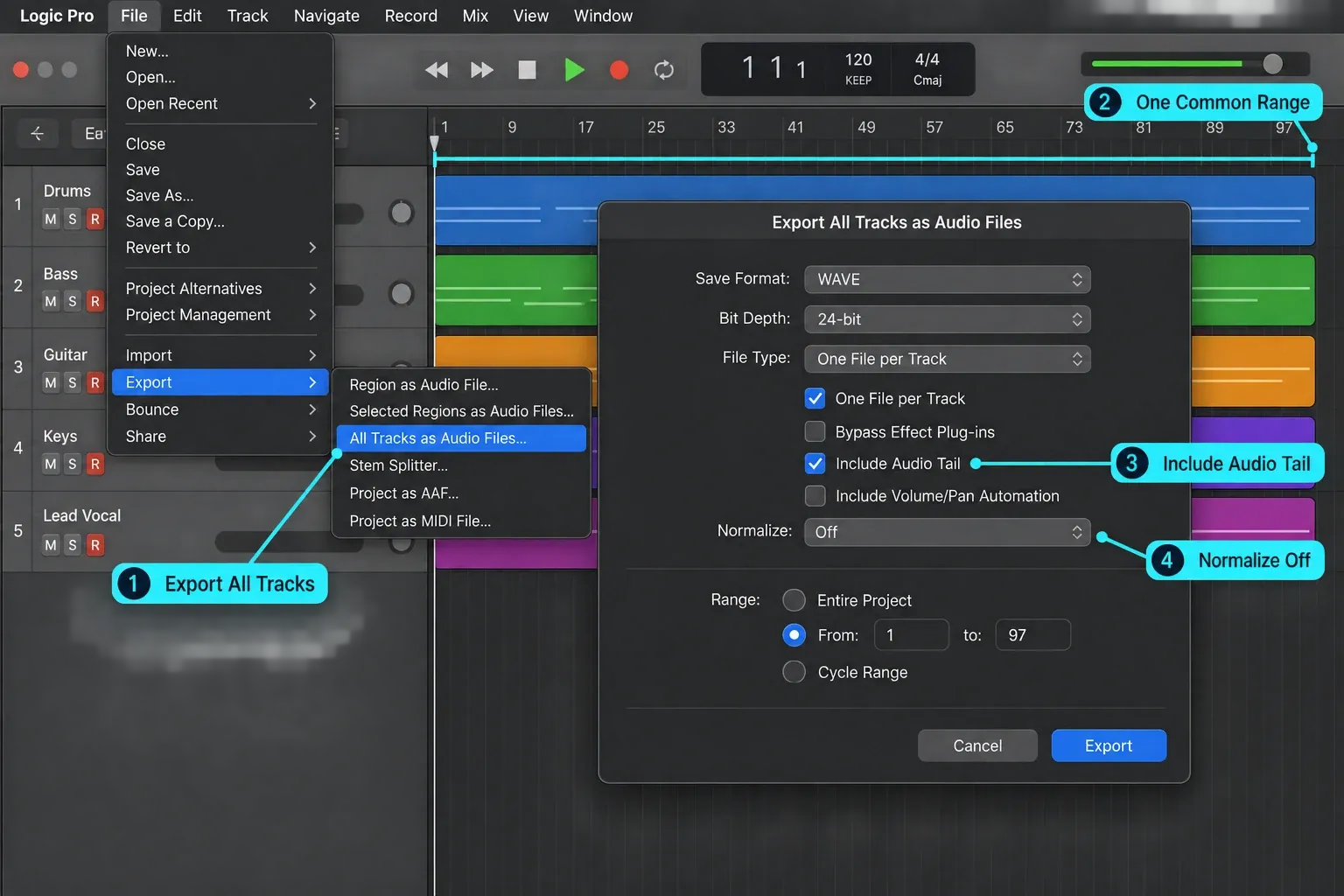
The dependable route is to export exchange files while you still have access to Logic. Apple documents Export All Tracks as Audio Files, including options for effect tails and volume/pan automation, and the Logic user guide also covers MIDI export. Rendered audio keeps the processing choices you used at export. MIDI keeps note and controller data. It won’t carry the sound of a Logic-only instrument.
Export a Logic Project Before Moving to Windows
- Duplicate the project. Keep the untouched original and work from a migration copy.
- Save every required asset with the project. Apple warns that a shared project needs the same assets available on the receiving computer.
- Commit anything only Logic can recreate. Bounce software instruments, Session Players and tracks that depend on Logic-only effects or sounds.
- Export all tracks over one common project or cycle range. Avoid per-track silence trimming so every file keeps the same timeline reference in the Windows DAW.
- Choose the automation decision deliberately. Export with volume/pan automation when you want the rendered balance; leave it out when the receiving mixer needs clean control.
- Include effect tails where they matter. Reverb and delay may continue after the last region. Decide whether Bypass Effect Plug-ins should be off for processed exports or on for cleaner source tracks. Set Normalize to Off when preserving relative levels, and check for clipping. For multi-output instruments, choose deliberately between One File per Track and One File per Channel Strip. Shared aux returns and master processing are separate routing paths: agree on separate FX or grouped-stem delivery and compare against a reference mix instead of assuming ordinary track exports recreate the complete mix.
- Export MIDI separately. Keep it for parts you may revoice. Do not assume an Audio Unit preset will load in the Windows VST version of the same plugin.
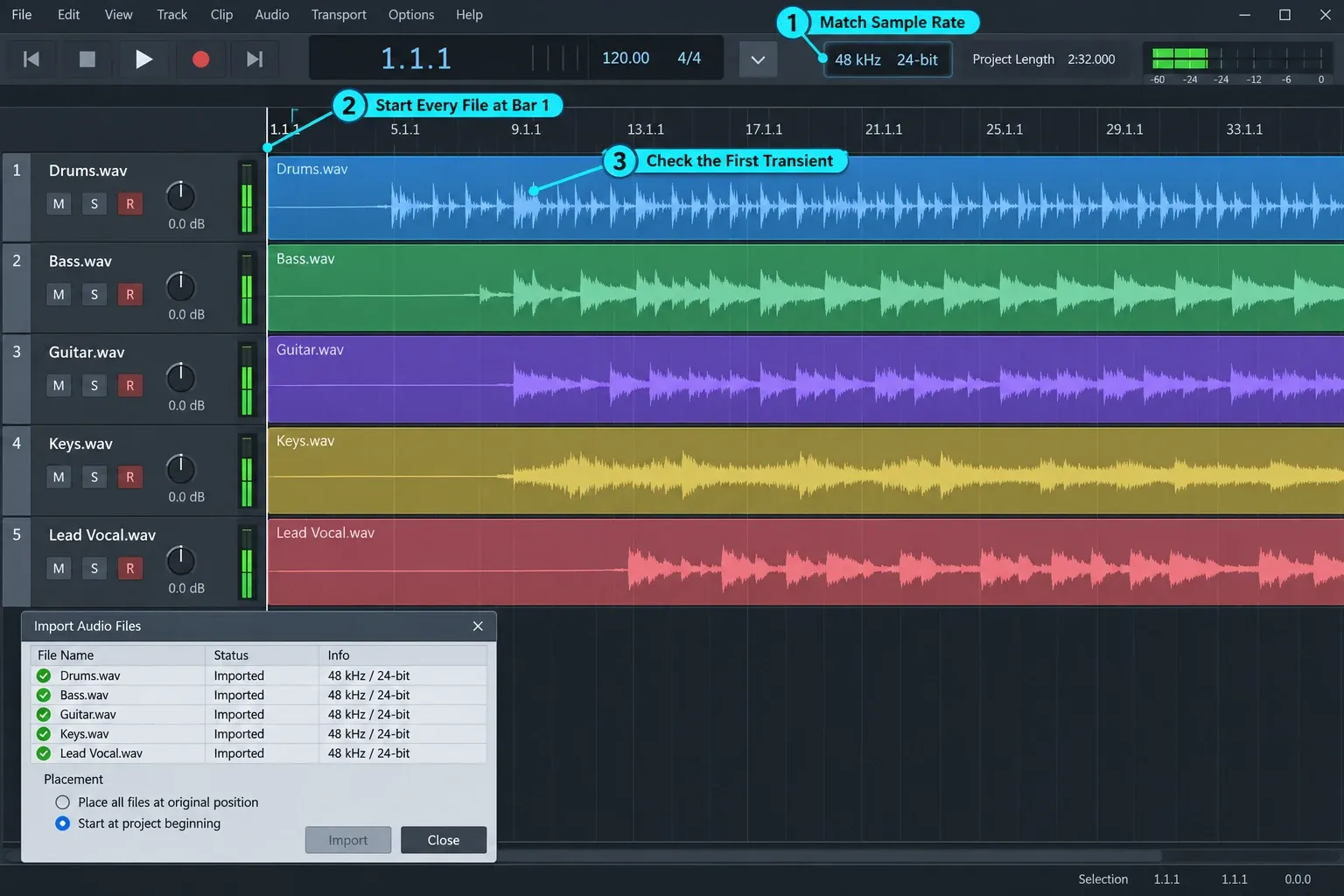
- Record the session facts. Note the tempo, sample rate, bit depth, track names and any plugin or routing decision the audio files cannot explain. If the song changes tempo, provide a tempo map or documented changes and verify them in the receiving DAW; embedded tempo metadata is not a guarantee of identical import behavior.
- Test one import before retiring the Mac. Confirm the start positions, track count, duration and audible result in the destination DAW.
For a collaborator, ask what they want before exporting: dry tracks, processed tracks, stems, MIDI, AAF or a combination. “Send the project” means different things in different rooms.
Best Logic Pro Alternatives for Windows by Workflow
No Windows DAW is Logic with a different logo. The useful comparison is which part of Logic you’re trying to replace.
| If you value this in Logic | Start with | Why it belongs on the shortlist | License note |
|---|---|---|---|
| Linear recording, comping and deep MIDI | Cubase | Traditional timeline, recording tools and detailed MIDI editing | Perpetual editions; verify current upgrades |
| Songwriting, recording and a separate mastering stage | Fender Studio Pro | Linear arrange workflow plus a dedicated Mastering page | Perpetual and Pro+ subscription routes |
| Beatmaking and pattern-based MIDI | FL Studio | Pattern workflow and extensive piano-roll editing | Purchased edition includes Lifetime Free Updates |
| Clips, loops and live performance | Ableton Live | Session View is designed around clip launching | Intro, Standard and Suite editions |
| Custom routing and a low entry price | REAPER | Small install, flexible routing and extensive customization | $60 discounted / $225 commercial; current license covers versions through 8.99 |
| Session exchange with an existing Pro Tools team | Pro Tools | Choose it when collaborators already require its session format | Check current perpetual and subscription options |
Cubase: a sensible first demo for someone who wants a conventional timeline, audio recording and detailed MIDI in one application. Check the current editions and supported Windows versions on Steinberg’s Cubase page.
Fender Studio Pro: the current name of the DAW formerly known as Studio One Pro. It offers a perpetual license and Pro+ plans, so “subscription only” would be inaccurate. Its linear arrangement view and dedicated Mastering page (the former Project page) make it relevant to recording-focused Logic users. Verify current plans on Fender’s product page.
FL Studio: the better trial when the reason you wanted Logic was sequencing beats and editing MIDI. Image-Line’s Lifetime Free Updates policy applies to the edition you buy. Extra products and higher-edition features are a separate question. Our Logic Pro vs FL Studio comparison handles the full workflow trade-off.
Ableton Live: choose it for Session View, clip launching and a performance-oriented workflow, not because it copies Logic’s timeline. The detailed Logic Pro vs Ableton Live guide separates the two approaches.
REAPER: the current official license is $60 for qualifying discounted use or $225 commercial, with a fully functional 60-day evaluation and upgrades through version 8.99. The discounted license covers personal use, educational or non-profit organizations, or commercial use with yearly gross revenue no greater than US $20,000. Other commercial use requires the commercial license. It’s highly configurable but doesn’t bundle a Logic-sized instrument and loop library.
Choose the Windows DAW Around the Work You Do
You record bands, vocals or acoustic instruments: demo Cubase and Fender Studio Pro first. Compare take comping, headphone mixes, audio editing and how quickly you can reach a clean bounce with your own interface.
You build beats and MIDI arrangements: start with FL Studio. Test a short song and export its audio before closing the standard trial. Image-Line allows saving but not reopening saved projects until you purchase and unlock FL Studio; plugins outside your purchased edition can remain in trial mode.
You perform with clips or improvise arrangements: start with Ableton Live. Session View is the deciding feature. If you won’t use it, compare the timeline workflows instead.
You exchange sessions with a specific studio: ask which DAW and version that studio uses. Pro Tools matters when the people receiving your work require its session format, not because every musician must own it.
You need the lowest software cost: try Cakewalk Sonar’s free core tier if it meets your workflow. It requires a free BandLab account and periodic activation; some features require Membership. REAPER is a low-cost paid alternative after its 60-day evaluation, not permanently free. Budget separately for instruments and samples.
Check the current Cakewalk Sonar free-tier conditions and compare the included tools with your project needs.
Should You Buy a Mac Just for Logic Pro?
Buy or keep a Mac when a Logic-only project, instrument or collaborator is central to the work. The one-time Mac app currently costs $199.99 in the US, but the computer, storage, interface compatibility and migration time belong in the same budget.
Stay on Windows when your current DAW already gets finished work out the door, your PC hardware is important for other jobs, or the feature you want exists in a native Windows application. A different DAW can be inconvenient. An unsupported operating-system build can stop the entire session.
A second Mac can be the least disruptive choice when old Logic sessions must remain openable. Before buying, check the current Logic Pro system requirements and the size of the projects you need to run. “Any Mac mini will do” is too broad: the supported macOS version, memory pressure, storage and plugin compatibility still decide whether the machine fits.
Logic Pro for iPad isn’t a Windows workaround. It runs on compatible iPads, and its touch workflow and plugin environment differ from the Mac application. Our Logic Pro for iPad guide keeps that separate from the PC decision.
Logic Pro on Windows FAQ
Is Logic Pro coming to Windows?
Apple has not announced a Windows edition. Its current product and support pages describe Logic Pro for Mac, while the separate touch version is for iPad. That could change later, but there is no official Windows release to plan around as of October 8, 2026.
Can you run Logic Pro on Windows 11?
Not natively. There is no Apple Logic Pro installer or license for Windows 11, and Apple’s Logic Pro requirements name a Mac with Apple silicon. A virtualized or Hackintosh setup is outside the supported route and should not be treated as a dependable production machine.
Is Logic Pro free on Windows?
No. Apple doesn’t offer Logic Pro for Windows at any price. On a Mac it’s a $199.99 one-time purchase in the US Mac App Store, and Apple also includes it in the Apple Creator Studio subscription, which you can try free for 30 days. For a free start on Windows, Cakewalk Sonar has a free tier that needs a BandLab account, and FL Studio’s trial lets you save and export but won’t reopen saved projects until you buy an edition.
Can Wine run Logic Pro on Windows?
No. Wine translates Windows application calls for POSIX systems; Logic Pro is a macOS application. Wine is solving the opposite compatibility problem.
Can I open a Logic project in a Windows DAW?
Not as a complete native Logic session. Export audio tracks or stems, MIDI where useful, and session notes from Logic first. Stock instruments, Logic-only effects, routing and plugin state will not automatically become an equivalent Windows session.
Is Logic Pro for iPad available on Windows?
No. Logic Pro for iPad runs on compatible iPads. It is not a Windows app, emulator or browser version.
What Windows DAW is most similar to Logic Pro?
Cubase and Fender Studio Pro are sensible first trials for a linear recording-and-MIDI workflow. FL Studio fits pattern-based beatmaking, Ableton Live fits clip performance, and REAPER fits a low-cost custom setup. The closest choice depends on which part of Logic you actually use.


