How to Make 808 Bass in Logic Pro
Build an 808 that plays in tune, follows the groove and survives outside the studio, using Quick Sampler or Drum Synth and stock Logic Pro tools.

To make an 808 bass in Logic Pro, load an 808 sample into Quick Sampler, check its original pitch and set the Root Key to match. Then use one voice, shape the tail and write your bass notes in Piano Roll. Tune the instrument before writing the line: changing MIDI notes to compensate for a wrongly mapped sample makes later editing confusing.
Here, 808 means the long, pitched low end descended from the booming bass drum of the Roland TR-808. In a modern Logic session it may be a sample or a synthesized patch, and it can act as the kick, the bass, or both.
This guide gives you two stock workflows. Use Quick Sampler when you already have a one-shot you like. Use Drum Synth when you want to build the kick and sub from Logic's own synthesis engine. Both routes end with the same checks: the 808 must be in tune, each note must end deliberately, and the low end must still make musical sense when the deepest sub is hard to hear.
These are manual programming workflows for Logic Pro on Mac. If you want Logic to write a bass line for you instead, Apple’s current Synth Bass Player includes an 808 Bass style with repeat, triplet and slide controls. That is a separate route from building your own Quick Sampler instrument.
Quick Sampler or Drum Synth?
| Use | Best when | Main tradeoff |
|---|---|---|
| Quick Sampler | You already have an 808 one-shot whose character fits the track | You must verify the sample's real pitch and root-key mapping |
| Drum Synth | You want a stock sound you can reshape from the source | Direct kick-synthesis controls rather than sample-editing tools |
| Alchemy or Sampler | You need layered sources, deeper modulation, or a reusable multisample instrument | More controls than a one-sample 808 usually needs |
For one prepared sample, Quick Sampler keeps the editing focused on that sound. If you are still building the whole beat, use the broader Logic Pro beat-making workflow for drums, harmony, arrangement and export.
Make an 808 in Quick Sampler
- Choose one clean source. Audition the sample with the track, not alone. Listen for a clear attack, a tail long enough for the groove, and no obvious clipping or unwanted room noise.
- Load it without guessing what Logic changed. Drag the file below the last track header and choose Quick Sampler. Use Original when the file is already trimmed and prepared. Optimized can analyze tuning and loudness, crop silence, and look for loop points, but you should still verify the result.
- Choose Classic mode. Classic lets note length and the amp envelope control playback. One Shot is triggered by a note rather than stopped by its release; the sample boundaries and Amp envelope still limit its duration. Use Classic when you want to shorten each bass note from the MIDI region.
- Trim the start and inspect the tail. Move the start marker to the first useful transient without cutting into it. Remove dead space at the end. Choose No Loop from the Loop mode menu unless you need a sustained loop and can make one without an audible seam.
- Find the original pitch and set the root key. Insert Tuner in the first Audio Effect slot after Quick Sampler. Before measuring, reset pitch offsets and modulation and turn Key Tracking off, as detailed below. Read the stable tail, confirm its note and octave against a reference, then assign that note as Root Key. Turn Key Tracking back on and correct any remaining cents with Tune. An arbitrary MIDI note with tracking on may play a transposed pitch, not the source pitch.
- Set Polyphony to one voice. One voice prevents two sample voices from sounding together. Select an Amp envelope type with the controls you need, then shape Attack, Decay, Sustain and Release around the phrase. A long MIDI note cannot extend a non-looping sample beyond its end.
- Write the line in Piano Roll. Start with the song's root notes and the kick's strongest accents. Extend or shorten every MIDI note on purpose. Check the pitch an octave higher if the sub is hard to identify, then return the notes to the intended register.
- Save the patch after it works in the beat. Select the track and open the Library. In the inspector, make sure the blue triangle points to the channel strip’s Setting button. Click Save at the lower right of the Library and name the patch. Keep the source sample with your project assets as well; a patch is not a separate backup of your audio files.
Apple’s drag-and-drop guide distinguishes Original from Optimized. The Classic mode reference explains Root Key and Tune. With Flex off, playing below the root lowers pitch and slows playback; playing above it raises pitch and speeds playback. With Flex on, pitch changes need not change the sample’s playback speed. Check the tail again if you change Flex or Follow Tempo.
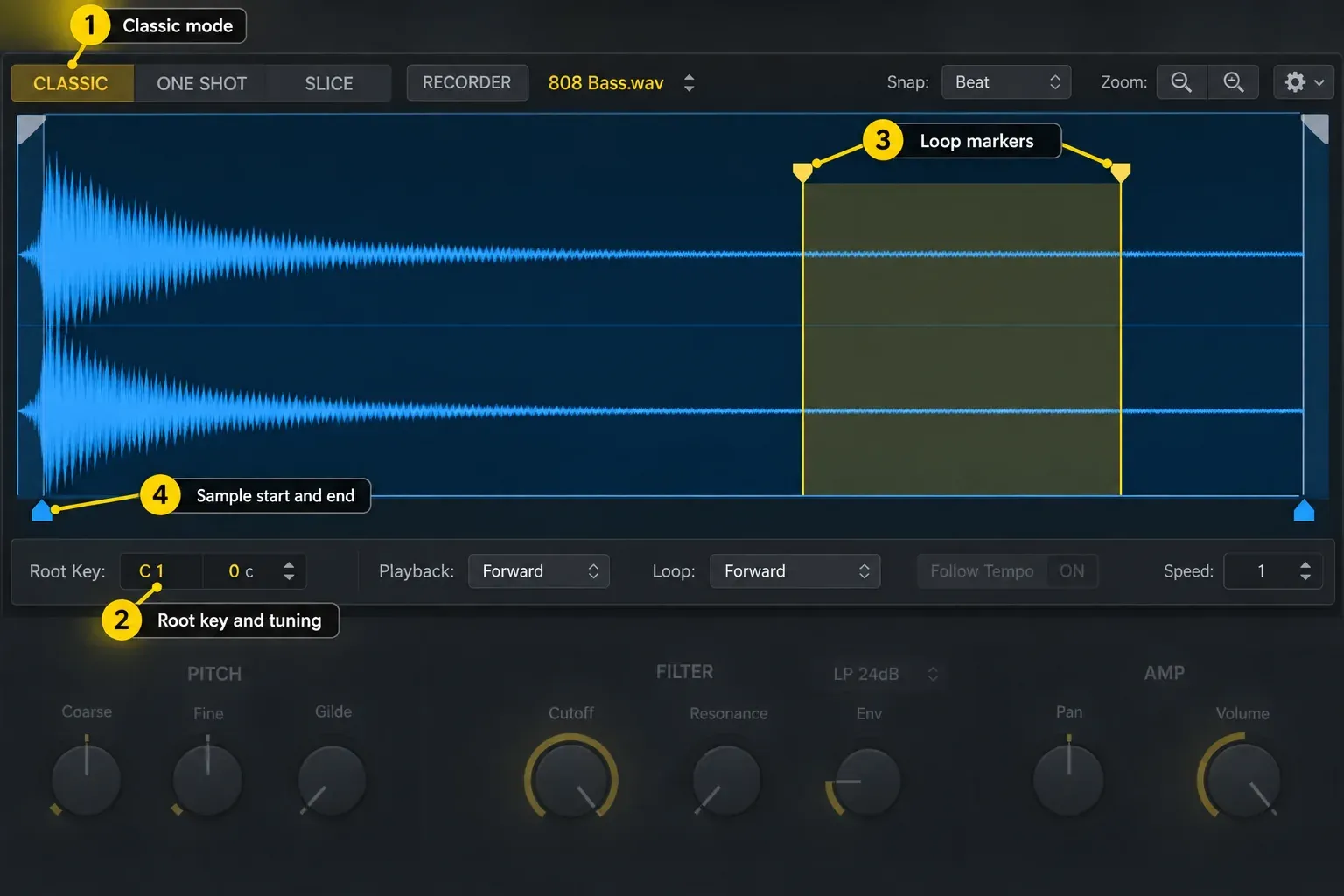
Tune the 808 before you write around it
Measure the source without transposing it first. For this tuning check, set Tune, Coarse and Fine to zero, set Pitch Env Depth and Glide to zero, disable other pitch modulation and center pitch-bend data. Bypass pitch-changing effects; leave Quick Sampler and Tuner active. Turn Key Tracking off and hold a note. Apple’s Quick Sampler Pitch controls specify that this plays the sample at its original pitch regardless of the key pressed.
Let the initial sweep pass and read the stable tail. Logic’s Tuner reports the nearest keynote and deviation in cents. Confirm the octave against a known reference note too: matching the letter alone can leave the instrument an octave out. Assign that note and octave as Root Key, re-enable Key Tracking, then play the assigned root and use Tune for the remaining cent correction. Root Key describes the sample’s original note, not the key of your song. If there is no stable tail, choose a more stable sample rather than treating a flickering tuner reading as an answer.
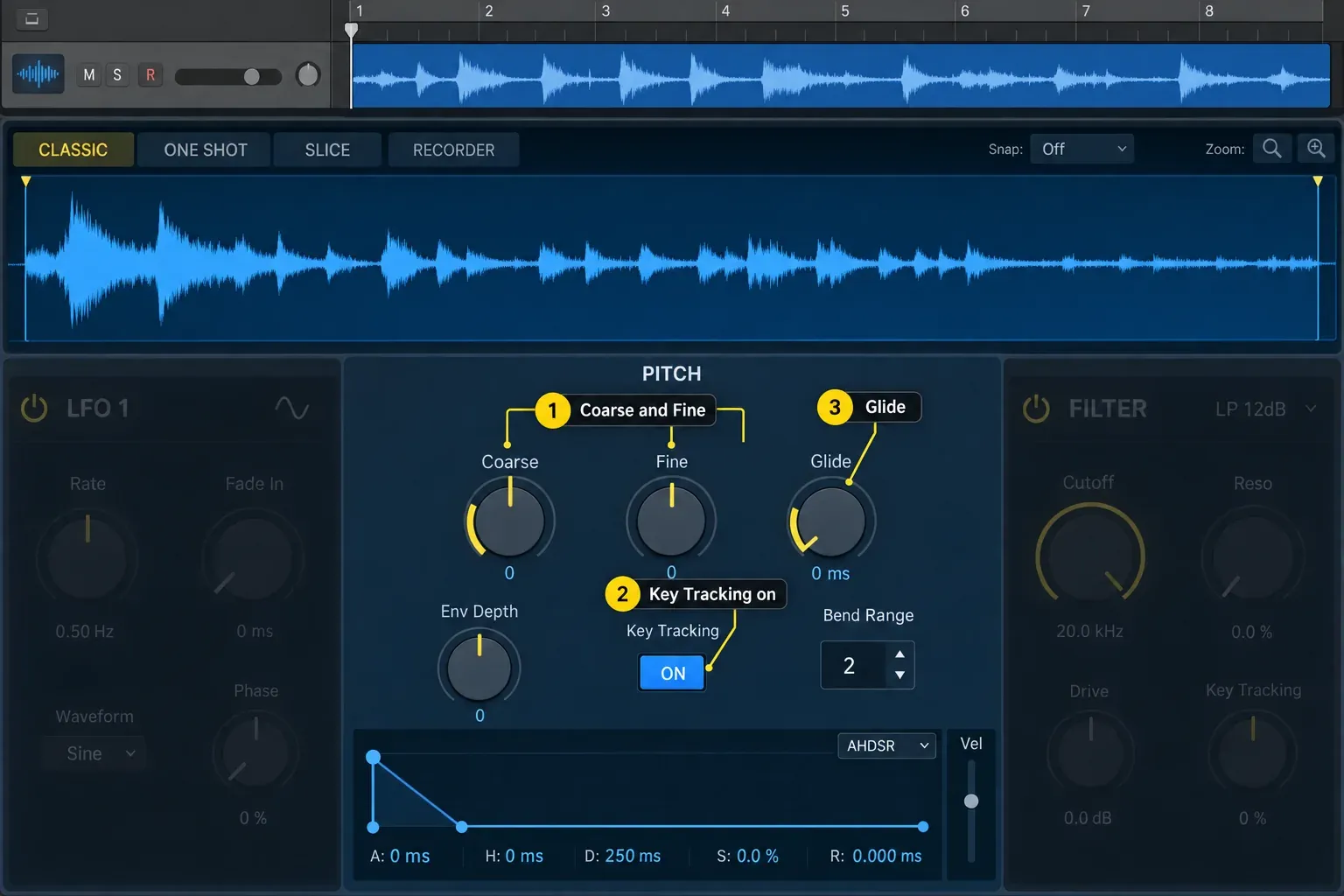
Test several notes from the bass line against known notes on another tuned instrument, then with the chords. For example, a sample whose stable tail is F should be mapped to F in the matching octave, even if the song is in C minor; you can then play C, E-flat or G from MIDI. If the notes are correctly pitched but one sounds weak, check the register and source sound. A low note may be difficult to hear on small speakers, while a higher note may have a shorter tail with Flex off.
Shape the tail with notes and the amp envelope
A long tail can fill a sparse beat or run into the next kick. Start by shortening the MIDI notes in Classic mode, then adjust the Amp envelope while the beat plays. If the sample ends before the note does, use a longer source or a carefully checked loop; raising Sustain does not create more recorded audio.
- Attack: keep it short enough to preserve definition. Raise it slightly only when a separate kick should own the first transient.
- Decay and sustain: decide whether the 808 falls away naturally or holds while the note is pressed.
- Release: use enough to avoid an abrupt stop, but not enough to overlap the next phrase.
- Velocity: reduce amp velocity sensitivity when every programmed note should produce a consistent low-end level; keep some sensitivity when dynamics are part of the pattern.
Quick Sampler's Amp controls include the polyphony limit and multimode envelope. There's no universal decay time for an 808. Tempo, note spacing, the sample itself, and the kick pattern all change the right value.
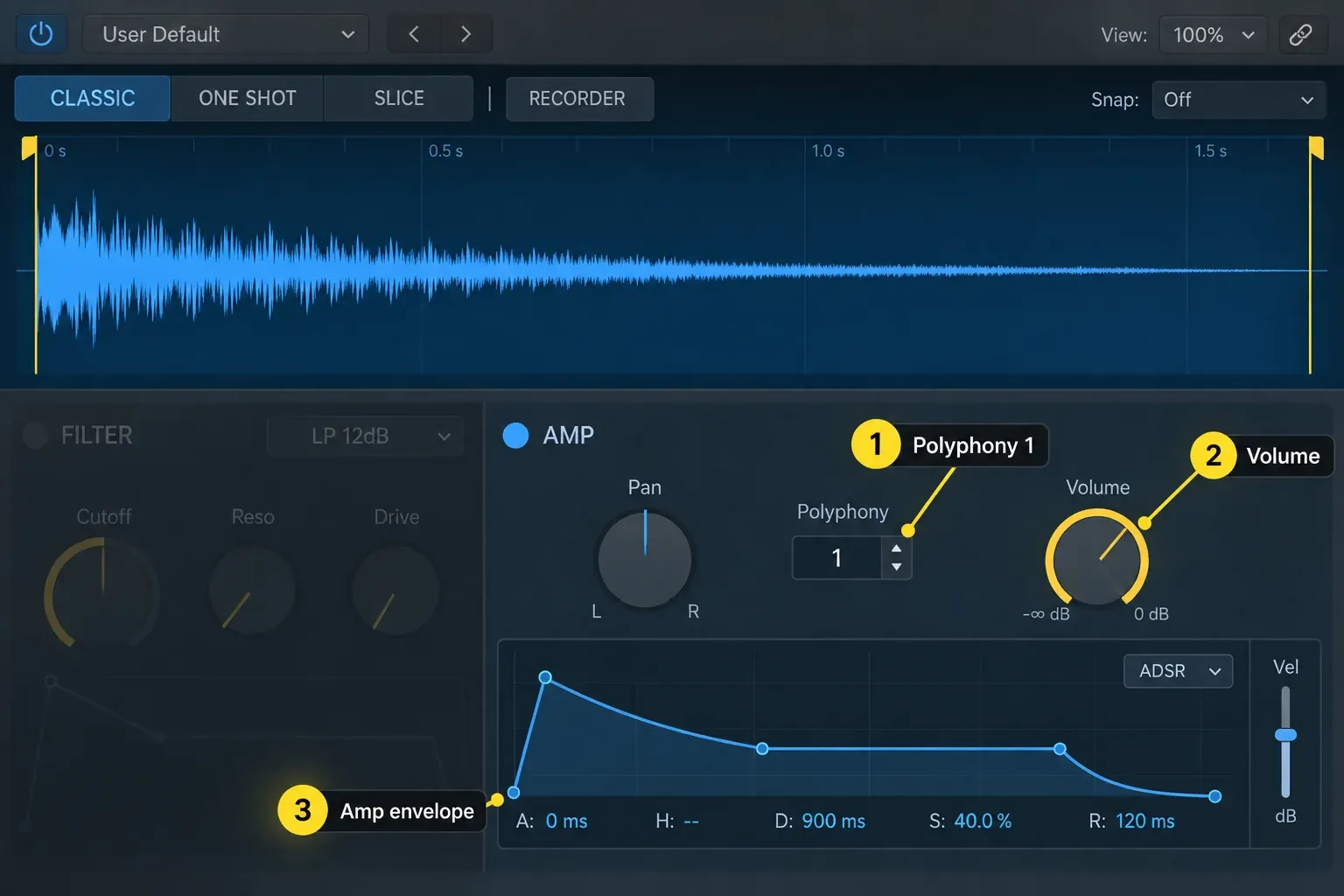
Create 808 slides without turning every note into a glide
For a connected slide, set Polyphony to one voice and raise Glide from zero. Overlapping the destination MIDI note with the previous note is a useful way to write a legato phrase, but it's a programming choice rather than a fixed requirement. Adjust Glide while the full beat plays. A value that sounds dramatic in solo can arrive late once drums and vocals are present.
Glide sets the time between played pitches and can affect transitions throughout the line. For a bend on only one phrase, turn Glide down to zero and set Quick Sampler’s Bend Range to the interval you need. Open the MIDI region in Piano Roll, click Show/Hide Automation, set the Automation button to Region and choose Pitch Bend from the Automation/MIDI parameter menu. Draw the bend and return it to center before the next unbent note. Apple documents the Piano Roll Automation/MIDI area and the pitch-bend value formats; use the center value for your display format rather than assuming every view uses the same number.
Try a short bend into the last note of a phrase, then leave the next phrase unbent. Listen for both the arrival pitch and any unexpected slide at the restart. This checks the musical timing and whether the bend has returned to center.
Build an 808-style bass from scratch with Drum Synth
Create a software instrument track, click its Instrument slot and choose Drum Synth. Choose the Kicks group and a kick type to edit. Turn on Key Tracking so MIDI notes change pitch. Set Mode to Mono when each new note should cut off the previous voice, or Gate when the sound should be heard only while the key or MIDI note is held.
Now make the sound fit the part:
- Set Pitch while the track's chords or reference tone are playing.
- Use Decay to establish the length of the sub tail.
- Adjust Sweep, Punch, Shape, or Snap only if those controls appear for the chosen kick type.
- Add Saturation until the bass reads on smaller speakers, then compare at matched output level.
- Program the same simple bass line you would use with Quick Sampler and revise the note lengths in context.
The available Drum Synth kick parameters depend on the sound type. Check which controls your selected kick actually provides. The global controls include the Kicks group, Key Tracking and Mono/Poly/Gate playback.
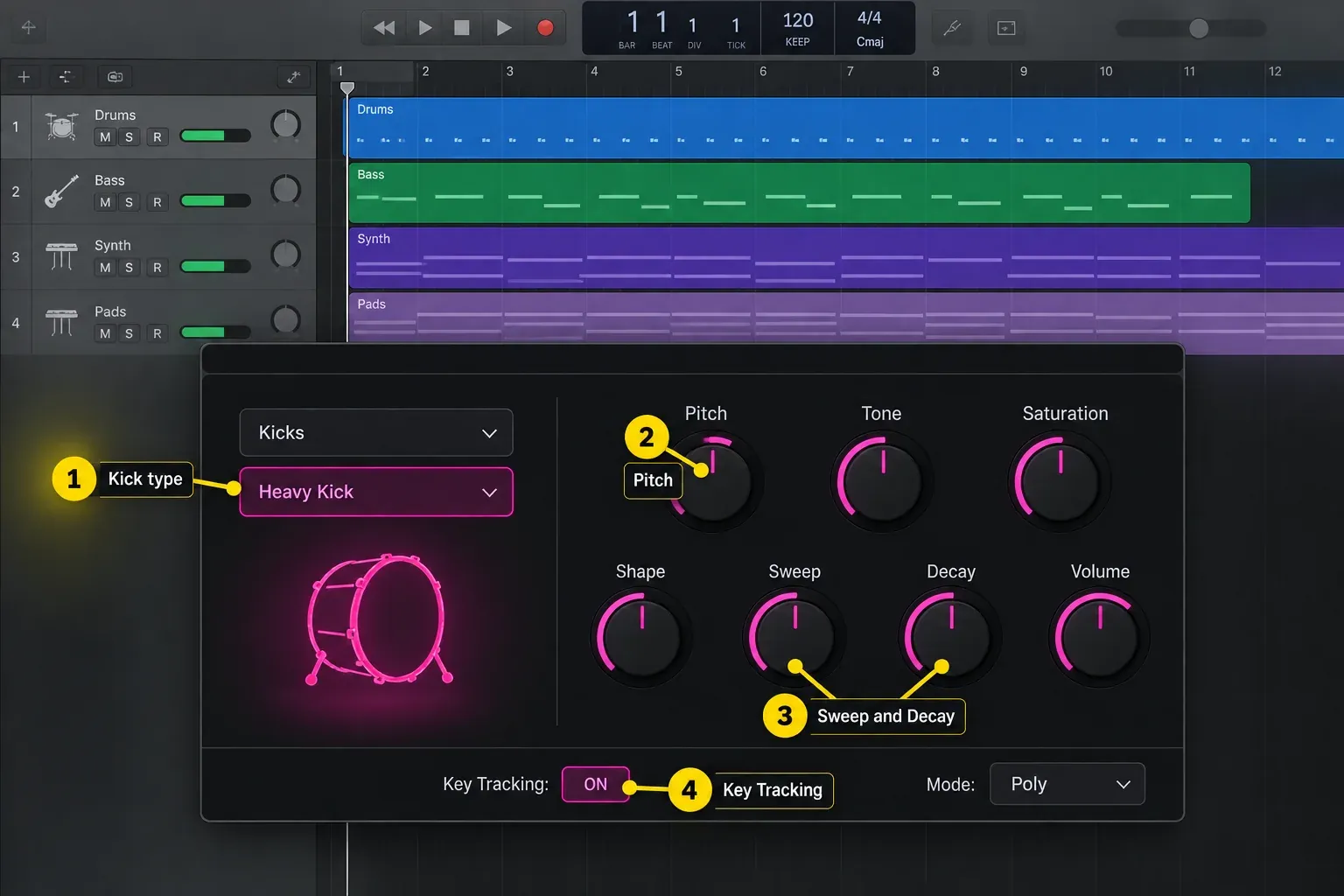
Make the kick and 808 share the low end
First decide whether the 808 is also the kick. Many 808 sources already have a strong attack. Adding another kick at every hit can create two transients and two low-frequency tails where the arrangement only needs one.
If you do use a separate kick, solve the collision in this order:
- Pattern: let some kick and 808 hits answer each other instead of stacking every note.
- Length: shorten the 808 or the kick tail before cutting large sections of either sound.
- Source: pair a shorter, more focused kick with a deeper sustained 808.
- Level and timing: compare the kick and bass together and separately. If the combined hit becomes thinner, try changing the timing or choosing a different kick, then listen across the whole bass line. Keep the change only if the combination improves in context.
- Processing: use EQ or sidechain compression only when the remaining problem is repeatable and audible.
Use Channel EQ to inspect the relationship, not to chase a fixed “808 frequency” recipe. Apple’s Analyzer documentation notes that high resolution helps with very low bass frequencies but uses more processing power. Turn the Analyzer off when you no longer need it. If ducking is needed, the sidechain compression guide explains how to set the kick as the trigger and adjust the response.
Make the 808 audible on phones without ruining the sub
Small phone speakers may not reproduce the deepest part of an 808 clearly. Added upper harmonics can make its pitch and rhythm easier to follow; iZotope explains this relationship between bass harmonics and small-speaker playback. Try saturation or gentle distortion, then match the processed output level to the original before comparing. Keep enough sub for systems that can reproduce it.
Logic's Drum Synth includes Saturation on relevant kick types. ChromaGlow can also add harmonic coloration, but Apple limits the Mac version to M1 or later Apple silicon. On an Intel Mac, reach for another available stock distortion or saturation tool rather than building the workflow around a plug-in the machine can't load.
Check the bass on your main system at a sensible level, at a quieter listening level, and on a small speaker or phone. The small-speaker check is for the audibility of the line, not for judging sub depth.
Fix the problems that waste the most time
The 808 is out of tune even though the MIDI notes are right
Recheck the original-pitch measurement with Key Tracking temporarily off and pitch offsets neutral. Then verify Root Key, turn tracking back on and test named MIDI notes against a reference. Make sure you did not assign the song’s key as the sample root or leave pitch-bend data away from center.
The low end is muddy
Soloing won't show you the conflict. Shorten overlapping notes, compare kick and 808 tails, remove unnecessary simultaneous hits, and check other bass-heavy instruments. Use the analyzer to locate a repeatable collision only after the arrangement is clean.
Notes click when they stop
Add a small release and inspect the sample end. If the next note should interrupt the first, use one voice but avoid an envelope that drops from full level to silence instantly.
Every note slides
Lower or disable global Glide. Use region pitch-bend data for the one phrase that needs a deliberate bend, and return the controller to center afterward.
The 808 is loud but does not hit
Lower the listening level and compare the kick alone, the 808 alone and the two together. Listen to the start of each hit and what follows it. Try changing an overlapping tail, the source or the timing before adding a limiter. Keep the change only if the full beat becomes clearer.
Frequently asked questions
What is the best Logic Pro instrument for 808 bass?
Use Quick Sampler for one prepared 808 sample and Drum Synth to shape a stock synthesized kick-and-sub sound. Sampler or Alchemy can suit layered sounds or deeper modulation. Choose based on the source you want to edit, not a universal best-instrument ranking.
Should an 808 use Classic or One Shot mode?
Use Classic when MIDI note length and the amp envelope should control the tail. One Shot starts from a note trigger without needing the key to stay held, but the sample boundaries and Amp envelope still limit how long it plays.
How do I find the root key of an 808?
Measure the original sample, not a transposed MIDI note. Neutralize pitch offsets and modulation, center pitch bend and temporarily turn Key Tracking off. Read the stable tail through Tuner and confirm the octave against a known reference. Set Root Key to that note, turn tracking back on and use Tune for the remaining cents.
Should 808 bass be mono?
For a typical single-note bass line, set Quick Sampler's Polyphony to one voice so long sub notes do not overlap. That is different from forcing the audio channel itself to mono. Check the source and the mix rather than applying a blanket stereo-width rule.
How do I make 808 glides in Logic Pro?
Set Quick Sampler to one voice and raise Glide, then audition transitions in the beat. For a bend on only one phrase, set Glide to zero, choose a suitable Bend Range and draw Pitch Bend in Piano Roll’s Region automation. Return the bend to center before the next unbent note.
Do I need a separate kick with an 808?
No. An 808 with a useful attack can handle both jobs. Add a separate kick only when it contributes a clearer transient or different rhythmic role, then shorten and balance the two so their low-frequency tails do not mask each other.
Why does my 808 disappear on phone speakers?
Small phone speakers usually do not reproduce the deepest sub reliably. Add controlled upper harmonics with saturation or distortion, compare at matched level, and make sure the rhythm remains clear. Do not remove the useful sub just to make the phone version louder.
Does every 808 note have to stay in the song key?
The bass line should support the harmony, but that does not mean it can use only the tonic. Chord tones, passing notes, and slides can work when their destinations and timing make musical sense. Tune the instrument correctly first, then judge the line as music.
Finish the bass line before processing it
Temporarily bypass the channel’s Audio Effect plug-ins using their Bypass controls; leave the instrument active. Listen for pitch, note length and the kick relationship on your main system. Then restore any effects you intend to keep, compare at matched level and check small-speaker playback. Saturation may be part of what makes the finished bass audible there, so do not judge that check only with the processing removed.
Return to the Create Music hub when the bass is working and move on to drums, sampling, synthesis, or arrangement.


