What Is the Latest Version of Logic Pro? Mac 13.0, iPad 4.0 and Version History
Logic Pro for Mac 13.0 arrived November 5, 2026; iPad 4.0 followed November 18. Compare the release history, system requirements, Assistant conditions and update advice.

The latest version of Logic Pro for Mac is 13.0, released on November 5, 2026. Logic Pro for iPad 4.0 followed on November 18 and requires iPadOS 27 or later. The Mac App Store listing prices the standalone Mac app at $199.99 and requires macOS 26.1 or later. Apple’s Logic Pro 13.0 release notes reserve the intelligent Assistant beta for Creator Studio subscribers on Apple silicon with macOS 27 or later.
My advice on a working studio Mac is to keep the compatible version you trust until your interface driver and essential plug-ins support the new macOS requirement. Below are the current Mac and iPad builds, the release history from Logic Pro 9 through 13, and the update and backup steps. The final section uses six historical release pairs to show how long the first fix took; it does not predict when Logic 13 will receive one.
Latest Logic Pro version at a glance
| Logic Pro for Mac | Logic Pro for iPad | |
|---|---|---|
| Latest version | 13.0 | 4.0 |
| Released | November 5, 2026 | November 18, 2026 |
| App Store name | Logic Pro | Logic Pro: Make Music |
| How you pay | $199.99 once, or Apple Creator Studio at $12.99 a month or $129 a year | Free download, with the full app through Apple Creator Studio |
| Minimum system | macOS 26.1 or later; Apple silicon for Creator Studio. Assistant beta needs macOS 27 and the subscription. | iPadOS 27 or later and A12 Bionic or later; some features need newer hardware |
The installer’s current minimum is macOS 26.1 in the Mac App Store listing and Apple’s version-specific Creator Studio requirements, which specify Apple silicon. Some general product pages still print the older 15.6 figure; use the current installer’s compatibility field when the pages disagree. RAM, storage, Intel downloads and feature-specific limits are covered in Logic Pro system requirements.
Every Logic Pro 12 update
Logic Pro 12 arrived on January 28, 2026, the day Apple Creator Studio became available, and has had five updates since. The dates below come from the App Store version history, which records the day each build went live. TidBITS, for one, places 12.3 in July, but the store dates it June 30.
| Version | Released | What Apple lists | iPad release that day |
|---|---|---|---|
| 12.4 | September 29, 2026 | A Merge Custom Key Commands option, a fix for MIDI Cycle Recording with Takes, a fix for a crash when undoing with Mastering Assistant, plus many more fixes | 3.4 |
| 12.3.1 | August 13, 2026 | Stability improvements and bug fixes | None |
| 12.3 | June 30, 2026 | Flex Time and Smart Tempo enhancements, the producer project Shoulda Never, a Chord ID fix for Intel Macs | 3.3 |
| 12.2 | April 9, 2026 | Preview of Dolby Atmos Mix, the Step Reflex: Modern Garage pack, a zoom fix for Intel Macs and Rosetta | 3.2 |
| 12.0.1 | February 5, 2026 | Stability improvements and bug fixes | None, iPad 3.0.1 followed on February 17 |
| 12.0 | January 28, 2026 | Synth Player and more AI Session Players | 3.0 |
The two latest releases in the 12 generation are covered in what’s new in Logic Pro 12.4 and 12.3; the April release has its own Logic Pro 12.2 guide. Their Intel-specific fixes describe those older builds, not guaranteed access to Logic 13. Read the separate Intel Mac compatibility check before changing a working installation.
Why there is no Logic Pro 12.1
Apple skipped it. Neither the App Store history nor the release notes have a 12.1 entry, and the iPad app went from 3.0.1 straight to 3.2 the same way. Neither history explains the skipped number. Across the April–September 2026 releases, the minor numbers matched: 12.2 with 3.2, 12.3 with 3.3 and 12.4 with 3.4. Each pair shipped on the same day. A download or a tutorial labeled Logic Pro 12.1 isn’t an Apple release.
Logic Pro version history from Logic Pro 9 to 13
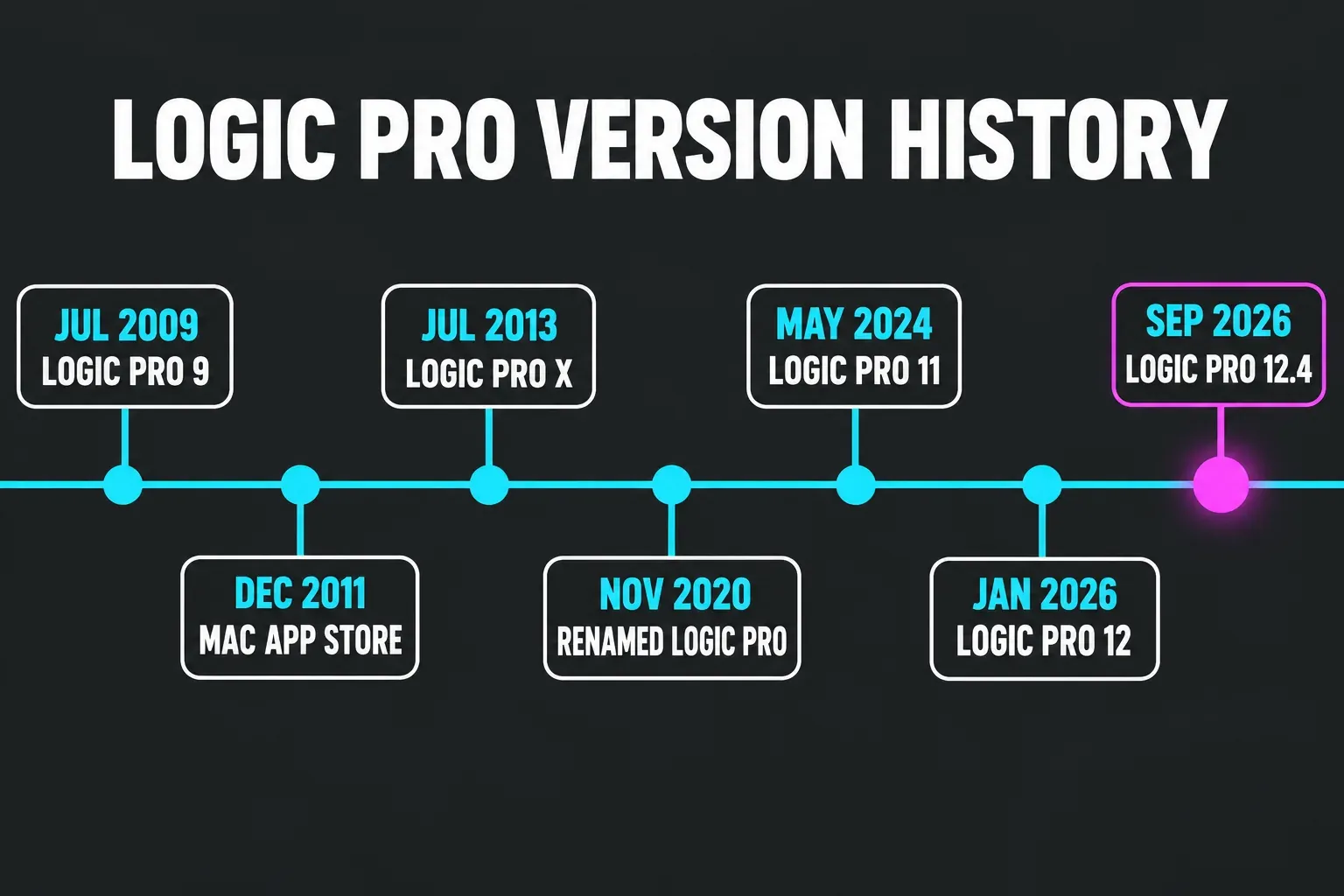
Logic has been Apple’s since it bought Emagic in 2002, and the Logic Pro history on Wikipedia covers the early Emagic years. The version numbers you’ll meet today start with Logic Pro 9. The macOS column shows the minimum Apple or a trade magazine published for that release; where neither did, it says so.
| Release | Date | What it brought | macOS minimum |
|---|---|---|---|
| Logic Pro 9 | Announced July 23, 2009 | Flex Time | Not listed |
| Logic Pro on the Mac App Store | December 2011 | Off DVD and onto the App Store, with the price cut from $499 to $199.99 | Not listed |
| Logic Pro X 10.0 | July 16, 2013 | A new app and new numbering at $199.99; MainStage 3 launched alongside it | Not listed |
| 10.5 | May 12, 2020 | Live Loops, a redesigned sampling workflow and new beat-making tools | Mojave 10.14.6 |
| 10.6 | November 2020 | Arrived with the first M1 Macs, and the app became Logic Pro with Big Sur | Not listed |
| 10.7 | October 18, 2021 | Dolby Atmos mixing and export for Apple Music | Big Sur 11.5 from 10.7.3 |
| 10.8 | November 6, 2023 | Mastering Assistant, Sample Alchemy and Beat Breaker | Ventura 13.5 |
| 11.0 | May 13, 2024 | Bass Player and Keyboard Player beside Drummer, Stem Splitter and ChromaGlow | Ventura 13.5 |
| 11.1 | November 13, 2024 | Quantec Room Simulator and Plug-in Search | Not listed |
| 11.2 | May 28, 2025 | Flashback Capture and Stem Splitter for guitar and piano | Sequoia 15.4 |
| 12.0 | January 28, 2026 | Synth Player and expanded AI Session Players; Creator Studio launch | 15.6 for the Creator Studio version |
| 12.4 | September 29, 2026 | Last release in the 12 generation | 15.4 in the archived 12.4 App Store listing; 15.6 on the product page |
| 13.0 | November 5, 2026 | Unified Browser, individual drum stems, Play Surface, Liquid Glass and Assistant beta | 26.1; Assistant beta needs 27 and Creator Studio |
Two earlier releases still shape the app: 10.2 brought Alchemy, and 10.4 added ChromaVerb and Smart Tempo. Apple called 10.5 the biggest update since Logic Pro X, free for existing owners. Sound On Sound’s review warned readers to preserve the previous app before updating. That remains sensible: keep your own backup rather than relying on an App Store redownload to restore an exact older build.
The jump to 11 in May 2024 was the first full-number update since 2013, and Apple announced Logic Pro 11 as a free update for existing users. At the January 2026 launch, Production Expert described Synth Player and the Creator Studio rollout. Check the exact build and purchase route for compatibility rather than inferring it from the major version number.
Logic Pro for iPad versions
Logic Pro for iPad has been on sale since May 23, 2023, when Mac 10.7.8 added project roundtrip. The iPad version history now lists 4.0 on November 18, 2026; Mac 13.0 shipped separately on November 5. The iPad update adds individual drum-stem separation, a Liquid Glass design and Audio Quick Look previews of Logic projects. Earlier feature releases often shipped alongside Mac updates, as the table shows.
| iPad version | Released | Mac release that day |
|---|---|---|
| 4.0 | November 18, 2026 | None; Mac 13.0 shipped November 5 |
| 3.4 | September 29, 2026 | 12.4 |
| 3.3 | June 30, 2026 | 12.3 |
| 3.2 | April 9, 2026 | 12.2 |
| 3.0 | January 28, 2026 | 12.0 |
| 2.2 | May 28, 2025 | 11.2 |
| 2.1 | November 13, 2024 | 11.1 |
| 2.0 | May 13, 2024 | 11.0 |
| 1.1 | November 6, 2023 | 10.8 |
The 2.0 release needed iPadOS 17.4 and sold for $4.99 a month or $49 a year. Today the iPad app comes through Apple Creator Studio, and the Logic Pro for iPad guide covers what it can and can’t do next to the Mac version.
What happened to Logic Pro X and Logic Studio
Logic Pro X is the app Apple now sells under the shorter Logic Pro name. Apple dropped the X in November 2020, and the 10.x numbering carried on until 11. The same standalone listing now sells 13.0. Owners can redownload their purchased app without buying it again, subject to compatibility and the account used. Do not rely on redownloading an exact older version: keep a recoverable copy before updating.
The name Logic Studio is older history. Apple released it on September 12, 2007 as a suite that included Logic Pro 8, and it’s discontinued, so there’s no Logic Studio to buy or download from Apple now.
What the November 2026 Logic Pro update brings
Apple announced the new tools in October and released Logic Pro for Mac 13.0 on November 5. The Logic Pro 13.0 release notes now document the shipped features and their conditions:
- The unified Browser brings Sound Library content, your own samples and patches, and plug-in presets together. Natural-language search and Find Similar require Apple silicon. Splice Sounds appears only after the Splice app is installed and sounds have been downloaded.
- The intelligent Assistant beta accepts requests for tracks, plug-ins, regions, Session Players and editing tasks. Open it with View > Show Assistant. It requires Creator Studio, Apple silicon, macOS 27 or later and a personal Apple Account with iCloud set up, works in U.S. English only, has region limits, and may have usage limits.
- Stem Splitter can separate kick, snare, hi-hat, toms, cymbals, and other drums and percussion. These are individual kit pieces alongside the existing main stem groups, not a replacement name for every six-stem workflow.
- Play Surface expands Musical Typing into an on-screen keyboard with Chord Strips and drum pads. Choose Window > Show Play Surface or press Command-K. Use the computer keyboard, mouse or trackpad; supported touch setups and Sidecar add Multi-Touch.
- Liquid Glass changes the appearance of windows, the toolbar, menus and transport controls. Logic Pro for iPad 4.0 has its own release notes and Liquid Glass redesign.
- The Sergio George Producer Pack is available from the Sound Library. The release also includes fixes for saving, plug-ins, editing and other workflows.
Logic Pro 13.0 needs macOS 26.1 or later, and Logic Pro 13.0 release notes attach the Assistant beta to an Apple Creator Studio subscription. That is a real exception to older blanket claims that the one-time and subscription versions have identical features. Session Players, Mastering Assistant and Stem Splitter are separate tools; the Assistant’s subscription and macOS 27 conditions do not automatically apply to all of them. Logic Pro for iPad 4.0 has its own iPadOS 27 minimum.
If a studio Mac has to stay on Sequoia, keep its working compatible Logic installation. I wouldn’t upgrade the operating system just for the Assistant beta when the driver or plug-in support is unresolved. The Creator Studio versus one-time purchase comparison explains when the subscription earns its recurring cost.
How to check which version of Logic Pro you have
- With Logic Pro open, choose About Logic Pro from the Logic Pro menu. Apple gives this route in its guide to updating and backing up Logic Pro.
- Without opening it, select Logic Pro in the Applications folder in Finder and choose File > Get Info, or press Command-I. The version sits in the General section, as Apple’s Get Info help describes.
- For the macOS version, choose Apple menu > About This Mac.
Compare those two numbers with the exact release row: Logic Pro 13.0 needs macOS 26.1 or later, while an older installed Logic build can have a lower minimum.
How to update Logic Pro to the latest version
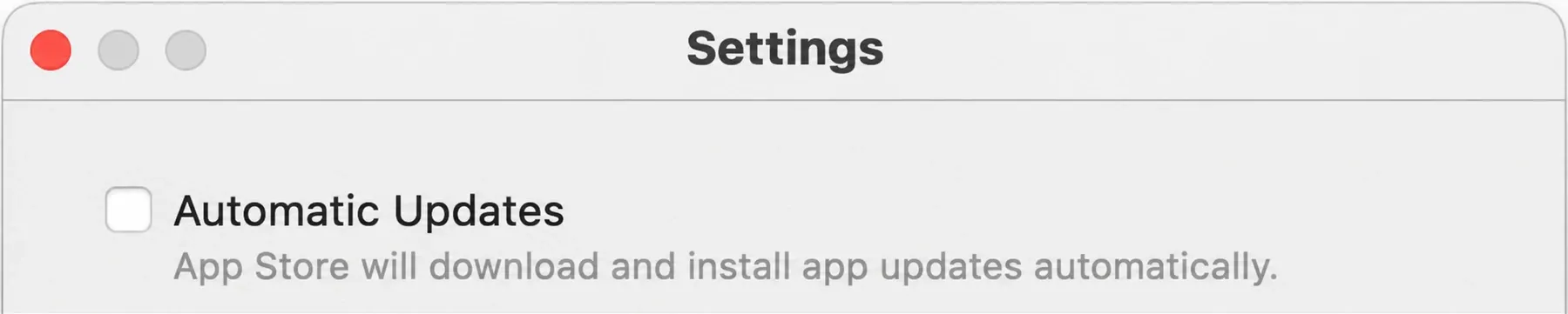
Updates come only through the App Store. Open it, click Updates in the sidebar, then click Update next to Logic Pro or Update All, following Apple’s App Store update steps. The switch for automatic updates is in App Store > Settings > Automatic Updates.
Switch automatic updates off on any Mac you record on. Apple’s own advice is to back up the installed app before you update, and an automatic install skips that step without asking. On a Mac you only use for learning, leave them on, since the newest features matter more there than a session that opens the same way tomorrow.
If Logic Pro doesn’t show an update, Apple points to two causes: a macOS version the new build doesn’t support, or a different Apple Account from the one that bought the app. The fixes are in Logic Pro update not showing in the App Store. To reinstall from scratch, click your name at the bottom of the App Store sidebar while signed in to the buying account, as Apple describes for redownloading its Pro Apps. New to Logic Pro altogether? Start with the official ways to get Logic Pro.
Keep a working copy before you update
Keep a copy of the working app before an update. Apple’s method is to select Logic Pro in Applications, choose File > Compress “Logic Pro”, and store the ZIP with your backups. If an update causes trouble, that saved copy gives you a rollback route; the App Store does not promise to supply the same historical build again. Follow the full backup and rollback routine for project and plug-in checks too.
Should you install a new Logic Pro version right away?
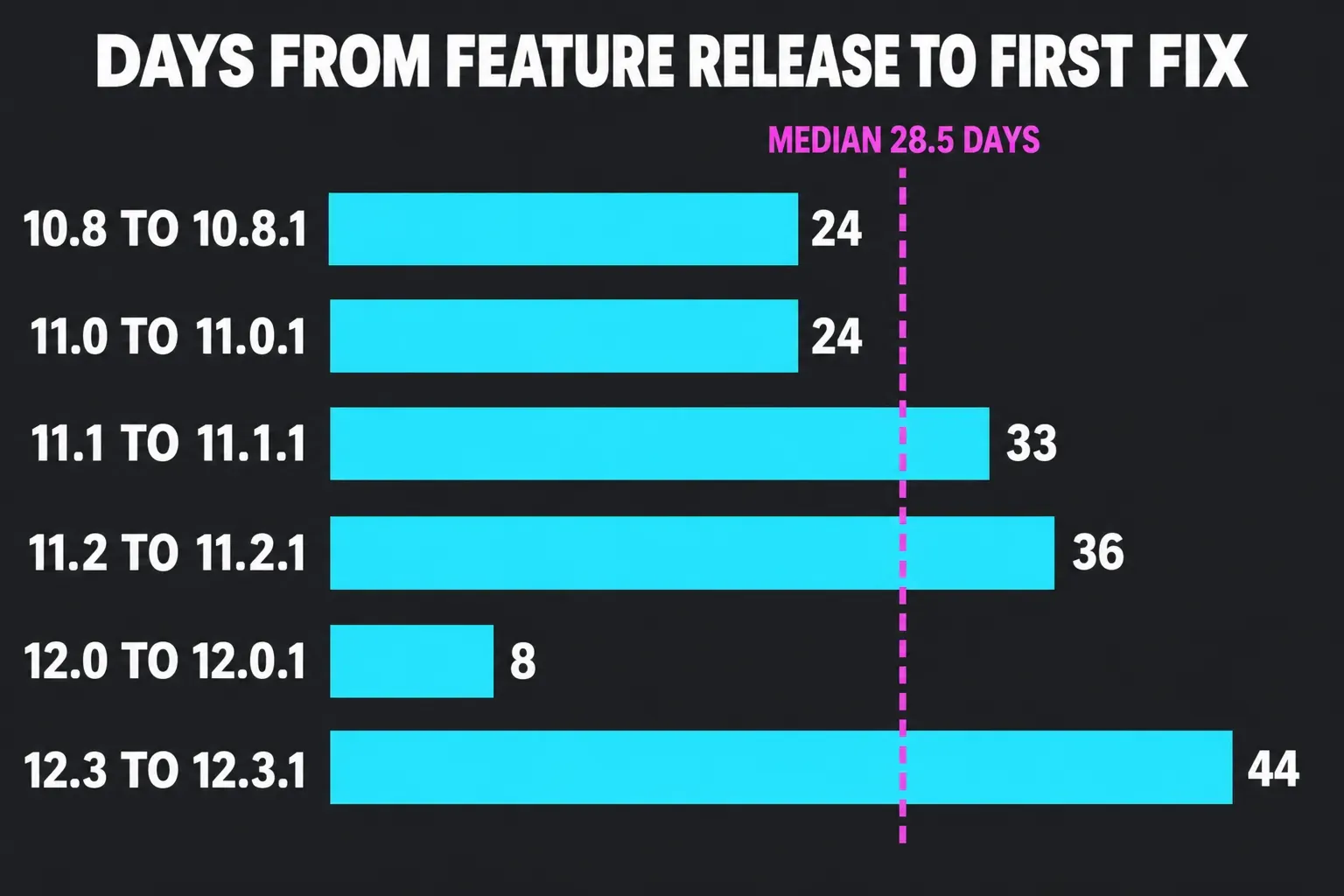
Not on a Mac you rely on for sessions. Across six feature releases from 10.8 to 12.3, Apple shipped the first “stability improvements and bug fixes” update a median of 28.5 days later, with a range of 8 to 44 days. I counted the days between each pair in the App Store version history: 10.8 to 10.8.1 took 24 days, 11.0 to 11.0.1 took 24, 11.1 to 11.1.1 took 33, 11.2 to 11.2.1 took 36, 12.0 to 12.0.1 took 8 and 12.3 to 12.3.1 took 44. The 12.2 release went straight to 12.3 without a fix release, so it isn’t in the count.
My default is to wait for the first fix or about four weeks on the Mac you depend on for recording, while keeping the version you trust. That is a scheduling choice based on those six historical pairs, not a guarantee that a new release will be stable after a month. A separate learning setup can take the update earlier. Before installing Logic Pro 13.0, confirm that your essential plug-ins and interface support macOS 26.1 or later and keep the working app backup.
Logic Pro version FAQ
Is Logic Pro X still available?
Not under that name. Logic Pro X became Logic Pro in November 2020, and the same standalone App Store listing now sells 13.0. Existing owners can redownload the purchased app without buying it again, as long as their Mac and Apple Account qualify.
Is Logic Pro 12 a free update?
Yes for owners of the Mac app. Logic Pro 12 replaced 11.2.2 on the same App Store listing, and Production Expert reported at launch that updates are expected to stay free for existing owners. New buyers pay $199.99 or subscribe to Apple Creator Studio at $12.99 a month or $129 a year.
Is there a Logic Pro 13?
Yes. Logic Pro for Mac 13.0 was released on November 5, 2026. The Mac App Store listing lists the standalone app at $199.99 with macOS 26.1 or later required; Creator Studio is the subscription route. Logic Pro for iPad 4.0 arrived separately on November 18.
What is the latest version of Logic Pro for iPad?
Logic Pro for iPad 4.0, released on November 18, 2026. The iPad App Store listing names it Logic Pro: Make Music and requires iPadOS 27 or later with an A12 Bionic chip or later. Some features need an A17 Pro chip or later.
Can the latest Logic Pro run on an Intel Mac?
Apple’s current Creator Studio requirements specify Apple silicon. The standalone 13.0 App Store compatibility field gives macOS 26.1 but omits a chip minimum, so it is not an Intel-support guarantee. Older Intel-specific fixes do not establish access to the latest installer. Keep a working older app and use the Intel Mac check before changing it.
What was the last version of Logic Pro 11?
Logic Pro 11.2.2, released on July 22, 2025, was the last 11 release; Logic Pro 12 followed on January 28, 2026. Logic Pro 11.2 needed macOS Sequoia 15.4. That historical requirement does not make a Sequoia Mac compatible with the current 13.0 installer, which needs macOS 26.1.


