What Is Logic Pro? What It Does, Who It Is For and What It Costs
Logic Pro is Apple’s digital audio workstation for recording, beat making, writing, mixing and mastering on a Mac or iPad. Here’s what it does, what comes in the box, what it costs, what it needs to run, who uses it and when another DAW fits you better.

Logic Pro is Apple’s digital audio workstation for the Mac and the iPad: one app where you record, program beats, write parts, fix timing and pitch, mix and master a song. On a Mac you buy it once for $199.99 or get it inside Apple Creator Studio at $12.99 a month or $129 a year after a one-month free trial. It needs a Mac with Apple silicon, and there’s no Windows version. Apple ended that when it bought Logic’s maker, Emagic, in 2002.
I think it’s the best-value DAW you can put on a Mac, because the $199.99 copy already includes the instruments, Session Players, Stem Splitter and Mastering Assistant, and Apple shipped versions 10.5, 11, 11.2 and 12 to existing owners as free updates. The survey rows below show it is a common choice within several music-production audiences. Their populations and answer formats differ, so they don’t establish a combined market share. Below I cover what it is, what it’s used for, what comes in the box, Mac versus iPad, the price and license, what it needs to run, who uses it and who should pick another DAW.
What is Logic Pro, in plain terms?
A DAW is the app where a song gets built, from the first idea to the master file you upload. Logic Pro is Apple’s. Apple writes it, sells it and updates it, and it runs only on Apple hardware.
| Question | Answer |
|---|---|
| Who makes it | Apple |
| Runs on | A Mac with Apple silicon, an iPad with an A12 Bionic chip or later |
| Current version | 13.0 for Mac, released November 5, 2026, and 4.0 for iPad, released November 18, 2026 |
| Price on Mac | $199.99 once, or Apple Creator Studio at $12.99 a month or $129 a year |
| Price on iPad | Free download; new subscribers use Apple Creator Studio. Existing standalone iPad subscriptions can continue or be reactivated. |
| Windows version | None since Logic 5.5.1 |
| Free Apple alternative | GarageBand, whose projects open in Logic Pro |
The history explains the name. According to Logic Pro’s history on Wikipedia, the German company C-Lab released Gerhard Lengeling’s Creator sequencer for the Atari ST in 1987, and programmers from C-Lab later left to form Emagic, which released Notator Logic in 1993. Apple bought Emagic in July 2002 and announced at the same time that the Windows version would stop, so Logic 5.5.1 was the last Windows release. In March 2004 Apple folded more than 20 Emagic products into Logic Pro 6, and in December 2011 Logic moved to the Mac App Store as its price fell from $499 to $199.99. Logic Pro X arrived in July 2013 at that same $199.99, Apple dropped the X in November 2020 with macOS Big Sur, Logic Pro for iPad came out in May 2023, and Logic Pro 12 launched with Apple Creator Studio on January 28, 2026, and Logic Pro 13 followed in November.
What is Logic Pro used for?
Almost every job between a voice memo and a finished master. Apple’s Mac App Store listing names the tools, and this table maps them to the work they do.
| Job | Tools inside Logic Pro | Where to learn it |
|---|---|---|
| Record vocals and instruments | Take folders, Quick Swipe Comping, Flashback Capture | vocal recording, take folders |
| Make beats | Drum Machine Designer, Drum Synth, Step Sequencer, Beat Breaker | Drum Machine Designer, Step Sequencer |
| Write and arrange | Session Players, Chord ID, Live Loops | Session Players and Chord ID, Live Loops |
| Fix timing and pitch | Flex Time, Flex Pitch, Smart Tempo | Flex Time, Flex Pitch |
| Sample and remix | Stem Splitter, Sampler, Quick Sampler, Sample Alchemy | Stem Splitter, Quick Sampler, Sampler vs Quick Sampler |
| Mix and master | ChromaVerb, ChromaGlow, Mastering Assistant | mixing, Mastering Assistant |
| Spatial Audio | Dolby Atmos tools, ADM file export | Dolby Atmos |
| Sound design | Alchemy synth | Alchemy |
| Play live (Mac) | MainStage, a separate $29.99 app | MainStage for Logic users |
Two of these need a word. Apple’s Flashback Capture guide explains that Logic temporarily stores incoming audio and MIDI during project playback, and MIDI while stopped. Audio capture needs at least four seconds of playback and retains up to one minute; it does not capture audio while stopped. Stem Splitter separates vocals, bass, guitar, piano, drums and other instruments. Logic Pro 13 for Mac can also split drums into kick, snare, hi-hat, toms, cymbals and other drums, yielding up to 11 parts. That’s how producers pull a drum loop or an a cappella out of a finished track; Apple’s release notes describe the new drum options. If you score video, the Mac version also imports and exports XML for Final Cut Pro.
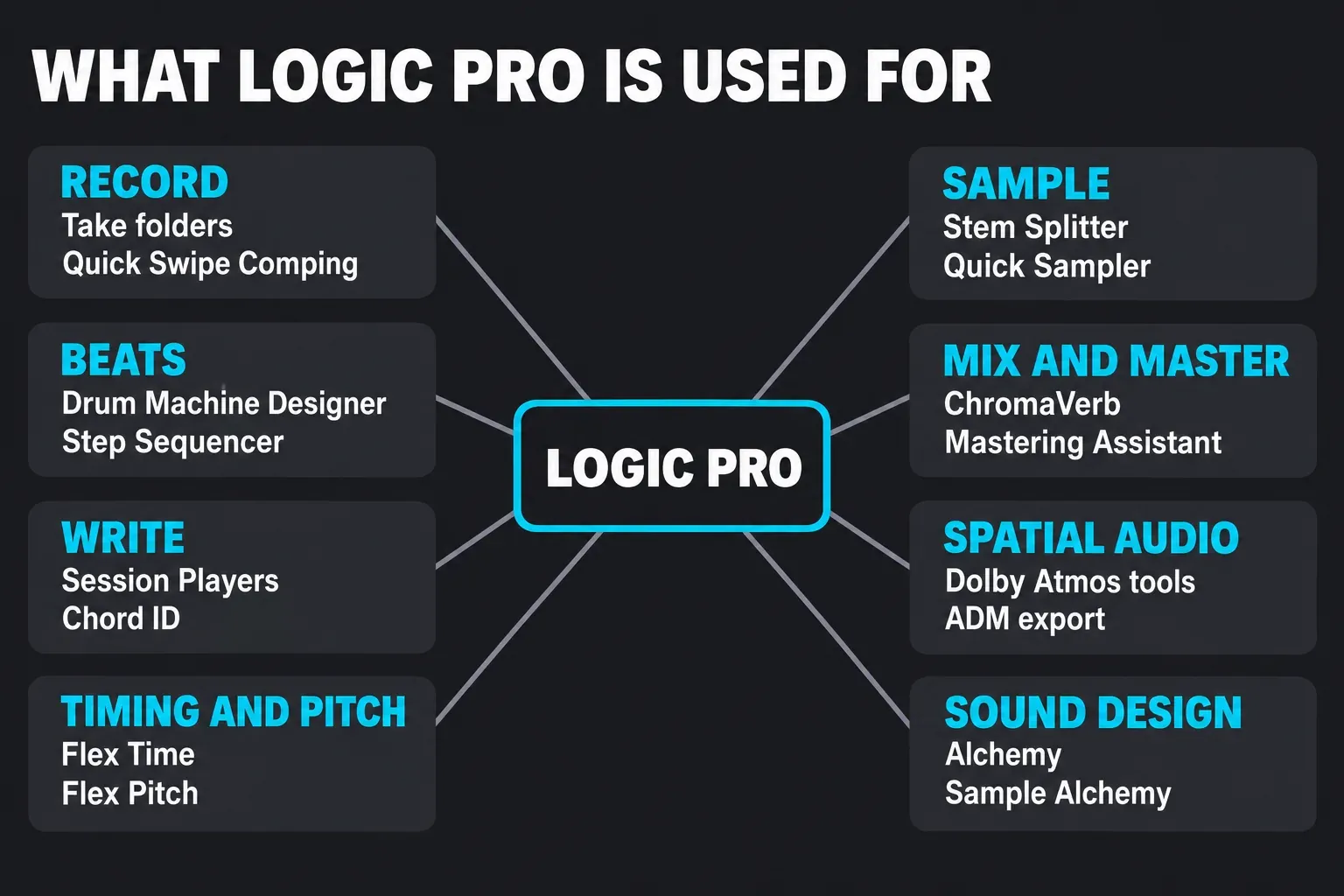
If you mostly record, I’d learn take folders and Quick Swipe Comping before anything else, because they let you combine the best phrases when you record several passes. If you mostly program, start with Drum Machine Designer and Step Sequencer, since Apple built Step Sequencer to drive Drum Machine Designer.
What comes with Logic Pro?
The app ships with enough instruments, effects and sounds to finish a record without buying plug-ins. These are the counts Apple publishes.
| What | What you get |
|---|---|
| Session Players | Six virtual players: Synth Player, Bass Player, Keyboard Player, Acoustic Drummer, Electronic Drummer and Percussionist |
| Stem Splitter | Six main parts: drums, bass, vocals, guitar, piano and other. Logic Pro 13 for Mac can split drums into six kit parts for up to 11 stems. |
| Alchemy | A sample-manipulation synth with a library of over 3,000 sounds |
| ChromaVerb | 14 reverb models with up to 100 seconds of decay |
| Sound library on iPad | Over 6,300 samples, over 5,700 instrument and effects patches, more than 12,900 loops |
| Storage on Mac | 6 GB for the minimum install, 44 GB or more for the full Sound Library |
Recent updates added more. The Mac listing calls out a producer project for the hit “Shoulda Never” by Kehlani, Usher and Khris Riddick-Tynes, a Granular Alchemy sound pack built around Alchemy’s new Grain Sync mode, and Chord ID that now catches slash voicings like C/E plus 7ths, maj7s and 6ths. Apple also makes Logic Remote, a free iPhone and iPad app that plays instruments, mixes tracks and runs Live Loops and Remix FX on the Mac from across the room, and Logic Pro opens GarageBand projects directly.
I’d install the essentials first and pull in the rest of the library as you need it. 44 GB is nearly 9% of a 512GB drive; downloading packs as you need them leaves more space for projects. The Sound Library guide shows how to manage it.
Logic Pro for Mac vs Logic Pro for iPad
They’re two apps that share a project format. The iPad App Store listing is called Logic Pro: Make Music, and the Mac listing says projects open back and forth between the two.
| Logic Pro for Mac | Logic Pro for iPad | |
|---|---|---|
| App Store name | Logic Pro | Logic Pro: Make Music |
| Current version | 13.0 | 4.0 |
| How you pay | $199.99 once or Apple Creator Studio | Apple Creator Studio; existing standalone iPad plans can continue |
| Needs | Mac with Apple silicon, macOS 26.1 or later for 13.0 | iPadOS 27 or later, A12 Bionic chip or later, A17 Pro or later for some features |
| Hands-on control | Mouse, keyboard, MIDI controllers, Logic Remote | Multi-Touch, Apple Pencil, class-compliant audio interfaces and MIDI devices |
| Learning | Guided tutorials | In-app Lessons |
| Live performance | MainStage | No MainStage |
Before Creator Studio the iPad app had its own plan, and Apple listed it at $4.99 a month or $49 a year as recently as the May 2025 Logic Pro update. For new subscribers, the listing now offers Logic Pro through Apple Creator Studio. Existing subscribers can keep their standalone iPad plan, or reactivate it after trying Creator Studio.
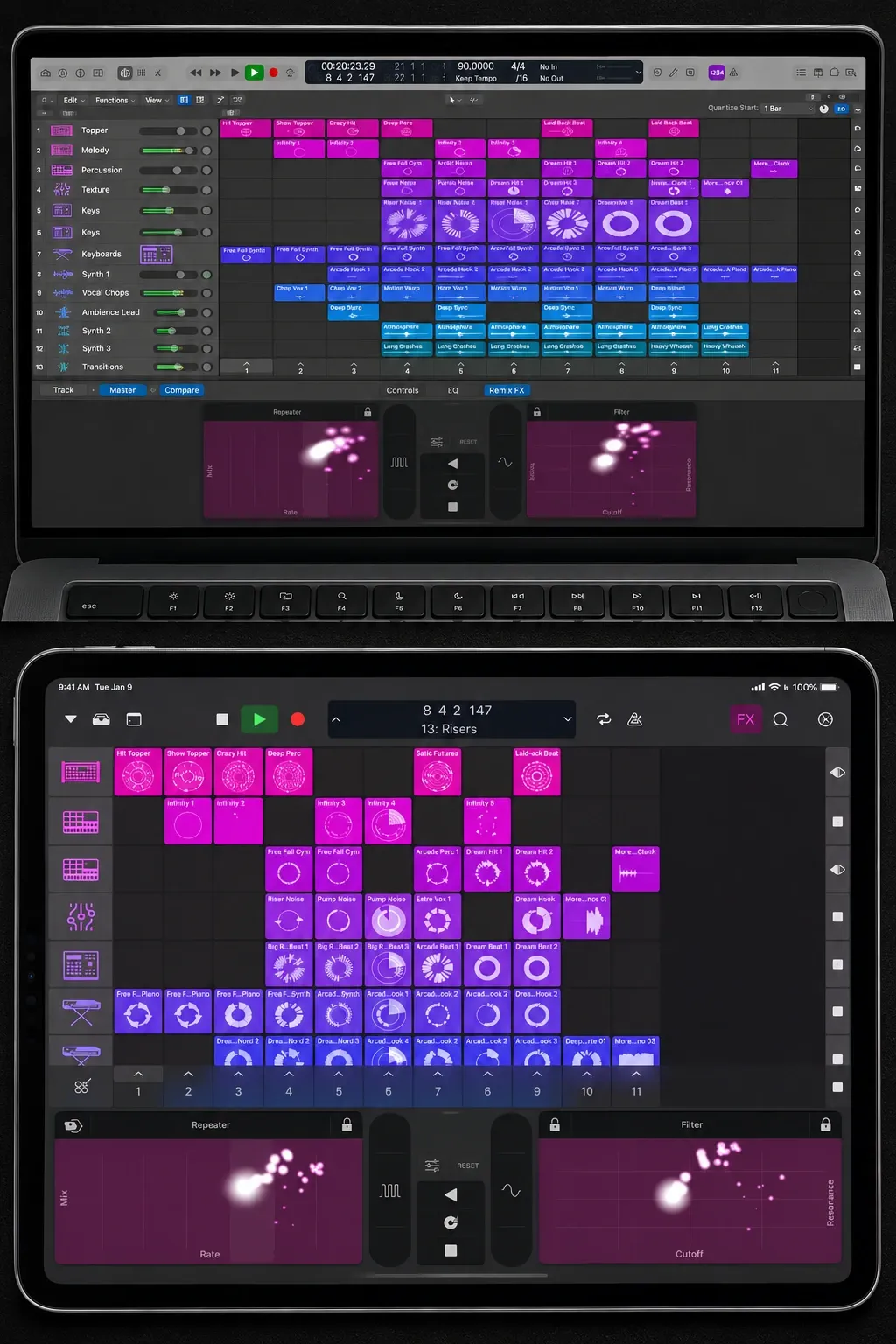
I’d pick the Mac version first. It’s the only one you can own outright, MainStage runs only on a Mac, and the base MacBook Air with the M5 chip starts with 16GB of memory and a 512GB SSD, which leaves room for the full Sound Library. The base iPad Air with the M4 chip has 12GB of memory and starts at 128GB of storage, which makes it a great sketchpad that hands songs back to the Mac. The best Mac for Logic Pro, best iPad for Logic Pro and Logic Pro for iPad guides go deeper.
How much does Logic Pro cost, and what is the license?
Logic Pro for Mac costs $199.99 once on the Mac App Store. Apple Creator Studio costs $12.99 a month or $129 a year after a one-month free trial, and students and educators pay $2.99 a month or $29.99 a year. An eligible new Mac or iPad can qualify for three months before billing starts; use the Apple Account used to set up the device and check Apple’s current offer and redemption conditions. The subscription includes Logic Pro and Final Cut Pro on Mac and iPad, Pixelmator Pro, and Motion, Compressor and MainStage on the Mac. MainStage on its own costs $29.99.
The Mac subscription and one-time purchase include the core production tools. In Logic Pro 13, the intelligent Assistant beta needs Creator Studio, a supported Apple-silicon Mac with macOS 27 or later, and U.S. English. Apple’s Creator Studio support page adds the details that matter before you subscribe. You and up to five other family members can share one subscription through Family Sharing, except on higher-education student and educator plans. If you cancel, the apps keep working until the end of the billing period, and you keep the projects and files you made, so you can resubscribe later or buy the one-time app. If you already own the $199.99 app and also subscribe, both versions can sit on your Mac.
The one-time purchase is a license. Apple’s Media Services terms say apps on the App Store are “licensed, not sold, to you.” What that license has bought owners is a long run of free updates. Apple released Logic Pro X 10.5 as a free update for all existing users in 2020, Logic Pro 11 in May 2024 and 11.2 in May 2025 as free updates for existing users, and Logic Pro 12 as another free update in January 2026. Apple’s Logic Pro 13.0 release notes name one feature the one-time purchase doesn’t include: the intelligent Assistant beta needs a Creator Studio subscription.
Compare actual payments: 15 monthly payments total $194.85, and the 16th takes the total to $207.84. The annual plan costs $129 up front and $258 when you renew for a second year. Those totals exclude free trials, tax and discounts. I’d buy Logic Pro once if it’s the only Apple pro app you need for the long term, because the purchase costs less after the 16th monthly charge or the second annual charge. I’d pick Creator Studio if you want Logic on an iPad, you also cut video in Final Cut Pro or you want the Assistant beta. How much Logic Pro costs covers price history and the education bundle, Creator Studio vs buying Logic Pro runs the full decision, and the Logic Pro free trial guide explains the trial.
What do you need to run Logic Pro?
For a new Logic Pro 13 setup, I’d choose an Apple-silicon Mac with macOS 26.1 or later. Apple’s current Creator Studio requirements specify that combination; the Assistant beta needs macOS 27 or later and U.S. English. Existing Intel owners should check the exact Mac, standalone or subscription purchase route, and available Logic build before changing a working installation.
- Storage on Mac: 6 GB for the minimum install, 44 GB or more for the full Sound Library.
- iPad: iPadOS 27 or later and an A12 Bionic chip or later, with some features needing an A17 Pro chip or later.
- Audio gear on iPad: class-compliant audio interfaces and MIDI devices.
- Windows: not supported. Logic 5.5.1 was the last Windows release; Apple ended Windows development after acquiring Emagic in 2002.
Before changing macOS or Logic, back up the working setup and confirm interface, plug-in and project compatibility. Choose a compatible macOS for the Logic build you plan to use; don’t interrupt a session just to install the newest version. The Logic Pro system requirements page has the full list, and Logic Pro on Windows covers what PC owners can do instead.
Who uses Logic Pro? What six DAW surveys show
Logic is a common choice in these respondent groups. The table keeps six survey editions from four publishers separate, including each question and denominator. Logic placed second in five editions and third in one. These self-selected audiences and different answer formats don’t support a pooled percentage of all producers, and the respondent counts should not be treated as unique people across surveys.
| Survey | Respondents | What it counted | Logic Pro | Place | Leader |
|---|---|---|---|---|---|
| Production Expert 2025 | Over 2,500 | Every DAW you use, share of all answers | 12.6% | 2nd | Pro Tools, 37.2% |
| Sleepfreaks 2025 (Japan) | 3,222 producers | Main DAW only | 18.1% | 3rd | Cubase, 36.9% |
| Bobby Owsinski follower poll, reported 2025 | Not published | Favorite DAW | 16% | 2nd | Pro Tools, 32% |
| Ask.Audio 2016 | Over 30,611 | Favorite DAW | 19.2% | 2nd | Ableton Live, 20.52% |
| Production Expert 2024 | Over 5,000 | Every DAW you use, share of all answers | 13.39% | 2nd | Pro Tools |
| Production Expert 2023 | 6,601 | Every DAW you use, share of all answers | 13.35% | 2nd | Pro Tools |
The surveys ask different questions of different people, which is why the shares spread out. Production Expert lets readers tick every DAW they use and reports each one’s share of all answers. Its audience leans professional: in 2023, 71% earned some or all of their income from audio. It prints its 2025 results as charts, and Bobby Owsinski’s write-up of that survey gives the figures: Pro Tools 37.2%, Logic Pro 12.6%. Sleepfreaks counts each producer’s main DAW, and its readers are mostly Japanese producers, many of them 30 or under. Logic still placed third there despite having no Windows version. Owsinski’s followers, who he says tend to be older and record a lot of live instruments, and Ask.Audio’s members each picked one favorite. Production Expert reports 13.35% in 2023, 13.39% in 2024 and 12.6% in 2025. Its presentations change: 2023 and 2024 separate music and post options, while the 2025 overview combines them by DAW. Treat the figures as edition-specific results, not a market-share trend. Across the six presentations, Logic is second five times and third once.
My verdict: these surveys show established use across several production communities, not that one in six producers uses Logic. Production Expert counts shares of multiple answers, while the other polls ask for a main or favorite DAW. Choose for your workflow and session exchange needs rather than turning those percentages into market share. Apple also shipped a Billie Eilish “Ocean Eyes” demo project with Logic Pro X 10.5, and the current version includes the “Shoulda Never” producer project.
Who is Logic Pro for, and who should pick something else?
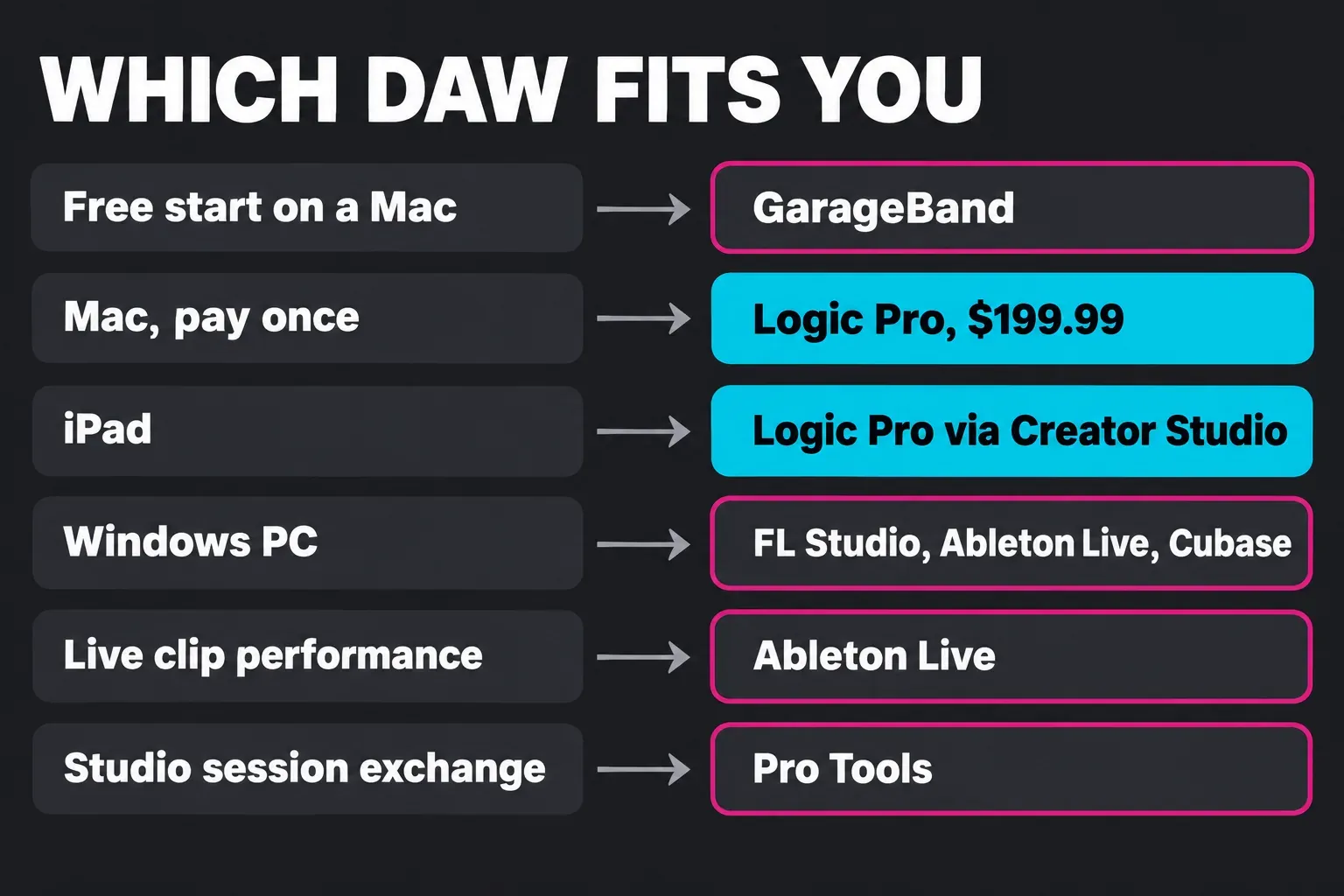
Logic Pro fits anyone on a Mac who wants recording, beats, writing, mixing and mastering in one app for one price. It’s also the natural next step from GarageBand. Pick something else in these cases:
- You want to start free. GarageBand is free on the Mac App Store, and Logic Pro opens its projects when you move up. See Logic Pro vs GarageBand.
- You work on a Windows PC. FL Studio runs on Windows and macOS with lifetime free updates for your edition, Ableton Live is available on Mac or Windows, and Cubase runs on Windows and macOS too. Compare them in Logic Pro vs FL Studio, Logic Pro vs Ableton Live and Logic Pro vs Cubase.
- You perform live by launching clips. Ableton’s Session View lays every clip out in a grid and fires them as scenes. On a Mac, Logic’s Live Loops and MainStage cover part of that ground.
- You trade sessions with Pro Tools studios. Pro Tools leads Production Expert’s 2025 survey with 37.2% and Owsinski’s poll with 32%. Logic Pro vs Pro Tools explains when that matters.
- You only have an iPad. New subscribers get Logic Pro for iPad through Creator Studio; existing standalone subscribers can keep their plan. Logic Pro for iPad covers what it can and can’t do.
For a wider shortlist, see the best DAW for beginners and best DAW for Mac roundups, and my Logic Pro review for the full verdict on the app.
How do you get started with Logic Pro?
- Start the trial. Creator Studio offers a one-month trial for eligible subscribers, with a three-month offer for eligible new-device purchases under Apple’s account and redemption conditions. The Assistant beta also has its own supported Mac, OS, U.S. English and usage requirements.
- Buy or download. Get the $199.99 app or the Creator Studio version from the App Store. Download Logic Pro on a Mac walks through it.
- Install the essentials first. The minimum install is 6 GB, so add the rest of the Sound Library once you know which sounds you use.
- Follow the built-in lessons. Apple puts guided tutorials in the Mac app and Lessons in the iPad app. Our Logic Pro beginner tutorial takes you through a first song.
- Bring your GarageBand songs. Open a GarageBand project in Logic Pro and keep working on it.
- Add hands-on control. A small keyboard controller makes Session Players and software instruments far quicker to play, and Logic Remote on an iPhone or iPad works as a free control surface. The best MIDI controllers for Logic Pro lists the ones that map well.
For a tour of every major feature, the Logic Pro features page and the Logic Pro tutorial hub pick up from here, and what’s new in Logic Pro 12.3 covers the 12.x feature releases.
FAQ
Is Logic Pro free?
No. Logic Pro for Mac costs $199.99 once, or you get it through Apple Creator Studio at $12.99 a month or $129 a year after a one-month trial for eligible subscribers; eligible new-device purchases can qualify for three months under Apple’s offer conditions. Apple’s free music app is GarageBand, and Logic Pro opens GarageBand projects when you’re ready to move up.
Is Logic Pro good for beginners?
Yes, if you’re on a Mac. Apple builds guided tutorials into the Mac app and Lessons into the iPad app, Session Players fill in drums, bass and keys while you learn to write, and anything you started in GarageBand opens in Logic. I’d still start with the beginner tutorial rather than every feature at once.
Do professional producers use Logic Pro?
Yes. Production Expert reported that 71% of its audience earned some or all of their income from audio. In its 2023 poll, Logic Pro placed second among music-production DAW options with 13.35% of all answers, behind Pro Tools. Apple also ships producer projects inside the app, including the “Shoulda Never” session by Kehlani, Usher and Khris Riddick-Tynes.
Can Logic Pro run on Windows?
No. Logic 5.5.1 was the last Windows version, and Apple stopped Windows development after it bought Emagic in 2002. On a PC, look at FL Studio, Ableton Live or Cubase, and see Logic Pro on Windows for the options.
What is the difference between Logic Pro and Logic Pro X?
They’re the same app line. Logic Pro X was the name from July 2013 until November 2020, when Apple dropped the X alongside macOS Big Sur. Owners kept getting free updates after the rename, through Logic Pro 11 in 2024 and Logic Pro 12 in 2026.
What do you get with a Logic Pro license?
The $199.99 Mac App Store purchase gives you Logic Pro for Mac and the downloadable Sound Library, plus, so far, free updates. The intelligent Assistant beta in Logic Pro 13 is for Creator Studio subscribers only. App Store apps are licensed, not sold. MainStage is a separate $29.99 app, and new iPad subscribers use Apple Creator Studio. Existing standalone iPad plans can continue.


