EQ Before or After Compression in Logic Pro?
Decide whether Channel EQ should feed Compressor or shape its output, then prove the order with a level-matched stock-plugin test.

Put EQ before compression when you need to change what makes the compressor react. Put EQ after compression when you want to shape its output. Use both positions when cleanup and tonal shaping are separate jobs. These examples use Compressor’s internal detector, with no external sidechain selected. “Always cut before and boost after” isn’t a rule.
In Logic Pro, the plug-in in the earlier insert slot feeds the one below it. Moving Channel EQ and Compressor changes the signal chain and the input the compressor receives, so the same threshold can produce different gain reduction. The right order is the one that solves the audible problem at a matched output level.
Rumble, proximity boom, or a sharp resonance is driving gain reduction: try EQ first. Dynamics are controlled but the result needs weight, presence, or air: try compressor first. Unsure: build both orders and level-match them.
What actually changes when you swap EQ and compression
A compressor doesn't react to the idea of a vocal, bass, or snare. It reacts to the level presented to its detector. A strong low-frequency bump can push the signal over the threshold even when that bump isn't the part you want controlled.
With EQ first and the internal detector selected, cuts and boosts change the signal Compressor measures. A high-pass filter can reduce rumble-driven gain reduction. A 3 dB presence boost might make consonants or pick attack trigger more compression, depending on the recording and threshold. EQ on the main track doesn’t automatically change a separate external key signal.
With compression first, the compressor makes its gain-reduction decision from the un-EQ'd track. The later EQ shapes the already controlled result. A broad top-end lift after compression doesn't retroactively make those frequencies cross the compressor threshold.
Berklee’s discussion of EQ before or after compression also treats order as a listening decision. Neither position guarantees a warmer or clearer sound. First identify whether the problem is the compressor’s reaction or the tone left afterward.
Use EQ before compression when the detector hears the wrong thing
Start with Channel EQ before Compressor when unwanted energy is dominating the gain reduction. Common cases include microphone stand rumble, vocal proximity boom, guitar cabinet low-mid buildup, a bass note that overwhelms the rest, or a narrow resonance that jumps on a few words.
- Insert Channel EQ in the earlier Audio FX slot and Compressor below it.
- Make a small correction to the rumble, boom or resonance you can hear. Leave useful bass and body intact.
- Watch the gain-reduction meter. If the cut reduces compression more than intended, lower Threshold carefully; do not change it just to recover an arbitrary meter reading.
- Compare the corrected chain at a similar listening level. The A/B procedure below separates the effect of order from output loudness.
If Compressor already sits in the first slot, Option-click the EQ display on the channel strip. Logic inserts Channel EQ as the first plug-in, moves the existing plug-ins down one slot and redirects their automation. A plain click on the EQ display uses the first unused slot instead, so the new EQ lands below the compressor.
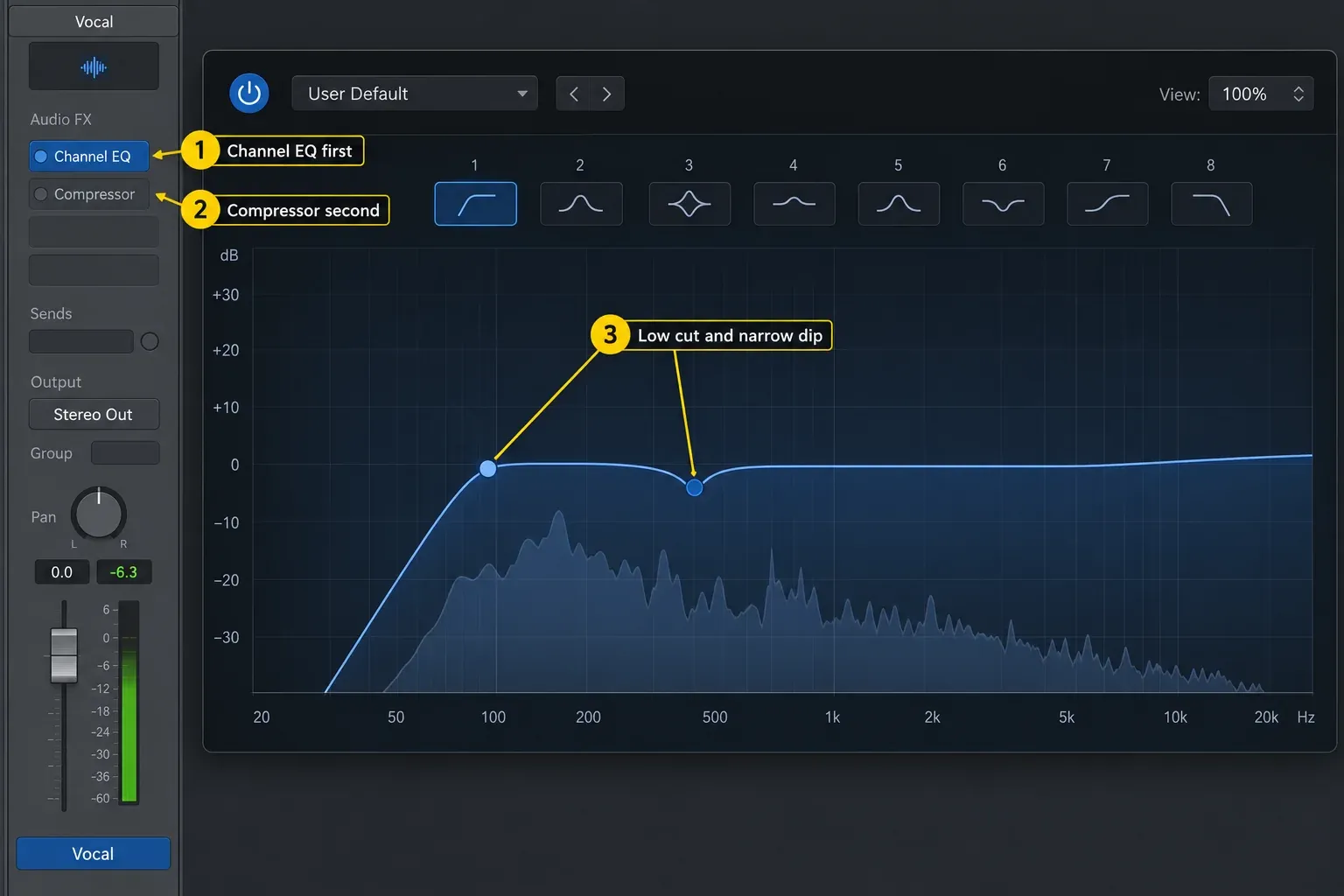
Apple’s Channel EQ reference documents its high-pass, shelving, parametric and low-pass bands. If you need help choosing the band or width, the Channel EQ guide covers those controls. A steep filter on every track isn’t a substitute for listening in context.
Use compression before EQ when dynamics need control first
Put Compressor first when the source spectrum is already usable but its level is inconsistent. The compressor sees the natural balance of the recording. A later Channel EQ can then add broad color, restore presence, or trim a tone introduced by the compressor model.
This order often works for a vocal that needs stable phrases before a gentle air shelf, a bass whose note levels need evening before a broad midrange choice, or a bus where compression creates movement and the final EQ makes a small balance correction.
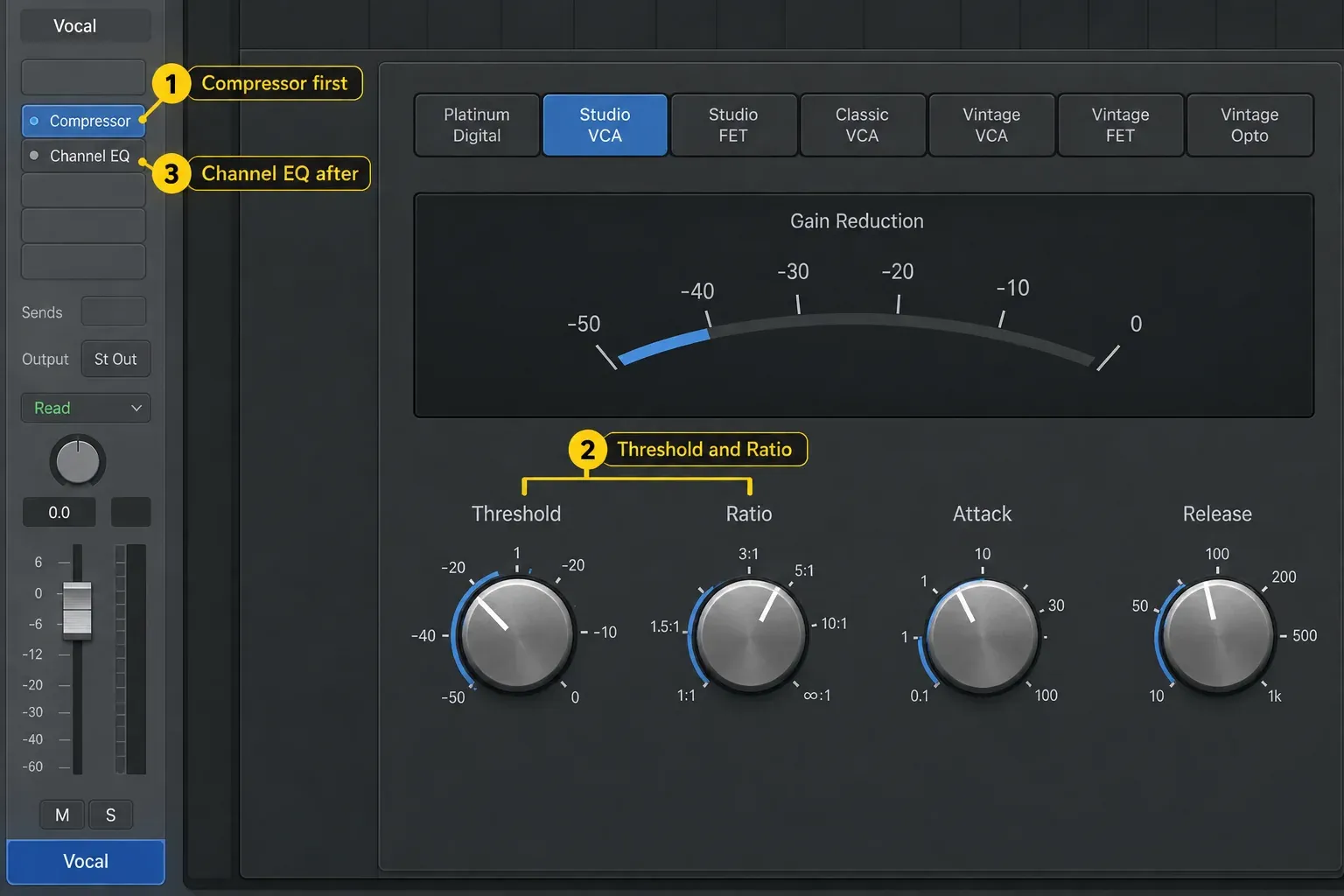
Apple defines threshold as the level above which Compressor reduces the signal, with ratio, attack, release and knee shaping its response. The Logic Pro Compressor guide explains those controls. Here, keep them fixed for the first order comparison so you can hear what moving EQ changes.
Use two EQ stages when one plug-in is doing two jobs
When cleanup and tone are separate jobs, try corrective EQ → Compressor → tonal EQ. The first EQ removes energy you don’t want steering compression. Compressor controls the envelope. The second EQ adjusts the resulting tone.
That doesn't mean every track needs three plug-ins. Add the second EQ only when you can name the second job. If the pre-EQ correction and compressor already produce the right result, stop. If compression exposes nasal midrange, dulls the apparent top end, or adds low-mid weight, use a small post-EQ move to rebalance it.
Two stages are also easier to troubleshoot. Bypass the first EQ to hear the detector change. Bypass the second to hear the tonal finish disappear. One overloaded EQ instance can hide which decision caused the improvement.
Use Compressor's side-chain filter for detector-only correction
Sometimes you want to keep the track’s bass but stop it dominating compression. Use Compressor’s internal side-chain filter instead of high-passing the audible signal. With no external sidechain selected, open Side Chain, switch Filter On, choose HP and adjust Frequency while watching gain reduction. Use Listen briefly to hear the detector signal, then turn Listen off before judging the track.
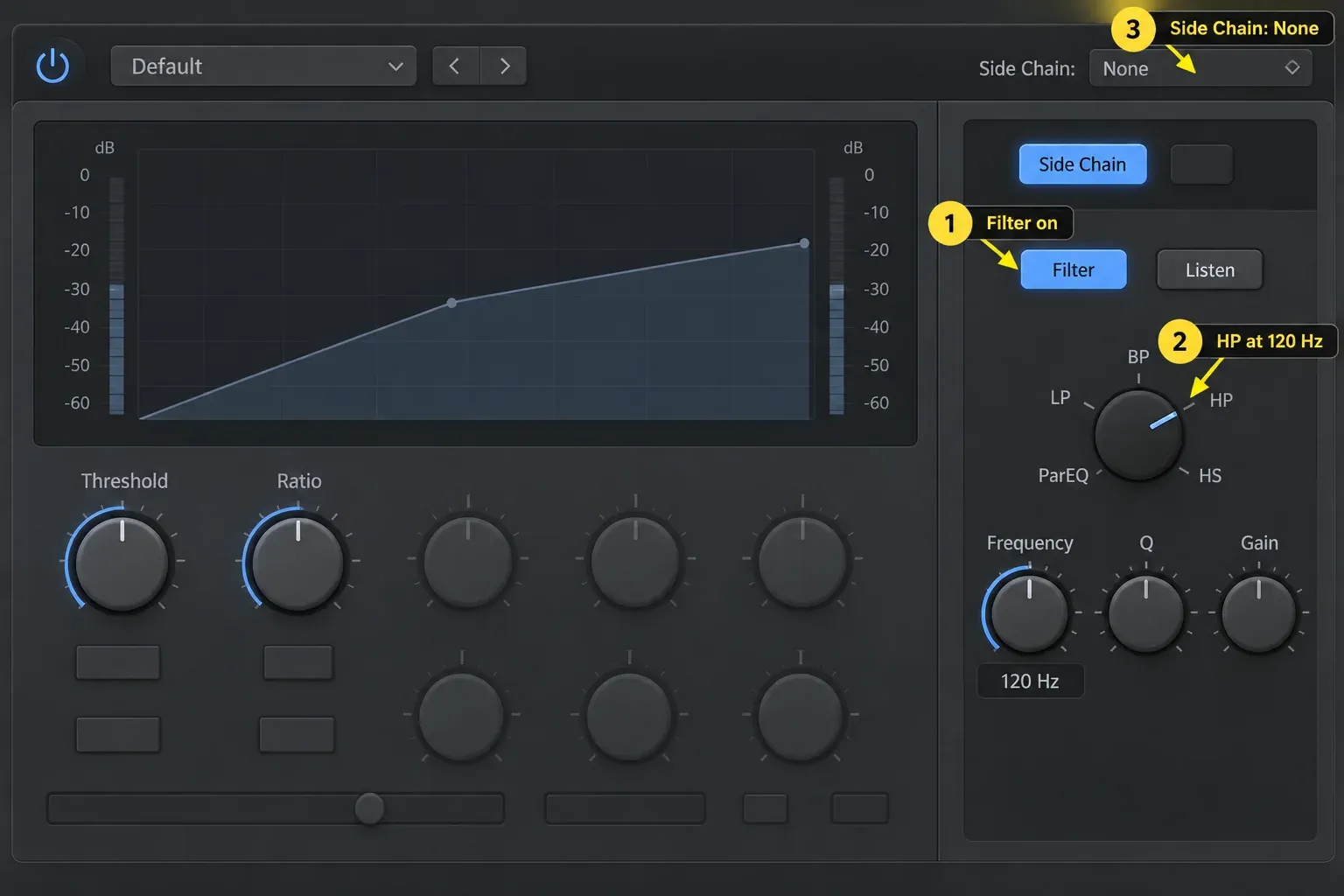
Apple’s Compressor side-chain reference confirms that this filter works without an external source. Available modes include LP, BP, HP, ParEQ and HS. Some controls vary by compressor model. This isn’t a bass cut in the audio path, but the resulting gain reduction still affects the full signal. The low end isn’t exempt from compression.
This is different from external sidechain compression in Logic Pro, where another track or bus supplies the control signal. Here the source still controls its own compression. You're just changing what the detector emphasizes.
Run a level-matched A/B test in Logic Pro
A louder chain can seem better even when its tone or envelope is worse. Save the project first. For this test, use the internal detector, turn its filter off, set Mix to 100% wet and Auto Gain to Off. Turn the integrated Limiter off and keep Distortion and the circuit model unchanged, with enough headroom to avoid clipping. Hold Input Gain, Make Up and Output Gain fixed. Bypass later processors for the first comparison. Restore and recheck them afterward.
- Choose a representative loop with quiet and loud moments, and keep the channel fader and monitoring volume fixed.
- Set one useful Channel EQ move and one Compressor setting. Keep ratio, attack, release, knee and detector options unchanged during the first comparison.
- Insert Utility → Gain after both plug-ins for output matching. Leave its phase, balance, channel-swap and mono controls neutral.
- Listen to EQ → Compressor → Gain. Note the gain-reduction range and listen for pumping, lost attack or a tonal problem.
- Drag the EQ insert below Compressor, using the position line, to make Compressor → EQ → Gain. Do not hold Option: Option-drag copies the plug-in.
- Adjust only the final Gain plug-in to match the two versions’ apparent loudness by ear, using a level meter as a check. Compare the same passage; matching peaks alone does not guarantee equal loudness.
- Choose in the full mix, soloing briefly to diagnose artifacts. If you want a second comparison at similar gain reduction, adjust Threshold for each order, then level-match again. Restore later processors and check the full chain before keeping the change.
Apple documents dragging and copying insert plug-ins, the main Compressor controls and its Mix, Limiter and Distortion controls. A separate Gain plug-in lets you match the finished output without changing Compressor’s internal gain controls. Apple also warns that Auto Gain with RMS detection can oversaturate the signal. Leave Auto Gain off for this test.
Choose the order for vocals
For a vocal with rumble or heavy proximity effect, try gentle corrective EQ before compression. If sharp consonants trigger too much broadband gain reduction, filtering those frequencies out of the detector can reduce that reaction—but it doesn’t remove audible sibilance. For harsh “s” sounds, use DeEsser 2 with an appropriate range and modest reduction, or reduce the offending words before Compressor. Avoid a broad cut that makes the whole vocal dull.
I’d start most vocals with cleanup EQ → Compressor → tone EQ, because each stage then has one job you can bypass and hear. The first stage removes only what shouldn’t hit the detector. The compressor stabilizes phrases. The final EQ adds a broad presence or air choice in the context of the mix. Our stock-plugin vocal mixing workflow shows how that order fits with de-essing, sends, and automation.
Choose the order for bass, drums and buses
Bass: if one sub-heavy note makes Compressor clamp down, a pre-EQ cut may help, but it also changes the bass tone. Try the internal side-chain high-pass first when you want to keep the audible low end. Use post-EQ when compression gives the notes the right consistency but leaves the sound too dark or boxy.
Kick or snare: pre-EQ can stop unwanted rumble or a narrow ring from dominating the detector. Compressor first may suit a track that needs envelope control before a tonal adjustment. If a live Compressor setting removes too much attack, revisit its attack time and amount of reduction. Swapping order alone won’t restore a transient already flattened in the recorded or rendered file.
Drum or mix bus: use smaller moves. A broad pre-EQ boost can make the compressor react more to that range and change the groove. A post-EQ move leaves the compressor's established movement intact. Level-match carefully because a fraction of a decibel can bias the decision.
Separate a plug-in-order problem from a gain problem
If a broad boost before Compressor causes more gain reduction than intended, raise Threshold toward a less negative value or attenuate the signal before Compressor. Lowering Threshold adds compression, so it can’t compensate for the boost. If a cut instead reduces gain reduction too much, lowering Threshold may help. These adjustments belong to the optional matched-reduction comparison, after you’ve heard both orders with the original settings.
To adjust what reaches Compressor, put a Gain plug-in before it or change the output of the preceding EQ. This is input trimming, separate from the final Gain plug-in used to level-match the finished chain. The Logic Pro gain-staging workflow explains how to keep headroom without chasing arbitrary target numbers.
Place de-essing, saturation and ambience by the same logic
EQ and compression rarely live alone. The same question applies to every processor: should it change what the next stage receives, or should it treat the result?
De-essing: a de-esser before Compressor can stop sharp consonants from driving broadband gain reduction. A de-esser after Compressor can catch sibilance that becomes more obvious when quiet syllables are raised. Some vocals need small stages in both places. Many need one. Listen to the problem words instead of copying a preset order.
Saturation: saturation before Compressor creates extra harmonics and can alter peak shape, so the compressor reacts to a denser input. Saturation after Compressor colors a more stable level and may sound more consistent. If a post-compression saturator creates new harshness, a final EQ can trim it without changing the earlier compressor behavior.
Reverb and delay: these are commonly fed from sends so the dry track and ambience remain controllable. Compressing before the send makes the ambience follow the controlled vocal or instrument. Compressing the aux return changes the reverb or delay envelope itself. That's a routing decision with its own logic.
In a bus-based parallel compression setup, EQ before Compressor on the wet aux changes what gets compressed. EQ after it shapes the compressed return. The separate dry route is unaffected by that aux EQ. An EQ after Compressor’s own Mix knob instead processes the already blended dry/wet output. They aren’t interchangeable placements.
Avoid the comparison mistakes that create false answers
Confusing an order test with a matched-reduction test
A broad cut can reduce detector level and gain reduction, and a boost can do the opposite. Keeping the same threshold is a valid first test: it tells you what swapping the order changes. Adjusting threshold for similar gain reduction answers a second question: which tone and envelope do you prefer when the compressors do a similar amount of work? Level-match both comparisons. Similar meter readings don’t make their envelopes identical.
Using Auto Gain during the comparison
Auto Gain can change the output level as compression changes. Turn it off and use the neutral Gain plug-in after EQ and Compressor to match apparent loudness. Leave Compressor’s Make Up and Output Gain fixed during this test. Compare the same passage in context rather than choosing whichever version peaks higher.
Sweeping EQ in solo and choosing the most dramatic sound
A resonant cut can sound impressively clean alone while removing the frequency that helps the instrument read in the mix. Find the problem in context, solo briefly to set the band, then return to the full arrangement before deciding order or depth.
Moving plug-ins but forgetting later processors
A limiter, clipper, saturation plug-in, or level-sensitive analog model later in the chain may react differently after the order swap. Bypass downstream processors during the first comparison, choose the EQ/compressor relationship, then restore the rest of the chain and recheck the final level.
Use this decision table
| Problem | First test | Reason |
|---|---|---|
| Rumble or resonance causes pumping | Corrective EQ before Compressor | Reduces unwanted detector energy |
| Keep bass tone, reduce low-end triggering | Internal side-chain filter | Changes detector without EQing the audible path |
| Dynamics are right, tone needs polish | Compressor before tonal EQ | Post-EQ does not alter the prior gain-reduction decision |
| Cleanup and tone are separate jobs | EQ → Compressor → EQ | Keeps each decision easy to hear and bypass |
| No clear problem | Use fewer plug-ins | Order cannot improve processing the track does not need |
These are starting tests, not templates. Keep the order that produces the right envelope and tone in the mix at a matched level. The broader Logic Pro mixing hub connects this decision to routing, gain staging, buses, sidechain work, and mastering.
Frequently asked questions
Should EQ go before or after compression in Logic Pro?
With the internal detector selected, use EQ before compression to change what drives Compressor, and EQ after compression to shape its output. Use both when cleanup and tonal shaping are separate jobs. EQ on the main track does not automatically change an external sidechain source.
Should I always cut before compression and boost after?
No. It is a useful starting pattern, but a pre-compression boost can intentionally make a frequency drive compression, and a post-compression cut can remove tone created or exposed by the compressor.
Why does the compressor show different gain reduction after I move EQ?
With an internal detector, moving EQ changes the level and frequency balance being measured. First compare unchanged settings at matched output loudness. For a second test at similar gain reduction, raise Threshold if a boost causes too much compression, or lower it if a cut causes too little, then level-match again.
Can I stop low end from triggering Logic's Compressor without cutting the bass?
Yes. With no external sidechain selected, open Side Chain, turn Filter On, choose HP and adjust Frequency. Use Listen to audition the detector, then turn Listen off. This changes low-frequency triggering without applying a high-pass EQ to the audio path; the resulting gain reduction still affects the full signal.
Is EQ before compression better for vocals?
It is helpful when rumble, proximity boom, or a resonance drives too much gain reduction. If the recording is tonally balanced and only needs level control, compression first followed by a broad tonal EQ may be cleaner.
How do I compare plug-in order fairly?
Use the internal detector with its filter off, Mix at 100% wet and Auto Gain off. Keep the other settings fixed, turn the integrated Limiter off, avoid clipping and temporarily bypass later processors. Swap EQ and Compressor, then match loudness with a neutral Gain plug-in after both. Compare the same passage in the mix. Optionally adjust Threshold for similar gain reduction, rematch loudness, then restore and recheck the full chain.


