Strum Session 2 in Logic Pro: Setup and Workflow
Install AAS Strum Session 2 in Logic Pro, map chords and picking-hand triggers, build editable guitar parts and fix a missing Audio Unit.

Strum Session 2 is not one of Logic Pro's built-in Session Players. It's a third-party guitar instrument from Applied Acoustics Systems, loaded on a Software Instrument track as an Audio Unit. That distinction matters because the install path, chord control and troubleshooting are completely different. If you meant Apple's Drummer, Keyboard Player or Bass Player—including the synth styles inside the latter two—use our Logic Pro Session Players and Chord ID guide instead.
To start, install the AU, load it on a Software Instrument track, select Guitar mode and enable Auto-Strum. Record a short chord progression. For control over individual strokes, switch Auto-Strum off and add separate trigger notes. If you prefer a supplied pattern, use Loop mode, then export its keyswitch pattern with MIDI Drag as explained below.
Quick verdict: what Strum Session 2 is good at
Strum Session 2 creates acoustic and electric guitar sounds through physical modeling rather than a sample library. You can enter chords, choose guitar-style voicings and use MIDI notes to control strumming or individual strings. That makes it useful for writing rhythm parts and changing their harmony without recording another take.
Decide whether you need a programmable part or a recorded performance. I’d reach for it on sketches and guitar layers behind other instruments, because every chord and stroke stays editable as MIDI. For an exposed solo or acoustic part, compare the result with a real player before you commit. The Logic Pro guitar-recording workflow covers that route. The steps here focus on Strum Session’s controls.
| Need | Best starting mode | Why |
|---|---|---|
| Play a melody or exact voicing | Keyboard mode | Plays the MIDI notes you enter instead of rebuilding them as a guitar chord. |
| Perform chord changes and strokes | Guitar | Separates the fretting-hand chord area from the picking-hand trigger area. |
| Build a part from supplied patterns | Loop | Applies a selected MIDI strumming loop to the chords you hold. |
Install and open Strum Session 2 in Logic Pro
- Download the current AAS installer. The AAS support index lists Strum Session 2 version 2.4.5. Get your licensed installer through your AAS account’s Registered Products page; do not confuse it with the separate Strum GS-2 installer.
- Install the Audio Unit. Logic uses the Mac AU version. Installing only VST or AAX will not make the instrument available in Logic.
- Reopen Logic after installation. If the instrument is missing, follow Apple’s missing-plug-in checks: confirm 64-bit compatibility and restart the Mac before attempting a full Audio Unit reset.
- Create a Software Instrument track. Open the Instrument slot, then look under AU Instruments > Applied Acoustics Systems > Strum Session 2 and choose Stereo. A customized Plug-in Manager layout may place it elsewhere; use the plug-in menu search if needed.
- Check input and sound separately. Select an acoustic preset and Keyboard mode, then play or draw MIDI note 60. The MIDI indicator should react to incoming notes; the track meter should also show audio. A blinking MIDI indicator alone does not prove that audio is reaching the output.
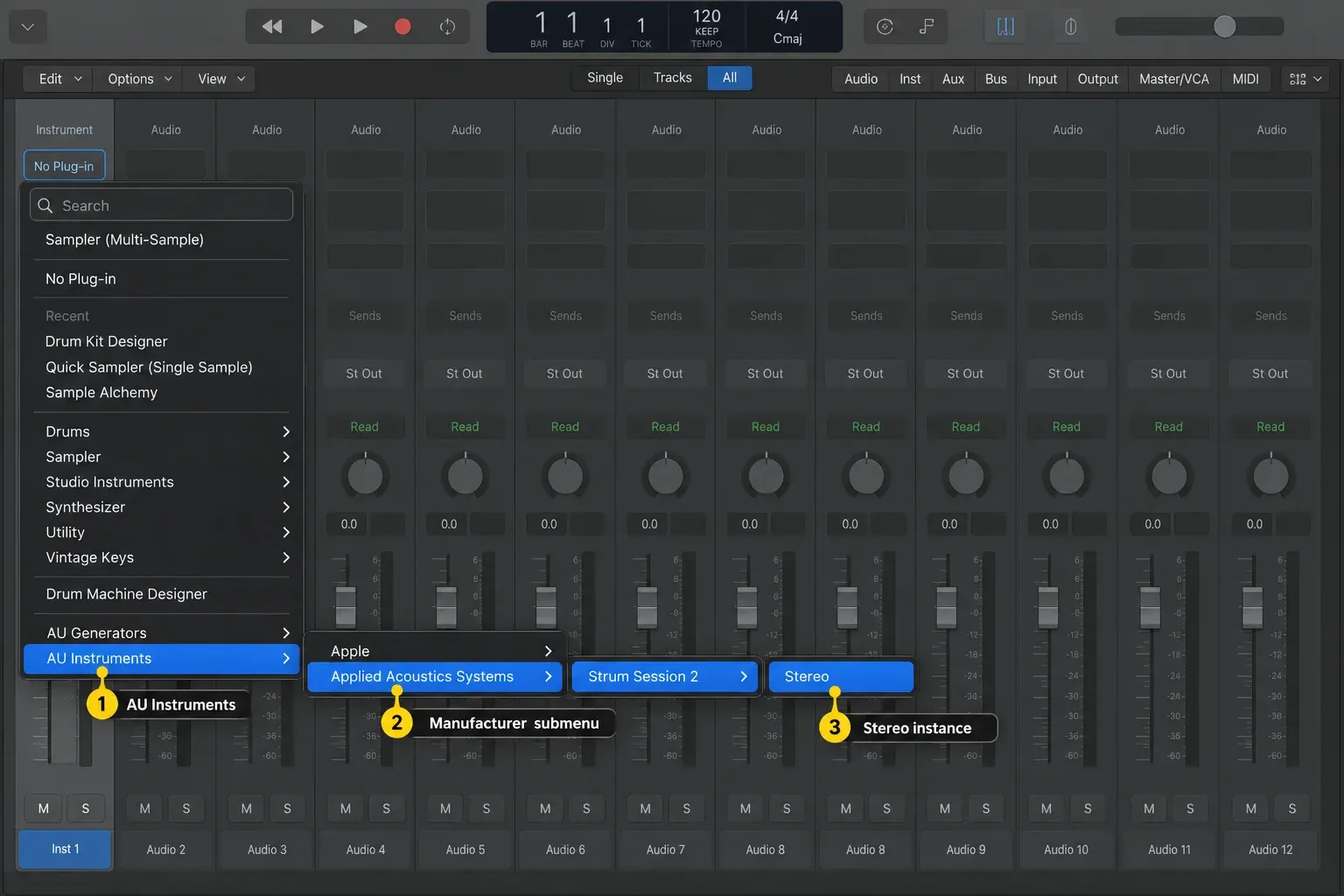
If this is your first third-party instrument, the Logic Pro AU installation guide covers installation and validation. Apple lists two possible Audio Units component folders: /Library/Audio/Plug-Ins/Components and ~/Library/Audio/Plug-Ins/Components. The second is inside your user Library. Check these locations when troubleshooting. Do not move components without a specific reason.
Build the first playable guitar part
Load an acoustic preset, select Guitar mode and enable Auto-Strum using the Auto button in the Strumming section. Record a short progression using complete chords. The instrument detects the harmony, chooses a guitar voicing and produces a downstroke when you play a new chord. A single input note produces an automatic major chord. In this mode it isn’t a single guitar note. Use Keyboard mode for melodies and exact voicings within MIDI notes 40–93. In that mode, legato notes one or two semitones apart trigger hammer-ons and pull-offs automatically, so overlap a lead line’s notes slightly in the Piano Roll wherever you want a slur instead of a fresh pick stroke.
In the Piano Roll, correct wrong notes and move late chord changes. Be careful when removing just one note from a held chord: the detector doesn’t recalculate on note release alone. For example, after removing B-flat from C7, retrigger a remaining note or play a strumming key to recognize C major. When programming separate strokes, place the chord notes slightly before the stroke trigger. These behaviors are documented in sections 3.2.4 and 3.5 of the Strum Session 2 manual.
Use MIDI note numbers when controller octave labels differ. Chord input is MIDI 40–71. Three or more notes are used for chord detection, with additional one- and two-note shortcuts described in the manual. On the upper trigger range, 72 is downstroke, 73 palm-muted downstroke, 74 upstroke and 75 alternate bass. Start with those four notes before programming a busier pattern.
Mute All is MIDI 82 in Guitar mode. Individual-string triggers use 76, 77, 79, 81, 83 and 84, ordered from the low-string side to the high-string side. Some voicings use fewer than six strings, so the mapping can repeat notes. Do not transpose the trigger notes with the chord progression: their pitches select techniques, not harmony.
Use Guitar mode for a controlled performance
Once the harmony is correct, turn Auto-Strum off. Keep each chord held in the chord area and put the stroke notes in the trigger area. Now chord choice and rhythm are independent. The lower notes tell Strum Session what the fretting hand is doing, and the upper notes tell it when and how the picking hand moves.
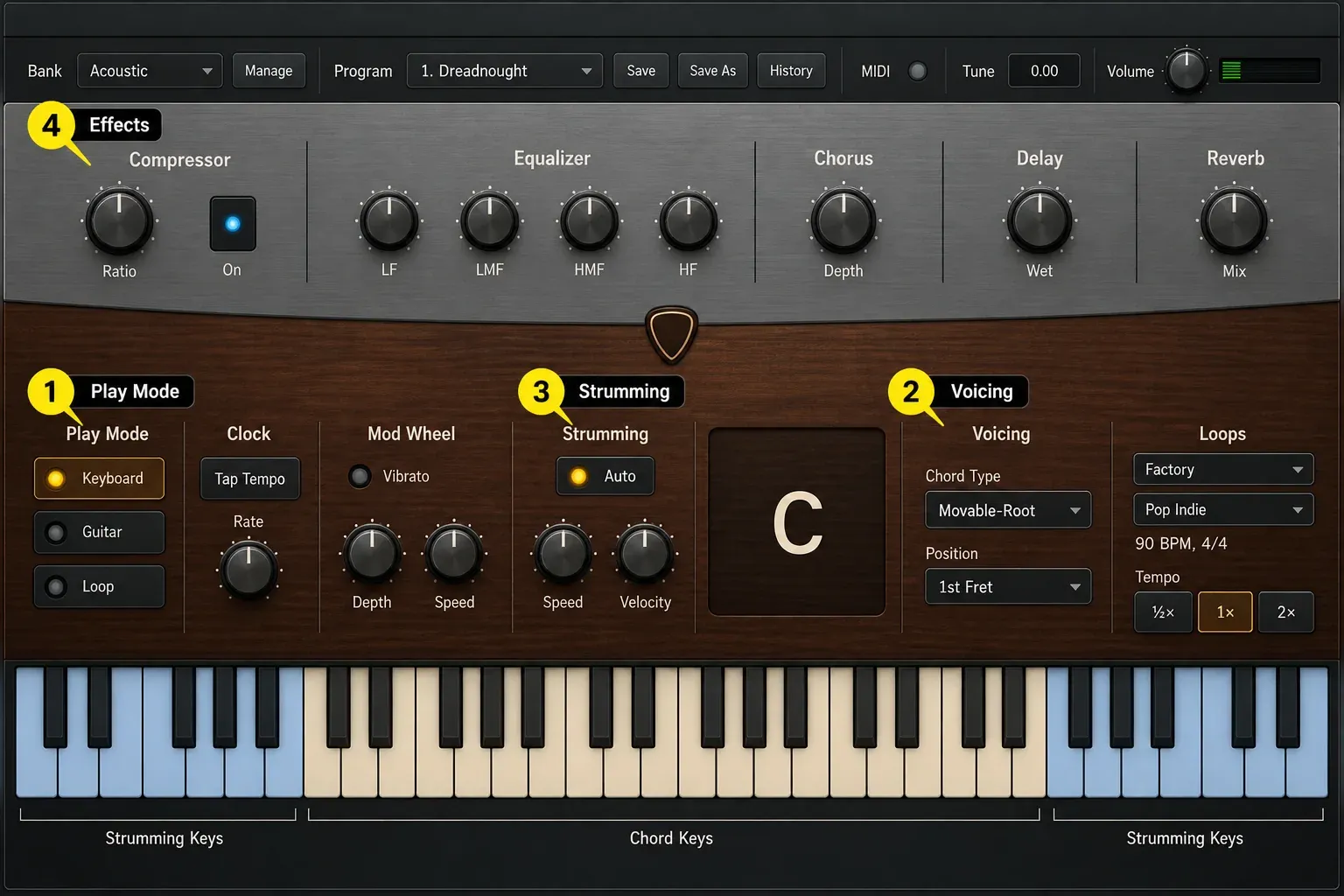
Try a one-bar pattern of downstroke, palm-muted downstroke, upstroke and downstroke. Vary the trigger velocities and listen to the accents. The Strumming section’s Velocity control determines how strongly velocity changes strum speed. At its far-left position, speed stays fixed. If a chord jumps to an awkward position, try another voicing. The Position control applies to movable, drop and power chords, not open chords.
Keep the rhythm readable in the Piano Roll. One lane of sustained chord notes plus a clearly separated lane of short stroke triggers is easier to repair than a dense block of duplicated notes. If MIDI editing still feels slow, our Logic Pro Piano Roll guide covers velocity, note length and selection tools, while the MIDI controller setup guide handles input and octave problems.
Use Loop mode and export an editable MIDI pattern
Each preset has a pack of seven MIDI loops. In Loop mode, hold chord notes and use the seven white keys from MIDI 72 through 83 to select patterns. Enable Sync To Host to follow Logic’s project tempo. The selected pattern is marked by a purple key in the plug-in. Those seven are only the preset’s own loop pack. To audition other patterns, load a different pack from the Loops module in the Play view. AAS lists more than 700 strumming loops in different styles for Strum Session.
At the end of a phrase, use Stop (MIDI 84) to stop the loop while allowing the guitar sound to decay, or Mute (MIDI 82) to stop the loop and mute the strings. Releasing all held chord notes also ends the loop. These are Loop-mode controls: MIDI 84 plays an individual string in Guitar mode, so it isn’t a universal stop command.
To edit the supplied strumming pattern: select it in Loop mode, then drag the MIDI Drag control below the Loops module into Logic’s Tracks area. AAS describes this export in manual section 5.2.16. Keep a copy of your original region before changing the arrangement.
The exported MIDI contains strumming keyswitches, not a rendered guitar performance or a complete chord progression. Put the pattern on a track feeding Strum Session, switch the plug-in to Guitar mode, and turn Auto-Strum off. Add or retain the chord notes alongside the imported triggers in the region. If you recorded loop-selection notes earlier, do not leave them in this Guitar-mode part: those notes now trigger strokes or strings instead of selecting loops.
Check the chord at each pattern entry, then edit trigger timing, velocity or individual hits in the Piano Roll. Recording your controller input captures the notes you send. On its own, it doesn’t expand every stroke the plug-in produces internally into editable notes. Use MIDI Drag for a supplied pattern, or program the Guitar-mode triggers yourself. Keep the MIDI source when bouncing the finished part to audio.
Make Strum Session 2 sound less programmed
- Prepare chords before strokes. Place chord notes slightly ahead of their trigger so the intended voicing is available.
- Choose stroke direction deliberately. Try upstrokes between stronger downbeats; repeated downstrokes may still suit the part.
- Distinguish palm muting from a full stop. Use MIDI 73 for palm-muted downstrokes and MIDI 82 when the strings need to stop.
- Fix the voicing before EQ. Processing will not change the notes or fret position of an awkward chord.
- Program rests. Remove unnecessary triggers around vocal pickups and fills, and use the appropriate mute control for an exact cutoff. Shortening one chord note is not the same as muting all strings.
- Change the second performance. For a doubled part, record or edit a separate MIDI performance. Panning identical copies does not create independent timing.
Process after the performance works. High-pass only if the modeled body is fighting the bass or kick. Cut harshness only where the chosen preset needs it. Use compression for a real dynamic problem. It can’t make identical velocities sound varied. The site's Logic Pro Channel EQ guide and Logic Pro Compressor guide explain those decisions without preset numbers.
Strum Session 2 versus Strum GS-2
The AAS Session Bundle description identifies Session instruments as simplified versions of the Professional Series. Strum Session 2 has acoustic and electric guitar presets, chord voicing, strumming and MIDI loops, but fewer editing options and factory sounds than Strum GS-2. AAS expansion sound packs can’t be loaded into Session instruments. Starting with Session 2 doesn’t lock you in: the same page says you can upgrade to the Professional Series instruments at any time, and the Session Bundle trial is fully functional for 15 days.
If you already own Session 2, first check whether its sounds and controls cover the part. Consider GS-2 when you need a specific editing control or a larger editable library. For expansion playback, check the pack’s compatibility first: AAS lists Pop Rocks for GS-2 and the included free AAS Player. Player lets you play that pack’s sounds without buying GS-2; GS-2 provides deeper sound editing. The pack still does not load into Session 2. A bigger library won’t correct poorly timed chord changes.
Compatibility on current Macs
AAS lists the latest Strum Session 2 as native on Apple M-series Macs. Its macOS Tahoe 26 statement includes Strum Session 2 and reports no issues in the configurations AAS tested. Use the current installer and check your audio interface, MIDI drivers and other plug-ins before an operating-system update.
The Mac AU is the format you need for Logic. If an older project has a missing or failed instrument, save a copy before troubleshooting. Check AAS compatibility and updates before replacing anything, then reopen the copy and test playback. Do not overwrite your only project while the instrument is unavailable.
If Strum Session 2 does not appear or make sound
- Check the format. Confirm that the installer included the Mac AU. VST or AAX alone will not appear in Logic.
- Restart the Mac. Then reopen Logic and check the Instrument slot’s manufacturer submenus.
- Open Logic Pro > Settings > Plug-in Manager. Filter by Applied Acoustics Systems and read the Compatibility column.
- Resolve authorization first. If it says not authorized, complete AAS authorization before rescanning.
- Rescan the selected plug-in. For failed validation, use Reset & Rescan Selection. If it fails again, check compatibility and updates with AAS. Reserve Full Audio Unit Reset for the missing-plug-in cases described by Apple; it rescans all installed Audio Units.
- If it opens but is silent, check the playing mode. Keyboard mode accepts MIDI 40–93. Guitar mode with Auto-Strum off needs chord notes plus a stroke trigger; Loop mode needs chord input plus a selected pattern. Confirm MIDI input, track mute and the audio output separately.
For a complete decision tree, use Logic Pro Plugins Not Showing Up. It covers component files, validation, quarantine and cache resets without turning the first troubleshooting step into a destructive cleanup.
Frequently asked questions
Is Strum Session 2 built into Logic Pro?
No. Strum Session 2 is a third-party AAS guitar instrument installed as an Audio Unit. Apple's built-in Drummer, Keyboard Player and Bass Player are separate Logic features; Synth Player sounds are styles inside Keyboard Player and Bass Player.
Where is Strum Session 2 in Logic Pro?
Open a Software Instrument track's Instrument slot, then choose AU Instruments, Applied Acoustics Systems, Strum Session 2 and Stereo. If it is missing, check Logic's Plug-in Manager.
Does Strum Session 2 run natively on Apple silicon?
AAS says the latest Strum Session 2 has native support for Apple M-series Macs. Install the current AAS build rather than relying on an older archived installer.
Can Strum Session 2 follow Logic Pro's Chord Track?
There is no documented native automatic link between Strum Session 2 and Logic's Chord Track. Drive the plug-in with MIDI chord notes, Logic MIDI tools or recorded controller input and verify the resulting voicings.
What is the difference between Strum Session 2 and Strum GS-2?
Session 2 is the simplified instrument: it keeps the core modeled guitar and performance workflow but has fewer editing options, a smaller library and no support for AAS Strum expansion packs. GS-2 is the deeper Professional Series version.
Can I use Strum Session 2 without a MIDI keyboard?
Yes. Draw chord and trigger notes in Logic’s Piano Roll. Musical Typing can also send notes, but you may need to change its octave range to reach both chord and trigger areas. A hardware keyboard helps with two-handed performance; it is not required to program the part.
Before bouncing, play through the chord changes and phrase endings. Check that loop-selection notes have not been mistaken for Guitar-mode triggers, and keep the editable MIDI. For another instrument task, browse the Logic Pro plugin guide or choose a lesson in the Logic Pro tutorials hub.


