Best Audio Editor for Mac
The best Mac audio editor depends on the edit: QuickTime Player or Fission for a quick trim, Audacity or Ocenaudio for free editing, TwistedWave or Amadeus Pro for an easier paid editor, iZotope RX 12 or Acoustica 8 for repair and WaveLab 13 for mastering, with review scores and prices.

The best audio editor for a Mac depends on the edit. For a quick trim or to pull the sound out of a video, QuickTime Player is already on your Mac, and Rogue Amoeba’s Fission cuts MP3 and AAC files without a second encode for $35. For free full editing, use Audacity or the simpler Ocenaudio. Pay for TwistedWave or Amadeus Pro when you want an easier everyday editor, iZotope RX 12 or Acoustica 8 when their repair tools improve on the free options, and WaveLab 13 to master and batch-process.
I’d pick by job rather than by review score, because the 2026 reviews mostly punish price and licence models, not sound. Below are the quick picks with versions, prices and macOS support, the review scores and one published speed test, then each job in turn, the WAV versus MP3 maths and my picks. Recording apps are a separate choice, and this page sticks to editing a file you already have.
Which Mac audio editor fits your job?
Twelve apps cover almost every editing job on a Mac. The last column is the limit that usually decides between two of them.
| App | Best for | Price | macOS | The limit that matters |
|---|---|---|---|---|
| QuickTime Player | Trimming a clip, saving a video’s sound as AAC | Free, built in | Comes with macOS | Basic clip edits; no effects or noise reduction |
| Fission 2.9.5 | Cutting MP3 and AAC without quality loss, splitting on silence | $35 | macOS 14 to 27 | Trial mode is limited |
| Audacity 4.0.2 | Free full editing with effects | Free, open source | Tested on macOS 14 and 15 | The arm64 build has no plug-ins; may overwhelm beginners |
| Ocenaudio 3.22.2 | Simple, fast edits | Free | macOS 14.4 or later | Can’t match a professional DAW |
| TwistedWave 34.3 | Everyday voice and music edits, batch jobs | Subscription, from $9.99 a month | macOS 10.15 to Tahoe 26 | Speech recognition and video sync are paid add-ons |
| Amadeus Pro 3.0.4 | Multitrack edits, batch conversion, quick repairs | $59.99 | macOS 13 or later | Older Macs need version 2.8.14 |
| iZotope RX 12 | Noise, hum and dialogue repair | Full licences: Elements $99, Standard $399, Advanced $1,399 | macOS 14.7, 15.8 or 26 | Elements has no standalone editor |
| Acoustica 8 | Repair and editing in one app | $149, $299 or $449, one time | macOS 12 or later | Extract:Dialogue 2 starts at Premium |
| WaveLab 13 | Mastering, Dolby Atmos, batch processing | About €500 Pro, €100 Elements | macOS 14, 15 or 26 | Elements stops at 96 kHz and eight tracks |
| Adobe Audition | Spoken word in a Creative Cloud workflow | $22.99 a month on an annual plan | macOS 14 or later | Stops working when you stop paying |
| GarageBand 10.4.14 | Cutting and arranging music for free | Free | macOS 15.6 or later | A song project, not a file editor |
| Logic Pro 13.0 | Editing inside a full music project | $199.99 standalone; Creator Studio subscription also available | macOS 26.1 or later | A full DAW rather than a dedicated file editor; check hardware eligibility for the edition you choose |
Ask what the file needs. A cut at the start and end needs QuickTime or Fission. Trimming removes unwanted time; it cannot remove noise underneath speech. Audacity’s free Noise Reduction can reduce steady background noise using a noise profile. Compare the result on a copy before paying for RX or Acoustica; choose a paid tool when its specific repair process handles the remaining problem more cleanly.
What do the test results say?
Editorial reviews put these editors close together. Nine scores from TechRadar, PCMag, MusicTech and 344 Audio Academy cover six of them. The median is 4.0 out of 5, the mean 4.14 and the range 3.5 to 4.8. The four 2026 reviews alone give a median of 3.75 with the same range, while TechRadar’s five scores date from 2022. PCMag ran its 2026 Audacity and Audition reviews on an M4 Max Mac Studio with 64GB of RAM.
| App | Review scores | What the reviewer flagged |
|---|---|---|
| Audacity | 4.0 PCMag (March 2026), 4.5 TechRadar (2022) | Its reputation as the best free editor is well founded, but beginners may find it overwhelming |
| Ocenaudio | 4.5 TechRadar (2022) | As accessible as they come, but can’t match a professional DAW |
| WavePad | 4.0 TechRadar (2022) | Particularly impressive batch edit functions |
| Acoustica | 4.8 344 Audio Academy (version 8 Ultimate, October 2026), 4.5 TechRadar (version 7.5.7, 2022) | Especially strong for dialogue editing, restoration and podcasts; a rare perpetual licence |
| Adobe Audition | 3.5 PCMag (April 2026), 4.0 TechRadar (2022) | Strong restoration and noise reduction, but expensive for what you get |
| iZotope RX 12 | 3.5 MusicTech (7/10, April 2026) | A large premium for the Advanced edition over Standard |
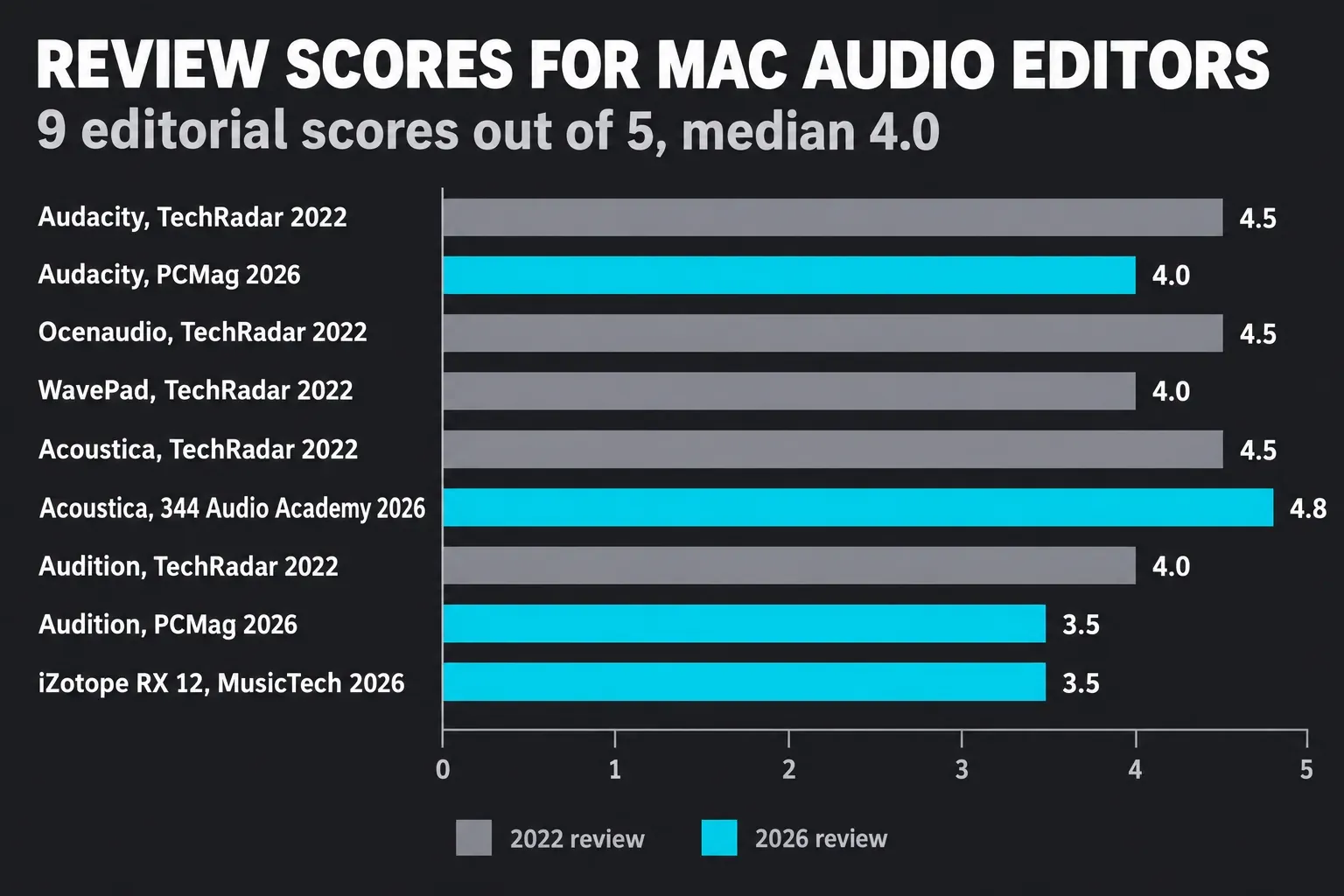
The scored reviews cover only those six. Fission’s 2026 review from Audio News Room and the proaudio.tech review of WaveLab 13 carry no score, and I found no recent scored review of TwistedWave, Amadeus Pro or Hindenburg, so for them the deciding facts are what each one edits and what it costs.
For speed, the clearest published number comes from repair. In MusicTech’s RX 12 review, published April 29, 2026, Adam Crute split a 4:30 test mix in around 2:30 with RX 11 and around 1:45 with RX 12, even at the highest quality level, and the results sounded significantly better too. That’s about 45 seconds, or 30%, saved on one song, and a jump from roughly 1.8 times real time to 2.6 times. The faster processing also let Music Rebalance and Dialogue Isolate run as real-time RX plugins inside a DAW.
That’s one reviewer’s timing on one mix, and I read it for direction rather than as a benchmark. My verdict on the scores is that the 2026 reviews split on the licence model more than on sound. Acoustica 8 scored 4.8 in its 2026 review, while Audition and RX 12 Advanced both got 3.5 with cost among the complaints. Acoustica and RX offer one-time licences; Audition uses a subscription. Free Audacity still earns 4 to 4.5. So I’d start free, pay when a specific repair or workflow improvement earns its cost, and rent Audition when the Creative Cloud workflow justifies it.
What is the quickest way to trim or convert audio on a Mac?
QuickTime Player handles the simplest cut. Apple’s QuickTime trimming guide works like this:
- Open the recording or clip in QuickTime Player, then choose Edit > Trim.
- Drag the yellow handles in the trimming bar. Everything outside the handles is cut.
- Click Trim, then save.
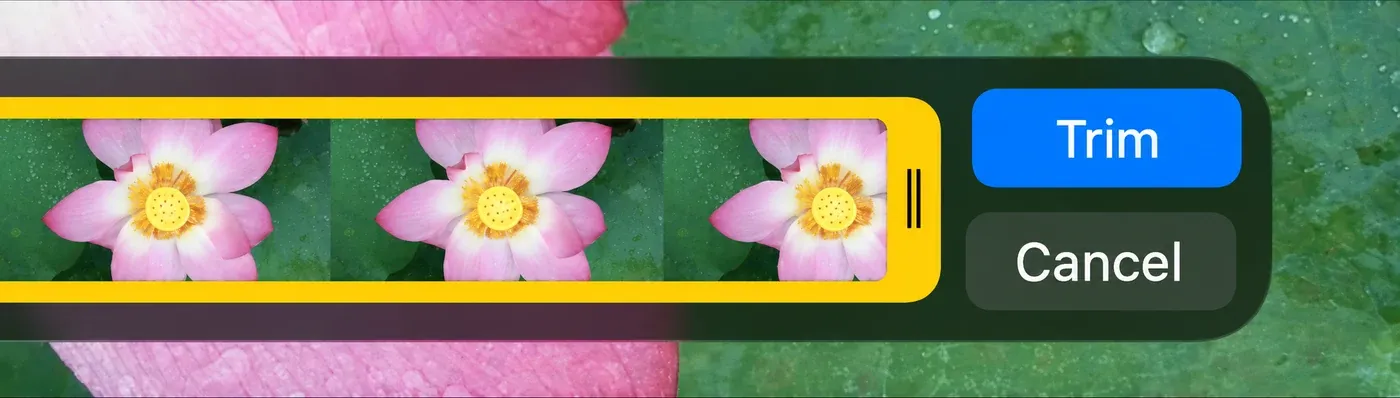
To keep only the sound of a video, choose File > Export As > Audio Only. Apple’s QuickTime export guide says that saves an Apple MPEG-4 audio file with an AAC audio track. QuickTime also splits and rearranges clips. For fades, effects or noise reduction, I’d move to a dedicated audio editor.
Fission is the paid tool for compressed files. Version 2.9.5 runs on macOS 14 to 27, and Rogue Amoeba says it never causes quality loss when it edits, even with MP3 and AAC. That matters because a typical editor decodes an MP3 to plain audio and encodes it again when you save, so each round adds another generation of lossy compression. Fission also batch converts to MP3, AAC, Apple Lossless, FLAC, AIFF and WAV, splits files on silence with Smart Split, splits from cue sheets, builds enhanced podcasts with MP3 or AAC chapters and saves iPhone ringtones.
The Fission store page lists it at $35, or $83 in a bundle with Audio Hijack, and local taxes may apply. The trial works with limitations until you buy. Audio News Room’s Rogue Amoeba review describes it as a very straightforward file editor built around cutting, trimming, fading and joining, without sample-level editing or plug-in hosting, and incredibly useful for podcasters who want to edit audio rapidly. I’d buy it the first time you need to cut an MP3 you can’t re-record, such as an old interview or a published episode.
Which free audio editor should you use on a Mac?
Audacity is the free default. The Audacity team calls it a free, open source audio editor and recorder, and the latest release brings an updated interface, Workspaces and productivity improvements. Its Mac download page lists version 4.0.2 in three builds: Universal, Apple silicon (arm64) and Intel (x86_64). The arm64 build has no plug-in support, so I’d install the Universal build unless you never use effects plug-ins. Audacity is tested on macOS 14 and 15 and may work on releases back to 10.11 El Capitan.
PCMag’s Audacity review gave it 4.0 in March 2026 after testing version 3.7.7 on an M4 Max Mac Studio. TechRadar’s Audacity review gave it 4.5 in 2022, said its reputation as the best free audio editor is well founded, and warned that beginners may find it overwhelming.
Ocenaudio is the answer to that warning. Its download page lists version 3.22.2 as a free download for macOS 14.4 or later on Intel and Apple silicon, with a legacy build of the same version for macOS 10.14 or later. TechRadar’s Ocenaudio review called it as accessible as they come, while noting it can’t match a professional DAW. This is the editor I’d hand to anyone who finds Audacity too busy.
WavePad 24.62 is also a free download with in-app purchases on the Mac App Store, and TechRadar’s WavePad review was particularly impressed with its batch edit functions. For music rather than single files, GarageBand is free too, and my best free DAW guide compares the full options.
Which paid editor is easiest for everyday voice and music edits?
TwistedWave is the paid editor I’d try first when Audacity feels busy. It runs on macOS 10.15 to Tahoe 26, native on Apple silicon, with a 90-day money-back guarantee and a fully functional 30-day demo; Macs on older systems can use version 32.10. Its release notes list version 34.3, released November 14, 2026. It detects silences to split a file automatically, and its batch engine applies effects such as an Audio Unit or VST plugin or a sample rate change to whole folders. Speech recognition lets you edit by reading the words, and video sync keeps a video in step with the audio you edit.
Both of those are add-ons. On the TwistedWave purchase page, the subscription showed $99.90 for the first year including tax, $79.90 for the second and $59.90 a year from the third, or $9.99 a month, and the page says prices include tax based on your country, so your figure can differ.
Amadeus Pro is the pay-once alternative at $59.99. Version 3.0.4 needs macOS 13 or later, while 2.8.14 is the last version for macOS 12 or earlier. HairerSoft calls it a powerful multitrack audio editor and says version 3 is a universal binary for Intel and Apple silicon, fully compatible with macOS 27 Golden Gate. It includes batch processing for converting many files with a chain of effects, plus a Repair Centre that finds and repairs cracks with a click.
I’d take TwistedWave for spoken word you edit every week, because silence detection and the speech add-on save the most time on long files. I’d take Amadeus Pro if you’d rather pay once and mostly convert and tidy music files.
What is the best Mac editor for repairing noisy audio?
iZotope RX 12 is the repair tool I’d compare everything against. iZotope’s U.S. full-licence list prices are $99 for Elements, $399 for Standard, $1,399 for Advanced and $1,799 for Post Production Suite 9, which includes RX 12 Advanced and Neutron 5. RX 12 supports macOS Sonoma 14.7, Sequoia 15.8 and Tahoe 26 on Intel Macs and Apple silicon, and the full range lists 50+ modules in the standalone editor and 20+ plugins for your DAW.
The catch is Elements. MusicTech’s review points out that it’s a set of six RX plugins for your DAW, without the standalone RX editor and modules, so the entry full licence with the standalone editor is Standard at a $399 list price. Education, update and upgrade offers have separate eligibility; compare the checkout total, including applicable tax and offers. RX 12 adds an all-new Trim Silence processor that MusicTech found particularly useful when editing podcasts, voiceover tracks and field recordings. If you use RX inside Logic, my iZotope RX in Logic Pro guide covers the workflow, and my guide to removing background noise in Logic Pro shows what Logic’s own tools fix first.
Acoustica 8 from Acon Digital is the one-time purchase rival: buy it once, keep it forever. Standard costs $149 with spectral, multitrack, restoration and mastering tools. Premium at $299 adds the Restoration Suite 3 module, full DeNoise 3, Extract:Dialogue 2 and the Dialogue Cleaning Suite, plus tools available as DAW plugins, and Ultimate at $449 adds DeVerberate 3 and 9.1.6 support. It needs macOS 12 or later and 4 GB of RAM, runs natively on Apple silicon and Intel, and has a 30-day free trial that needs no credit card. If you already own SpectraLayers Pro 8 or later, an Audition plan or RX 8 or later in Standard or above, Acon offers a 25% crossgrade discount.
344 Audio Academy’s Acoustica 8 review gave the Ultimate edition 4.8 in October 2026, calling it especially strong for dialogue editing, restoration, podcasts and post-production, and its rare perpetual licence excellent value for money. TechRadar scored version 7.5.7 at 4.5 in 2022.
I’d buy RX 12 Standard when repair is your daily job or you already use RX plugins in Logic, because its modules are the reference other tools get compared against. I’d buy Acoustica 8 Premium when you want repair and full editing in one app, because its $299 full price is $100 below RX Standard’s $399 full list price. Both are one-time licences; account offers can change the actual price difference.
Which editor should you use for mastering and batch work?
Steinberg’s WaveLab 13 comes as Pro and Elements, for macOS 14, 15 or 26 with at least 8 GB of RAM. proaudio.tech’s WaveLab 13 review, published May 19, 2026, puts Pro at about €500 and Elements at about €100 and calls Pro 13 excellent value for money. Version 13 adds Dolby Atmos support, with the ADM file as the mastering format.
The two editions split on scale. The same review lists the Elements limits: 96 kHz instead of 384 kHz, eight audio tracks, eight Mastering Section plugin slots instead of 16, and multichannel formats up to 5.1 instead of 22.1. DSP-Quattro 6.2.4 is the smaller Mac option that combines file editing, mastering, CD burning, plugin hosting and batch processing.
I’d use WaveLab Elements for stereo masters within those limits, and Pro for Atmos or larger montages. For folder-based batch jobs, I’d also compare TwistedWave and DSP-Quattro. If you master the song inside Logic instead, my guide to mastering a song in Logic Pro covers that route.
What should podcasters and voice editors use?
Adobe Audition is the spoken-word suite most lists put first, and the 2026 review is less kind. PCMag’s Audition review gave it 3.5 in April 2026 after testing on an M4 Max Mac Studio running macOS Tahoe 26.3.1. It lists $22.99 a month with an annual commitment, $34.49 month to month or $263.88 prepaid for a year, and warns that Audition stops working when the subscription ends. Audition needs macOS 14 or newer, runs natively on Apple silicon and asks for 8GB of RAM with 16GB or more recommended.
PCMag credits its restoration, sound removal and noise reduction, 128 audio tracks and a Strip Silence tool that removes inactive regions without losing sync. It also notes that Audition lacks MIDI and virtual instruments, and counted only two added features in the two years covered by that April 2026 review.
Two transcript editors suit interviews. Hindenburg PRO is spoken-word software built for journalists and audio storytellers, and PRO 2 adds editing by transcript. Descript lets you edit by deleting words in a transcript, and its pricing page starts free, with Hobbyist at $16 per person per month on annual billing or $24 on monthly billing.
For a weekly podcast, I’d use Audacity when free editing is enough, or TwistedWave when its silence detection and speech tools save time. Try Audacity’s free noise reduction first for steady noise, then add RX or Acoustica when the specific repair needs more than that result delivers. TwistedWave uses a subscription with a perpetual fallback licence: an annual plan grants one for the version available when you subscribe, while monthly billing requires 12 consecutive payments. If avoiding a subscription decides the purchase, compare Audacity and Amadeus Pro first. Audition makes sense when you already pay for Creative Cloud, and an Audition plan also earns the Acoustica crossgrade. If you record the show in Logic, my guide to recording a podcast in Logic Pro covers the session.
Should you edit music in GarageBand or Logic Pro instead?
If the audio is part of a song, edit it in the song. GarageBand 10.4.14 is free on the Mac App Store with macOS 15.6 or later, and it splits and joins regions right in the song.
Logic Pro 13.0 costs $199.99 once. Apple’s Logic Pro page lists a Creator Studio subscription at $12.99 a month or $129 a year and still prints macOS 15.6 or later and a Mac with Apple silicon, while Apple’s Creator Studio requirements and the App Store listing ask for macOS 26.1 or later, so I’d plan on 26.1 if you buy now. For the editing itself, see my guides to splitting, trimming and joining regions in Logic Pro and fades in Logic Pro, and my best DAW for Mac guide if you’re choosing a DAW rather than an editor.
When should you edit WAV instead of MP3?
Whenever you can. Keep the working file as WAV or AIFF, do every edit there, and export MP3 or AAC once at the end. Each time a normal editor saves an MP3 it encodes the audio again, and every encode throws away a little more. When the only copy is an MP3, Fission is the tool that cuts it without that second encode.
Size is the reason people edit MP3s in the first place. Uncompressed size is sample rate times bytes per sample times channels times seconds, and an MP3’s size is its bit rate times seconds:
| File | Per minute | Per hour | Against WAV |
|---|---|---|---|
| WAV or AIFF, 44.1 kHz, 16-bit, stereo | 10.58 MB | 635 MB | Same size |
| MP3, 320 kbps | 2.4 MB | 144 MB | About 4.4 times smaller |
| MP3, 128 kbps | 0.96 MB | 57.6 MB | About 11 times smaller |
The table counts a megabyte as a million bytes and ignores headers and tags. CD-quality stereo runs at 1,411.2 kbps, which is why a 128 kbps MP3 is about eleven times smaller.
I’d keep 16-bit WAV for anything you might edit again and send 320 kbps MP3 or AAC only as the final copy. My AIFF vs WAV guide compares the uncompressed formats, and my guide to exporting Logic Pro as MP3 covers the final export.
Which one would I pick?
- Quick trim or the sound from a video: QuickTime Player, because it’s already on the Mac and Edit > Trim takes seconds.
- An MP3 or AAC you can’t re-record: Fission at $35, because it cuts without a second encode.
- Free full editing: Audacity in the Universal build, or Ocenaudio if Audacity feels too busy.
- An easier paid editor: TwistedWave for weekly spoken word, or Amadeus Pro at $59.99 to pay once.
- Noisy dialogue: try free Audacity Noise Reduction first; compare RX 12 Standard at a $399 full list price with Acoustica 8 Premium at $299 when their repair tools solve the remaining problem. Both are one-time licences.
- Mastering and batch jobs: WaveLab 13 Elements for stereo masters, and Pro for Atmos or larger montages. For batch jobs, compare TwistedWave and DSP-Quattro too.
- Music: GarageBand first, then Logic Pro when you outgrow it.
The recording and editing hub collects the rest of my recording and editing guides.
Mac audio editor FAQ
Does a Mac have a built-in audio editor?
Only a basic one. QuickTime Player trims a recording or clip with Edit > Trim and saves the sound of a video as AAC with File > Export As > Audio Only. GarageBand is free from the Mac App Store for cutting and arranging music.
What is the best free audio editor for Mac?
Audacity, in the Universal build so plug-ins work. It scored 4.0 at PCMag in 2026 and 4.5 at TechRadar in 2022. Ocenaudio is the simpler free choice. WavePad is a free download on the Mac App Store, with paid feature upgrades.
Is there a Mac audio editor easier than Audacity?
Yes. Ocenaudio is free and TechRadar called it as accessible as they come. For simple cuts to MP3 and AAC files, Fission costs $35, and TwistedWave is the easier paid editor for everyday work.
Can you edit an MP3 without losing quality?
Yes, with Fission, which Rogue Amoeba says never causes quality loss when it edits MP3 or AAC. Most editors decode the file and encode it again when you save, so edit a WAV copy where you can and export the MP3 once.
Is Adobe Audition worth it on a Mac?
Only if you already pay for Creative Cloud. PCMag scored it 3.5 in April 2026, praised its restoration tools and called it expensive for what you get. If you stop paying, it stops working; Acoustica 8 or RX 12 Standard cover repair with a one-time licence.


